Most to-do lists don’t fail because you’re lazy. They fail because they’re too long, everything on them looks equally urgent and half of it gets copied to tomorrow’s page again. A good iPad to do list template fixes the layout part: a short list for today, a place for everything else and a way to see what really matters first.
Below are the 7 best to do list templates for iPad from Creative Fabrica I’d actually use. After the list: what to look for, how to write a to-do list you finish, to-do list ideas for every part of life and how to set a template up in GoodNotes.
The 7 Best To-Do List Templates for iPad I Found
Six are made just for to-do lists; the last one is a full planner with a strong to-do and priority page. I skipped Canva and Word templates, plain printable sheets without a digital version and anything with past-year dates. All seven work on the iPad in GoodNotes or Notability.
TL;DR: 7 to-do list templates for iPad: a priority matrix, daily and weekly lists, a 30-page to-do system and an all-in-one planner with a priority page. Each card lists orientation, layouts, dates and week start.
Quick Picks
- Best overall: To-Do List – Minimalist
- Best for weekly list: Digital Weekly To-Do List
- Best for to-do system: 2027 Daily To-Do List System
- Best for time blocking: Daily Schedule Planner with To-Do List
- Best for cutest weekly list: Weekly To-Do List • Coffee Latte
- Best for pastel pick: Weekly To-Do List – Cozy Pastel
- To-Do List – Minimalist – Best overall
- Digital Weekly To-Do List – Best weekly list
- 2027 Daily To-Do List System – Best to-do system
- Daily Schedule Planner with To-Do List – Best for time blocking
- Weekly To-Do List • Coffee Latte – Cutest weekly list
- Weekly To-Do List – Cozy Pastel – Best pastel pick
- All-in-One Digital Planner – Best inside a full planner
Best overall
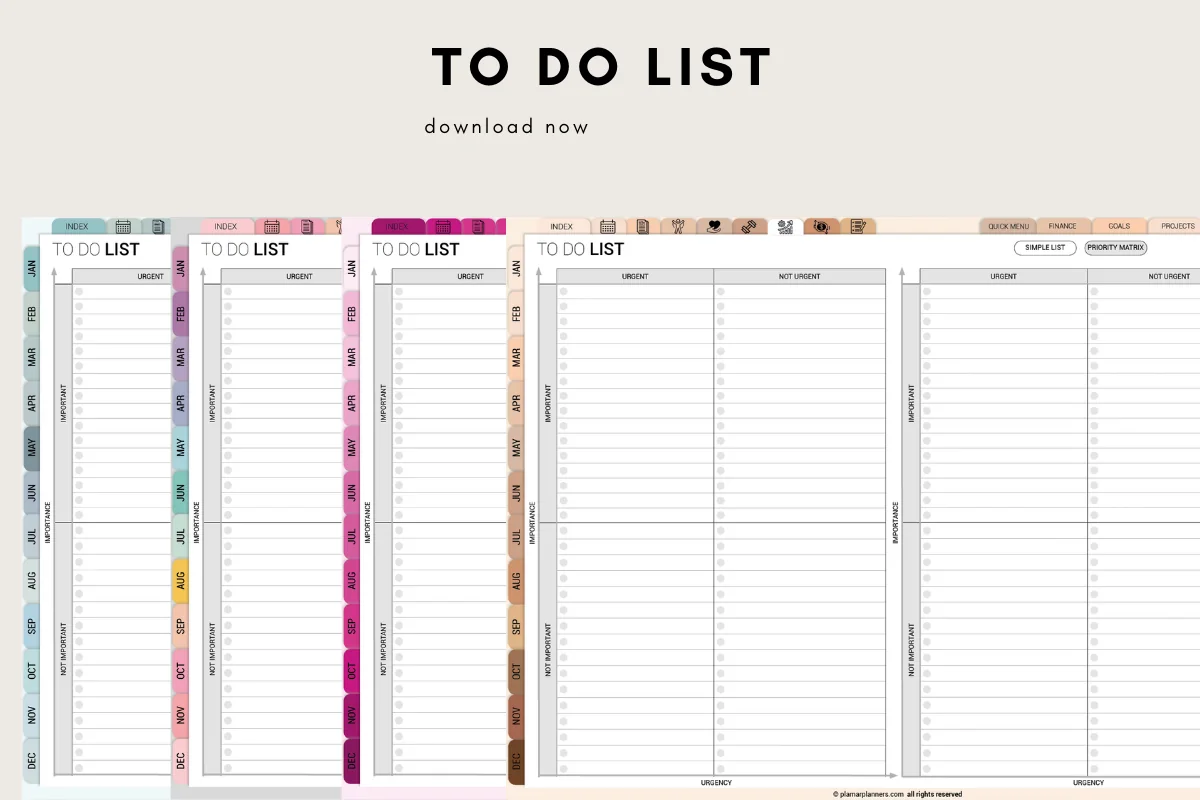
1. To-Do List – Minimalist
Orientation: LandscapeLayouts: Daily to-do, Urgent/Important matrixDates: Undated
Best for: priority sorters, minimalists, GTD fans. Designed by Plamarplanners.
- Daily to-do list with a priority task section and checkboxes
- Urgent / not urgent and important / not important columns on the list pages
- Notes and ideas area, plus a motivation or quote box
- Hyperlinked, tablet-ready digital version with month tabs; A4 and US Letter PDFs too
- Undated, so you can use it every day
The urgent and important columns are what make this list work: the task that's loud and the task that matters stop sitting on the same line. It's plain on purpose, with tabs along the side so you can jump around on the iPad. If you only want one to-do template, this is where I'd start.
Best weekly list
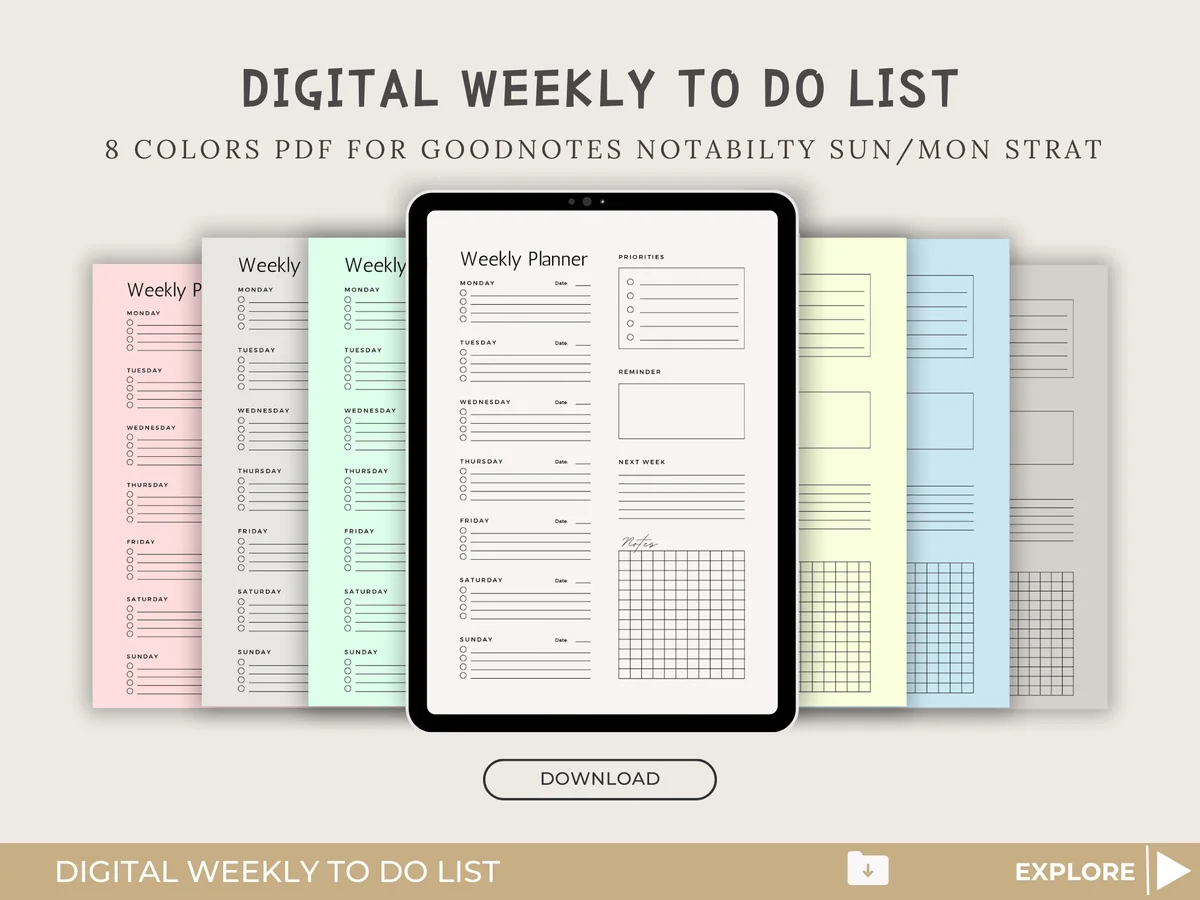
2. Digital Weekly To-Do List
Orientation: PortraitLayouts: Weekly to-doDates: UndatedWeek start: Monday or Sunday
Best for: weekly list makers, color lovers, simple planners. Designed by HEARTSinRED.
- Weekly to-do page with a short checklist for each day
- Priorities, reminders and a "next week" box beside the days
- 8 colors, Sunday and Monday start
- PDF for GoodNotes and Notability plus transparent PNG files
Sometimes a week doesn't need a planner, just a list per day and a spot for what slides to next week. That's all this is, in eight soft colors. I like the "next week" box: it's where unfinished tasks go instead of being copied forward every single day.

Best to-do system
3. 2027 Daily To-Do List System
Orientation: PortraitLayouts: Daily lists, Master lists, Weekly view, ReviewsDates: 2027
Best for: chronic list rewriters, systems thinkers, busy households. Designed by Healers Hub co.
- 30 hyperlinked pages with side tabs and an index
- 10 daily lists in three rotating styles, built around three things that matter
- Master task lists by area and a weekly "harvest" audit
- Weekly view, plus reviews that count what got crossed off in the month and the year
- Works in GoodNotes, Notability and Xodo; US Letter pages also print
This one is less a template and more a method. A master list holds everything, the daily list holds three things, and a weekly audit stops the same chore from being rewritten forever. If your problem isn't a missing list but a list that never ends, this is the one to look at.

Best for time blocking
4. Daily Schedule Planner with To-Do List
Layouts: Daily (hourly, 5 or 6 a.m. start)Dates: Undated
Best for: time blockers, soft color lovers, minimalists. Designed by ThePlannersDelight.
- Daily page with an hourly schedule next to top priorities and a to-do list
- 5 a.m. and 6 a.m. start versions
- Notes and journaling box, mood tracker and a rating for the day
- Ivory pages in 3 pastel colors, undated, for GoodNotes or Notability
A list tells you what; a schedule tells you when. This page puts both side by side, so the three priorities can go straight into a time slot. The calm ivory design and the 5 a.m. version suit early risers who plan before the day starts.

Cutest weekly list
5. Weekly To-Do List • Coffee Latte
Orientation: LandscapeLayouts: Weekly to-do (1 page)Dates: Undated
Best for: coffee lovers, cute planners, students. Designed by Tas Creative Studio.
- Undated one-page weekly to-do list, landscape
- A box for every day plus a side to-do list and an "idea parking lot"
- Coffee-themed design with a sticky note and notes area
- Digital PDF version for GoodNotes, Notability or Noteshelf, plus a printable PDF
One page, seven boxes and an idea parking lot for the things that pop into your head mid-task. It's the kind of page you can glance at once on Monday and know the week. The coffee look is cute without getting in the way of the list.

Best pastel pick
6. Weekly To-Do List – Cozy Pastel
Orientation: LandscapeLayouts: Weekly to-do (1 page)Dates: Undated
Best for: pastel lovers, cute planners, students. Designed by Tas Creative Studio.
- Undated one-page weekly to-do list, A4 landscape
- Day boxes, a side to-do list and an "idea parking lot"
- Lilac and pink pastels with hearts and a sticky note
- Digital PDF version for GoodNotes and Notability, plus a printable PDF
The same smart layout as the Coffee Latte list, by the same designer, in pastels instead of browns. I put both on the list because how a page looks really does decide whether you open it again. Pick the one you'd rather see every morning.
Best inside a full planner
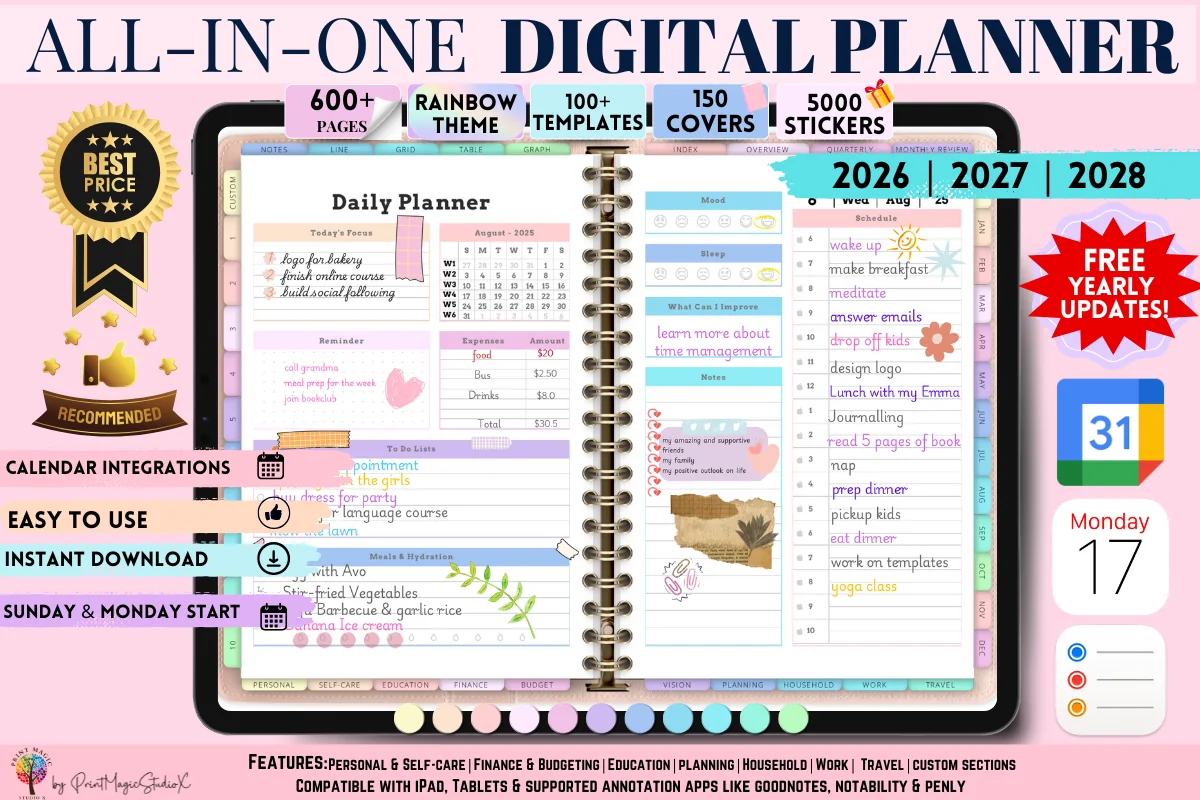
7. All-in-One Digital Planner
Orientation: LandscapeLayouts: Yearly, Monthly, Weekly, Daily, 86 templatesDates: 2026–2028
Best for: people who want one planner for everything, sticker lovers, colorful planners. Designed by Print Magic StudioX.
- To-do list and a page for tasks by priority and importance
- Daily and weekly pages, 86 templates from goals to budgeting and travel
- Dated 2026, 2027 and 2028 with free yearly updates
- Rainbow theme, 5,000 stickers; the seller notes a paid GoodNotes account may be needed for the large file
If you'd rather not keep a separate to-do file, this planner has a to-do page and a priority page next to your calendar. It's big, with 86 templates, so it suits someone who wants everything in one place more than someone who just wants a list.
Quick Comparison
| Template | Best for | Layout | Stand-out extra |
|---|---|---|---|
| 1. To-Do List – Minimalist | Daily priorities | Daily + priority matrix | Urgent/important columns |
| 2. Digital Weekly To-Do List | A simple week | Weekly | 8 colors, next-week box |
| 3. 2027 Daily To-Do List System | Endless lists | Daily + master + review | Weekly audit, reviews |
| 4. Daily Schedule Planner with To-Do List | Tasks with a time | Daily, hourly | Schedule + to-do side by side |
| 5. Weekly To-Do List • Coffee Latte | Week at a glance | Weekly, 1 page | Idea parking lot |
| 6. Weekly To-Do List – Cozy Pastel | Pastel lovers | Weekly, 1 page | Idea parking lot |
| 7. All-in-One Digital Planner | Lists + full planner | Daily, weekly + templates | Priority page, 2026–2028 |
What I Look For in a To-Do List Template
- A small “today” box. Three to five lines for today’s priorities, separate from the long list. A template with 30 equal lines invites 30 tasks.
- A place for everything else. A master list, a “next week” box or an idea parking lot keeps the rest out of today without losing it.
- Some way to sort. Priority boxes, urgent and important columns or a top 3 at the top of the page.
- The right time frame. Daily if your days change a lot, weekly if you like to see the whole week on one page.
- Undated pages. To-do lists get used up fast. Undated pages can be duplicated in GoodNotes as often as you need.
- Made for the iPad. A digital version that works in GoodNotes or Notability, ideally with tabs or links if there’s more than one page.
How to Write a To-Do List You Actually Finish
- Dump everything first. Write every task on a master list or brain dump page. Getting it out of your head is half the relief.
- Pick three for today. Only three go on today’s list. If you finish them, take the next one from the master list.
- Write tasks as actions. “Email Sarah about Friday” beats “Sarah”. A task you can start in one step gets done.
- Sort by urgent and important. Important but not urgent tasks are the ones that change things, and the ones that never get done unless they get a box of their own.
- Give big tasks a time. If a task takes more than 30 minutes, block a time for it on your schedule instead of leaving it on the list.
- Move, don’t copy. Unfinished tasks go back to the master list or to a “next week” box. Copying the same task forward every day is how lists start to feel heavy.
- Review once a week. Cross out what no longer matters. A shorter list is more motivating than a complete one.
A sample to-do list for a busy day might read: email Sarah to confirm Friday, compare the two repair quotes, and spend 20 minutes sorting the tax folder. Keep each line small enough to start. Put “waiting for the quote” in a separate waiting list, and leave the rest on your master list instead of squeezing it onto today’s page.
Daily vs Weekly To-Do List: Which One Fits You?
A daily to-do list works best when your days are packed and different from each other: meetings, school runs, errands. Pair it with a schedule, like the Daily Schedule Planner above. A weekly to-do list suits people whose tasks are flexible: you see the whole week on one page and move tasks between days as plans change. Many people use both, a weekly list on Sunday and a short daily list each morning.
If that weekly view also needs a copy on the fridge or desk, compare these weekly planner printables for GoodNotes. The selection includes task columns and hourly layouts that can be used on the iPad, with paper sizes listed for printing.
To-Do List Ideas: What to Put on Your List
Not sure what belongs on a to-do list beyond work tasks? These are the lists worth keeping on your iPad:
- Home: one cleaning task a day, laundry, take out recycling, water plants, change bed sheets.
- Errands: pharmacy, post office, returns, groceries, car service.
- Money: pay bills, check the budget, cancel an unused subscription, move money to savings.
- Health: book a checkup, refill prescriptions, plan workouts, drink water.
- Work: the one task that moves a project, emails that need an answer, prep for tomorrow’s meeting.
- School: assignments by due date, readings, study sessions, forms to sign.
- Family: birthdays and gifts, school events, appointments for kids or pets.
- Someday: books to read, places to visit, things to learn. Keep them off today’s list.
For a calmer start to the week, a short weekly reset helps: plan meals, check the calendar and pick next week’s three priorities. My weekly planner ideas have more pages worth adding.
To-Do List Template or To-Do List App?
To-do apps like Apple Reminders send alerts, repeat tasks and sync with your iPhone. A to-do list template is a page you write on with the Apple Pencil: no notifications, but writing a task by hand makes you think about whether it belongs there, and crossing it off feels better. Many people use both: Reminders for things with a time (“call the dentist at 9”) and a handwritten list for the day’s priorities.
Keeping alerts separate from handwritten priorities also means deciding what stays visible when you open the iPad. These iPad productivity setup ideas cover a planning Home Screen, Focus settings and a place for your main planner file.
What You Need for an iPad To-Do List Template
- An iPad and an Apple Pencil, or another stylus that works with it.
- A note-taking app that opens PDFs: GoodNotes, Notability or Noteshelf. Linked tabs work in all three.
- Optional: a sticker pack or highlighter colors for marking priorities.
How to Set Up a To-Do List Template in GoodNotes
- Save the template on your iPad and unzip it if needed.
- Open the PDF, tap Share → GoodNotes → Import as New Document. Or add it to an existing planner with Import inside the notebook.
- For a single-page template, save it as a custom page template in GoodNotes so you can add a fresh list with one tap.
- Duplicate the page each day or week instead of erasing the old one; finished lists are nice to look back on.
- Bookmark today’s page so it opens first.
FAQ
What is the best iPad to-do list template?
For most people, a simple daily list with a priority section, like the Minimalist To-Do List with its urgent and important columns. If you prefer to see the week at once, choose a weekly list; if your lists keep growing, the 2027 Daily To-Do List System adds master lists and weekly reviews.
How do I make a to-do list on my iPad?
Import a to-do list template into GoodNotes or Notability and write on it with the Apple Pencil, or type tasks into an app like Apple Reminders. A template works best for daily priorities you want to think through; an app works best for reminders at a set time.
Does Apple have a built-in to-do list app?
Yes, Reminders comes with every iPad and iPhone and syncs between them. It’s great for alerts and recurring tasks. It doesn’t give you a handwritten page or a weekly overview, which is why many people pair it with a to-do list template in GoodNotes.
How many tasks should be on a daily to-do list?
Three priorities, plus a few small tasks if you have time. Anything more belongs on a master list. A list you can finish keeps you motivated; a list of twenty tasks mostly reminds you of what you didn’t do.
Is there a free to-do list template for iPad?
GoodNotes comes with plain lined and grid papers you can turn into a list for free. Paid templates add the parts that help you finish: priority boxes, a weekly view, an idea parking lot or master lists. Many cost about as much as a coffee.
Final Thoughts
The best to-do list is the short one. Pick a to-do list template with a small “today” box and a place for everything else, write three priorities each morning and move what’s left instead of copying it. If you’d like the list inside a full planner, see my daily digital planners and daily planner ideas. If lists tend to overwhelm you, the ADHD planner ideas have a simple brain dump setup, and the digital goal planners help when your tasks serve a bigger goal. Action items from work? Capture them with a meeting notes template first. If most of your tasks are clients and orders, see my business planners for iPad.
You May Also Like
If a list needs more context, these project planners for iPad bring tasks together with a project overview and planning details.
This post contains affiliate links. If you buy through them, I may earn a small commission at no extra cost to you. Learn more.