Most people who give up on a planner don’t fail at planning. They picked the wrong layout: a vertical week when their days are all tasks and no appointments, or a page per day when two lines would do. These planner layout ideas help you choose the format that fits how your days actually look, before you spend money on a planner built around the wrong one.
Below are 15 layouts (weekly, daily, monthly and big-picture), what each one is good for, and a quick quiz-style guide to pick yours. Then 7 iPad planners from Creative Fabrica that make it easy to try them, including two with four or five weekly layouts in one file. At the end: how to mix layouts in GoodNotes.
15 Planner Layout Ideas, Explained
One planner rarely needs more than three of these: one big-picture page, one weekly and maybe one daily. The rest are options for when your life changes.
Weekly Layouts 1–6
- 1Vertical week: a column per day, best for appointments
- 2Horizontal week: a row per day, best for task lists
- 3Boxed week: seven boxes plus notes, flexible and simple
- 4Hourly (scheduled) week: time grid for time blocking
- 5Week + notes: days on the left, a big notes page on the right
- 6Life-area columns: work, home, health, fun instead of days
Daily Layouts 7–11
- 7Hourly day: a schedule column plus priorities and to-dos
- 8Top 3 + list: three priorities, then everything else
- 9Two days per page: less scrolling, enough for lighter days
- 10Journal-style day: a short plan and room to reflect at night
- 11Dot grid day: blank dots for your own bullet journal layout
Monthly and Big Picture 12–15
- 12Calendar month: the classic grid for dates and deadlines
- 13List month: days as rows, great for logging and habits
- 14Dashboard: goals, habits and the month on one page
- 15Year at a glance: twelve mini months for planning far ahead
How to Choose Your Planner Layout
| If your days are… | Try this weekly | And this daily |
|---|---|---|
| Full of meetings and appointments | Vertical or hourly week | Hourly day |
| Mostly tasks, few fixed times | Horizontal or boxed week | Top 3 + list |
| Different every week | Week + notes | Two days per page |
| Split between work, home and family | Life-area columns | Top 3 + list |
| Calm, and you like to reflect | Boxed week | Journal-style day |
| Creative, you like to draw | Week + notes | Dot grid day |
Not sure? Start with a monthly calendar plus a horizontal week. It’s the most forgiving combination, and you’ll quickly notice whether you miss a time grid or more room to write.
The Best Planners for Trying Different Layouts
Digital planners have a big advantage here: one file can hold several layouts, and you can switch weeks without buying anything new. I picked planners with several weekly or daily layouts first, then a few that do one layout really well.
TL;DR: 15 planner layout ideas (weekly, daily, monthly, big picture) with a table to pick yours, then 7 iPad planners to try them: three with several weekly or daily layouts in one file and four that do one layout really well. Each card lists orientation, layouts and dates, plus who it suits.
Quick Picks
- Best for trying layouts: Digital Planner for Ipad, GoodNotes
- Best for most weekly layouts: Neutral Undated Yearly Digital Planner
- Best for layouts for the workday: Pinksy Work Planner
- Best for vertical week: 52 Weekly Digital Planner + Hyperlinks
- Best for hourly week: Half-Hour Weekly Planner
- Best for one-page hourly day: Daily Planner • Coffee Latte
- Digital Planner for Ipad, GoodNotes – Best for trying layouts
- Neutral Undated Yearly Digital Planner – Most weekly layouts
- Pinksy Work Planner – Best layouts for the workday
- 52 Weekly Digital Planner + Hyperlinks – Best vertical week
- Half-Hour Weekly Planner – Best hourly week
- Daily Planner • Coffee Latte – Best one-page hourly day
- All-in-One Digital Planner 2027 – Best dashboard-style planner
Best for trying layouts
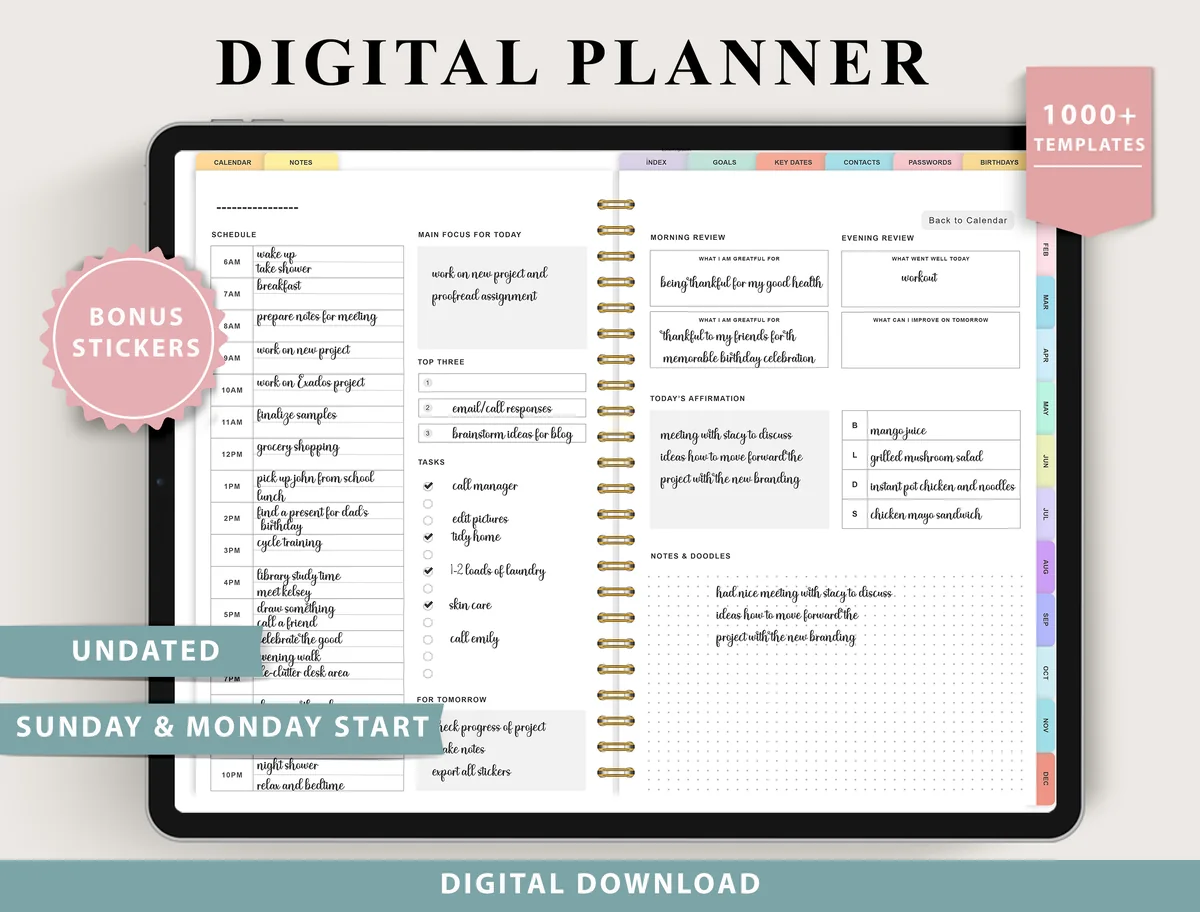
1. Digital Planner for Ipad, GoodNotes
Layouts: Monthly, Weekly (4 layouts), Daily (4 layouts), 100+ templatesDates: UndatedWeek start: Monday or Sunday
Best for: indecisive planners, fitness trackers, finance trackers. Designed by ThePlannersDelight.
- 4 weekly layouts: boxed, horizontal and scheduled
- 4 daily layouts: structured and minimal
- Undated, Monday and Sunday start
- 100+ templates for fitness, finance, nutrition and more; bonus stickers
Four weekly and four daily layouts in one file is the cheapest way to find your format: try boxed one week, scheduled the next, and keep the one you actually fill. Well reviewed, too.
Most weekly layouts
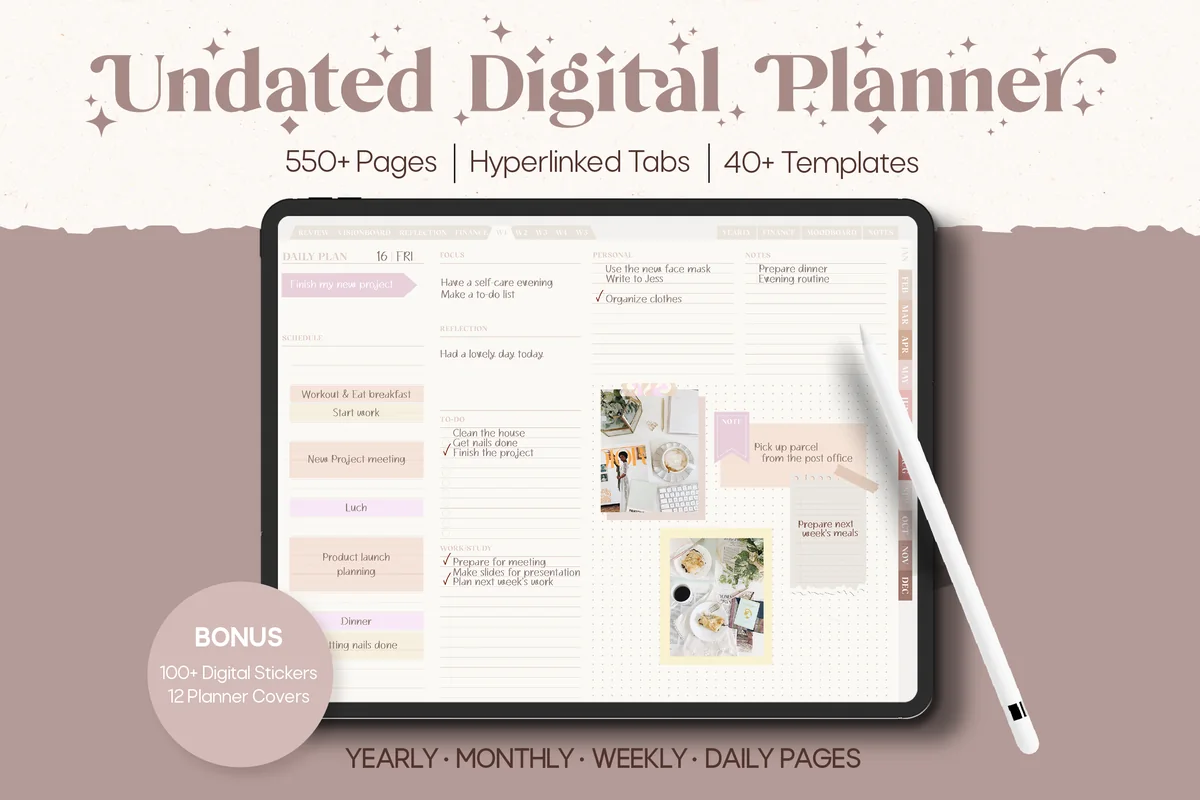
2. Neutral Undated Yearly Digital Planner
Orientation: LandscapeLayouts: Yearly, Half-year, Quarterly, Monthly, Weekly, DailyDates: Undated
Best for: big-picture planners, neutral lovers, moodboard fans. Designed by Felicia Notes.
- 5 weekly layouts, including weekly schedules and days + notes
- 2 daily layouts: one day per page or two days per page
- Undated, horizontal, with hyperlinked tabs
- Neutral beige and mauve design
Five weekly layouts, including the week + notes and scheduled versions from the list above, and the handy two-days-per-page option for lighter days. The neutral colors go with any pen palette.
Best layouts for the workday
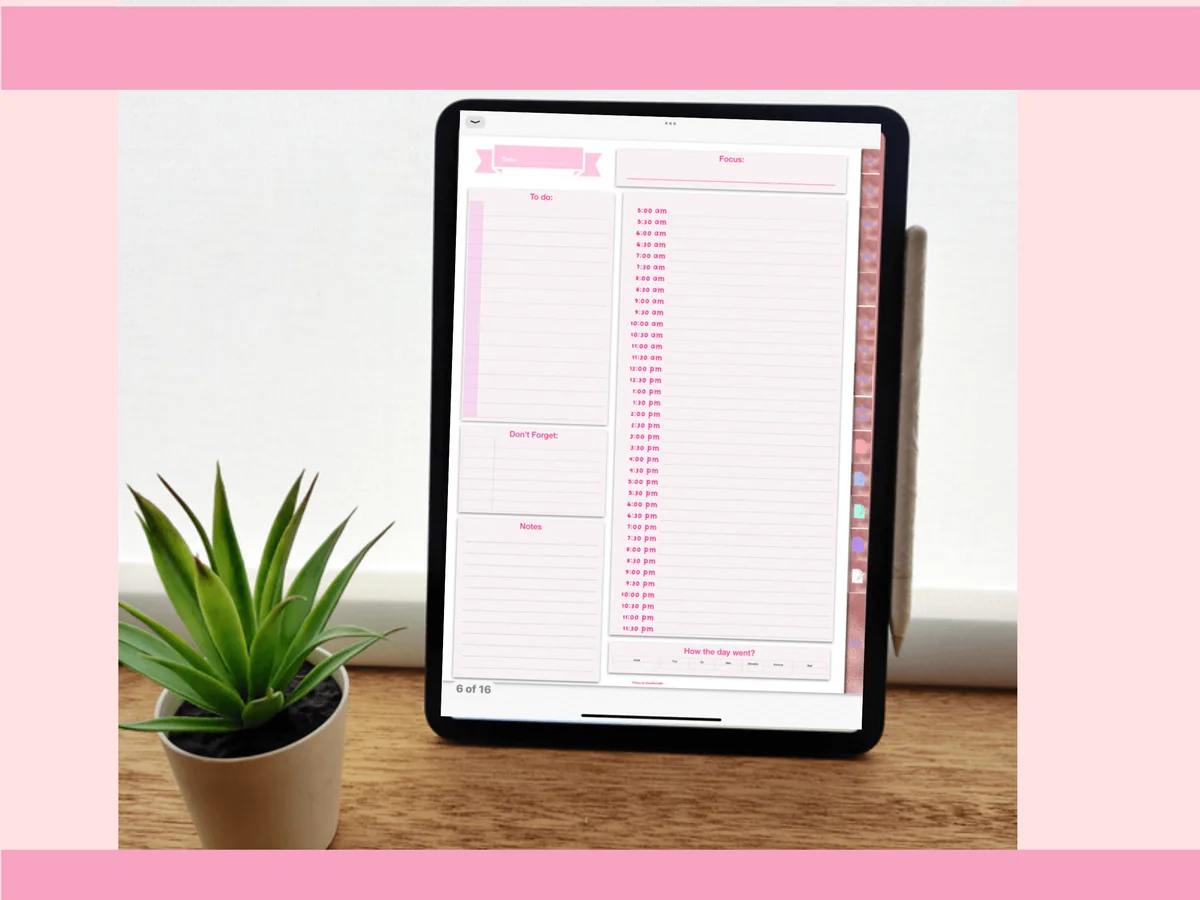
3. Pinksy Work Planner
Orientation: PortraitLayouts: Monthly, Weekly (2 layouts), Daily (3 layouts), Meeting minutesDates: Undated
Best for: remote workers, meeting-heavy jobs, pink lovers. Designed by Pinksy by HimeMarieMC.
- 2 weekly and 3 daily layouts
- Undated monthly calendar
- Meeting minutes and password pages, 16 templates in total
- PDF and GoodNotes files
Three daily layouts let you pick a different structure for meeting days and focus days. Add the meeting minutes page and it covers the whole workday.
Best vertical week
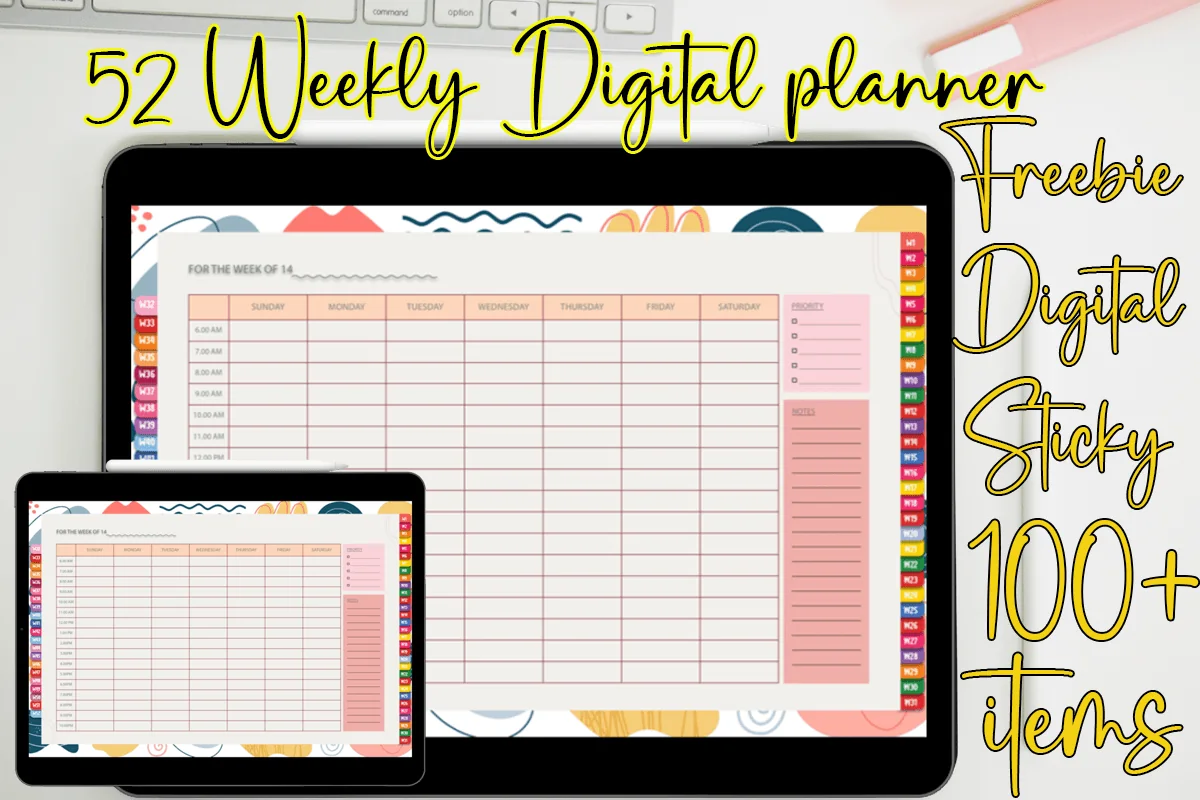
4. 52 Weekly Digital Planner + Hyperlinks
Orientation: LandscapeLayouts: Weekly (hourly, 52 weeks)Dates: UndatedWeek start: Sunday
Best for: time blockers, colorful planners, sticky note fans. Designed by MOMAT THIRTYONE.
- 52 undated weekly pages, each linked from the side tabs
- Hourly grid with a column for each day, Sunday to Saturday
- Priority list and notes column on every week
- 100+ digital sticky notes; for GoodNotes, Noteshelf and Xodo
Each day gets its own tall column with the hours down the side, which is the vertical week at its clearest. Appointments go in their time slot, and sticky notes hold tasks that don't have a time yet.
Best hourly week
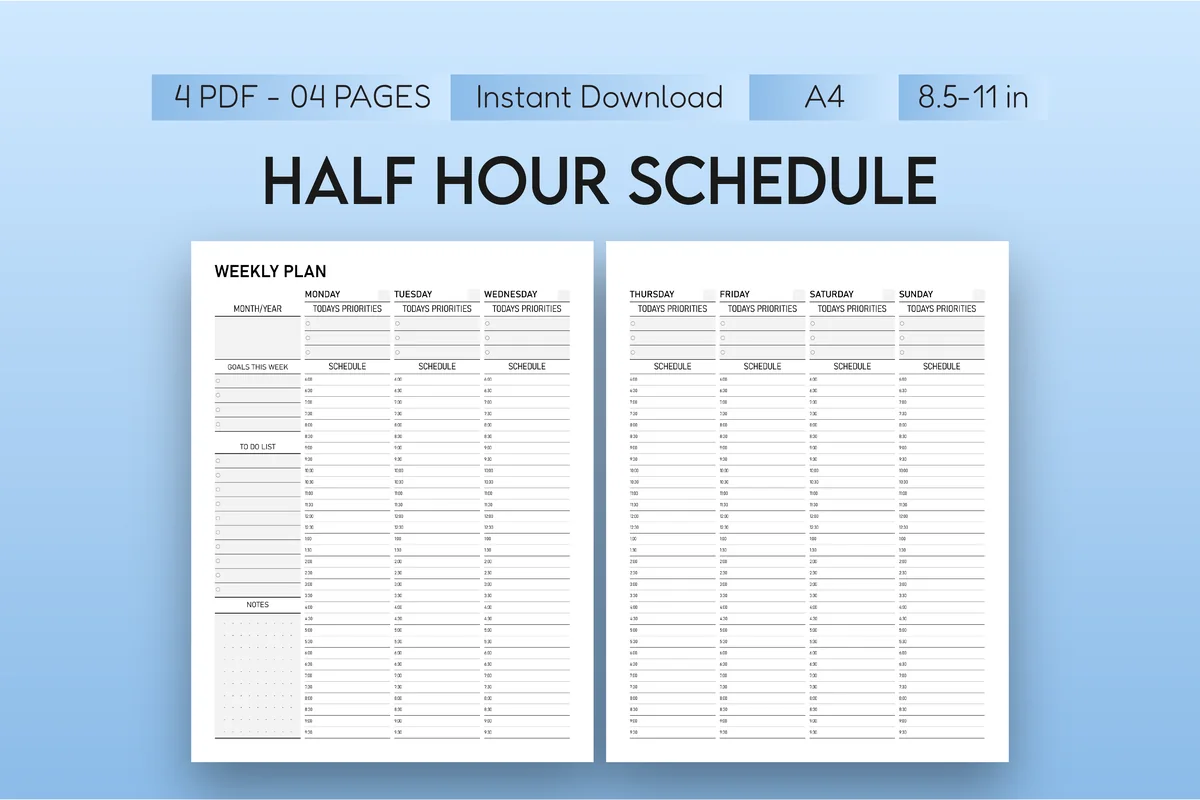
5. Half-Hour Weekly Planner
Orientation: PortraitLayouts: Weekly (30-minute slots)Dates: UndatedWeek start: Monday
Best for: busy professionals, students, time blockers. Designed by Mol Tazime.
- Weekly layout in 30-minute intervals
- Space for notes, priorities or to-dos
- Undated, minimalist
- PDF and PNG for GoodNotes and Notability
The scheduled week at its most precise: half-hour slots for seven days. If the comparison table above pointed you to an hourly week, this is the simplest way to try it.
Best one-page hourly day
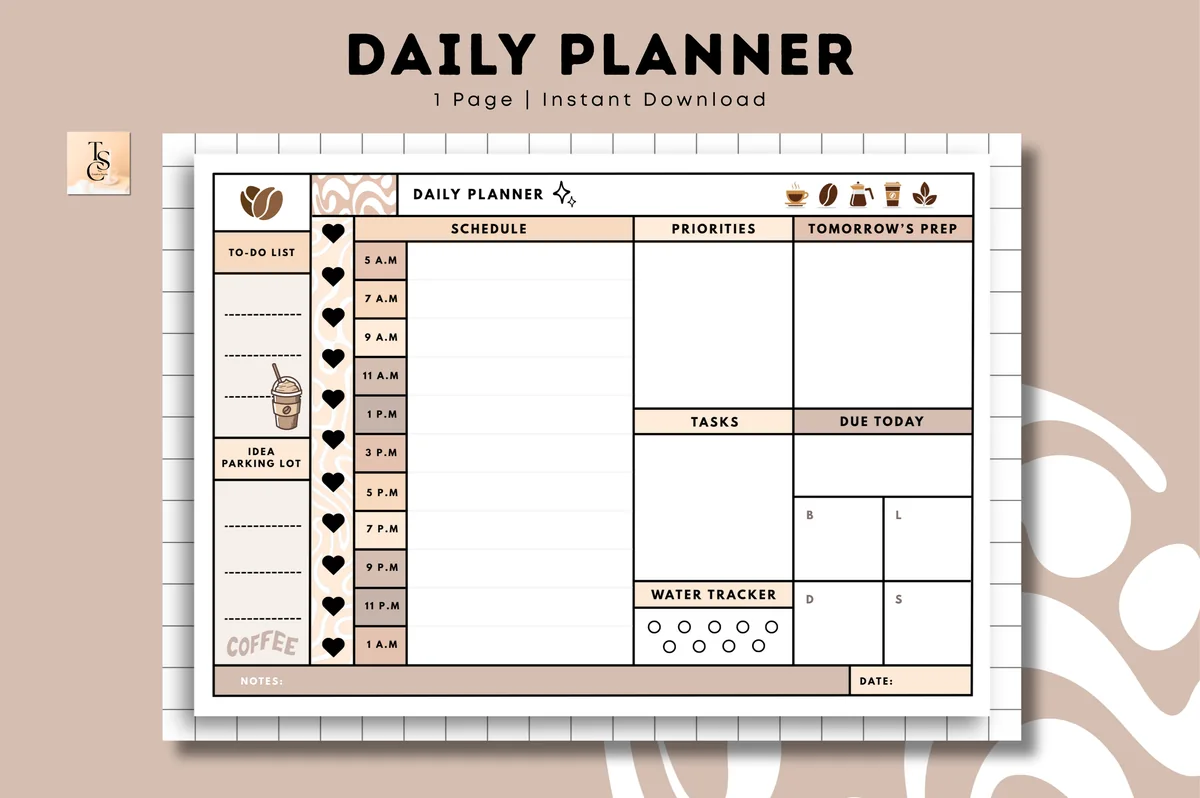
6. Daily Planner • Coffee Latte
Orientation: LandscapeLayouts: Daily (1 page, hourly)Dates: Undated
Best for: time blockers, coffee lovers, one-page planners. Designed by Tas Creative Studio.
- Undated one-page daily layout, landscape
- Hourly schedule, priorities, tasks and tomorrow's prep
- Water tracker and notes
- Digital PDF (printable version included)
The "hourly day" layout done well: schedule on the left, priorities and tasks on the right. Duplicate the page for each day you need and skip the quiet ones.
Best dashboard-style planner
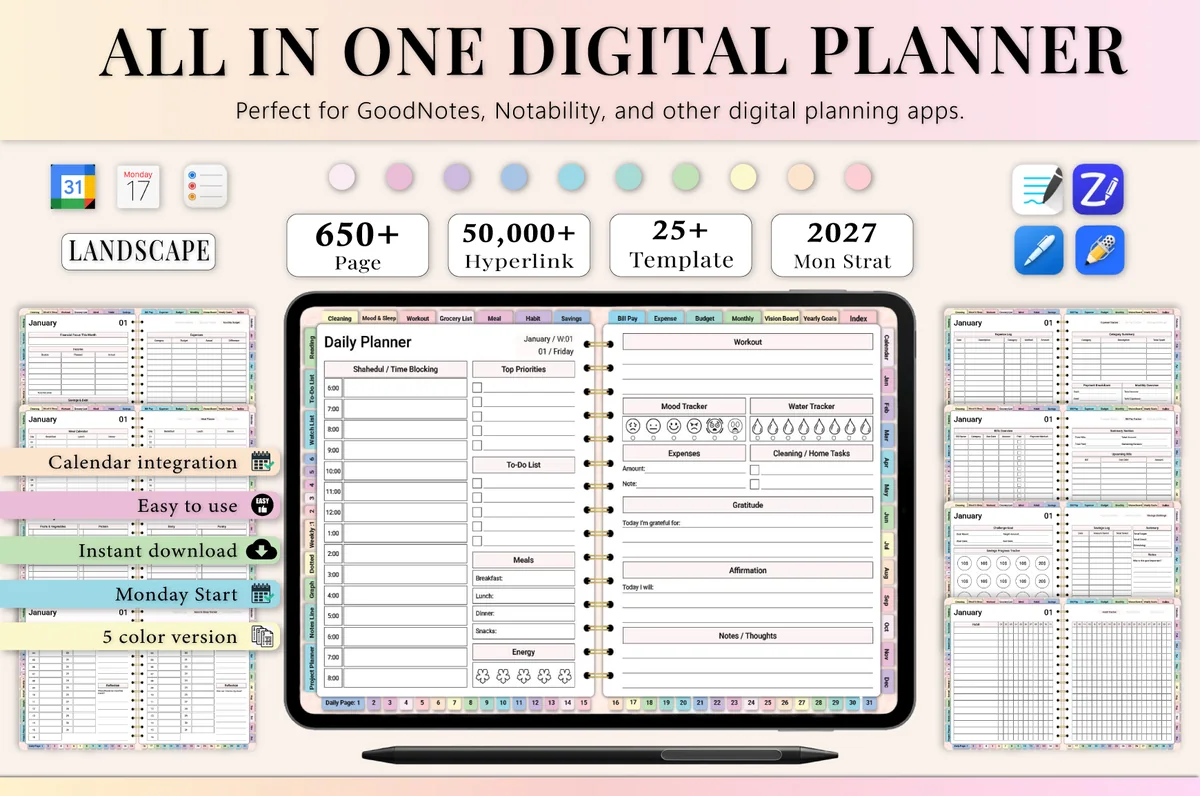
7. All-in-One Digital Planner 2027
Orientation: LandscapeLayouts: Yearly, Monthly, Weekly, DailyDates: 2027Week start: Monday
Best for: busy professionals, budgeters, people who want one planner for everything. Designed by Heartcraft Studio.
- 655 hyperlinked pages, dated 2027
- Year at a glance, monthly calendar and planner, weekly and daily layouts
- Time blocking and daily schedule pages
- Budget, habit and meal pages
If you want the big-picture layouts too (year at a glance, monthly planner with goals), this covers every level from year to hour. Dated for 2027, so it's ready for January.
Quick Comparison
| Planner | Layouts | Best for | Stand-out extra |
|---|---|---|---|
| 1. Digital Planner for Ipad, GoodNotes | 4 weekly + 4 daily | Layout explorers | 100+ templates |
| 2. Neutral Undated Yearly Digital Planner | 5 weekly + 2 daily | Neutral lovers | Two days per page |
| 3. Pinksy Work Planner | 2 weekly + 3 daily | Remote workers | Meeting minutes |
| 4. 52 Weekly Digital Planner + Hyperlinks | Vertical hourly week | Busy calendars | 100+ sticky notes |
| 5. Half-Hour Weekly Planner | Hourly (30 min) week | Time blockers | Half-hour slots |
| 6. Daily Planner • Coffee Latte | Hourly day | One-page planners | Tomorrow's prep box |
| 7. All-in-One Digital Planner 2027 | Year to hour | All-in-one fans | Time blocking pages |
Vertical vs Horizontal Weekly Layout
The most common question, so here’s the short answer. A vertical week gives each day a tall column, which works like a calendar: you see what’s in the morning and what’s in the evening. A horizontal week gives each day a wide row, which works like a list: perfect when you write tasks, not times. If you write mostly “10:00 dentist”, go vertical; if you write mostly “call the bank”, go horizontal.
Digital Planner Layout Extras Worth Having
- Index page with links to every section
- Side tabs for months
- Monday and Sunday start versions
- Notes pages after each week
- A dashboard or “this month” page
- Matching backgrounds for dark mode
- Blank and dot grid pages to build your own
How to Mix Layouts in GoodNotes
- Keep the main planner as your base so the hyperlinks keep working; don’t delete pages the tabs point to.
- Add extra layouts as new pages: import a single-page template, or duplicate a page from another planner and paste it after the week it belongs to.
- Save favorite layouts as GoodNotes templates so “add page” offers them every time.
- Try a layout for two weeks before you decide; the first week always feels strange.
- Match the colors with the same pen palette across pages; my GoodNotes color palettes help with that.
If you’d rather build a planner from single pages, see my digital planner templates, including free ones.
FAQ
What is the best planner layout?
The one that matches your days. For most people a monthly calendar plus a horizontal weekly layout is the easiest start; add an hourly day only if you have many appointments or want to time block. I collected the best hourly planners for time blocking separately.
What’s the difference between a vertical and a horizontal planner?
Vertical layouts give each day a column (good for times and appointments); horizontal layouts give each day a row (good for task lists). Boxed layouts sit in between with a box per day.
Can I change the layout of a digital planner?
You can’t edit the PDF itself in GoodNotes, but you can add pages with other layouts, use planners that include several layouts, or write and draw your own structure on blank and dot grid pages.
What is a page a day planner?
A page a day planner gives every date its own page, with room for a schedule, priorities and notes. A 2 page per day planner spreads one day over two pages, usually the schedule on one side and tasks or journaling on the other. On an iPad you scroll instead of carrying a thick book, so even a two page per day layout stays light.
What is a 2 page per week planner?
It’s a weekly spread: the whole week across two facing pages, in a vertical, horizontal or boxed layout (ideas 1–3 above). One look shows the full week, which is why most planners start with it. On an iPad in landscape both pages fit the screen at once; in portrait you usually get the week on a single page.
Do I need a daily layout if I have a weekly one?
Not always. If your weekly boxes are big enough, skip daily pages; add them only for busy days. In a digital planner, unused daily pages cost nothing, so a planner with both is a safe choice.
Final Thoughts
Pick from these planner layout ideas by how your days really look, not by how pretty the preview is. Then try it for two weeks and adjust; with a digital planner, switching costs nothing. For planners built around one layout, see my weekly digital planners, daily digital planners and day planners for time blocking, or browse all everyday planners.
For a full-year planner to pair with this, browse the best digital planners for iPad in 2027.
You May Also Like
This post contains affiliate links. If you buy through them, I may earn a small commission at no extra cost to you. Learn more.