A low income budget planner needs room for an uncomfortable number: the amount you cannot currently cover. If the page makes every month look balanced before you have enough money, it is hiding the problem you need to see. I prefer a small set of records that keeps available income, essential costs and unanswered questions separate.
These seven page ideas work on paper, in an existing notebook or in a PDF annotation app on your iPad. The eight optional digital tools later in this guide offer starting layouts for budgets, bills and notes. They do not solve a shortfall. Try the records in a notebook you already own before choosing another file.
What this low income budget planner should show
The first job is to describe the situation accurately. A budget for limited income should make the difference between money available and costs visible, without turning every unused savings tracker into another obligation. My layout uses seven records with a short index, so you can find the next thing to check without opening dozens of sections.
- Available money: the amount you can actually use in the period you are recording, without counting the same balance twice.
- Costs and dates: obligations, everyday essentials and the evidence behind each amount.
- A visible gap: the difference, even when it is negative, plus an honest record of what remains unresolved.
- Follow-up: questions, conversations and changes that have actually been agreed, rather than changes you hope will happen.
The basic budget cycle comes from consumer.gov’s guide to making a budget: record income and expenses, subtract costs, then compare your plan with actual spending. The CFPB Your Money, Your Goals toolkit also separates income tracking, bill calendars and cash-flow tools. The seven-page arrangement below is my own way to organize those tasks.
7 pages for a budget that does not hide a shortfall
Use a single month or another clearly labeled period throughout the first pass. Write the start and end dates on the index. If an amount belongs to a later period, put it in a future note instead of quietly mixing it into today’s total. The labels below are pages you create yourself, including when you use one of the files further down.
Establish the figures
- 1Available-income page. Write the period, source, date received and amount available. Keep an expected payment outside the available total until it is received. If part of a balance already has a committed purpose, mark that clearly so you do not assign it again. Put a small checked-on date beside the final figure; a number copied from last week may no longer describe the money available today.
- 2Essential-commitments inventory. List the costs you need to account for, such as housing, utilities, groceries and necessary transport. Give each entry an amount, a date where relevant and a source, such as the current bill. This is an inventory, not an instruction to skip any category. If two adults share a cost, record the share used in this budget and leave a note explaining the boundary.
- 3Unknown-amounts and estimates log. Use three columns: item, working estimate and what will confirm it. For example, label a utility figure Estimated until the bill arrives. Add a date to check it. An estimate can belong in the working total, but its uncertainty should stay visible. When the confirmed amount arrives, update the inventory and keep the earlier estimate in this log so the difference is explainable.
A small distinction helps here: unknown is not zero. If you have not checked a bill, a blank amount should prompt a question. It should not make the monthly total look lower. If you cannot make a meaningful estimate yet, label the total Incomplete and say which item is missing.
Make the gap and next action visible
- 4Payment-date calendar. Copy the due dates of known bills and the dates of expected receipts onto one calendar, with different labels for received and expected money. Add a reminder to check any uncertain date. This calendar is a timing view; it does not change the amounts in the inventory or create a payment agreement. If the totals look possible but the dates do not line up, keep that timing question visible.
- 5Shortfall statement. Write available income, recorded costs and the difference on one uncluttered page. Leave a negative result negative. Add the date and a short status line such as No changes agreed yet. Do not enter an invented extra-income figure to make the page balance. If you revise a cost after receiving better information, preserve a dated note explaining why the total changed.
- 6Contacts and agreed-changes record. Give each entry a date, organization, reason for contact, outcome and next follow-up. Separate Requested from Agreed. Asking about a different payment date does not mean it has changed; record any actual terms only after they are confirmed. Keep a reference to the message or letter in your own secure records rather than writing sensitive account details into a shared planner.
- 7Next-period review. Compare the original figures with actual income and costs. Note which estimates changed, which commitments remain unresolved and which information you need earlier next time. Start the next period with the current facts rather than copying a hoped-for improvement. One useful review note might be Utility estimate needs checking before the next budget, rather than a vague promise to spend less.
Build a low income budget planner template around actual bills
For a low income budget plan, start with the bills and income records described in the consumer.gov guide above. On your budget worksheet, give each cost a planned amount, an actual amount and a due date. Separate fixed commitments, such as rent or a mortgage and insurance, from changing costs such as groceries. Include debt payments and subscriptions in the inventory so they do not disappear behind the essentials total.
A low income budget template also needs a clear boundary around whose money it records. If you manage costs with a partner or other household members, write down which shared costs each person covers. Keep cash and bank accounts distinguishable, and record transfers between your own accounts separately from income. When you record a credit card purchase, mark the later payment against that record so the same purchase does not appear twice in your spending total.
Keep a separate line for saving if you have assigned money to an emergency fund or another goal. Label any emergency or retirement savings you are tracking separately from the balance available for this month’s costs. If a side hustle brings in extra money, use the income page to distinguish amounts received from work that has not yet been paid. These labels give your own low income financial planning records a consistent meaning without assuming that every household can set aside the same percentage.
Worked example: $1,500 available, $1,650 recorded
Here is an invented example to show the arithmetic, not a suggested household budget. All figures refer to the same period. The $1,500 is the amount available for it; the costs below total $1,650, including the utility estimate. No opening balance or expected payment is being added a second time.
| Entry | Amount | Status |
|---|---|---|
| Available income | $1,500 | Available for this period |
| Housing | $900 | Recorded amount |
| Utilities | $150 | Estimate; check the bill |
| Groceries and household supplies | $350 | Working plan |
| Necessary transport | $150 | Working plan |
| Phone | $100 | Recorded amount |
| Total recorded costs | $1,650 | Includes the utility estimate |
| Difference | −$150 | Shortfall; not yet resolved |
The shortfall page reads $1,500 − $1,650 = −$150. That number is the finding, not a failure of the person filling in the page. The next record should show what needs clarification or discussion. A percentage rule, a colored tracker or an optional PDF cannot supply the missing $150.
- Keep the estimate visible: the utility figure is still uncertain, so the result is a working shortfall.
- Keep requests separate: a proposed change to a date or amount does not alter the budget until it is actually agreed.
- Record the update: if the confirmed utility bill is $170, costs become $1,670 and the gap becomes −$170. That is new information, not a reason to erase the earlier entry.
This example concerns the total gap. A bill calendar answers a separate question about when money and costs occur. Moving a date would not by itself reduce the $1,650 total. Keeping those two questions separate helps prevent a timing note from looking like a solution to insufficient income.
When payment dates and amounts also change, the timing record needs more detail than a bill calendar. The irregular income budget workflow separates expected payments from actual receipts and shows how a checked weekly balance carries into the next review.
8 optional iPad tools to adapt for these records
I selected the following files for their visible budget, income, bill, expense or note pages. None is presented as a purpose-built low-income calculator. Dedicated finance options come first, followed by bill-focused and broader life-planning alternatives. Choose one only if its structure helps you; the seven ideas above remain usable in a notebook you already own.
These are manual digital tools. A compatible annotation app is required separately, and an iPad or stylus is not included. I reviewed public descriptions and previews rather than purchasing and testing the paid files. Hyperlinks help with navigation; they are not bank connections, automatic calculations or automatic payment changes.
TL;DR: Start with a notebook you already have. These eight optional digital tools supply budget, bill, expense or Notes pages; the seven low-income logs are your own adaptations, with manual arithmetic.
Quick Picks
- Best for a monthly gap review: Digital Budget Planner, Financial Planner
- Best for a compact income record: Budget Digital Planner Hyperlinked Tabs
- Best for roomy custom notes: Gold Budget Digital Planner
- Best for a visual spending summary: Undated Budget Planner for GoodNotes
- Best for bill follow-up: Hyperlinked Bill Tracker Planner
- Best for a workbook overview: Digital Budget Planner, Finance Tracker
- Digital Budget Planner, Financial Planner – Best for a monthly gap review
- Budget Digital Planner Hyperlinked Tabs – Best for a compact income record
- Gold Budget Digital Planner – Best for roomy custom notes
- Undated Budget Planner for GoodNotes – Best for a visual spending summary
- Hyperlinked Bill Tracker Planner – Best for bill follow-up
- Digital Budget Planner, Finance Tracker – Best for a workbook overview
- All-in-One Digital Planner – Best for calendar context
- Undated Digital Planner, Life Planner – Best for separate revenue and expenses
Compare available money with costs
Best for a monthly gap review
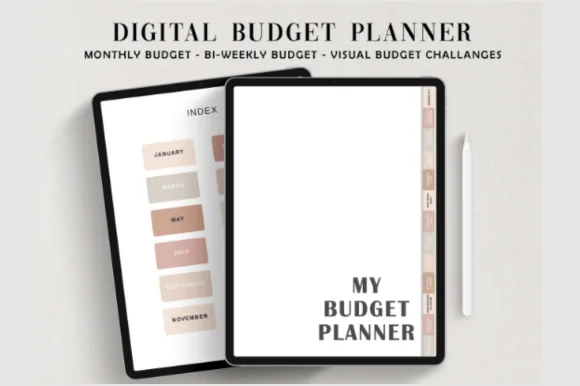
1. Digital Budget Planner, Financial Planner
Orientation: PortraitLayouts: Monthly budget, spending and reviewDates: Undated
Best for: bringing a monthly budget, daily spending and a weekly check-in together. Designed by ThePlannersDelight.
- Hyperlinked PDF for GoodNotes, Noteshelf or Notability
- Monthly budget, daily spending logs and bill tracker
- Weekly expense check-in, monthly breakdown and undated calendar
- The listing specifies an Apple tablet plus a writable stylus such as Apple Pencil; neither that equipment nor the note-taking apps are supplied.
The monthly budget and spending log give this workflow two distinct homes: what you can cover and what actually happened. The weekly check-in can help identify an estimate that was too low. Add your own shortfall statement in a separate app note rather than treating the savings challenges as a required task. You can leave those challenges unused when the essentials already exceed available money.
Best for a compact income record
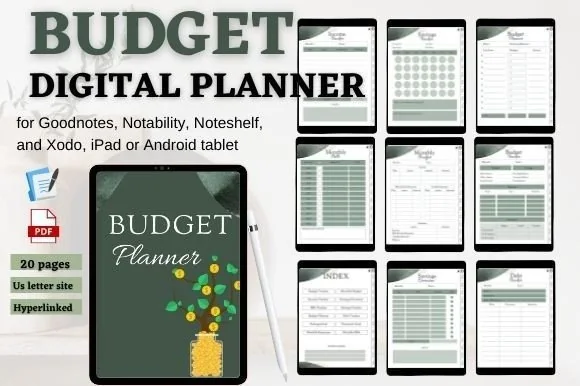
2. Budget Digital Planner Hyperlinked Tabs
Orientation: PortraitLayouts: Income, monthly budget, bills and notes
Best for: separating available income from bills in a compact green planner. Designed by mixxdigitaldesign.
- 20-page hyperlinked PDF with US Letter layout
- Income Tracker, Monthly Budget and Bills Tracker
- Notes and extra pages; GoodNotes, Notability, Noteshelf and Xodo listed
An Income Tracker is a useful starting point for page one. Put only the money available for this period into the total, and use an extra page for amounts you are still waiting to receive. The separate Monthly Bills section helps keep the obligation visible. The 20-page structure keeps the starting point compact: you can build the seven records without adding a large life-planning system.
Best for roomy custom notes
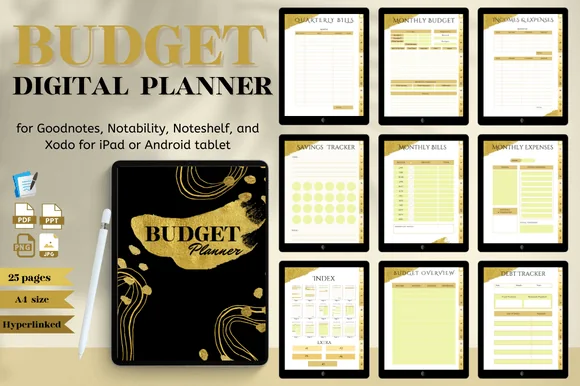
3. Gold Budget Digital Planner
Orientation: PortraitLayouts: Income, expenses, quarterly bills and notes
Best for: using note layouts alongside income, expense and bill records. Designed by Nann Digital Art.
- 25-page A4 digital planner with hyperlinked navigation
- Income Tracker, Expense Tracker, Monthly Bills and Quarterly Bills
- Five extra pages with lined and grid note layouts shown
The five extra pages make the black-and-gold option particularly useful for the parts no ready-made tracker can decide for you. Give one note page to unknown amounts and another to conversations and agreed changes. Its quarterly-bills page can flag an upcoming cost, but record the actual amount and due date separately. This is a 25-page A4 planner, not a seven-page low-income workbook.
Best for a visual spending summary
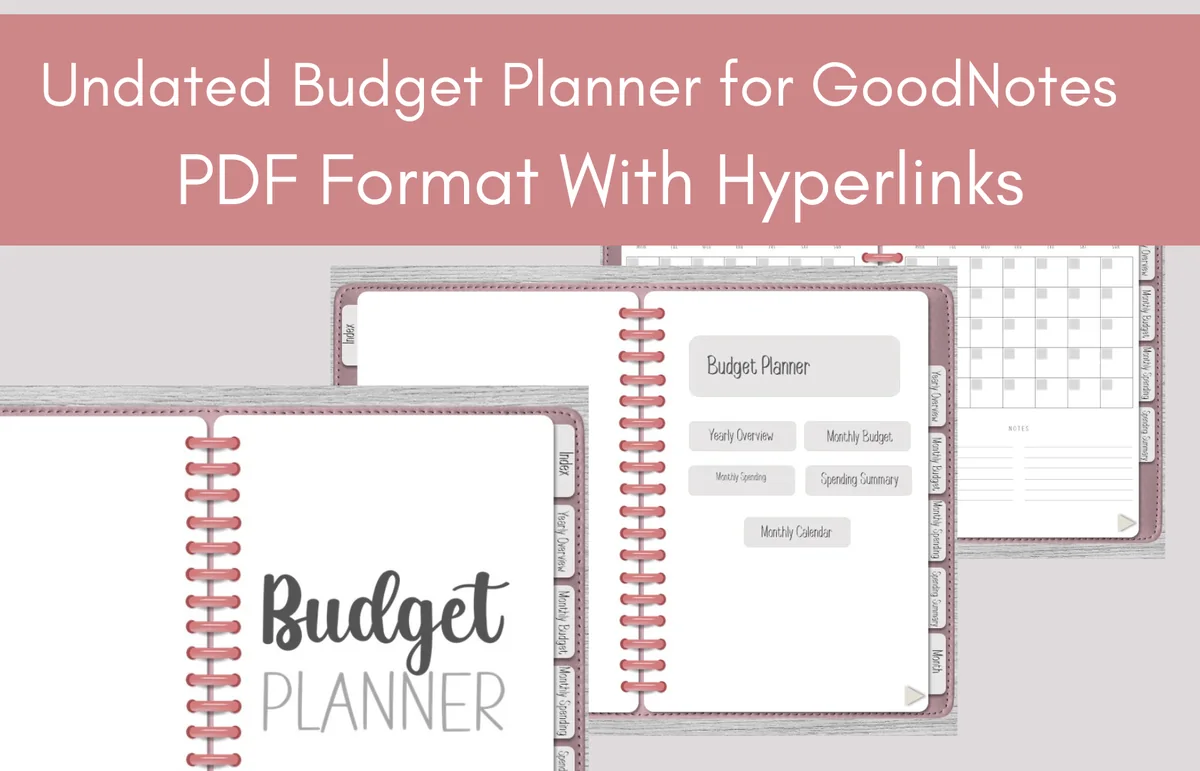
4. Undated Budget Planner for GoodNotes
Orientation: PortraitLayouts: Monthly budget, spending and calendarDates: Undated
Best for: reviewing a month with a calendar and spending overview. Designed by Perla Designs.
- 30-page hyperlinked PDF for GoodNotes
- Monthly Budget, Spending Summary and Monthly Calendar
- Yearly Overview and Monthly Spending pages
The pink previews show Monthly Budget, Spending Summary, Monthly Spending and a Monthly Calendar. Those are useful for comparing your original plan with the final figures. Keep the shortfall and contact logs in separate note pages in your annotation app; a dedicated contact form is not shown here. Choose it for the visible monthly overview rather than an extensive promised toolkit.
Keep bills and follow-up together
Best for bill follow-up
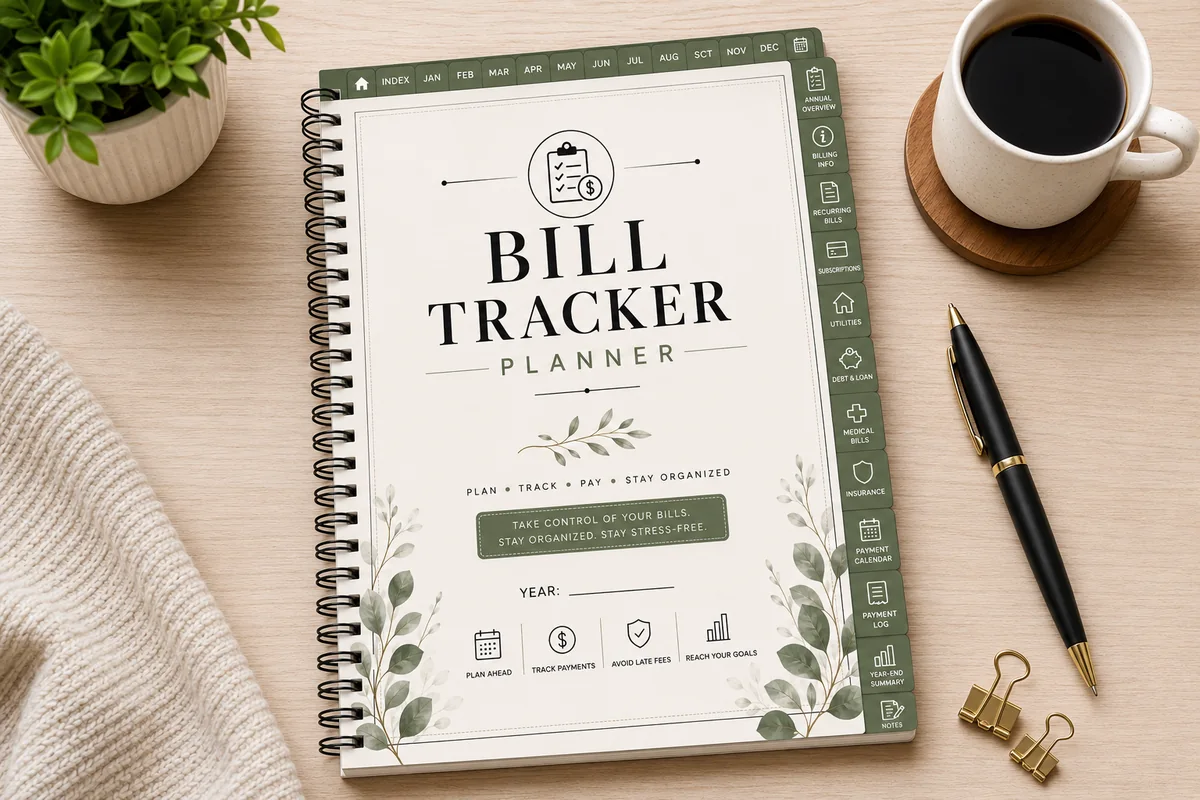
5. Hyperlinked Bill Tracker Planner
Orientation: Portrait A4Layouts: Bills and payment recordsDates: Undated
Best for: keeping recurring obligations and payment records in one place. Designed by Azhir.
- 52-page undated hyperlinked PDF with portrait A4 layout
- Monthly Bill Trackers, Payment Log and Bill Payment Calendar listed
- Compatible with GoodNotes, Notability and Noteshelf
When the hardest part is knowing which bill needs a conversation, the dedicated bill structure is more relevant than a decorative savings page. The listing includes monthly trackers, payment summaries and several Notes layouts. Use a note page to record the date, person and terms of an actual agreement. Only the cover is publicly previewed, so I cannot judge the spacing of the internal forms. This does not replace an income record.
Best for a workbook overview
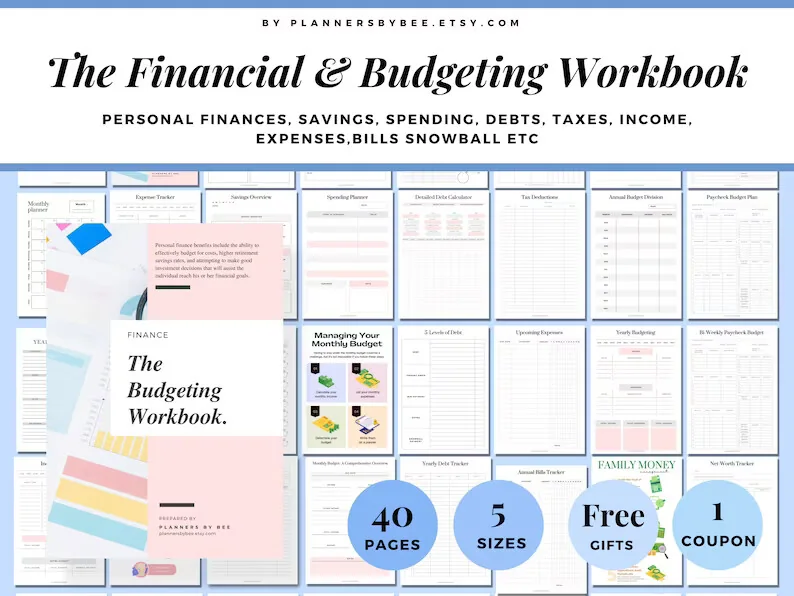
6. Digital Budget Planner, Finance Tracker
Orientation: PortraitLayouts: Spending and annual bill overview
Best for: adding a broad spending overview to your own simple logs. Designed by PlannersByBee.
- GoodNotes financial planning workbook
- Gallery shows Spending Planner and Annual Bill Tracker
- Single promotional overview; interior detail is limited
The public collage shows a Spending Planner and Annual Bill Tracker among the workbook pages. Those can provide context, but the listing is broad and does not establish a ready-made low-income sequence. Use it for a broad spending overview, with your own seven-page set alongside it. A single promotional collage gives less detail about writing space than the multi-page galleries above.
Combine money notes with daily plans
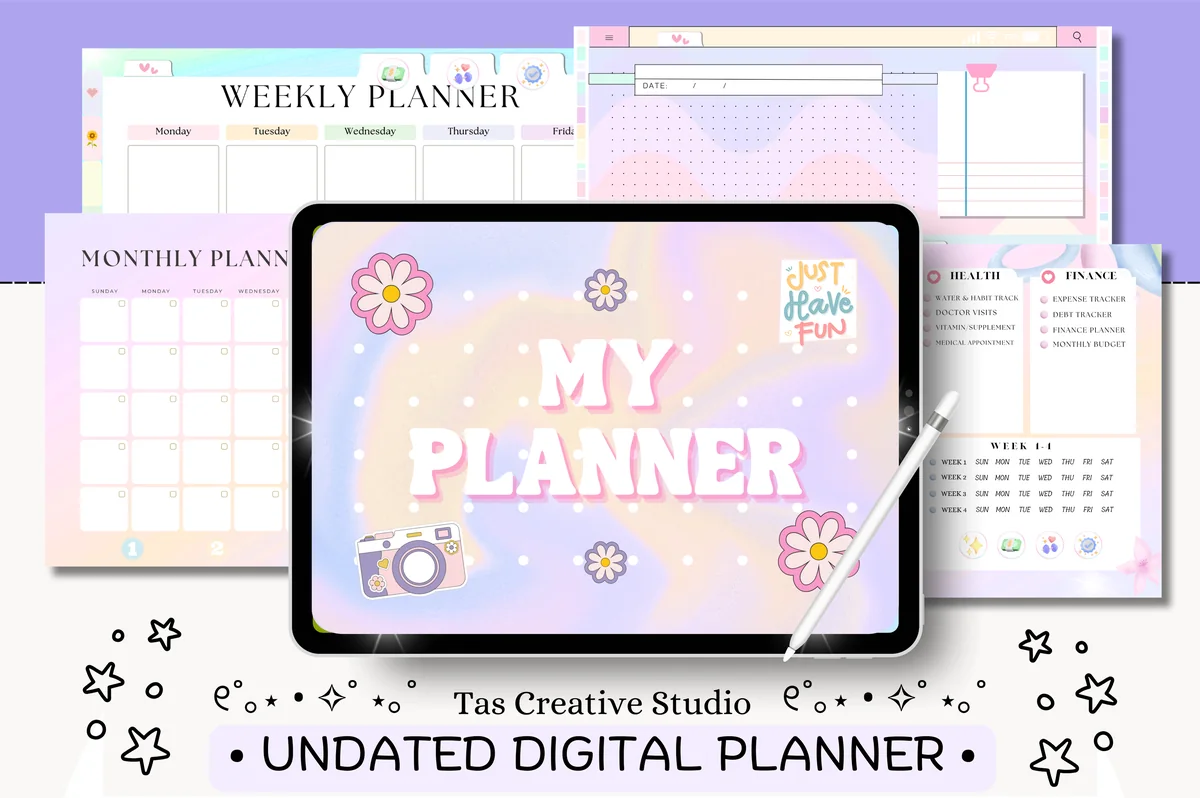
Best for calendar context
7. All-in-One Digital Planner
Orientation: LandscapeLayouts: Weekly plans, budget and finance recordsDates: Undated
Best for: keeping appointments and household spending in one landscape planner. Designed by Tas Creative Studio.
- 112-page undated horizontal hyperlinked PDF
- Monthly Budget, Finance Tracker, savings and bills visible in the gallery
- Weekly calendar and dotted notes; GoodNotes and Notability supported
The finance preview contains Monthly Budget, Finance Tracker, savings and bill pages; the dotted note layout offers a place for your own gap statement. A calendar beside the numbers can help you remember a provider appointment or a follow-up call. This pastel, gamer-style planner also has many nonfinancial sections. It makes sense if you want those together, rather than buying a large file solely to record seven money pages.
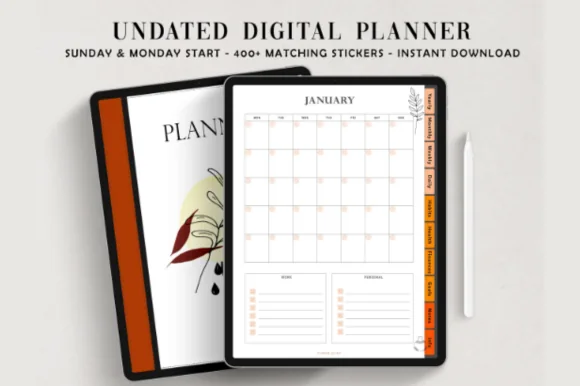
Best for separate revenue and expenses
8. Undated Digital Planner, Life Planner
Orientation: PortraitLayouts: Revenue, expenses, budget and notesDates: UndatedWeek start: Monday and Sunday versions
Best for: using distinct money trackers with flexible note layouts. Designed by ThePlannersDelight.
- Undated hyperlinked PDF for GoodNotes or Noteshelf
- Revenue Tracker, Expenses Tracker and Monthly Budget
- Monday-start and Sunday-start versions; lined and grid notes shown
Revenue Tracker and Expense Tracker are visibly separate in Autumn Hues, which suits the first pass through this system. Its ruled, grid and box-style notes can hold an estimates list or a contact record. The finance pages are one section of a larger planner, so keep the seven-page index short and ignore unrelated areas. The botanical portrait layout is an alternative to the pastel landscape option, without changing the manual work involved.
Quick Comparison
| Planner | Useful starting point | Custom addition | Main limit |
|---|---|---|---|
| 1. Digital Budget Planner, Financial Planner | Monthly budget and daily spending | Shortfall statement and contact log | Many optional sections; arithmetic is manual |
| 2. Budget Digital Planner Hyperlinked Tabs | Income Tracker and Monthly Bills | Estimates flag and change record | Custom logs must be made on extra pages |
| 3. Gold Budget Digital Planner | Income, expenses and Quarterly Bills | Unknown-amounts and contact pages | Some forms use a longer planning period |
| 4. Undated Budget Planner for GoodNotes | Monthly Budget and Spending Summary | Separate notes for contacts and gaps | Only two public previews; brief listing |
| 5. Hyperlinked Bill Tracker Planner | Bill calendar, recurring bills and Notes | Available-income ledger | Only the cover is publicly previewed |
| 6. Digital Budget Planner, Finance Tracker | Spending Planner and Annual Bill Tracker | All seven narrow workflow records | One promotional collage; internal spacing uncertain |
| 7. All-in-One Digital Planner | Finance pages, monthly calendar and notes | Custom gap and conversation logs | General 112-page life planner |
| 8. Undated Digital Planner, Life Planner | Revenue, expenses, Monthly Budget and Notes | Your seven-page index and gap statement | Finance is part of a broader life planner |
Choose the smallest setup you can keep current
Start with the record you will open again. A large workbook can be useful, but it also contains pages that may be irrelevant while essential costs exceed available income. Leave optional challenges and goal trackers unused if they distract from the current figures.
- Already have an annotation notebook? Add the seven page titles there before considering another PDF.
- Need a concise finance file? Compare the green 20-page planner, black-and-gold 25-page planner and pink monthly summary. Their custom-page space differs.
- Need to track bill conversations? The dedicated bill planner has listed Notes layouts, but you still create your own Requested/Agreed labels.
- Want calendar context? A general planner can hold follow-up appointments beside money notes. Avoid buying its unrelated sections as a substitute for checking the numbers.
Review small purchases before the next bill is due
The consumer.gov routine starts with a monthly plan, records spending each day and compares actual costs with the plan at month end. For these seven pages, I would add a weekly check of receipts against the essential-commitments inventory. Watch for several small purchases that belong to the same grocery allowance, and carry their total into the review rather than treating each receipt as a new allowance. Keep the check date beside the amount so you know which spending the page includes.
Use the contact log when that review uncovers an unresolved bill or a question for a support service. Record what you need to ask, which organization you contacted and what it actually confirmed; keep online reference numbers in your secure records. The CFPB toolkit linked above includes tools for tracking bills, discussing debt and reviewing cash flow. Bring the current figures to a conversation with a qualified counselor or community support service so the discussion starts with the gap you need help addressing.
A short check before you close the file
Use this as a reading check rather than another spending rule. You should be able to point to the source of the current total and explain anything still uncertain. If you cannot, a short question on the index is more helpful than an apparently finished page.
- The period is labeled consistently on income, costs and the shortfall statement.
- Available money is not mixed with expected receipts or counted in two places.
- Estimated amounts are marked, and a completely missing amount is not treated as zero.
- The difference remains negative if the recorded costs exceed available money.
- Requested changes are distinct from actual agreements, with a date for follow-up.
- The review says what changed and what remains unresolved.
If a page is becoming difficult to maintain, simplify its labels before adding another tracker. Keep the money record separate from decorative progress pages. A useful planner makes the situation easier to read; it does not need to make it look cheerful or complete.
FAQ: low-income money records and iPad tools
Can I do this without buying a planner?
Yes. Seven labeled paper pages or notes in an app you already have are enough for these records. The optional files offer existing layouts and navigation, not access to a budgeting method that requires a purchase.
What should I write if expenses exceed income?
Keep the difference visible and date the calculation. Mark estimates, missing information and unresolved items. Do not add an expected payment to available money just to balance the page. Use the contact log for questions, replies and the next follow-up date.
Is this the same as a budget by paycheck?
A paycheck budget organizes costs around pay periods. This guide focuses on showing an overall shortfall and the status of information or agreed changes. If fixed pay dates are your main problem, the biweekly budget template guide explains that separate timing approach. Two paychecks do not automatically mean costs are affordable.
Do the files calculate totals or sync with my bank?
No such functionality is established for these picks. Treat every amount and total as manual. The listed hyperlinks move between pages; they do not confirm a bank balance, send a payment or change a provider’s terms.
When should I seek help beyond a planner?
If the recorded money cannot cover essential costs, or you are unsure about a debt or agreement, consider qualified financial counseling or an appropriate local support service. This guide is about organizing records, not advice to skip bills, take credit, choose investments or interpret legal rights. A PDF purchase is not the next required step.
Keep the gap readable
The useful result of a low income budget planner is an honest record you can return to: what is available, what is due, what is uncertain and what has actually changed. Start with those seven pages, keep the negative number when it belongs there, and choose an optional iPad tool only if it makes the records easier to maintain.
You May Also Like
Some product links are affiliate links. I may earn a commission if you buy through them, at no extra cost to you. Read the affiliate disclosure.