Your savings app shows one balance, the loan statement shows another, and the notebook total has no date. These net worth tracker ideas bring those scattered numbers into a personal balance sheet you can read again later without guessing what you counted.

Build the records below before choosing a new planner. They work on paper or on an iPad note page; the six optional digital tools farther down provide places to keep them. The point is a clear snapshot, not a promise that buying a planner will improve your finances.
Start with a snapshot, not a monthly budget
Net worth is the value of your assets minus your liabilities at a particular time. Assets are what you own; liabilities are what you owe. The Dallas Fed balance-sheet introduction uses this distinction to separate wealth from income. A paycheck is a flow of money, while an account balance is a value on a date.
A budget asks how money comes in and goes out over a period. A net worth statement asks where you stand at one point. Keep the two records connected, but give them different jobs. For monthly spending pages, the broader budget planner ideas guide is a better starting point.
- Snapshot: record account balances, current asset values and amounts owed, all tied to a review date.
- Monthly budget: track expected income, spending categories and actual transactions during the month.
- Review note: explain changed values, changed scope or an unresolved figure.
7 net worth tracker ideas for a comparable record
These seven pieces can live on separate pages or share a few spreads. Start small: one summary plus supporting lists is enough. A busy layout does not make an uncertain number more accurate, so leave space for dates and notes before adding decorative progress bars.
Define the snapshot
- 1A date-and-scope card. Write the valuation date, currency and whose finances the statement covers at the top. For example: “Personal statement, June 30, USD.” Add a short inclusion note, such as “bank accounts, retirement account, car and debts.” If you keep a household statement, label it consistently. An explicit boundary helps prevent a personal-only total from being compared with a later household total. This card is your reference when the history looks surprising.
Use a fresh copy for each review instead of overwriting the previous one. Keep the same scope label visible even when the notebook title already names the owner. If ownership or an account is unclear, flag it for follow-up rather than inventing a share. The tracker is a personal organizing aid, not a legal ownership assessment.
Record the two sides
- 2An assets register. Make columns for item, current value, value date and source. List each included account or possession once. Use neutral labels such as Savings A rather than full account numbers. A separate note can explain a car or property estimate. The register should show where each amount came from, not just produce the largest possible total. Leave a subtotal at the bottom and a margin for missing information.
- 3A liabilities register. Give every debt its own row with amount owed, balance date and source reference. Keep the remaining balance distinct from the next payment due. A loan payment calendar is useful elsewhere, but it cannot substitute for this figure. For a personal list, separate debts you have identified from questions still needing clarification. Review both registers together before transferring totals to the summary.
For valuation, Colorado State University Extension explains using current market values for assets and up-to-date debt amounts. The worksheet distinguishes a home from its mortgage. That same separation matters in a handwritten statement: record the asset value and related debt separately, rather than counting equity as another asset on top.
Give cash and investments separate rows so you can see exactly which balances you included. If your statement includes real estate, record the house value on the assets side and the outstanding mortgage on the liabilities side. Use the same approach for a student loan: enter the amount still owed, rather than the monthly payment. This gives your current financial snapshot a traceable basis and helps you stop guessing what the total actually covers.
Keep uncertainty visible
- 4An estimate-and-unknown key. Choose simple marks: S for a statement balance, E for an estimate and ? for a missing figure. Put the mark beside the amount, then write the method or missing source in a small key. A blank is not automatically zero. If a figure is unknown, label the summary provisional and say which item is missing. This is more informative than a beautifully precise total built on a guess.
An estimate note could read “Car: $4,000, estimated June 30 using comparable listings.” A follow-up note could read “Savings B: balance not yet checked.” These are sample labels, not valuations. Use a repeatable method and preserve the note so a later change can be understood. You do not need to value every household object individually to practice the layout.
Calculate and preserve
- 5A manual totals box. Copy total assets and total liabilities from their registers, subtract once and check with a calculator. Label the result with the same date and scope as the heading. Keep positive, zero and negative results in the same format; none needs a motivational target beside it. If a missing value makes the statement incomplete, keep that warning beside the total instead of hiding it on another page.
- 6A like-for-like history strip. Use one row per review with date, assets, liabilities, net worth and a short change note. Compare the same scope and valuation approach. If you add a previously omitted account, explain that the increase partly reflects a more complete record. A chart can help show the sequence, but only after the dated rows are clear. Keep negative values visible if you draw a vertical scale.
Do not treat every upward movement as a new saving habit or every drop as a spending mistake. Values can change, a balance can be corrected, or the coverage can be different. Write the explanation you can support, and leave the cause open when you cannot. A history page works best as a record of comparable statements, not a scoreboard against other people.
Make the next review easier
- 7A source-and-next-review note. Keep a small index of the statements or valuation notes used, without recording passwords or complete account details. Beside it, list the unresolved items and your next review date. For instance: “Check Savings B; refresh car estimate; repeat June review next year.” This turns the next session into a short checklist. Store original financial documents securely elsewhere and use references in the planner.
Both Investor.gov and the university worksheet describe annual updates. A monthly or quarterly notebook check can be your own preference, but it is not a requirement from these files. Choose a repeatable date and distinguish a quick interim check from the fully sourced annual statement.
Keep a monthly row without rebuilding the whole notebook
If you choose monthly logging, reuse the history strip and set a reminder for the same day each month. Keep columns for updated assets, debts and the net worth calculation, then add a short note about what changed. Use two consistent ink colors to distinguish the asset and liability totals, while keeping the column labels readable without color.
A net worth template gives you a repeatable place to measure the change between dated snapshots. Keep cash flow in your budget pages so income and payments do not get added to balances twice. If you want to see how the total changes as your records grow, draw a small trend line from the history rows and keep the dates beneath it. Review the supporting notes before treating a rise or fall as progress.
A worked example: $12,000 minus $5,000
Here is an invented teaching example in one currency, with all amounts taken for the same snapshot date. It is not a typical household, a target or a financial recommendation. The car estimate is explicitly marked; the other amounts are assumed known for the exercise.
| Record | Assets | Liabilities | Source note |
|---|---|---|---|
| Checking and savings | $8,000 | None in this example | Statement balances |
| Car and car loan | $4,000 | $3,000 | Estimated car value; loan balance |
| Credit card | None | $2,000 | Amount owed |
| Totals | $12,000 | $5,000 | Net worth: $7,000 |
The calculation is $12,000 − $5,000 = $7,000. The car appears at its full estimated value on the assets side, and the car loan appears separately on the liabilities side. Adding the car’s $1,000 equity as another asset would count part of its value twice.
- A transfer from checking to savings changes where the money sits; by itself it does not create another asset.
- Do not add this month’s salary on top of an account balance that already includes the money.
- A monthly debt payment is not the remaining loan balance. Use the amount still owed for the liability row.
- If the car estimate later changes, keep the old statement and explain the new method or value.
Choose an iPad home for the records
A blank note page is enough for this exercise. If you want the records inside a purchased planner, the six options below have different roles. Only the first advertises a Net Worth Tracker; the others offer supporting finance pages or Notes for a table you create yourself. None is presented as a bank-connected calculator.
I reviewed the public descriptions and every available listing preview, rather than the paid files. A PDF annotation app is separate from the planner. Hyperlinks can move between pages, but they do not establish automatic sums, live balances or shared editing. Check the app and product requirements before choosing a file.
TL;DR: Make the seven records in a notebook you already own. These six optional iPad planners offer a named net worth page or note space to adapt; all figures and checks remain manual.
Quick Picks
- Best for a named net worth page: Digital Budget Planner, Finance Tracker
- Best for a compact custom statement: Budget Digital Planner Hyperlinked Tabs
- Best for a roomy source register: Gold Budget Digital Planner/Hyperlinked
- Best for checking the debt side: Hyperlinked Bill Tracker Planner
- Best for a landscape review spread: All-in-One Digital Planner ( 112 Pages )
- Best for a separate history page: Undated Digital Planner, Life Planner
- Digital Budget Planner, Finance Tracker – Best for a named net worth page
- Budget Digital Planner Hyperlinked Tabs – Best for a compact custom statement
- Gold Budget Digital Planner/Hyperlinked – Best for a roomy source register
- Hyperlinked Bill Tracker Planner – Best for checking the debt side
- All-in-One Digital Planner ( 112 Pages ) – Best for a landscape review spread
- Undated Digital Planner, Life Planner – Best for a separate history page
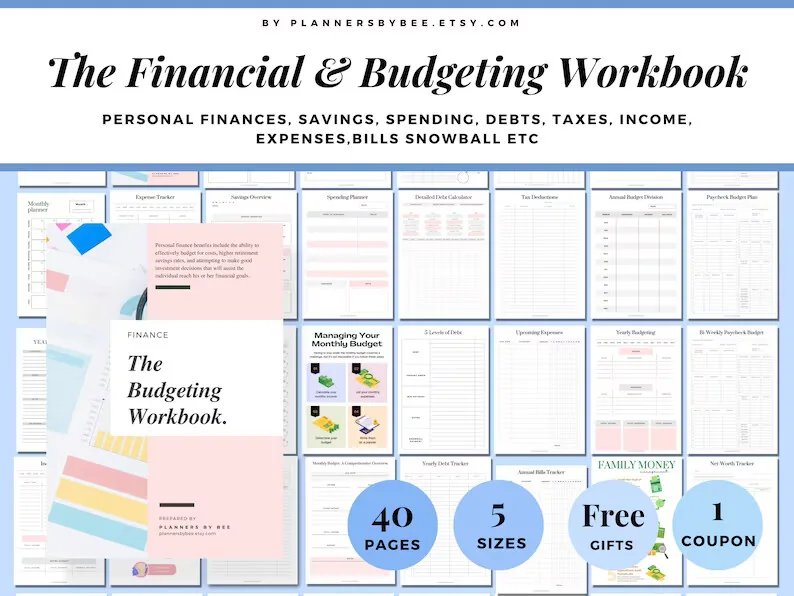
Best for a named net worth page
1. Digital Budget Planner, Finance Tracker
Orientation: PortraitLayouts: Net worth and wider finance pages
Best for: starting with a finance workbook that advertises a Net Worth Tracker. Designed by PlannersByBee.
- GoodNotes financial planning workbook
- Net Worth Tracker named in the promotional overview
- Spending and annual bill pages also shown
The tiny Net Worth Tracker title is the reason this workbook comes first. It offers a more direct starting point than a general note page, but the single gallery image does not reveal the internal column labels or writing space. Keep the source register and estimate key on a separate page if the form feels too compact. The listing does not establish automatic totals, so check the arithmetic yourself.
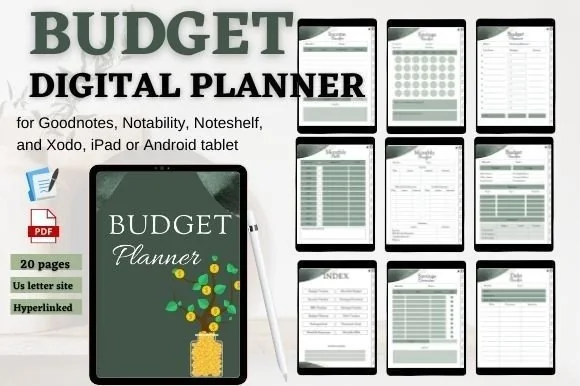
Best for a compact custom statement
2. Budget Digital Planner Hyperlinked Tabs
Orientation: PortraitLayouts: Debt, savings, Notes and extra pages
Best for: adding your own balance sheet beside existing debt and savings records. Designed by mixxdigitaldesign.
- 20-page hyperlinked US Letter planner
- Debt Tracker, Savings Overview, Notes and extra pages
- GoodNotes, Notability, Noteshelf and Xodo listed
A compact green file makes sense if you want the statement beside the records you already check. Use Notes for the assets register and an extra page for liabilities, then copy the checked totals onto one summary. Its savings pages can prompt you to look up balances, but a savings goal is not the balance itself. There is no dedicated net worth form in the listed contents; this route needs your own headings.

Best for a roomy source register
3. Gold Budget Digital Planner/Hyperlinked
Orientation: Portrait A4Layouts: Finance trackers and five extra note pages
Best for: separating the statement, estimates and history across note pages. Designed by Nann Digital Art.
- 25-page A4 hyperlinked digital planner
- Five extra pages; ruled and grid Notes shown
- Income, expense, savings and debt trackers
The five extra pages give each supporting record a home. A grid layout works for item, amount, valuation date and source; another page can hold the comparable history. Separate pages leave room for source references without crowding the summary. Black-and-gold styling is the visual difference, while the useful feature for this task is the choice of note layouts. You still build the net worth worksheet and enter all totals manually.
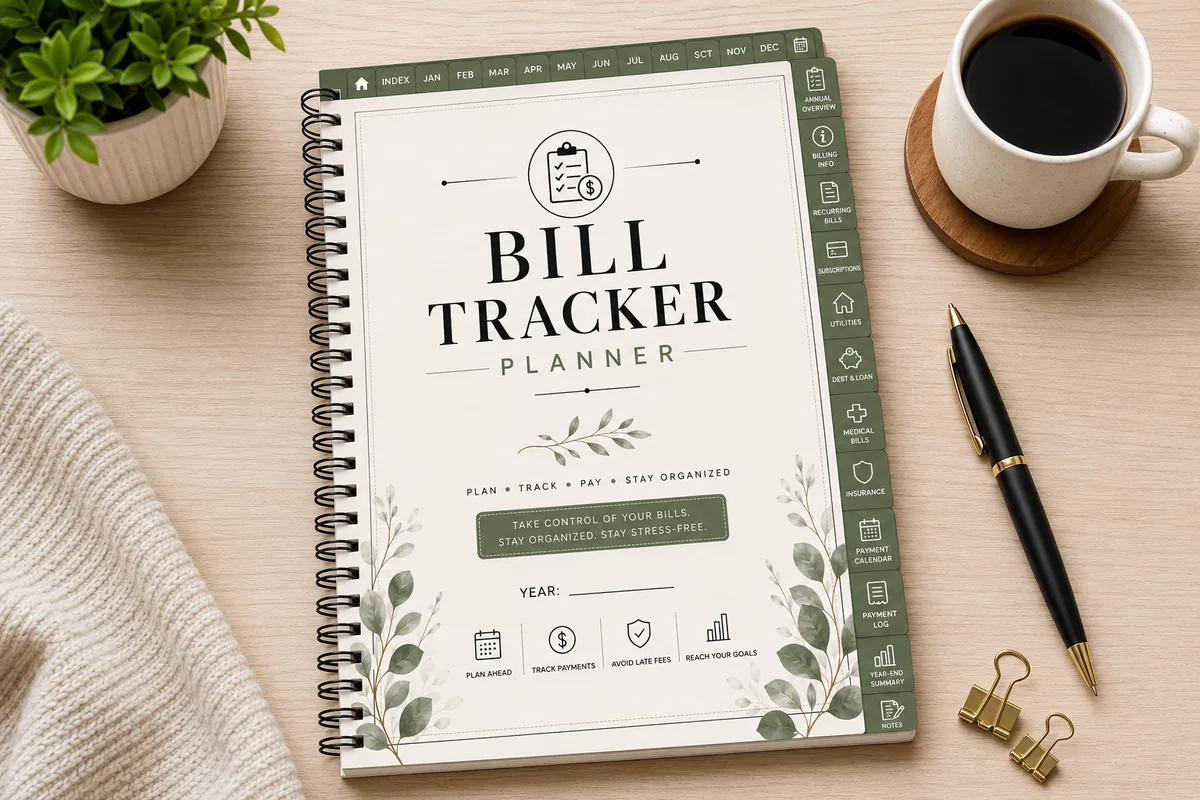
Best for checking the debt side
4. Hyperlinked Bill Tracker Planner
Orientation: Portrait A4Layouts: Bill records, debt payments and NotesDates: Undated
Best for: keeping a custom liability register near bill and loan records. Designed by Azhir.
- 52-page undated portrait A4 hyperlinked PDF
- Debt & Loan Payment Tracker plus lined, grid, dot-grid and blank Notes listed
- GoodNotes, Notability and Noteshelf among supported apps
Bills can remind you where a debt exists, but the next payment is not the remaining balance. Use a note page for the amount still owed and its statement date, keeping the bill calendar for due dates. This is a bill-led companion for a custom statement, not a complete net worth tool. The gallery contains only a cover, so I cannot judge the interior columns or note spacing before purchase.

Best for a landscape review spread
5. All-in-One Digital Planner ( 112 Pages )
Orientation: LandscapeLayouts: Weekly planning, finance and dotted NotesDates: Undated
Best for: putting a custom financial snapshot beside your weekly planning. Designed by Tas Creative Studio.
- 112-page undated horizontal hyperlinked PDF
- Finance section with monthly budget, debt, savings and bill views
- Dotted Notes shown; GoodNotes and Notability supported
The landscape notes offer a different way to arrange the same information: assets on the left, debts on the right, and the dated total below. Its pastel game-console motifs are quite distinctive, so choose it for a wider life planner rather than a restrained finance workbook. The included finance pages provide context, not a ready-made personal balance sheet. You supply the table and source references on Notes.
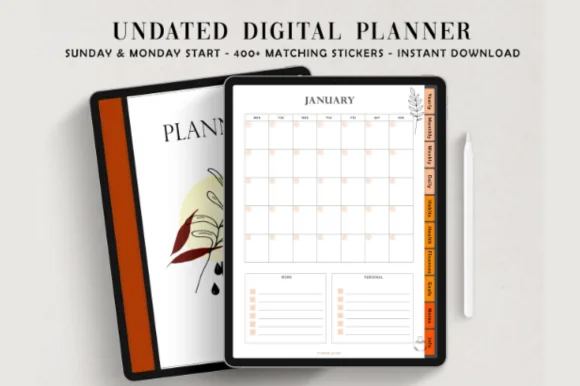
Best for a separate history page
6. Undated Digital Planner, Life Planner
Orientation: PortraitLayouts: Finance logs and six note templatesDates: UndatedWeek start: Monday and Sunday versions
Best for: using grid Notes to preserve comparable financial snapshots. Designed by ThePlannersDelight.
- Undated hyperlinked life planner for GoodNotes or Noteshelf
- Monthly Budget, Revenue Tracker and Expenses Tracker
- Six note templates; Monday-start and Sunday-start versions listed
Autumn Hues has visible grid and ruled note layouts that suit a history page. Reserve one for dated totals and one for changes in what you included, rather than rewriting last month's record. Its Revenue Tracker and Expenses Tracker belong to the monthly money story; they do not calculate net worth. This warm-toned life planner is useful when you want the review inside an everyday notebook, with the balance-sheet structure added by you.
Quick Comparison
| Planner | Useful role | Relevant pages | Limit to check |
|---|---|---|---|
| 1. Digital Budget Planner, Finance Tracker | Named Net Worth Tracker | Financial workbook | Internal fields not readable in overview |
| 2. Budget Digital Planner Hyperlinked Tabs | Custom balance sheet | Debt, savings and Notes | Create asset and liability columns |
| 3. Gold Budget Digital Planner/Hyperlinked | Separate supporting registers | Five extra note pages | No dedicated net worth worksheet listed |
| 4. Hyperlinked Bill Tracker Planner | Liability reference | Debt and loan pages; Notes | Only cover preview; add assets register |
| 5. All-in-One Digital Planner ( 112 Pages ) | Landscape custom spread | Finance section and dotted Notes | Net worth table is your own addition |
| 6. Undated Digital Planner, Life Planner | Comparable snapshot history | Grid and ruled Notes | Revenue and expenses are separate records |
Use the comparison without buying twice
Choose by the page you are missing. A new life planner adds little if your current notebook already has usable grid Notes. A bill-focused file has a narrower role: it can hold supporting debt records, while the asset register remains a separate addition.
- Want a named form? Start by examining the Finance Tracker workbook, remembering that its small overview does not show detailed internal fields.
- Need source columns and estimate notes? Compare the green compact planner with the gold extra-page layouts.
- Prefer money inside a wider notebook? The pastel landscape planner and Autumn Hues offer different note styles.
- Already own a bill organizer? Check for Notes before buying another file just for a liability list.
A short review routine for your next snapshot
Prepare the sources before filling the new page. The following sequence keeps the summary tied to its supporting lists. It is a suggested manual workflow, not an automated feature of any planner.
From sources to checked totals
- 1Set the boundary. Copy the prior scope label, choose the snapshot date and note any intended change. Keep the earlier statement open for reference, but do not copy its balances as if they were current.
- 2Refresh and reconcile. Enter the asset values and amounts owed with their dates. Check for repeated accounts, missing liabilities and estimates without a method. Mark unresolved items clearly instead of filling the gaps with zero.
- 3Calculate and annotate. Add each register, subtract liabilities from assets and check the result. Put the dated total into the history strip. If the scope or method changed, write that beside the new row before interpreting the difference.
If a balance is missing, you can still organize the known records and schedule the follow-up. Keep the statement visibly provisional until the missing information is resolved. For planning upcoming payments instead, biweekly budget templates address the separate payday task.
Keep checked totals beside your balance history
For this notebook workflow, enter balances and check totals yourself. Keep the calculation beside the dated history row so you can trace the result back to the two registers. If you calculate in a separate spreadsheet, copy the checked total and its snapshot date into the notebook together.
- Record the inputs: write the asset and liability subtotals beside the review date.
- Check the subtraction: verify assets minus liabilities before adding a history row.
- Preserve the explanation: note missing balances or changed estimates beside the result.
FAQ: Net worth records and iPad planners
What belongs in a simple net worth tracker?
Include a date, scope, asset values, liabilities and the difference between the two totals. Add value dates and source references so the result can be checked later. The registers and example above are a starting structure, not an exhaustive assessment of every possible financial situation.
Can I use a budget PDF without a dedicated net worth page?
Use Notes or another suitable writing page to create your own asset and liability columns. Label the result clearly. Do not assume a Monthly Budget or Savings Goal page already contains the fields needed for a balance sheet.
Should I use my car’s purchase price?
For a current snapshot, the university guidance uses current market value rather than original purchase price. Mark an estimated amount and record how and when you arrived at it. Keep the related loan balance separate.
How often should I update the statement?
The primary educational sources describe annual statements. You can keep interim records if helpful, but use comparable dates and a consistent scope. A change caused by newly included information deserves a note rather than being treated automatically as financial progress.
What if the result is negative?
A negative result means included liabilities exceed included assets. Keep the sign and check that you have not confused monthly payments with total balances. The number is a snapshot, not a judgment of you, and this record does not tell you which financial decision to make next.
Is it safe to store this on an iPad, and when should I ask for help?
Use neutral account labels and avoid putting passwords or full account numbers in the planner. Store it with the care you give other financial documents. If ownership, pension values, business interests, taxes or a difficult debt situation make the statement unclear, ask an appropriately qualified professional; this page provides an organizing method, not personal financial advice.
Keep the explanation with the number
Before closing the notebook, check that the summary date matches the dates beside the balances. Leave any unresolved item beside the total for the next review. Keep the net worth tracker ideas you use tied to those dated records, so you can explain a changed figure when you reopen the page.
You May Also Like
This article contains affiliate links. If you purchase through them, I may earn a commission at no extra cost to you. See the affiliate disclosure.