The car registration notice arrives the same week as a birthday invitation, and suddenly an ordinary month feels expensive. A short list of sinking fund categories gives those predictable costs a place before the bill lands, with a target, a due date and a record of what you have actually set aside.

Below are 25 category ideas to choose from, followed by a practical contribution example and eight iPad budget tools. You do not need all 25 funds, a separate bank account for each one or a new planner to start. I would begin with the few expenses that repeatedly catch your budget off guard.
What belongs in a sinking fund?
For this guide, a sinking fund means money you gradually reserve for a future expense you can reasonably anticipate. The cost may arrive once a year or only when something wears out. A monthly grocery allowance covers current spending; a vehicle registration fund prepares for a later bill.
The Financial Consumer Agency of Canada distinguishes occasional expenses, such as school supplies and seasonal tires, from unexpected emergencies. The CFPB emergency-fund guide also defines emergency savings around unplanned costs. A scheduled dental appointment and an urgent, unexpected treatment can therefore need different records.
- Known future cost: write a target and a date, or an estimated replacement window.
- Current monthly spending: keep it in the normal monthly budget so it is not funded twice.
- Unexpected emergency: keep the emergency reserve distinct from money already assigned to a known bill.
25 sinking fund categories for predictable future costs
Use these as prompts, not a checklist of obligations. Each category below suggests an estimating source and a timing cue. If a cost is already covered through payroll, escrow, an existing monthly payment or another fund, leave it out or record only the part you still need to cover.
Home and essential annual bills
- 1Annual insurance premiums. Start with the renewal notice for a policy paid annually. Record the renewal month and your share of the premium; exclude any premium already paid through another arrangement.
- 2Property charges due annually. List a known local charge or property-related payment only when you pay it directly. Use the actual notice and due date rather than a generic percentage of the home value.
- 3Home maintenance. Name the planned job, such as a scheduled service or repainting project, and collect an estimate. A vague home fund is harder to measure than a named job with a review month.
- 4Appliance replacement. Choose one aging appliance and a realistic replacement estimate. Add a planning window, then revisit it if the appliance lasts longer; this is preparation, not a prediction of failure.
- 5Furniture replacement. Separate a planned mattress, desk or sofa purchase from urgent repairs. Record a spending ceiling and the intended purchase month so the fund has a clear stopping point.
Transport and planned moves
- 6Vehicle registration. Copy the renewal date and expected fee from the latest notice. If the amount varies, mark it as an estimate and update it when the new notice arrives.
- 7Scheduled car servicing. Use the next known service interval and a workshop estimate. Keep routine servicing separate from an unexpected breakdown when you classify transactions.
- 8Tire replacement. Note the number of tires, fitting costs and a likely replacement season. This makes a better target than saving only the advertised price of a single tire.
- 9Moving costs. List the planned deposit-related cash needs, transport, packing and other applicable costs separately. Distinguish money you expect back later from costs that will be spent.
- 10Planned travel. Reserve toward a trip with a defined date and cost boundary. Decide whether transport, accommodation and activities share one target or need subcategories; do not also count the same trip in another savings goal.
Health, care and family commitments
- 11Planned dental work. Use a treatment estimate and the amount you expect to pay yourself. Ask the provider about timing and coverage rather than guessing from someone else’s bill.
- 12Routine medical costs. Include an anticipated appointment, prescription cycle or other known out-of-pocket cost. Keep unpredictable urgent treatment distinct and revise the target when coverage changes.
- 13Routine pet care. Schedule expected checkups, vaccinations or other planned care using an estimate from your provider. Emergency veterinary treatment is a different situation from an appointment you already know is coming.
- 14School supplies. Use the next school list and term start date. Include only items your household needs; a separate category is unnecessary if you already hold the full amount in a school budget.
- 15School activities. Write the activity and expected payment date, such as a term fee or planned trip. Keep it separate from general supplies when the deadlines or amounts are meaningfully different.
Celebrations and seasonal purchases
- 16Holiday gifts. Set a total for the people and events you actually plan to buy for. A short recipient list helps avoid a target that grows each time another gift idea appears.
- 17Birthday gifts. List upcoming birthdays and a combined spending limit. Use the nearest birthday as the first checkpoint, rather than assuming the whole year’s target is needed immediately.
- 18Family celebrations. Reserve for an agreed event such as an anniversary gathering. Write what the fund covers, including your share of food or venue costs, so it does not overlap the gift budget.
- 19Seasonal clothing. Plan for a known change of season or a replacement you already expect. If clothing is a regular monthly allowance, fund only the unusual larger purchase here.
- 20Sports equipment. Choose a specific replacement or planned activity purchase. Record size, safety requirements and an estimate before setting the goal; an attractive accessory list is not a cost estimate.
Work, learning and renewals
- 21Technology replacement. Name the device or accessory you plan to replace and an estimated purchase date. Keep a repair estimate separate if repair remains a realistic option, then update the target after deciding.
- 22Annual subscriptions. Record the actual renewal date and whether you intend to renew. If you cancel, release the reserved amount deliberately instead of leaving an obsolete target in the tracker.
- 23Professional fees. List a known professional membership or renewal you personally pay. Note whether reimbursement is expected, because an expense paid back later still has a timing question.
- 24Continuing education. Use the course, exam or certification fee you have chosen and its payment deadline. Leave optional future courses on a wish list until you have decided to fund them.
- 25Annual membership renewals. Use this for nonprofessional memberships that do not already appear under subscriptions. Name the organization and the renewal month; merge the categories if that is clearer for your household.
Sinking funds for beginners: choose priorities first
A long list of sinking fund categories can make every expense look equally urgent. For your own page, sort the selected costs by deadline, consequence and flexibility. This is a planning exercise, not a universal ranking: an optional trip and a required renewal do not need the same priority.
- Higher priority: known essential bills with a firm deadline and a clear consequence if unpaid. Verify the amount and timing before assigning contributions.
- Flexible priority: planned replacements where repair, a smaller purchase or a later date remains possible. Review the estimate instead of treating it as fixed.
- Lower priority: optional upgrades, celebrations and discretionary travel that can be resized or postponed if the budget does not support them.
Build a high priority sinking funds list around essential deadlines
Start with vehicle registration, an essential insurance renewal and planned medical expenses that you must pay soon. Add a scheduled home repair when delaying it would affect the use of your home, and include oil changes when they fall within your car’s service schedule. For health insurance costs, record the expected out-of-pocket amount for planned visits, including any applicable deductible, rather than treating the whole policy limit as a bill.
Keep a low priority sinking funds list for flexible purchases
Optional technology upgrades, a vacation and a larger anniversary celebration can go on this list when their dates or spending limits can change. Consider setting a smaller target or moving the purchase date if these contributions compete with essential living expenses. The impact of postponing a purchase matters more than its category name: replacing a broken work device may be important even when a newer model would otherwise be optional.
Use timing to distinguish sinking fund types
A practical sinking fund classification separates recurring bills, planned replacements and one-off goals. An annual membership starts another cycle after payment, an appliance replacement needs an estimated window, and a moving fund closes after the move. These examples show why two costs with similar amounts may need different contribution schedules.
For individuals, common sinking fund categories can include your own dental care, vehicle servicing, annual fees and a chosen trip; you can leave out school or household costs you do not pay. Use the 25 sinking fund category ideas above to name the expenses that actually belong in your budget. To manage multiple sinking funds, give every target its own balance and deadline while checking that their combined contributions fit your cash flow.
Turn your shortlist into a contribution plan
A category becomes useful when it has an amount and a date. For your first page, choose three categories and write the same five fields for each one. A blank note in an iPad planner is enough; the digital tools below are optional ways to organize that record.
Build one fund record
- 1Name the expense precisely. Write “vehicle registration” instead of “car,” then define what is included. That keeps servicing, fuel and registration from sharing an unclear balance.
- 2Set the target and evidence. Record an estimate from a notice, quote or purchase plan. Add the source date in your notes and mark uncertain amounts as estimates so you know what to revisit.
- 3Count the contribution dates. Count the actual paydays or monthly saving dates before the bill is due. Do not divide by twelve if the payment is only four months away.
- 4Subtract money already reserved. Use only money truly assigned to this fund. Money earmarked for another bill is not an opening balance just because it sits in the same account.
- 5Check the planned contribution against the budget. Divide the remaining gap by the contribution dates, then check whether the result fits after essentials and other commitments. Change an optional target or timing when it does not fit; a neat calculation does not create spare money.
A worked example with an existing balance
Suppose a planned annual charge is $420, you already have $60 assigned to it and six monthly contribution dates remain. The gap is $360; $360 divided by six is $60 per contribution. These are illustrative numbers, not a suggested target for your household, and they assume no interest or fees.
| Field | Example entry | What to check |
|---|---|---|
| Target | $420 annual charge | Latest bill or estimate |
| Already reserved | $60 | Assigned only to this fund |
| Remaining gap | $420 minus $60 = $360 | No double-counted savings |
| Contribution dates | 6 monthly dates | All occur before payment |
| Each contribution | $360 divided by 6 = $60 | Fits the current budget |
If you budget around paydays, count those dates directly instead. Our biweekly budget templates guide covers the wider paycheck layout; this page keeps the attention on the individual future expense and its running balance.
Eight digital tools for keeping the records on iPad
The first tools hold a fund goal or savings log; the later choices support deadlines, spending history or the surrounding budget. Record actual transfers separately and reconcile your fund balances against your bank records. The cards explain where you need to create your own category fields rather than implying that all 25 categories come preprinted.
TL;DR: Start with the category list and choose only the future costs you expect. These eight tools range from a dedicated sinking-funds ledger to savings pages and supporting budget records; plan to enter contributions and balances manually.
Quick Picks
- Best for dedicated sinking fund records: Digital Budget Planner, Financial Planner
- Best for a goal overview: Budget Digital Planner Hyperlinked Tabs
- Best for one monthly contribution log: Simple Savings Planner, Digital Planner
- Best for visual progress on one goal: Rabbit Savings Tracker
- Best for annual payment dates: Hyperlinked Bill Tracker Planner
- Best for monthly budget context: Undated Budget Planner for GoodNotes
- Digital Budget Planner, Financial Planner – Best for dedicated sinking fund records
- Budget Digital Planner Hyperlinked Tabs – Best for a goal overview
- Simple Savings Planner, Digital Planner – Best for one monthly contribution log
- Rabbit Savings Tracker – Best for visual progress on one goal
- Hyperlinked Bill Tracker Planner – Best for annual payment dates
- Undated Budget Planner for GoodNotes – Best for monthly budget context
- Expenses Tracker 4years Interactive PDF – Best for reviewing irregular spending
- Digital Budget Planner, Finance Tracker – Best for a wider finance workbook
Record the goal and its contributions
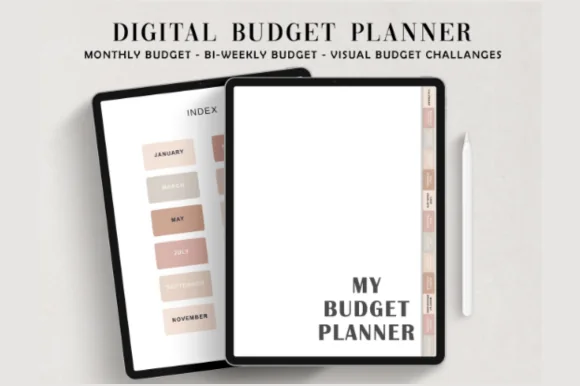
Best for dedicated sinking fund records
1. Digital Budget Planner, Financial Planner
Orientation: PortraitSections: Sinking Funds, monthly and biweekly budgetsFormat: Hyperlinked PDF
Best for: logging contributions on a purpose-built sinking funds page. Designed by ThePlannersDelight.
- Sinking Funds pages with goal and target date fields
- Monthly and biweekly budgets, savings and bill trackers
- Hyperlinked PDF for GoodNotes, Noteshelf or Notability; matching PNG stickers
- Requires an Apple tablet and a writable stylus such as Apple Pencil; tablet, stylus and annotation apps are not included
This is the closest match to the job here. The Sinking Funds preview separates a fund name, target amount and date from the contribution rows, so a car registration pot has a clear identity. I like that the daily spending log is a different page: money reserved for a future bill should not disappear among this week's purchases. Plan to record your balances and check the arithmetic yourself.

Best for a goal overview
2. Budget Digital Planner Hyperlinked Tabs
Paper: US LetterSections: 20 pages; savings and budget recordsFormat: Hyperlinked PDF
Best for: keeping several savings goals beside the wider monthly budget. Designed by mixxdigitaldesign.
- 20-page hyperlinked PDF with a Savings Overview
- Savings Goal page with a deadline and amount fields
- Savings Tracker, bills, income, notes and extra pages
The green Savings Overview is useful when several future costs compete for the same month's money. Give each goal a specific name, then use the Savings Goal page for its deadline. The jar and circle layouts offer a visual alternative to a ledger. These are general savings pages; you supply the category names and the contribution plan.
Best for one monthly contribution log
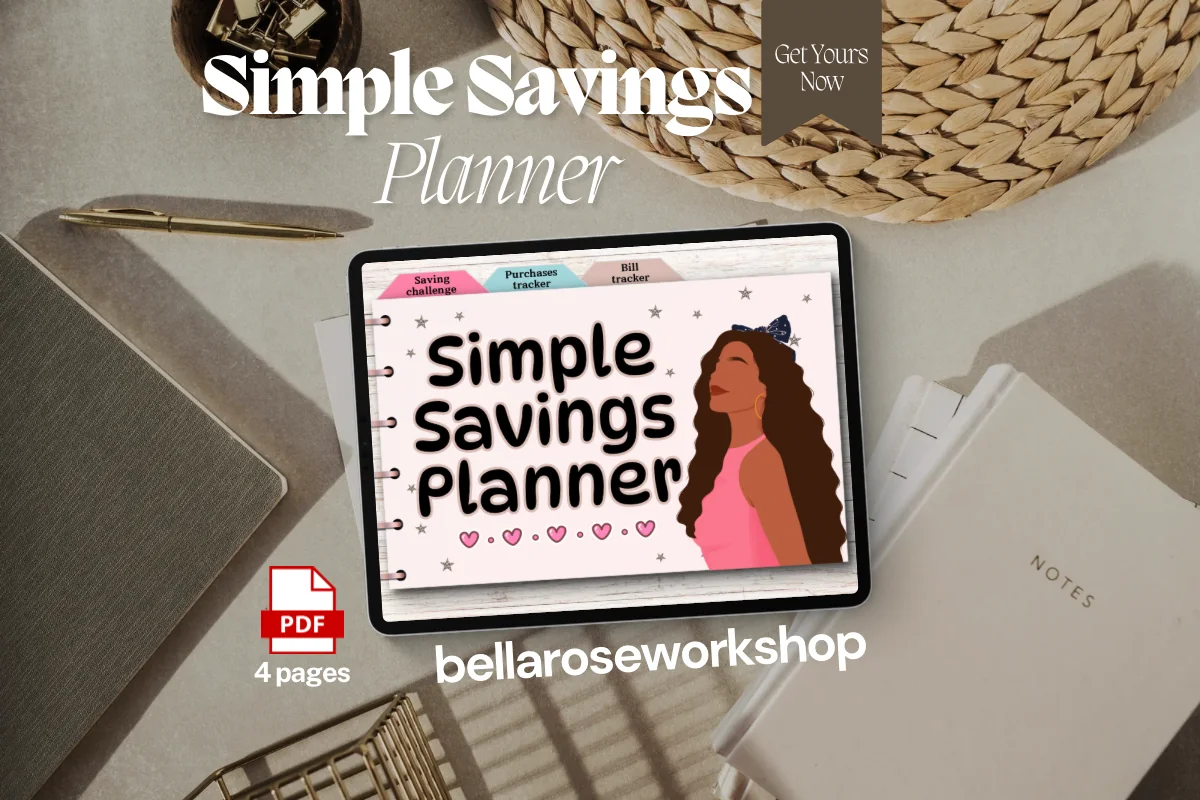
3. Simple Savings Planner, Digital Planner
Sections: 4 pages; monthly savings logFormat: PDF
Best for: following one named future expense month by month. Designed by bellaROSEworkshop.
- Four-page PDF with hyperlinked navigation shown in previews
- Saving Challenge page with saving-for and goal fields
- Monthly rows for date, deposit, balance and notes; bill and purchases trackers
For a single annual fee, the small monthly deposit log may be easier to maintain than a large workbook. Put the fee's due date in your notes and record the actual amount reserved each month. The preview has one row per month, not a daily contribution grid. Frequent deposits need a separate running log or a clear monthly total.

Best for visual progress on one goal
4. Rabbit Savings Tracker
Paper: A4Sections: Savings plan, two challenges and budget trackerFormat: PDF and JPG
Best for: coloring progress toward a self-defined planned purchase. Designed by Little Craftlab Studio.
- JPG and PDF files in one archive, A4 size
- Two fixed 30-day challenges plus a separate savings plan
- Savings plan with blank amounts and a budget tracker
The useful page for this article is the blank paw-print savings plan. Assign a value to each shape and label the purchase yourself; the category is your addition. The two fixed challenge pages show $1,000 and $3,000 targets over 30 days, which are separate options and not a required pace. Keep the real balance in the ledger even if you enjoy coloring the progress.
Keep the payment date and monthly budget visible
Best for annual payment dates
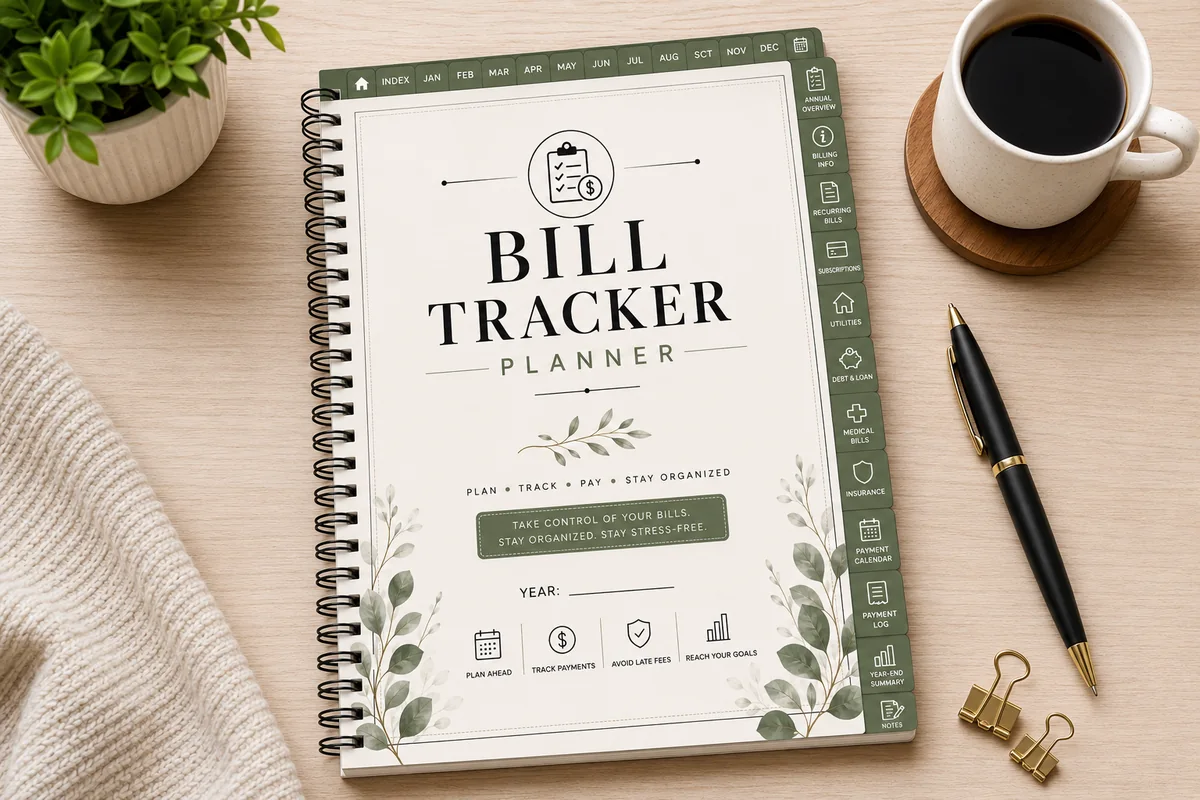
5. Hyperlinked Bill Tracker Planner
Orientation: PortraitPaper: A4Sections: 52 pages, per listingFormat: Hyperlinked PDF
Best for: connecting a planned annual bill with its payment calendar. Designed by Azhir.
- Listing specifies a 52-page hyperlinked PDF
- Annual bill overview, insurance payment tracker and payment log
- Notes pages for your own fund ledger; Goodnotes and other annotation apps
An annual insurance renewal needs both a savings plan and a payment date. This tool supports the deadline side; use a notes page for the contributions leading up to it. Its public preview shows the cover, so I cannot judge the internal writing space. The annual overview and tracker list come from the listing, rather than an interior-page test.
Best for monthly budget context
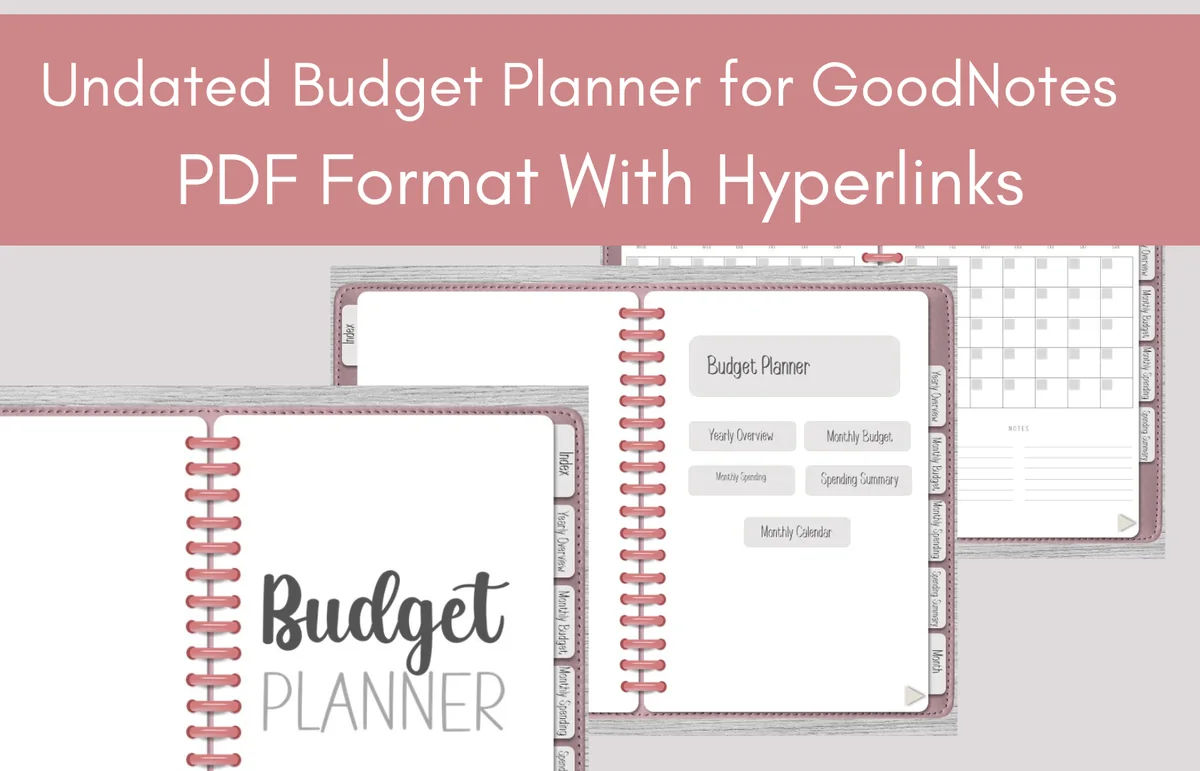
6. Undated Budget Planner for GoodNotes
Sections: 30 pagesFormat: Hyperlinked PDFDates: Undated
Best for: seeing how a fund contribution fits beside normal monthly expenses. Designed by Perla Designs.
- 30-page hyperlinked PDF for GoodNotes
- Previews show yearly overview and monthly budget
- Monthly spending and spending summary layouts
Perla Designs is a compact option for the budget around your sinking funds. Add the planned contribution to your monthly allocation, then keep the fund balance in a separate named note. The previews show spending categories and summaries, not a dedicated sinking-fund ledger. Choose this for the monthly overview rather than expecting ready-made category pages.
Use spending history and wider financial records
Best for reviewing irregular spending
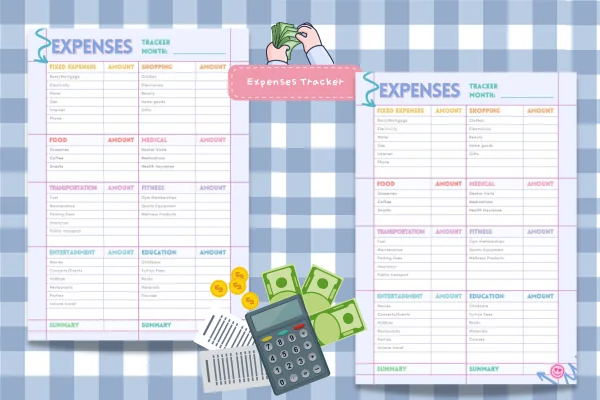
7. Expenses Tracker 4years Interactive PDF
Sections: 48 monthly pages, per listingFormat: Interactive PDF
Best for: checking recorded spending before estimating a future category target. Designed by Zoom4Design.
- Interactive PDF with 48 monthly pages, per listing
- Listing describes income, expenses, savings and notes sections
- Previews show category-based monthly expense layouts; iPad/GoodNotes use stated
Past spending can make a replacement estimate less arbitrary. This tracker is useful for recording what was actually paid in categories such as transportation or medical costs, then consulting those entries when setting the next target. The public previews show monthly expense records; a dedicated sinking-fund layout is not established. The public layouts do not establish how interactive fields behave inside GoodNotes.
Best for a wider finance workbook
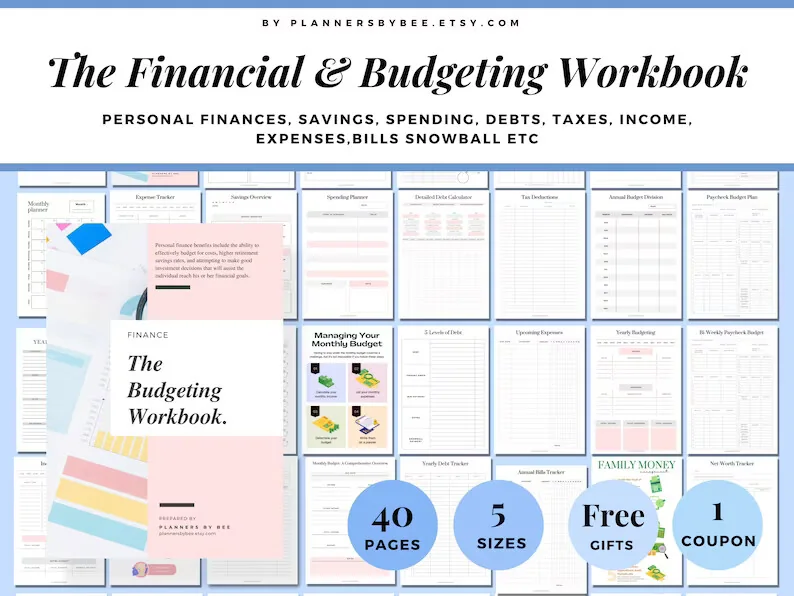
8. Digital Budget Planner, Finance Tracker
Sections: 40 pages advertised on coverFormat: Digital workbook
Best for: keeping savings and upcoming costs near other budget records. Designed by PlannersByBee.
- GoodNotes planner named in the listing
- Public cover advertises 40 pages and five sizes
- Cover montage shows Savings Overview, Upcoming Expenses and Annual Bill Tracker
The cover suggests a broad workbook for someone who wants future costs beside other financial records. Use the upcoming-expense view to name the bill and the savings overview to record your progress, adding a contribution log if needed. Only the cover montage is publicly available here. I would not assume a dedicated sinking-funds template, automatic formulas or a particular internal page size.
Quick Comparison
| Tool | Useful role | Relevant pages | Adaptation or limit |
|---|---|---|---|
| 1. Digital Budget Planner, Financial Planner | Dedicated fund ledger | Goal, date and contribution rows | Manual amounts and reconciliation |
| 2. Budget Digital Planner Hyperlinked Tabs | Several goals at a glance | Savings Overview and Savings Goal | Write your own category names |
| 3. Simple Savings Planner, Digital Planner | One recurring savings goal | Monthly deposits and balance | Add the deadline in your notes |
| 4. Rabbit Savings Tracker | Visual single-goal progress | Blank savings plan and budget tracker | Set your own value per shape |
| 5. Hyperlinked Bill Tracker Planner | Due dates and payment status | Annual overview and payment log | Create the contribution ledger in notes |
| 6. Undated Budget Planner for GoodNotes | Monthly allocation context | Budget and spending summary | Separate note for fund balances |
| 7. Expenses Tracker 4years Interactive PDF | Actual spending history | Monthly expense categories | Add a separate goal and due date |
| 8. Digital Budget Planner, Finance Tracker | Wider finance context | Savings and upcoming expenses shown on cover | Interior layouts not independently tested |
Keep the fund balance accurate after each contribution
I would give each selected category one short log and use the same entry order throughout. A colored progress shape is useful for motivation, but the ledger should still explain the balance. Keep a receipt or bill reference beside a withdrawal so you can distinguish spending from a transfer between categories.
- Contribution: date, amount added, new balance and the next planned contribution date.
- Payment: date, amount spent, bill reference and remaining balance.
- Reallocation: the category money left, the category it entered and matching entries in both logs.
- Review: compare assigned balances with the money actually available to support them; a planner entry is not proof that money has moved.
When a category no longer needs funding
An annual bill usually starts a new cycle after payment; a one-off purchase may be finished. Decide which case applies before copying the old target forward. Keep the closing entry so next year’s estimate starts with the actual cost, not an old guess.
- Renew: enter the next due date and revise the target using the new bill.
- Close: mark the purchase complete and decide where any unused balance belongs.
- Merge: combine overlapping goals only after recording the transfer, so the same money is never counted twice.
- Pause: leave a clear note when an optional goal is deferred; do not keep an unaffordable contribution on autopilot in the written plan.
FAQ: choosing and managing your funds
How many sinking funds should I start with?
There is no required number. Three named future expenses are a manageable starting exercise. Add another only when it has a distinct purpose or deadline; you do not need to activate every category in this list.
Is a sinking fund the same as an emergency fund?
No. This guide uses sinking funds for anticipated costs and emergency savings for unplanned events. A planned tire replacement and an unexpected breakdown can involve the same car but different reasons for setting money aside.
Should every fund have its own bank account?
A separate record does not require a separate account. If you keep the money in one savings account, use the planner to distinguish the assigned balances and ensure their combined total matches the money reserved for those funds. Account choices, fees and access rules depend on your circumstances and provider.
What if the bill arrives before the target is funded?
Calculate the remaining gap and check the due date immediately. For an optional purchase, revising the timing or scope may be possible. For an essential bill you cannot cover, contact the provider promptly and seek appropriate guidance rather than assuming a new tracker resolves the shortfall.
Do these digital tools calculate contributions automatically?
No automatic calculation is established for the tools here. Treat targets, contribution amounts and running balances as manual records. The interactive-PDF listing describes editable fields, but that does not demonstrate formulas or identical field behavior in every annotation app.
When should I ask for financial help?
This is an organizational guide, not a personal financial plan. If you cannot cover essentials, face arrears or need advice about debt, benefits, tax or legal obligations, consult an appropriately qualified professional or a reputable nonprofit credit counselor in your area.
Choose the categories you will actually maintain
The most useful sinking fund categories are the ones tied to a real expense, an honest estimate and a date you can check. Pick three, record the opening balances and write the next contribution date. For the surrounding monthly routine, the budget planner ideas guide offers broader page layouts; keep this record focused on the future costs you have chosen.
You May Also Like
This article contains affiliate links. If you buy through them, I may earn a commission at no extra cost to you. Read the affiliate disclosure.