A college budget planner needs to answer a timing question before it answers a spending question: which part of the money in front of you belongs to later in the semester? A large deposit can look generous until books, rent and the last month of groceries all need a share. Start with a term map, then use monthly pages to keep it current.
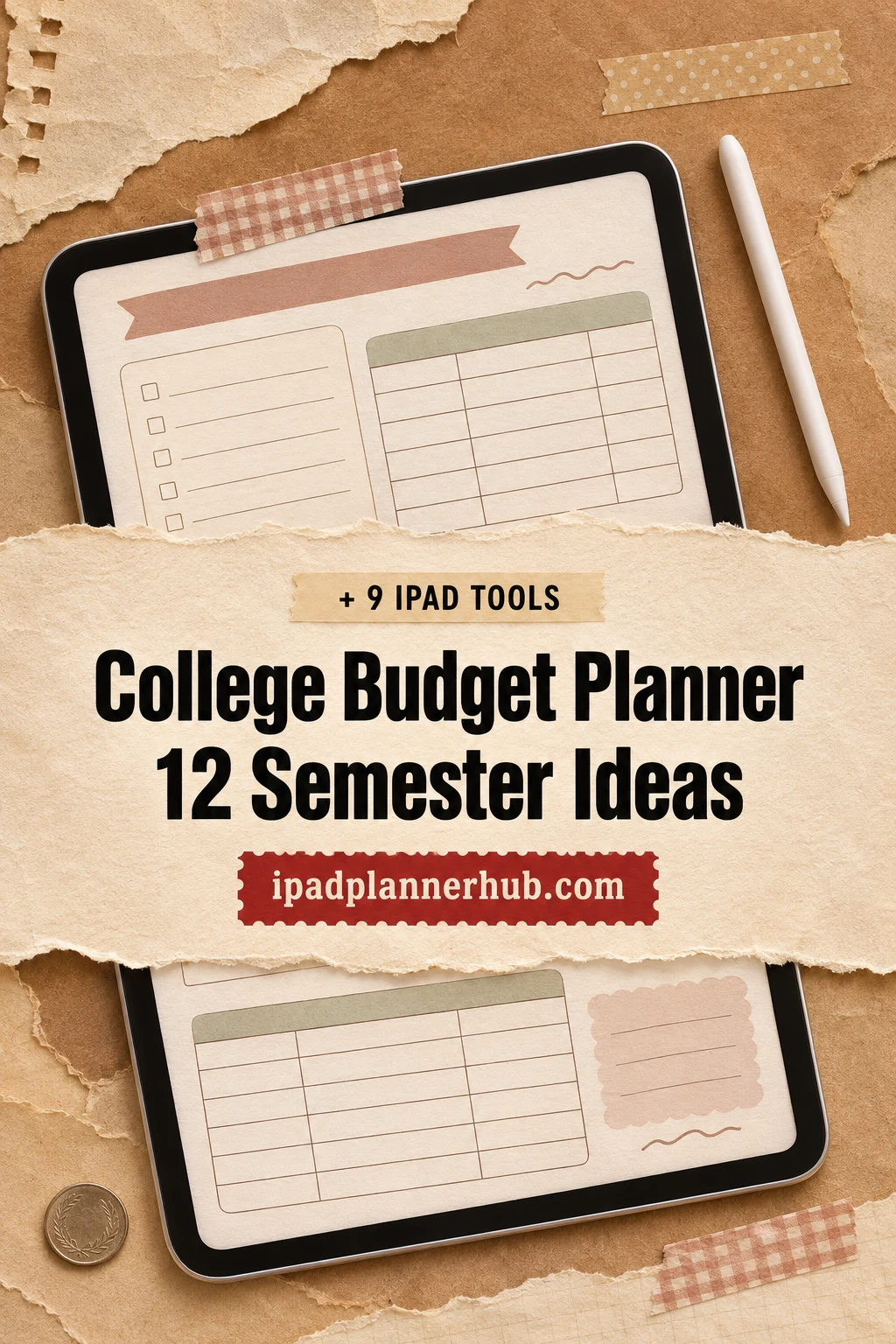
Below are twelve layouts you can create on your iPad, followed by nine digital planning tools for the records behind them. The workflow uses manual records. Confirmed PDF planners need a separate annotation app; the Finance Tracker listing does not specify its file format. I reviewed product descriptions and public previews; I have not bought or personally tested these files.
Build a college budget planner around the semester
Start with the first and last dates your money must cover, including any days between terms that still bring living costs. A student budget planner becomes more useful when its time window matches real payments. Four equal months can be a first draft, but a deposit, a book purchase and a journey home may fall in very different weeks.
The basic budget sequence is to list income and expenses, compare them and review actual spending. Consumer.gov’s budget worksheet explains that monthly cycle; PNC’s student budget tool also separates living, food, education, travel and personal costs. The layouts here adapt those categories to a handwritten semester record, rather than prescribe an amount every student should spend.
- Received: money that has actually arrived and is available for this plan.
- Expected: an amount with an estimated arrival date, kept separate until received.
- Reserved: money already assigned to later rent, bills or one-time costs.
- Available for this period: what remains for the current allocation after those reservations.
Give your college financial planner a cost breakdown
Separate fixed expenses, such as rent and phone bills, from variable costs, such as groceries and day-to-day expenses on campus. Add loan payments or a gym membership only if you actually pay them during the term. Keep a separate line for unexpected costs, such as medical bills, so they do not disappear inside routine spending.
If you use credit cards, record purchases in their spending categories and label the later card payment as a transfer against those recorded purchases. Keep any payment toward an older balance separate so you don’t count the same spending twice. This breakdown helps you understand exactly which costs belong to this semester before you compare them with received income.
Twelve page ideas for uneven student income
You do not need twelve separate files. Put related layouts on one notes page and keep the monthly transaction record elsewhere. The names below describe original page designs to make yourself; they are not a contents list for any product.
Funding and the months it must cover
- 1.Funding arrival log. Use columns for source, expected date, expected amount, actual date and received amount. A pending payment stays visibly pending. When it arrives, replace the estimate with the amount received rather than counting both entries as income.
- 2.Semester runway. Draw a row of month boxes from move-in through the final week you must cover. Under each box, write major payments and the money reserved for them. Include a partial opening or closing month instead of squeezing it silently into the middle.
- 3.Reserved-versus-current page. Split a blank page into current-period spending and later commitments. Write the later rent reserve as a named amount. This makes the same account balance easier to interpret without pretending that a handwritten reserve creates a separate bank balance.
- 4.Part-time pay calendar. Record pay dates and actual take-home amounts. Keep work shifts as notes if useful, but do not count an offered shift as paid income. A second column can hold related transport costs so you see the spending that accompanies the work.
Costs that arrive at awkward times
- 5.Books and supplies register. List each required item, the date it is needed, estimated cost, amount paid and any expected refund. Record a refund as received only when it arrives. Keep receipts or reference numbers beside the line so a return is traceable.
- 6.Housing payment map. List rent, utilities and other housing charges by due date, with separate amount-due and amount-paid columns. If a cost is already included in another charge, mark it included rather than budgeting it twice. Use your own actual agreement for the amounts.
- 7.Meals coverage note. Write what your existing meal arrangement covers, then leave separate lines for groceries and meals outside it. Mark breaks or travel days when your usual arrangement will not cover food. This is a money record, not a meal plan or nutrition recommendation.
- 8.Trips home reserve. Give a planned journey a target amount and expected payment date. Add lines for the ticket and local transport so the ticket price does not become the entire estimate. Moving money into this reserve is an allocation, not a purchase. Record the travel expense once, when you pay it.
Checkpoints before the term ends
- 9.Small campus costs log. Track printing, club fees, laundry and occasional supplies with date, category and amount. Keep the categories short enough to use between classes. Review the total weekly before deciding that each individual purchase is too small to matter.
- 10.Weekly spending checkpoint. Write the opening allocation, actual spending and remaining amount for the week. Add one sentence about an upcoming unusual cost. A week that spans two months needs a clear home in your records so the same purchases do not enter both monthly totals.
- 11.Midsemester revision. Compare the remaining money with the remaining commitments. Move amounts between categories only when you also update the later-month plan. If the figures no longer work, write down the gap; changing a color on the page does not close it.
- 12.End-of-term handover. List final payments, expected refunds and the costs before your next expected income. Keep expected refunds outside the available total. Close the semester with a short note about which estimates were wrong, so the next term starts with better information.
A worked example: one deposit, four study months
Here is an invented arithmetic example, not an estimate of college living costs. Assume $4,800 has already arrived for four study months after tuition and the school account are dealt with. There is no other income in this example. The opening amount must cover the listed items; a different student would need different categories and figures.
| Allocation | Amount | Why it is separate |
|---|---|---|
| Books and supplies | $400 | A one-time opening cost |
| Trip home | $200 | A later one-time cost |
| Unassigned buffer | $200 | Kept outside routine spending |
| Four monthly allocations | $4,000 | 4 × $1,000 for the months in this example |
The calculation is $4,800 − $400 − $200 − $200 = $4,000, then $4,000 ÷ 4 = $1,000 per month. Each monthly figure still has to cover that student’s actual living expenses. It is not $1,000 of discretionary spending, and it is not evidence that this deposit would be enough for your college.
- At the start of month one, the other three monthly allocations total $3,000. Keep them visible as later-month money.
- When the $400 books cost is paid, mark the reserve as spent. Do not deduct it again from the $1,000 monthly allocation.
- If books cost $450, show the $50 difference and revise a named allocation or the buffer. The original plan is now out of date.
- For weekly planning, use the weeks or days actually covered. Dividing every month by four can leave an extra day or week with no assigned money.
Nine iPad tools for the records behind your plan
Choose the smallest tool that supports the record you will maintain. Detailed budgets help with allocations; a bill tracker records timing and status; a general planner offers space for a custom overview. None of those roles alone proves that the full semester is funded.
TL;DR: Start with a semester funding map, then choose the record you need. These nine digital tools support different parts of the process; none is promised to contain all twelve original college layouts below.
Quick Picks
- Best for detailed monthly allocations: Digital Budget Planner, Financial Planner
- Best for a small travel reserve: Simple Savings Planner, Digital Planner
- Best for separate income and bills: Budget Digital Planner Hyperlinked Tabs
- Best for a broad finance workbook: Digital Budget Planner, Finance Tracker
- Best for a budget inside a wider planner: All-in-One Digital Planner ( 112 Pages )
- Best for a custom semester overview: Undated Digital Planner, Life Planner
- Digital Budget Planner, Financial Planner – Best for detailed monthly allocations
- Simple Savings Planner, Digital Planner – Best for a small travel reserve
- Budget Digital Planner Hyperlinked Tabs – Best for separate income and bills
- Digital Budget Planner, Finance Tracker – Best for a broad finance workbook
- All-in-One Digital Planner ( 112 Pages ) – Best for a budget inside a wider planner
- Undated Digital Planner, Life Planner – Best for a custom semester overview
- Undated Budget Planner for GoodNotes – Best for a compact spending summary
- Expenses Tracker 4years Interactive PDF – Best for detailed expense categories
- Hyperlinked Bill Tracker Planner – Best for rent and recurring due dates
Detailed budgets and smaller supporting records
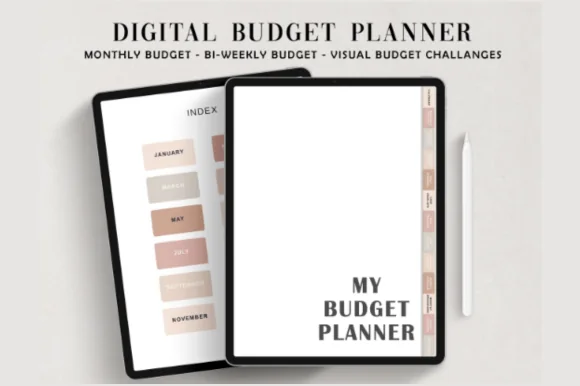
Best for detailed monthly allocations
1. Digital Budget Planner, Financial Planner
Orientation: PortraitFormat: Hyperlinked PDF
Best for: dividing a lump sum into month-by-month records. Designed by ThePlannersDelight.
- Hyperlinked PDF for GoodNotes, Noteshelf and Notability; requires an Apple tablet and a compatible writable stylus such as Apple Pencil (app, tablet and stylus not included)
- Monthly and biweekly budgets, sinking funds and spending logs
- Separate bill and savings trackers
The monthly and biweekly pages make this the most detailed starting point here. Give each living-cost month its own budget, then record books and travel in the spending log. The sinking-fund page can hold a future trip goal. This is a general finance system, so the semester labels and allocation decisions are yours; hyperlinks do not calculate a safe weekly allowance.

Best for a small travel reserve
2. Simple Savings Planner, Digital Planner
Orientation: LandscapeFormat: Hyperlinked PDF
Best for: setting aside a specific trip or replacement cost. Designed by bellaROSEworkshop.
- Digital-use hyperlinked PDF for GoodNotes and Notability
- Four pages advertised in the preview
- Saving challenge, purchases tracker and bill tracker
A short savings record can sit beside a semester overview without becoming another full planning project. The displayed challenge has month, deposit, balance and notes columns, so use it for an amount you actually set aside for a journey home. It is not a complete semester budget. Its description says the PDF is not editable; writing annotations is different from redesigning the underlying template.

Best for separate income and bills
3. Budget Digital Planner Hyperlinked Tabs
Orientation: PortraitFormat: Hyperlinked PDF
Best for: keeping funding entries apart from monthly commitments. Designed by mixxdigitaldesign.
- 20-page digital and printable planner for iPad PDF apps
- Income Tracker, Monthly Budget and Monthly Bills
- Savings Goal, Savings Overview, Notes and extra pages
The separate income and bill pages suit a student whose paydays and rent dates do not line up. Put received wages in the income record and upcoming payments in the bill record, then compare them on your own semester page. I like the extra notes space for an arrival-date log. There is no dedicated financial-aid worksheet promised here.
Best for a broad finance workbook
4. Digital Budget Planner, Finance Tracker
Orientation: PortraitFormat: Digital GoodNotes workbook
Best for: organizing several types of financial record. Designed by PlannersByBee.
- GoodNotes planner described as a portrait budget workbook
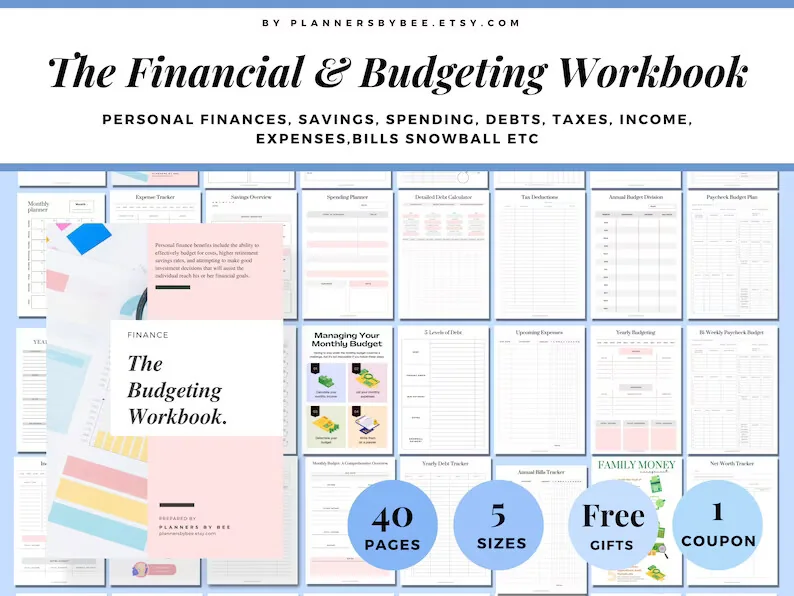
- Public preview advertises 40 pages and five sizes
- Montage shows expense, savings and annual budget records
The only public preview is a montage, with an expense tracker and savings overview visible among many finance pages. Start with those visible records instead of filling out every section. The listing includes wider debt and tax material; this article does not recommend using those sections for financial decisions.
General planners for a custom term overview
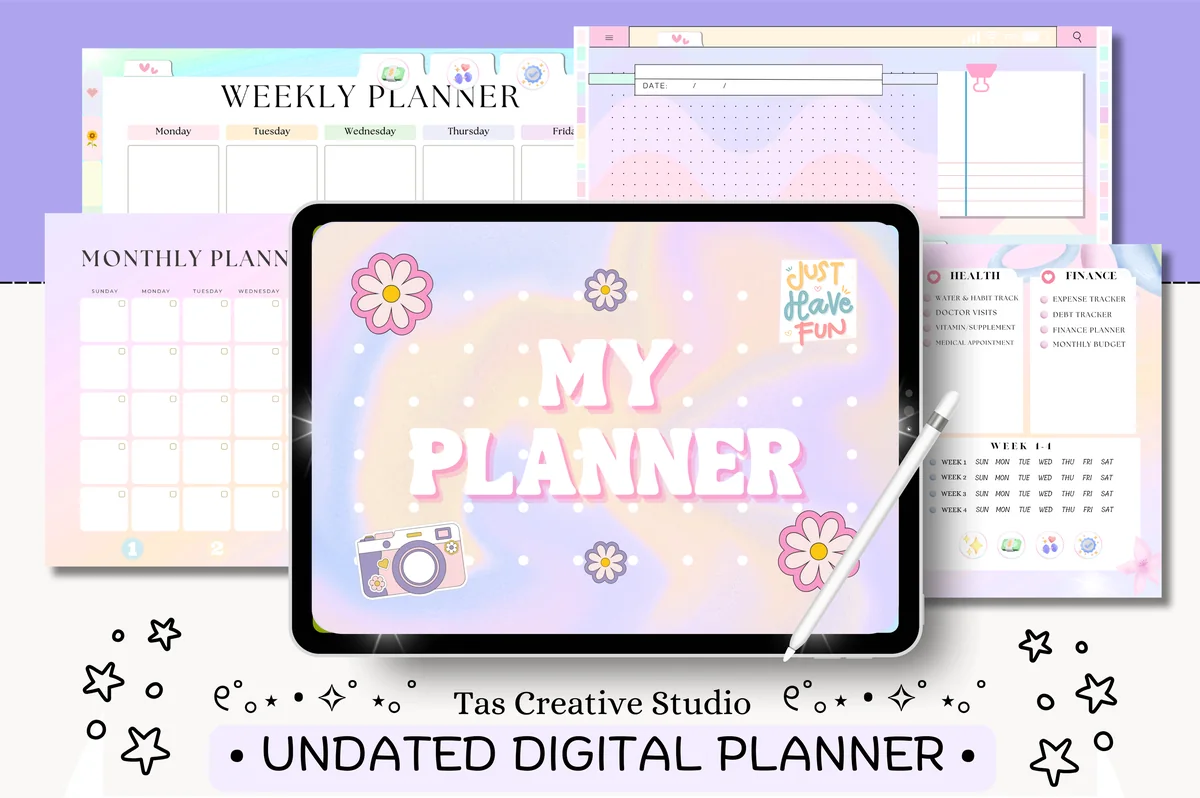
Best for a budget inside a wider planner
5. All-in-One Digital Planner ( 112 Pages )
Orientation: LandscapeFormat: Hyperlinked PDF
Best for: placing money records near everyday planning. Designed by Tas Creative Studio.
- 112-page undated landscape PDF
- Monthly budgeting, expense, saving and bill trackers listed
- GoodNotes, Notability, Noteshelf and Xodo named
The finance section gives this colorful all-in-one planner a real role here. Use its money pages for the monthly record and its notes space for your own term overview. I like it for someone who wants one notebook rather than a separate finance file. The twelve original ideas above are not a ready-made student budget package inside it, and the preview gallery includes illustrative study pages.
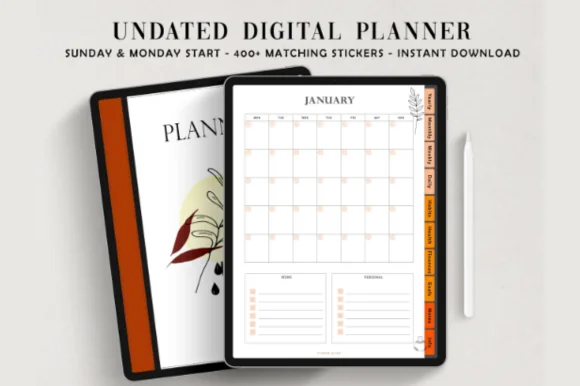
Best for a custom semester overview
6. Undated Digital Planner, Life Planner
Orientation: PortraitFormat: Hyperlinked PDF
Best for: combining finance pages with a handwritten term map. Designed by ThePlannersDelight.
- Undated PDF for GoodNotes and Noteshelf
- Monthly Budget, Revenue Tracker and Expense Tracker
- Six notes templates and Monday/Sunday start files listed
The combination of revenue, expenses and notes is useful when your student budget needs a page that no general planner can predict. Draw your funding timeline on a notes template, then use the monthly records for actual transactions. Its autumn colors are a visual preference, not a college-specific feature. Keep the custom term map on a notes page so it stays separate from the transaction logs.
Focused spending and payment records
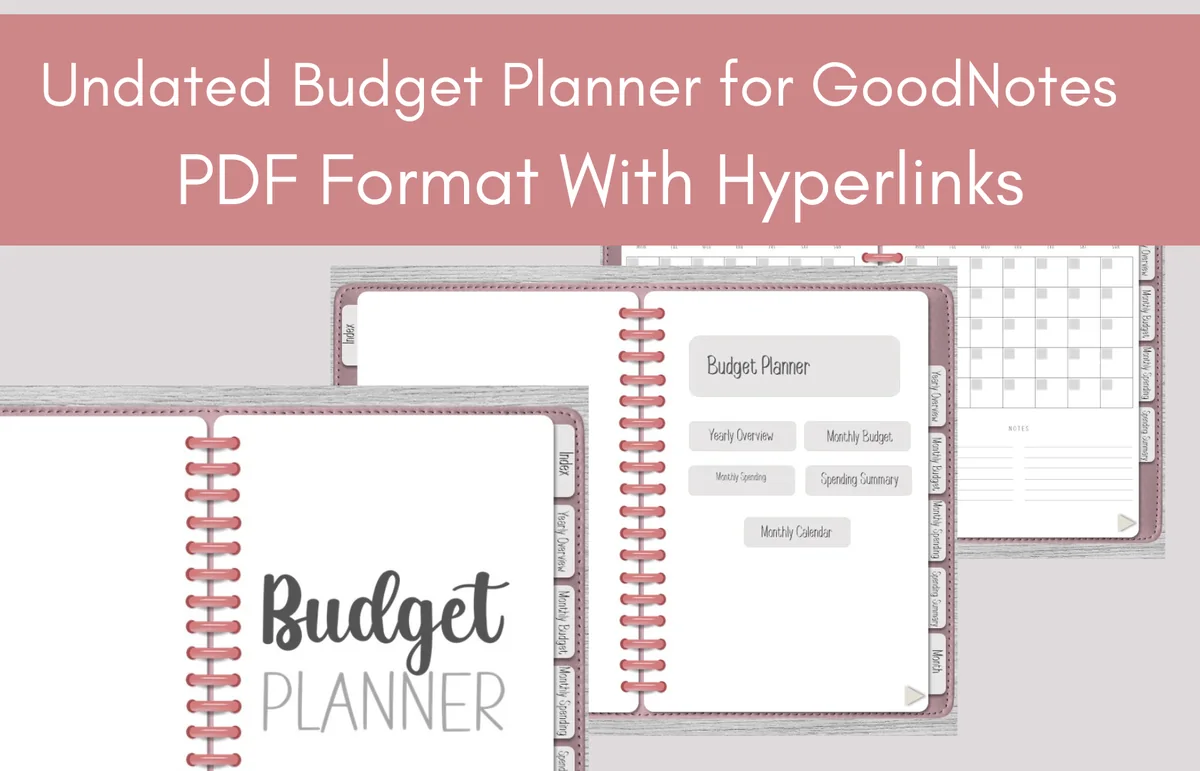
Best for a compact spending summary
7. Undated Budget Planner for GoodNotes
Format: Hyperlinked PDF
Best for: reviewing money across the term without many extra sections. Designed by Perla Designs.
- GoodNotes PDF with hyperlinks
- 30 slides stated in the description
- Previews show Yearly Overview, Monthly Spending and Spending Summary
Perla keeps the visible structure relatively focused. The spending summary can help you look back across your study months, while the monthly page holds the category detail. Add a received-versus-expected note before treating that summary as spendable money. The listing is brief, so I am not promising extra trackers, automatic arithmetic or a dedicated grant schedule.
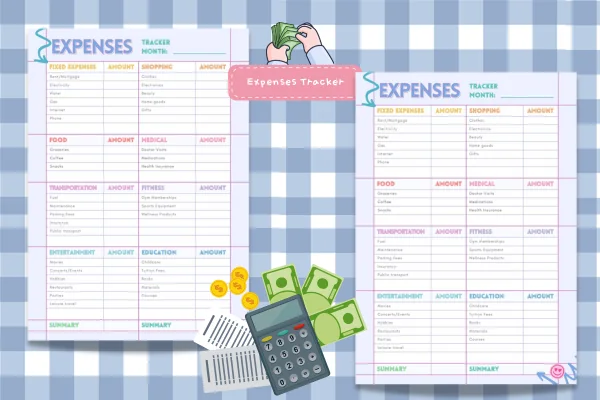
Best for detailed expense categories
8. Expenses Tracker 4years Interactive PDF
Format: Interactive PDF
Best for: checking actual education and living costs. Designed by Zoom4Design.
- 48-month interactive PDF described for iPad and GoodNotes
- Income, expenses, savings and notes sections listed
- Preview includes education, food, transport and fixed expenses
Education has its own space in the preview, alongside food and transportation. That makes this a useful record of what the semester actually costs, especially when small purchases are easy to miss. The listing advertises editable fields, but I have not tested field behavior in GoodNotes. Choose it for the visible category structure and use ordinary annotations if your app does not preserve those fields.

Best for rent and recurring due dates
9. Hyperlinked Bill Tracker Planner
Orientation: Portrait A4Format: Hyperlinked PDF
Best for: keeping payment status visible across study months. Designed by Azhir.
- 52-page hyperlinked PDF for GoodNotes and other annotation apps
- Annual Bill Overview, monthly trackers and payment summaries listed
- Recurring bills, subscriptions, payment log and notes
Rent and subscriptions continue between paydays, which is why a bill-focused record can earn a separate place in this workflow. The description lists monthly payment summaries and an annual overview; the single public preview shows the cover and navigation tabs. Pair it with an allocation page to check whether the money for each bill is available. No reminders or bank synchronization are promised.
Quick Comparison
| Tool | Semester role | Useful layout | Limit |
|---|---|---|---|
| 1. Digital Budget Planner, Financial Planner | Monthly allocations | Monthly and biweekly budgets | Manual totals; larger system |
| 2. Simple Savings Planner, Digital Planner | One reserve goal | Deposit and balance columns | Needs a separate term overview |
| 3. Budget Digital Planner Hyperlinked Tabs | Income beside commitments | Income, bills and notes | Add your own funding timeline |
| 4. Digital Budget Planner, Finance Tracker | Broad workbook | Expense and savings overview | One montage, not individual page previews |
| 5. All-in-One Digital Planner ( 112 Pages ) | One everyday notebook | Budget, expense, saving and bills | General planner; custom term page |
| 6. Undated Digital Planner, Life Planner | Custom overview | Revenue, expenses and notes | Create semester structure yourself |
| 7. Undated Budget Planner for GoodNotes | Term spending review | Monthly Spending and summary | Brief listing; add arrival-date notes |
| 8. Expenses Tracker 4years Interactive PDF | Actual category costs | Education, food and transport | Field behavior in your app untested |
| 9. Hyperlinked Bill Tracker Planner | Due dates and status | Monthly bills and payment log | Needs a separate allocation record |
Set up your planner without making a second accounting system
Keep one semester overview and one place for actual expenses. Extra pages should answer a distinct question, such as whether a bill is paid. If two pages both carry the same total, label one as a summary so you know which record to correct first.
A short setup sequence
- 1.Create the working copy. For a confirmed PDF planner, import the file into your chosen annotation app and give it a term name. The Finance Tracker listing does not confirm a file format; check its format and import instructions before choosing it. Check the app’s link-navigation mode before assuming a tab is broken. Keep an untouched original so your working notes do not become the only copy of the template.
- 2.Add the term map. Use a notes page for your funding log and month boxes. Write the period covered at the top. Copy only money already received into the opening total, and put future estimates in a clearly separate area.
- 3.Choose the transaction home. Record each actual purchase once, in the expense page you selected. A bill-status page may refer to that payment, but its status total is not another expense. Use a short reference such as “rent, September” to connect the records.
- 4.Schedule a brief review. At the same point each week, compare the record with actual transactions and update the remaining allocations. Then look ahead to the next irregular cost. Save a backup using your app’s available export or backup features before making major structural changes.
Review the month before changing the semester plan
Use the weekly review process to compare actual purchases with the amount left for that week, and revise affected allocations as soon as you spot a shortfall. Use a full month of recorded spending to refine estimates for the following month. If one category frequently runs over, consider whether its allowance fits your actual costs or whether a recurring purchase can change. Keep the revised amount beside the original so you can see what changed.
Give emergency funds their own reserved line instead of treating every unspent dollar as available for the weekend. If you’re finding ways to spend less, write one specific change beside the category, such as reducing meals bought outside your existing meal arrangement. Repeat that check at each review to make money management a habit you can maintain between classes.
PDF, spreadsheet or app: choose by the job
A college student budget worksheet PDF works well for handwritten notes, visible allocations and a page you can mark up. This article covers that workflow. If you want recalculating formulas, a student budget planner spreadsheet serves a different job; if you need bank imports or alerts, check those features in an actual budgeting app before choosing it.
- PDF: you enter amounts, calculate totals and update the page yourself. Hyperlinks move between pages.
- Spreadsheet: formulas can recalculate totals when the sheet is correctly built; that is not a feature to infer from a PDF preview.
- App: imports, reminders and shared access vary by service. A digital planner listing does not establish that any of them are included.
For a class and exam notebook, the college planner guide covers academic organization separately. Keep that schedule connected to your money review when it identifies a book deadline or travel date, rather than turning this budget into another assignment tracker.
FAQ: Student Budget Questions
How do I make a budget as a college student?
Start with the period you must cover, money already received, expected income and actual bills. Separate one-time education costs from repeating living costs, then compare the totals. Record spending during the month and revise the next month from what happened, not just what you hoped to spend.
What is a realistic monthly student budget?
It depends on housing, tuition arrangements, transport, food coverage and the months you need to fund. Build a total from your own bills and recent transactions. The $1,000 monthly allocation in the worked example is invented arithmetic, not a recommended college budget.
Is $500 a month enough for a college student?
First define what the $500 must cover. An amount for personal extras is a different question from an amount that must also pay rent and food. Add the actual required costs for your situation, then compare them with the available amount; there is no universal answer from a planner page.
Should students use the 50/30/20 rule?
The 50/30/20 rule divides income into 50% for needs, 30% for wants and 20% for savings and debt repayment. Compare those shares with your actual semester commitments before using them as targets, especially when housing or meals are already paid elsewhere. This setup starts with amounts and payment dates because a percentage split alone does not show whether the last study month is funded.
Will these tools calculate my remaining money automatically?
Do not assume so. The main workflow here uses manual arithmetic and annotation. One listing advertises interactive fields, but that does not establish automatic totals or field behavior in every iPad app. Check the relevant app and product information if calculations are essential.
Can I use financial aid as the opening amount?
Use only the amount actually available to you for the expenses in your plan, and keep expected payments separate. For questions about the amount, timing or permitted use of a particular aid payment, ask your school’s financial aid office. This page does not determine eligibility or funding rules.
Leave the last study month funded
The most useful college budget planner is the one that still makes sense after the first large deposit has been partly spent. Start with the received-versus-reserved distinction, give one-time costs their own lines and keep the later months visible. Choose one of the tools above for its actual record-keeping role, then make the term overview your own.
You May Also Like
This article includes affiliate links. I may earn a commission if you purchase through them, at no extra cost to you. Read the affiliate disclosure.