The science worksheet made it home, but the workbook needed to finish it is still in a locker. A middle school planner on iPad needs a place for what travels with the assignment, not just the due date.
I picked nine digital tools you can adapt for that handoff: a student planner, seven notebooks and a paper pack. Below the options are sixteen page ideas for the trip from classroom to backpack to home and back again. These are suggested pages to create yourself, not sixteen templates included in each product.
TL;DR: Use one subject-and-materials list to carry work from school to home and back. These nine choices are one student planner, seven adaptable notebooks and one paper pack. You create the school-to-home fields yourself; a compatible annotation app may cost extra.
Quick Picks
- Best for an existing class schedule: Simple Student Planner
- Best for a sketch beside each reminder: Watercolor Hyperlinked Digital Notebook
- Best for separate subject references: Digital Notebook
- Best for tall subject reference pages: Digital Notebook Hyperlinked Cute Purple
- Best for five clear workflow stops: Digital Notebook 5 Hyperlinked Tabs
- Best for adding a weekly overview: Digital Notebook 5 Hyperlinked Tab
- Simple Student Planner – Best for an existing class schedule
- Watercolor Hyperlinked Digital Notebook – Best for a sketch beside each reminder
- Digital Notebook – Best for separate subject references
- Digital Notebook Hyperlinked Cute Purple – Best for tall subject reference pages
- Digital Notebook 5 Hyperlinked Tabs – Best for five clear workflow stops
- Digital Notebook 5 Hyperlinked Tab – Best for adding a weekly overview
- Cute Hyperlinked Notebook – 5 Tab – Best for a simple two-column list
- Pastel Digital Notebook Hyperlinked – Best for a compact six-section notebook
- Digital Notebook Papers – GoodNotes – Best for keeping the notebook you have
Start with school planning or subject references
Best for an existing class schedule
1. Simple Student Planner
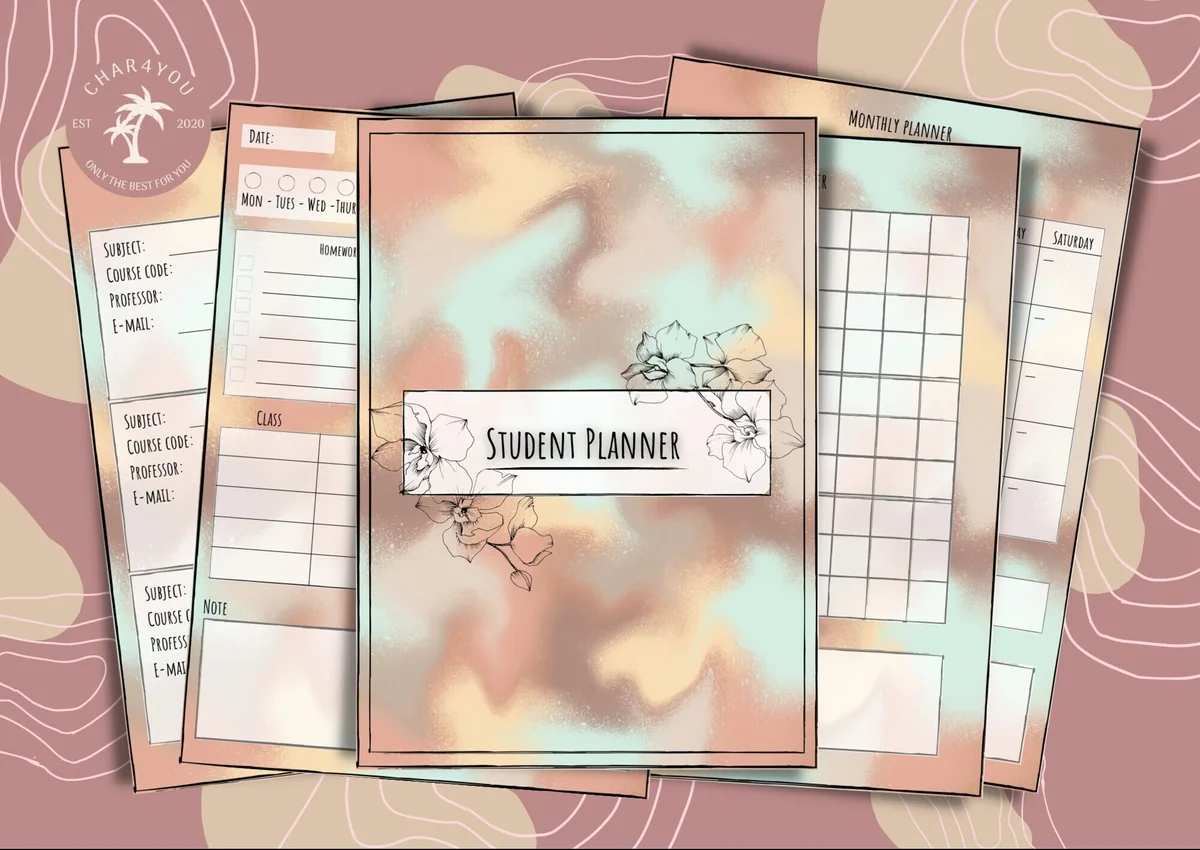
Orientation: PortraitLayouts: Class, daily, weekly, monthly, study, notesFormat: PDFWeek start: Monday or Sunday monthly options
Best for: high school students, college students, budget shoppers. Designed by Char4You.
- Class schedules, class information and grade tracking
- Daily, weekly and monthly planning, plus a study tracker
- Lined and blank notes; color and black-and-white versions
- PDF for GoodNotes; 12-hour or 24-hour time and Monday or Sunday monthly starts
The schedule gives you a ready-made place for classes, while a note page can hold the packing check. I would keep teacher contact details in their intended class section and use a separate, short list for what travels home. The packet-return workflow in this article is your addition, not a built-in school portal feature.
Best for a sketch beside each reminder
2. Watercolor Hyperlinked Digital Notebook
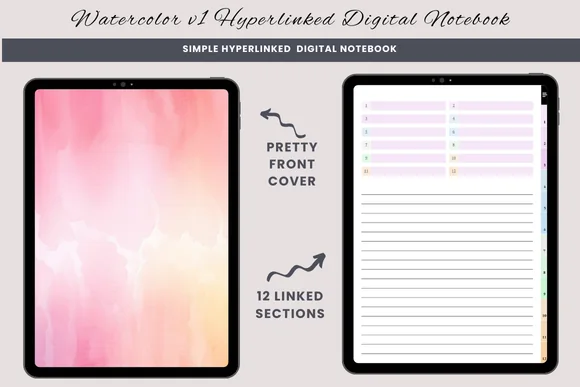
Orientation: PortraitLayouts: Lined, blank, half-linedSections: 12Format: PDF
Best for: free-form writers, sketch and write journalers, topic-by-topic journalers. Designed by daysfilledwithjoy.
- 12 hyperlinked sections
- Lined, blank and half-lined paper
- One PDF for GoodNotes or similar annotation apps
- Duplicate a blank page to extend a section
A half-lined page leaves room to sketch the blue science workbook above a short bring-home list. That is a useful distinction when two notebooks have similar names. Keep the watercolor cover if it helps the student identify the right file, but let the page headings do the organizing. Subject and packing fields need to be added by the reader.
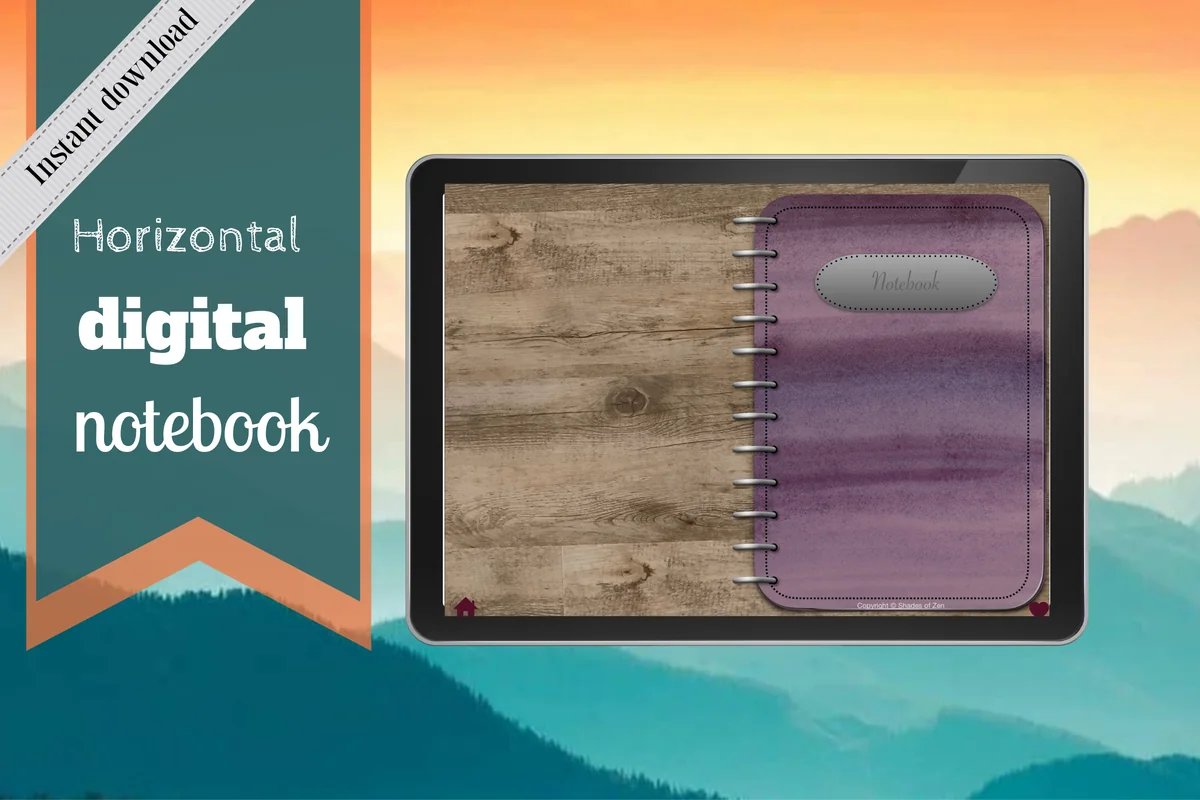
Best for separate subject references
3. Digital Notebook
Orientation: LandscapeLayouts: Lined, dotted, graph, Cornell, two-columnSections: 12Format: PDF annotation notebook
Best for: landscape note-takers, busy students, meeting notes. Designed by Shades of Zen.
- 12 expandable sections with hyperlinked tabs
- 16 note templates including lined, dotted, graph and Cornell
- Two-column templates visible in the gallery
- Section dividers and instructions for use in GoodNotes
Twelve sections leave room for subjects and a separate school-to-home reference. The landscape binder spread offers several ways to draw a materials table; I like the two-column option for item and destination. Avoid creating sixteen different routines just because there are sixteen paper choices. One consistent checklist is easier to reopen between classes.
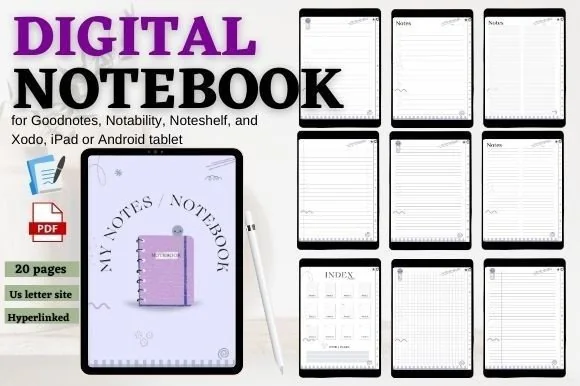
Best for tall subject reference pages
4. Digital Notebook Hyperlinked Cute Purple
Orientation: PortraitLayouts: Lined, grid, checklist and blank-style pages shownSections: 12Format: PDF
Best for: students who prefer twelve portrait sections to a landscape spread. Designed by mixxdigitaldesign.
- 12 hyperlinked sections and an index with shortcuts
- 20-page PDF including a cover and three extra pages
- Gallery shows lined, grid, checklist and blank-style pages
- For GoodNotes, Notability, Noteshelf and Xodo on iPad or Android
The tall format is the reason to compare this with the twelve-section landscape notebook. A narrow page can hold a running materials list without the ring-binder spread. Twenty pages does not mean twenty paper styles. Write your own school-to-home headings; the notebook supplies the structure rather than a school-specific workflow.
Smaller notebooks for a repeatable routine
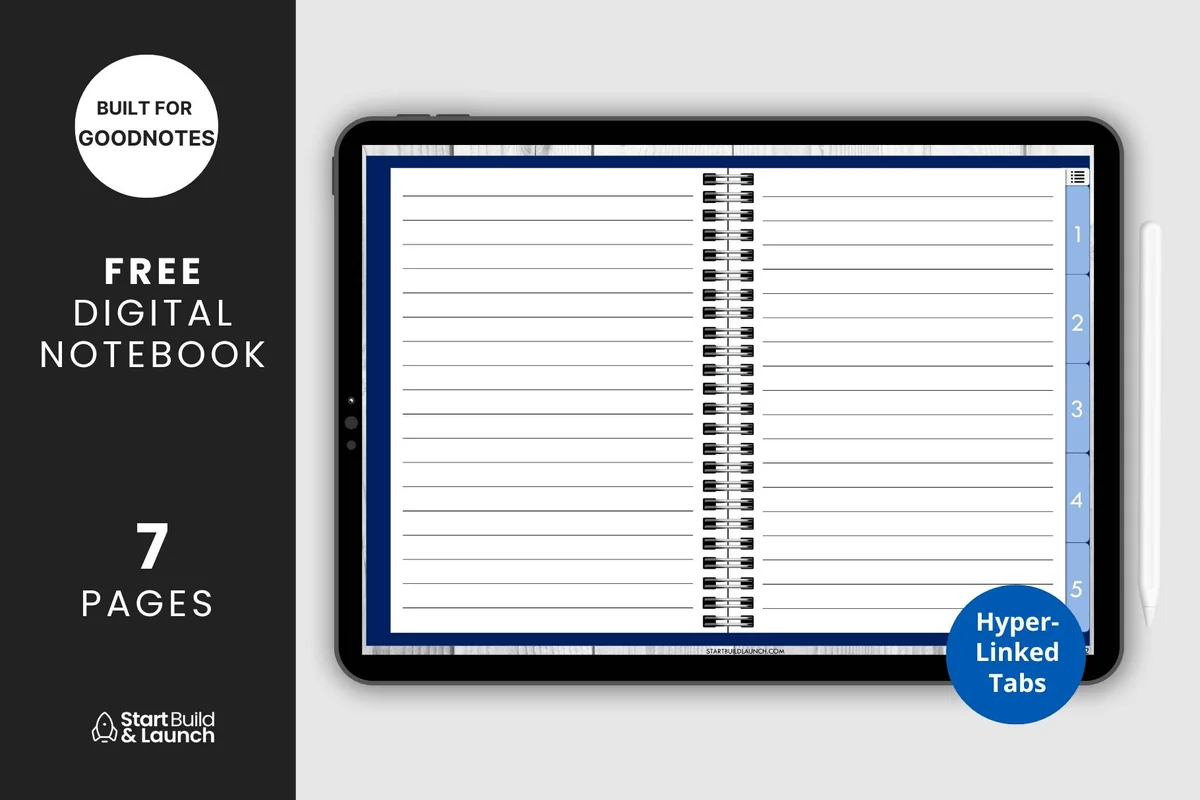
Best for five clear workflow stops
5. Digital Notebook 5 Hyperlinked Tabs
Orientation: LandscapeLayouts: Blank, lined, dotted, graph, CornellSections: 5Format: PDF
Best for: beginners, high school students, minimalists. Designed by aviswilliams.
- Five linked sections and an index page
- Blank, lined, dotted, graph and Cornell paper
- A blank cover to title yourself
- PDF for an iPad or tablet with a stylus; GoodNotes, Noteshelf or Notability
The five-tab structure matches the five stops in this guide without requiring a separate section for every class. Give each tab a job and write the subject beside each item. The cover, index and paper are included; school-specific labels are yours to write.
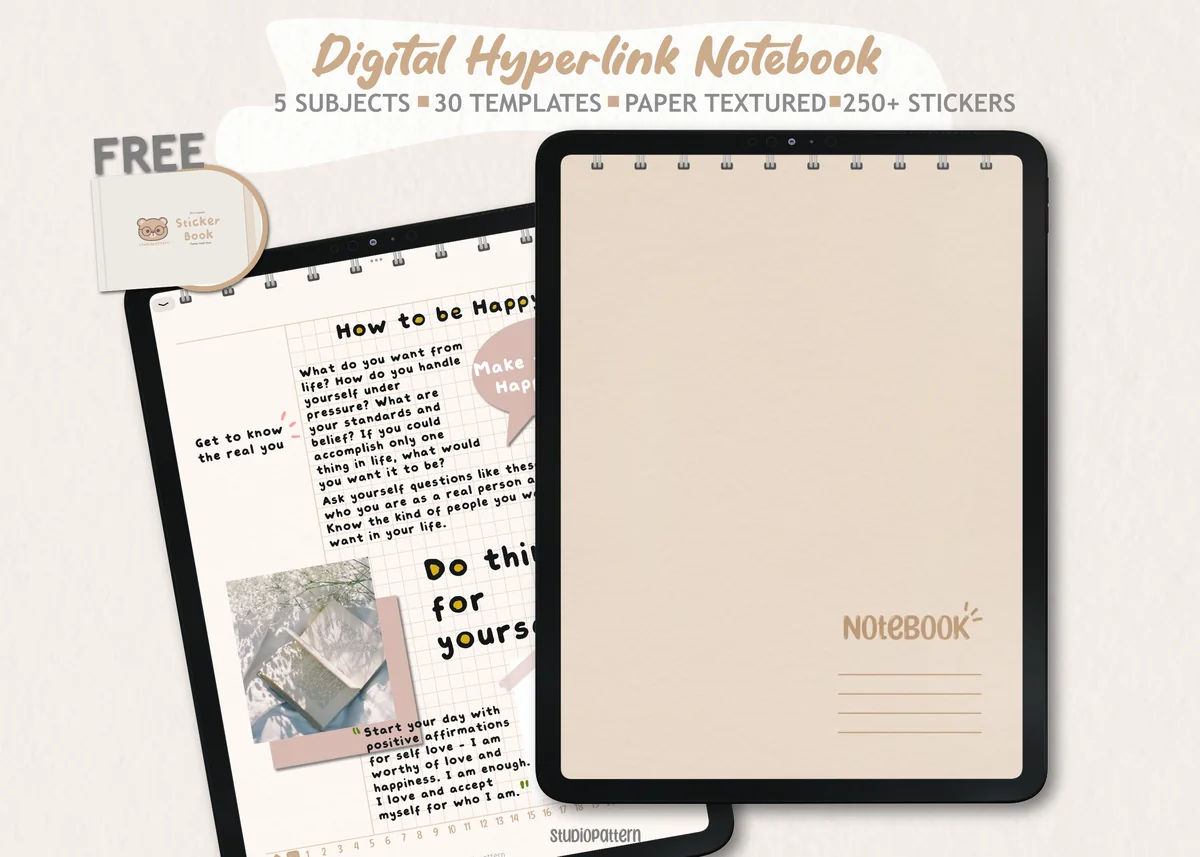
Best for adding a weekly overview
6. Digital Notebook 5 Hyperlinked Tab
Orientation: PortraitLayouts: Note paper, monthly, weekly, daily, checklistSections: 5Format: PDF; bonus PNG and GoodNotes stickers
Best for: 5-subject students, sticker lovers, neutral aesthetic fans. Designed by studiopattern.
- Five subject sections with linked contents and tabs
- 30 note-taking templates
- Gallery shows monthly, weekly, daily, habit and checklist pages
- Hyperlinked PDF, manual and bonus stickers; annotation app purchased separately
This is the more expansive five-section option. Use a weekly page for clubs and school events, then keep the materials check on a nearby note sheet. The paper has a soft texture, so compare that look with the plainer blue notebook above. The seller recommends an iPad or tablet with an Apple Pencil or stylus; the device and separate annotation app are not included.
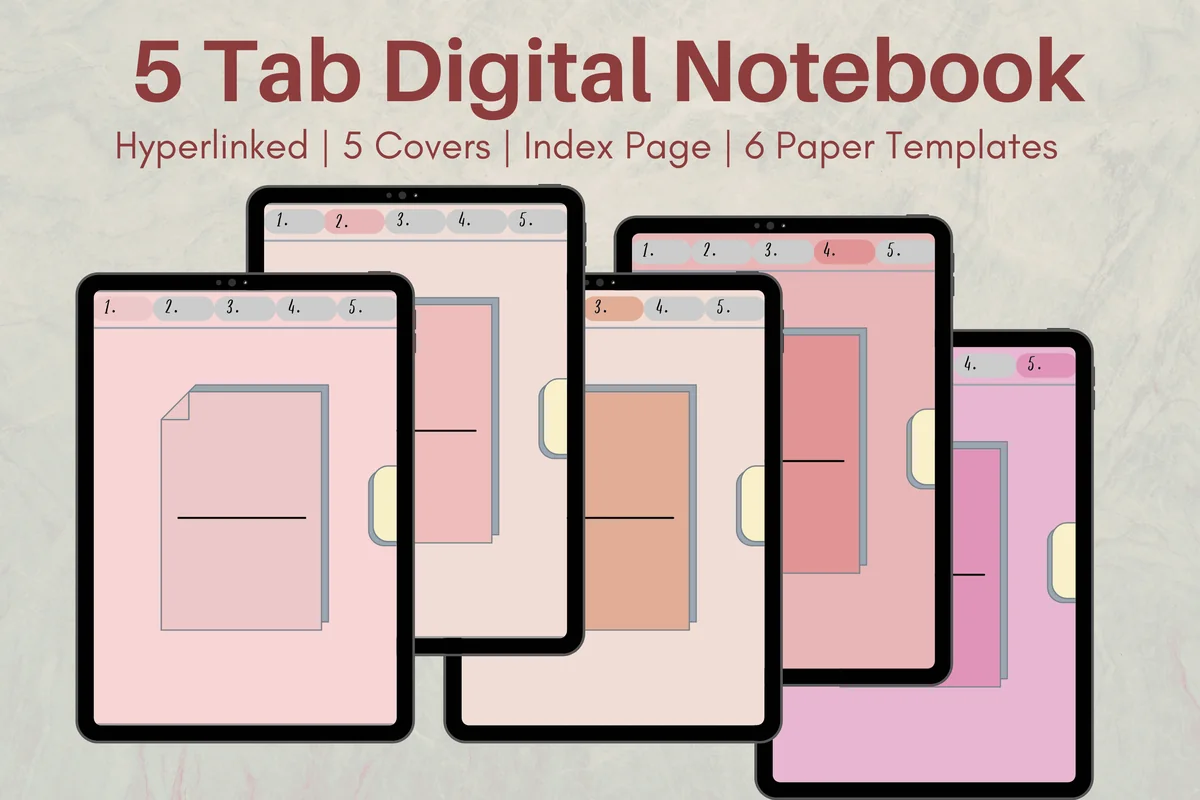
Best for a simple two-column list
7. Cute Hyperlinked Notebook – 5 Tab
Orientation: PortraitLayouts: Six papers; lined, split-column, grid, blankSections: 5Format: PDF
Best for: students, multi-subject note takers, cute style fans. Designed by Melissam Illustration.
- Five hyperlinked subject dividers and an index
- Six paper templates
- Five cover choices
- One PDF for iPad apps including GoodNotes and Notability
The split-column paper shown in the previews is a good starting place for item on the left and home or school on the right. Five cover choices change the outside, not the number of subject sections. If the student takes more than five classes, group by workflow or put several subject headings on one page instead of pretending there is a tab for every class.
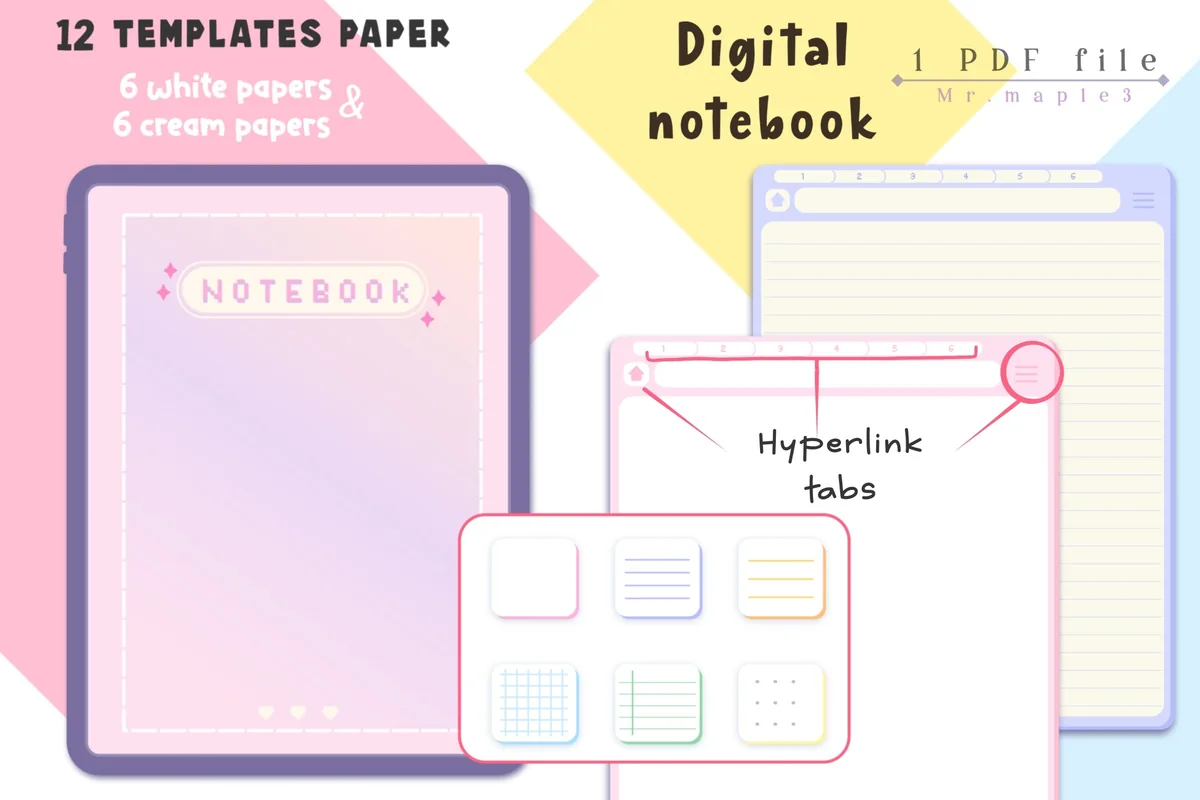
Best for a compact six-section notebook
8. Pastel Digital Notebook Hyperlinked
Orientation: PortraitLayouts: 12 white and cream paper templatesSections: 6 shown in galleryFormat: PDF with JPG instructions
Best for: keeping a small subject set with a consistent paper style. Designed by Maple3Studio.
- Hyperlinked tabs with six chapter covers shown in the gallery
- 12 paper templates: six white and six cream
- One notebook PDF in a ZIP archive
- JPG instructions for adding templates; GoodNotes and Notability compatible
Six chapter covers make this worth comparing if five sections feel cramped and twelve feel excessive. The twelve paper templates are six white and six cream versions, not twelve subject tabs. Choose one background and keep it consistent for the packing list, leaving color for subject labels. The student creates the school checklist on the included paper.
Add paper to a familiar notebook
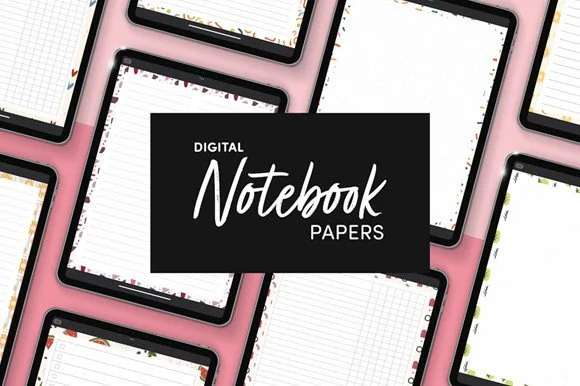
Best for keeping the notebook you have
9. Digital Notebook Papers – GoodNotes
Orientation: PortraitLayouts: Columns, to-do, numbered list, dots, square, lines, notes, habit trackerFormat: PNG and PDF
Best for: list makers, decorative note-takers, planner add-ons. Designed by catsquills.
- Nine portrait digital paper designs
- Eight layouts per design: columns, habit tracker, to-do, numbered list, dots, square, lines and notes
- PNG and PDF formats for GoodNotes or Notability
- 2550 × 3300 px papers at 300 dpi
Choose this when the student already knows where their notebook lives. A columns page can become the school-to-home list, and a to-do page can hold the short evening check. This is paper rather than a tabbed notebook or a ready-made school planner. The practical advantage is avoiding a second file that gets forgotten while the first one stays in use.
Quick Comparison
| Tool | Useful for | Structure | Main distinction |
|---|---|---|---|
| 1. Simple Student Planner | Class schedule first | School pages plus notes | Color or black and white |
| 2. Watercolor Hyperlinked Digital Notebook | Picture plus reminder | 12 sections | Half-lined paper |
| 3. Digital Notebook | Many subject sections | 12 sections / 16 templates | Landscape binder spread |
| 4. Digital Notebook Hyperlinked Cute Purple | Portrait subject references | 12 sections / 20 pages | Tall page format |
| 5. Digital Notebook 5 Hyperlinked Tabs | Workflow over subjects | 5 sections / 5 papers | Small section set |
| 6. Digital Notebook 5 Hyperlinked Tab | Weekly context plus notes | 5 sections / 30 templates | Planning pages included |
| 7. Cute Hyperlinked Notebook – 5 Tab | Item and destination | 5 sections / 6 templates | Split-column paper |
| 8. Pastel Digital Notebook Hyperlinked | A smaller subject set | 6 chapter covers | White and cream paper |
| 9. Digital Notebook Papers – GoodNotes | Extend an existing file | 9 designs / 8 layouts each | Paper pack, not a notebook |
Set up a middle school planner around the trip home
Start with the point where something gets lost. If the student writes assignments down but leaves materials at school, another deadline calendar will not solve that particular problem. Give the daily page four fields: subject, item needed, where it is now, and where it must go next. Add the due date and hand-in location alongside the assignment when those matter.
- School: capture the task and check which physical materials it needs before leaving the classroom.
- Bag: move the right folder, book or permission slip into the backpack.
- Home: use the materials, then put work in its return location.
- Return: carry it back and hand it to the right person or place.
- Review: look for one broken handoff and change one cue.
An iPad is useful only if the school permits it and the student can reach it at the right moment. If tablets stay home, use the school-approved paper agenda during class and transfer the materials list at home. Do not make the student remember a second recording system during a rushed hallway change.
16 page ideas for subjects, backpacks and handoffs
Choose two or three ideas to begin with. Add another only when it fixes a specific problem. The examples below are suggested layouts; use the same subject names and folder names that the school uses.
Before leaving the classroom
- 1A subject-to-materials key. Write each class beside its usual folder, workbook and room. Use words as well as colors: “Science: blue folder, lab notebook.” A small sketch helps when book covers look alike. Keep this reference separate from the daily list so routine items do not need to be rewritten every afternoon.
- 2A bring-home column. Beside a task, record the physical item required: “read pages 18–20: history textbook.” Before leaving class, check the item rather than the assignment title alone. If a reading is available in the school portal, note that location accurately instead of assuming that every textbook has an online copy.
- 3An A/B day header. Write the actual next school date and its A or B label at the top of the packing page. Under it, list the classes and equipment needed for that day. For middle school schedule examples, try “Monday, A day: science notebook and art folder” and “Tuesday, B day: math workbook and PE kit.” Replace those sample classes with the student’s actual schedule. Copy rotation changes from the school calendar; a handwritten PDF does not know about holidays, assemblies or altered schedules.
- 4A last-class exit cue. Put a short prompt on the page used at the end of the school day: “What needs to leave the building?” The answer might be a library book, an art folder or a signed form. Tie the check to an allowed pause before dismissal rather than trying to open the iPad while walking.
At the locker and backpack
- 5A two-pocket folder map. Label one pocket “Home” and the other “Return,” using the same wording on the digital page. A worksheet moves into Home before the trip out and Return after it is ready to go back. The planner records the location; it does not replace the physical folder that keeps loose paper together.
- 6A packing receipt. Write the item and its location, then mark it only after touching the item in the bag. “Math workbook: front compartment” is more useful than an unchecked reminder that says “pack.” Keep the receipt brief enough to check while the backpack is open. Include tomorrow’s equipment, not everything the student owns.
- 7A bulky-item parking spot. Create a separate line for a model, instrument or sports kit that cannot fit in the backpack. Record where it waits and which adult or student will carry it. Place a visible cue near the bag if that is permitted at home, because a digital check alone cannot make a large object travel.
- 8A missing-materials box. When an item is absent, write what is missing, where it was last seen and the next approved way to ask for help. “Science notebook in locker; ask teacher tomorrow morning” is actionable. Do not mark the homework finished or guess at instructions to make the page look tidy.
At home and before the return trip
- 9An arrival landing check. Open the Home pocket in a consistent place and compare its contents with the materials list. Keep the check separate from starting homework so a missing book is noticed before late evening. If the student goes to an after-school club first, define that later arrival as the cue rather than insisting on a fixed clock time.
- 10A short evening schedule. Block existing activities, a meal and a reasonable homework window before adding optional tasks. Beside each work block, name the materials that must be on the desk. Leave space for rest and changes. This is a planning suggestion, not a promise that a particular number of minutes fits every child or assignment.
- 11A ready-to-return check. Separate “work finished” from “paper inside Return pocket.” Add a final box for “Return pocket in backpack.” Those are different physical actions. For digital work, record the school platform and any submission confirmation instead; a paper-packing check should not pretend to prove that a file was submitted.
- 12A question-to-teacher note. Use a small space for the exact uncertainty: “Is the graph sheet due with the written answer?” Include the class and the next appropriate time to ask. Keep it as a question until the teacher answers. Avoid copying private messages or other students’ personal information onto a page that may be shown during a check-in.
For the weekly parent handoff
- 13A student-led bag walkthrough. Ask the student to show one item that came home and one that is going back. The parent checks the handoff while the student opens the folder and explains it. Keep the conversation about what the system needs, rather than asking the adult to rebuild the whole planner from the school portal.
- 14A prompt ladder. Write three possible levels of support: checking together, one reminder to open the list, and a student-led recap. Agree which level fits the current routine. Step back when the student can manage that handoff, and increase help again if circumstances change. Independence is not a deadline to meet by a particular grade.
- 15A Friday return sweep. Look for library books, permission slips, unfinished questions and loose papers before the weekend. Decide which item must return on the next school day and which can be filed at home. Keep school documents according to school guidance; clearing a backpack does not mean throwing away work that a teacher still needs.
- 16One change for next week. Record a concrete snag and a matching adjustment: “Workbook stayed in locker; add workbook to science exit cue.” Review whether that change helped at the next check-in. A single useful change is easier to assess than a new layout, six colors and a different app introduced together.
A worked example: the science notebook stayed at school
Imagine a Tuesday science worksheet due Thursday. The worksheet is in the Home pocket, but the experiment notes are in a notebook left in the locker. This is a materials problem even though the task and due date were recorded correctly. Here is how the page can preserve the distinction.
| Checkpoint | What the student records | Next physical action |
|---|---|---|
| Tuesday at home | Worksheet here; notebook in locker | Keep worksheet in Home pocket; note the missing notebook |
| Wednesday in science | Need experiment notes for Thursday | Check with teacher, then pack the notebook if allowed |
| Wednesday evening | Answer written; materials together | Put worksheet in Return pocket and notebook in bag |
| Thursday in class | Worksheet handed to teacher | Clear the return reminder after the handoff |
If the missing material makes the deadline uncertain, follow the school’s contact process and explain the situation early. The planner cannot authorize an extension or supply access to a locked classroom. That limit belongs beside the recovery plan rather than hidden under a reassuring checkmark.
Try the routine for one school week
A small setup you can review together
- 1Choose one page and one folder. Use a familiar notebook if possible. Add subject, task, required material, current location and next destination, with a due-date space beside the task. Pick a folder the student can recognize without opening several similar files. Do the setup together once; avoid making an adult the permanent keeper of the page.
- 2Practice a real transfer. Take an actual worksheet or school item through the route: classroom information, Home pocket, desk, Return pocket, bag. Ask the student to point to where the item is now. If the instructions are awkward to write, shorten the headings before adding more stickers or sections.
- 3Review the broken handoff. At the end of the trial, ask where the routine stopped: recording, packing, starting at home or returning. Keep the parts that worked and adjust that one stop. There is no need to abandon a readable weekly student planner because a locker cue needs changing.
PDF template or school planner app?
When comparing student planner templates, separate paper-like files from apps that manage a live schedule. Weekly student planner templates suit a handwritten view, while a study planner with subject sections leaves more room for notes. Each middle school planner template in this selection is a file for an annotation app, rather than a live connection to school assignments. A PDF can hold handwriting and, where supplied, navigation links. PDF hyperlinks move between pages; they do not turn a class timetable into a synced calendar or send automatic homework reminders.
- Choose a PDF notebook when the student wants handwriting, a stable page and control over the materials list. Check that the app and device are available before buying a template.
- Keep the school platform for official instructions, announced changes and submissions. Copy only the information needed for the next handoff, and resolve discrepancies with the teacher.
- Use a separate approved reminder if an alert is necessary. Check it on the device the student actually carries; do not assume an annotation file provides notifications.
- Use paper at school if classroom device rules require it. A digital home check can complement the required school agenda without replacing it.
For a full revision timetable, see the separate study-planner guidance in the related reading. This page stays focused on keeping materials organized. For projects, record the next item that needs to travel, not every project step. Keep scheduling and time management in the main study plan, with room for a break and flexibility when activities change. An assignment tracker handles deadline and submission details; the backpack list handles where the worksheet and notebook physically are.
FAQ: choosing and using school planning pages
What is the best planner for middle school students?
Choose one the student is allowed to access, can read quickly and can update without adult transcription. For this routine, prioritize a subject field, enough room for required materials and a clear return check. A larger planner is useful only when its extra pages solve a problem the student actually has.
Can I make a middle school planner with subjects?
Yes. Use a tab per subject when the notebook has enough sections, or write a subject label on each row of a shared daily page. A five-tab notebook can instead hold workflow stages. The suggested subject and materials fields are your own layout, even when the file includes lined or grid paper.
Is a middle school planner PDF the same as a printable?
PDF names a file format, not the whole intended use. These picks support digital annotation in named apps; one is a PNG and PDF paper pack. If you need a middle school planner printable for classroom use, first check school requirements and the specific product’s printing terms. iPad compatibility does not by itself establish print sizes or print quality.
What if my child resists using a planner?
Ask which part feels unnecessary or difficult, then choose one visible problem to address together, such as leaving the math workbook behind. Let the student choose a readable layout and reduce repeated copying. If difficulties persist, discuss support with the teacher rather than making a missed checkmark a punishment.
How can I adapt a middle school planner for ADHD support?
A short materials list may be one practical support, but a template is not a treatment or an accommodation plan. Ask the student and their school support team which cues fit existing arrangements. Keep personal health information off shared pages, and follow any agreed school or clinician guidance rather than replacing it with this routine.
How long should an evening check take?
Keep it brief enough to repeat: open the folder, compare materials, identify a missing item and prepare the return pocket. Five to ten minutes can be a starting planning allowance, not a rule or a measured promise. If it regularly becomes a long interrogation, simplify the page and revisit what the adult needs to check.
How long until using a planner becomes a habit?
There is no fixed number of days promised here. Review after a school week to see which cue works, then continue or adjust the support. A schedule change, a new subject or a different after-school routine may require another walkthrough even after the student has managed the old routine independently.
Make tomorrow’s bag easier to check
A useful middle school planner closes a small physical loop: the right item leaves school, reaches the desk and returns to the right place. Start with one list and a folder the student can explain. Add pages when they make that trip clearer, and let the student take over each handoff as the routine becomes manageable.
You May Also Like
This article contains affiliate links. If you buy through them, I may earn a commission at no extra cost to you. Read the affiliate disclosure.