Someone asks when the last feed happened, and two adults remember different times. A note on a phone, a half-finished paper row and a message thread make the answer harder to find. Start a baby feeding tracker with one readable event record and one agreed place to write it.
These 15 baby feeding log ideas focus on recording what you observed and handing that record to the next caregiver. They do not set feeding amounts, intervals or treatment. You can draw the layout in a notebook you already have; the five iPad notebooks below are optional writing surfaces, with no ready-made baby forms promised.
Choose a notebook for the way you record events
TL;DR: Use any notebook you already own to try these 15 ideas. The five options below offer section tabs, daily pages, simple lines or monthly filing. You add every feeding field yourself; none is a ready-made baby feeding tracker.
Quick Picks
- Best for separating active notes and archives: Digital Notebook 5 Hyperlinked Tab
- Best for a page-per-day record: 365 Days Daily- Digital Journal
- Best for short chronological entries: Digital Ruled Journal
- Best for a simple repeatable page: DaisyNotes | Digital Notebook | Purple
- Best for filing closed days by month: Digital GoodNotes Journal – Art Deco
- Digital Notebook 5 Hyperlinked Tab – Best for separating active notes and archives
- 365 Days Daily- Digital Journal – Best for a page-per-day record
- Digital Ruled Journal – Best for short chronological entries
- DaisyNotes | Digital Notebook | Purple – Best for a simple repeatable page
- Digital GoodNotes Journal – Art Deco – Best for filing closed days by month
Best for separating active notes and archives
1. Digital Notebook 5 Hyperlinked Tab
Orientation: PortraitLayouts: 30 paper templatesDates: Undated
Best for: building your own event log inside five linked sections. Designed by studiopattern.
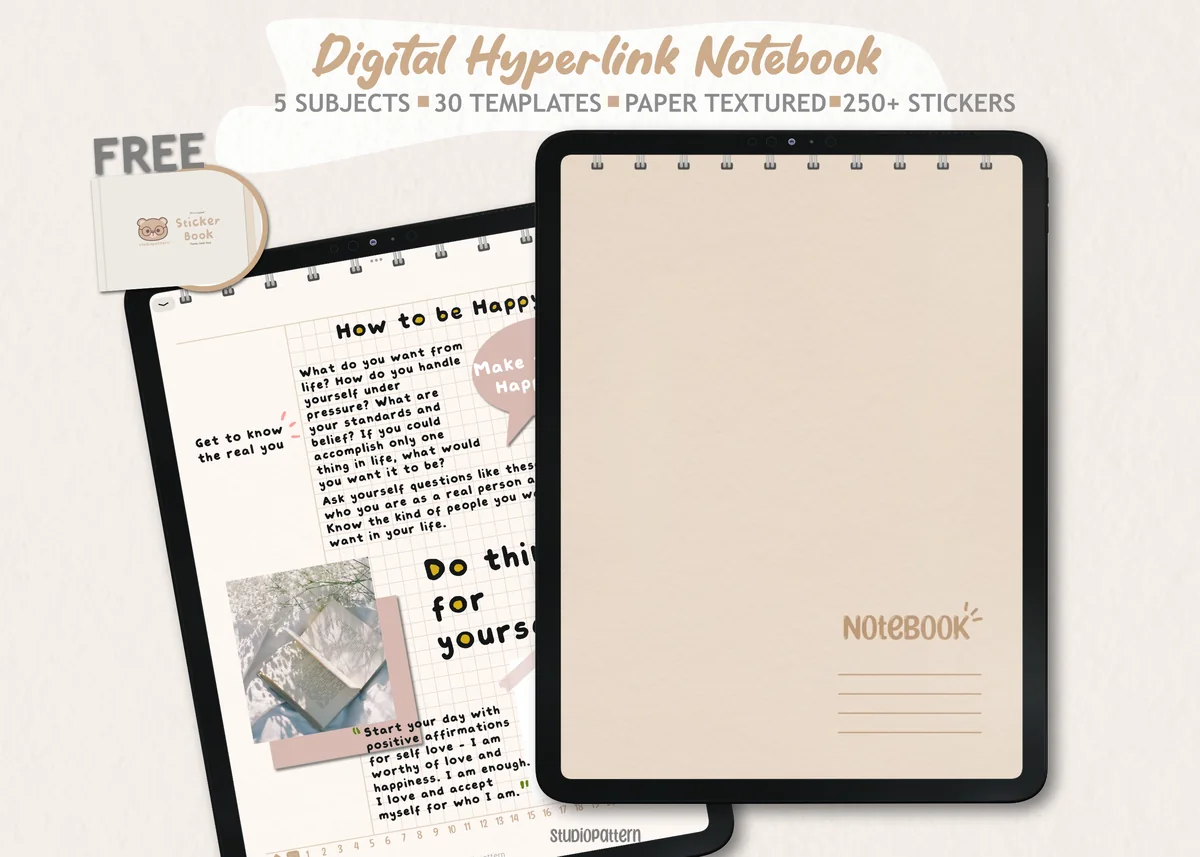
- Hyperlinked PDF notebook with five sections, contents page and 30 paper templates
- Blank, lined, grid, dot and dashed paper options appear in the gallery
- Manual PDF, individual PNG stickers and a precropped GoodNotes sticker book are included
- Designed for PDF annotation apps including GoodNotes and Notability; best used with an iPad or tablet and Apple Pencil or stylus; apps may require separate purchase
Five sections give this notebook a useful filing job: current day, closed days, handoff notes, questions and reference. Start with grid paper for short event rows and lined paper for questions. Keep the daily log in one section rather than scattering feeds among all five. The baby-specific headings are yours to add; the included habit and planning layouts are general-purpose pages.
Best for a page-per-day record
2. 365 Days Daily- Digital Journal
Orientation: PortraitLayouts: Daily lines and 16 templatesDates: Undated
Best for: keeping dated entries together with room for short narrative notes. Designed by ThePlannersDelight.
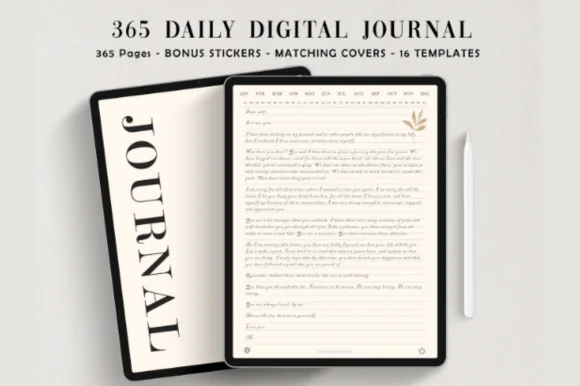
- Undated PDF journal with 365 linked daily pages and 384 total pages
- Narrow-lined and wide-lined versions, plus 16 additional page templates
- Bonus covers and PNG stickers
- Requires a tablet that supports writing with a stylus such as Apple Pencil; app, tablet and stylus are not included
The wide-lined version leaves more room for a readable time and initials; the narrow-lined version favors longer notes. Month-and-day links suit a chronological archive, but write the full date on the page so an exported record still makes sense. This is a daily writing journal, not a feeding timer or calculator. You create the event format and any handoff checklist yourself.

Best for short chronological entries
3. Digital Ruled Journal
Orientation: PortraitLayouts: Ruled daily pagesDates: Undated
Best for: writing one plain-language line for each observed event. Designed by Island Tulip Designs Co.
- 366 ruled pages in a fully hyperlinked digital journal
- Three cover choices with a paper-like page design
- 40 journal prompts in PNG and precropped GoodNotes elements
- Gallery shows daily pages and a month-and-day index; the journal file format is not specified in the description
A ruled page works well when a table would become too cramped. Use the same order in each entry: event time, observation, initials, then any uncertainty. The daily index helps locate a day; the general journal prompts are unrelated to infant feeding. Check the received journal file and its app compatibility before setting up your log. Leave decorative prompts off the active page to keep the record easy to scan.

Best for a simple repeatable page
4. DaisyNotes | Digital Notebook | Purple
Orientation: PortraitLayouts: Two page templatesDates: Undated
Best for: starting with a small portrait notebook rather than a large planner. Designed by catsquills.
- Portrait digital notebook for GoodNotes and Notability
- Four covers and two page templates
- JPG and PDF formats, with wood-texture backgrounds
- Purple daisy borders and a lined writing page are pictured; linked navigation is not specified
This is the simplest surface in the shortlist. The decorative border reduces the writing area, so use a short event sentence instead of squeezing in six columns. A date at the top and clear initials at the end do more work here than a complicated color key. Choose it for a page you can keep consistent; do not expect a built-in feeding ledger, timer or monthly linked archive.
Best for filing closed days by month
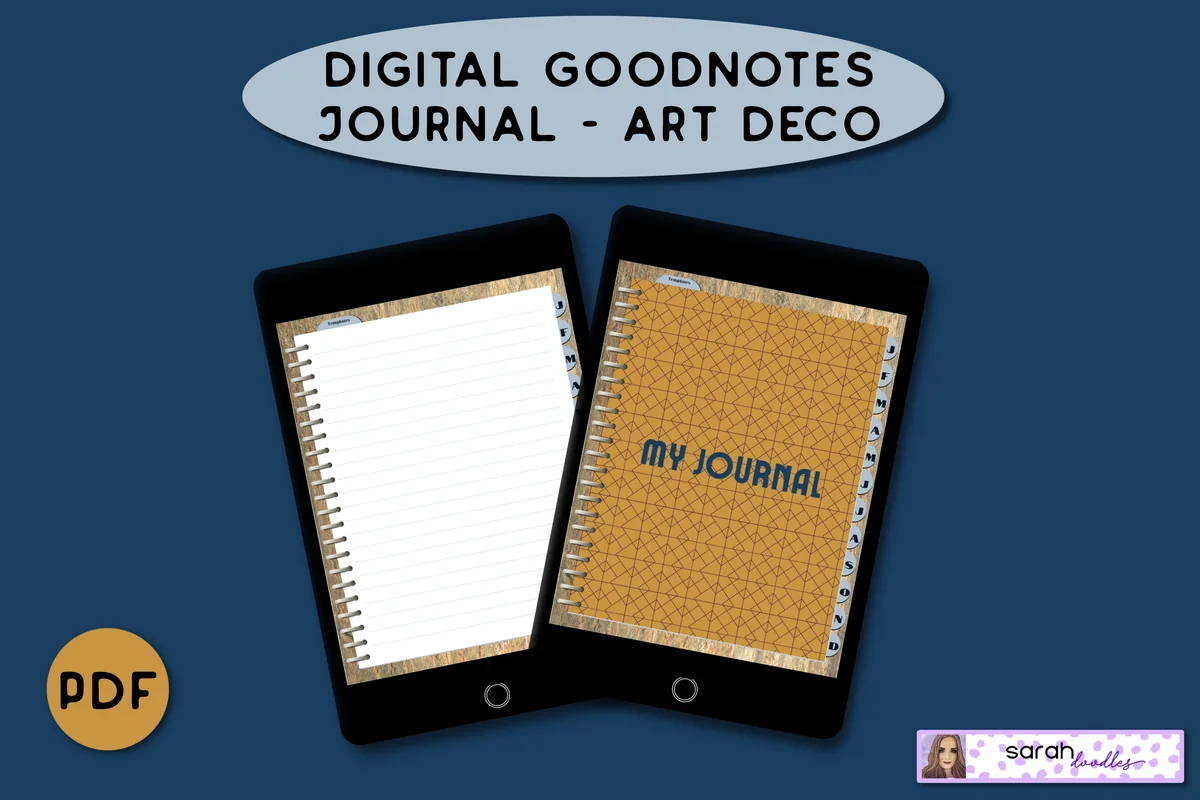
5. Digital GoodNotes Journal – Art Deco
Orientation: PortraitLayouts: Monthly dividers and linesDates: Undated
Best for: organizing your own daily notes under monthly dividers. Designed by Sarah Doodles.
- Hyperlinked PDF journal for iPad or Android tablets in PDF annotation apps
- Monthly divider tabs with five blank lined pages per month
- Extra lined pages and brain-dump templates can be duplicated in GoodNotes
- Seller recommends an iPad or tablet with Apple Pencil or stylus and specifies Read Only mode for links in GoodNotes or Notability
Monthly filing is the strength here. Five starting pages per month will not provide a page for every day, so plan to add writing pages as needed. Reserve the brain-dump page for questions to discuss, keeping it apart from observed feeding events. The seller states personal use only and no sharing of the product; this option suits your own record. Do not distribute the purchased journal as a shared caregiver template.
Quick Comparison
| Notebook | Your writing task | Page structure | Navigation or format |
|---|---|---|---|
| 1. Digital Notebook 5 Hyperlinked Tab | Five separate subjects | Grid or lines | Contents and linked tabs |
| 2. 365 Days Daily- Digital Journal | One day per page | Narrow or wide lines | Month-and-day links |
| 3. Digital Ruled Journal | Short event sentences | 366 ruled pages | Daily index |
| 4. DaisyNotes | Digital Notebook | Purple | Minimal page setup | Two templates | JPG and PDF |
| 5. Digital GoodNotes Journal – Art Deco | Personal monthly archive | Five starting pages per month | Linked month dividers |
15 baby feeding tracker ideas for a clearer handoff
Start with the smallest useful entry. Add a field only when someone actually needs it to understand the record. A page that takes too long to complete is easy to leave unfinished; a short consistent line can be easier to read later.
Make each event understandable
- 1Give every page a full date
Write the day, month and year in words or another agreed unambiguous format. Repeat the date on a continuation page. A tab labeled Monday is useful inside a notebook, but it loses context when someone sees a single page later. Keep the page date visible above the first event. - 2Use one entry for one observed feed
Leave a small gap between entries so a later note cannot look like part of the wrong event. Record the event you observed rather than writing a planned feed as if it already happened. If you keep reminders elsewhere, keep their checkboxes away from the factual log. - 3Separate event time from entry time
Label the main time field clearly, such as Feed started. If you write the note later, add a separate Entered at time. Otherwise a caregiver might read the time you opened the notebook as the time of the feed. Write approximate when the event time is only an estimate. - 4Put initials at the end of the entry
Agree on a small key so each adult can identify who recorded an observation. Initials make a question easier to direct without filling the page with names. They do not prove that an entry is complete; any missing details still need their own note. - 5Choose plain words for the feeding method
Use the words your household already understands, such as breast or bottle, rather than a row of unexplained symbols. Keep the wording descriptive. If your care team has asked you to record specific details, use its instructions for those fields instead of inventing a measurement system.
Keep uncertainty visible
- 6Write unknown instead of guessing
A blank cell is ambiguous: it might mean not recorded, not applicable or not yet checked. Use a word such as Unknown and add a short reason when helpful. Do not enter zero merely to fill a gap. Zero is a value, while an unknown is missing information. - 7Label the source of a copied note
If you transcribe a message or a paper entry, name its source and original time. For example: Copied from Alex’s paper note, event time approximate. This keeps a copied account distinguishable from your own observation. Avoid copying the same event twice when two adults update the notebook. - 8Correct an entry without hiding the change
Keep the original wording readable and add a short correction with your initials and correction time. An unexplained replacement can leave the next adult wondering which version they saw earlier. A simple correction note is easier to follow than an invisible edit to a shared screenshot. - 9Keep observations and questions apart
Put what happened in the event log and what you want to ask in a separate Questions section. For example, a note about a difficult-to-read time belongs with the record, while a question about what your clinician wants tracked belongs in the questions list. Do not turn a question into a diagnosis. - 10Use text alongside any color key
A color can help you find an entry, but it should not carry the only meaning. Add words such as Approximate, Corrected or Copied so the record remains understandable in grayscale or in a small image. Keep the key short enough that another adult can use it without a tutorial.
Close the loop at handoff
- 11Mark the last completed entry
Before handing over, point to the last entry you consider complete and state its event time. This is a reference point for reading the record, not a prediction of the next feed. If anything remains uncertain, say so beside that entry instead of relying on memory. - 12Add a short handoff note
Use three prompts: Last completed entry, Unresolved details and Who is recording next. Keep tasks and household scheduling in your family planner. The handoff note only explains where the factual record stands, so the next adult can continue without reconstructing the whole day. - 13Keep one agreed current record
Decide which notebook or device is the place to record new events. A PDF by itself does not provide a live shared caregiver system. If you use separate devices, agree how you will reconcile entries and verify the latest version. Avoid assuming that two files with the same name contain the same notes. - 14File closed days separately
Give a finished day a clear title and place it behind the relevant divider or in your chosen archive. Leave the current page easy to reach. When a day needs more than one page, number the continuations so a missing page is apparent without having to compare every line. - 15Make a small review list for your next conversation
Collect questions about unclear records or about which fields your care team wants you to keep. Link each question to a date and entry where possible. The purpose is to make that conversation specific, not to grade a day or infer a medical pattern from incomplete notes.
Set up one page before adding more sections
Test the layout with a fictional entry first. This checks whether the handwriting fits and whether another adult reads the fields in the same order. Do not use invented sample entries in the live record; keep the practice page clearly labeled.
- 1Name the active page. Add the full date and a title such as Feeding events. Keep a clean master layout separate from completed records.
- 2Choose a line format. Start with event time, method or observation, and initials. Add entry time or a source note only where needed.
- 3Check a fictional handoff. Ask the next adult to identify the last completed entry and any unknowns. Revise ambiguous labels before using the page.
- 4Agree who writes next. Identify the current record and the person continuing it. Keep private health details out of public sample images.
Record breastfeeding and bottle feeding on the same daily page
A baby tracker is a record of observed care events; this layout keeps its focus on feedings. Use one dated page for breastfeeding and bottle feeding, and label the method in each entry so the next caregiver can tell them apart. The purpose is to remember what happened without asking either adult to reconstruct the day from memory.
For nursing, write the observed start time and any details your care team has asked you to record. For a bottle entry, distinguish the milk offered from the amount taken if you record both, and label the units, such as ounces or milliliters. If you’re pumping, label that event separately rather than treating it as a feed your child received.
Keep sleep notes and diaper changes in separately labeled sections if you record them in the same notebook. This keeps a note about your baby’s diaper from looking like another feeding entry. Use a separate questions area for anything you want to discuss with your pediatrician or lactation consultant, rather than adding a conclusion about weight gain to an event row.
A fictional entry: show the uncertainty, not a feeding target
Here is a writing example, not a recommended schedule: 14 November 2026, feed started about 02:10, bottle, recorded by AB at 02:25, start time approximate. The next adult can see which time describes the event, who entered it and what remains uncertain. No amount, target or clinical conclusion is implied.
- Clear: “Event time unknown; copied from paper note at 07:15, CD.” The source and limitation travel with the entry.
- Ambiguous: “07:15, done.” Neither the event nor the meaning of the time is clear.
- Correction: “Entry time corrected to 07:20, CD at 07:35; event time still unknown.” Only the detail you actually know changes.
Notebook or app: choose the tool for the task
A digital notebook gives you space to write. A dedicated tracking app may offer timers or shared-account features, but those are product-specific features to evaluate separately. None of the notebooks in this list should be treated as an automatic feeding monitor, calculation tool or medical assessment.
- Choose a manual notebook when your priority is a flexible page and plain-language notes. You control the headings and must keep entries up to date yourself.
- Evaluate an app separately if you need timed events, reminders or multi-person updates. Check its current features and privacy settings instead of assuming a PDF provides them.
- Keep the handoff human when something is unclear. A neat page does not resolve an unknown time or replace a conversation with the person who made the entry.
For linked PDFs in Goodnotes, Goodnotes Support explains how to open links in imported files. Test navigation on a blank copy before using it for the active log. Follow the instructions for the actual file you receive; the Digital Ruled Journal description does not specify the journal file format.
Keep this log separate from the rest of family planning
Your mom planner can hold household tasks and who is available. This page records feeding events after they happen. Keeping those jobs distinct prevents an assigned task from being mistaken for an observed feed.
For a broader writing notebook, compare the page structures in GoodNotes journals. If you also want a personal reflection space, keep it separate from the care record; digital journaling ideas cover that wider use.
FAQ: Baby Feeding Log Questions
Which fields belong in a baby feeding tracker?
Start with a clearly labeled event time, a short factual observation and the recorder’s initials. Add an entry time, source or uncertainty note where needed. Ask your care team which additional details matter for your baby rather than copying a generic target from a template.
Can I make these pages in a notebook I already own?
Yes. The layout ideas are manual writing prompts, so you can use an existing blank or lined page. The five products offer different page structures for your notes. Choose one that suits your layout; you do not need all five.
How do I keep a baby feeding tracker for both parents?
Choose one current page, use initials for each parent and confirm the last completed entry when you hand over. Keep that page updated before the next person starts recording, especially when you take turns overnight. A PDF file alone does not establish a live shared record; if you share it online, confirm that your partner can see the latest entry before relying on that copy.
How often should I update the feeding log?
For this event-based layout, make a separate entry for each feeding you are recording, rather than combining several feeds into one remembered summary. Write the note while the details are fresh when you can, and show the entry time if you add it later. Agree with your care team on what to record and for how long; this page does not set a newborn feeding schedule.
How should I handle a missing feeding entry?
Mark what is unknown and name the source of any later clarification. Do not reconstruct an event from an expected schedule. If a clinician asks about that period, explain the gap rather than presenting an estimate as an exact observation.
Can the log tell me whether my baby is getting enough?
A handwritten log is a record, not a clinical assessment. Ask your baby’s healthcare professional about feeding concerns and which observations to record. Do not delay seeking help while you finish a page or use this article to set amounts, intervals or treatment.
Start with the next clear entry
The most useful baby feeding tracker is one the next caregiver can understand. Start with a full date, a labeled time and a short observation. Keep uncertainty visible, agree who is recording next and add structure only when it makes the handoff clearer.
You May Also Like
Some notebook links are affiliate links: a qualifying purchase can earn this site a commission without changing what you pay. My link policy is explained in the affiliate disclosure.