The school email says early pickup. Your work calendar says meeting. Dinner is still a question mark. A mom planner on iPad needs to show those collisions before the afternoon starts, with enough space for your own plans too.

Start with a planner that fits the part of the week you need to organize: children’s schedules, a broader household overview or dinner and groceries. The three digital options below serve different jobs. After the comparison, use the 30 ideas and filled-in family week to choose a few pages you will actually maintain.
Three Digital Planners for Different Parts of Mom Life
These choices include one planner made for moms and two broader tools with relevant sections. I compared the seller descriptions and preview galleries, not purchased files. The two supporting options are identified clearly so a meal planner is not mistaken for a complete family organizer.
TL;DR: Start with ADHD Planner for Moms for child schedules and backup meals. Choose the undated life planner for separate calendar, budget and goal sections. Add the meal planner only if dinner and groceries need their own pages. These are three alternatives for different needs, not three purchases required to use the ideas.
Quick Picks
- Best for compact family setup: ADHD Planner for Moms
- Best for separate planning sections: Undated Digital Planner, Life Planner
- Best for dinner-planning companion: Digital Meal Planner with Hyperlinks
- ADHD Planner for Moms – Best compact family setup
- Undated Digital Planner, Life Planner – Best separate planning sections
- Digital Meal Planner with Hyperlinks – Best dinner-planning companion
Best compact family setup
1. ADHD Planner for Moms
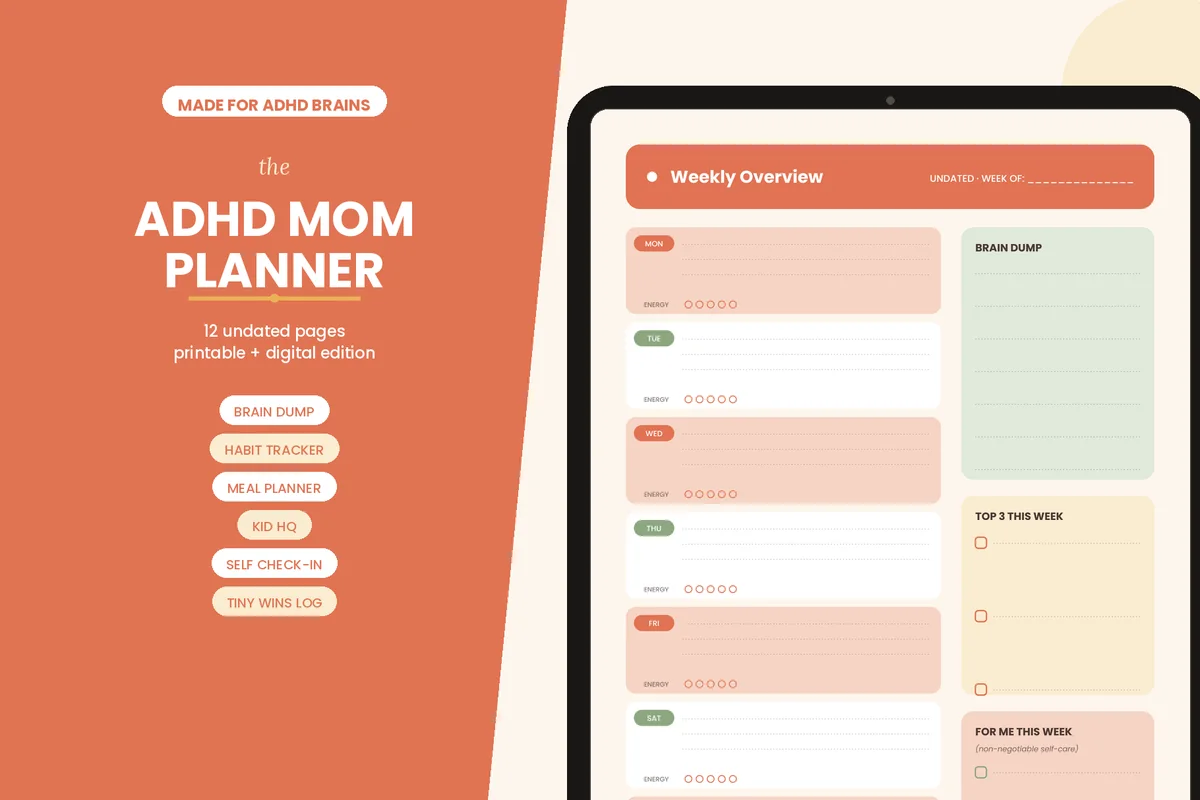
Layouts: 12 pages with weekly, daily, meal and child-schedule sectionsFormat: PDF for GoodNotes or Notability; print use also offeredDates: Undated
Best for: a small weekly system with a place for children’s schedules and backup meals. Designed by thecliparthouse.
- Weekly overview with a brain-dump area, three priorities and an energy tracker
- Kid Wrangling HQ for schedules for up to three children
- Weekly meal grid and a low-energy backup-meals list
- Daily page, undated monthly calendar, habit tracker and a short home-reset checklist
This is my closest match to the family-week ideas below: the children’s schedule and backup-meal list address specific household questions. I would start with the weekly overview and add one supporting page. The ADHD label describes the seller’s intended audience, not a medical benefit or a guarantee that this layout suits every parent.
Best separate planning sections
2. Undated Digital Planner, Life Planner
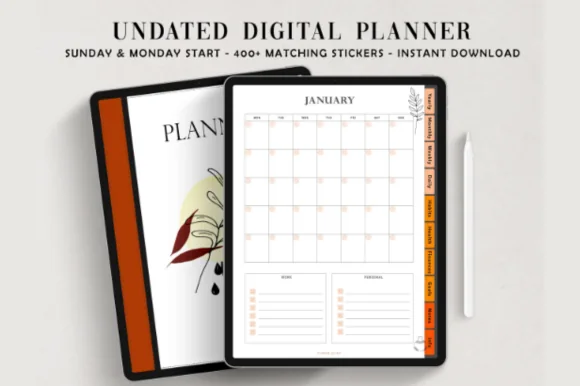
Layouts: 110 pages in 10 hyperlinked sectionsFormat: PDF for GoodNotes and NoteShelfDates: UndatedWeek start: Monday-start and Sunday-start PDFs
Best for: keeping the calendar, household budget and personal goals in separate sections. Designed by ThePlannersDelight.
- Monthly, weekly and daily pages with key dates and yearly goals
- Meal planner, monthly budget, revenue and expense trackers
- Goal-planning pages and several note layouts for household lists
- Separate Monday-start and Sunday-start PDFs with app setup instructions
Choose this broader layout when family planning and your own goals need separate places. The calendar can hold school and work commitments, while the budget and meal pages keep the details elsewhere. It is a general life planner: named pickup owners and family handovers are information you add, not dedicated features promised by the seller.
Best dinner-planning companion
3. Digital Meal Planner with Hyperlinks
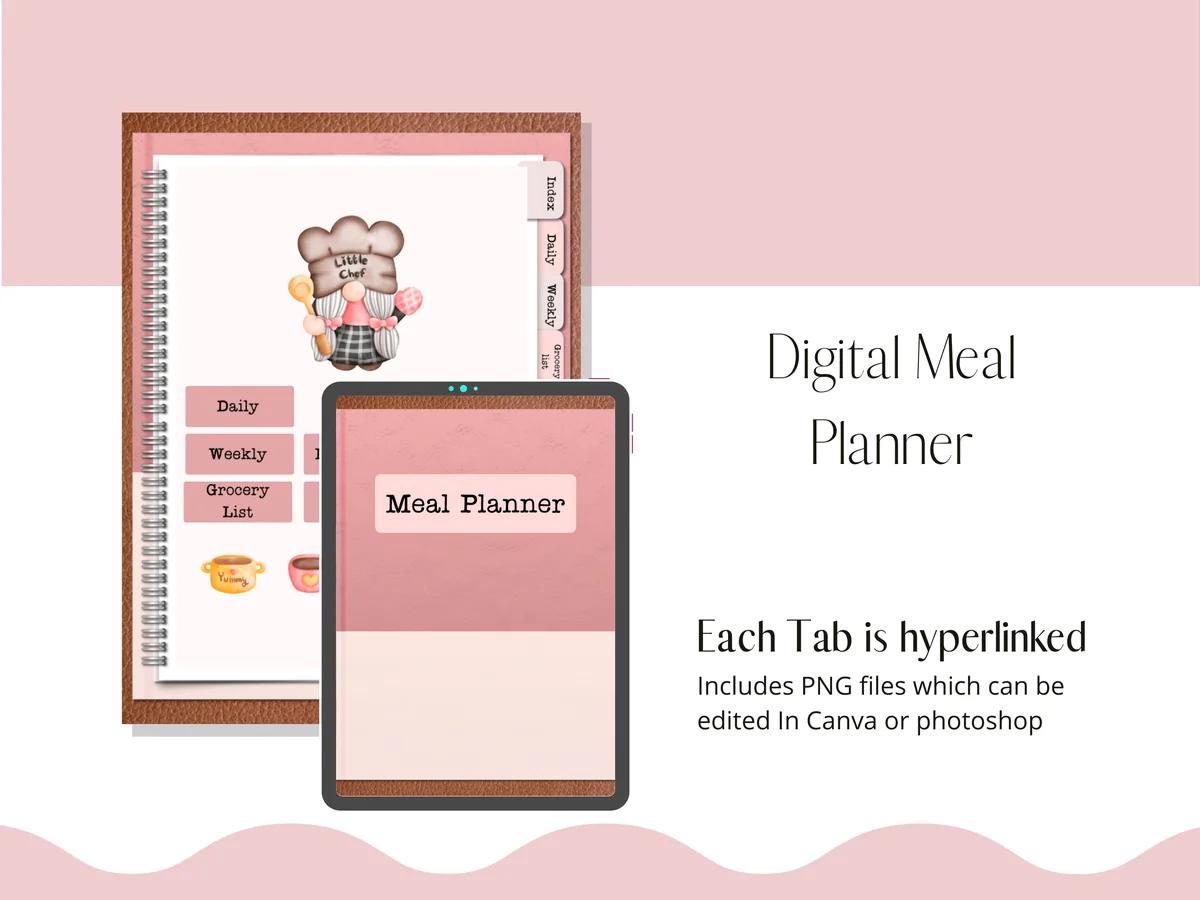
Layouts: Daily and weekly meals, groceries, inventory, recipes and budgetFormat: Hyperlinked PDF plus separate PNG pages
Best for: connecting the week’s dinner choices to groceries and food already at home. Designed by Perla Designs.
- Linked PDF with daily and weekly meal pages
- Grocery-list and inventory sections for planning what needs buying
- Recipe, budget and notes sections alongside the meal plan
- Separate PNG pages are included; the linked PDF is the digital-planning option
This is a focused companion rather than a full mom planner. It suits the part of the week where a late pickup changes dinner and the grocery list. Keep appointments in your main weekly calendar, then use this file for food decisions; buying it would not replace a family schedule.
Quick Comparison
| Planner | Family-week role | Files and structure | Main limitation |
|---|---|---|---|
| 1. ADHD Planner for Moms | Children’s schedules and a small weekly plan | Undated PDF; 12 pages | A compact family option; not a shared calendar app |
| 2. Undated Digital Planner, Life Planner | Calendar, budget and personal goals | Undated hyperlinked PDF; two week starts | General life planner; add family roles yourself |
| 3. Digital Meal Planner with Hyperlinks | Dinner, groceries and pantry checks | Hyperlinked PDF with PNG extras | Meal-planning companion, not a full family organizer |
Build Your Mom Planner Around Three Questions
- What is fixed? School hours, appointments, work shifts and activities go on the weekly calendar with travel time.
- Who owns the next action? Add a name beside pickup, the permission slip and the grocery order. A task without an owner stays undecided.
- What belongs to you? Reserve a small area for rest, a personal appointment or one project. Family administration should not fill every box.
The planner supplies pages; your entries connect them to the household. A plain notebook page can hold the same weekly structure. Choose one main calendar, add names beside shared tasks and keep detailed lists on supporting pages.
30 Mom Planner Ideas, Grouped by the Job They Do
Start with the first group if appointments are the problem. Add a second group only when the weekly page leaves a repeated question unanswered. Busy moms do not need a separate tracker for every small part of the day.
Family Calendar: See the Handovers 1–6
- 1One weekly landing page. Put school, work and activities in one view. Keep detailed project notes elsewhere so the week remains readable.
- 2A pickup owner beside every event. Write “Alex collects, 3:10” rather than just “soccer.” Include the return trip if a different adult handles it.
- 3A travel buffer. Block the journey before and after an appointment. A 4:00 lesson across town cannot follow a 3:55 pickup without another arrangement.
- 4A simple person key. Use initials plus color for each family member. Names or initials keep the meaning visible when colors look similar.
- 5An exception strip. Give early release, a visiting relative or a changed work shift a short line at the top. Check it before copying last week.
- 6A waiting-for box. Record the reply you need, who you asked and a follow-up day. “Waiting for club confirmation, check Wednesday” is actionable.
Home and Meals: Plan for the Actual Evening 7–12
- 7Dinner beside the busiest days. Choose the easiest meal for the tightest handover. Write “leftovers” deliberately instead of leaving the box blank.
- 8A grocery cutoff. Put the shopping or order deadline before the meals that need it. An ingredient list is useful only when someone buys it.
- 9A short kitchen inventory. List a few foods to use first. Keep this separate from the full grocery list so it stays easy to scan.
- 10A minimum home reset. Choose a small finish line such as clearing the table and packing bags. Do not turn a tired evening into a whole-home checklist.
- 11A weekly chore owner. Pair each recurring chore with a name and an agreed time. Include noticing and restocking supplies in the assignment.
- 12A backup dinner line. Name one low-effort option already available at home. Change the plan when pickup runs late rather than carrying a failed meal forward.
Kids and School: Track the Next Action 13–18
- 13School messages into actions. Turn a long email into “return form Thursday, Alex.” Keep the original message where you can retrieve the details.
- 14One line per child. On a mom planner for multiple kids, put each child on a separate row. Shared events can sit in a family row.
- 15An activity bag checklist. Write the few items that are repeatedly forgotten, such as shoes, water and the instrument. Skip obvious items that add clutter.
- 16A deadline and a preparation date. If a project is due Friday, schedule buying materials earlier. The due date alone does not show the work needed.
- 17A school-break coverage box. Write who is available and which hours still need a decision. Leave an unanswered slot visibly open until confirmed.
- 18A birthday preparation note. Add the gift or RSVP action before the party date. A birthday reminder on the morning itself is too late for preparation.
Money and Household Admin: Keep Decisions Visible 19–24
- 19A bill review reminder. Use the planner to remember a review, not to store bank details. Keep financial credentials outside a shared family page.
- 20An upcoming-cost list. Note likely school, club or household costs for the month. Amounts can stay in a separate private budget if you share the weekly page.
- 21A return or renewal deadline. Give library returns, subscriptions and borrowed items a dated action. Remove the entry once it is resolved.
- 22A short errand route. Group nearby errands into one possible trip. Treat it as a suggestion that can move, not another fixed appointment.
- 23A home-maintenance next step. Write “ask for repair appointment” before reserving a slot for the repair. Keep estimates and private contact information elsewhere.
- 24A family decision list. Separate “choose summer coverage” from ordinary tasks. Give a decision a discussion time and identify who needs to take part.
Mom Time: Make Your Own Week Visible 25–30
- 25A personal appointment slot. Put your own appointment on the same weekly page as family commitments. Include travel and coverage, just as you would for anyone else.
- 26One small personal goal. Choose a next step such as outlining a page or emailing a class organizer. “Improve everything” does not fit a Tuesday.
- 27An optional energy note. Use a word like “low” or “steady” to guide which flexible job you choose. It is a planning note, not a health assessment.
- 28A protected off-duty handover. Agree who is covering the family responsibilities during your break. Write the start and finish so the plan is clear.
- 29A tiny good-moment log. Save one sentence or a small note if memory keeping appeals to you. Leave it blank on days when recording feels like extra work.
- 30A stop-doing line. Name one task you are dropping, simplifying or delegating this week. A mom life planner should also make room by removing work.
Keep a detailed room rotation separate and copy only this week’s chosen job to the family page. Apply the same boundary to recipes: the weekly calendar needs the meal decision, while ingredients and cooking notes belong on supporting pages.
A Filled-In Family Week: Find the Collision First
This is an invented example, not a record of a real family. Jamie works until 5:00 on weekdays, Alex has a late shift Tuesday, and two children have different afternoon activities. The point is to make handovers explicit before adding chores.
Monday: Normal Pickup, One Small Reset
- Fixed: School ends 3:10; Alex collects both children. Jamie finishes work at 5:00.
- Home: Pasta at 6:00; Alex cooks, Jamie packs Tuesday bags.
- Personal: Jamie’s reading break 7:30–8:00, with Alex covering bedtime questions.
Tuesday: Two Places at Once
- Collision: School early release 1:30; Jamie has a 1:00–2:00 meeting; Alex starts work at 1:00.
- Decision: Ask an agreed backup adult on Monday. Write “awaiting confirmation” until they accept; do not mark the pickup covered yet.
- Fallback: If coverage is unavailable, arrange a work change or another agreed pickup arrangement. Canceling an after-school activity alone will not cover the 1:30 release. Remove the grocery trip from this afternoon.
Wednesday: Split the Activities
- Fixed: One child has soccer 4:00–5:00; the other has music 4:15–4:45 at a different location.
- Owners: Alex handles soccer and its travel; Jamie arranges the music trip around work with confirmed cover or an agreed schedule change.
- Check: If that work change is unavailable, this is still an unresolved conflict. Reschedule a lesson rather than draw an impossible route.
Thursday and Friday: Finish Only What Matters
- Thursday: Jamie submits the school form before its deadline. Alex checks ingredients and places the grocery order.
- Friday: Leftovers for dinner. Move the optional closet tidy to the parking list; keep the library return if it is due.
- Personal: Alex covers Friday pickup so Jamie can keep a personal appointment, with the travel window shown.
Weekend: Review, Then Leave Space
- Saturday: Alex collects groceries; Jamie handles the party RSVP. Keep the afternoon unassigned unless something genuinely needs it.
- Sunday: Check school messages together, resolve next week’s pickup owners and select a few meals.
- Rollover: Give each unfinished task a decision: schedule, delegate, park or drop.
Notice the Tuesday and Wednesday gaps. A planner does not solve a coverage shortage, but a visible unresolved box gives you a specific conversation to have. Do not fill it with a hopeful name and mistake that for an agreement.
Working Mom or Stay-at-Home Mom: Change the Anchors
The page structure can stay the same while the fixed commitments change. These are two sample setups, not assumptions about who should do the work. Shift work, single parenting and shared custody may need different handover boundaries.
Working Mom Planner: Protect the Transitions
- Anchor the workday: Show your actual unavailable hours and commute. Do not fit a school errand into a meeting block just because both boxes are small.
- Write the handover: Name who handles pickup, dinner and the next morning’s bags. Confirm coverage before accepting overlapping commitments.
- Give admin a container: Choose one feasible slot for forms and messages rather than leaving them scattered through work time.
- Use a low-effort evening: Match a late shift with a simple dinner and a short reset. Leave optional chores movable.
Stay-at-Home Mom Planner: Show the Care Work
- Anchor care periods: Put school runs, appointments and supervision in the week before flexible housework. Being home does not make every hour available.
- Use flexible windows: “After lunch, if possible” suits an optional errand better than an exact time that depends on a child’s day.
- Make partner tasks visible: Agree who handles a form, the grocery list or weekend care from start to finish.
- Keep an off-duty block: Show who takes over during a personal break. It needs coverage, not just a decorative self-care sticker.
Set Up the Weekly Page on iPad in Five Steps
- Choose one week view. Use a page you already have, or sketch seven labeled sections in a notebook. Add small boxes for owners, meals and flexible tasks. No new purchase is necessary to try the method.
- Copy fixed commitments first. Check the original school message or calendar before writing an exception. Include travel, then flag overlaps.
- Add the owner and next action. “Ask Alex about pickup Monday” belongs on the task list until Alex confirms. Replace it with the agreed arrangement afterward.
- Choose a few flexible jobs. Put them beside days with room, keeping a separate parking list for everything that can wait.
- Open tomorrow before finishing today. Check the first appointment, required bag and pickup owner. Make only the changes that matter for the next handover.
For a mom daily planner page, pull just today’s fixed times and a few next actions from the weekly view. Avoid copying the entire running list every morning. The daily page should help you start, while the weekly page keeps the family picture visible.
Share the Plan with a Partner Without Sharing Everything
A page export is useful when another adult only needs the week. Goodnotes and Notability both support PDF export. An exported copy is a snapshot: send a replacement when the pickup plan changes, and label it with the week and revision time.
- Choose the shared content: Include pickup arrangements, agreed chores and meals. Keep private journaling and sensitive family information on separate pages.
- Send the current page: In Goodnotes on iPad, open Share and choose the current-page export option, then PDF. Menu wording can differ by app version.
- Ask for acknowledgment: “Can you confirm Tuesday pickup?” is clearer than assuming that a sent file has been read.
- Handle changes explicitly: Mark the revised arrangement and send it to the people affected. Keep one agreed current version.
Live document collaboration depends on the app and participants’ accounts. Goodnotes currently requires Pro to initiate private sharing, and Apple devices need iCloud Sync enabled to share or accept documents. Check the current Goodnotes collaboration guidance before relying on that workflow.
For export details, see Goodnotes page export and Notability sharing options. Use the instructions for your app version.
Move Unfinished Tasks Without Rewriting the Whole Week
A carryover list gets heavy when every unfinished idea receives a new date automatically. At the weekly review, choose one of these four outcomes for each task:
- Schedule: Still needed and time-sensitive? Give it a feasible date and an owner. Check the deadline before choosing the slot.
- Delegate: Could someone else take this on? Agree the handover, including what “finished” means. Keep it pending until accepted.
- Park: Useful someday? Move it to a parking list without a false deadline. Review that list when there is actual capacity.
- Drop: No longer worth doing? Cross it out. You do not need to preserve a task just because last week’s page contains it.
Example: “sort all school papers” becomes “sign Thursday form” on this week’s page. Old artwork goes on a later sorting list, and duplicate notices can be discarded. The important action stays visible without pretending the entire pile must disappear today.
Template or App? Decide What You Need the Tool to Do
- Choose a writable page when you want a visual family overview, handwritten notes and flexible placement. A PDF alone does not create calendar alerts or automatically sync its written appointments to a calendar.
- Use a calendar or reminder feature for an event that needs an alert. Enter the event in that tool deliberately rather than expecting handwriting in the planner to trigger it.
- Use both with a clear boundary if needed: alerts in your calendar, family context and handovers on the weekly page. Decide where a changed appointment gets updated so the two views do not quietly disagree.
FAQ: Mom Planner Questions
What is a good planner for a mom?
A useful starting point is a readable weekly view with space for family commitments, named owners and your own time. Pick the layout around the job you need to solve, such as conflicting pickups, rather than the number of included pages.
How do you use a planner as a beginner?
Start with the next seven days. Write fixed times, name the pickup owners and choose a few flexible tasks. Review the page after that week before adding trackers, color systems or more sections.
Can I make a mom planner template without buying anything?
Yes. Draw a week view and add headings for meals, owners and a small task list in a notebook app you already have. A mom planner printable can also provide a layout idea, but check file format and your app’s import support before assuming any particular template works digitally.
What should a mom planner for multiple kids include?
Give each child a labeled row or initials, then include the location, travel window and adult responsible for each handover. When activities overlap, resolve the coverage first. More colors alone do not fix a scheduling conflict.
Is a mom planner app the same as a digital planner PDF?
No. A PDF is the page you write on; the app supplies tools such as annotation and export. Collaboration, alerts and syncing depend on the app and settings. A separately exported copy stays as it was when you sent it; send a revised copy after changing the original.
How do I include self-care without another checklist?
Reserve one realistic personal block and agree who covers care responsibilities during it. It can be rest or a personal appointment; it does not need a daily streak. Keep a personal appointment or a short rest block visible beside family commitments.
Give Next Week a Clear Starting Point
Choose one weekly page and resolve the first handover that could go wrong. Then add a meal decision, a small personal block and a place for tasks that can wait. Your mom planner earns its space when it makes the next decision clearer, even if half the optional boxes stay empty.
You May Also Like
This site may earn a commission from qualifying purchases through affiliate links. See the affiliate disclosure.