You finish a course, close the last lesson and return to the same work problem on Monday. What changed? These professional development planner ideas turn that awkward gap into a small record of learning, practice and evidence on your iPad, with seven digital tools for building your own pages.
Start with one competency and a single page. Give it a baseline, a task where you can practice and a date to look again. The notebook options come first so you can compare their structure; the 18 layouts below also work in a notebook you already have.
TL;DR: Choose a notebook by how you file your work-skill notes: five stages, daily attempts, monthly reviews or separate competencies. These seven tools provide general pages and navigation. You add the development fields yourself; you can set up all 18 layouts in your current notebook.
Quick Picks
- Best for five stages of skill development: Digital Notebook 5 Hyperlinked Tab
- Best for an ongoing reflection log: Digital Ruled Journal
- Best for a short practice note: DaisyNotes | Digital Notebook | Purple
- Best for monthly evidence reviews: Digital GoodNotes Journal – Art Deco
- Best for frequent practice entries: 365 Days Daily- Digital Journal
- Best for several separate competencies: Watercolor Hyperlinked Digital Notebook
- Digital Notebook 5 Hyperlinked Tab – Best for five stages of skill development
- Digital Ruled Journal – Best for an ongoing reflection log
- DaisyNotes | Digital Notebook | Purple – Best for a short practice note
- Digital GoodNotes Journal – Art Deco – Best for monthly evidence reviews
- 365 Days Daily- Digital Journal – Best for frequent practice entries
- Watercolor Hyperlinked Digital Notebook – Best for several separate competencies
- Dark Mode Digital Notebook – Gold Theme – Best for side-by-side dark-paper notes
Best for five stages of skill development
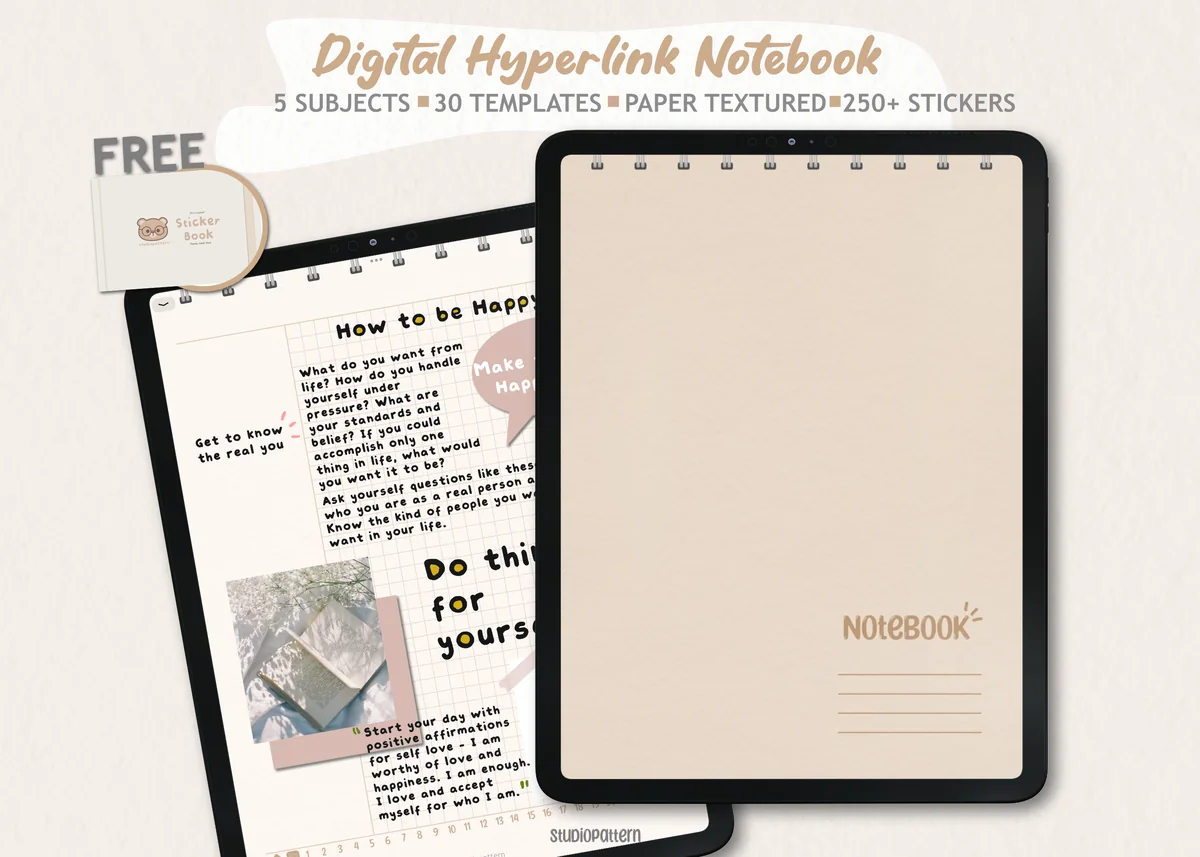
1. Digital Notebook 5 Hyperlinked Tab
Orientation: PortraitLayouts: Blank, ruled, grid and planner pagesDates: No prefilled year shown
Best for: separating a skill baseline, learning, practice, feedback and evidence. Designed by studiopattern.
- Five linked subject sections and a contents page
- One hyperlinked PDF, a PDF manual and 30 reusable paper templates
- 250+ individual PNG stickers and a GoodNotes sticker book
- Designed for PDF annotation apps; the seller recommends an iPad or tablet with Apple Pencil or another stylus
Five sections fit the whole process without assigning a tab to every small task. Blank, ruled and grid pages give a baseline chart and longer practice notes different spaces. Rename the subject pages yourself and keep one clean template in each section. The included planning sheets are general layouts, so your work-skill fields still need to be added.

Best for an ongoing reflection log
2. Digital Ruled Journal
Orientation: PortraitLayouts: Ruled daily pages and indexDates: No prefilled year shown
Best for: writing dated accounts of applying a skill at work. Designed by Island Tulip Designs Co.
- 366 ruled pages with a paper-like appearance
- Fully hyperlinked navigation with month and day links shown
- Three floral covers and 40 PNG/GoodNotes journal prompts
- The general prompts are not a set of professional-development questions
A chronological journal suits a skill that develops through repeated attempts: one entry after a presentation, a difficult handoff or a first draft. Its ruled pages give the situation and outcome more room than a small tracker cell. Use your own date and task heading, then add a short reference to the earlier attempt. This is a writing-first option rather than a five-part filing system.

Best for a short practice note
3. DaisyNotes | Digital Notebook | Purple
Orientation: PortraitLayouts: Two lined page designsDates: No prefilled year shown
Best for: keeping a small notebook for one competency. Designed by catsquills.
- Portrait digital notebook for GoodNotes and Notability
- Four covers and two page templates
- JPG and PDF files with wood-texture backgrounds
- The seller allows handwriting with a stylus or finger
The restrained page choice is useful when building a large system would delay the first entry. Put a single skill on the cover label, then write Situation, Action and Next Try on the lined page. The floral border leaves less writing width than a plain sheet, so keep the entry brief. There is no linked career dashboard to maintain.

Best for monthly evidence reviews
4. Digital GoodNotes Journal – Art Deco
Orientation: PortraitLayouts: Lined pages and brain-dump templatesDates: Undated
Best for: filing personal progress notes under linked month dividers. Designed by Sarah Doodles.
- Undated hyperlinked PDF for apps including GoodNotes and Notability
- Monthly dividers with five blank lined pages per month
- Brain-dump pages, including a priority layout, can be duplicated
- The seller recommends a tablet with Apple Pencil or another stylus and specifies personal use only
Monthly tabs make sense for reviewing evidence rather than writing every day. Reserve one lined page for what changed, one for feedback and one for the next practice task. The Art Deco dividers give each month a visible boundary. In apps such as GoodNotes and Notability, the seller says to select the read-only tool for tab links; keep this journal as a personal record rather than a shared team template.
Best for frequent practice entries
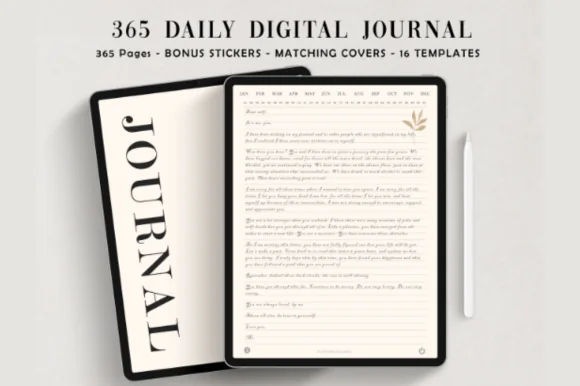
5. 365 Days Daily- Digital Journal
Orientation: PortraitLayouts: Daily lines and 16 note templatesDates: Undated
Best for: tracking many small attempts with a choice of line spacing. Designed by ThePlannersDelight.
- Undated PDF journal with 365 linked daily pages and 384 total pages
- Narrow-lined and wide-lined versions plus 16 additional templates
- Bonus covers and PNG stickers
- Requires a tablet that supports writing with a stylus, such as Apple Pencil; app, tablet and stylus are not included
Choose narrow lines for a detailed account or wide lines for a few observations after each attempt. The month-and-day links suit frequent practice, but they do not require an entry every calendar day. Use a column template for Before and After when a change is easier to compare side by side. Keep the main skill index short so it remains easy to find the useful entries.

Best for several separate competencies
6. Watercolor Hyperlinked Digital Notebook
Orientation: PortraitLayouts: Lined, blank and half-linedDates: No prefilled year shown
Best for: keeping each work skill in its own linked section. Designed by daysfilledwithjoy.
- One hyperlinked PDF for GoodNotes or a similar PDF annotation app
- Twelve sections with lined, blank and half-lined pages
- Blank pages can be duplicated to extend a section
- Pink watercolor cover and numbered dividers shown in the gallery
Twelve sections give room to separate facilitation, analysis and written communication without mixing their evidence. Start with only the sections you need and leave the rest unused. A half-lined page can hold a small process sketch above the written result. This is the stronger fit when you need more subject divisions than the five-tab option, rather than more daily pages.
Best for side-by-side dark-paper notes
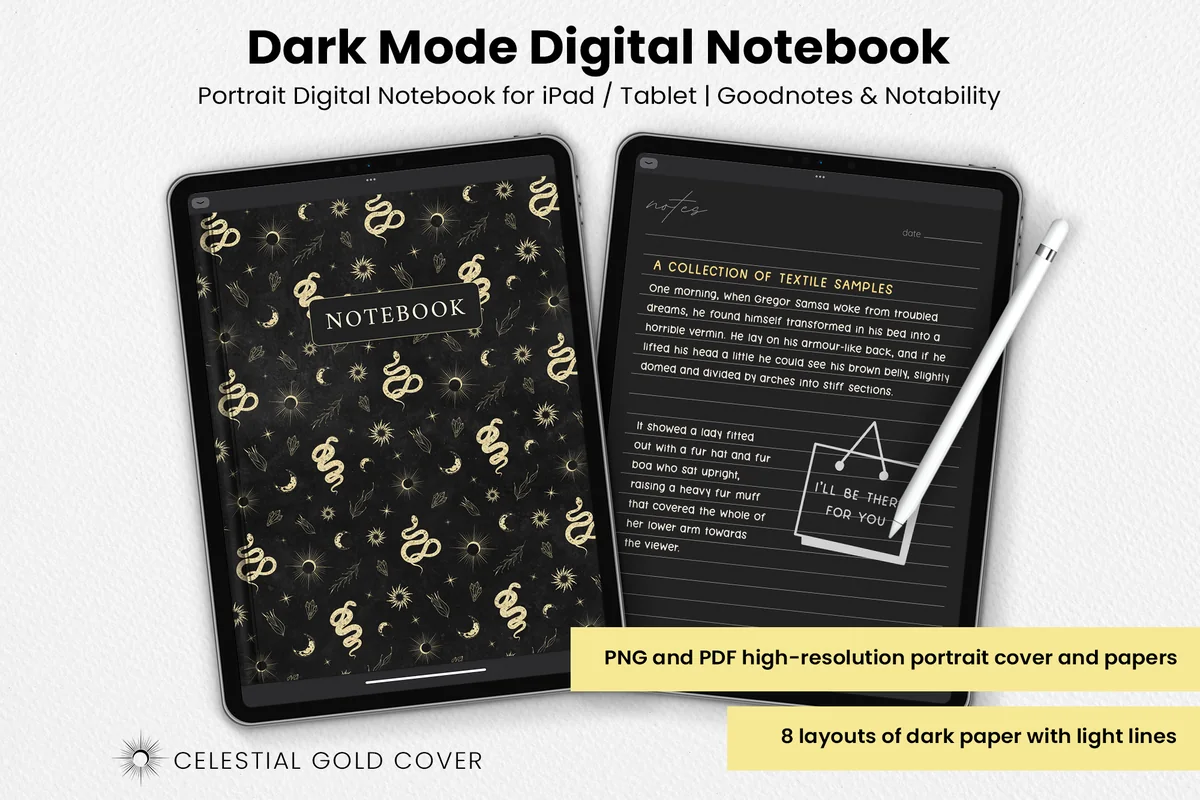
7. Dark Mode Digital Notebook – Gold Theme
Orientation: PortraitLayouts: Columns, lists, dots, square, lines, notesDates: No prefilled year shown
Best for: comparing an intended action with what actually happened. Designed by catsquills.
- Portrait digital notebook for GoodNotes and Notability
- Eight dark-paper layouts with light lines
- Columns, habit tracker, to-do, numbered list, dots, square, lines and notes
- PNG and PDF files with a celestial gold cover
The column sheet offers a simple place for Plan and Observation without drawing a new layout each time. Pick a light ink color that remains legible against the dark texture. The dot and square pages also leave room for a process diagram. Choose this set for its paper layouts, rather than linked monthly navigation. Add your own competency headings.
Quick Comparison
| Tool | Work-skill use | Page structure | Main distinction |
|---|---|---|---|
| 1. Digital Notebook 5 Hyperlinked Tab | Five-stage process | 5 linked subjects | 30 paper templates |
| 2. Digital Ruled Journal | Chronological reflections | 366 ruled pages | Month and day navigation |
| 3. DaisyNotes | Digital Notebook | Purple | One-skill notes | 2 page templates | 4 purple floral covers |
| 4. Digital GoodNotes Journal – Art Deco | Monthly review archive | 5 lined pages per month | Linked monthly dividers |
| 5. 365 Days Daily- Digital Journal | Frequent work practice | 365 linked daily pages | Narrow or wide lines |
| 6. Watercolor Hyperlinked Digital Notebook | Separate competencies | 12 linked sections | Lined, blank, half-lined |
| 7. Dark Mode Digital Notebook – Gold Theme | Plan versus observation | 8 dark-paper layouts | Light lines on dark pages |
18 Professional Development Planner Ideas for a Work Skill
A professional development plan template becomes more useful when each learning action points to a work task. The layouts follow that connection: current skill, learning action, application, feedback and evidence. They are pages you create, not features included in the seven products above.
Set a baseline you can revisit
- 1A one-skill brief. Write the competency, the work situation and why it matters. Replace “be a better communicator” with “give a project update that ends with a clear decision request.” Keep the scope small enough to practice in your current role.
- 2A task-based skill gap map. List three tasks that use the skill. Beside each, write “independent,” “with help” or “not tried,” then add one dated example. Treat these as personal working labels, not a formal score or certificate.
- 3A before-sample note. Describe how you approach the task now. Record the missing step, the question you could not answer or the help you needed. Use an approved reference to an example rather than copying confidential work into a personal notebook.
- 4A success-signs checklist. Choose two or three things you could observe after practice. For a meeting update, try “decision requested,” “owner named” and “next date stated.” Check the behavior rather than writing a broad confidence rating.
- 5A resource-and-access list. Name the lesson, colleague or approved guide you need, plus any permission or time constraint. If a practice opportunity depends on a manager, write the specific request and a fallback task you can do without it.
- 6A review-date card. Put the review date beside the skill and expected evidence. Add a brief question such as “Can I do the next attempt without help?” Choose a date that follows a real opportunity to practice, rather than an arbitrary streak.
Connect learning to a work attempt
- 7A learn-to-try page. Split a sheet into “What I learned,” “Where I will try it” and “What I will notice.” Capture one usable technique rather than a transcript of the course. End with the next task and its date.
- 8A bounded learning action. Write one lesson, chapter or demonstration to complete and the question it should answer. Include a stopping point. For example, learn one way to summarize a chart, then test it on a sample report before taking another lesson.
- 9A practice opportunity map. Look at upcoming work and mark a small place to use the skill: a handoff email, a rehearsal or a supervised task. Separate the opportunity from the outcome so you do not claim progress simply because a meeting happened.
- 10A first-attempt record. After the task, note the situation, what you did and what happened. Keep observation separate from interpretation: “the reader asked for the deadline” is more useful than “my explanation was bad.” Add the part you would keep.
- 11A blocker-and-adjustment log. Pair each obstacle with the next change you can make. If the issue was missing access, write an access request; if it was unclear wording, draft a new opening. Avoid treating every blocked task as a skill failure.
- 12A second-attempt comparison. Keep the first and next attempt on the same spread. Use the same success signs so you can see what changed. Leave a space for “still uncertain” when there is not enough evidence to judge the result.
Use feedback and keep useful evidence
- 13A focused feedback request. Write one question for someone who saw the work. “Was the decision request clear?” is easier to answer than “How did I do?” Include the task context so the response refers to an actual attempt.
- 14A feedback-to-action record. Use three fields: observation received, clarification needed and next experiment. Preserve the meaning of the comment without turning it into a verdict on your ability. Ask for an example if the feedback is too broad to act on.
- 15An evidence index. Record a date, task, your contribution, result and approved reference. Give each entry a short ID, such as E01. An evidence index points to work you are allowed to retain; it is not a reason to store private client files.
- 16A development conversation agenda. Bring one progress example, one unresolved difficulty and one request for support. Link each to a notebook entry. Keep performance-review decisions separate from your own learning notes so the purpose of the conversation stays clear.
- 17A monthly skill review. Compare the baseline with current attempts. Mark what you can now do independently, what still needs help and which evidence is missing. A completed course can be recorded as learning, while application remains open until you try the task.
- 18A next-cycle decision. Choose “continue,” “narrow,” “pause” or “move on,” and give a short reason. Carry forward the next action rather than copying the whole notebook. Keep one link to the previous review so the history remains understandable.
Build One Skill-to-Evidence Page on Your iPad
Use one page for a small development cycle before building separate sections. The fields below are a suggested working layout, not an accredited professional-development record. In a five-tab notebook, file the same information across the five stages only when the single page becomes crowded.
A five-step setup
- 1Name the work task. At the top, write a task you expect to repeat, the skill it uses and the date. Add a one-sentence baseline with an example. That gives the review something concrete to compare against.
- 2Choose one learning action. Write the resource, the question you need it to answer and a short completion target. Keep general course notes elsewhere. On this page, record only the technique you intend to use at work.
- 3Plan a small application. Name the next suitable task and the behavior you will try. Add one or two success signs. If the opportunity changes, revise the task instead of checking off an attempt that never happened.
- 4Capture an observation and feedback. Afterward, write what happened in plain language and ask one focused question of someone who saw the work. If no feedback is available, label the observation as your own and leave the feedback field open.
- 5Index the evidence and review. Add a dated reference you are permitted to keep, then record the next decision. Duplicate a clean page for the next cycle. Do not replace the baseline; you need it to understand what changed.
For app navigation and reusable page setup, see these GoodNotes planning tips. The five-section notebook above suits stage-based filing; the twelve-section option suits filing by competency. A simple ruled journal is enough if you prefer dates and a short index.
A Professional Development Plan Example: Clearer Project Updates
Here is a fictional example you can adapt. Maya coordinates a small internal project and wants to make her update emails easier to act on. She chooses one communication skill rather than treating the planner as a complete promotion plan.
- Baseline: Her last update described activity but left the decision request until the end. A colleague had to ask what response was needed.
- Learning action: Read an approved internal example and draft an opening with status, decision needed and response date.
- Application: Use that opening in the next routine update, keeping the rest of the message brief.
- Feedback question: “Could you tell what decision I needed and by when?”
- Evidence entry E01: Date, her contribution, a short description of the change and an approved work-system reference. No private email is copied into her personal notebook.
- Review: The recipient identified the request correctly. Maya keeps the opening and tries the format again on a more complex update before judging the skill established.
The example records a useful observation without promising a promotion or a measured productivity gain. If the recipient still needed clarification, the next entry would note the unclear phrase and a revised attempt. An honest “not yet” is more useful than a row of completed course boxes.
Choose Professional Development Topics That Fit Your Work
Professional development topics for employees are easier to plan when they connect to a task you can actually do. Use these starting points to choose a competency, then narrow it to one practice opportunity. Agree on any role-specific requirements with the appropriate person at work.
- Written communication: Turn a long update into a clear status, decision request and next date. Keep a before-and-after note.
- Data explanation: Explain one chart to a colleague and ask what conclusion they understood. Record the question that remained.
- Meeting facilitation: Prepare a short agenda and close with an owner and next action. Note which part needed prompting.
- Project handoffs: Write what the next person needs, where it lives and what remains unresolved. Ask which detail was missing.
- Tool proficiency: Practice one approved feature on a sample task and record the steps you can now complete independently.
- Feedback conversations: Prepare a specific observation and a clarifying question. After the conversation, record the agreed next experiment.
For an administrative assistant, the work task might be a clearer handoff between calendars; for a teacher, it might be a lesson reflection followed by a small change in the next session. The layout stays task-based. It does not replace an employer form, teaching standard or regulated CPD process.
Review Progress Without Turning the Notebook Into Another Job
A career development plan can hold long-term ambitions, but this notebook only needs the next skill cycle. Keep routine deadlines in your work planner and use the development pages to explain what you tried and what changed. That boundary keeps the evidence visible.
- Weekly, after a useful attempt: Add a short observation and link it to the skill. Skip entries that repeat the same information without adding an example.
- At the chosen review date: Compare the same success signs with the baseline. Separate resource completion from application.
- Before a development conversation: Select one example, one question and one request. Share only the material you are allowed to share.
- When a skill stops being relevant: Write a closing note and archive it. A paused goal does not need an empty tracker for the rest of the year.
A digital work planner is better suited to meetings and delivery dates. For broader milestones, compare digital goal planners. Keep a reference between them rather than copying every task into all three systems.
What Belongs in a Professional Development Plan?
Two useful starting references are LinkedIn Learning’s development-plan guide and Small Improvements’ guide to development plans. Both connect goals with action and continuing progress conversations. The notebook layouts here adapt those components for a personal record of work practice.
- Direction: The competency and the reason it matters to your work.
- Action: A resource or practice opportunity with a clear next step.
- Support: The feedback, time or access needed to attempt the task.
- Review: A date to examine the result and adjust the plan.
FAQ: Professional Development Planning on iPad
What is professional development?
For this notebook, it means deliberately building a skill you can apply in your work. A course may be one learning action, but the record also includes practice, feedback and a later review. Your employer or professional body may define additional requirements.
Can I use these ideas without buying a new notebook?
Yes. Draw the fields on any suitable page you already have. The seven tools offer different page structures and navigation, but none is required to try the layouts. Start with the single-page cycle before deciding whether linked sections would help.
Are the seven tools ready-made professional development planners?
No. They are general digital notebooks and journals. You add the skill baseline, learning actions, feedback questions and evidence index yourself. Choose by page layout and filing method rather than expecting career-specific forms inside.
Do all seven tools include PDF files?
PDF is explicitly listed for six tools. The Digital Ruled Journal description names a digital hyperlinked journal and GoodNotes prompt assets without specifying the main journal file extension. Check that detail with the seller if a PDF file is essential to your workflow.
Can this journal count as a formal CPD record?
Do not assume it does. The layouts are suggestions for personal learning notes, not a certificate or approved reporting system. Check the required fields, evidence rules and submission format with your employer or professional body before using any notebook for formal reporting.
How often should I review the plan?
Set the review after a realistic practice opportunity. A short weekly note may suit frequent tasks, while a monthly review may suit a longer cycle. The useful question is what changed in your work, not whether you filled a page every day.
Give One Skill a Clear Next Attempt
Choose one of these professional development planner ideas, write the next task and leave space for what actually happens. Begin with the learn-to-try page and one focused feedback question. Once you know whether you prefer chronological notes or subject sections, choose a digital tool that supports that habit.
You May Also Like
Affiliate note: purchases through selected links can earn this site a commission. You pay the listed price. Read our affiliate disclosure.