The silhouette looks right, but one more soft blending pass turns your painted pear into a smooth digital blob. The useful distinction between Procreate gouache brushes is often the mark they leave behind: solid color, a broken edge, a dusty dab or a gentle transition.
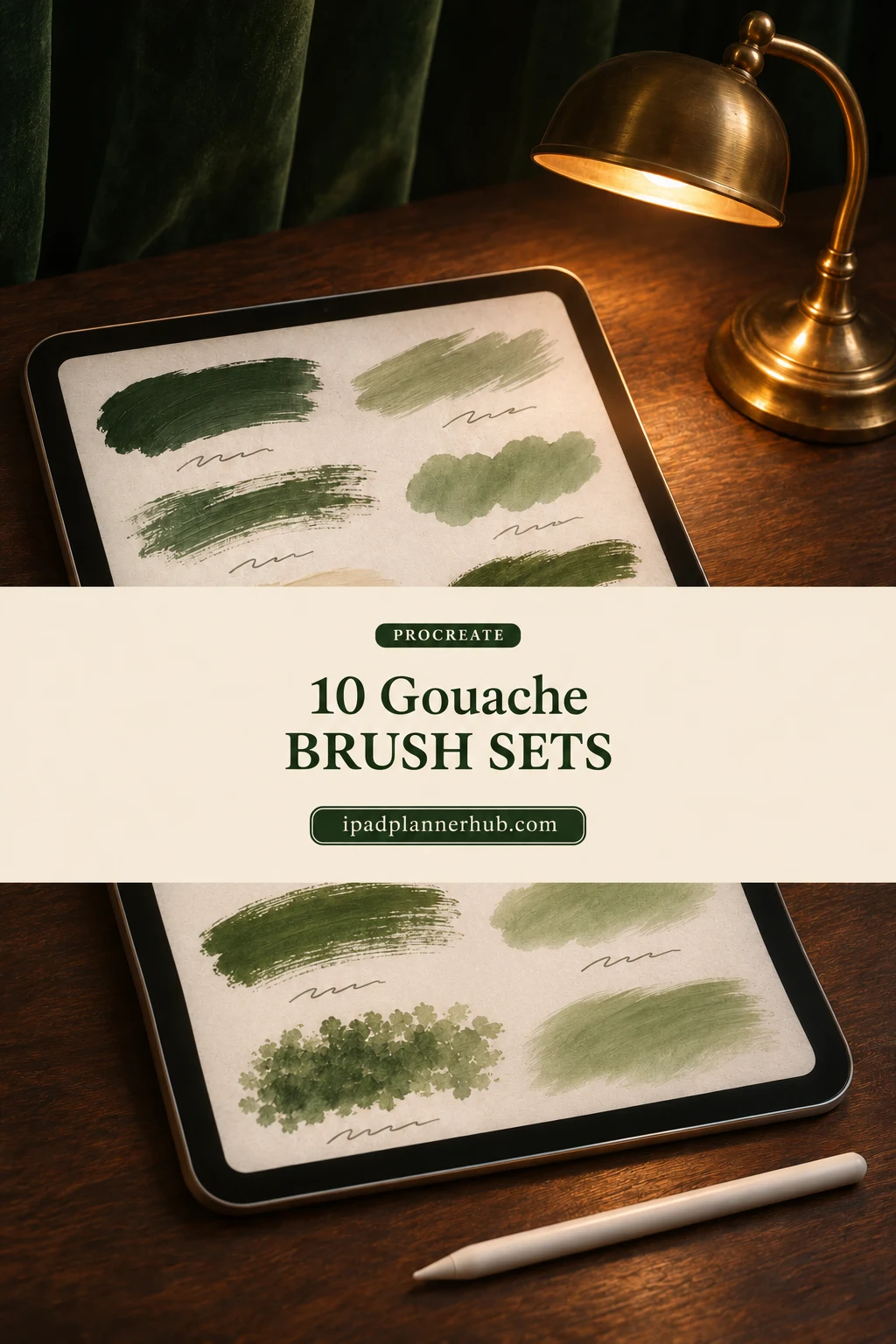
I compared the public descriptions and complete preview galleries for these sets, looking for different ways to build that painted effect. I have not installed or tested the paid files. This list separates painting brushes from stamps, blenders and paper extras so you can choose one set for the picture you actually want to make.
10 Procreate Gouache Brushes and Sets I Shortlisted
There is no single winner for every style. Oh My Gouache is my starting point for clearly demonstrated tool roles; the smaller Freya set suits a limited practice kit. The larger collections add variety, while the blossom-accent choice solves a narrower composition problem.
TL;DR: For clearly labeled paint and blending roles, start with Oh My Gouache. Freya offers a three-brush option or a 12-tool mix. Choose EasyProcreate for sketch and paper variety, Sko4 for contrasting paint behaviors, or Springtime when blossom accents are the actual project. These 10 sets are alternatives, not one shopping list.
Quick Picks
- Best for named painting and blending roles: Procreate Brush Pack | Gouache Brushes
- Best for a compact mixed toolkit: Gouache Brush Procreate
- Best for the smallest painting selection: Procreate Gouache Brushes
- Best for sketch-to-paint variety: Gouache Brushes for Procreate
- Best for contrasting paint behaviors: Gouache Procreate Brushes
- Best for a straightforward swatch-led set: 10 Gouache Brushes Procreate
- Procreate Brush Pack | Gouache Brushes – Best for named painting and blending roles
- Gouache Brush Procreate – Best for a compact mixed toolkit
- Procreate Gouache Brushes – Best for the smallest painting selection
- Gouache Brushes for Procreate – Best for sketch-to-paint variety
- Gouache Procreate Brushes – Best for contrasting paint behaviors
- 10 Gouache Brushes Procreate – Best for a straightforward swatch-led set
- Mary Blair Inspired Gouache Brushes – Best for atmospheric scene texture
- Gouache Painting Brushes for Procreate – Best for painted character work
- Groovy Gouache for Procreate – Best for a guided practice subject
- Gouache Springtime , Procreate Brushes – Best for blossom accents alongside paint
General gouache painting collections
Best for named painting and blending roles
1. Procreate Brush Pack | Gouache Brushes
Layouts: 16 brushesFormat: Procreate on iPad
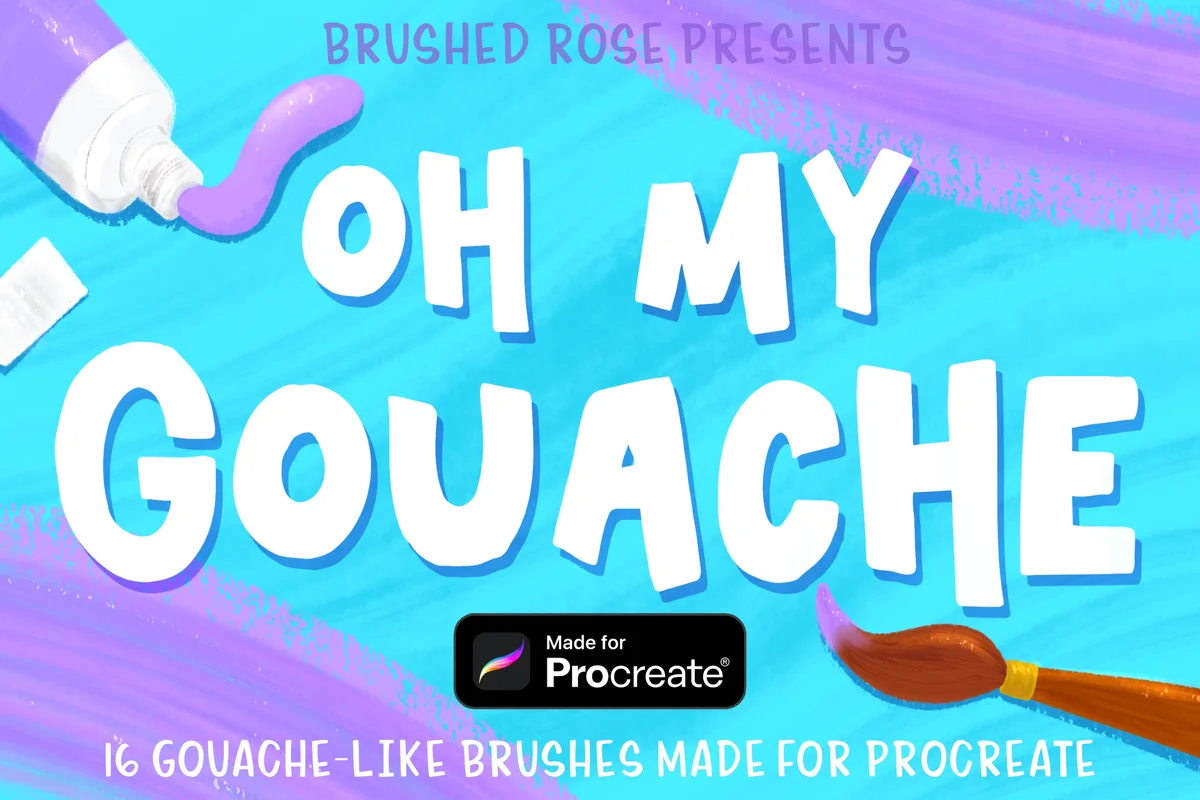
Best for: learning how opaque paint, dry marks and blenders work together. Designed by Brushed Rose.
- 16 gouache-like brushes shown on the cover
- Preview sheet includes Opaque, Dry Brush, Dry Crumble, Washy Liner and Pointillism
- Three blending brushes illustrated with separate wet and dry examples
- ZIP archive containing the Oh My Gouache Procreate brush set
Oh My Gouache makes the division of labor unusually clear. The strawberry illustration labels which brush made the body, seeds and soft transitions; a separate sample shows dry blending around a dark circle. That is more useful to me than a large brush count without examples. Start here if you want a medium-size set with visible painting and blending roles. Its examples include smooth finishes too, so keep the dry marks visible when a matte, broken edge is your goal.
Best for a compact mixed toolkit
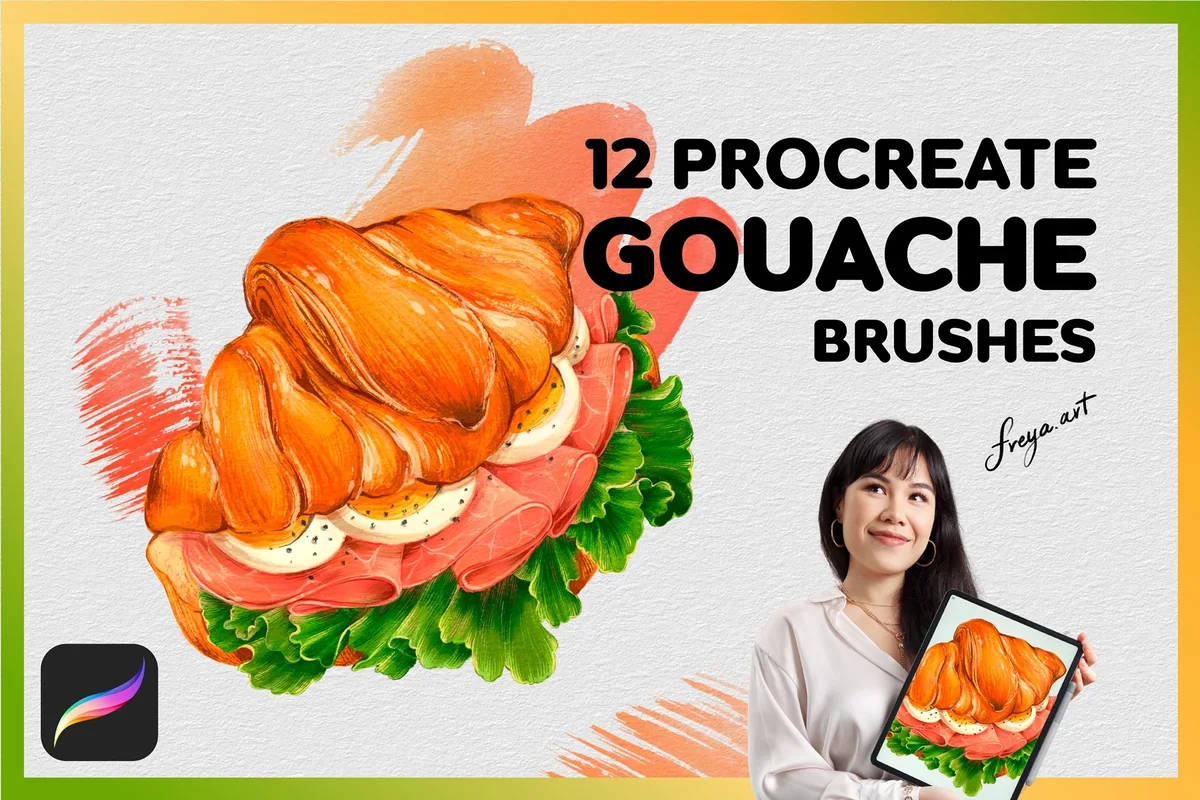
2. Gouache Brush Procreate
Layouts: 12 tools, including 3 stampsFormat: Procreate on iPad
Best for: food studies and painted shapes with a few stamp accents. Designed by FreyaArtProcreate.
- 12 tools: 4 thin, 2 thick, 2 tip, 1 blender and 3 stamp brushes
- 1 bonus paper texture
- Preview shows a croissant sandwich, directional paint marks and color blending
- Made for Procreate on iPad; Apple Pencil recommended for pressure response
Freya’s larger gouache pack has a practical split: eight thin, thick and tip brushes, one blender and three stamps. The croissant example gives those tools a concrete job, from broad bread shapes to narrower lettuce marks. I like it for a small still life where a few accents matter more than dozens of brush variations. Count the stamps as part of the 12, rather than expecting 12 continuous-painting brushes.
Best for the smallest painting selection
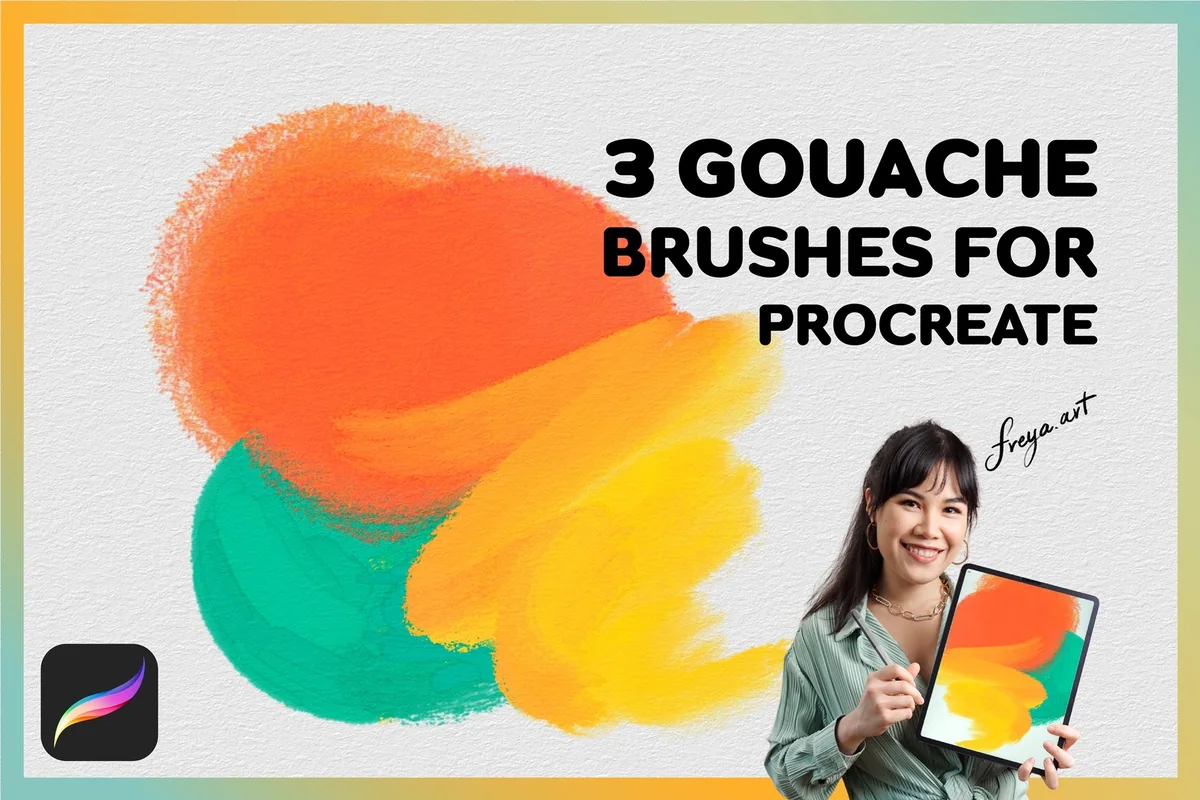
3. Procreate Gouache Brushes
Layouts: 3 painting brushesFormat: Procreate on iPad
Best for: a simple three-brush practice routine. Designed by FreyaArtProcreate.
- 3 gouache brushes: 2 thin and 1 thick
- 1 bonus paper texture
- Orange, yellow and green swatches show differences in mark width and edge texture
- Procreate on iPad only; Apple Pencil recommended
Three brushes can be an advantage when choosing a tool interrupts every mark. Freya’s small set shows two thin options and one thick option, so the next decision can be about your shape or color instead. This is a separate listing from her 12-tool pack, with a much narrower brief. Choose between them according to how much variety you want; there is little reason to start by buying both. No separate blender is listed in this smaller set.
Best for sketch-to-paint variety
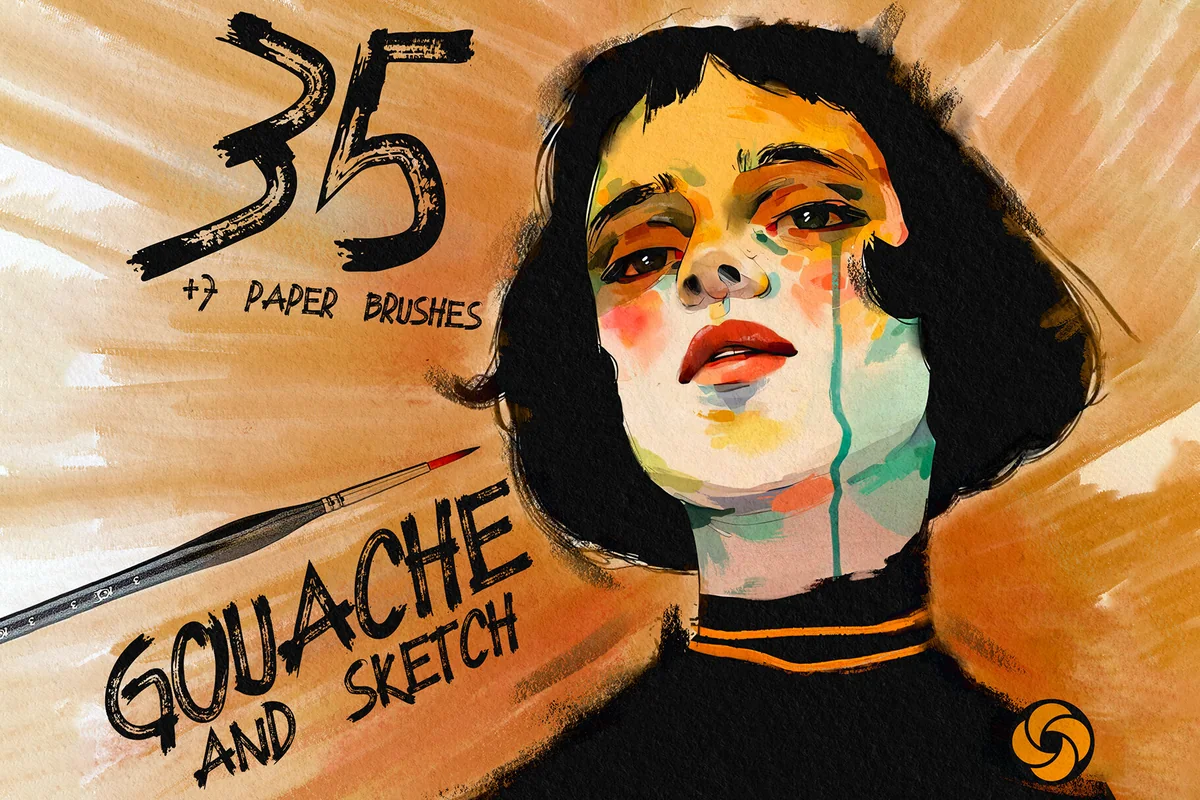
4. Gouache Brushes for Procreate
Layouts: 35 mixed art toolsFormat: Procreate on iPad
Best for: portraits and illustrations that need several dry marks. Designed by EasyProcreate.
- Cover presents 35 gouache and sketch tools plus 7 paper brushes
- Preview lists sketchers, round and flat gouache marks, dry textures and a soft blending brush
- Paper choices shown include linen, textured watercolor, virtual canvas and cardboard
- Only for Procreate; paper extras are brushes, not seven ready-made canvases
This is the broadest toolbox here, but its 35 tools are not all basic paint brushes. Sketchers, ink-like marks, dry textures and blending sit alongside the gouache shapes. The portrait and astronaut examples show how different those marks can look together. I would put it on the shortlist for a complete illustration workflow, especially if you also need sketching options. The seven paper brushes are a separate bonus, and the preview’s paper comparison is worth studying before choosing a finish.
Best for contrasting paint behaviors
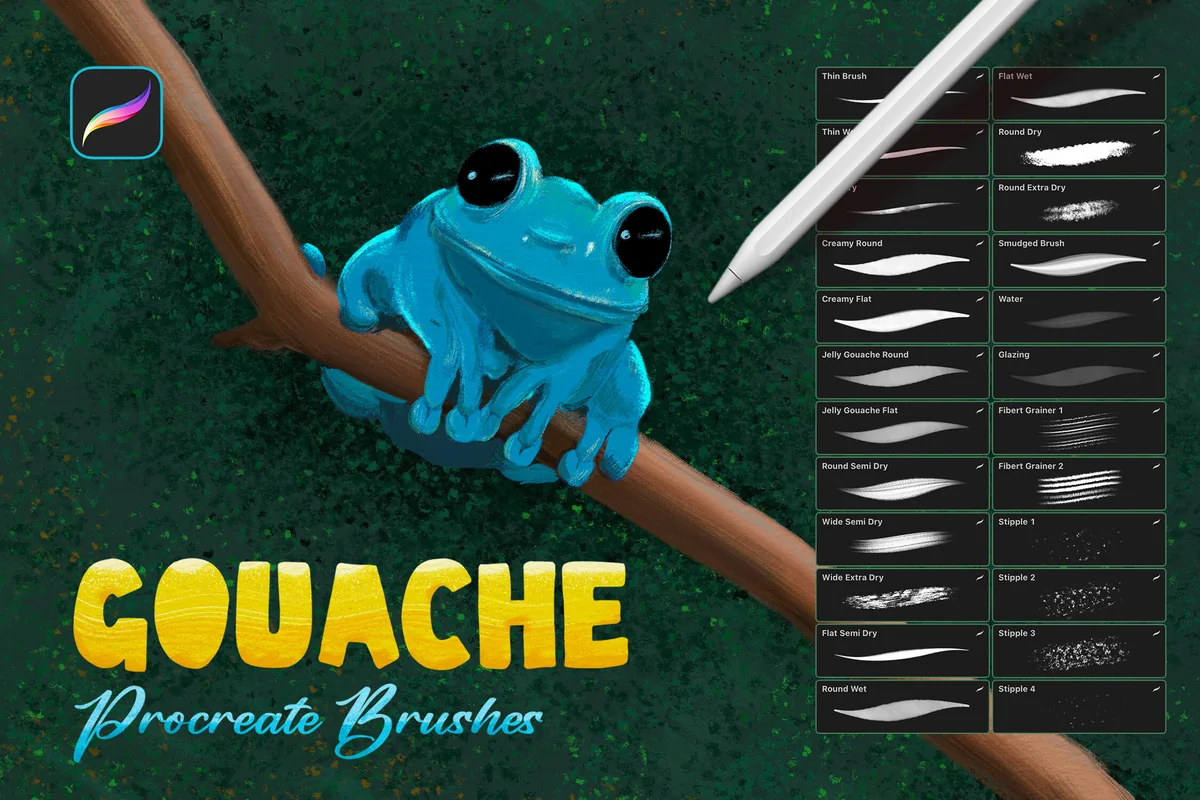
5. Gouache Procreate Brushes
Layouts: 24 brushesFormat: Procreate on iPad
Best for: comparing creamy, jelly, dry and stippled marks. Designed by Sko4.
- 24 Procreate brushes in a .brushset file
- Round, flat and thin options, plus filbert grainer and stipple brushes
- Description includes creamy, jelly, smudged, watered paint and glazing effects
- Preview compares orange paint swatches and shows thin detail lines
Sko4 offers the clearest side-by-side contrast between smooth paint and broken texture. The orange swatches show creamy and jelly marks beside dry and extra-dry options, while the thin and stipple tools have their own examples. That makes the pack a useful candidate for someone who already knows that one generic gouache brush is too limiting. It also includes watery effects, so the entire set should not be read as 24 equally opaque matte brushes. No paper pack is listed.
Compact and characterful gouache sets
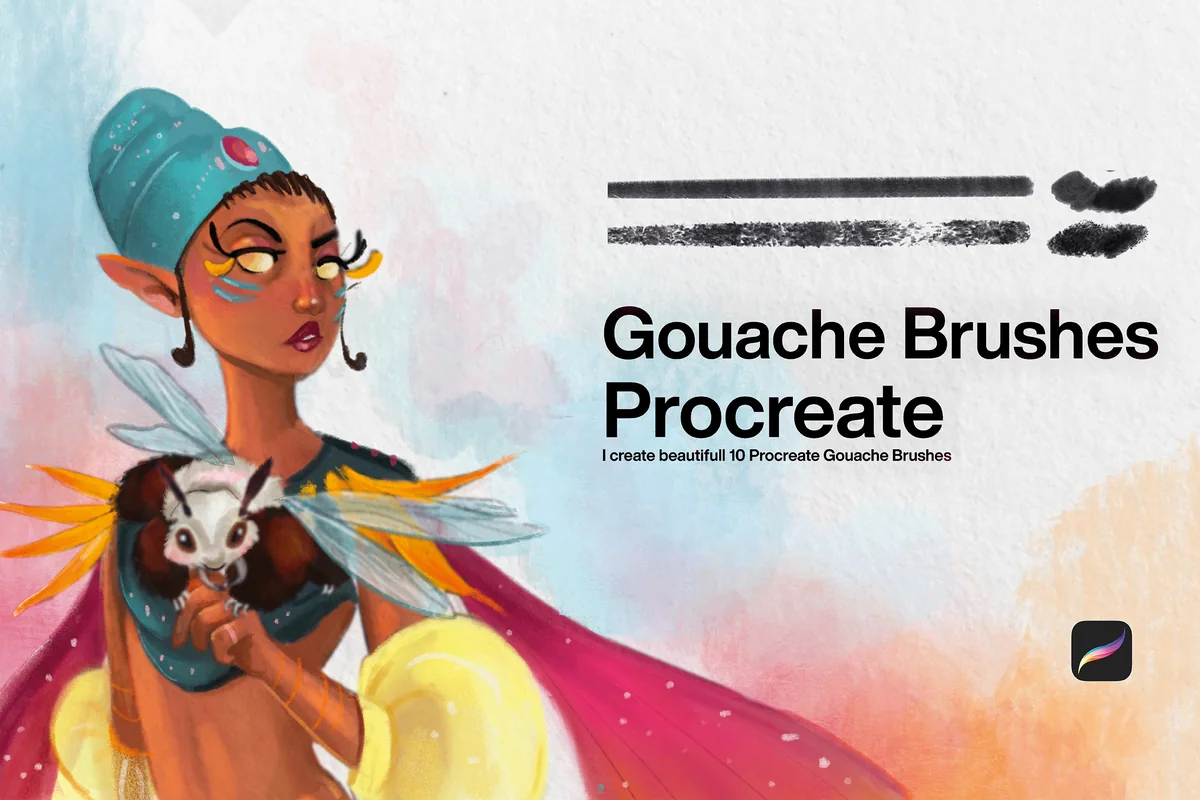
Best for a straightforward swatch-led set
6. 10 Gouache Brushes Procreate
Layouts: 10 brushesFormat: Procreate on iPad
Best for: choosing a mark from a small lineup. Designed by CCPreset.
- 10 Procreate brushes for a gouache effect
- Preview pairs ten horizontal strokes with separate dab samples
- Character artwork illustrates painted cloth, face details and a small animal
- No paper texture or palette bonus is specified
CCPreset keeps the offer focused: ten brushes and a clear black swatch sheet. The long strokes make differences in grain and continuity easier to compare than the finished character alone. This is a sensible middle ground if three brushes feel restrictive but a full sketch-and-paper kit feels excessive. The appeal is the mark selection itself; no paper canvas, guide or coordinated palette is listed. The character illustration demonstrates the finish rather than a coloring template.
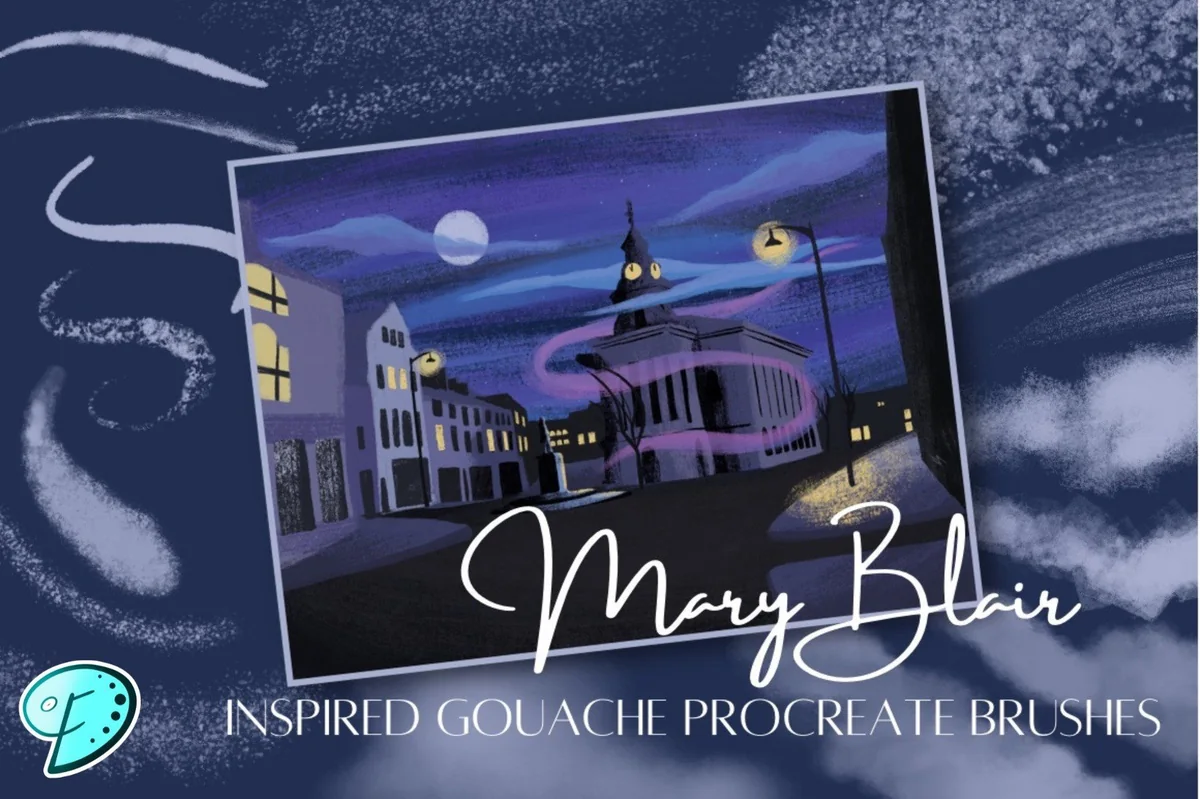
Best for atmospheric scene texture
7. Mary Blair Inspired Gouache Brushes
Layouts: 18 brushesFormat: Procreate on iPad
Best for: stylized buildings and layered landscape shapes. Designed by Emily Designs.
- 18 digital gouache brushes for Procreate
- Purple and white swatch sheets show fine lines, broad broken strokes and scattered grain
- Finished examples feature night scenes, architecture and strongly simplified shapes
- No separate paper canvas or color palette is listed
Emily Designs pairs its 18-brush description with atmospheric scenes and two useful swatch sheets. Fine lines sit next to dusty broad strokes and scattered texture, which gives this set a different emphasis from Freya’s food study or the blossom pack below. I like the potential for a small landscape or a row of simplified buildings. The inspiration named in the title describes the seller’s direction; it does not mean the set includes an artist’s original work, a lesson or a ready-made scene.
Stylized gouache collections
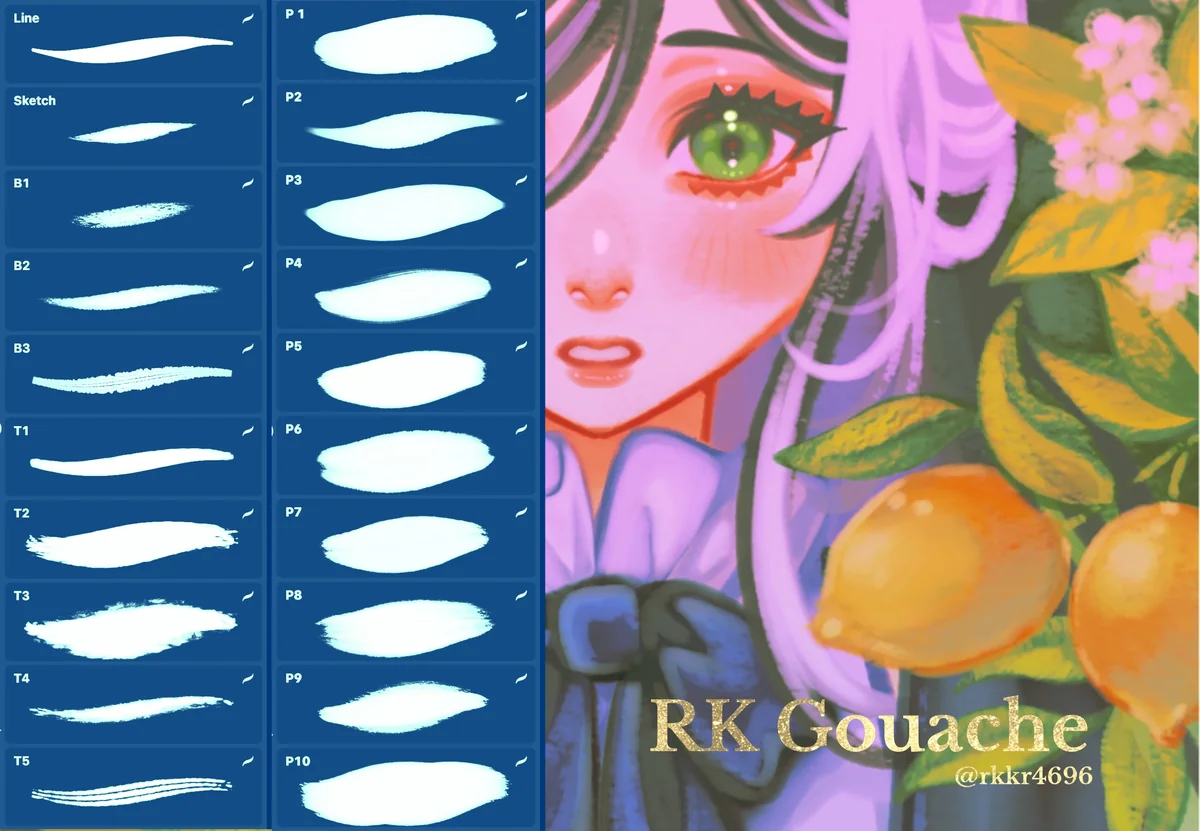
Best for painted character work
8. Gouache Painting Brushes for Procreate
Layouts: 5 T + 10 P + 3 B marks; line/sketchFormat: Procreate on iPad
Best for: combining line, texture and blending in one illustration. Designed by RKKRART.
- RK Gouache previews show 5 T paint marks, 10 P paint marks and 3 B blending marks
- Line and Sketch brushes are shown separately
- 2 paper textures and a Gouache palette appear in the gallery
- Description recommends Apple Pencil; brushes work only in Procreate
RK Gouache is organized around a painting process rather than a single finish. The T sheets show more broken strokes, the P sheets compare broader paint transitions, and the B sheet isolates blending. Its line and sketch examples make the intended workflow easy to read. This would suit character art that needs both defined features and softer painted passages. I would compare the T swatches first if dry gouache texture is the priority. The gallery shows two paper textures; it does not establish two layered canvas files.
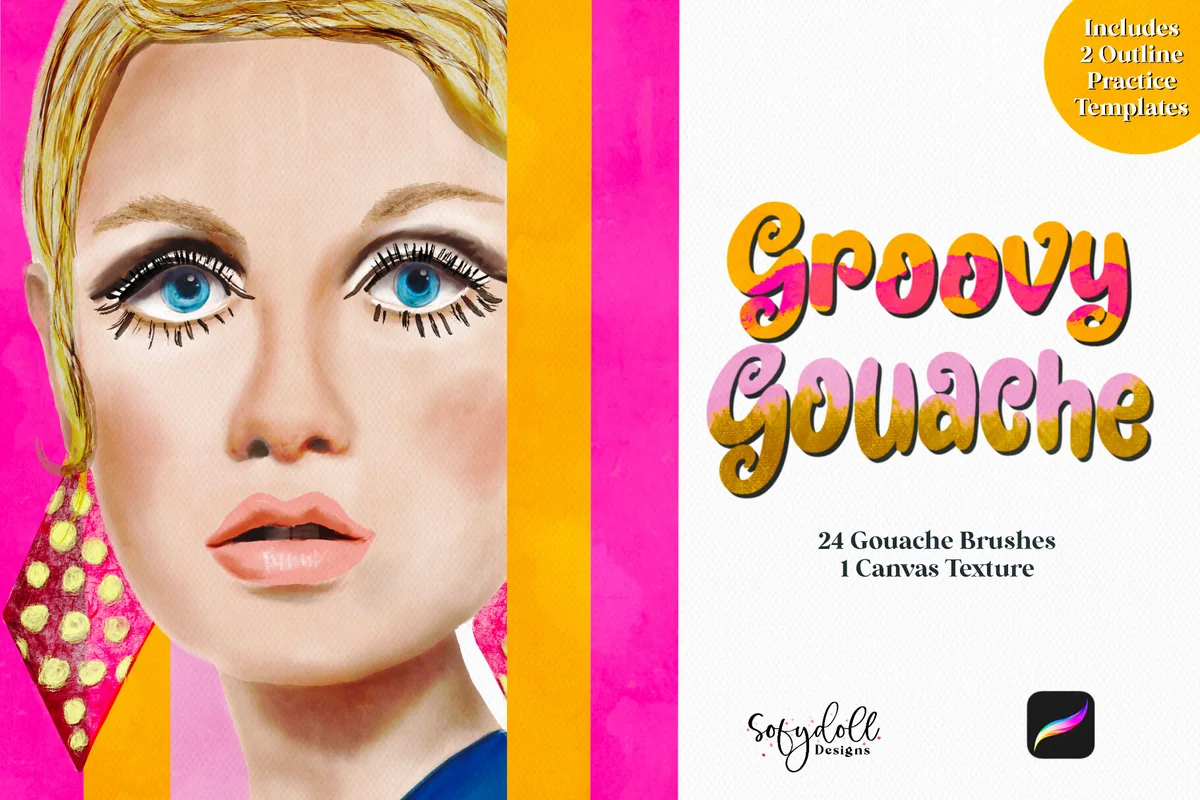
Best for a guided practice subject
9. Groovy Gouache for Procreate
Layouts: 24 brushesFormat: Procreate on iPad
Best for: starting a painted study from an outline. Designed by SofydollDesigns.
- 24 brushes and 1 canvas texture
- Canvas includes 2 outline sketch templates
- Previews include a portrait, a colorful van and a car with an outline comparison
- Swatch sheets show liners, grainy strokes, broad paint and textured marks
Groovy Gouache includes something the other large sets do not list: two outline sketch templates within its canvas. That can remove the blank-page problem when you want to compare paint marks before drawing your own subject. The gallery connects a car outline to a finished painted version and shows a separate canvas-texture comparison. Choose it if that starting point is useful, rather than for brush count alone. The outlines provide a starting drawing; editable versions of the finished car or portrait are not listed.
Best for blossom accents alongside paint
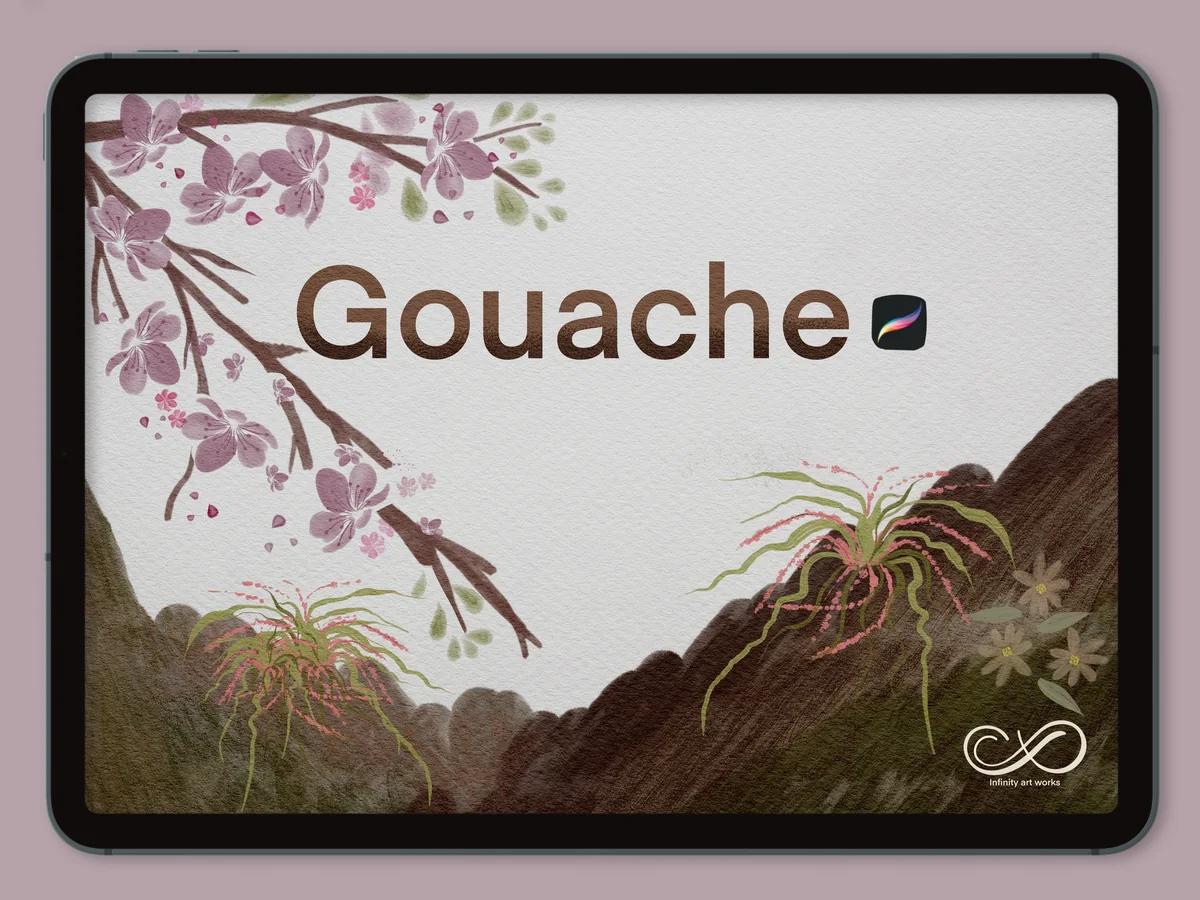
10. Gouache Springtime , Procreate Brushes
Layouts: 27 mixed tools shownFormat: Procreate on iPad
Best for: pairing textured strokes with small floral marks. Designed by Infinity Art Works.
- Preview advertises 27 brushes, with gouache swatches and floral/stem marks
- Gallery shows landscape paint, pink blossom illustrations and scattered petal marks
- A color palette appears on the contents preview
- Written description is only a short label; file breakdown and paper extras are not specified
Springtime is the most preview-led offer in this list. Its gallery shows a 27-brush collection mixing painted swatches with small floral and branch-like marks, plus a palette. That makes it an option for blossom-framed illustrations or a soft landscape. Because the written description gives no file breakdown, check the seller’s current details before choosing it. The 27 is a mixed-tool count, not 27 general-purpose painting brushes, and the listing does not establish a free offer.
Quick Comparison
| Brush set | Tools | Paper and extras | Best use |
|---|---|---|---|
| 1. Procreate Brush Pack | Gouache Brushes | 16 brushes | 3 blenders within the set | Labeled painting examples |
| 2. Gouache Brush Procreate | 12 tools, including 3 stamps | 1 paper texture | Small food and object studies |
| 3. Procreate Gouache Brushes | 3 painting brushes | 1 paper texture | Minimal brush switching |
| 4. Gouache Brushes for Procreate | 35 mixed art tools | 7 paper brushes | Sketching, painting and texture |
| 5. Gouache Procreate Brushes | 24 brushes | No paper pack listed | Creamy, jelly and dry contrasts |
| 6. 10 Gouache Brushes Procreate | 10 brushes | No extras specified | A compact stroke-and-dab lineup |
| 7. Mary Blair Inspired Gouache Brushes | 18 brushes | No extras specified | Atmospheric scenes and grain |
| 8. Gouache Painting Brushes for Procreate | 5 T + 10 P + 3 B marks; line/sketch | 2 paper textures + palette shown | Character painting and blending |
| 9. Groovy Gouache for Procreate | 24 brushes | 1 canvas texture + 2 outlines | Painting from a starting outline |
| 10. Gouache Springtime , Procreate Brushes | 27 mixed tools shown | Palette shown; file details sparse | Blossom accents and painted scenery |
Choose by the Marks You Need, Then by the Extras
Before comparing totals, decide what is missing from your current artwork. A thin liner, a texture stamp and a blender may all count as brushes, but they solve different problems. These ten options fall into three working groups.
Compact painting selections
- 1Clear roles: Oh My Gouache labels paint and blending examples.
- 2Fewer choices: Freya’s 3-brush set keeps the selection small; her 12-tool pack adds tips, stamps and a blender.
- 3Swatch first: CCPreset offers ten strokes with matching dab examples.
Broader illustration toolkits
- 1Sketch through texture: EasyProcreate combines 35 art tools with seven paper brushes.
- 2Different paint behaviors: Sko4 compares creamy, jelly, dry and stippled effects.
- 3Scenes and characters: Emily Designs emphasizes atmosphere; RK Gouache shows separate paint and blending groups; Groovy Gouache adds practice outlines.
Botanical marks
- 1Blossom accents: Springtime shows painted marks beside petals and branches.
- 2Check the main project: A specialist floral pack makes sense when plants are central, rather than an occasional decoration.
These groups are alternatives, not a progression you need to purchase. If your current brushes already handle fine details, a pack with more liners may add less than one convincing dry brush. A larger total becomes useful only when its additional marks have a job in your illustration.
What Makes a Gouache Effect Look Painted?
The examples I found work through a combination of shapes and surface marks. In Liz Kohler Brown’s tutorial, base shapes, details and gouache texture are separate stages. The Pigeon Letters also distinguishes broad canvas coverage from accent brushes and paper texture. Those are useful questions to ask of a set, even though their own brushes are different products.
- Coverage: Can you see a reasonably solid base shape, or mostly translucent strokes? Look at an area such as a leaf or the body of a fruit, not just an isolated swipe.
- Edges: Compare a smooth silhouette with a broken, dry-brush edge. Decide which one you want to see at the final size of your artwork.
- Internal texture: Check whether grain appears inside the paint, in a paper overlay, or through an extra texture brush. These are different controls.
- Small marks: Dabs, stems and fine lines should support the larger shapes. A stamp can place a useful accent, but it does not demonstrate continuous brush handling.
- Transitions: A blender may soften a junction. Ask whether the examples preserve some stroke direction or smooth the area almost completely.
A glossy-looking highlight in a finished sample does not mean the brush produces physical gloss. These are digital marks. For matte color, compare broad swatches and dry edges before looking at the finished painting for context. A detailed portrait can make a modest brush collection look far more complex than its actual contents.
Paper Brushes, Canvas Textures and Palettes Are Different Extras
Paper can change how a preview feels without adding a new painting brush. EasyProcreate’s seven paper brushes are not seven ready-made illustration canvases. Groovy Gouache lists one canvas texture and two outline templates, while Freya lists a single paper-texture bonus. Keeping those categories separate makes the totals more useful.
- Paper brush: An additional mark-making tool for applying surface texture. Check the preview for the intended effect and the product instructions for its use.
- Canvas texture: A surface component; the listing should explain its file type and whether it is part of a layered canvas. Do not assume every texture includes editable layers.
- Color palette: A set of colors rather than painted artwork. A palette shown in an example is not proof that every illustrated color study is included.
- Outline template: A starting drawing for practice. Groovy Gouache lists two, which can be useful if drawing the subject is delaying your painting session.
If you already have a paper workflow, brush behavior may matter more than another surface. Our Procreate paper texture brush comparison separates brush-based textures from other surface extras. Use it when the missing piece is the finish of the page rather than the paint mark itself.
A Short Gouache Practice Routine for One Set
You do not need an elaborate illustration to decide whether a brush fits your way of drawing. Start with a pear, a mug or a simple leaf, using the same subject across a few marks. This is a suggested comparison exercise, not a test I performed on these paid packs.
Compare a shape, an edge and a detail
- 1Choose a small subject. Make a loose sketch with a clear silhouette and two or three large color areas. Keep it simple enough that drawing accuracy does not dominate the exercise. Pick one midtone, one darker shade and one lighter shade before exploring extra palettes.
- 2Paint the base. Use a broad brush to establish the main shape. Leave space beside it for a second version. Notice how the edge and overlapping strokes look; do not keep adding layers simply to force every brush into the same finish.
- 3Add a dry mark separately. Place a darker or lighter texture over part of the base on its own layer. A clipping mask can keep the texture within the shape. Preserve an untouched area so the original coverage remains visible for comparison.
- 4Finish with a few details. Add a stem, handle or highlight with a smaller tool. Try a little blending on just one junction if your set includes a blender. Stop while the dry edge and individual marks are still visible, then compare both versions at the intended viewing size.
The point is to discover a small working combination: one brush for coverage, one for texture and one for detail. Liz Kohler Brown’s tutorial similarly builds texture over separate base shapes using clipping masks. You can keep experimenting with color after the marks are doing the job you want, rather than changing the palette and every brush at once.
When the Result Looks Too Smooth or Too Busy
- Too smooth: Compare an unblended area with the blended area. Try a dry mark over only part of the shape, leaving the original edge visible. Avoid assuming that more blending always makes paint look more realistic.
- Too grainy: Reduce the number of competing texture sources in your next version. Compare the paint without the extra paper effect before deciding that the brush itself is unsuitable.
- Too repetitive: Look for repeated stamp shapes. Use those accents sparingly, or switch to a freehand brush for the main silhouette.
- Too many tools: Set aside the specialist marks for a moment. Work with three roles and return to the larger collection only when a particular missing mark becomes clear.
Opaque matte coverage, translucent washes and thick-looking strokes can share similar colors while serving different styles. If the effect you want is mostly pale washes and soft blooms, the watercolor brush sets are a more relevant comparison. For a stronger impression of thick paint, compare the oil paint brush selection before choosing by the word “painterly” alone.
FAQ: Choosing and Using a Gouache Brush Set
Where is the gouache brush in Procreate?
These are add-on brush sets for Procreate on iPad, rather than directions to a built-in brush. Sko4 specifies a .brushset file that opens in Procreate; Brushed Rose describes importing its set through the Brushes panel after extracting the ZIP archive. Follow the instructions for your chosen pack, since file details are not listed for every set. This comparison does not establish a built-in gouache brush name or location.
What type of brush is best for a gouache look?
Choose according to the mark: broad coverage for the base, a dry or textured brush for broken areas, and a finer tool for details. A blender is optional. Oh My Gouache illustrates those roles clearly, while the three-brush Freya set offers a much smaller selection. The best fit is the set whose examples resemble the marks you want to make.
Are there free Procreate gouache brushes?
Some creators offer free brushes, but access terms can change. This comparison does not label any of its ten sets free: a product name, a short “Freeebie” description or subscription access is not enough to establish a current zero-price offer. Check the seller’s current terms and the files included before relying on a free option.
Do all of these sets include paper?
No. Paper extras are listed separately in the comparison. EasyProcreate shows seven paper brushes, Freya lists one paper texture with each of her two sets, and Groovy Gouache includes one canvas texture. Several others list no separate paper pack. A paper-like background in a finished example does not automatically mean the background is included.
Will pressure-sensitive marks work with my stylus?
Freya and RK Gouache recommend Apple Pencil for their pressure-sensitive brushes. Check your iPad and stylus compatibility separately. These are Procreate tools for iPad, and the listings do not establish equivalent behavior in Photoshop or another painting app.
Why can a gouache painting look difficult to control?
One source of frustration is asking a single tool to handle solid fill, broken texture and smooth blending at the same time. Separate those tasks in a small practice image. If a stamp repeats too obviously or a paper effect overwhelms the color, compare another version with that element removed. That gives you a specific decision instead of changing everything at once.
Keep the Painted Marks That Matter
My shortlist for Procreate gouache brushes begins with the result: a solid shape, a lively edge and a few deliberate details. Oh My Gouache explains those roles well in its examples; Freya keeps the toolkit compact; the larger and botanical sets give you other directions when the project calls for them. Choose one useful combination, compare it on a small subject and let the brush count stay secondary to the picture.
You May Also Like
This article contains affiliate links. If you buy through them, I may earn a commission at no extra cost to you. Read the affiliate disclosure.