The face looks finished, but the hair is still a dark helmet with a few pale stripes. If that is where your portrait gets stuck, Procreate hair brushes can help you build more deliberate strands, or let you begin with a hairstyle stamp instead.
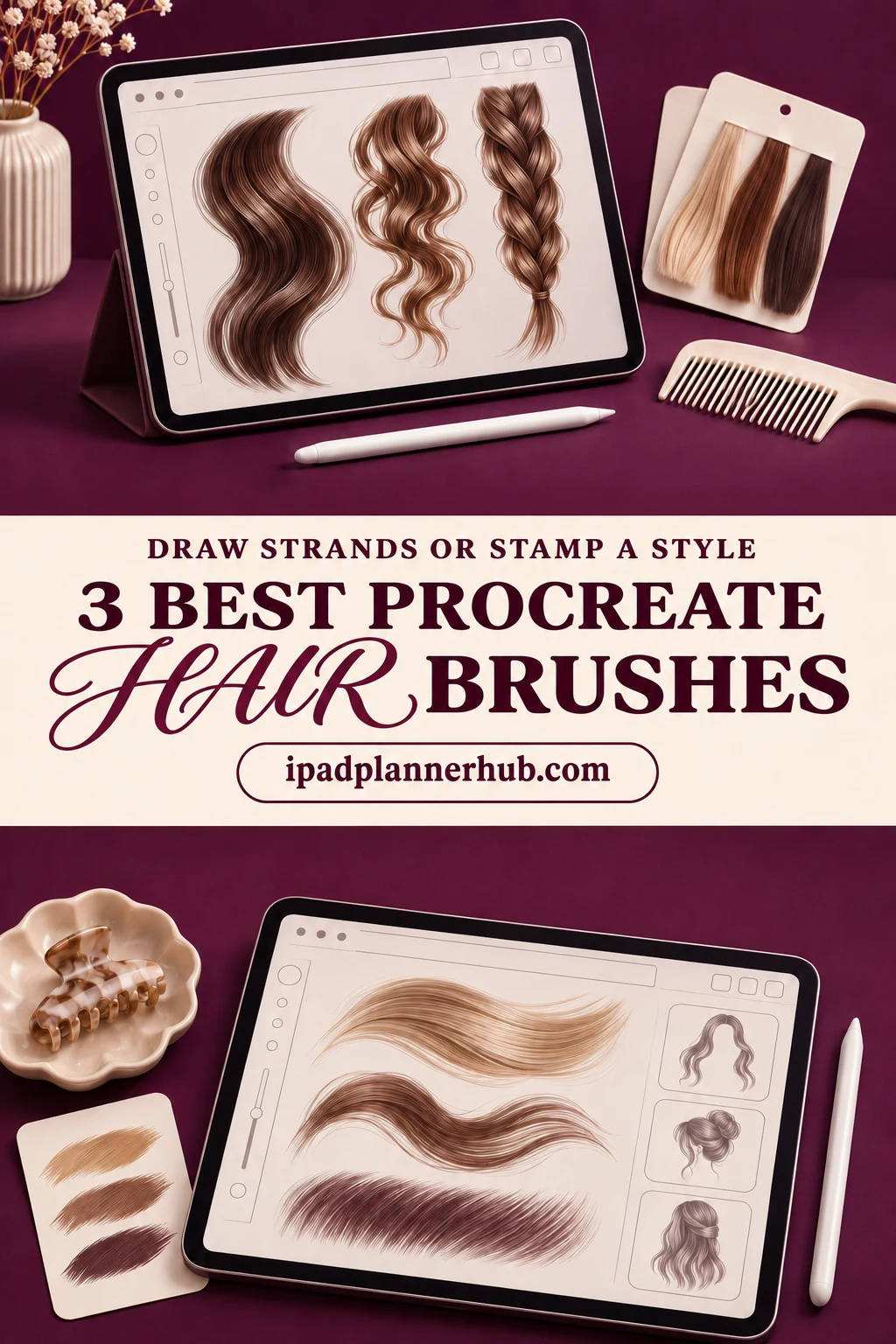
I compared three sets with different roles: a focused collection of flowing locks, a larger texture selection, and a stamp-led kit. My shortlist is based on the product descriptions and all public previews, not hands-on testing of the paid files. The most useful question is whether you want to draw the hair’s movement or start with an existing shape.
Procreate Hair Brushes: Strands or a Whole Hairstyle?
A stroke and a stamp solve different problems. The sundrameda and Calcool previews show marks you use while drawing. EasyProcreate shows hairstyle shapes that combine a base with a light overlay. A larger headline number can hide that difference, especially when matching stamp parts are counted separately.
- Choose drawing brushes if you want to decide where a lock begins, how it curves and where it ends. Use the preview swatches to judge the kind of mark you want to practice.
- Choose hairstyle stamps if an existing silhouette suits your character. You can spend more of the session on color and finishing, while accepting a starting shape designed by someone else.
- Choose one set first if you are unsure. These are alternatives, not three parts of a kit you need to buy together.
For an original portrait, my first stop is sundrameda’s set because its sample sheets show so many versions of a curved lock. Calcool gives you more stroke textures to compare. EasyProcreate belongs on the shortlist for a different reason: the ready hairstyle is the main feature, with a few brushes alongside it.
3 Best Hair Brush Sets for Different Drawing Tasks
TL;DR: Start with sundrameda for 20 brushes illustrated with individual curved locks. Calcool offers 30 brushes with a broader texture swatch sheet. EasyProcreate is the different option: 60 hairstyle stamps in three groups, plus three hair brushes and a palette. Choose by the work you want to do, not the biggest number.
Quick Picks
- Best for drawing flowing locks: Procreate Hair Brushes
- Best for comparing hair textures: Procreate Hair Brushes Set
- Best for layered hairstyle stamps: Procreate Hair Brushes and Stamps
- Procreate Hair Brushes – Best for drawing flowing locks
- Procreate Hair Brushes Set – Best for comparing hair textures
- Procreate Hair Brushes and Stamps – Best for layered hairstyle stamps
Best for drawing flowing locks
1. Procreate Hair Brushes
Layouts: 20 hair brushesFormat: Procreate on iPad only
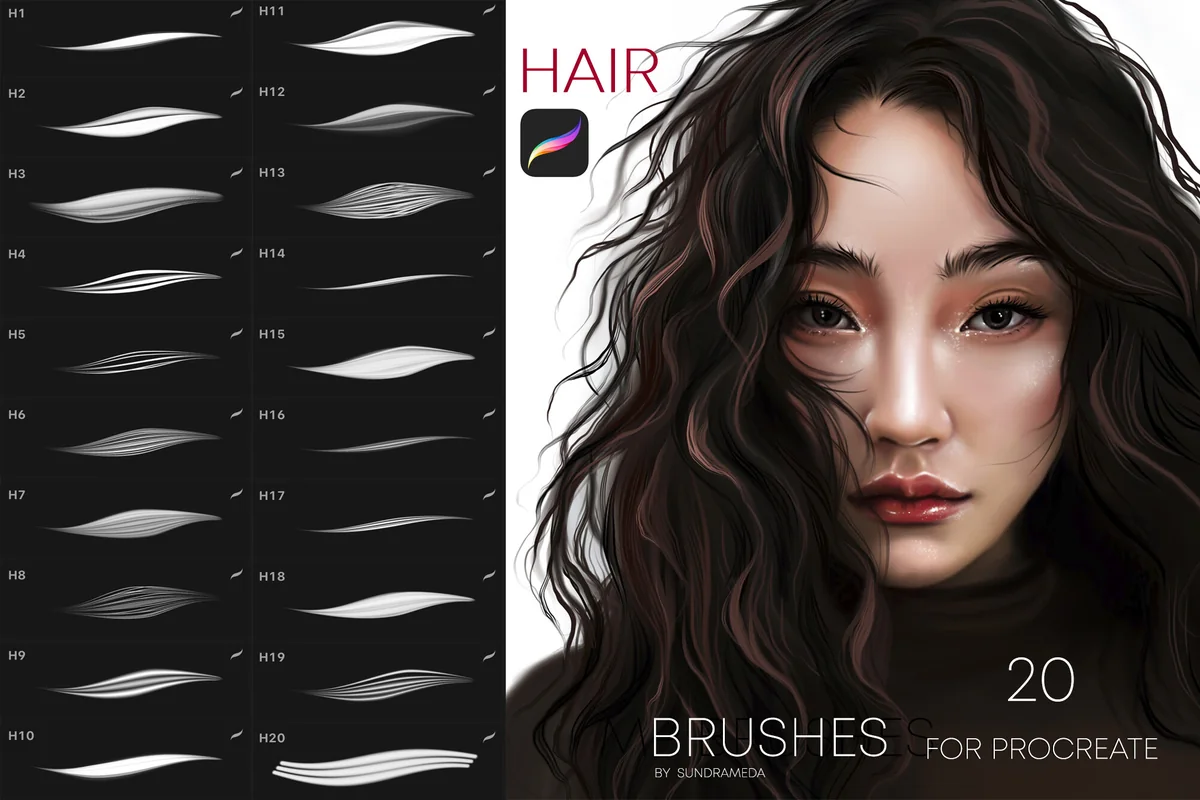
Best for: shaping individual wavy or curling locks around a portrait. Designed by sundrameda.
- 20 hair brushes for Procreate on iPad
- All 20 brush tips shown in the cover swatch panel
- Five further sample sheets show flowing strands, tight curves, wispy marks and grouped lines
- Portrait example with dark wavy hair; no complete hairstyle stamp collection listed
The sample sheets are the reason I put this first. You can compare a broad ribbon-like lock with a fine group of strands before deciding whether that is the mark your portrait needs. I like this smaller selection for someone who wants to control the silhouette rather than fit a finished hairstyle around a face. The trade-off is that you still have to build the haircut yourself; a beautiful portrait on the cover is an example, not a one-tap result.
Best for comparing hair textures
2. Procreate Hair Brushes Set
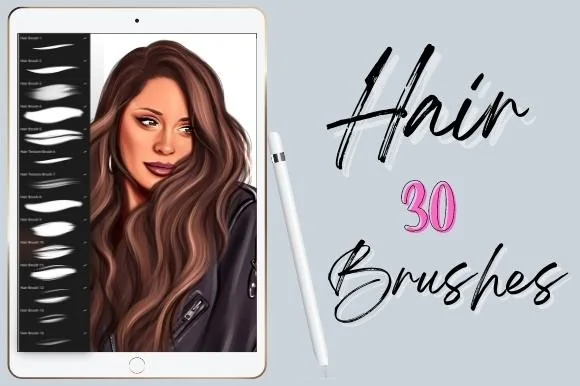
Layouts: 30 hair brushesFormat: Procreate on iPad only
Best for: artists who want a larger group of stroke textures to audition. Designed by Calcool.
- 30 hair brushes for Procreate on iPad
- Swatch sheet shows dense dark strokes, finer separated lines and lighter textured marks
- Portrait previews show long brown hair with broad highlights
- Procreate only; no hairstyle stamp library or color palette listed
Calcool makes sense when the texture of a stroke is your starting point. The overview puts many marks side by side, from dense strokes to airy strands, which gives you a useful visual comparison with sundrameda’s curved-lock examples. Thirty brushes do not automatically make this the better kit. For a simple character drawing, start with a few marks and leave the rest until a particular texture is needed.
Best for layered hairstyle stamps
3. Procreate Hair Brushes and Stamps
Layouts: 20 basic + 20 light + 20 guideline stamps; 3 brushes; paletteFormat: Procreate on iPad only
Best for: trying a ready hairstyle shape before adding personal details. Designed by EasyProcreate.
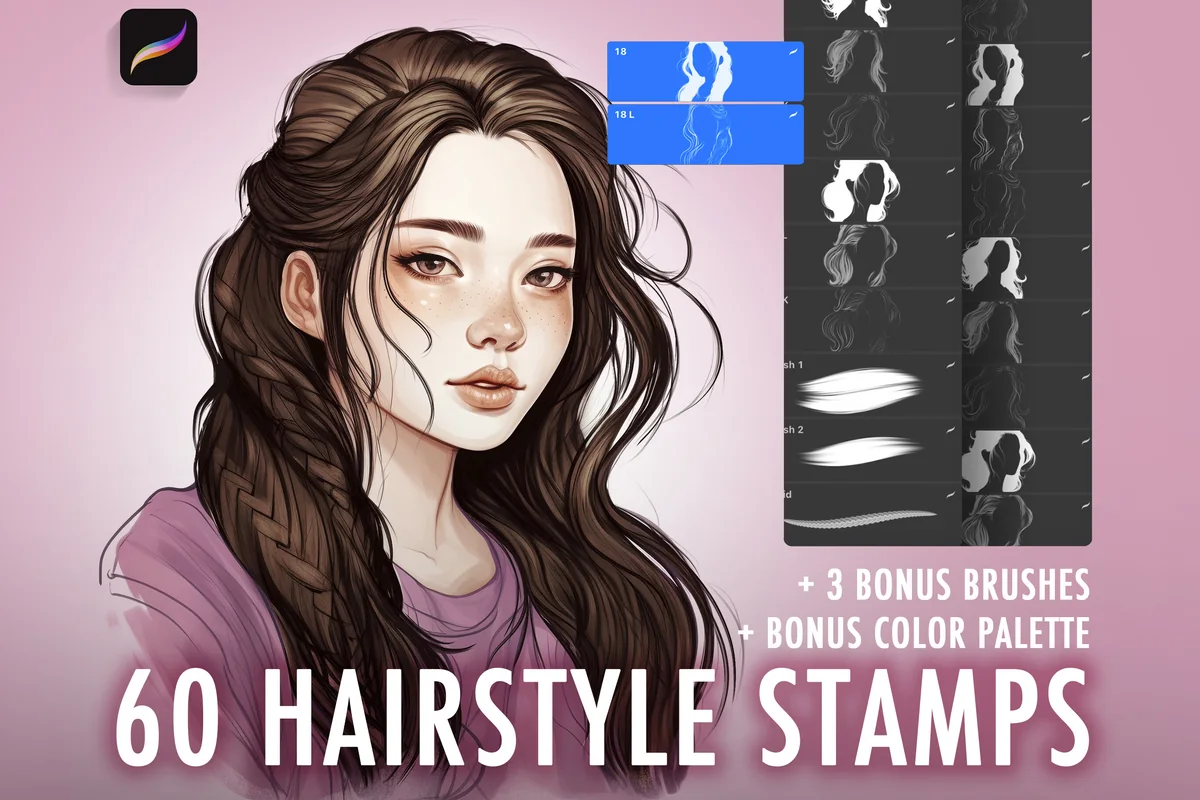
- 60 hairstyle stamp entries: 20 basic, 20 light and 20 hair guidelines
- 3 additional hair brushes, including a braid brush
- Basic hair color palette
- Preview demonstrates a base hairstyle stamp combined with its light stamp
- Several finished hairstyle examples; these are not 60 distinct haircuts or 60 painting brushes
The base-plus-light demonstration is the useful part of this kit: it shows how the stamp parts combine into a hairstyle. The 20 guideline entries are another coordinated group, not 20 extra finished haircuts. I like the option of adding individual strands or a braided accent with the three extra brushes. Choose it when an existing silhouette fits your character; drawing a completely different hairstyle calls for a brush-led approach. The 39-brush kit advertised in a preview inset is not included.
Quick Comparison
| Set | Contents | Useful for | Main limitation |
|---|---|---|---|
| 1. Procreate Hair Brushes | 20 hair brushes | Curved strands and flowing locks | Build the hairstyle yourself |
| 2. Procreate Hair Brushes Set | 30 hair brushes | Varied stroke textures | No ready hairstyle stamps listed |
| 3. Procreate Hair Brushes and Stamps | 60 stamps + 3 brushes + palette | Ready hairstyle shapes and layered light | Stamp count includes matching parts |
Choose the Mark Before Choosing the Pack
Picture the next drawing you want to finish, rather than every hairstyle you might eventually try. A close-up portrait, a tiny journal character and a page of hairstyle studies do not need the same level of detail. Match the purchase to that one project first.
For a small character, the gaze deserves the same check at the intended size. The Procreate eye brush comparison separates eye contours, iris details and catchlights, helping you choose the missing part of the face alongside your hair study.
- A flowing portrait: compare the curved-lock examples in sundrameda’s sheets with the direction you want the hair to travel. The curves and fine-line groups tell you more about the available marks than the cover portrait alone.
- A texture study: look at Calcool’s full swatch page. Its dense and wispy marks suggest different drawing roles; choose a few to compare at the same size on your canvas.
- A character concept: check whether an EasyProcreate hairstyle already has the length and silhouette you need. Matching base and light stamps make more sense here than treating every entry as a separate haircut.
- A braided accent: EasyProcreate explicitly includes a braid brush. That is a specific extra, not evidence that the other two sets also contain dedicated braid tools.
A 30-brush set is not automatically a better fit than a 20-brush set, and stamps serve a different purpose from drawing brushes. Pick the mark your next project needs before comparing counts.
When the subject changes from a human hairstyle to an animal coat, flowing locks are no longer the only marks to compare. The Procreate fur brush comparison distinguishes directional strands, fuzzy patches and repeating surfaces, keeping the choice tied to the part of the animal you are drawing.
Read the Preview as a Contents List
A polished example tells you what the designer can make. A swatch sheet tells you more about the marks you are choosing between. Look at both: the portrait gives context, while the stroke examples help separate the tool from the finished illustration.
- Check the units. A brush count, a stamp count and a count of coordinated parts are different measurements. EasyProcreate’s final contents slide is the clearest explanation of its three stamp groups.
- Separate examples from extras. A photo of another brush kit inside a preview does not put that whole kit in your purchase. The EasyProcreate description and contents slide promise three additional brushes.
- Look for repetition with a purpose. A basic stamp and a light stamp can belong to the same hairstyle. That relationship is useful, but it does not make two new haircuts.
- Do not infer settings. A thin-to-thick-looking stroke is not a full specification of pressure, tilt or behavior on every device. Those details are not sufficiently documented here for me to compare them.
All three sets are listed for Procreate on iPad. Support for Photoshop or Procreate Pocket is not established. If you use an older Procreate installation, ask the seller about the minimum app version before buying.
A Small Portrait Study Before a Finished Illustration
Try this small practice session with a new hair set. Keep the subject simple so the tool choice is easy to evaluate: one head, one light direction and one main curve.
Build the silhouette, then add detail
- 1Start with the outside shape. Sketch a plain head and decide where the part, crown and ends should sit. Block in a simple hair mass before adding fine lines. For a stamp-led study, choose a silhouette that already fits the pose instead of forcing a very different hairstyle into place. Leave enough space around the head to judge its width.
- 2Pick a small working selection. With a drawing set, choose one broader mark and one finer mark from the sample sheet. Make a few strokes beside the portrait before committing to the hair. With EasyProcreate, begin with a basic hairstyle stamp and identify its matching light version. Keep this first study focused on those tools rather than trying every entry.
- 3Follow one direction at a time. Work from the part toward the ends in a few clear sections. Preserve the main curve instead of filling every gap with lines. If a mark fights the shape, undo it and try a different size or a simpler curve. Save small flyaways until the outline already reads as hair.
- 4Review at the intended viewing size. Step back from the close-up and look at the portrait as it will appear in a journal, character sheet or illustration. Keep the marks that explain the form. Remove details that merely make the area busier. A readable silhouette with a few deliberate accents is a more useful first study than an unfinished page of texture.
For a second attempt, change only one thing: the brush, the size, or the light color. Keep the same head sketch so you can tell what changed. That gives you a personal comparison based on your own marks, rather than asking a product preview to predict your result.
Using the Layered Hairstyle Stamps
EasyProcreate’s demonstration shows a basic stamp plus a light stamp forming a finished hairstyle. That is the clearest starting point for understanding this kit. The guideline group adds a third kind of entry; it should not be mistaken for another twenty fully rendered hairstyles.
Keep the stamp parts easy to adjust
- 1Place a base you can work with. Choose a hairstyle whose silhouette is already close to the character. Keep it on a separate layer from the face so placement remains easy to assess. If the hair covers an important feature, reconsider the fit before adding more parts. A ready shape is useful only when it helps the drawing you are actually making.
- 2Add the matching light shape. Use the base-and-light relationship illustrated in the preview as your reference. Check their alignment and the direction of the visible highlights. Try the light on its own layer so you can adjust its color or opacity separately from the base. You are arranging the stamp parts yourself; the listing does not promise a layered portrait file.
- 3Finish selectively. Add a few drawn strands or a braided accent only where the composition needs them. The three included brushes are extra tools, not a requirement to decorate every edge. When the hairstyle works at normal viewing size, stop and save a version before experimenting further. That makes it easier to compare the clean stamped result with your more detailed version.
Keep Hair Color and Highlights Manageable
A color palette can be convenient, but it does not choose the lighting for you. EasyProcreate lists a basic hair color palette; neither of the other two descriptions lists one. Begin with a base shade, a darker shade and a lighter shade; add colors only if the portrait needs them.
- Base: choose a color that lets you see the silhouette against the background.
- Shadow: use it to separate overlapping sections instead of outlining every individual strand.
- Light: reserve a few clear areas for the shine so the whole head does not become an even pattern of stripes.
For color experiments inside an existing shape, Procreate’s masking guide explains the distinction: Alpha Lock limits edits to existing pixels, while a clipping mask takes its visibility from the layer below. A separate clipped layer keeps the color work apart from the base. These masking tools belong to Procreate itself.
Common Reasons a Hair Study Feels Too Busy
Before buying another set, check the drawing at its final size and hide the detail layer. Does the main shape still make sense? Use these review prompts to find what needs attention:
- Every section has the same texture: leave some areas quieter and keep the most visible strands where they help describe a bend or an edge.
- The highlights ignore the hairstyle: reconsider the light direction before adding more pale strokes. For matching stamps, check that the base and light parts are aligned.
- The hair overwhelms a small character: compare the image at its intended size. Detail that looks appealing when enlarged may be unnecessary in a small journal illustration.
- You cannot judge the brush: use the same simple head and a limited color selection for several attempts. Changing the drawing, palette and tool at once makes comparison harder.
FAQ: Choosing Procreate Hair Brushes
Which set is the clearest starting point for drawing strands?
My first choice is sundrameda’s 20-brush set for its varied curved-lock samples. Calcool is the alternative for comparing more stroke textures. Neither listing establishes which set will be easiest for a particular beginner.
Are the 60 EasyProcreate entries all painting brushes?
No. The final preview itemizes 20 basic hair stamps, 20 light hair stamps and 20 hair guidelines. It also lists three brushes and a hair color palette. Read the 60 as coordinated stamp entries, not 60 brushes or 60 distinct hairstyles.
Can these brushes make curly hair or braids?
The sundrameda sheets include curved and curling strand examples. EasyProcreate explicitly lists a dedicated braid brush among its three extras. Neither point guarantees a finished hairstyle: use the preview examples to decide whether the shown marks suit your drawing, and avoid assuming that every set includes every curl or braid type.
How do I bring a brush set into Procreate?
Procreate’s official import guide describes importing a compatible brush file through the brush library or opening the file to send it to Procreate. Follow the seller’s instructions for accessing the files as well; the exact archive contents and filenames have not been checked here.
Do these work in Photoshop, Pocket or another drawing app?
These listings are for Procreate on iPad. Sundrameda explicitly excludes Photoshop and other painting programs, and Calcool says its brushes do not work in other applications. EasyProcreate likewise specifies Procreate. Pocket support is not established by the material reviewed here; ask the seller rather than treating it as included.
Is there a free set in this comparison?
This shortlist does not include a standalone free brush set. EasyProcreate’s palette is an extra within its paid product, not a standalone free offer. Check the current product page for purchase terms; I have left prices out because they can change.
Final Thoughts: Start with the Hair You Want to Draw
The best Procreate hair brushes for your next portrait are the ones that match the work you want to keep in your hands. Start with sundrameda for flowing locks, compare Calcool for more stroke textures, or choose EasyProcreate for a ready hairstyle with matching light shapes.
Choose one simple project, practice with a small selection of marks, and judge the result at its intended size. The count matters much less once you can point to the particular stroke or stamp that helps your drawing.
You May Also Like
This article contains affiliate links. If you buy through them, I may earn a commission at no extra cost to you. Read the affiliate disclosure.