Procreate stitch brushes can turn a plain drawn edge into a dashed seam, a looped border or an embroidery-style ornament. The important choice is what you want the mark to do: follow your pencil, add a garment fastening, create a fabric surface or place a finished letter. Those are different jobs, even when the previews all look like thread.
I compared seven Creative Fabrica sets by their stated contents and preview sheets. Six focus on stitch lines or sewing details; the seventh is a stitched alphabet for short labels. These are digital drawing tools for iPad artwork, not machine embroidery files or instructions for sewing a physical garment. I have not tested their drawing feel, so my recommendations focus on the differences you can judge before buying.
Choose Procreate Stitch Brushes by the Mark You Need
- A seam that follows an edge: look for continuous stitch-line samples, such as running, zigzag or chain styles.
- An embroidered ornament: compare the curve samples and the spacing of the repeated shapes, not just the finished cover illustration.
- A garment fastening: choose a mixed zipper, chain and stitch set when those hardware tools belong in your sketch.
- A textile surface: check whether fabric textures are included separately from the stitch count.
- Consistent stitched letters: use an alphabet stamp set if you want fixed character shapes rather than handwriting.
A bigger number is not automatically a better fit. Count dedicated stitch brushes separately from textures, zipper pulls and letter stamps. A compact set with the seam you need can be a more sensible purchase than a large mixed library with only a few relevant tools.
The Seven Brush Packs and Their Practical Differences
TL;DR: For a broad stitch library, start with EfficientTools. Sko4 offers embroidery-focused lines, with a separate second collection for duo-color work. HYDNSTUDIO suits garment fastenings; PdknyStudio pairs stitches with fabric textures. Sibby Clips adds buttonholes, while DREAMs Soul G. supplies stitched letter stamps rather than freehand seams.
Quick Picks
- Best for broad stitch library: 88 Procreate Stitch and Sewing Brushes
- Best for embroidered ornaments: Embroidery Stitches Procreate Brushes
- Best for garment hardware: Zip Chain Stitch Brush Set for Procreate
- Best for fabric-backed artwork: Procreate Sewing Stitch Brushes
- Best for two-color decoration: Embroidery Stitches Procreate Brushes 2
- Best for buttonholes and simple seams: Procreate Stitches Brush Stamps
- 88 Procreate Stitch and Sewing Brushes – Best broad stitch library
- Embroidery Stitches Procreate Brushes – Best for embroidered ornaments
- Zip Chain Stitch Brush Set for Procreate – Best for garment hardware
- Procreate Sewing Stitch Brushes – Best for fabric-backed artwork
- Embroidery Stitches Procreate Brushes 2 – Best for two-color decoration
- Procreate Stitches Brush Stamps – Best for buttonholes and simple seams
- Stitch Font Procreate Brush Stamp – Best for ready-shaped stitched letters
Best broad stitch library
1. 88 Procreate Stitch and Sewing Brushes
Layouts: Seams, decorative chains and edge stitchesFormat: .brushset; instruction guidebook
Best for: exploring many seam and decorative line styles in one Procreate set. Designed by EfficientTools.
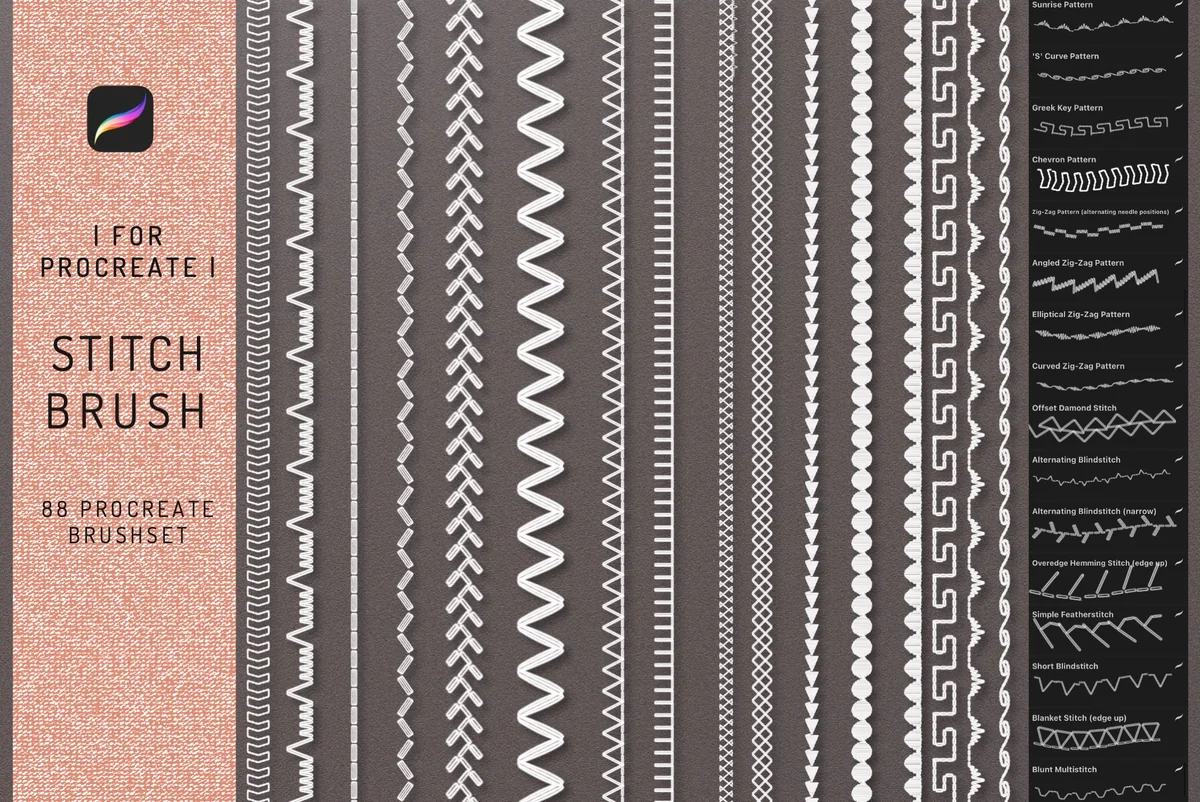
- 88 Procreate brushes in a brushset, plus an instruction guidebook
- Sample sheets include running stitches, overlock, zigzag, blanket-style edges and decorative chains
- The seller specifies Procreate 4 or higher on iPad Pro; other applications are excluded
The range runs from ordinary seams to ornamental marks. A narrow broken line can describe a garment edge, while a larger loop or scallop can become the main border. For one drawing, start with a handful of recognizable shapes rather than sorting through all 88. The compatibility wording specifically names iPad Pro, so check with the seller before buying for a different iPad model.
Best for embroidered ornaments
2. Embroidery Stitches Procreate Brushes
Layouts: Satin, chain, cross, overlock and ornamentsFormat: .brushset; video tutorial listed
Best for: building curved embroidery-style lines and layered decorative borders. Designed by Sko4.
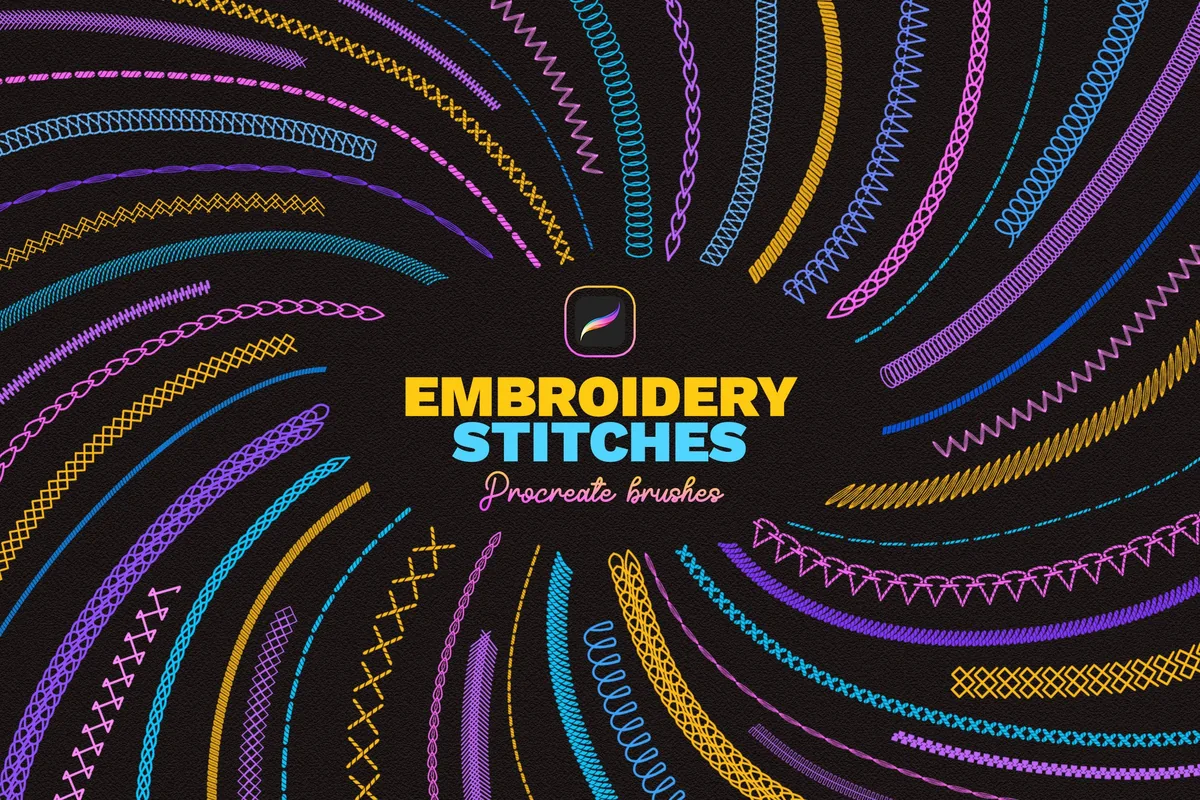
- 40 Procreate brushes with different stitch effects
- The preview sheets label satin, chain, cross, overlock, zigzag, ornament and zipper styles
- A video tutorial is listed; the brushset is for Procreate on Apple iPad only
The curved samples are the strongest reason to consider this set: chain and cross-stitch lines wrap around shapes rather than only crossing a straight sampler. The flower and patterned clothing examples offer composition ideas, with no finished flower templates promised in the contents. This is a useful choice when embroidered decoration is the main task. The separate duo-color collection below is the one to compare if a paired-color stroke matters.
Best for garment hardware
3. Zip Chain Stitch Brush Set for Procreate
Layouts: 13 stitches, 7 zippers, 6 chains, 6 slidersFormat: .brushset for Procreate
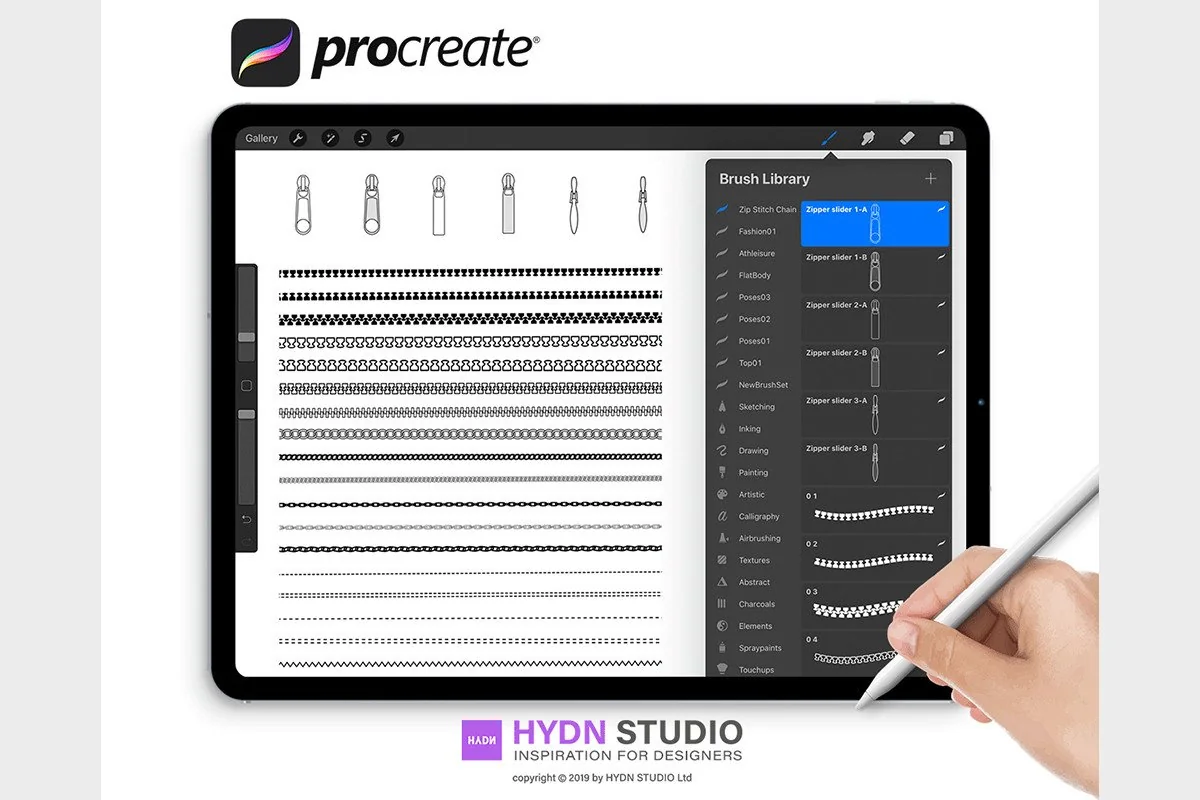
Best for: drawing seams alongside zippers, zipper pulls and chain details in fashion sketches. Designed by HYDNSTUDIO.
- 32 tools total: 13 stitch brushes, 7 zipper brushes, 6 chain brushes and 6 zipper sliders
- A Procreate .brushset file is specified
- Preview sheets show line samples and separate zipper pull shapes
This pack suits a jacket, pouch or bag drawing where the fastening matters as much as the seam. The seller separates the counts clearly: 13 stitch brushes and 19 hardware tools. The black line samples make the zipper and chain shapes easy to compare. For an embroidered floral frame with no fastening, much of this mixed collection would have little use.
Best for fabric-backed artwork
4. Procreate Sewing Stitch Brushes
Layouts: 72 sewing stitches; 9 fabric/linen texturesFormat: .brushset for Procreate
Best for: combining stitch lines with a fabric or linen surface in an illustrated textile piece. Designed by PdknyStudio.
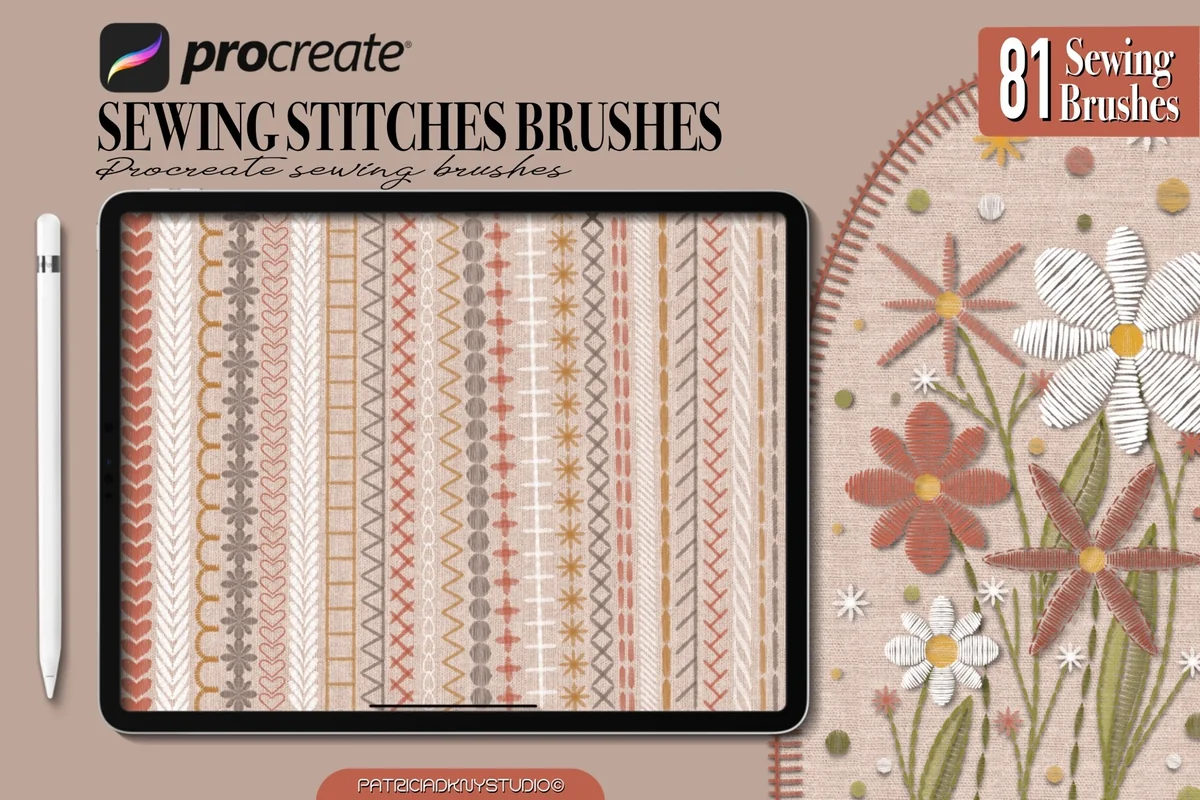
- 72 sewing stitch brushes plus 9 fabric/linen texture brushes
- 81 tools altogether, rather than 81 different stitch brushes
- The previews separate the stitch sample sheets from a nine-texture sheet
- A .brushset file is named in the installation instructions
The useful distinction is having surface textures and stitch marks together. The flower and wreath examples place light thread-like marks against warm fabric, while the texture sheet shows several weaves. That gives a starting point for a textile-style illustration, though you still need to draw the composition. The two cover counts agree with the detailed contents: 72 stitches plus nine textures make 81 tools.
Best for two-color decoration
5. Embroidery Stitches Procreate Brushes 2
Layouts: 40 effects including 18 duo-color brushesFormat: .brushset for Procreate on iPad
Best for: using paired colors in one decorative stitch line. Designed by Sko4.
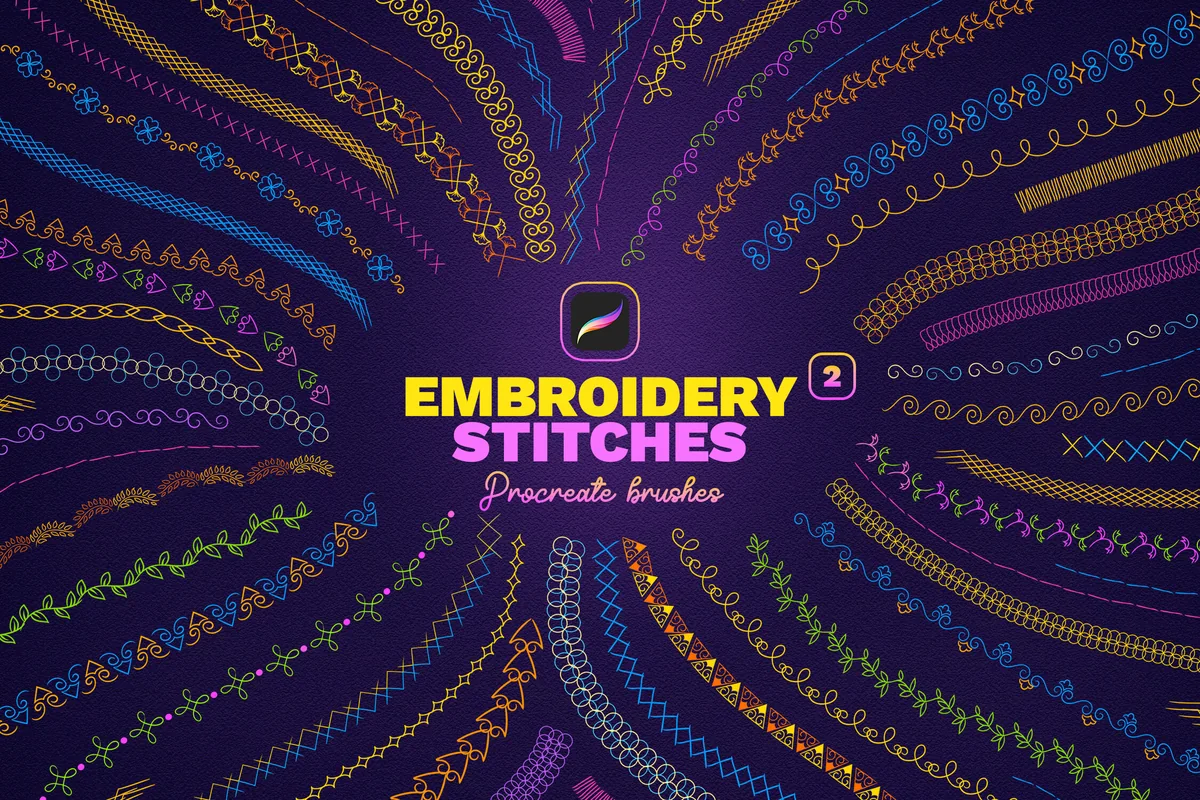
- 40 Procreate brushes, including 18 duo-color brushes
- The description says the duo-color tools use a main and secondary color
- Preview sheets label Duo 01 through Duo 18 and show two-color ornaments
- Procreate on iPad and .brushset files are specified
Paired-color crosses, loops and ornaments distinguish this collection from the first Sko4 set. Choose it when contrast within the stitch itself is central to the border. Its 18 duo-color brushes are included in the total of 40. Owning the first collection is not a prerequisite; compare the individual marks and choose the set whose shapes suit your drawing.
Best for buttonholes and simple seams
6. Procreate Stitches Brush Stamps
Layouts: Stitch lines and 3 buttonhole stampsFormat: .brushset; PDF instructions
Best for: adding recognizable sewing details to a small fashion illustration or stitched label. Designed by Sibby Clips.
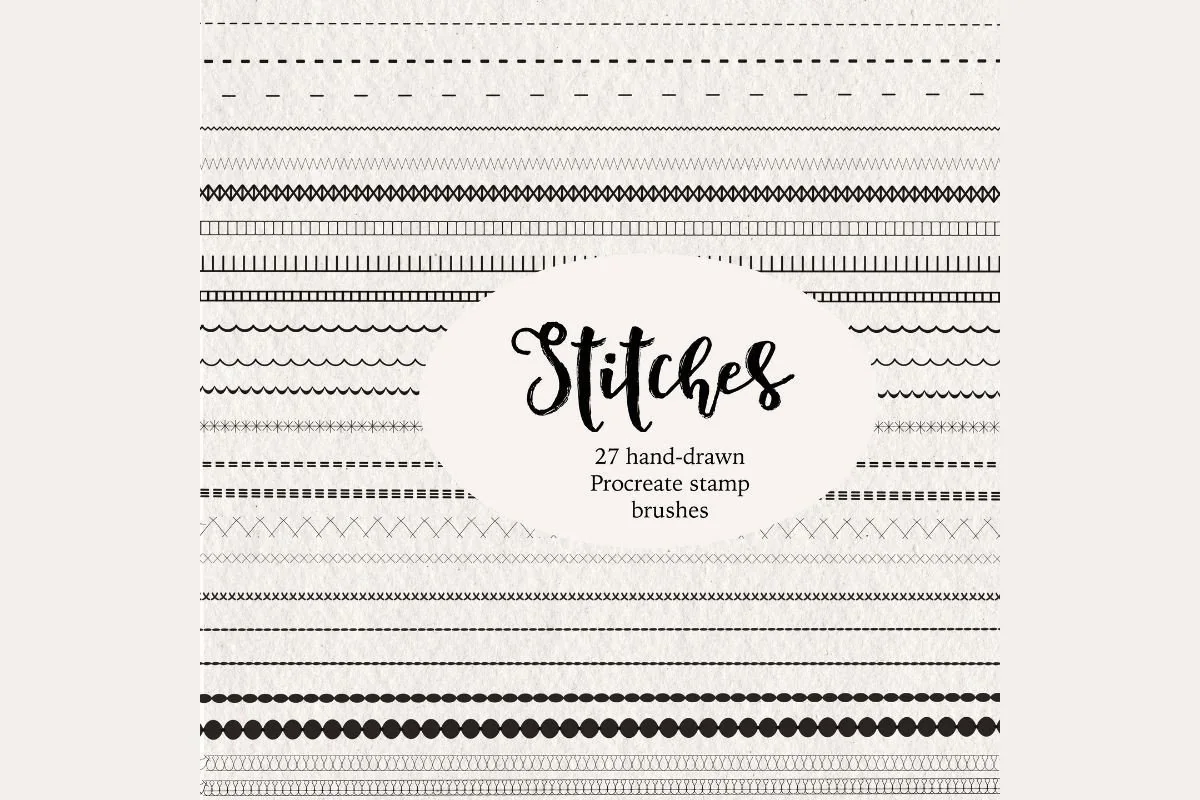
- 27-piece Procreate brush set, including 3 buttonhole stamps
- The listing names straight, basting, serged, scallop, blanket, chain, zigzag and cross-stitch styles
- Sample sheets show line strokes, stitched lettering, curves and a separate buttonhole page
- The files are .brushset with PDF instructions
Buttonholes give this smaller collection a clear role in fashion sketches and illustrated sewing labels. Although the name says stamps, the seller demonstrates stitches following a drawn curve as well as three separately placed buttonhole shapes. The hand-drawn samples have a softer look than the dense ornamental borders above. Follow the included instructions for line and curve behavior.
Best for ready-shaped stitched letters
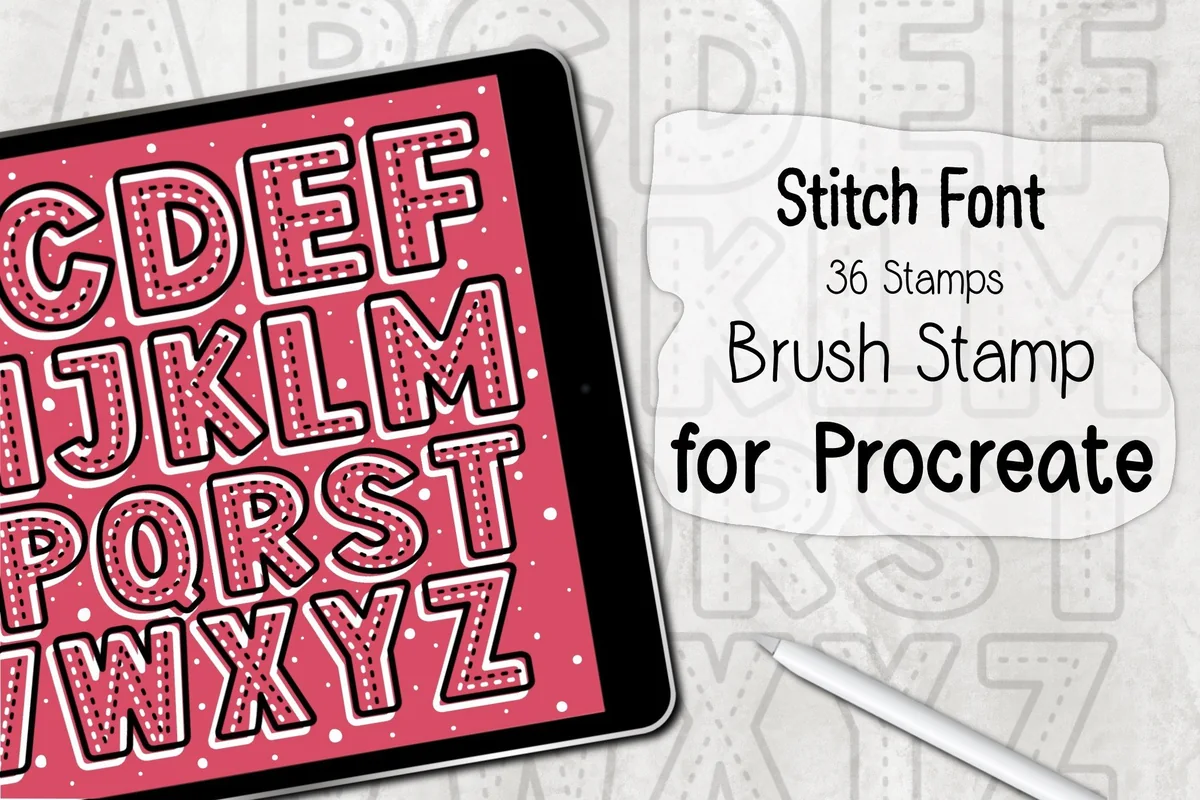
7. Stitch Font Procreate Brush Stamp
Layouts: 26 uppercase letters and 10 digitsFormat: ZIP with one .brushset; Procreate 5.0+
Best for: placing stitched-outline capitals and numbers without drawing every letter by hand. Designed by DREAMs Soul G..
- 36 stamps in one Procreate .brushset inside a ZIP archive
- The previews show the 26 uppercase letters and digits 0 through 9
- The seller requires Procreate 5.0 or higher, iPad and Apple Pencil or a compatible pressure-sensitive stylus
- This is a stamp alphabet, not an installable keyboard font or a freehand seam brush
For a short uppercase label or monogram, these fixed character shapes offer consistency without drawing each letter. The dashed interiors sit inside outlined capitals and digits. Arrange the stamps individually, then use a separate line brush for a surrounding seam. Lowercase letters and punctuation are not listed. Despite Font in the product name, the included file is a Procreate brushset rather than a keyboard typeface.
Quick Comparison
| Brush pack | Main use | Contents | Files / compatibility |
|---|---|---|---|
| 1. 88 Procreate Stitch and Sewing Brushes | General stitch library | 88 brushes + guide | Procreate 4+; iPad Pro stated |
| 2. Embroidery Stitches Procreate Brushes | Embroidery-style borders | 40 brushes + video tutorial | .brushset; Procreate only |
| 3. Zip Chain Stitch Brush Set for Procreate | Fashion seams and fastenings | 13 stitches; 19 hardware tools | .brushset |
| 4. Procreate Sewing Stitch Brushes | Stitches plus textile surfaces | 72 stitches + 9 textures | .brushset |
| 5. Embroidery Stitches Procreate Brushes 2 | Paired-color stitch lines | 40 brushes; 18 duo-color | .brushset |
| 6. Procreate Stitches Brush Stamps | Buttonholes and hand-drawn seams | 27 tools; 3 buttonholes included | .brushset + PDF guide |
| 7. Stitch Font Procreate Brush Stamp | Stitched alphabet companion | 36 uppercase/digit stamps | .brushset; Procreate 5.0+ |
Read the Sample Sheets Before Choosing a Stitch Style
The most useful preview is often the sheet of individual marks. A beautiful embroidered flower can hide whether the set offers one dense decorative stroke or several fine, open stitches. Compare the shape of one repeat, the empty space around it and how the line looks on a curve.
- Running and basting looks: useful visual shorthand for a simple seam or a light outline. Sibby Clips names both in its contents.
- Chain stitch: linked loops create a more ornamental edge. Sko4 and EfficientTools show chain-like samples; compare their actual shapes before choosing.
- Cross stitch: the repeated X creates a strong rhythm. Both Sko4 collections and Sibby Clips show cross-style marks, but that does not make the pack a counted cross-stitch chart.
- Overlock or serged looks: choose these for a visibly finished garment edge. The first Sko4 set labels several overlock examples, and Sibby Clips shows serger stitches.
- Satin and dense thread effects: the first Sko4 collection includes labeled satin samples for a more solid-looking line.
Inspect the stroke at the size it will occupy in the finished image. Tiny crossed marks and closely packed loops may look similar when a composition is reduced. Let a clear silhouette carry the idea of stitching; reserve the more intricate texture for a larger detail.
Plan a Small Textile-Style Illustration
A simple stitched label is a useful first project because it separates the decisions: surface, outline, lettering and one accent. The workflow below is a suggested drawing plan, not a claim that every pack contains a ready-made label template. Keep the project small enough that you can compare two or three candidate marks without rebuilding the whole composition.
From a blank canvas to a stitched label
- 1Choose the surface first. Decide whether the label is clean digital artwork or a fabric-style illustration. PdknyStudio includes nine fabric/linen textures if you need the surface as well as the seam. Create your own label shape and arrangement around the texture.
- 2Sketch the boundary. Draw the label outline before choosing the most decorative brush. Leave room for a seam inside the edge and for letters in the center. A simple outline makes it easier to judge whether the border is helping the composition or overwhelming the words.
- 3Make a short stitch sampler. On a separate working layer, compare one light seam, one looped line and one more decorative mark. Draw a straight segment and a curve for each. Treat this as a decision sheet for the project rather than a requirement to explore every brush in the collection.
- 4Add the words deliberately. For handwriting, draw the word shape yourself and choose a line tool that suits it. For fixed block capitals, the DREAMs Soul G. alphabet provides ready-shaped stitched characters. Its stamp format means arranging individual letters; it is not a keyboard typeface that automatically lays out a sentence.
- 5Inspect at the final viewing size. Check whether the border is still distinct from the texture and whether the letter interiors remain readable. Remove an accent if it competes with the words. Keep the layered working file so you can revisit the seam separately from the background later.
Match the Tool to the Project, Not Just the Cover
- A jacket or bag sketch: HYDNSTUDIO combines thirteen stitch brushes with zipper and chain tools. Use the hardware only where the drawing calls for it; decorative chain links are a different visual role from a sewn chain stitch.
- A curved floral frame: the first Sko4 set shows curved embroidery lines and a flower example. The second collection is worth considering when two colors within one line are the specific feature you need.
- A fabric-backed monogram: PdknyStudio supplies surface textures; the alphabet stamps supply fixed capitals. They solve different parts of the composition, so check whether you already own one of those functions before buying two packs.
- A small illustrated sewing label: Sibby Clips offers hand-drawn lines and buttonholes without requiring a much larger mixed library.
- A varied sampler page: EfficientTools has the broadest stated stitch-brush count here. Organize a small personal shortlist so the number of choices does not become the project itself.
For an initial drawing, the Procreate sketch brush guide covers line tools before the decorative stage. Stitch effects work best when the underlying outline already explains the object. They can describe an edge, but they do not replace the garment silhouette or the structure of a letter.
Files, Compatibility and What the Artwork Does Not Include
All seven listings specify Procreate brushset files. Several include instructions, but the supporting material differs: EfficientTools lists a guidebook, the first Sko4 set lists a video tutorial, and Sibby Clips lists a PDF guide. Do not assume that one seller’s instructions or bonus applies to another pack.
- Check the app: these recommendations concern Procreate on iPad. Explicit exclusions on the EfficientTools and first Sko4 listings rule out treating those sets as Photoshop brushes.
- Check model and version wording: EfficientTools specifically names Procreate 4 or higher and iPad Pro. The alphabet pack specifies Procreate 5.0 or higher and a compatible pressure-sensitive stylus. Verify suitability if your setup differs.
- Check the archive: extract a received ZIP archive when required, then locate the .brushset file. The alphabet listing explicitly describes one brushset inside its archive.
- Check the promised result: flower arrangements, garment drawings and stitched words on a preview demonstrate possible artwork. They do not establish that a finished editable composition is included.
- Check the usage terms: inspect the current license and seller notes for the way you intend to use your finished art. Check the terms separately if you intend to share any brush files.
If you want a paper finish instead of a textile look, the paper texture brush comparison is a separate route. Paper grain and linen weave suggest different surfaces; adding both without a clear reason can distract from a simple stitched line.
FAQ: Choosing and Using Stitch Brush Packs
Which set is best for a chain stitch brush in Procreate?
Start with the sample sheets rather than the count. The first Sko4 collection labels several chain stitch effects, while EfficientTools includes chain-like and ornamental lines. HYDNSTUDIO also includes six chain brushes, but those sit in a hardware-focused collection beside zipper tools. Decide whether you want thread-like loops or a metal-chain detail.
Are these Procreate cross stitch brushes embroidery-machine patterns?
No. Some of the brush samples create an X-shaped or cross-stitch appearance in a digital drawing. The listed files are Procreate brushsets, not machine-ready stitch instructions or counted charts. A realistic-looking illustration should not be treated as production data for a sewing or embroidery machine.
Is a stamp pack the same as a continuous sewing brush?
The names alone are not enough to tell. Sibby Clips calls its collection stamps but also demonstrates drawn stitch lines and curves, with separate buttonhole stamps. The alphabet collection is different: it supplies individual ready-shaped letters and digits. Check the actual marks and the seller’s instructions for each tool.
Can I make a two-color embroidery line with these sets?
The second Sko4 collection explicitly includes eighteen duo-color brushes within its forty-brush total. Its description says to select a main and secondary color, and its previews show paired-color ornaments. That feature is the reason to choose it; it should not be assumed for every other pack in the comparison.
Are there free Procreate stitch brushes in this list?
No pack in this comparison is presented as a verified free offer. Check the current product page and the terms shown for your account; access through a subscription is different from an independently free item.
How do I get the brushset into Procreate?
Follow the instructions included with the chosen pack. The listings describe opening the .brushset file on iPad so it imports into Procreate; extract an archive first when the seller supplies one. If the received file is a PDF guide or a ZIP archive, locate the actual brushset rather than trying to use that document or archive as a brush.
Pick One Clear Role for Your First Set
Test Procreate stitch brushes on one small sample before using them across an illustration. Draw a curved seam, place a short stamped word and add fabric texture on a separate layer. At the intended viewing size, check whether the stitches remain distinct, the letters read clearly and the fabric supports the seam without hiding it. That sample will show which role your project still needs.
You May Also Like
This article contains affiliate links. If you buy through them, I may earn a commission at no extra cost to you. Read the affiliate disclosure.