Quiet time often starts with good intentions and a blank page. You open the Bible, read a chapter, and then don’t quite know what to write. A bible journal works best with a small structure: one reading plan, one way to study a verse, one prayer list. On the iPad that structure is easy to set up once and reuse every morning.

Below are 40 Bible journal ideas in six groups: reading plans, verse mapping and study methods, prayer lists, gratitude, sermon notes, and pages for January and Lent. Then come 4 picks from Creative Fabrica I’d actually use on the iPad: 2 digital Bible and prayer journals and 2 faith sticky note packs to add prompts to any page. After that: what Bible journaling is, how to do it on an iPad, a 15-minute quiet time routine and a simple plan for Lent 2027.
40 Bible Journal Ideas for Quiet Time
You don’t need all 40. Pick one idea from the reading group and one from the prayer group, and you already have a page for tomorrow morning. Add the rest when you want a change.
Reading Plan Pages 1–8
- 1A Bible-in-a-year tracker: 1,189 chapters, a bit over three a day
- 2One New Testament chapter every weekday: 260 chapters fit into the 261 weekdays of 2027
- 3A Proverbs month: 31 chapters, one for each day
- 4Psalms in a month: five psalms a day for 30 days
- 5The four Gospels (89 chapters) as a 90-day plan
- 6A book-by-book checklist with all 66 books to color in
- 7A chapter summary box: one or two sentences per chapter you read
- 8A “catch-up” row, so a missed day moves instead of breaking the plan
Verse Mapping and Study Methods 9–16
- 9SOAP: Scripture, Observation, Application, Prayer, one box each
- 10Verse mapping: the verse in the middle, context, key words and cross-references around it
- 11A word study page: one word, its original meaning and where else it appears
- 12A character study: who they were, what happened, what stands out to you
- 13Observe, interpret, apply: three columns for one passage
- 14Five questions for any passage: who, what, where, when, why
- 15A verse to memorize each week, written out by hand every day
- 16A questions page for things you want to look up or ask someone later
Prayer List Ideas 17–24
- 17A prayer list with three columns: date, request and answered
- 18A focus for each weekday: family on Monday, friends on Tuesday, church on Wednesday
- 19ACTS prayer: adoration, confession, thanksgiving, supplication
- 20A “people I’m praying for” page with a small box for each name
- 21Praying a psalm: copy a few verses and write your own words under each line
- 22A one-line prayer for the day at the top of the page
- 23A “still waiting” list for long-term prayers you want to keep in view
- 24A monthly look back at answered prayers, however small
Gratitude and Reflection 25–30
- 25Three things you’re thankful for, written before you read
- 26A thanksgiving ledger: one line a day, all year
- 27A “where I saw grace today” box for the evening
- 28A weekly reflection: what you read, what stayed with you, what you’ll carry into next week
- 29A favorite verses collection, one page you add to over the year
- 30A short letter to your future self at the end of each month
Sermon and Church Notes 31–35
- 31A sermon notes page: date, speaker, title and passage at the top
- 32Key points as a short list, not a transcript
- 33One “how will I live this out this week?” line at the bottom
- 34A sermon index, so you can find notes on a passage months later
- 35Small group notes with the discussion questions and prayer requests shared
January and Lent Pages 36–40
- 36A word for the year with a verse to go with it
- 37Spiritual goals for January: one reading plan, one prayer habit, one thing to give
- 38A 40-day Lent tracker from Ash Wednesday to Easter
- 39A Lent reading plan: the Gospel of Mark, 16 chapters, one every two or three days
- 40A Holy Week page with one short reading and one prayer for each day
Which Bible Journal Idea to Start With
The best first page is the one you’ll open again tomorrow. A quick guide:
- New to Bible journaling: SOAP (9)
- Want to go deeper into one verse: verse mapping (10)
- Want to read more: one reading plan (1–5)
- Prayers get forgotten: date, request, answered (17)
- Busy mornings: one-line prayer plus three thank-yous (22, 25)
- Take notes at church: sermon page plus index (31, 34)
If you can’t decide, start with SOAP. It fits on one page, works with any passage and already includes a short prayer.
The 4 Best Digital Bible and Prayer Journal Picks I Found
I went through more than 100 Bible, prayer, faith and sermon notes listings on Creative Fabrica. Most are printable sheets, Canva files or KDP interiors for print books, and several are dated for years that are already over. I kept only journals with real digital features for the iPad, like hyperlinks for GoodNotes or Notability, and only two journals passed. To round out the list, I added two faith sticky note packs made for GoodNotes: they turn any plain page into a prayer list, verse page or sermon notes, which matters when the journals themselves are this rare.
TL;DR: 40 Bible journal ideas in six groups: reading plans, verse mapping and study methods, prayer lists, gratitude, sermon notes, and pages for January and Lent. Then 4 picks for the iPad from Creative Fabrica: an undated Bible study journal, a 2027 prayer journal and two faith sticky note packs for GoodNotes.
Quick Picks
- Best for bible study and sermon notes: Bible Study Journal Hyperlinked PDF
- Best for a 2027 prayer list: 2027 Prayer Journal
- Best for study prompts: Digital Sticky Note: Bible Study Pack
- Best for prayer lists: Digital Sticky Note: Faith Pack
- Bible Study Journal Hyperlinked PDF – Best for Bible study and sermon notes
- 2027 Prayer Journal – Best for a 2027 prayer list
- Digital Sticky Note: Bible Study Pack – Best for study prompts
- Digital Sticky Note: Faith Pack – Best for prayer lists
Best for Bible study and sermon notes
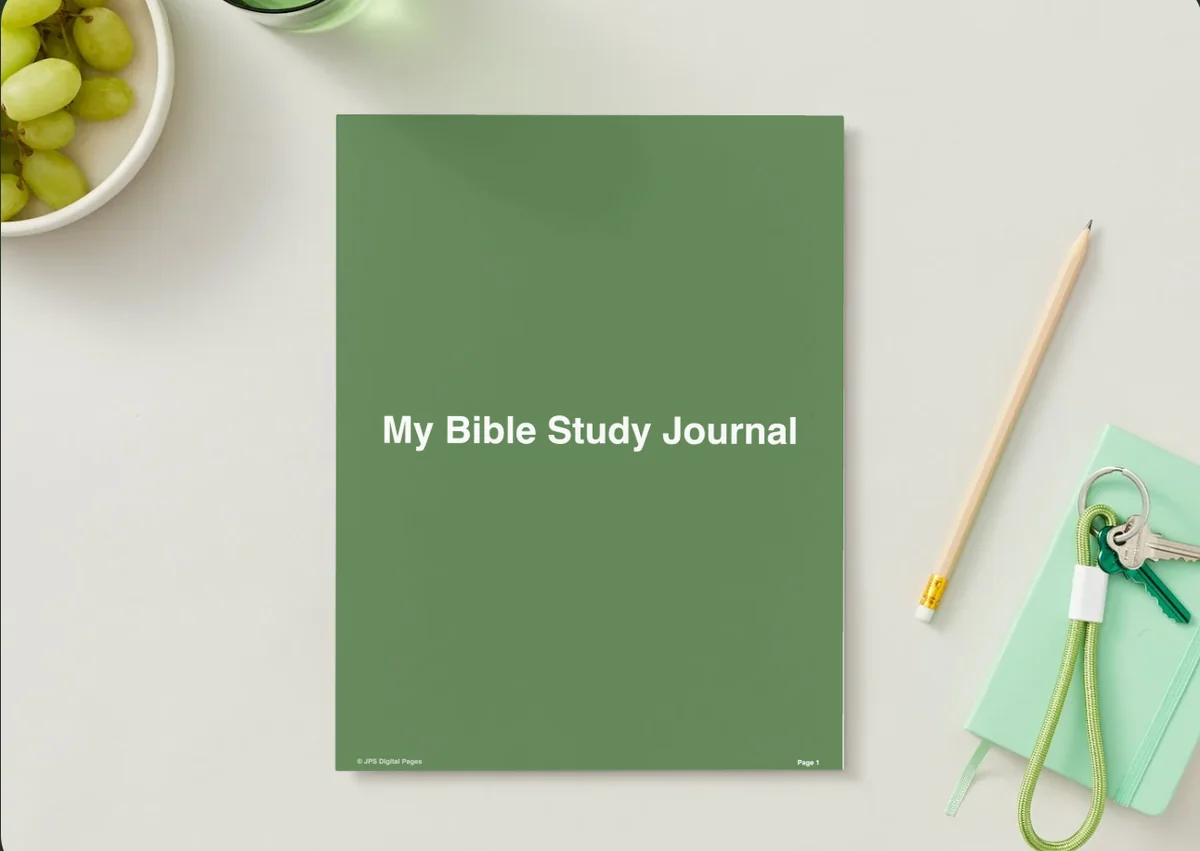
1. Bible Study Journal Hyperlinked PDF
Orientation: PortraitDates: Undated
Best for: Bible study groups, sermon note takers, daily devotions. Designed by DesignsbyDarowan.
- A hyperlinked PDF with over 400 pages, 8.5 x 11 inches
- A sermons index, sermon study pages and daily devotion reflection sheets
- A daily devotions tracker: the preview shows a grid of numbered day boxes
- Made for any PDF reader or note-taking app, including GoodNotes and Notability
- The listing also mentions prayer request and gratitude pages and a favorite verse tracker
This is the one I'd pick for verse mapping, SOAP notes and Sunday sermons in one place. Over 400 undated pages means it can last well past one January, and the sermons index makes old notes easy to find again. The design is very plain, a green cover and simple pages, which some people will love because nothing competes with the text.
Best for a 2027 prayer list
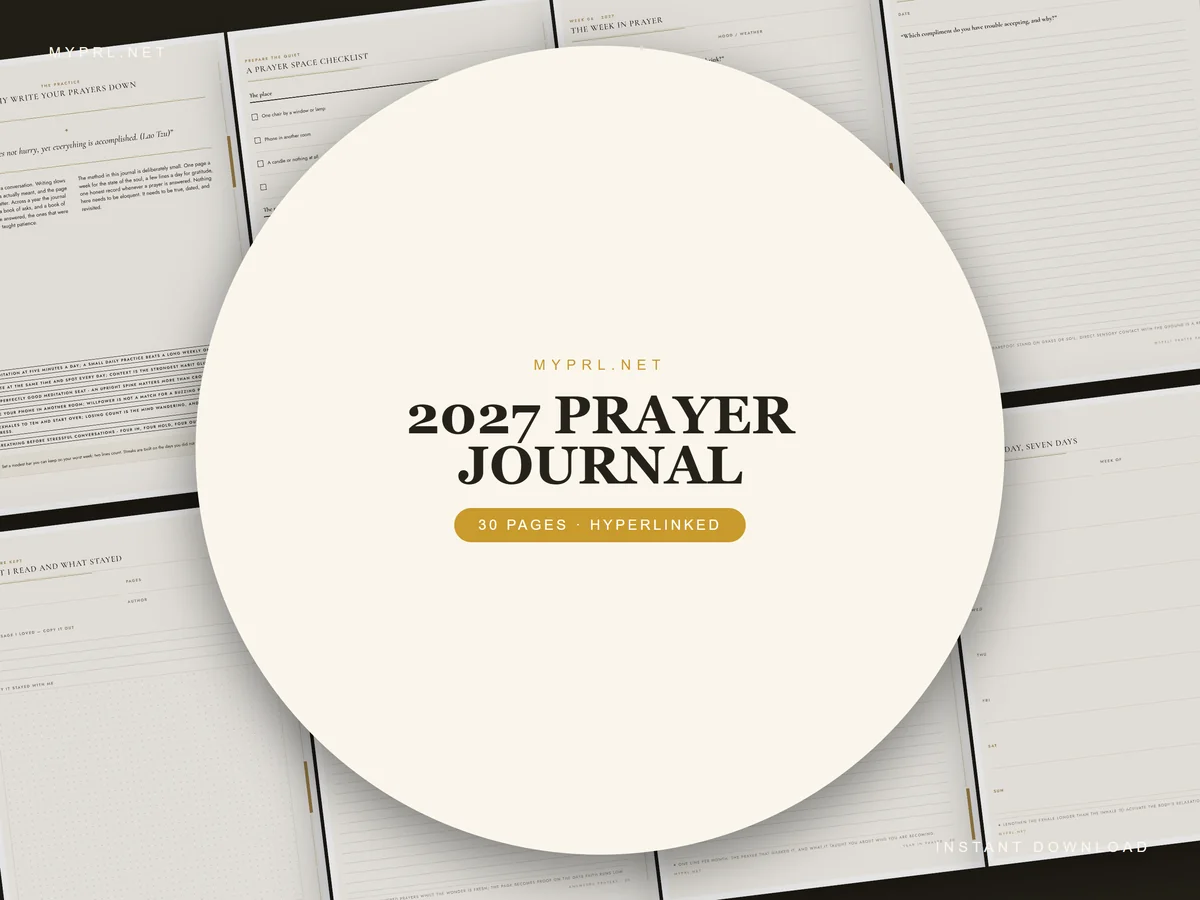
2. 2027 Prayer Journal
Orientation: PortraitDates: 2027
Best for: prayer list keepers, weekly reflection, minimalists. Designed by Healers Hub co.
- 30 pages, dated 2027, US Letter size
- Fourteen guided weekly prayer spreads, a thanksgiving ledger and monthly reviews
- Answered-prayer records that follow a request from start to finish
- Sections from the preview: Begin Here, Prayer Patterns, Weekly Prayer Pages, Monthly Review, Answered Prayers and Year in Prayer
- A hyperlinked PDF with side tabs for GoodNotes, Notability and Xodo, plus every page as a PNG
Where the first journal is about study, this one is about prayer: a list, a weekly rhythm and a place to write down what happened. The answered-prayers pages are the part I like most, since looking back is easy to skip. It's designed for print as much as for the iPad, so think of it as a light, focused file rather than a full digital planner with hundreds of pages.

Best for study prompts
3. Digital Sticky Note: Bible Study Pack
Layouts: 24 faith-based sticky notes, transparent PNGs
Best for: Bible study groups, pastel lovers, planner users. Designed by Char4You.
- 24 faith-based digital sticky notes
- Prompts on the notes like Questions I Have, Who wrote this book?, Verse to Memorize, My Prayer Focus Today (per the cover)
- GoodNotes-ready transparent PNGs
- Works in Notability, Noteshelf, ZoomNotes and other apps
Not a journal, but it turns any plain page into a study page: drop "Who wrote this book?" and "Verse to Memorize" next to today's passage and you have a guided study in seconds. A good match for the study ideas above if you'd rather keep everything in your main planner.

Best for prayer lists
4. Digital Sticky Note: Faith Pack
Layouts: 24 faith-based sticky notes, transparent PNGs
Best for: prayer journalers, colorful planners, busy moms. Designed by Char4You.
- 24 faith-based digital sticky notes
- Notes like Prayer List, Verse of the Day, Sunday Sermon Notes, Faith Goals Tracker, Dear God… (per the cover)
- GoodNotes-ready transparent PNGs
- Works in Notability, Noteshelf, ZoomNotes and other apps
The prayer side of the same set: a prayer list, a verse of the day and a Sunday sermon note you can stick on the weekly spread. Paired with the Bible Study Pack, it covers most of the 40 ideas without buying a separate journal.
Quick Comparison
| Journal | Best for | Pages | Stand-out extra |
|---|---|---|---|
| 1. Bible Study Journal Hyperlinked PDF | Bible study and sermons | 400+, undated | Sermons index |
| 2. 2027 Prayer Journal | Prayer lists and reflection | 30, dated 2027 | Answered-prayer records |
| 3. Digital Sticky Note: Bible Study Pack | Study prompts | 24 sticky notes | Works in any planner |
| 4. Digital Sticky Note: Faith Pack | Prayer and sermons | 24 sticky notes | Sermon notes sticker |
What Is Bible Journaling?
Bible journaling is writing, and sometimes drawing, in response to what you read in Scripture. For some people that means art in the wide margins of a journaling Bible. For others it means a separate notebook with study notes, prayers and verses. Both count, and many people mix them.
A Bible study journal leans toward study: passages, observations, cross-references, sermon notes. A prayer journal leans toward prayer: lists, requests, answers and gratitude. The ideas above cover both, so one journal on your iPad can hold your study and your prayers side by side.
Digital or Paper Bible Journal?
Paper has a quiet charm and no notifications. A digital Bible journal on the iPad has other strengths: you can duplicate a SOAP page as many times as you need, search your handwriting in GoodNotes, keep years of notes in one file and erase without a trace. If your phone or tablet distracts you, turn on Do Not Disturb before you start.
How to Bible Journal on iPad
Digital Bible journaling needs only a few things:
- An iPad and a stylus. An Apple Pencil is the most common choice, but any compatible stylus works for handwriting.
- A note-taking app. GoodNotes, Notability or another app that opens PDFs and lets you write on them.
- A journal template. One of the journals above, or a blank lined notebook in your app.
- A Bible to read from. A paper Bible next to the iPad, a Bible app in split view, or a digital journaling Bible PDF if you want to write right next to the text.
- Choose one reading plan from ideas 1–5 and write it on the first page.
- Pick one study method (SOAP or verse mapping) as your default page.
- Set up one prayer list page with date, request and answered columns.
- Read, write a few lines, pray. Stop when the time is up, even mid-page.
- Once a week, add one idea from the gratitude or sermon groups.
Christian Stickers for Your Bible Journal
Christian stickers do a small job in a Bible journal: they mark the verse you are memorizing, frame a prayer request and make the page easier to find a month later. The Bible Study sticky notes in the picks above already cover study prompts. These two packs add the verses and the decoration.
Best for verse-of-the-day pages
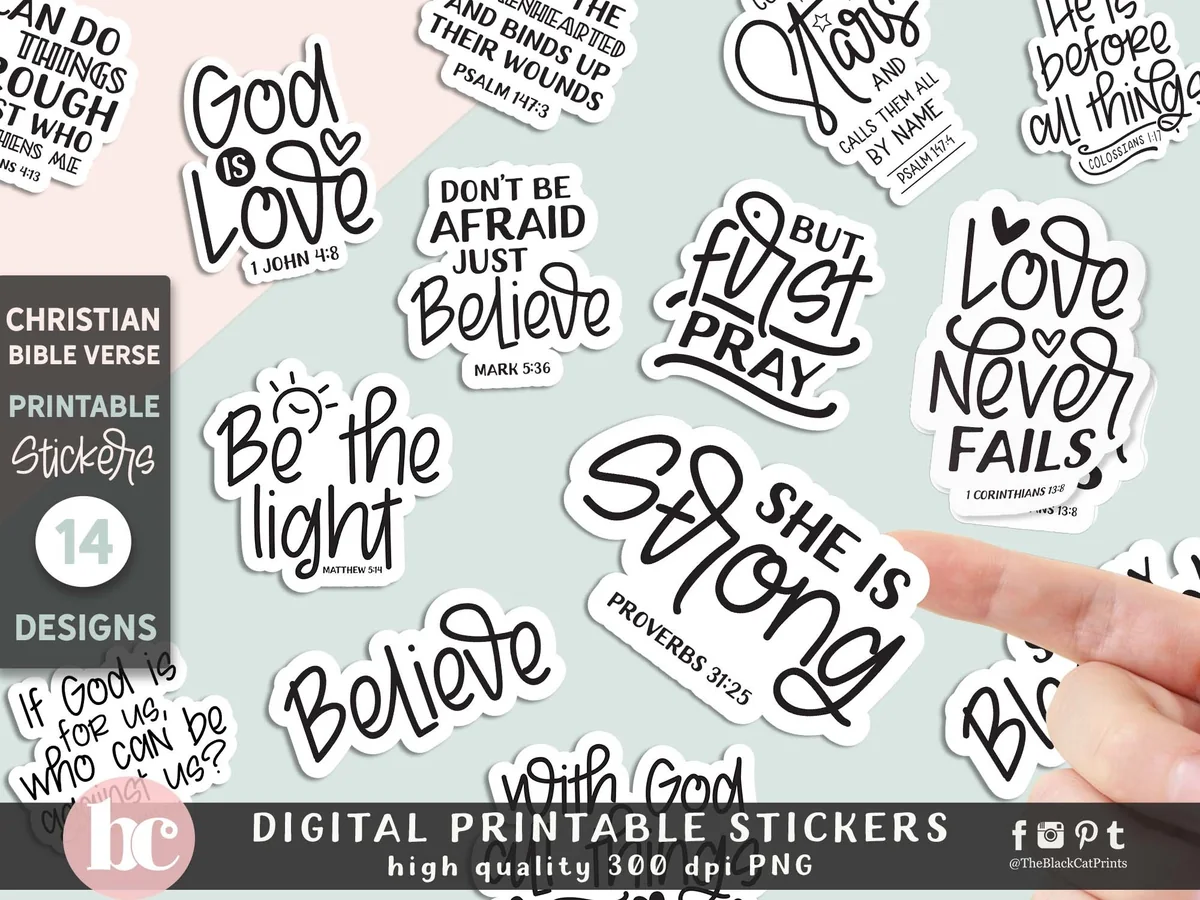
Christian Bible Verse Quote Stickers
Stickers: 14 hand-lettered verse and quote designsFiles: transparent PNG, 300 dpi
Best for: verse mapping, memory verses, black-and-white pages. Designed by TheBlackCatPrints.
- 14 separate PNG stickers with transparent backgrounds, so each one drops onto a page on its own
- Verses and short quotes such as Be the Light (Matthew 5:14), Love Never Fails and But First Pray
- The description says they can be used in GoodNotes and Notability; the same files also print and cut
- Black hand lettering that sits well next to your own handwriting
The most-saved Christian sticker pack I found on Creative Fabrica, and the easiest to use: drag a verse onto the top of a SOAP page and your study has a title. The lettering is black only, so it pairs with any planner palette, but it won’t add much color.
Best for soft floral decoration
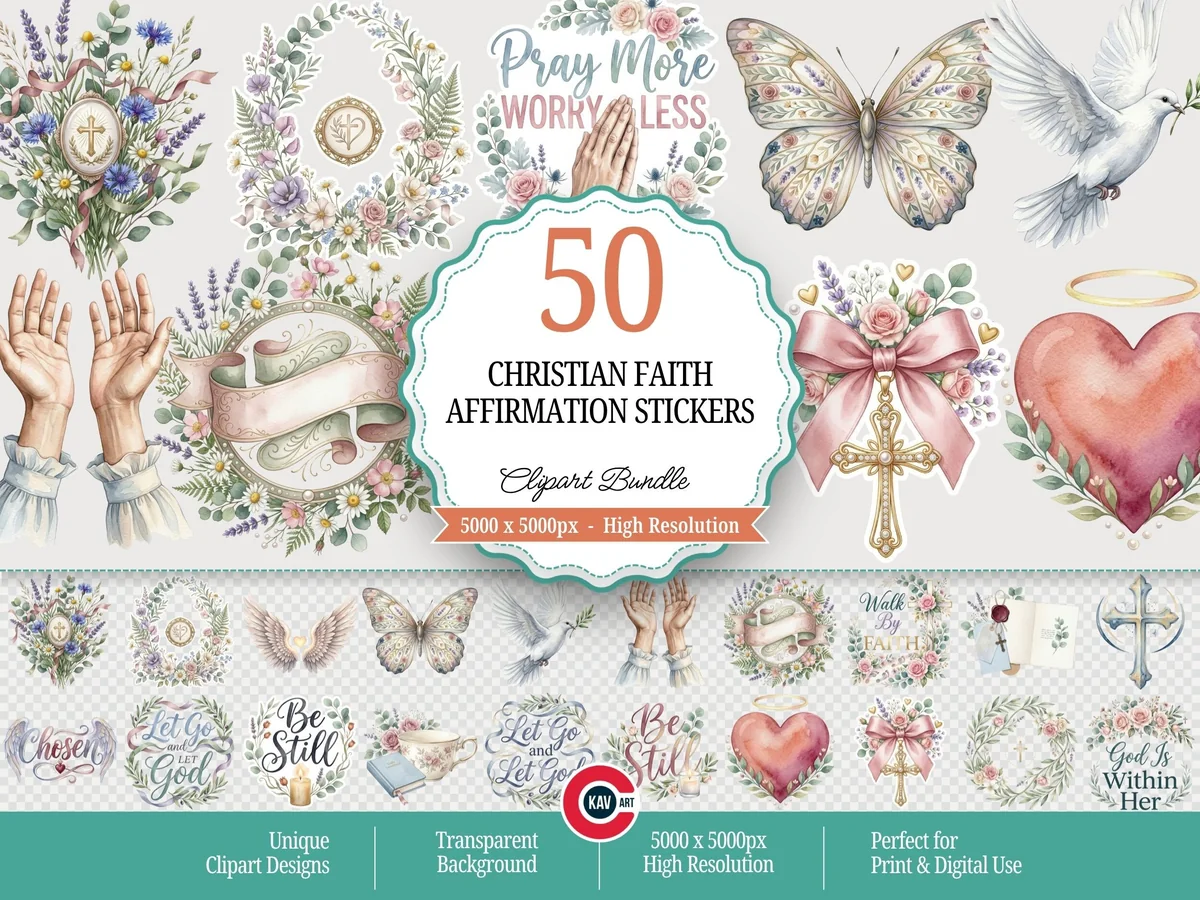
Christian Faith Affirmation Stickers
Stickers: 50 clipart designsFiles: transparent PNG, 5000 px
Best for: prayer pages, gratitude lists, pretty headers. Designed by c.kav.art.
- 50 watercolor-style designs: floral crosses, praying hands, doves, open Bibles and hearts
- Affirmation quotes such as Be Still, Walk by Faith, Let Go and Let God
- Large transparent PNG files; the description lists digital planner embellishments among the uses
- A soft pastel palette of pink, sage and lavender
This one is for decoration rather than study: a dove beside an answered prayer, a floral cross at the top of a gratitude list. It’s a clipart bundle, so you crop nothing, but you will want to resize the big files once and save the favorites into your GoodNotes sticker book.
Keep the stickers you use every week (one verse, one cross, one dove) in a single GoodNotes sticker notebook, so a quiet time page takes seconds to decorate instead of minutes.
How to Set Up a Bible Journal in GoodNotes
- Import the PDF into GoodNotes (Share → GoodNotes → Import as New Document).
- Find your blank SOAP or study page and duplicate it a few times, so the next week is ready.
- Bookmark the prayer list, so it’s one tap away from any page.
- Pick two pen colors: one for the verse, one for your own thoughts. It makes pages easier to scan later.
- Use the lasso tool to copy a verse you want to memorize onto the next day’s page.
- Back up the notebook (iCloud or GoodNotes backup), especially once it holds months of notes.
Sermon Notes Template for iPad
A sermon notes template for iPad is one page you fill in during the service or right after it, so the message doesn’t fade by Tuesday. I didn’t add a separate pick for it: the sermon notes listings I checked on Creative Fabrica were printable sheets or Canva files, not journals made for GoodNotes. Two picks above already cover it. The Bible Study Journal Hyperlinked PDF has sermon study pages and a sermons index, and the Faith Pack sticky notes include a Sunday Sermon Notes note you can stick on any weekly spread.
- Top of the page: date, church or speaker, sermon title and the main passage.
- Key points: three to five short lines, not a transcript.
- Verses mentioned: a short list to read again during the week.
- One question: something to look up or ask your small group.
- Apply it: one line on what you will do differently this week.
In GoodNotes, duplicate the sermon page each Sunday or save it as a page template, so a fresh one is a tap away. Then add the date and passage to your sermon index (idea 34), and months later you can find every note on one book of the Bible.
A 15-Minute Quiet Time Routine
Quiet time doesn’t have to be long to be steady. A simple rhythm that fits before work or after the kids are in bed:
- Settle (1 minute). Turn on Do Not Disturb, open the journal and write today’s date.
- Give thanks (2 minutes). Three short lines of gratitude (idea 25).
- Read (5 minutes). Today’s passage from your reading plan.
- Write (4 minutes). A SOAP page or one verse mapped. Short is fine.
- Pray (3 minutes). Go through today’s group on your prayer list and tick off anything answered.
On busy days, keep only steps 3 and 5. The journal is there to support the habit, not to become another thing to keep up with.
A Bible Journal Plan for January and Lent 2027
January and Lent are the two times of year when many people start or restart a Bible journal. Two simple plans:
- January. Pick a word for the year (idea 36), choose one reading plan and set one prayer habit. A New Testament chapter every weekday starting January 1 finishes all 260 chapters within 2027.
- Lent. In Western churches, Lent 2027 begins on Ash Wednesday, February 10, and leads to Easter Sunday on March 28. That’s 40 days not counting Sundays. A 40-day tracker (idea 38), the Gospel of Mark as a reading plan (idea 39) and a Holy Week page from Palm Sunday, March 21 (idea 40) fit neatly into one journal. Orthodox churches follow a different calendar, so check your own church’s dates.
FAQ
What should I put in my Bible journal?
Start with three things: the passage you read, a few lines about what stood out (SOAP or verse mapping work well), and a short prayer. Over time you can add a prayer list, gratitude notes, sermon notes and a page of favorite verses.
What is the difference between a Bible journal and a prayer journal?
A Bible journal centers on Scripture: reading plans, study notes and reflections on passages. A prayer journal centers on prayer: requests, answers, thanksgiving and the people you pray for. Many people keep both in one notebook, with study pages and prayer pages in separate sections.
Can you do Bible journaling digitally?
Yes. With an iPad, a stylus and an app like GoodNotes or Notability, you can write on a digital Bible journal template the same way you would on paper. Some people also use a digital journaling Bible PDF so their notes sit right next to the text.
How do I start Bible journaling as a beginner?
Choose a short book (Mark, Philippians or James are common first picks), read a small section each day and fill in one SOAP page. Keep it to 10–15 minutes. Once that feels natural, add a prayer list or try verse mapping.
Is there a sermon notes template for iPad?
Yes. Any one-page PDF with space for the date, speaker, passage and key points works in GoodNotes or Notability. In this list, the Bible Study Journal has sermon study pages and a sermons index, and the Faith Pack adds a Sunday Sermon Notes sticky note. You can also draw the five sections on a blank lined page and save it as a template.
How do I keep sermon notes in a journal?
Write the date, speaker, title and passage at the top, then just the key points as a short list. End with one line on how you’ll apply it this week. A sermon index at the front of your journal (idea 34) helps you find notes again later.
Can I use a free printable Bible journal on my iPad?
Yes, a printable PDF opens in GoodNotes as a plain page. You won’t get tabs or links, and the page size is made for paper, not the screen. For a single SOAP sheet that’s fine. For a journal you’ll use all year, a hyperlinked digital version is easier to navigate.
Final Thoughts
A Bible journal doesn’t need to be beautiful or long to matter. One reading plan, one study page and one prayer list are enough to make quiet time steady, and the iPad makes it easy to repeat that page every morning. If you also keep a gratitude practice, see my digital gratitude journals for iPad, or browse all wellness planners and journals.
Want to decorate your pages or add a notes section? Try my picks of GoodNotes stickers, GoodNotes note templates and self-care planners. For prompts beyond faith journaling, see my digital journaling ideas.
You May Also Like
For prayer-page accents that leave room for notes, compare these Christian digital stickers before choosing a style for the journal.
This post contains affiliate links. If you buy through them, I may earn a small commission at no extra cost to you. Learn more.