December pages in a digital planner tend to look like every other month, only busier: gift lists, dates, a cookie schedule. A few Procreate Christmas stamps change that in minutes. One tap drops a stocking into the corner, a branch brush draws a wreath around the month title, and a strip of holiday washi tape divides the week, so the page feels like Christmas without a single hour of drawing.

Below are 10 Christmas stamp and brush sets for Procreate that I’d use to decorate holiday planner and journal pages on the iPad. After the list: stamps vs brushes, what to look for, free vs paid, how to install and use stamps, how to build a December page and move it into GoodNotes, and 15 Christmas Procreate ideas to start with.
The Best Procreate Christmas Stamps and Brushes I Found
I skipped painting packs made for big illustrations, print-only clipart and anything that isn’t a Procreate brush file, and kept sets that help on a planner page. The list goes in four groups: big holiday kits (1–3), cute doodle stamps (4–6), planner helpers for an advent countdown and framed headers (7–8), and lights and washi tape (9–10). All of them work in the Procreate app on the iPad only; they don’t run inside GoodNotes, so the section after the list shows how to move your designs over.
TL;DR: 10 Christmas Procreate stamp and brush sets for decorating December planner and journal pages on the iPad: 3 big holiday kits, 3 cute doodle sets, 2 sets for advent countdowns and framed headers, and 2 for lights and washi tape. They all work in the Procreate app only; you design a header, sticker or full page in Procreate, then move it into GoodNotes as a PNG or PDF.
Quick Picks
- Best overall: Christmas Procreate Brushes Bundle (OkayAnnie Designs)
- Best for wreaths and greenery: Christmas Procreate Brushes Bundle (Red Ink)
- Best for coloring in yourself: 200 Procreate Christmas Stamps
- Best for cute icons in color: 77 Cute Christmas Procreate Stamp Brushes
- Best for kawaii page corners: 120 Christmas Doodle Procreate Stamps
- Best for minimalist tree doodles: 20 Doodle Christmas Tree Procreate Stamps
- Christmas Procreate Brushes Bundle (OkayAnnie Designs) – Best overall
- Christmas Procreate Brushes Bundle (Red Ink) – Best for wreaths and greenery
- 200 Procreate Christmas Stamps – Best for coloring in yourself
- 77 Cute Christmas Procreate Stamp Brushes – Best for cute icons in color
- 120 Christmas Doodle Procreate Stamps – Best for kawaii page corners
- 20 Doodle Christmas Tree Procreate Stamps – Best for minimalist tree doodles
- Gifts Advent Calendar Procreate Stamps – Best for an advent countdown
- Procreate Brushes Christmas Frames – Best for framed headers
- Christmas Lights Procreate Brush Set – Best for glowing lights
- Christmas Washi Tape Procreate Brush Set – Best Christmas washi tape
Best overall
1. Christmas Procreate Brushes Bundle (OkayAnnie Designs)
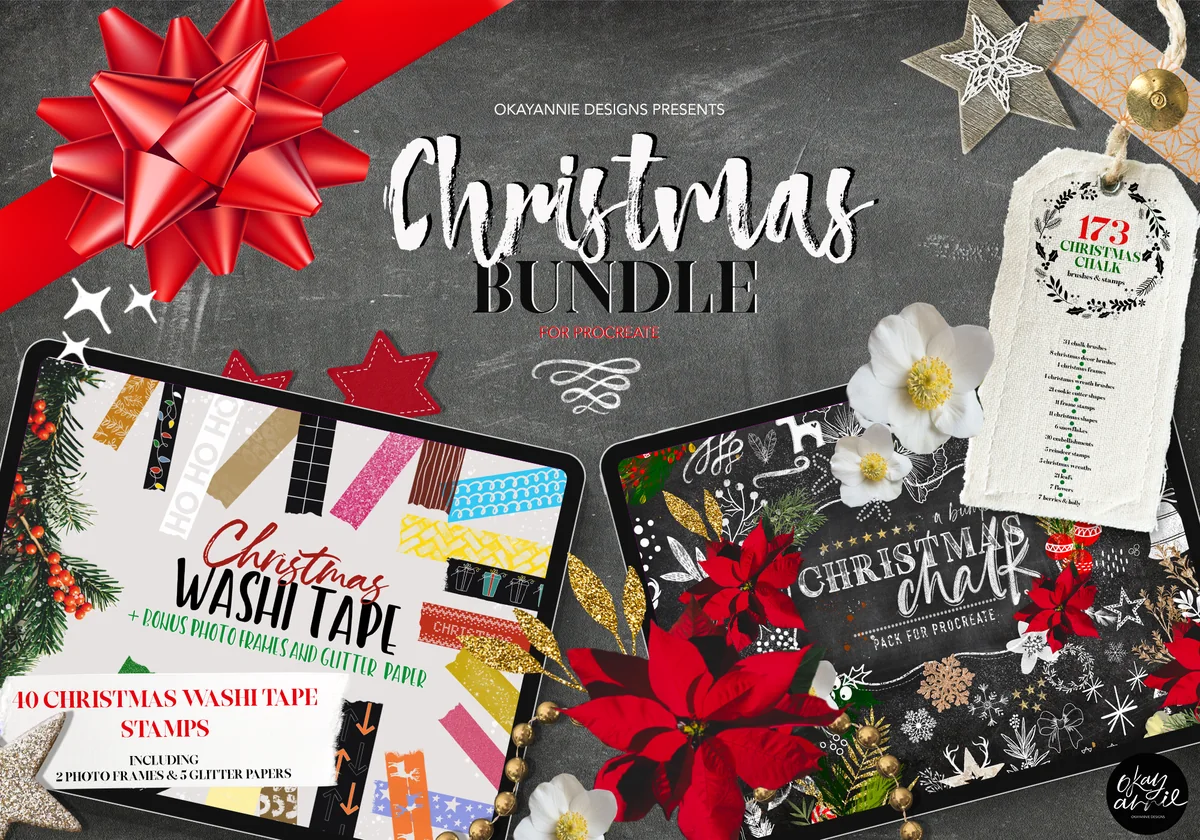
Layouts: 173 Christmas stamps & brushes (decor, cookie cutter shapes, florals) + 40+ washi tape brushesFormat: Procreate brushsets + bonus glitter papers, chalkboards and photo frames
Best for: December spreads, scrapbook pages, all-in-one shoppers. Designed by OkayAnnie Designs.
- 173 Christmas stamps and brushes: decor, shapes, cookie cutter shapes, embellishments and florals
- A separate set of hand-drawn Christmas washi tape brushes (44 in the description; the cover image says 10)
- Bonus glitter papers, chalkboards and photo frames
- Installation guide and tips for adjusting brush settings
If I could keep only one set for December pages, it would be this one, and it's the most favorited Christmas Procreate kit I found on Creative Fabrica. Stamps for the decoration and washi tape for the edges in one purchase means a whole monthly spread can come from a single brush library. The chalk look on the cover is just a demo; the stamps take any color you pick.
Best for wreaths and greenery
2. Christmas Procreate Brushes Bundle (Red Ink)
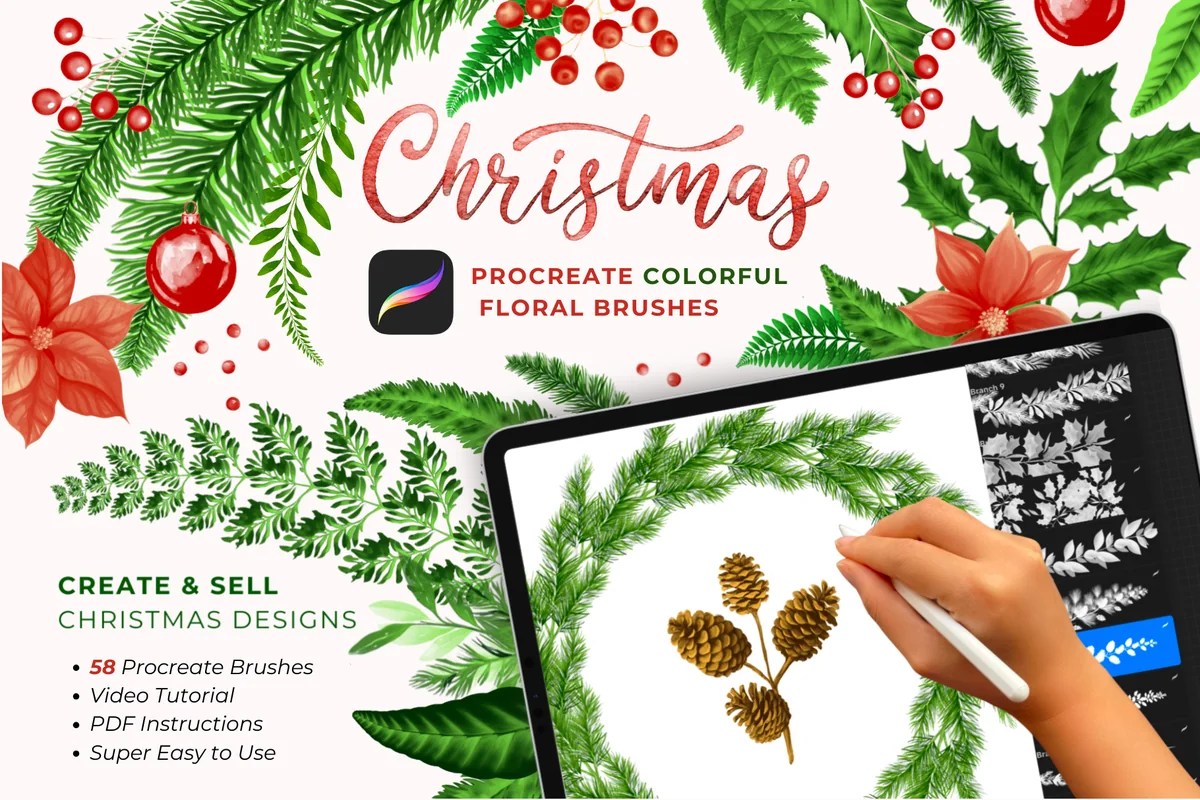
Layouts: 58 brushes: 18 branch, 12 leaf, 15 decor stamps, 13 lettering stampsFormat: Procreate brushset + PDF instructions
Best for: wreath borders, greenery lovers, holiday headers. Designed by Red Ink.
- 58 brushes: 18 branch brushes, 12 leaf brushes, 15 decor stamps, 13 lettering stamps
- The previews show each of the 18 branch brushes as a full pine, holly, berry or pinecone wreath
- PDF instructions and a video tutorial (shown on the cover)
- Needs Procreate 5.3.6 or newer; Apple Pencil recommended
Branch brushes are the quickest way to make a planner page look like Christmas without filling it: one wreath around the month title or a garland across the top is enough. The 13 lettering stamps give ready holiday words, so you don't have to letter "Merry Christmas" yourself. Because branches follow your stroke, an Apple Pencil helps here more than with plain stamps.

Best for coloring in yourself
3. 200 Procreate Christmas Stamps
Layouts: 200 Christmas line-art stamps + 15 bonus stampsFormat: Procreate brushset + PDF import guide
Best for: color-in pages, big libraries, doodle fans. Designed by DrawingStoryArt.
- 200 Christmas stamps plus 15 bonus stamps
- Clean outline drawings: trees, Santa, snowman, fireplace, sleigh, stockings, gingerbread, a "Merry Christmas" sign
- PDF guide on importing the brushes into Procreate
- A companion Set 2 with 180 more stamps is sold separately by the same designer
Outline stamps are the most flexible kind for a planner: stamp a stocking, fill it with your page colors, and it matches the rest of the spread. With 215 drawings you'll have a different doodle for every day of December and still some left for the New Year pages. The second set from the same designer adds 180 more if you run out.
Best for cute icons in color
4. 77 Cute Christmas Procreate Stamp Brushes
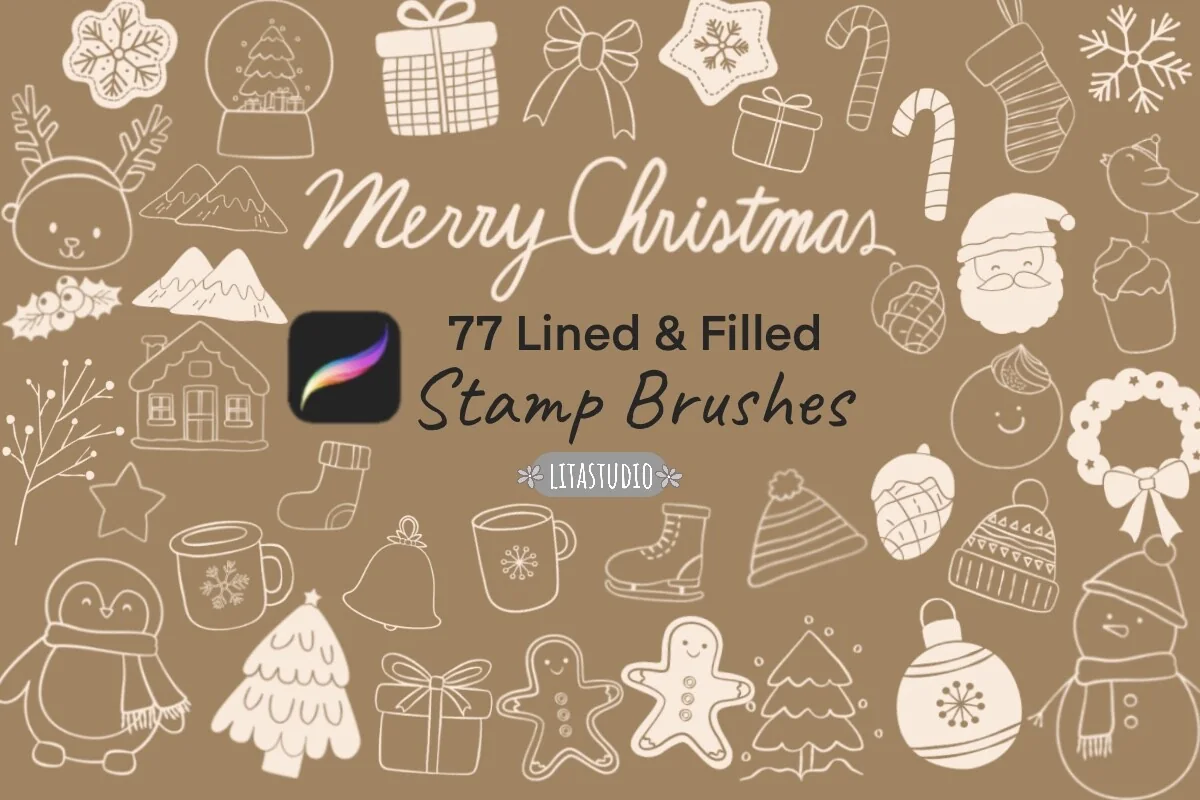
Layouts: 77 stamps: 40 lined + 37 filledFormat: 2 Procreate brushsets
Best for: cute planners, quick decorating, digital planner stickers. Designed by LitaStudio.
- 77 stamps in two brushsets: 40 lined and 37 filled
- Santa, penguin, snowman, snow globe, snowflakes, reindeer, fireplace, stockings and more
- Filled set includes "Merry" and "Christmas" lettering stamps
- The designer lists digital planners among the intended uses
Lined and filled versions of the same motifs is a smart combination: filled stamps drop in finished color, lined ones sit on top as outlines, so a penguin takes two taps instead of a minute of coloring. It's also one of the best-loved sets in this list on Creative Fabrica, and the style is soft enough for a minimal planner.

Best for kawaii page corners
5. 120 Christmas Doodle Procreate Stamps
Layouts: 120 kawaii Christmas doodle stampsFormat: Procreate brushset + PDF import guide
Best for: kawaii fans, color-in doodles, daily page corners. Designed by DrawingStoryShop.
- 120 kawaii Christmas doodle stamps
- Bells, cocoa mug, candle, gingerbread house, stocking, bear, Santa and a "To Santa Claus" letter on the previews
- PDF guide on importing into Procreate
- Brand new on Creative Fabrica (listed October 2026)
This one is so new it has no favorites yet, which isn't a minus for me: the previews show clean outlines with tiny faces that look great small, exactly the size of a daily page corner. Pair it with the lights set below for a cozy, slightly silly December.
Best for minimalist tree doodles
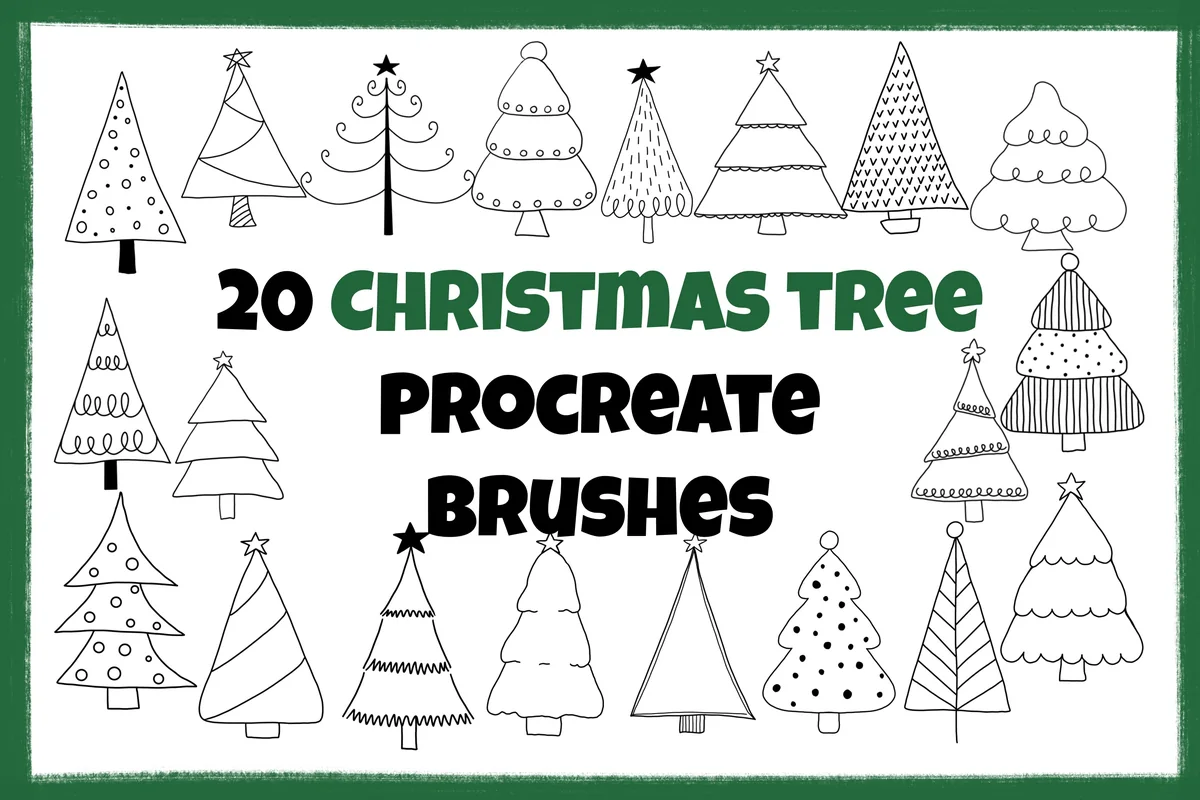
6. 20 Doodle Christmas Tree Procreate Stamps
Layouts: 20 hand-drawn Christmas tree stampsFormat: Procreate brushset
Best for: minimal decorators, tree borders, beginners. Designed by Sakura Lemon Designs.
- 20 hand-drawn Christmas tree stamps in a loose doodle style
- Stamp brushes, not dynamic brushes: one tap places one tree
- Dots, stripes, swirls and zigzags, with and without stars
- One brushset file in a ZIP
Twenty trees sounds small next to 200 stamps, but for a minimal planner it's the right amount. A line of five trees in green and red under the weekly header is all the decoration a page needs, and the loose doodle style looks hand-drawn rather than clipart.
Best for an advent countdown
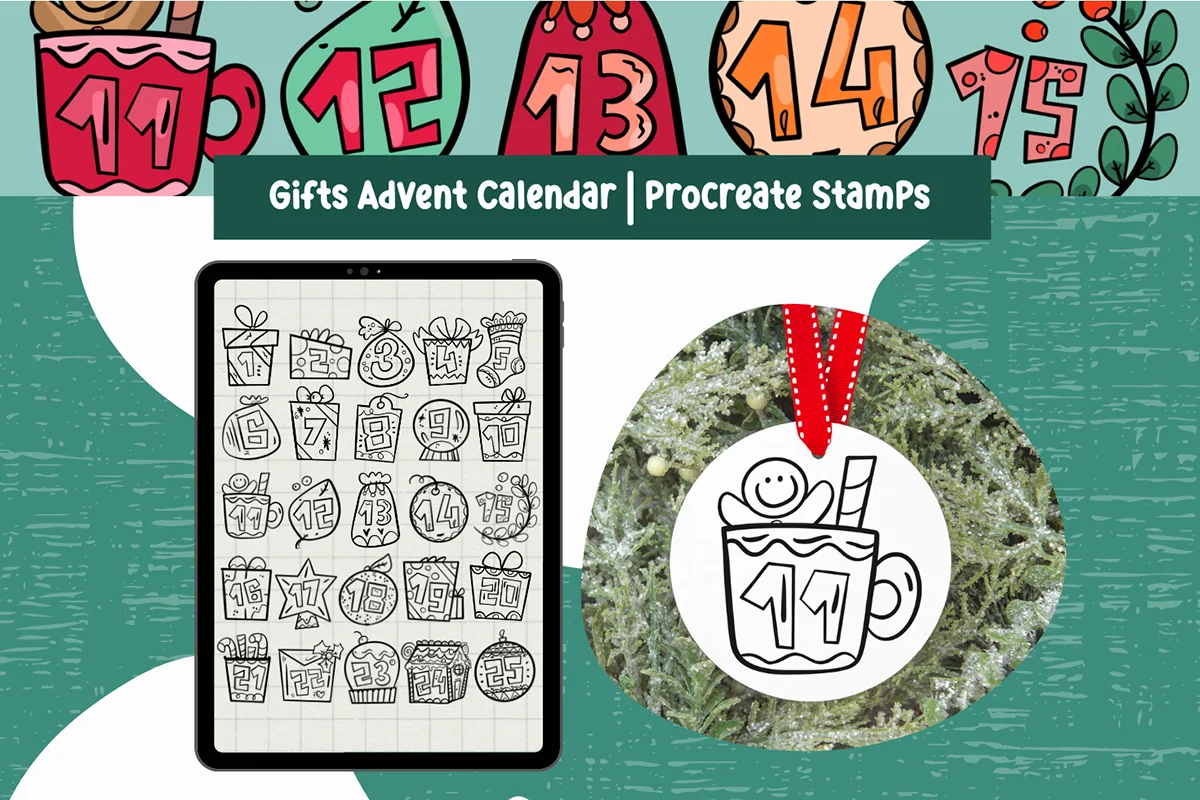
7. Gifts Advent Calendar Procreate Stamps
Layouts: 26 gift stamps with countdown numbers 1–25Format: Procreate stamps
Best for: advent countdowns, December trackers, families. Designed by AghCreativeLab.
- 26 Christmas gift stamps made for composing an advent calendar
- Numbers 1 to 25 drawn into gifts, mugs, stockings, ornaments and a gingerbread house
- Change color, opacity and size of each stamp
- Not pressure sensitive, so they stamp the same with an Apple Pencil, any stylus or a finger
This is the set I'd pick for a planner first, because it gives you a ready layout idea: stamp the 25 numbered gifts in a grid and color one in each evening. It doubles as a countdown tracker, a gift log or a "one good thing a day" page for December.
Best for framed headers
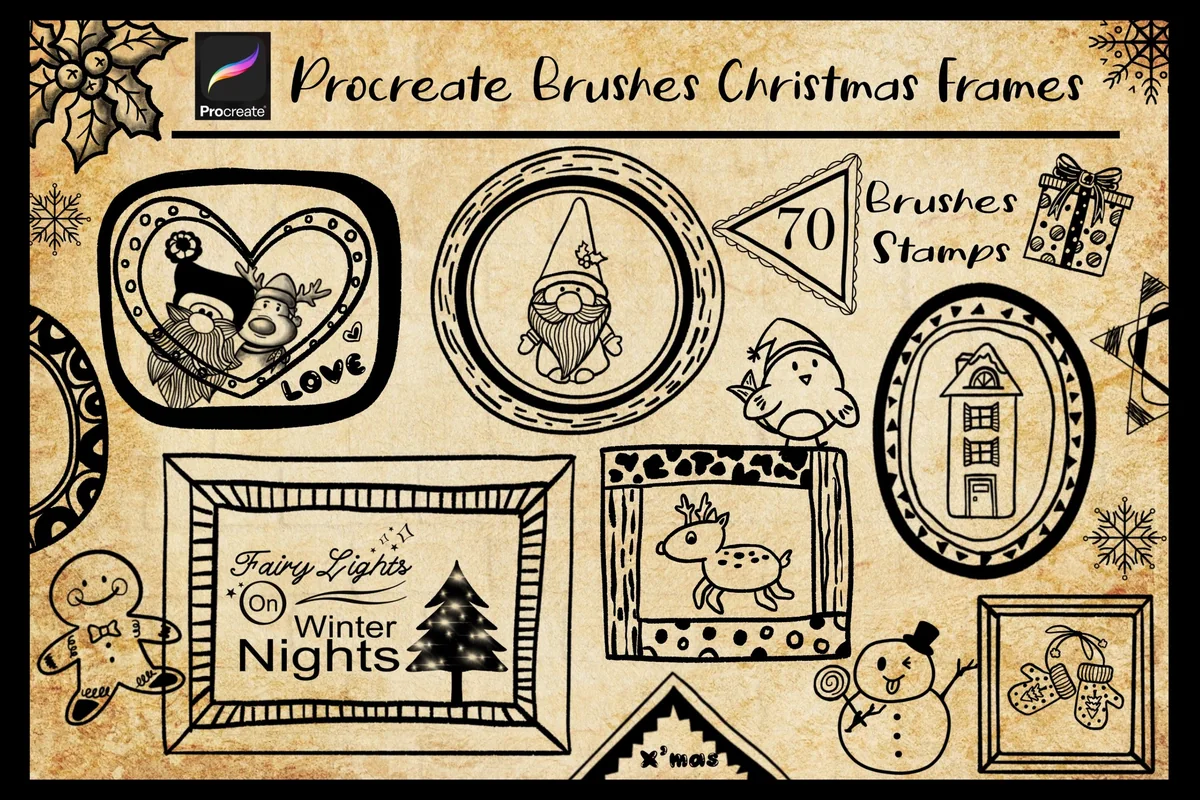
8. Procreate Brushes Christmas Frames
Layouts: 70 Christmas frame stamps (round, heart, square, with gnomes, Santa, deer)Format: Procreate brushset
Best for: header boxes, journaling prompts, photo frames. Designed by TANVARA DIGITAL ART.
- 70 Christmas frame stamps
- Round, heart, square and banner frames, some with gnomes, Santa, deer and houses
- Previews show three ways to use them: plain stamp, colored in, or filled with a clipping mask
- One brushset file in a ZIP
Frames are what turn a decorated page into an organized one: a gnome frame around the week's priorities, a heart frame for the gift list, a plain round one for the date. Seventy is plenty for every December page without repeating the same box twice.

Best for glowing lights
9. Christmas Lights Procreate Brush Set
Layouts: String lights, sparkle lights, scatter dots, confetti, 2 glitter brushes; rainbow and single colorFormat: Procreate brushset
Best for: dark mode pages, festive borders, glitter lovers. Designed by illuztrate.
- String lights, sparkle lights, scatter dots and confetti brushes, plus small and large glitter brushes
- Each light brush comes in rainbow and single-color versions
- Every brush has a filled and a transparent version
- The designer notes they look best on dark backgrounds
If your planner runs in dark mode, this is the set that makes it feel festive: one stroke of string lights along the top of a black page glows in a way stamps can't. On a white page I'd stick to the single-color lights in a soft tone, as the designer says the rainbow effect shines on dark backgrounds.

Best Christmas washi tape
10. Christmas Washi Tape Procreate Brush Set
Layouts: 11 Christmas washi tape brushes, some dual colorFormat: Procreate brushset
Best for: washi lovers, scrapbook spreads, page dividers. Designed by Aliss Art.
- 11 Christmas washi tape brushes (brushes, not stamps, so the strip follows your stroke)
- Some brushes are dual color: the primary and secondary colors in Procreate change both
- Patterns on the previews: stars, poinsettias, trees, baubles, "Merry & Bright"
- Made for decorating and digital scrapbooking
Washi as a brush is easier than washi as a stamp: drag a line and the tape is exactly as long as you need. The dual-color trick means one pattern can match every page palette you use in December. A good small add-on if you take the doodle sets above.
Quick Comparison
| Set | Type | What you get | Stand-out extra |
|---|---|---|---|
| 1. Christmas Procreate Brushes Bundle (OkayAnnie Designs) | Stamps + washi | 173 stamps + 40+ washi brushes | Glitter papers and chalkboards |
| 2. Christmas Procreate Brushes Bundle (Red Ink) | Brushes + stamps | 58 brushes | 13 lettering stamps |
| 3. 200 Procreate Christmas Stamps | Stamps | 200 + 15 bonus | Line art to color in |
| 4. 77 Cute Christmas Procreate Stamp Brushes | Stamps | 77 (40 lined, 37 filled) | Two layers per motif |
| 5. 120 Christmas Doodle Procreate Stamps | Stamps | 120 doodles | Kawaii faces |
| 6. 20 Doodle Christmas Tree Procreate Stamps | Stamps | 20 trees | Loose hand-drawn style |
| 7. Gifts Advent Calendar Procreate Stamps | Stamps | 26 numbered gifts | Ready countdown 1–25 |
| 8. Procreate Brushes Christmas Frames | Stamps | 70 frames | Clipping-mask ready |
| 9. Christmas Lights Procreate Brush Set | Brushes | Lights, confetti, glitter | Rainbow or single color |
| 10. Christmas Washi Tape Procreate Brush Set | Brushes | 11 washi tapes | Dual-color patterns |
Christmas Stamps vs Brushes: What Each Does on a Planner Page
Both come as .brushset files and live in the same Brush Library, but they behave differently:
- Stamps place a whole picture with one tap: a tree, a gingerbread man, a numbered gift, a frame. Size and color are set before you tap. Most stamps aren’t pressure sensitive, so a finger works as well as an Apple Pencil.
- Brushes follow your stroke. Garlands, branches, string lights and washi tape are brushes, because their length depends on where you drag. Pressure and the Apple Pencil matter more here.
- Lettering stamps are a shortcut for headers: a ready “Merry Christmas” or another holiday greeting in one tap, instead of lettering it by hand on every page.
For December, a good mix is one doodle stamp set, one border option (branches, lights or washi) and something that gives the page structure, like frames or the advent countdown. Three sets cover the whole month.
What I Look For in Christmas Procreate Stamps
- Readable at planner size. A stamp that looks lovely at full canvas often turns into a blob in the corner of a daily page. Clean outlines and simple filled shapes survive shrinking best.
- Recolorable. Every set in this list takes any color, so the stamps match your planner palette instead of the seller’s previews.
- Planner shapes, not only pictures. Frames, numbered gifts and washi tape give a page structure; trees and Santas decorate it. The best December pages use both.
- A style that fits your planner. Line art suits minimal and neutral planners, kawaii doodles suit cute ones, and glowing lights look best on dark pages.
- A clear license. All of these are fine for your own planner. If you plan to sell stickers or planners made with them, read the license on the product page, because rules differ between designers.
Free vs Paid Christmas Procreate Stamps
Free Christmas Procreate stamps exist: the Procreate Folio community forum has holiday sets shared by artists, and many designers give away a handful of stamps as a sample of a bigger pack. They’re a good way to test whether you’ll actually stamp your planner before you spend anything.
Where paid sets earn their place is consistency. A free sample gives you five unrelated doodles; a full set gives you 70 frames or 200 drawings in one style, so the whole month looks like it belongs together. With a Creative Fabrica All Access plan, sets like these are included instead of bought one by one.
A No-Cost Christmas Stamp Set to Try
Here’s a small set that follows exactly that advice: Creative Fabrica offers it as a freebie, so you can test stamping a December page without paying or signing up for a trial. Six quote stamps won’t fill a month, but they show quickly whether stamps fit the way you decorate.
Free quote stamps
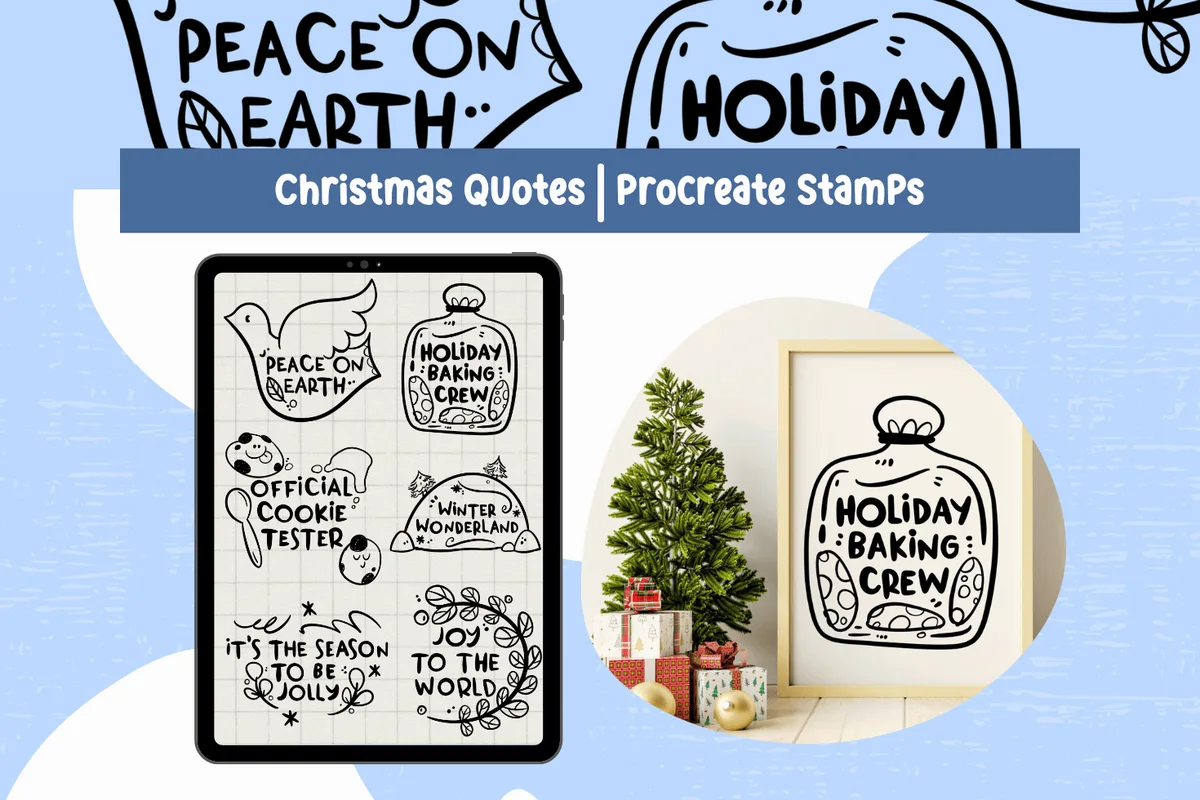
Christmas Quotes Procreate Stamps
Stamps: 6 Christmas quotesApp: Procreate 4.1 and later
Best for: December headers, holiday baking pages, gift tags. Designed by AghCreativeLab.
- Six cute Christmas brushes with short quotes in doodled frames
- Phrases on the preview include Peace on Earth, Holiday Baking Crew, Official Cookie Tester and Joy to the World
- Color, opacity and size can be changed; the stamps are not pressure sensitive
- Works with an Apple Pencil, another stylus or a finger
The baking quotes are the reason I’d install it: Holiday Baking Crew and Official Cookie Tester are fun headers for a cookie plan or a recipe page. Stamp one in Procreate, then copy it into your GoodNotes planner the same way as the paid sets above.
How to Install and Use Procreate Stamps on iPad
- Save the file from Creative Fabrica to the Files app on your iPad.
- If it’s a ZIP, tap it to unzip. Inside you’ll find one or more .brushset files.
- Tap the .brushset file. Procreate opens and adds the set to the top of your Brush Library.
- Create a new layer, pick a stamp, set its size and color, and tap once on the canvas.
- Keep each stamp on its own layer, so you can move, resize or recolor it later without touching the rest of the page.
If a set won’t import, check that Procreate is updated: some sets in this list name a minimum version (5.3.6 for the Red Ink bundle). To color in an outline stamp, use Color Drop: drag the color circle into the shape, or set the outline layer as Reference and fill on a layer below.
How to Decorate a Holiday Planner Page and Move It to GoodNotes
Procreate and GoodNotes don’t share brushes, so you design in Procreate and bring the result into your planner. There are two ways to do it.
Make Christmas stickers and headers
- Stamp a frame, a tree or a lettering stamp on its own canvas and color it in.
- Hide the background layer so it’s transparent.
- Export as PNG (Actions, Share, PNG).
- In GoodNotes, insert the image on your page or save it to Elements, so your December stickers are one tap away all month.
Design a full December page
- Set the canvas to your planner’s page size, for example Letter or A4 portrait.
- Draw a wreath or garland across the top with a branch brush, then stamp the month title inside a frame.
- Add the advent grid, a gift list box or a few doodles on separate layers.
- Export as PDF or PNG and import it into GoodNotes as a new page or as a page template, then write on it with your normal pens.
To keep colors the same in both apps, use one palette: my Procreate color palettes include a frosty Christmas set, and the hex codes go straight into GoodNotes. If you’d rather skip designing, ready Christmas digital stickers work inside GoodNotes from the start.
15 Christmas Procreate Ideas for Your December Planner
Page Setups 1–5
- 1Advent grid of 25 numbered gifts, one colored in each evening
- 2Month title inside a wreath drawn with a branch brush
- 3Gift list in a framed box with a small stamp next to each name
- 4Christmas baking plan with gingerbread and cocoa doodles in the margin
- 5Holiday budget page with a stocking stamp per person
Weekly and Daily Pages 6–10
- 6A row of five doodle trees under the weekly header
- 7One kawaii doodle per day in the corner of a daily page
- 8String lights along the top of a dark mode week
- 9Christmas washi tape as a divider between to-dos and notes
- 10A “Merry” lettering stamp on the week of Christmas
Journal and Memory Pages 11–15
- 11Photos of the tree “taped” on with washi brushes
- 12Christmas movie log with a snow globe stamp per film
- 13Gratitude list for December in a heart frame
- 14Year in review page with confetti and glitter brushes
- 15Christmas tree drawing practice page: stamp outlines, then trace them
For more December layouts without Procreate, see my December bullet journal ideas and Christmas planner ideas.
Who These Christmas Sets Are For
- Digital planner users who want December to look different from the other eleven months.
- Bullet journal fans on the iPad who miss stamping and doodling a holiday spread by hand.
- Sticker makers who design their own GoodNotes stickers for the season.
- Procreate owners who already have the app for drawing and want it to help with planning too.
New to Procreate in a planner? Start with my Procreate brushes for planners: lettering, highlighter and layout stamps that work all year, then add one Christmas set on top.
FAQ
Do Procreate stamps work in GoodNotes?
No. Stamps and brushes only work inside Procreate. You can still use them for your planner: stamp and color in Procreate, export as PNG or PDF, and add the image or page to GoodNotes.
How do I import stamps into Procreate?
Save the file to the Files app, unzip it if needed, and tap the .brushset file. Procreate opens and the set appears at the top of the Brush Library. If nothing happens, update Procreate and try again.
Can I make my own Christmas stamp in Procreate?
Yes. Draw the design on a square canvas in black on white, copy it, then create a new brush in the Brush Studio and paste the drawing as the brush shape. Turn spacing all the way up so one tap leaves one image. It takes a few tries to get the size right, which is why ready sets save time in a busy month.
Do I need an Apple Pencil for Christmas Procreate stamps?
Not for stamps: most of them aren’t pressure sensitive, and the advent calendar set says outright that a finger works. For branch, garland, lights and washi brushes, an Apple Pencil gives smoother strokes.
Can I sell stickers made with these stamps?
It depends on the set. Some designers allow selling finished designs, some only with a commercial license, and none allow reselling the brush files themselves. Check the license on each product page before you sell anything.
Will these stamps still work next Christmas?
Yes. None of the sets in this list has a year on it, so the same stamps work for every December planner, and they stay in your Brush Library until you delete them.
Final Thoughts
A December planner doesn’t need a new planner, only a few good Procreate Christmas stamps. One doodle set, one border option and the advent countdown or frames cover every page of the month, and since the stamps carry no year, they come back out next December. Save your favorite headers as stickers in GoodNotes and the holiday pages almost decorate themselves. For dark pages that make string lights glow, see my dark mode digital planners; for more seasonal decoration, try digital washi tape, or browse all how-to guides.
For a sparkle accent around a stamped design, compare the fine marks and bolder effects in these Procreate glitter brushes.
You May Also Like
This post contains affiliate links. If you buy through them, I may earn a small commission at no extra cost to you. Learn more.