A bag marked “donate” can sit by the door while the same questions keep coming back. These decluttering journal ideas give each undecided item a short record: why it is here, what you decided and what needs to happen next. You can write the pages on your iPad using a notebook you already own, or compare seven adaptable planners and journals below.
I would start with one shelf and one page. A decision journal earns its space when it helps you find an answer later; you do not need to inventory every possession or decorate a whole binder before beginning. The examples here are page designs to make yourself, not worksheets included in every product.
Start with an item, a reason and a next step
A cleaning checklist might say “wipe the shelf.” This journal asks which things belong on it and what is holding up the others. Keep the cleaning routine separate; these cleaning schedule ideas cover the recurring jobs once the space is usable.
- Item: name it clearly enough to recognize later, with a photo only if useful.
- Reason: describe the current use, memory or unanswered question.
- Decision: keep, release or revisit, with someone responsible for the next action.
- Closure: record its home, actual departure or next review date.
These headings are a suggested workflow, not a rule about how many things you should own. “Keep” can be a complete, sensible answer. For shared belongings, leave the decision open until the owner has agreed; a private journal entry is not permission to remove someone else’s things.
25 Decluttering Journal Ideas for the Decisions Between Piles
Use the groups below as a menu. Choose the entry that matches the obstacle in front of you and leave the rest for later. A few useful records are easier to revisit than 25 mostly empty pages.
1–5: Define the space and what belongs there
- 1Give the space one job. Finish the sentence “I want this surface to let me…” with a real activity, such as packing lunch. Compare the objects with that job instead of judging the shelf by how empty it looks. Keep this purpose above the entries so you can return to it when the project starts expanding.
- 2Draw a boundary around one zone. Name a drawer, a section of counter or one box, rather than “the kitchen.” Write what is outside today’s decision. If an object belongs elsewhere, add that destination as a next step instead of opening a second room project while the first drawer is still on the floor.
- 3Take a useful starting photo. If a photo helps, choose an angle that shows which objects block the space you want to use. Add a factual caption such as “lunch containers cover the cutting board.” Skip the photo if it feels unhelpful; this is a reference for your own decisions, not a public before-and-after challenge.
- 4Connect an item to a current routine. For each uncertain object, write the routine it supports now and where it would be used. A serving bowl for occasional gatherings can still have a role. If the answer describes a future hobby, note the first concrete step for trying it rather than pretending the routine already exists.
- 5Compare duplicates by function. Put similar objects on one line and record the difference that matters: fit, condition, capacity or the person who uses each. Two items may serve different needs. Make the choice from those notes, then assign a home to the keepers instead of using a blanket “only one of everything” rule.
6–12: Write the reason before choosing a destination
- 6Define your own keep criteria. Write two or three reasons that make an item useful or meaningful to you. “Fits the current shelf and gets used for family meals” is more specific than “might be handy.” Use the criteria as questions, not as a score that forces sentimental possessions into a usefulness contest.
- 7Give a repair a next action. Name the broken part, the person who can assess it and when you will check the answer. Separate “I want this repaired” from “repair arranged.” If you do not know the cost or feasibility, label it unknown rather than writing an optimistic estimate as though the job is already booked.
- 8Make a borrowed-item return note. Record the object, its owner and how to contact them. Ask about a convenient handover, then mark the return only after it happens. An item leaving your house is not automatically a donation; keeping these returns separate prevents a borrowed book or tool from entering the wrong outgoing box.
- 9Verify a donation destination. Write the recipient you plan to contact and the specific type and condition of item you are offering. Leave an acceptance field open until you have checked directly. A charity name on the page is a lead, not evidence that the organization currently accepts everything you want to give.
- 10Ask before giving something to a friend. Create a simple offered/accepted/handed-over note. Mention a way for the friend to decline without explaining. Until there is an answer, keep the item in your own pending list; announcing a gift in your journal does not turn someone else’s home into its agreed destination.
- 11Set a limit on selling effort. List the work involved: photos, description, messages, storage and handover. Decide how much of that effort you want to spend and choose a review date for an unsold item. Keep a hoped-for price separate from money actually received; the journal need not become an elaborate resale business plan.
- 12Write a local recycling question. Identify the material or item and the local service you need to ask. Record the instructions you receive with the date checked. Avoid guessing from an old screenshot or a generic symbol; this page is a place for the verified route, especially when an object needs handling beyond an ordinary collection bin.
13–19: Make room for memories, uncertainty and other people
- 13Tell the story of a sentimental object. Describe the person, moment or activity you associate with it. Let the story stand on its own before deciding what happens to the physical item. Keeping the object remains an option; writing a memory is not a commitment to part with it or a test of how much the memory matters.
- 14Consider a photo as one possible record. If you are curious about keeping a photo instead, note which details you would want visible and try viewing the image before deciding. A picture may not capture texture, sound or the experience of using an object. Treat it as a choice to explore, with no requirement to make it feel equivalent.
- 15Choose the purpose of a memory box. Write what the box is for and which stories you want it to hold. If you choose a physical limit, make it your own, not a standard borrowed from someone else’s shelf. Add a note about anything that needs protection or a different home rather than forcing every keepsake into the same container.
- 16Put a question on a maybe box. Label the box and record the unanswered question, its location and a date to reopen it. “Will this fit after the desk moves?” gives the review a purpose. At that date you can keep, release or set a new action; it is not an automatic disposal deadline.
- 17List unopened supplies before buying more. Record what the packages contain and which current project could use them. Keep future purchases on a separate pause list while you check the cupboard. You are gathering information for a choice, not promising to finish every abandoned craft before being allowed to move on to something you enjoy.
- 18Separate paperwork that needs an answer. Create a “check before deciding” entry for documents you do not understand or cannot confidently classify. Note the question and the appropriate source to ask. This journal does not provide retention periods or legal advice, and a general decluttering prompt is not enough reason to destroy an uncertain document.
- 19Write the shared-possession conversation. Name the owner or people affected, what you want to change and the question you need to discuss. Record the agreement after the conversation, including any decision to wait. Focus on access or storage needs rather than writing a verdict about another person’s attachment to their belongings.
20–25: Follow through and learn from the result
- 20Separate an outbox from a departure. Record when an object entered the outgoing box, its destination and the date it actually left. A ready box is useful progress, but it is still in the house. If it remains there, look for the missing practical step instead of rewriting the original decision repeatedly.
- 21Plan the transport for a bulky item. Write down the dimensions you need to check, who can help and whether the recipient has agreed to collection or delivery. Keep “asked” and “arranged” separate. A large object may be decided but waiting on logistics; that deserves a clear task rather than a vague note saying you lack motivation.
- 22Match the next session to available energy. Record what remains open and choose an amount of work you are comfortable beginning. You might only check one recipient or label one box. Leave enough time to put belongings in a safe temporary place; a stopping note is more useful than an ambitious list you cannot close today.
- 23Notice what made one decision clearer. After a session, write one specific helpful detail: finding the matching lid, asking the owner or remembering the shelf’s purpose. Save that observation for similar decisions. Avoid turning a single easier afternoon into a rule about how everyone should declutter; this is a record of what was useful in that situation.
- 24Create a pause question for a new purchase. Use a recent duplicate or unused supply as a prompt: where would the next one live, and what would it do that the existing item does not? Put a date beside a purchase you want to revisit. The point is to keep your reason visible, not to promise that you will never buy anything decorative again.
- 25Review how the cleared space works. Return after you have used the area and describe the activity you can now do, what still gets in the way and whether the keepers are easy to put back. Compare with the original purpose rather than only the photo. That gives the next page a practical question instead of another demand for a perfect-looking room.
Seven adaptable planners and journals for your own pages
You do not need all seven. Choose the writing structure you would actually return to: sections for a growing item record, lines for reflections, a calendar for review dates or a project sheet for the next trip. These are general templates for iPad annotation apps; none is presented here as a prebuilt decluttering system.
TL;DR: Choose one page structure for the way you make decisions: a sectioned notebook for item records, a ruled journal for the reasons, a small calendar for revisit dates, or a project sheet for getting the box out the door. These seven options are adaptable templates; you add the decluttering fields.
Quick Picks
- Best for a room-by-room decision ledger: Digital Notebook
- Best for a dark item-and-action list: Dark Mode Digital Notebook: Gold Theme
- Best for explaining a difficult decision: Digital Ruled Journal
- Best for a small revisit calendar: Undated Cute Orange Bullet Journal
- Best for defining one clearing project: Project Planner: Printable & Digital
- Best for a departure-task dashboard: Project Planner Printable
- Digital Notebook – Best for a room-by-room decision ledger
- Dark Mode Digital Notebook: Gold Theme – Best for a dark item-and-action list
- Digital Ruled Journal – Best for explaining a difficult decision
- Undated Cute Orange Bullet Journal – Best for a small revisit calendar
- Project Planner: Printable & Digital – Best for defining one clearing project
- Project Planner Printable – Best for a departure-task dashboard
- Digital Project Planner Printable – Best for a short list with a box map
Build an item record with room to expand
Best for a room-by-room decision ledger
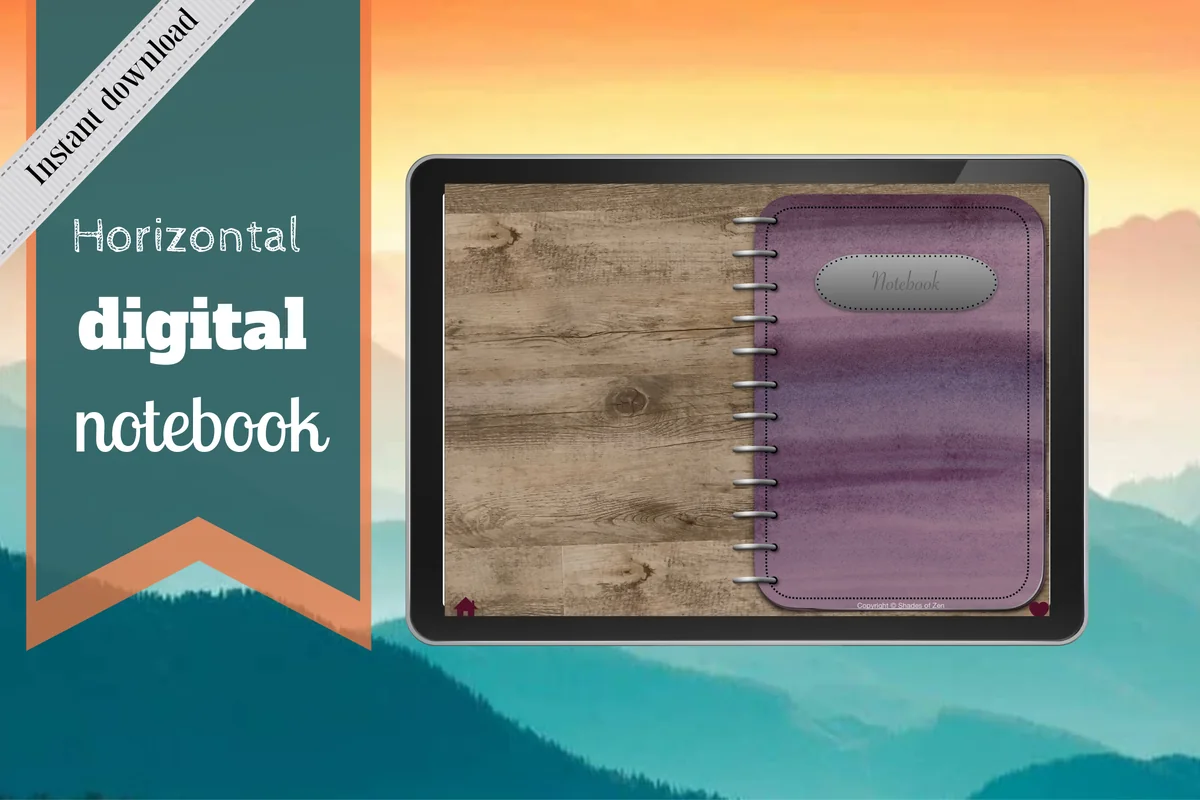
1. Digital Notebook
Orientation: LandscapeLayouts: 16 note templates; 12 sections
Best for: keeping item decisions and photos in separate home zones. Designed by Shades of Zen.
- 12 expandable sections and hyperlinked tabs
- 16 note templates, including lined, dotted, graph and Cornell pages
- Two-column and blank layouts pictured; GoodNotes import instructions included
The two-column layout is the strongest starting point here for pairing an item with the reason for its decision. Give each section a room name, then use blank pages for a small reference photo and a longer explanation. This is a general notebook: the keep, donate and revisit headings are yours to add. Its landscape spread offers more room than the compact project sheets, although the illustrated binder uses some screen space.
Best for a dark item-and-action list
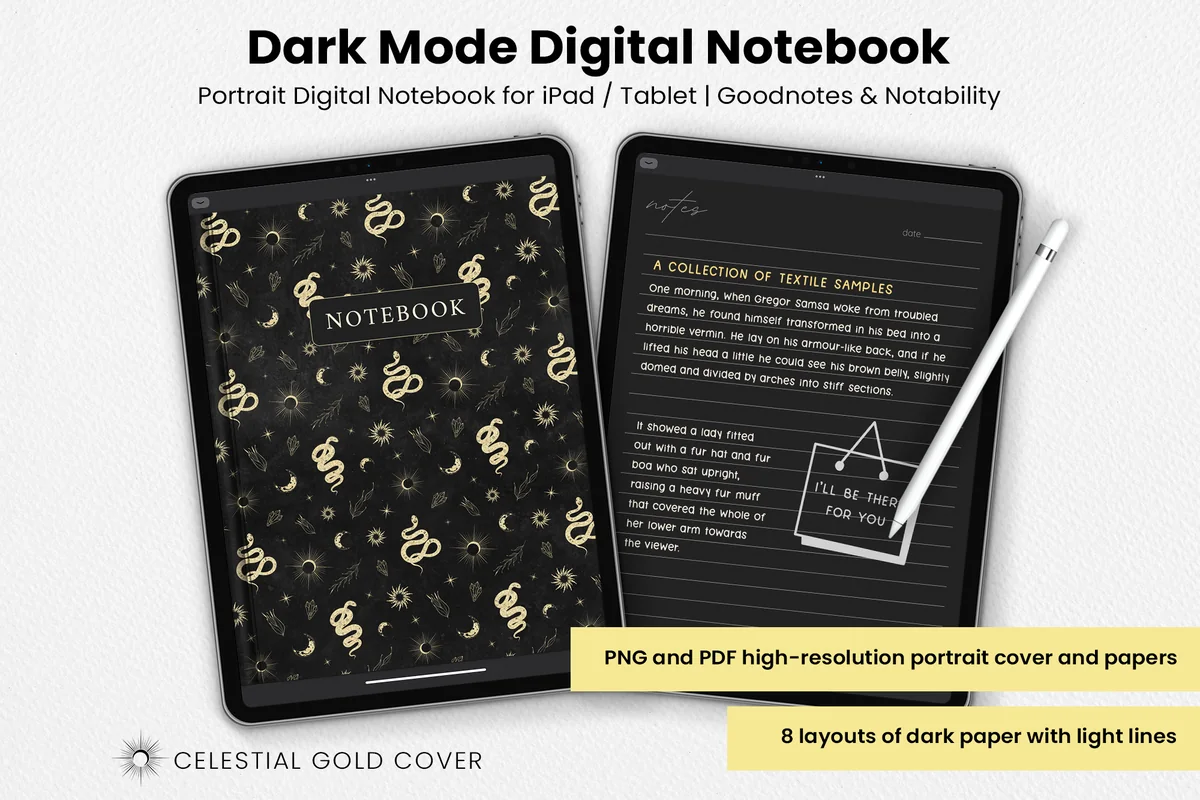
2. Dark Mode Digital Notebook: Gold Theme
Orientation: PortraitLayouts: 8 dark paper layouts
Best for: writing a compact decision ledger on dark paper. Designed by catsquills.
- Eight dark paper layouts, including columns, numbered list and to-do
- Portrait PDF and PNG files for GoodNotes or Notability
- Light ruling and a celestial gold cover
The columns and numbered-list layouts suit an item on the left and its next action on the right. Choose this set if you prefer a dark writing surface, rather than expecting a full home organizer. Light pen colors need enough contrast, and the habit tracker is optional; you do not need a streak for letting go of things. Long handwritten stories will fit better on its notes layout than squeezed into the checklist.
Leave space for the reason and review date
Best for explaining a difficult decision
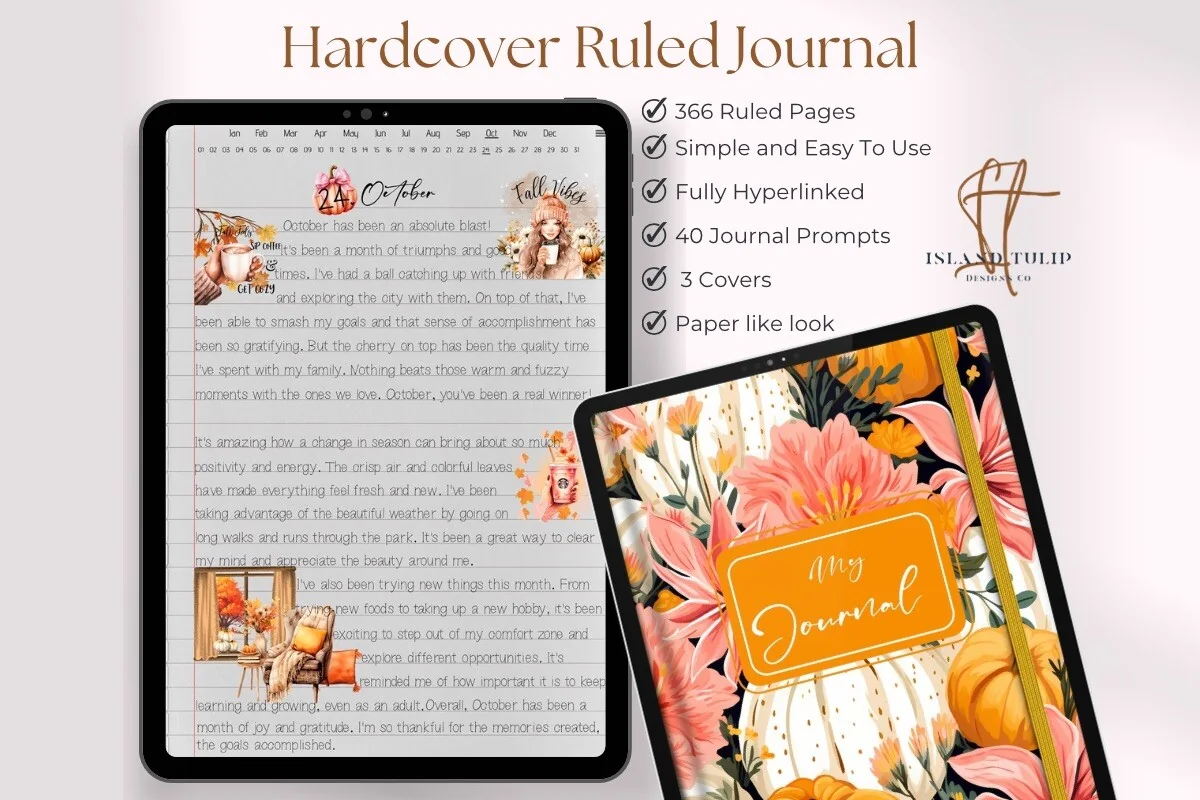
3. Digital Ruled Journal
Orientation: PortraitLayouts: 366 ruled pages; month/day index
Best for: writing the reason behind keeping or releasing an item. Designed by Island Tulip Designs Co.
- 366 ruled pages and three cover choices
- Hyperlinked journal with a month/day index pictured
- 40 general prompts in PNG and precropped GoodNotes formats
This is the option for a decision that needs a paragraph: a gift, a collection or something you are keeping for a possible future routine. The ruled pages leave more space for that story than a small dashboard cell. The index is chronological, so keep a separate handwritten item locator if you want to find a particular entry later. The included prompts are general journaling material, not a dedicated decluttering workbook.
Best for a small revisit calendar
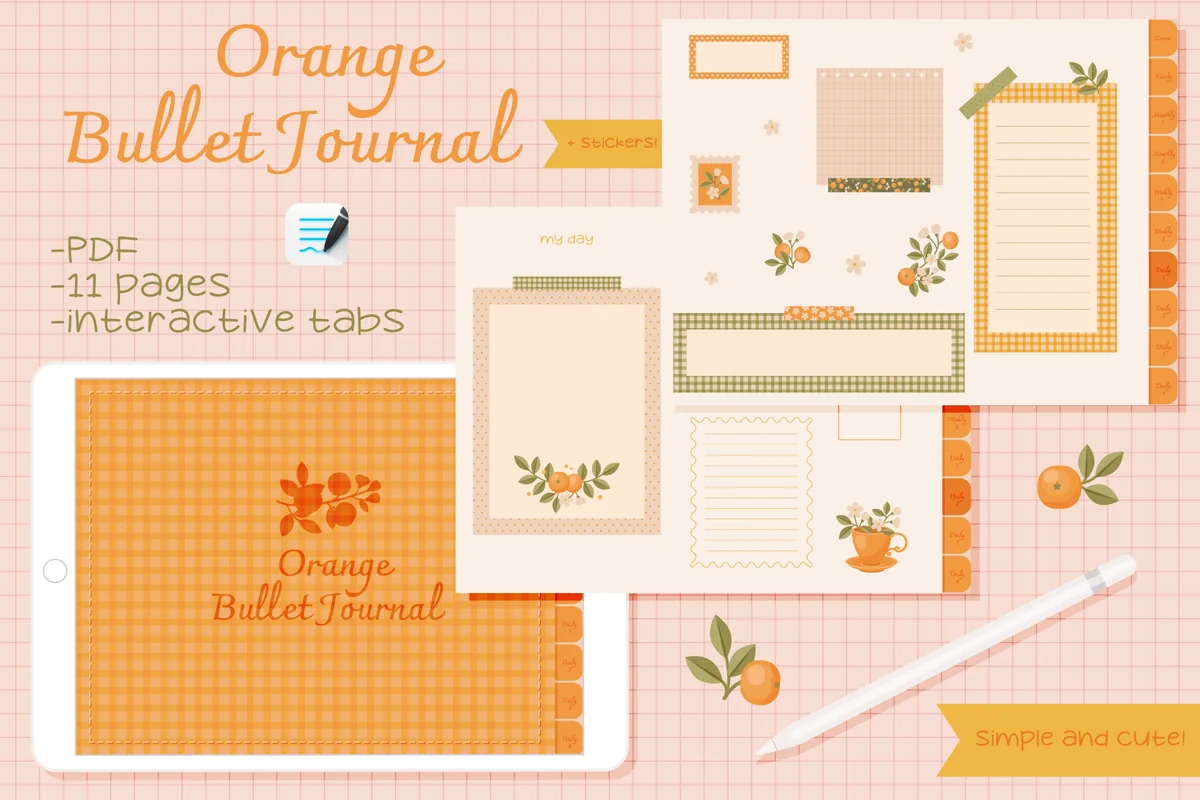
4. Undated Cute Orange Bullet Journal
Orientation: LandscapeLayouts: Calendar, weekly columns and decorated framesDates: Undated
Best for: pairing a few decisions with a review or departure date. Designed by digitaliya_studio.
- Clickable PDF bullet journal for GoodNotes
- Blank calendar, weekly columns and decorated writing frames pictured
- Stickers included in GoodNotes format
A small calendar is useful when a maybe box has a review date or a donation trip needs a day. The orange frames are better for a few concise notes than for a complete household inventory. The calendar can sit beside a short decision list. Decorative pages and stickers take up room, so use a plainer notebook if you need long reasons or many item records. Calendar dates still need to be entered by you.
Turn decisions into physical next steps
Best for defining one clearing project
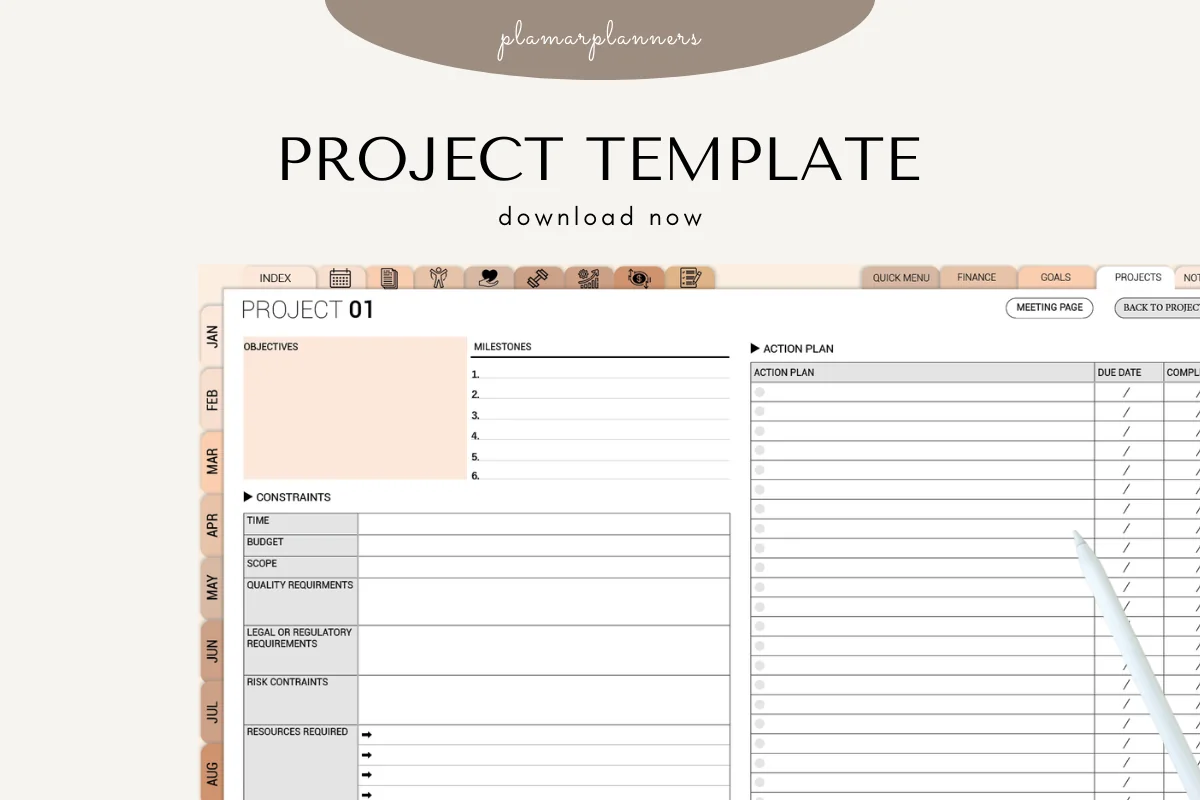
5. Project Planner: Printable & Digital
Orientation: LandscapeLayouts: Project overview with action plan
Best for: setting the limits and next actions for a single zone. Designed by Plamarplanners.
- Project overview with objectives, milestones and an action-plan table pictured
- Constraints for time, budget, scope and resources
- Digital version for GoodNotes, Notability or Xodo alongside printable PDFs
Use the objective for a usable shelf and the constraints for how much time or help is available. Then put the next physical actions in the action plan: ask the owner, check the recipient and arrange transport. This is a project overview rather than an item journal. The previews show color variants of one overview, while the listing names several page types. Ask the seller about the full page set before buying for those extras. Navigation has not been tested in an annotation app.
Best for a departure-task dashboard
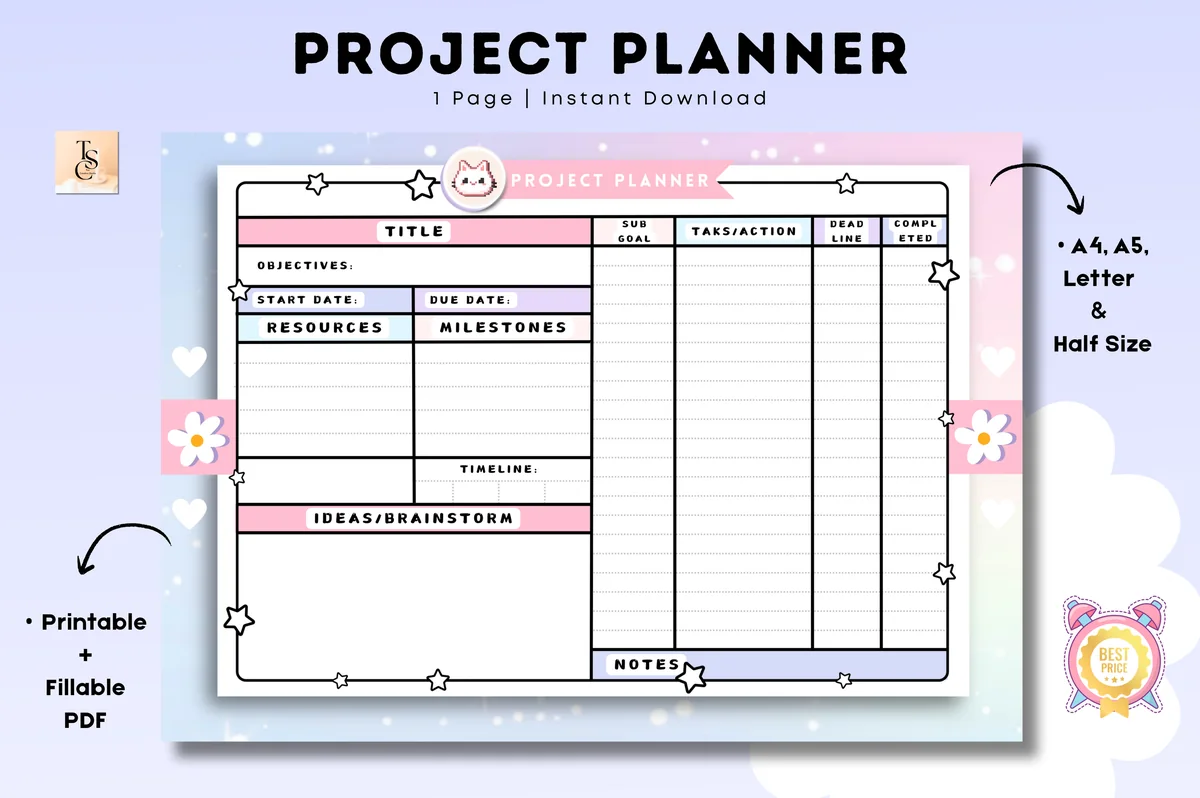
6. Project Planner Printable
Orientation: LandscapeLayouts: One project layout; four PDF sizesDates: Undated
Best for: keeping a short donation task list beside deadlines. Designed by Tas Creative Studio.
- One project layout with objectives, resources and milestones
- Subgoal, task/action, deadline and completed columns pictured
- Four PDF sizes; GoodNotes and Notability supported
The deadline and completed columns make an important distinction: planning to take a box away is different from recording that it left. Use a line for checking acceptance and another for the trip. The landscape dashboard stays compact, but its narrow fields will not hold much of an item's story. The four sizes share one layout. The PDF supports digital annotation as well as printing; typed form fields have not been tested.
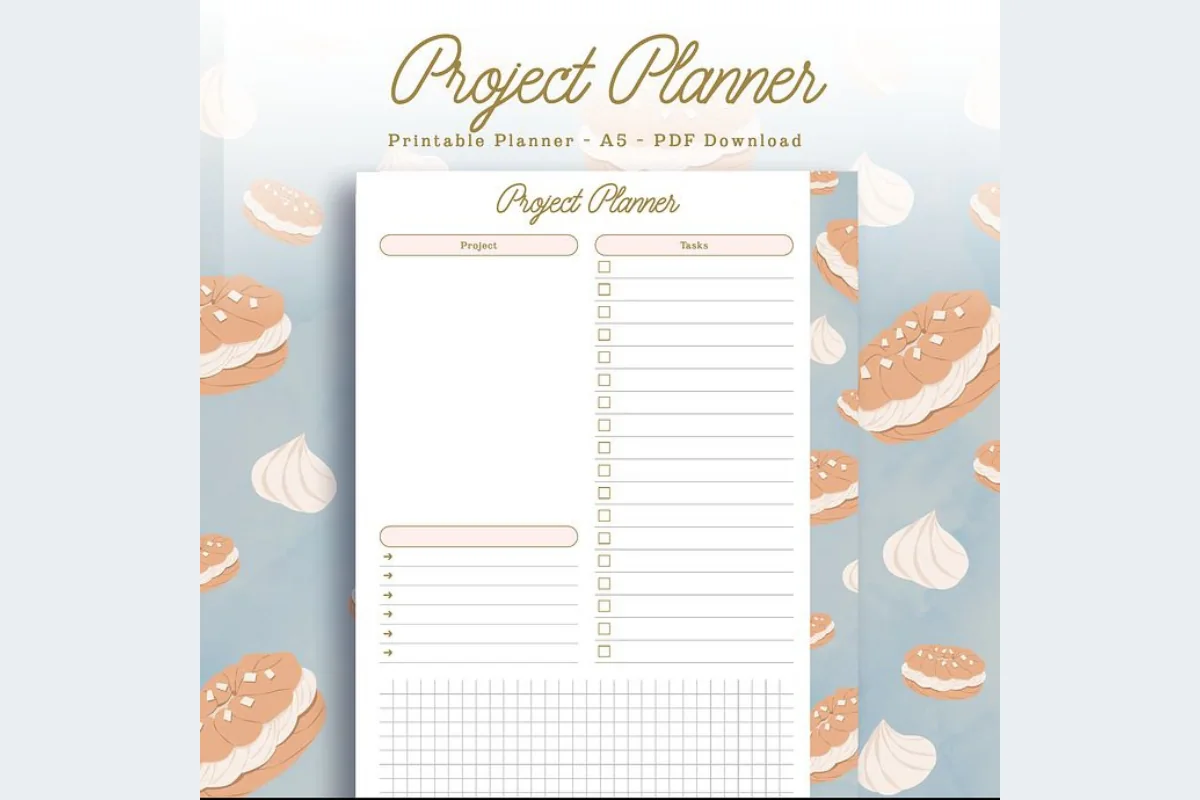
Best for a short list with a box map
7. Digital Project Planner Printable
Orientation: PortraitLayouts: Two-page PDF; checklist and grid
Best for: linking a few physical next steps to a rough storage sketch. Designed by PlannerPlanet.
- Two-page PDF with project heading and task checklist
- Open writing area, short note lines and grid pictured
- Digital use with GoodNotes or Notability as well as printing
The grid offers room for a rough sketch showing where an undecided box is stored, while the checklist holds its next steps. That is handy when the obstacle is finding the item again. Treat the sketch as a locator, not a measured floor plan. The two pictured pages have closely related layouts, so this is a small task surface rather than an expandable decision archive. A separate notebook suits a large collection of photos and reflections better.
Quick Comparison
| Option | Page structure | Decluttering use | Keep in mind |
|---|---|---|---|
| 1. Digital Notebook | 12-section notebook | Item/reason ledger by room | Add your own decision fields |
| 2. Dark Mode Digital Notebook: Gold Theme | 8 dark paper layouts | Item/action columns | Check your pen contrast |
| 3. Digital Ruled Journal | Ruled daily pages | Reasons, memories and reflections | Add an item locator yourself |
| 4. Undated Cute Orange Bullet Journal | Calendar and small frames | Revisit and departure dates | Less space for detailed entries |
| 5. Project Planner: Printable & Digital | Overview and constraints | One zone and its next actions | Compact fields; color variants |
| 6. Project Planner Printable | One-page dashboard | Acceptance check and departure tasks | Four sizes share one layout |
| 7. Digital Project Planner Printable | Checklist and grid | Short action list and box locator | Small scope; no item database |
Build one decision page on your iPad
Start with a blank or lined page in an annotation app you already use. A purchased template changes the writing surface; it does not decide what to keep, arrange collections or send a reminder from a handwritten date. Check the app’s page and link controls before filling a large journal.
- 1Name the page: write the zone and a short item ID, such as K-01 for a kitchen object.
- 2Add only useful context: one photo or a sentence naming the object, plus the reason it is undecided.
- 3Choose a state: keep, release or revisit. Add the next question or action and who owns it.
- 4Find it again: put the ID and page location in a simple front index. Use an app bookmark if that suits your setup.
- 5Close the entry: add the actual home or departure date, or an explicit new review question.
For a sectioned PDF, give each room its own handwritten heading. For a chronological journal, put the item ID at the start of each entry and in the front index. More digital journaling ideas can help you choose a page style, but keep this record small enough to update beside the physical item.
A filled example: the spare mixing bowl
This fictional entry shows why a decision and a completed action belong in different fields. The bowl is useful, but it duplicates another one and a friend may want it.
| Field | Example entry |
|---|---|
| Item / location | K-01: spare glass mixing bowl, bottom kitchen shelf |
| Reason | Same size as the bowl I use; keeping both blocks the baking tray. |
| Decision | Release if the friend wants it; no handover agreed yet. |
| Next action / owner | I will send a photo on Tuesday and ask whether it is useful. |
| Pending state | In the labeled outbox; still at home. |
| Closure | Update after handover, or choose another verified destination if declined. |
The example ends with an open action on purpose. Do not write “donated” simply because the object moved into a box. When the friend answers, change the next step; after the handover, add what actually happened.
Review the open loops, not every possession
At the next review, read the pending entries before starting a new zone. The useful question is what each item is waiting for. A decision can be settled while the transport is still unresolved, and a review date can arrive without forcing an immediate release.
- Waiting for information: ask the owner, repair service or intended recipient one specific question.
- Waiting for a trip: put the handover or collection task somewhere you will see it.
- Staying: assign the item a home and close the decision entry.
- Still uncertain: write what remains unknown and choose a next review you can realistically make.
If several items share one trip, a separate project page can hold that short task list; these iPad project planners show the difference between task overviews and a long-form notebook. Keep the individual reasons in the journal so the trip page does not become another crowded inventory.
FAQ: Keeping a Useful Decluttering Journal
What should I write after deciding to keep something?
Write why it stays, where it belongs and whether any action is needed, such as finding a lid or moving it to a usable shelf. Then close the entry. You do not have to keep defending the same choice at every review unless your circumstances change.
How is this different from a cleaning checklist?
A checklist tracks a recurring job, such as wiping a counter. An item-decision journal records what belongs there, why another object is unresolved and what needs to happen to it. They can sit beside each other, but a completed cleaning task does not answer an ownership or donation question.
Do I need a special declutter journal PDF?
No. You can add these headings to blank, lined or grid paper in an iPad annotation app. The seven products above offer different page structures. You create the item fields, review questions and donation record yourself; buying a journal does not supply those decisions.
How often should I revisit a maybe box?
Choose a date tied to the unanswered question or a practical event, such as checking whether an object fits after a move. Record the box location and what you will check. The date is a prompt to review, not permission to discard everything automatically.
Can I use this journal when the process feels distressing?
You can stop, leave an entry unfinished or ask someone you trust for support. This article offers page ideas, not assessment or treatment. If distress is significant or belongings affect safety or daily life, seek appropriate professional support rather than relying on a journal or an online challenge.
Give one undecided item a clear next step
Match these decluttering journal ideas to the unanswered question beside your shelf. Start with one object, write why it is unresolved and name the next action. A keeper with a home, a box with an agreed destination or an honest review question is enough to make that page useful.
If you want more room to explore the reason before making a choice, the journaling prompts guide offers broader reflection starters. Bring the answer back to the item record so the reflection and the physical next step stay connected.
You May Also Like
This article contains affiliate links. If you purchase through them, I may earn a commission at no extra cost to you. Read the affiliate disclosure.