Cleaning the whole house on Saturday sounds efficient, and by the third week it usually stops happening. A cleaning schedule works the other way: a few small jobs every day, one zone per weekday and one deep job a month, so the house never gets far enough behind to need a marathon. On the iPad it’s easy to keep up: tick the boxes, duplicate next week’s page, and move a job when life gets busy instead of starting over.
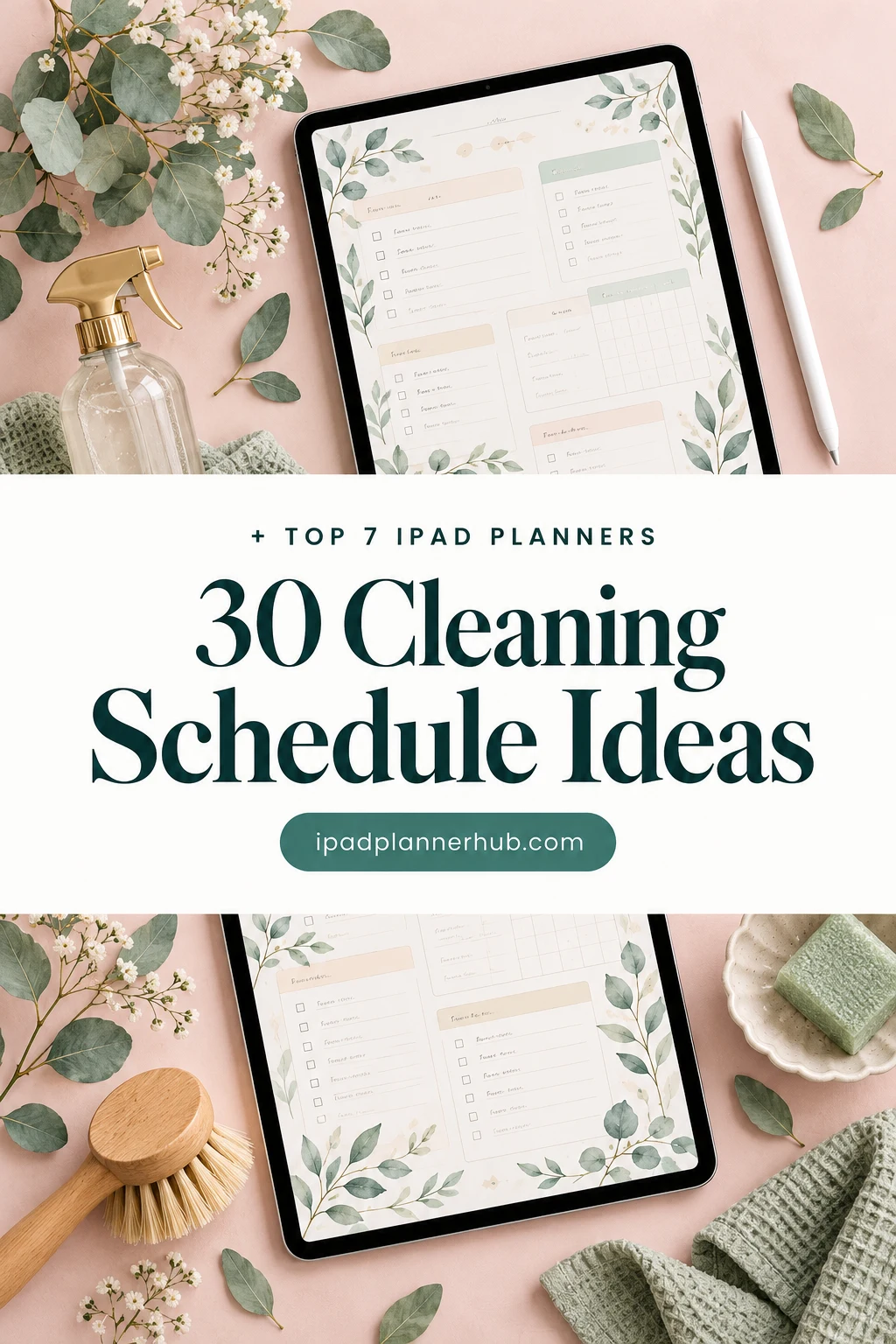
Below are 7 digital cleaning planners from Creative Fabrica I’d use on my iPad: two made just for cleaning, and five planners with a real cleaning, zone or chores section. After the list: 30 cleaning schedule ideas, a sample daily, weekly and monthly schedule, how to make one that sticks and how to set it up in GoodNotes.
The 7 Best Digital Cleaning Planners I Found
Most cleaning planners on the market are printables or Canva templates, so I kept only PDFs that open in GoodNotes and other iPad apps. I skipped kids’ chore charts and anything with past-year calendars. The two cleaning planners come first, then planners where the cleaning pages are a named section, not a blank list.
TL;DR: 7 digital cleaning planners for iPad and GoodNotes: a dated 2027 cleaning planner with Cleaning, HomeCare and Seasonal tabs, a one-page weekly cleaning schedule and five planners with a real cleaning, zone or chores section.
Quick Picks
- Best for cleaning planner for 2027: Cleaning Schedule Planner 2027 Portrait
- Best for one-page weekly schedule: Cleaning Schedule – Cozy Pastel Planner
- Best for undated planner with a cleaning section: IPad Daily Digital Planner ( 620 Pages )
- Best for zone cleaning: Digital Planner for GoodNotes
- Best for chores among 100+ trackers: Digital Planner for Ipad, GoodNotes
- Best for routine vs deep cleaning: All-in-One Digital Planner
- Cleaning Schedule Planner 2027 Portrait – Best cleaning planner for 2027
- Cleaning Schedule – Cozy Pastel Planner – Best one-page weekly schedule
- IPad Daily Digital Planner ( 620 Pages ) – Best undated planner with a cleaning section
- Digital Planner for GoodNotes – Best for zone cleaning
- Digital Planner for Ipad, GoodNotes – Best for chores among 100+ trackers
- All-in-One Digital Planner – Best for routine vs deep cleaning
- 2027 Bundle Digital Planner, Goodnotes – Best color choice for 2027

Best cleaning planner for 2027
1. Cleaning Schedule Planner 2027 Portrait
Orientation: PortraitLayouts: Monthly, Weekly, Daily + 24 subject templatesFormat: Hyperlinked PDF, 513–515 pagesDates: 2027Week start: Monday or Sunday
Best for: zone cleaners, seasonal planners, people who want cleaning in their 2027 planner. Designed by Print Magic StudioX.
- Dated 2027, portrait, two hyperlinked PDFs: Monday start and Sunday start
- Six subject tabs of its own: Cleaning, Home, Routines, Habits, HomeCare and Seasonal, with 4 templates under each
- Monthly pages, a weekly page for every week with a checklist beside each day, and 365 daily pages with an hourly schedule and top 3
- Sized for the 13-inch iPad Pro page, works in any PDF app that takes a stylus
This is a full 2027 planner where cleaning is the theme, not an extra page: the tabs down the side are Cleaning, HomeCare and Seasonal, so the weekly zone and the twice-a-year jobs live next to your calendar. I'd put the daily reset on the weekly checklist and the deep jobs on the monthly page. It's new on Creative Fabrica, so no reviews yet.

Best one-page weekly schedule
2. Cleaning Schedule – Cozy Pastel Planner
Orientation: LandscapeLayouts: 1 weekly cleaning schedule pageFormat: Digital + printable PDF, A4Dates: Undated
Best for: cute style fans, minimalists, beginners. Designed by Tas Creative Studio.
- One undated cleaning schedule page in A4 landscape
- Task column with day-of-the-week boxes and a check column (per the cover)
- Everyday box, task goals, to-do list and an idea parking lot (per the cover)
- Digital PDF for GoodNotes, Notability, Noteshelf and Xodo, plus a printable version
If a whole planner feels like too much, this single page is enough: write each job once, tick the day it's done and keep the daily jobs in the Everyday box. The pastel hearts make a dull list a little more fun to open. Duplicate it each week and you have a running record.
Best undated planner with a cleaning section
3. IPad Daily Digital Planner ( 620 Pages )
Orientation: PortraitLayouts: Yearly, Monthly, Weekly, DailyDates: Undated
Best for: homemakers, busy parents, meal planners. Designed by Tas Creative Studio.
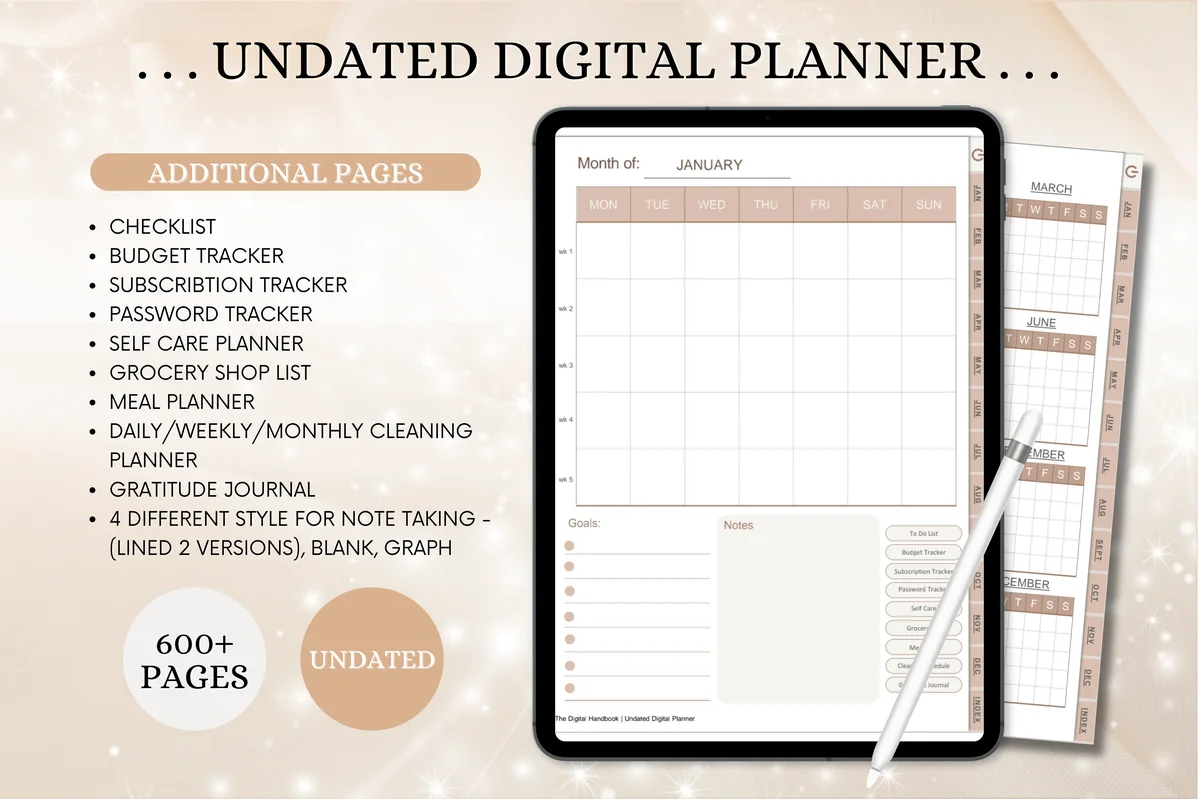
- Undated, portrait, 620 hyperlinked pages
- A daily/weekly/monthly cleaning planner page in the additional pages
- Meal planner, grocery list, budget and subscription trackers nearby
- Works in GoodNotes, Notability, Noteshelf, Xodo and other PDF apps
The cleaning planner here is split into daily, weekly and monthly jobs, which is exactly how I'd build a schedule, and it sits next to the meal plan and grocery list. Undated, so you can start any week and reuse it. Calm beige design that doesn't fight with your notes.
Best for zone cleaning
4. Digital Planner for GoodNotes
Orientation: PortraitLayouts: Monthly, Weekly, DailyFormat: Hyperlinked PDF, 70 pages, 8 sectionsDates: Undated
Best for: zone cleaners, declutterers, cute design fans. Designed by Daniell Shirley.
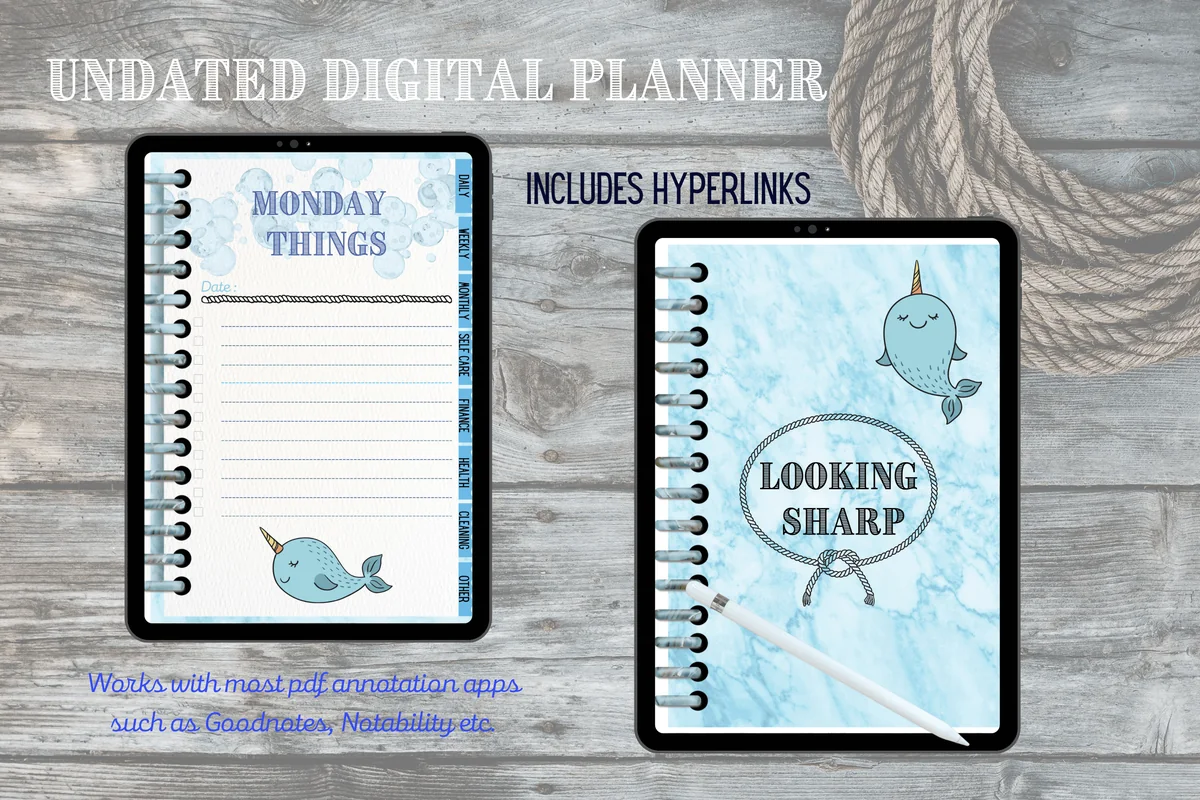
- Undated, 70 hyperlinked pages in 8 sections, for GoodNotes, Notability and other PDF apps on iPad
- Cleaning Schedule, Zone Cleaning and Declutter Checklist pages
- 5 weekly routine checklists, plus monthly, weekly and daily planner pages
- Also has a grocery list, weekly meal planner, budget and habit tracker
Small and undated, with the two pages a cleaning schedule really needs: a schedule and a zone cleaning page, plus a declutter checklist for the bigger jobs. I'd use the weekly routine checklist for the 15-minute daily reset. The decor is a playful ocean theme, so it suits you if you like a cute planner.
Best for chores among 100+ trackers
5. Digital Planner for Ipad, GoodNotes
Layouts: Monthly, Weekly (4 layouts), Daily (4 layouts), 100+ templatesDates: UndatedWeek start: Monday or Sunday
Best for: indecisive planners, fitness trackers, finance trackers. Designed by ThePlannersDelight.
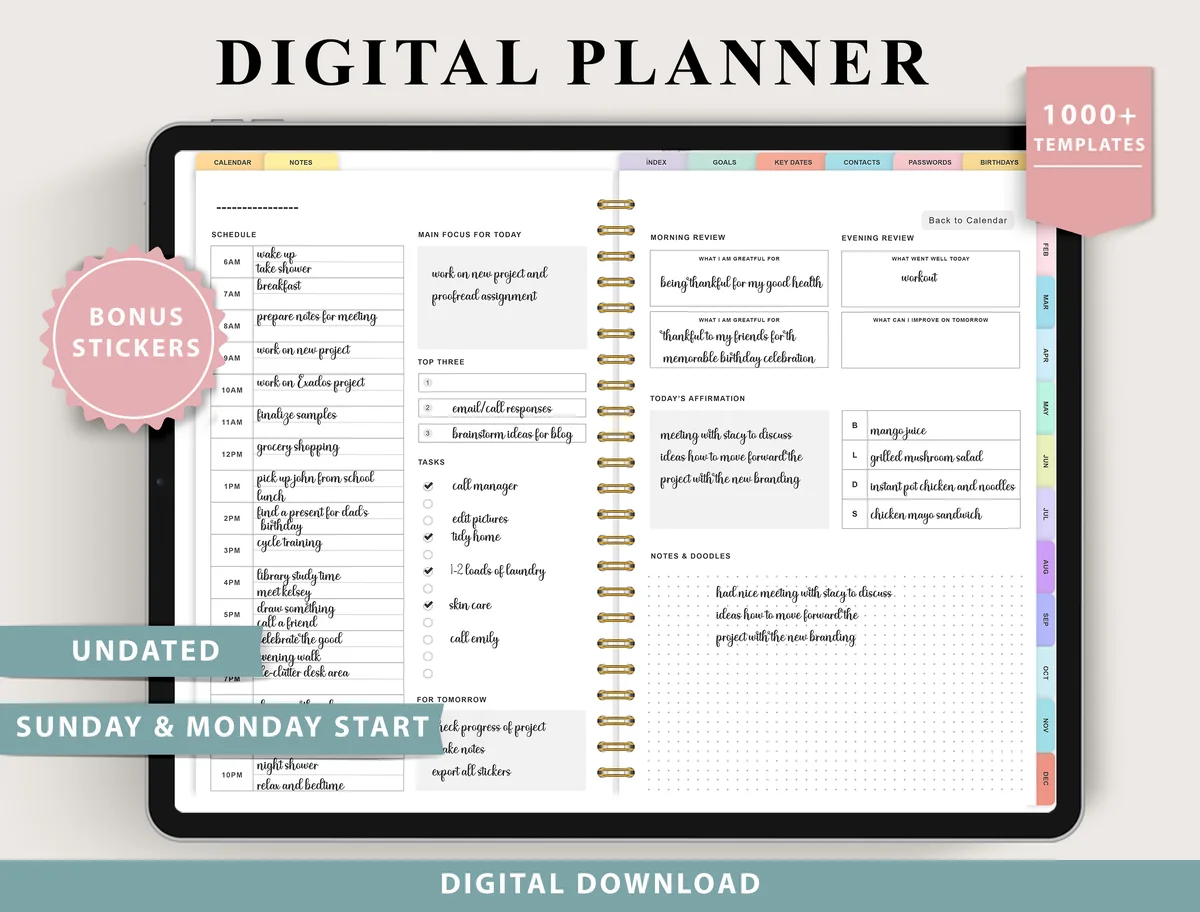
- Undated, Monday or Sunday start, not designed to be printed
- Chores & cleaning and Routines templates in the Others section
- 4 weekly and 4 daily layouts to choose from
- 100+ templates: fitness, finance, nutrition (meal planner, grocery list, kitchen inventory), wellness and productivity
One of the most saved planners on Creative Fabrica. The cleaning part is a single Chores & cleaning template plus a Routines page, so it fits you if you want chores in the same file as meals, money and habits rather than a separate cleaning system.
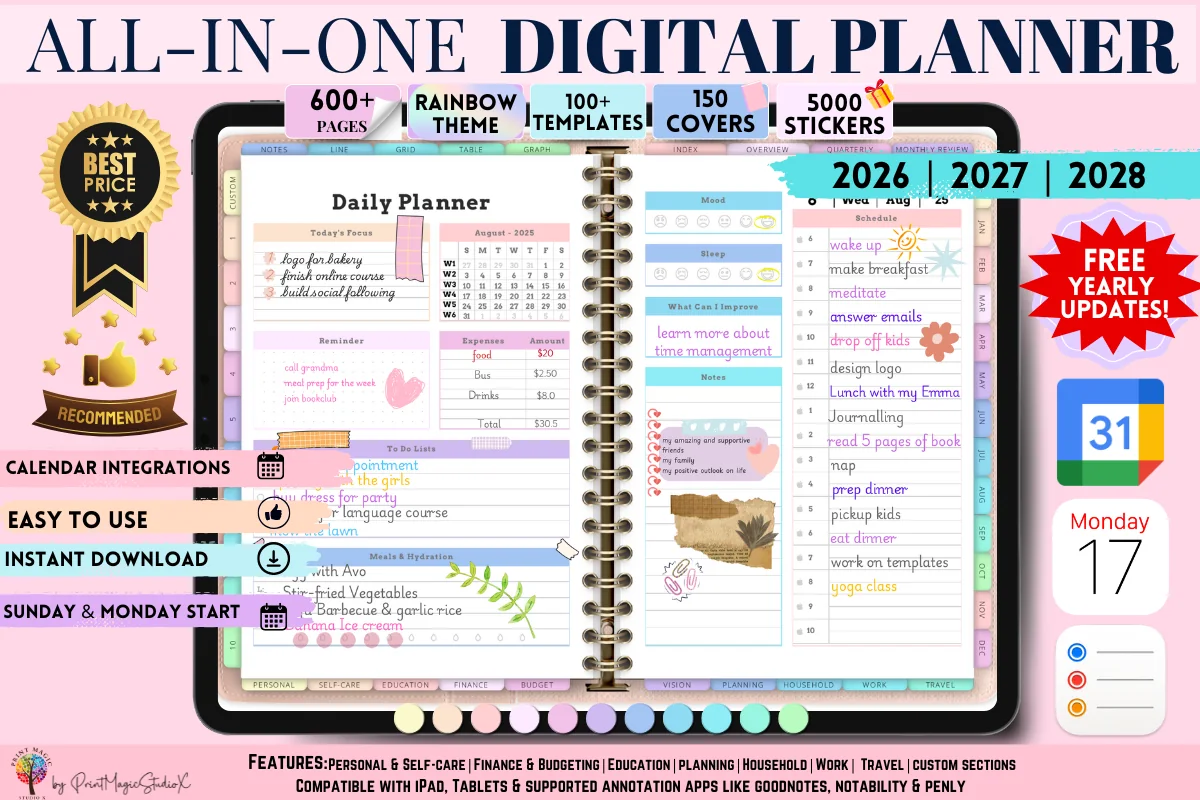
Best for routine vs deep cleaning
6. All-in-One Digital Planner
Orientation: LandscapeLayouts: Yearly, Monthly, Weekly, Daily, 86 templatesDates: 2026–2028
Best for: people who want one planner for everything, sticker lovers, colorful planners. Designed by Print Magic StudioX.
- Household section with 8 templates, including a Chore Chart and a Cleaning Tracker for routine and deep cleaning
- Maintenance Jobs, Meal Planner and Appointments pages in the same section
- 86 templates in 10 sections, dated 2026, 2027 and 2028
- Rainbow theme with 5000 stickers and 150 covers; the seller notes a paid GoodNotes account may be needed for the large file
The most saved planner in this list by far. Its Cleaning Tracker separates everyday jobs from deep cleaning, which is the split that keeps a schedule realistic, and the Chore Chart helps when more than one adult shares the house. Dated through 2028, so it covers 2027 without a new file.

Best color choice for 2027
7. 2027 Bundle Digital Planner, Goodnotes
Orientation: LandscapeLayouts: Yearly, Quarterly, Monthly, Weekly, DailyDates: 2027Week start: Monday or Sunday
Best for: goal setters, challenge fans, color lovers. Designed by SuperDigitalPlanners.
- Chores & Cleaning page to schedule and track household tasks
- Dated 2027, Monday and Sunday start, in 10 color themes
- Links to Apple Calendar, Reminders and Google Calendar
- For GoodNotes, Notability, Xodo and Noteshelf (not OneNote)
A good pick if you want a full 2027 planner first and a cleaning page second. The Chores & Cleaning page holds the weekly schedule, and the calendar links let you add a phone reminder for the zone day, which a plain PDF can't do on its own. Ten color themes, so the cleaning pages can match the rest.
Quick Comparison
| Planner | Best for | Cleaning pages | Stand-out extra |
|---|---|---|---|
| 1. Cleaning Schedule Planner 2027 Portrait | Dated 2027 cleaning planner | Monthly + weekly + daily | Cleaning, HomeCare, Seasonal tabs |
| 2. Cleaning Schedule – Cozy Pastel Planner | Single page | Weekly tick grid | Everyday box + to-do list |
| 3. IPad Daily Digital Planner ( 620 Pages ) | Undated planner | Daily/weekly/monthly page | Meal + grocery pages |
| 4. Digital Planner for GoodNotes | Undated, 70 pages | Cleaning schedule + zones | Declutter checklist |
| 5. Digital Planner for Ipad, GoodNotes | Undated all-in-one | Chores & cleaning page | Kitchen inventory + grocery list |
| 6. All-in-One Digital Planner | All-in-one, 86 templates | Routine + deep cleaning | Chore chart |
| 7. 2027 Bundle Digital Planner, Goodnotes | Dated 2027 bundle | Chores & cleaning page | Calendar + reminder links |
30 Cleaning Schedule Ideas That Fit in 15 Minutes a Day
Pick the groups that match your home and turn each into a short list in your planner. You don’t need all thirty: a daily reset, a weekly zone and one monthly job already make a working schedule.
Daily Reset 1–5
- 1Load or run the dishwasher before bed so mornings start with an empty sink
- 2Wipe the kitchen counters and stovetop after dinner
- 3Do a 10-minute pickup: everything back where it lives
- 4Make the bed as the first box you tick in the morning
- 5Run one load of laundry from washer to folded on the same day
Weekly Zones 6–10
- 6Give each weekday one zone: kitchen, bathrooms, living room, bedrooms, floors
- 7Change the bed sheets on the same day every week
- 8Clean out the fridge the evening before grocery day
- 9Take out all the trash and recycling on one fixed day
- 10Leave one weekday free as a catch-up day for whatever was skipped
Monthly Deep Cleans 11–15
- 11Plan one deep job per week of the month instead of a whole deep-clean weekend
- 12Clean the oven, microwave and range hood filter
- 13Wash shower curtains, bath mats and the inside of the trash cans
- 14Dust baseboards, door frames and light switches
- 15Vacuum the sofa, under the cushions and behind the furniture
Seasonal and Home Upkeep 16–20
- 16Wash windows inside and out in spring and fall
- 17Swap the closets between seasons and declutter while you do it
- 18Log filter changes for the HVAC, water filter and vacuum
- 19Clean gutters and check the outdoor faucets before winter
- 20Wash pillows, duvets and curtains twice a year
Low-Energy Days 21–25
- 21Keep a “bare minimum” list of three jobs for tired or sick days
- 22Clean in 15-minute sprints with a timer and stop when it rings
- 23Clean by time of day: a 5-minute morning job and a 10-minute evening job
- 24Pair a boring job with a podcast or a call so it has a start and an end
- 25If a day is missed, skip it and start with today’s zone instead of doubling up
Sharing the Chores 26–30
- 26Write a chore chart for the adults in the house with names, not “someone”
- 27Rotate the jobs nobody likes every week or every month
- 28Put the weekly schedule where everyone can see it, on a shared screen or the fridge
- 29Do a 20-minute family or roommate reset before guests arrive
- 30Review the schedule once a month and cut what nobody actually does
A Sample Daily, Weekly and Monthly Cleaning Schedule
Here is a simple daily, weekly and monthly cleaning schedule to copy into your planner and adjust. The daily part takes about 15 minutes, the weekly zone 20 to 30, and the monthly job about an hour once a week.
Every Day
- Make the bed and open the windows for a few minutes.
- Dishes done and counters wiped after dinner.
- A 10-minute pickup in the living areas.
- One load of laundry, if needed.
Weekly Cleaning Schedule by Zone
- Monday: kitchen (fronts of appliances, sink scrub, fridge check).
- Tuesday: bathrooms (toilet, sink, mirror, shower).
- Wednesday: living room (dust surfaces, cushions, tidy shelves).
- Thursday: bedrooms (sheets, dust, clear the nightstands).
- Friday: floors (vacuum everywhere, mop the kitchen and bathrooms).
- Saturday: catch-up for anything skipped, plus trash and recycling.
- Sunday: rest, or a 10-minute plan for next week.
Monthly: One Deep Job a Week
- Week 1: oven, microwave and range hood.
- Week 2: baseboards, doors and light switches.
- Week 3: under and behind the furniture, sofa vacuum.
- Week 4: bath mats, shower curtain, trash cans, plus one seasonal job from the list above.
If you prefer one page per day, add these boxes to the daily page of your planner; my daily routine planners have room for a short cleaning routine next to the morning and evening routine.
How to Make a Cleaning Schedule That Sticks
- Walk through the house once and write down every job you actually do, room by room. That’s your master list.
- Sort each job by how often it needs doing: daily, weekly, monthly or seasonal. Be honest: if you clean the windows twice a year, don’t put them on a monthly list.
- Give each weekday one zone, and keep one day free for catching up.
- Set a time limit, not a finish line. 15 minutes daily and 30 minutes for the weekly zone is enough for most homes.
- Put it where you’ll see it: the daily page of your planner, a weekly cleaning schedule page, or a checklist you duplicate each week.
- Review after a month. Cut what you never do, move jobs that keep getting skipped to a lighter day.
If keeping up with chores is hard for you because of ADHD, see the cleaning section in my ADHD planner ideas: shorter lists, timers and a bare-minimum page for bad days.
Cleaning Rules That Make a Schedule Easier
- 20/10: clean for 20 minutes, rest for 10, then decide if you want another round. Good for weekend catch-up days.
- 80/20: a few jobs (dishes, counters, floors, bathrooms) make most of the visible difference. Put those on the daily and weekly lists first.
- One touch: put things away the first time you pick them up instead of moving them to “later” piles.
- Top to bottom, dry to wet: dust before you vacuum, vacuum before you mop.
How to Set Up a Cleaning Schedule in GoodNotes
- Import the cleaning planner PDF into GoodNotes, or add the cleaning pages to the planner you already use.
- Fill in the master list and the weekly zone page once, with a pen color you don’t use for ticking.
- Duplicate the weekly checklist before you write on it, so a clean copy is always ready for next week.
- Star the weekly page and the monthly deep-clean page so they open from Favorites.
- Use a highlighter for done and leave skipped jobs blank; at the end of the month you’ll see which jobs need a new day.
- Set one phone reminder for the monthly review. The PDF itself won’t remind you.
Cleaning Planner or App?
Cleaning apps like Sweepy and Tody are good at reminders and splitting chores between people, and they adjust when you skip a job. A PDF cleaning planner in GoodNotes doesn’t send notifications or sync with a calendar, but you see the whole week and month at a glance, it fits in the same notebook as your meals and budget, and there is no subscription. I’d use the planner for the schedule and one phone reminder for the weekly zone day.
FAQ
What is a cleaning schedule?
A plan that spreads household cleaning over the days, weeks and months, so each job gets done regularly in small pieces. A digital cleaning schedule is the same thing as a PDF page or planner you tick off on an iPad.
How do I make a cleaning schedule?
List every job room by room, sort them by daily, weekly, monthly and seasonal, give each weekday one zone and set a time limit. The six steps above take about half an hour the first time.
Keep a one-time room update separate from the recurring cleaning list. Comparing a shelf, tracking its delivery and closing a return belong in a project record; these home project planner ideas outline pages for those decisions without turning them into weekly chores.
What should I clean every day?
Dishes, kitchen counters and a quick pickup of the living areas. Making the bed and a load of laundry help too. Everything else can usually wait for its weekly zone.
A quick pickup can stall when an object has no agreed home. Keep that decision off the daily chore list: these decluttering journal ideas give you a place to record why an item is undecided and what needs to happen next.
How often should I deep clean my house?
Most homes do fine with one deep job per week, which covers the whole house about once a month, plus seasonal jobs like windows and gutters twice a year. Homes with pets or allergies may need some jobs more often.
What is the best cleaning schedule app for iPad?
Sweepy and Tody are popular apps with reminders and shared chores. If you already plan in GoodNotes or Notability, a PDF cleaning planner keeps the schedule next to the rest of your plans; many people use a planner for the schedule and the phone for reminders.
Can I use a weekly cleaning schedule in GoodNotes?
Yes. Import the PDF, duplicate the weekly page before writing, and tick jobs with a pen or highlighter. All the planners in this list open in GoodNotes and similar iPad apps.
Final Thoughts
A cleaning schedule doesn’t need to be perfect to work. Start with a 15-minute daily reset and one zone per weekday, add a monthly deep job, and let the planner remember the rest. For the other parts of home life, see my digital meal planners and all-in-one life planners, or browse all everyday planners. To pull the house, meals and the week together in one hour, see my Sunday reset ideas.
You May Also Like
For a schedule that leaves room for missed days and changing energy, try these ADHD cleaning planner ideas.
This post contains affiliate links. If you buy through them, I may earn a small commission at no extra cost to you. Learn more.