The supermarket receipt says $84, but part of that was detergent and a replacement lunch box. A grocery budget tracker becomes useful when it shows what the food actually cost, rather than treating every checkout total as the same kind of spending.

I recommend starting with one food-only ledger on the iPad and add detail only when it answers a question. These fifteen layouts cover receipt entry, weekly totals and a monthly review. You can draw them in notes you already own; the eight digital planners later in this guide are optional starting points for the records, not automatic grocery apps.
Set up your grocery budget tracker before the next receipt
Choose a reporting period and write down what belongs in your food category. A calendar month is easy to match to a monthly planner; a shopping week is useful for shorter check-ins. Keep the dates explicit if your week crosses into another month. A payment method is not a category: the food amount stays food whether you used cash or a card.
- Include consistently: groceries bought to eat at home, using the same definition each period.
- Separate visibly: household supplies, restaurant meals, delivery charges and any other spending you decide to track elsewhere.
- Use actual amounts: a planned basket is a forecast; the paid receipt becomes the expense entry. Record discounts as they appear on the receipt instead of guessing savings.
For context, Iowa State University’s grocery budget estimate excludes restaurant meals. Its estimate is a reference point, not a rule for your household. I prefer to label the category clearly before comparing any two totals.
Build an easy-to-use grocery budget tracker template
Draw a reusable grocery bill tracker on an iPad notes page with columns for date, store, receipt reference, food amount and household items. Leave space at the bottom for the food subtotal, refunds and the amount remaining from your weekly plan. Copy the blank layout for the next week so you can collect receipts under the same headings.
Give recurring purchases a short tag, such as milk or lunch supplies, and keep occasional birthday groceries visible in a note. Those tags explain a change in spending without adding the same purchase twice. If keeping entry short is your priority, record receipt totals first and add detail only for the question you want to answer.
15 receipt layouts to make food spending easier to read
Pick the first three ideas for a basic system. The others answer narrower questions and do not need fifteen separate pages. Several small sections can share one notes page, with a monthly total carried into your main budget.
Capture what was actually bought
- 1.Receipt date, store and food amount. Create a row with date, store, receipt reference and food subtotal. Add a short note only when something unusual happened, such as a celebration shop. A receipt reference can be a simple number matching a saved photo. This gives every weekly total a trail back to the purchase without copying every item into your planner.
- 2.Food versus household supplies. Use two columns when a supermarket basket mixes groceries with paper towels, toiletries or kitchen equipment. Check that the split adds back to the receipt total. Keep a separate adjustment line if tax or a store discount needs allocating. Choose one reasonable convention and use it consistently; the goal is a repeatable record, not a new accounting puzzle at every checkout.
- 3.A weekly running total. After each shop, add its food amount to the current week’s total. Write the week’s date range at the top, then show the previous total, new entry and updated total. A running total makes top-up trips visible before the next large shop. It is a number you update manually, not a function that hyperlinks add to a PDF.
- 4.Refunds with a matching receipt reference. Give a returned grocery item its own negative entry and link it to the original receipt number. Record the refund when it happens, with a note if it relates to an earlier month. Do not erase the original purchase and also subtract the refund, because that would remove the cost twice. The original and adjustment together explain the final amount.
- 5.Delivery charges in their own lane. Break an online order into food, nonfood and delivery-related costs. Show the final charged amount after substitutions or adjustments, rather than relying only on the initial order estimate. If a membership fee is tracked elsewhere, note that choice without counting the whole fee again on each order. This keeps checkout costs visible without disguising them as food.
Compare trips without losing context
- 6.Planned versus actual basket. Write an intended amount before shopping and the actual food amount afterward. Add a difference column, then one explanation such as pantry restock or extra guests. A difference is information, not a score. Keep the original plan visible when reviewing the week; rewriting it to match the receipt removes the comparison you wanted to make.
- 7.Shopping-trip comparison. Put two similar shops side by side with dates, stores, food totals and a short basket note. A small top-up and a full household restock are different jobs, so avoid declaring one store cheaper from those totals alone. If you want to compare a specific item, use the unit-price note instead. This layout is for understanding trips in context.
- 8.Bulk purchase timing. Record the full amount paid in the spending ledger on the purchase date. Beside it, note the quantity and the period you expect it to cover. A separate planning note can explain why the week looks expensive. Do not replace the cash expense with a smaller imagined weekly share, then add that full purchase again in the monthly total.
- 9.Pantry restock note. Add a small restock box for purchases such as rice, oil or canned staples that are not bought every week. Use item, amount paid and a rough restock note. Keep these expenses inside the food total while tagging them for your review. A month with more restocking is easier to interpret when those receipts are identifiable.
- 10.Lunch supplies subtotal. Tag the groceries intended for packed school or work lunches if that is a question you want to answer. Treat this as a subset of food spending, not a second expense category added to the grand total. A short weekly subtotal can help you plan the next shop without turning the tracker into a diet or meal-preparation schedule.
Turn totals into a useful next step
- 11.Snacks and drinks subtotal. Mark these purchases with a small symbol and subtotal the marked items during your weekly check-in. Keep them inside the main food amount. This is a way to understand a pattern, not a reason to judge individual foods or impose a nutritional rule. Stop using the extra tag if the detail does not help your shopping decisions.
- 12.List items versus extra items. Divide a receipt note into planned-list items and items added during the shop. Record only the extra subtotal if writing every item feels burdensome. An extra purchase might be useful or necessary; the tag does not automatically mean waste. At the review, ask whether the original list was incomplete before deciding that the shopping habit needs to change.
- 13.Like-for-like unit prices. Make a small note with item, package size, total price and price per common unit. For a worked arithmetic example, $4 for 16 ounces and $6 for 24 ounces both equal $0.25 per ounce. Compare equivalent products and units, and consider how much you can use. A lower unit price is not useful if the larger package exceeds your available money or storage.
- 14.Month-to-date remaining amount. Place the month’s planned food amount beside actual food spending so far. Subtract the actual amount from the plan and label the result as remaining in this category. That figure is not a bank balance and does not guarantee cash is available after other commitments. If you change the plan, add a dated adjustment note so the original comparison remains understandable.
- 15.Month-end grocery review. Close the month with three lines: total food spending, what explains the difference from the plan, and one change to try next month. Separate a one-time event from a repeated pattern. Keep the change specific, such as checking pantry stock before Saturday shopping. The next review can then assess that decision instead of beginning another page with no connection to the last one.
A mixed-receipt example with totals that reconcile
Here is an invented example, not a suggested grocery allowance. Suppose the monthly food plan is $400 and earlier food spending is $118. A new supermarket receipt totals $84: $72 food and $12 household supplies. Another trip adds $31 of food, followed by a $5 food refund. Count only the food entries in this category.
| Entry | Food change | Food total so far |
|---|---|---|
| Earlier receipts | $118 | $118 |
| Mixed supermarket receipt | +$72 | $190 |
| Top-up trip | +$31 | $221 |
| Food refund | −$5 | $216 |
Food spending so far is $216, leaving $184 of the $400 category plan. The $12 household amount belongs in its separate record. All-category spending for these entries is $228, including those supplies and the refund. The food total and the all-category total answer different questions; neither should silently replace the other.
- Weekly view: group the entries by the dates they occurred.
- Monthly view: carry only the month’s food total into the monthly budget.
- Receipt check: the $72 food amount plus $12 household amount reconciles to the $84 receipt.
- Subset check: lunch supplies or snacks already included in food are not added a second time.
Choose a digital starting point for your grocery records
I selected eight digital planners with relevant purchases, spending, budget or notes layouts. None is presented as a complete grocery system with all fifteen ideas ready-made. For the workflow above, a PDF annotation app is needed separately; check its current purchase terms and device requirements. The product selection is based on public descriptions and previews, not hands-on testing of paid files.
TL;DR: Start with one receipt ledger and a consistent food category. These eight iPad planners provide different budget, purchases, expense or notes pages; the fifteen grocery layouts below are ideas you create yourself.
Quick Picks
- Best for weekly receipt reviews: Digital Budget Planner, Financial Planner
- Best for a short purchases log: Simple Savings Planner, Digital Planner
- Best for monthly food allocations: Budget Digital Planner Hyperlinked Tabs
- Best for a wider finance workbook: Digital Budget Planner, Finance Tracker
- Best for a monthly spending summary: Undated Budget Planner for GoodNotes
- Best for food category subtotals: Expenses Tracker 4years Interactive PDF
- Digital Budget Planner, Financial Planner – Best for weekly receipt reviews
- Simple Savings Planner, Digital Planner – Best for a short purchases log
- Budget Digital Planner Hyperlinked Tabs – Best for monthly food allocations
- Digital Budget Planner, Finance Tracker – Best for a wider finance workbook
- Undated Budget Planner for GoodNotes – Best for a monthly spending summary
- Expenses Tracker 4years Interactive PDF – Best for food category subtotals
- All-in-One Digital Planner ( 112 Pages ) – Best for shopping beside your schedule
- Undated Digital Planner, Life Planner – Best for meals beside spending
Budget and expense records for grocery totals
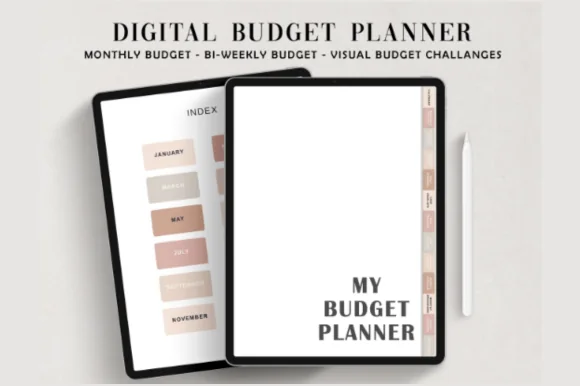
Best for weekly receipt reviews
1. Digital Budget Planner, Financial Planner
Orientation: PortraitFormat: Hyperlinked PDF
Best for: a detailed food-spending log alongside a monthly budget. Designed by ThePlannersDelight.
- Hyperlinked PDF for GoodNotes, Noteshelf and Notability
- Monthly and biweekly budgets plus daily spending logs
- Weekly expense check-in and monthly budget breakdown
The daily spending logs suit a grocery habit: enter each trip there, then review the weekly total before another shop. I like the separate budget breakdown for comparing your food allocation with the result. The broader debt and savings sections make this a substantial finance file, rather than a short grocery worksheet. The listing says an Apple tablet and a writing stylus are needed; neither is included. Grocery categories and receipt splits are yours to add.
Best for a short purchases log
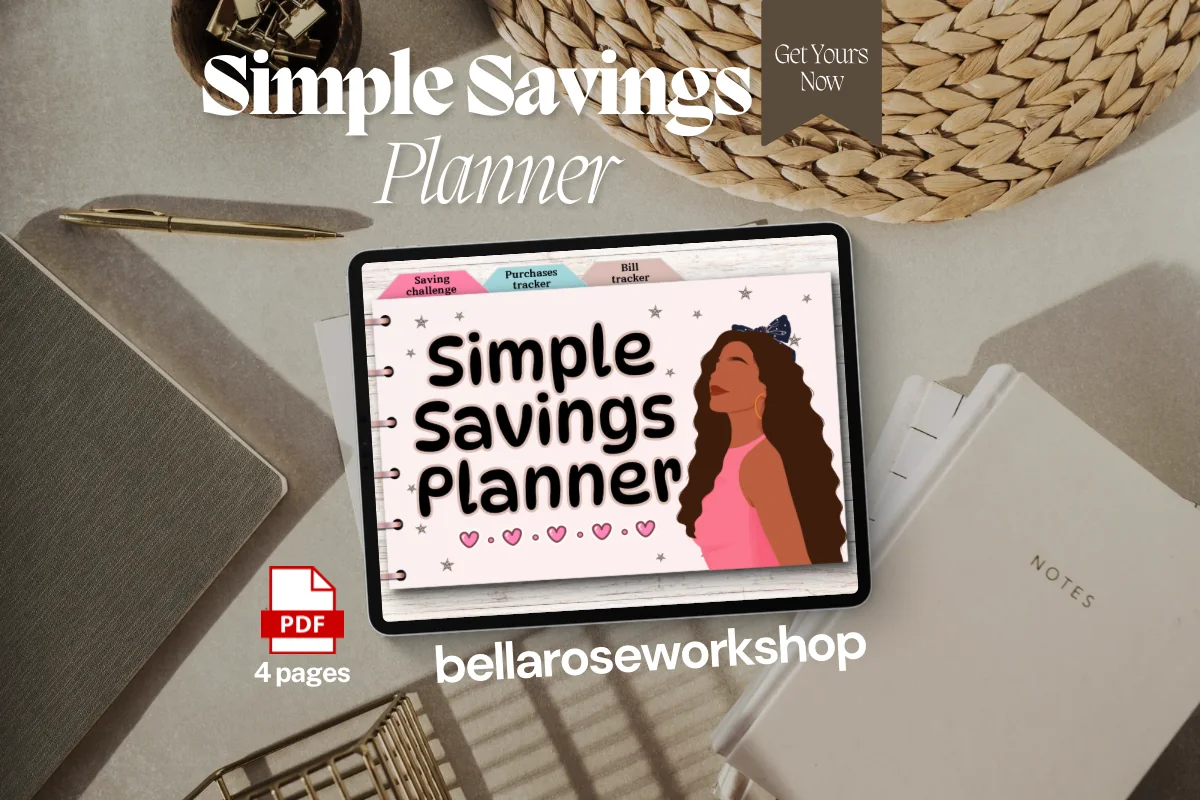
2. Simple Savings Planner, Digital Planner
Orientation: LandscapeFormat: Hyperlinked PDF
Best for: recording a small number of grocery purchases. Designed by bellaROSEworkshop.
- Hyperlinked PDF for GoodNotes and Notability
- Four-page set with a purchases tracker
- Purchases tracker, saving challenge and bill tracker
For a reader who abandons a large planner after a week, the small set is appealing. Use its purchases tracker for shopping entries and keep your food limit on a separate page. The saving challenge is a different record, not a grocery balance calculator. The seller describes the file as not editable: annotation in your PDF app is different from changing its underlying design. It does not contain the fifteen grocery layouts in this article.
Best for monthly food allocations
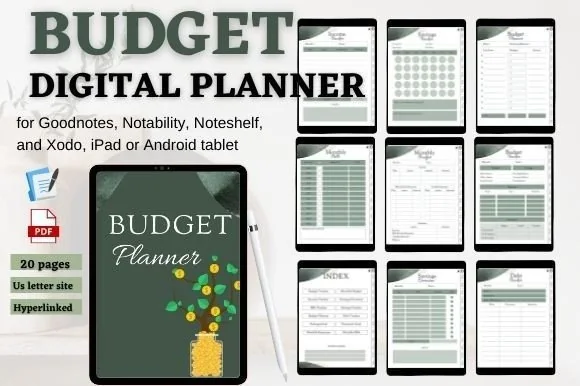
3. Budget Digital Planner Hyperlinked Tabs
Orientation: PortraitFormat: Hyperlinked PDF
Best for: keeping planned amounts separate from expenses. Designed by mixxdigitaldesign.
- 20-page digital and printable PDF for iPad annotation apps
- Monthly Budget and Monthly Expenses pages
- Notes and extra pages for custom records
The green monthly budget and expense pages give you two places to keep plan and actual apart. Put your intended food amount in the budget and the completed shopping amounts in expenses. The extra pages are useful for drawing your own mixed-receipt split; that is a reader-created layout, not an advertised grocery feature. This is a compact general budget planner with clickable navigation, so totals still need to be worked out manually.
Best for a wider finance workbook
4. Digital Budget Planner, Finance Tracker
Orientation: PortraitFormat: Digital workbook
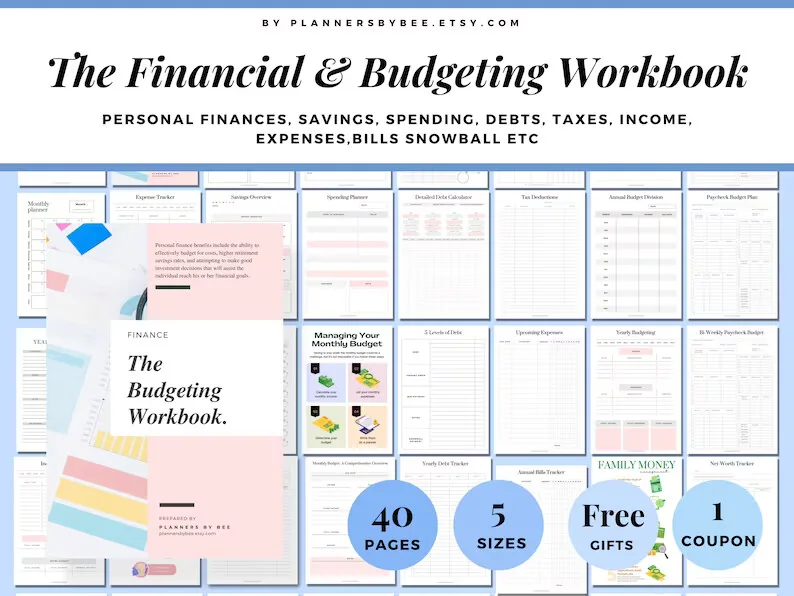
Best for: keeping grocery records inside a larger money notebook. Designed by PlannersByBee.
- GoodNotes planner described as a portrait budget workbook
- 40 pages and five sizes advertised
- Preview montage shows expense and spending records
Choose this when food is one part of a wider financial review. Its montage shows a broad workbook, including an expense tracker and spending planner, rather than a dedicated grocery page. Keep detailed receipt notes on a separate annotation page and transfer only the food subtotal into the workbook. The gallery is a single overview image, so small field labels and any automatic calculation behavior cannot be established from it.
Best for a monthly spending summary
5. Undated Budget Planner for GoodNotes
Orientation: PortraitFormat: Hyperlinked PDF
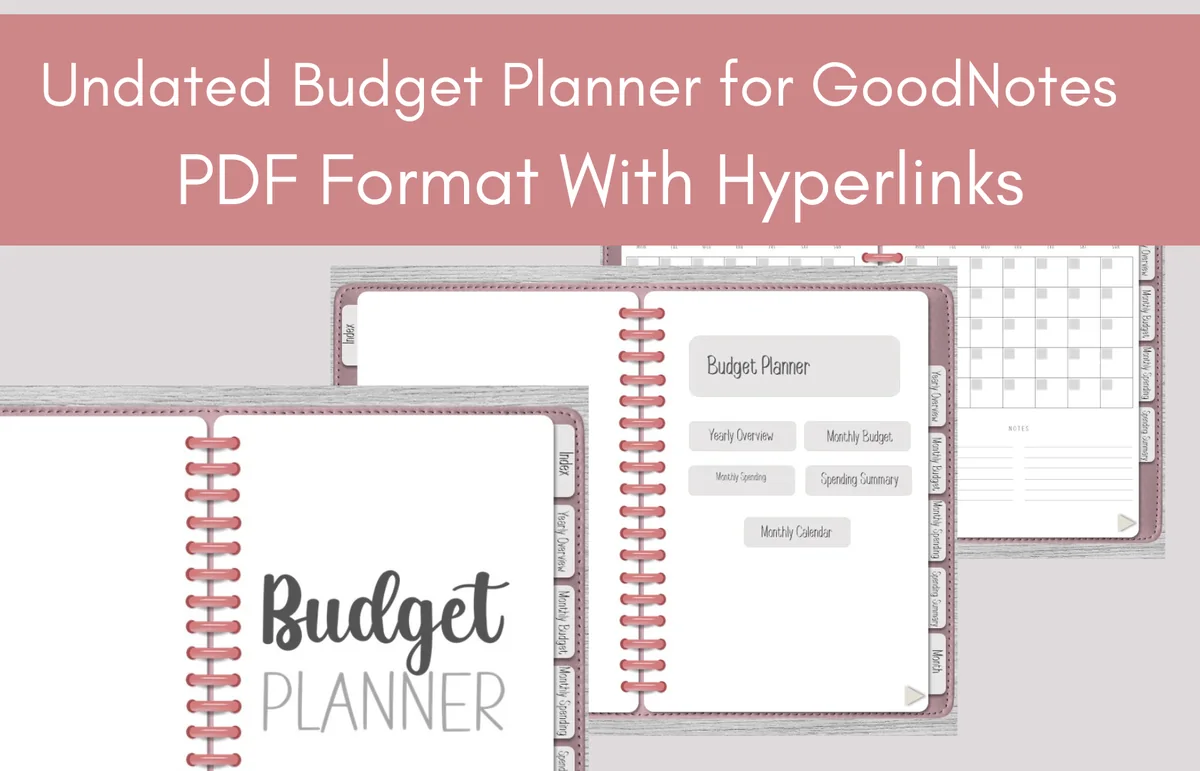
Best for: reviewing grocery spending across the month. Designed by Perla Designs.
- Undated PDF for GoodNotes with hyperlinks
- 30-page budget planner
- Spending Summary and Monthly Spending layouts shown
The pink spiral design puts the spending summary close to the monthly record. That suits a grocery routine where you enter transactions during the week and compare totals at month end. The monthly rows suit a summary rather than a detailed item-by-item receipt log. Keep the supermarket receipt detail in your own notes if the existing rows feel too narrow. There is no promised receipt scanner or bank connection.
Best for food category subtotals
6. Expenses Tracker 4years Interactive PDF
Orientation: PortraitFormat: Interactive PDF
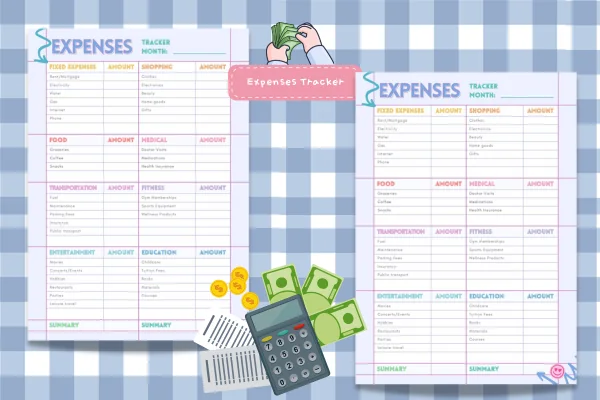
Best for: carrying a food amount into a monthly expense sheet. Designed by Zoom4Design.
- 48 monthly pages advertised across four years
- Description names iPad and GoodNotes use
- Preview separates Food, Housing, Medical and other expense categories
The visible Food section gives grocery spending a clear place in the monthly overview. Use a separate receipt ledger first, then transfer the grocery subtotal consistently; decide whether restaurant spending belongs elsewhere. The seller advertises interactive fields, but I have not tested form-field behavior in GoodNotes. Treat it as a manual annotation option unless you verify the features in your chosen app. Four years describes the length of the file, not automatic forecasting.
Life planners with finance and notes pages
Best for shopping beside your schedule
7. All-in-One Digital Planner ( 112 Pages )
Orientation: LandscapeFormat: Undated hyperlinked PDF
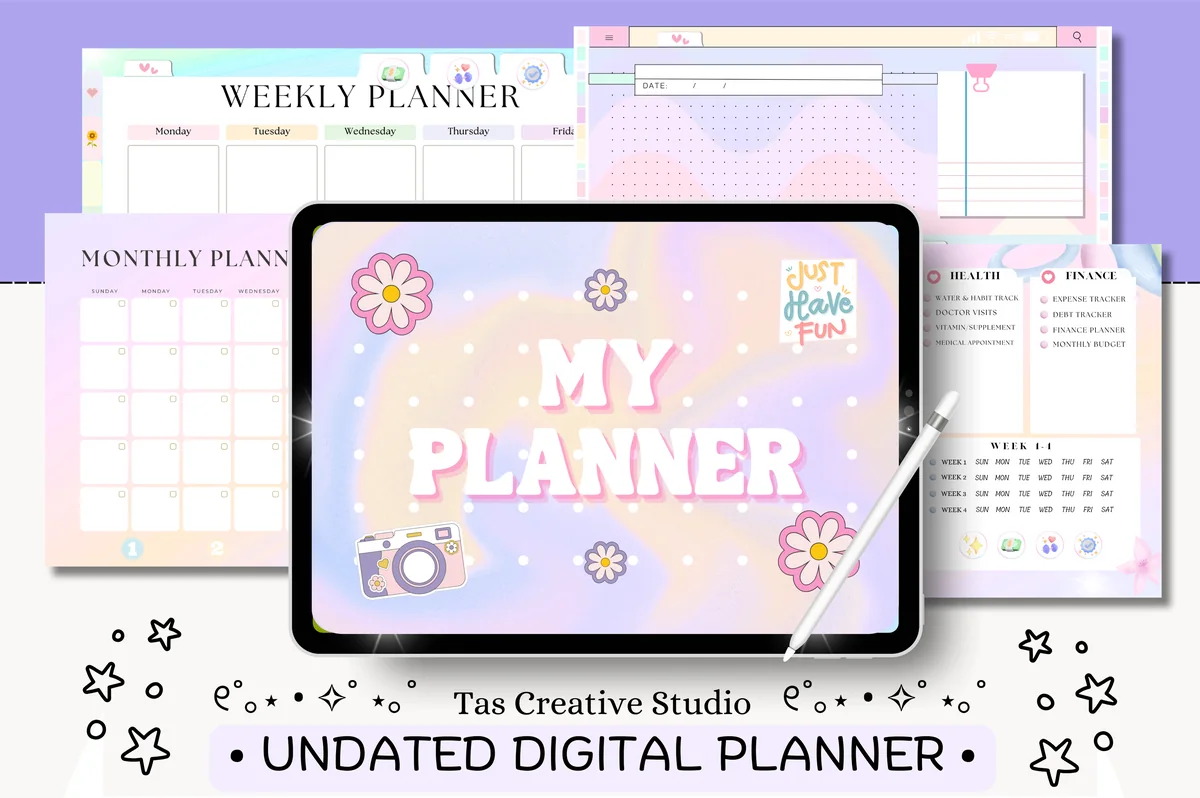
Best for: keeping shopping dates and money notes in one planner. Designed by Tas Creative Studio.
- Undated horizontal 112-page PDF
- Finance section with monthly budget and finance tracker
- Weekly planning and dotted notes also shown
This is the playful pastel option for a reader who wants a shopping check-in beside a weekly schedule. The finance gallery shows monthly budget and finance tracker pages, while the dotted notes page can hold a custom unit-price comparison. Keeping those jobs in one file avoids switching planners during a shopping review. It remains a general life planner with health and productivity sections, so it is more to navigate than a grocery-only journal.

Best for meals beside spending
8. Undated Digital Planner, Life Planner
Orientation: PortraitFormat: Undated hyperlinked PDF
Best for: keeping a food-cost record near meal planning. Designed by ThePlannersDelight.
- Undated PDF for GoodNotes and Noteshelf
- Monthly Budget, Revenue Tracker and Expenses Tracker
- Meal Planner plus six notes templates listed
The autumn colors are quieter than the pastel planner, and the gallery shows both finance pages and a separate meal planner. Use the expenses tracker for actual food costs, then consult meals when explaining why one week differed from another. These are separate pages, not a linked shopping-cost calculator. The notes templates are the space for receipt details and unit-price notes. A Monday-start and Sunday-start file are listed; choose the version that matches your planning routine.
Quick Comparison
| Planner | Grocery role | Useful layout | Limit |
|---|---|---|---|
| 1. Digital Budget Planner, Financial Planner | Receipt detail and review | Daily spending logs | Large general finance system |
| 2. Simple Savings Planner, Digital Planner | Small purchases record | Purchases tracker | Separate limit needed |
| 3. Budget Digital Planner Hyperlinked Tabs | Plan versus actual | Monthly budget and expenses | Custom grocery labels |
| 4. Digital Budget Planner, Finance Tracker | Whole-budget context | Expense and spending records | One overview preview |
| 5. Undated Budget Planner for GoodNotes | Monthly summary | Monthly spending and summary | Brief written listing |
| 6. Expenses Tracker 4years Interactive PDF | Monthly food subtotal | Food category in expense sheet | Form behavior untested |
| 7. All-in-One Digital Planner ( 112 Pages ) | Schedule plus costs | Budget, finance tracker and notes | Broader life planner |
| 8. Undated Digital Planner, Life Planner | Meals plus expenses | Expenses tracker and meal planner | No linked cost calculator |
Keep the weekly review short enough to repeat
A grocery expense tracker becomes harder to maintain if every receipt requires a full rewrite. Keep one ledger as the source of truth and copy only totals into the budget page. Use the following routine after shopping, then revisit the week before making another list.
A repeatable receipt-to-review routine
- 1.Enter and split. Read the final receipt and separate food from household purchases. Use the paid amount after any adjustments. Write a reference beside the entry so you can find the original if the total looks unusual later. If a receipt is missing, mark the entry as an estimate instead of making it look reconciled.
- 2.Reconcile and carry forward. Add the food entries and subtract food refunds once. Compare your split amounts with the complete receipt, then update the weekly running total. At month end, transfer the monthly food figure into the budget. Keep subset tags, such as lunch supplies, out of that addition because they are already counted.
- 3.Choose one next action. Look at what explains the difference between plan and actual. Decide whether you need a better list, a pantry check or simply a revised plan for a different household week. Write one next action beside the result. A single change is easier to evaluate than starting five new tracking habits at once.
Manual PDF, spreadsheet or grocery app?
A PDF gives you a place to annotate a consistent record. It does not calculate your totals, scan a receipt or update a bank transaction just because it has clickable tabs. If automatic arithmetic is the main requirement, a spreadsheet may suit the job better. If receipt recognition matters most, assess an app that explicitly offers it rather than expecting that function from a planner file.
- PDF: flexible handwriting and visual notes, with manual entry and totals.
- Spreadsheet: useful when you want formulas you can inspect and maintain.
- App: check its actual features, fees and data permissions before sharing financial information.
The CFPB’s Your Money, Your Goals toolkit includes a spending tracker alongside other money-management tools. Recording spending and reviewing a plan are separate jobs; both jobs can begin on an ordinary notes page.
FAQ: grocery tracking on an iPad
What should count as groceries?
Choose a definition and put it at the top of your record. Food bought for home use is one practical starting point. Keep restaurant meals, household supplies and delivery charges separate if you want a clearer food-only comparison. There is no need to hide those costs: they can remain visible in their own categories.
Can I use a grocery budget tracker PDF in GoodNotes?
The selected files are marketed for digital planning or compatible annotation apps, with specific app names in their listings. Import the file using your app’s supported process and add your entries manually. Hyperlinks navigate pages. They do not make a PDF calculate category totals, and advertised interactive form fields may behave differently across apps.
What is a realistic weekly grocery amount?
Start with your own recent receipts, household needs and available funds rather than an invented universal target. Keep restaurant meals separate when comparing with Iowa State’s grocery estimate. Track a few ordinary weeks and label unusual shops. The dollar amounts in this guide only demonstrate arithmetic; they are not a recommended allowance.
Do I need fifteen pages or a paid planner?
No. One receipt ledger, a weekly subtotal and a monthly review can share a page. Add unit prices or other tags only when they answer a useful question. Existing notes space is enough to begin. The products here offer optional structure; they are not necessary to follow the method.
How can two people track groceries on a budget?
Keep both shoppers’ receipts in the same weekly ledger and add a shopper column if you need to identify an entry. Before either person shops, review the running food total and check pantry stock against the next shared list. Count a purchase once even when one person repays the other, because that repayment does not represent another bag of groceries. At the weekly review, choose one shared change, such as using a pantry staple before buying more.
How should I handle sensitive information or an unaffordable food plan?
Use short receipt references rather than writing full payment-card or account details in a planner. Check an app’s privacy and sharing settings before storing receipts. If essential food costs are unaffordable or debt is creating persistent problems, a qualified financial counselor or local assistance service can help review your situation. A tracker is an organizational tool, not individualized financial advice.
Start with the next receipt
Your grocery budget tracker does not need every possible category today. Start with date, store and food amount; reconcile mixed receipts and carry one clear total into the week. After a month, keep the extra layout that helped you make a decision and drop the detail you never used.
For meals and shopping preparation, the digital meal planner guide covers the planning side. Keep that job separate from recording what was actually paid so the food list and the expense total remain useful together.
You May Also Like
Some planner links are affiliate links, which can earn me a commission without changing your price. Details are in my affiliate disclosure.