You color another square on your savings page, then open your account and wonder whether that money is actually there. These savings tracker ideas pair the picture with a clear amount and a place to record each contribution, so the page can explain your progress instead of just looking finished.

I have grouped 20 layouts by what you want to see: an amount building up, a goal taking shape, contributions over time, or a record you can check. There is also an original $500 arithmetic example and six iPad budget tools at the end. The layouts are ideas to create yourself, not a claim that every tool below contains all 20 designs.
Choose the amount before the shape
Give the page a small header: goal, target amount, starting amount and review date. Decide whether its colored area represents the whole balance or only new contributions. That distinction prevents a starting balance from disappearing when you make a fresh page.
For a whole-balance tracker, divide the target by the number of equal units. If the target is $500 and there are 50 boxes, each box represents $10. A $100 starting balance fills ten boxes immediately. For a tracker of new contributions only, write the starting balance separately and scale the units to the amount still needed.
- Fixed-value units: use a written key such as one square = $10. Leave a partial contribution in the log until it reaches a full unit, or mark the fraction clearly.
- Percentage marks: label the scale from 0% to 100% and calculate progress from the balance assigned to this goal. Do not mix percentages and dollars in one unlabeled scale.
- A real ledger: keep date, contribution, withdrawal and running balance beside the drawing. Update the picture from that record.
The CFPB money-goal worksheet connects a target and a time frame to an amount to set aside. For this page, choose an amount that fits your budget before choosing how many shapes to draw. A decorated target is a record, not a promise of what you can afford.
20 savings tracker ideas, grouped by what you want to see
These bullet journal savings tracker ideas also work as hand-drawn pages in an iPad notebook. Keep the marks large enough to select and shade at your usual zoom level. Use one layout for a goal first; a second design should add information rather than count the same money twice.
Equal units for an amount you can count
- 1A 50-box grid. Draw five rows of ten squares and write the value of one square above them. Mark the starting balance in a different pattern from new contributions, with a short key. This is useful when you want to count progress without redrawing a picture. Add a small carry-forward line for amounts below the value of a whole square.
- 2A banded thermometer. Divide a tall outline into equal bands, with the target at the top and zero at the bottom. Label several intermediate amounts so the scale stays understandable when viewed alone. Shade upward from the current balance. If the top band looks too small to annotate on your iPad, use fewer bands and larger values rather than squeezing in tiny numbers.
- 3A coin-stack ladder. Draw a stack of flat oval coins, each worth the same amount. Put the scale beside the stack and number every fifth coin so you can count without starting again. Keep the drawings plain enough that the boundaries remain obvious after shading. The stack represents recorded savings, even when the actual money is held digitally.
- 4Ten percentage rings. Make ten circles, each representing 10% of the same goal. Fill a circle only when the balance reaches its threshold; write any remainder below the row. This lets the visual layout stay the same when two goals have different dollar values. Give each goal its own page so a filled circle never ambiguously belongs to both.
Pictures that make the goal recognizable
- 5A jar with horizontal bands. Draw a wide jar and split its body into equal-height bands. Label the scale outside the glass, where coloring will not cover it. Use bands as equal money units rather than trying to estimate the volume of a curved jar. A side ledger keeps the exact balance visible between marks. This suits a goal whose total matters more than the deposit schedule.
- 6A suitcase of packing blocks. Divide a suitcase outline into a fixed number of rectangles, with one amount per block. Add a tag with the goal name and date; avoid giving different visual sizes different values unless you label them. This is a themed savings picture, not a trip budget. Keep destination costs and booking details on a separate planning page.
- 7A house built from bricks. Draw rows of equal bricks inside a house outline and color them from the foundation upward. Leave the roof as decoration unless you explicitly assign it a value. This works for a named household goal without implying that filling the house covers the entire cost of buying property. Write the exact purpose beside the drawing, such as a chosen furnishing fund.
- 8A plant with numbered leaves. Give every leaf the same value and add a small number to each one. Numbering helps when the leaves curve around a stem and are hard to count at a glance. Leave the pot and stem uncolored decoration so they do not become accidental savings units. Use a second pen pattern, rather than a nearly identical color, for the opening balance.
Routes and pieces for visible milestones
- 9A trail of stepping stones. Draw a path of equal circles ending at a flag. Number the stones in order, then write an amount per stone in the legend. This gives a visible direction without assigning a deadline to every contribution. A pause leaves the next stone blank; it does not require restarting the path. Put dates in the ledger instead of inside small circles.
- 10A jigsaw made of equal pieces. Create a rectangular puzzle with the same number of pieces in each row. Assign one amount to every piece, even if the drawn tabs make them look slightly different. Outline completed pieces with a second pen when color alone is unclear. Keep the edges simple enough to see where the next unit begins after several pieces have been shaded.
- 11A bookcase of labeled spines. Draw books of similar width and number their spines. Each book can represent one fixed contribution unit; the shelf itself has no monetary value. Put the goal on the top of the bookcase and the balance beneath it. For study-related savings, this offers a theme without needing a separate tracker for every textbook or item on a shopping list.
- 12A milestone ribbon. Draw a long ribbon with labeled checkpoints at 25%, 50%, 75% and 100%. Write the corresponding amounts next to those points and the exact balance underneath. Use this when you want fewer marks and more room for a review note. The ribbon does not show each deposit, so pair it with a dated record if you need to reconstruct progress.
Contributions over time
- 13A calendar of actual deposits. Use a month grid, but write an amount only on days when money is actually set aside. A blank day is simply a day with no recorded contribution. Add a monthly total below the calendar and compare it with the ledger. Avoid treating a colored date as both a planned deposit and a completed one; use an outline for plans if needed.
- 14A payday strip. Give each expected payday a wide box containing planned contribution, actual contribution and the date recorded. Keep planned and actual fields visually separate. This is useful when a regular calendar leaves too much blank space between paydays. If a payment date changes, amend the label; the tracker should reflect what happened rather than force a deposit on an arbitrary date.
- 15A twelve-month tile board. Draw twelve large tiles, each with a month, deposits, withdrawals and closing balance. The tiles work as a monthly savings tracker template that shows the year without a transaction-sized grid. Closing balances are snapshots: do not add the twelve balances together as though they were new contributions. Use the deposit totals when you want to compare how much was added each month.
- 16A flexible amount mosaic. Write a chosen contribution amount in every cell, then shade a cell only after setting aside that amount. Unlike a fixed-value grid, the cells may have different values, so the labels must stay readable. Add all the amounts before using the page. The $500 example below demonstrates this layout; it is arithmetic for a page, not a required saving pace.
Records for checking the picture
- 17A two-column deposit log. Put date and amount in two wide columns, with a balance summary at the foot of the page. Add a separate withdrawal line whenever money leaves the goal. This is a simple layout that suits readers who prefer large handwriting to detailed artwork. If you add a small progress bar, update it only after the balance has been checked.
- 18A contribution-and-withdrawal ledger. Use columns for date, money in, money out and balance. It makes a withdrawal visible without pretending every earlier deposit vanished. Shade the companion drawing back to the new balance or use a clear revised-balance marker. The important feature is the distinction between cumulative deposits and money still assigned to the goal; they answer different questions.
- 19Separate goal lanes. Draw one horizontal lane for each goal, with its own target, opening balance and current amount. Allocate a contribution to a named lane before marking progress. If you move money between goals, record the amount out of one and into the other. A shared page is useful for comparison, but it should never make one contribution appear to fund two goals.
- 20A planned-versus-actual pair. Put an outlined bar for the plan beside a solid bar for the actual balance, using the same scale. Label both bars in words so their meaning survives a black-and-white view. This shows a gap without hiding progress already made. Leave room for a revised date or amount rather than treating every difference from the plan as a reason to abandon the page.
A $500 page with 30 amounts that add up
Here is an original layout example for a 30-day page, starting from $0. Draw 30 cells, then enter ten $10 amounts, ten $15 amounts and ten $25 amounts. The total is $100 + $150 + $250 = $500. You can arrange them as five rows of six cells using the pattern below.
| Rows | Six cell labels in each row | Row total |
|---|---|---|
| 1 | $10, $15, $25, $10, $15, $25 | $100 |
| 2 | $10, $15, $25, $10, $15, $25 | $100 |
| 3 | $10, $15, $25, $10, $15, $25 | $100 |
| 4 | $10, $15, $25, $10, $15, $25 | $100 |
| 5 | $10, $15, $25, $10, $15, $25 | $100 |
Treat the labels as amounts, not mandatory daily instructions. A $10 contribution completes a $10 cell; a $20 contribution can complete two $10 cells if both remain blank. If only $25 cells remain, keep a smaller contribution in the ledger until it reaches $25. Do not shade a whole $25 cell for a $15 contribution.
- At the start: check that all 30 cell labels total $500 and that the balance starts at $0.
- During the month: record contributions first. Use a different mark for an intended contribution so plans do not resemble completed savings.
- At review: total the colored cells, include any uncolored remainder from the ledger and subtract withdrawals. Reconcile the result with the money assigned to this goal.
Thirty days is the page format, not a deadline you must meet. The average is about $16.67 a day, but the example does not assume that daily amount is affordable. Reduce the target or extend the period if necessary. This is not an interest calculation and does not include earnings, fees or investment returns.
Move the design into a PDF notebook
- 1Create the page. Use a blank, lined or grid page in a PDF notebook you already have, or annotate a suitable budget page. Draw the outline and leave space for a legend and amounts. The layouts above are your own additions; a product’s existing pages do not automatically become custom templates.
- 2Set the key before copying. Write the goal and unit value, and decide how opening balances and withdrawals will appear. If you copy a page for another goal, change both the target and the scale. Reusing an old dollar value with a new target makes the picture misleading.
- 3Keep a dated record. Write the contribution in the ledger and update the picture after checking it. A PDF does not move money or verify an account balance. Hyperlinks navigate pages; they do not provide bank syncing or automatic arithmetic.
- 4Review without rebuilding. Check the balance on a date that suits the goal. Change the target or time frame when circumstances change and keep a dated note explaining the revision. Export or back up your notebook using your app’s normal options, especially before making a large layout change.
For savings tracker ideas for students, a deposit log or payday strip can leave more space for irregular contributions than a daily challenge grid. The same designs work for other uneven income schedules. The tracking page should document the amount available after your obligations, rather than turn an uneven month into a string of missed boxes.
Adapt BuJo savings tracker ideas to your notebook
Start with the grid, jar or payday strip above and give your main goal one page. Leave a margin for dated entries so you can monitor the balance as the colored area grows. If you contribute from each paycheck, put the planned amount beside the actual deposit rather than coloring a box before the money arrives.
Record which money saving ideas at home become deposits
Use a small notes column to connect a household choice with money you actually save. For example, if you spend $8 less than planned on food and set that $8 aside for the goal, enter one $8 contribution with a date. If you pay by credit card, don’t count a lower purchase total as a savings deposit before you have accounted for the bill.
Keep cash set aside for the goal in the same ledger as transfers, labeling where each amount is held. Finding an unspent amount and moving it into savings describe two stages of the same contribution, so record it once. The ledger then explains the colored marks using recorded amounts rather than hoped-for savings.
Six iPad budget tools for the supporting records
I selected these for an identifiable savings page, a deposit record or a broader financial ledger. Choose the existing pages you need; create the decorative layouts above yourself where they are not included. My selection is based on the public previews and descriptions; it does not include hands-on testing of the digital tools.
TL;DR: Build one of the 20 layouts yourself, then choose a tool for its supporting records. These six digital tools range from small savings sheets to broader budget workbooks; the original layouts in this article are not promised contents of every product.
Quick Picks
- Best for several savings goals: Digital Budget Planner, Financial Planner
- Best for a monthly deposit log: Simple Savings Planner, Digital Planner
- Best for a jar and savings overview: Budget Digital Planner Hyperlinked Tabs
- Best for a wider savings review: Digital Budget Planner, Finance Tracker
- Best for a monthly savings record: Expenses Tracker 4years Interactive PDF
- Best for playful progress shapes: Rabbit Savings Tracker PDF Files
- Digital Budget Planner, Financial Planner – Best for several savings goals
- Simple Savings Planner, Digital Planner – Best for a monthly deposit log
- Budget Digital Planner Hyperlinked Tabs – Best for a jar and savings overview
- Digital Budget Planner, Finance Tracker – Best for a wider savings review
- Expenses Tracker 4years Interactive PDF – Best for a monthly savings record
- Rabbit Savings Tracker PDF Files – Best for playful progress shapes

Best for several savings goals
1. Digital Budget Planner, Financial Planner
Orientation: PortraitLayouts: Monthly and biweeklyFormat: Hyperlinked PDF
Best for: keeping visual goals beside a detailed household budget. Designed by ThePlannersDelight.
- Hyperlinked PDF for GoodNotes, Noteshelf and Notability
- Savings tracker and separate visual goal challenges
- Monthly and biweekly budgets, spending logs and PNG stickers
- Requires an Apple tablet and a writable stylus such as Apple Pencil; apps, tablet and stylus are not included and require separate purchase
The visual challenge pages give a picture a purpose: the previews show house, car and other goal shapes beside a wider budgeting system. I like the separate savings tracker for checking the amount behind those shapes. This is the larger option here; choose it when you want several financial records together, rather than only a decorative page.
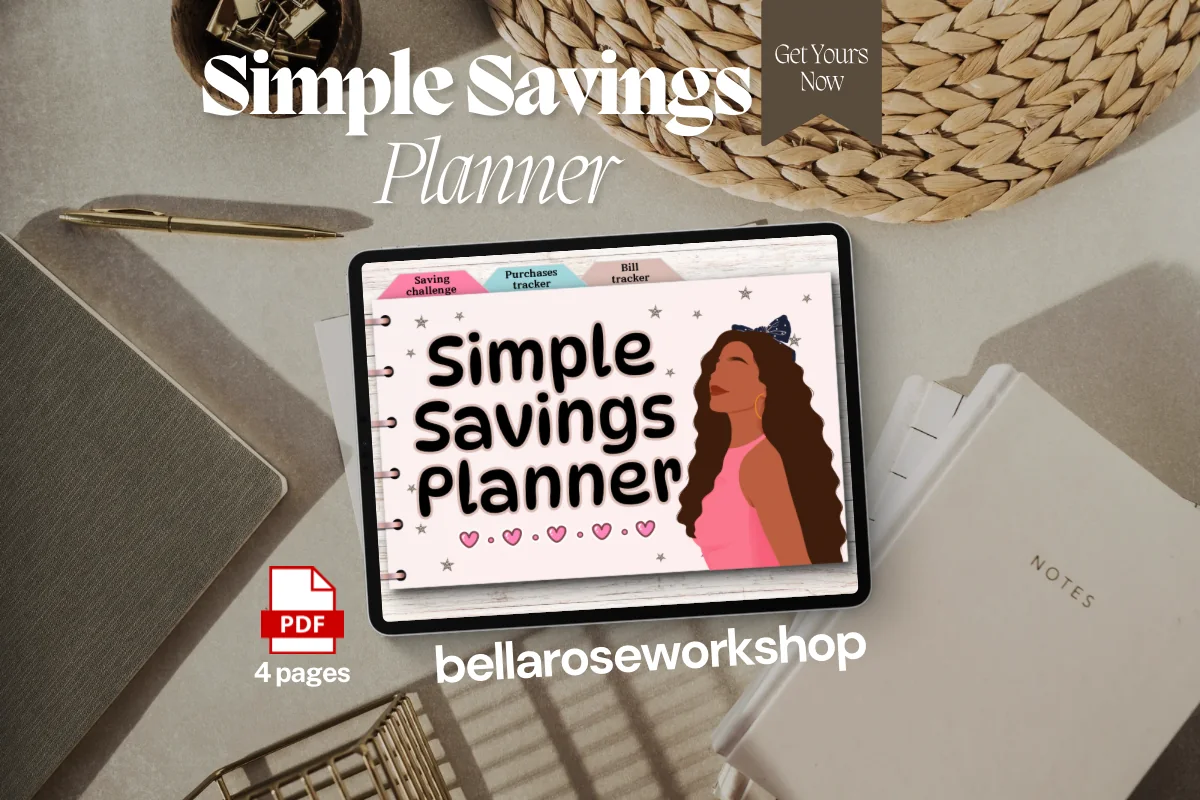
Best for a monthly deposit log
2. Simple Savings Planner, Digital Planner
Orientation: LandscapeLayouts: Monthly deposit logFormat: Hyperlinked PDF
Best for: recording contributions without a large planner. Designed by bellaROSEworkshop.
- Four-page hyperlinked PDF shown in the previews
- Saving challenge with monthly deposit, balance and notes columns
- Purchases tracker and bill tracker listed
A monthly deposit row is a useful anchor for an illustrated tracker on another page. Enter what actually arrived in savings, then update the picture from that balance. The compact format appeals to me, but it is not a daily 30-cell challenge: the displayed saving challenge is organized by month. It is a digital-use PDF, not an editable design template.
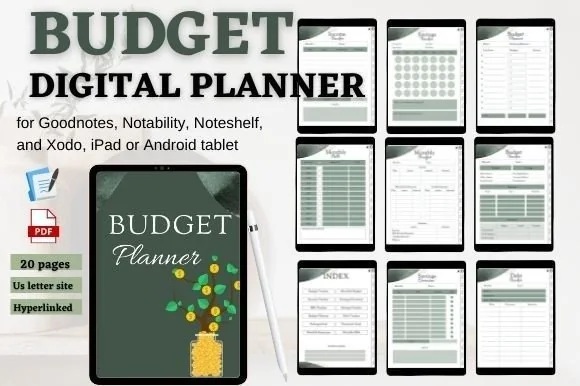
Best for a jar and savings overview
3. Budget Digital Planner Hyperlinked Tabs
Orientation: PortraitPaper: US letterFormat: Hyperlinked PDF
Best for: using a visual goal page alongside a transaction record. Designed by mixxdigitaldesign.
- 20-page hyperlinked digital and printable planner for iPad PDF apps
- Savings Goal page with a jar and an amount table shown
- Savings Tracker circles, Savings Overview and extra notes pages
The green Savings Goal layout comes closest to the jar idea above. Its adjacent table matters as much as the jar: write the contribution before adding color. The circle tracker offers a different shape within the same planner. Your own value-per-shape legend still needs to be added; the planner is not presented as a preset $500 challenge.
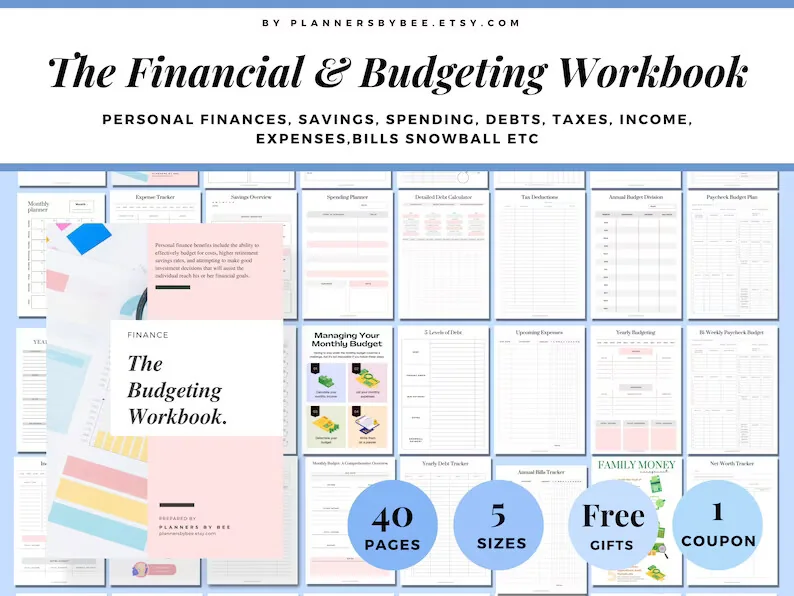
Best for a wider savings review
4. Digital Budget Planner, Finance Tracker
Orientation: PortraitLayouts: Financial recordsFormat: Digital workbook
Best for: viewing savings in the context of other financial records. Designed by PlannersByBee.
- GoodNotes financial and budgeting workbook
- Single cover montage shows savings overview and spending pages
- Cover advertises 40 pages and five sizes
The savings overview is the relevant part of this broader workbook. It gives an illustrated goal a place within the rest of the budget, rather than making the picture your only record. Only one public cover montage is available; individual interior pages are not available, and the file format is not specified in the listing. Do not assume a particular jar, daily grid or automatic calculator is included.

Best for a monthly savings record
5. Expenses Tracker 4years Interactive PDF
Orientation: PortraitLayouts: Monthly financial recordFormat: PDF
Best for: keeping savings entries with the month’s income and expenses. Designed by Zoom4Design.
- 48 monthly pages advertised in an interactive PDF
- Income, expenses, savings and notes sections listed
- iPad and GoodNotes use stated; public previews show categorized expenses
This is the ledger-focused alternative. The description lists a savings section, while the two public pictures mainly show expense categories and the cover. I would keep the illustrated tracker separately and use the monthly record to check contributions. The advertised editable fields have not been tested in GoodNotes; plan on manual annotation unless the behavior in your chosen app is verified.
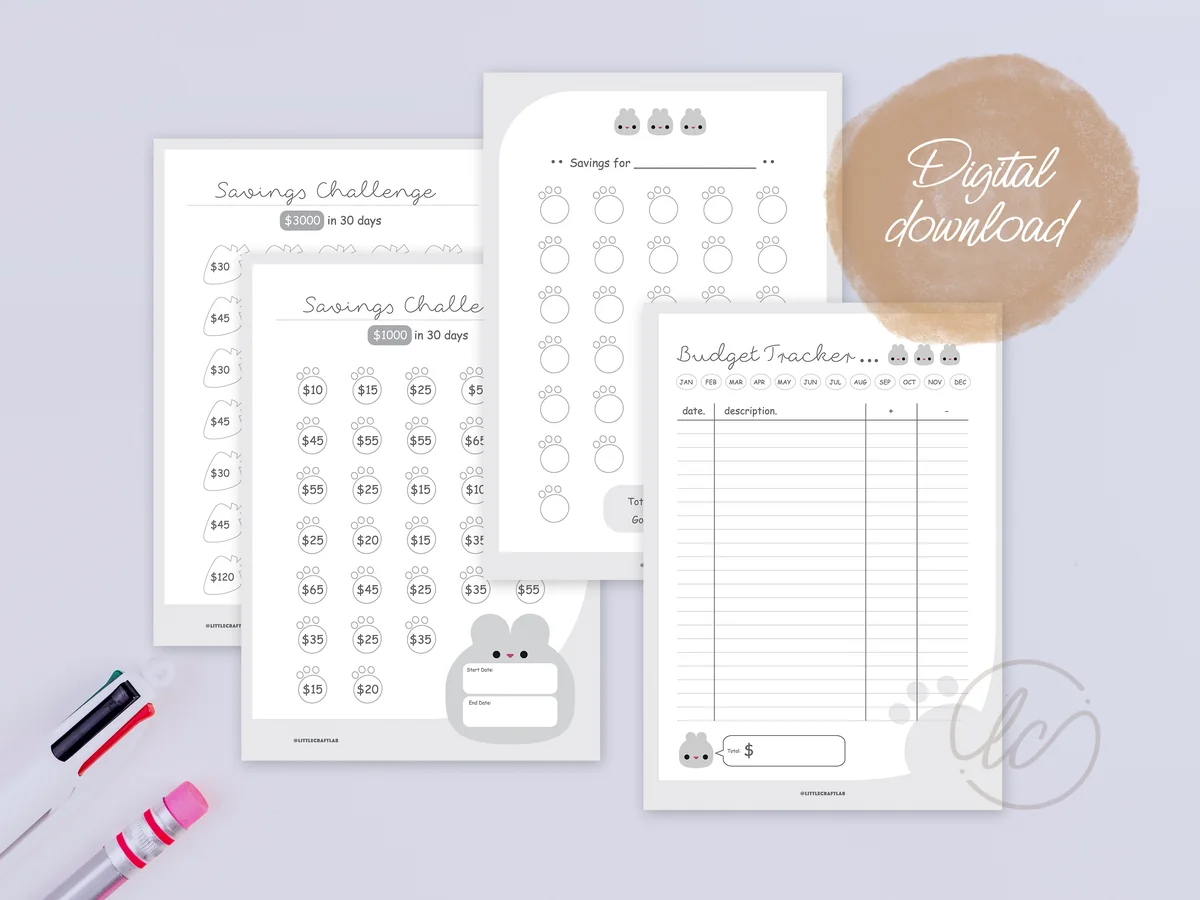
Best for playful progress shapes
6. Rabbit Savings Tracker PDF Files
Orientation: PortraitPaper: A4Format: PDF and JPG
Best for: coloring individual savings contributions. Designed by Little Craftlab Studio.
- JPG and PDF files in an archive for GoodNotes or Notability
- Two fixed-amount challenges, a savings plan and a budget tracker
- A4 rabbit-themed pages with progress shapes shown
The unnumbered savings-plan page is the flexible choice for these ideas. Assign a value to each shape and keep the budget tracker for dates and amounts. The other pages show fixed $1,000 and $3,000 challenges; those are alternatives inside the pack, not amounts you need to aim for. The rabbit artwork adds a theme without replacing the arithmetic.
Quick Comparison
| Tool | Tracking role | Useful layout | Important limit |
|---|---|---|---|
| 1. Digital Budget Planner, Financial Planner | Several goal pages | Savings tracker and visual challenges | Large general budget system |
| 2. Simple Savings Planner, Digital Planner | Monthly deposits | Deposit, balance and notes | Draw a daily grid separately |
| 3. Budget Digital Planner Hyperlinked Tabs | Jar and circle progress | Savings Goal and Savings Overview | Set your own scale |
| 4. Digital Budget Planner, Finance Tracker | Whole-budget context | Savings overview in cover montage | Only one public montage |
| 5. Expenses Tracker 4years Interactive PDF | Monthly ledger | Savings section listed; expense previews | Add the visual page yourself |
| 6. Rabbit Savings Tracker PDF Files | Color-in progress | Unnumbered savings plan and ledger | Other challenges have fixed amounts |
Keep the picture and the balance telling the same story
A colored shape can mean a balance, a contribution or a completed step. Pick one meaning and write it on the page. When the picture and ledger disagree, check the entries before adding another mark.
For the suitcase design, a trip introduces another distinction: money still held and costs already paid. The vacation fund tracking ideas show how a contribution ledger and a pre-trip handover page keep those figures visible alongside the progress picture.
- Opening money: count it once. A whole-balance picture can include it; a new-contribution picture should show it separately.
- Withdrawals: record the amount and update the current balance. Total deposits alone do not describe what remains.
- Two goals: give each amount an allocation. Moving money from one goal to another changes both records.
- Month changes: carry forward the closing balance once, without treating it as a fresh deposit.
For a wider record around the page, the budget planner ideas guide covers how other money pages fit together. If you are choosing a saving schedule instead of a visual layout, use the savings challenges guide. This article focuses on how to display and record progress.
FAQ: choosing and updating a savings page
What is a good goal for a savings account?
Choose a named purpose, an amount and a time frame that fits your circumstances. The CFPB worksheet starts with those details and checks the amount against the budget. A page can organize that decision; it cannot tell every reader what their target should be.
How do I keep track of savings without drawing?
Use a dated ledger with contributions, withdrawals and a running balance. A monthly total can give you an overview. Artwork is optional; the useful part is being able to explain how the current balance was reached.
Can I create a savings page in a GoodNotes PDF?
You can create an illustrated page in a PDF notebook and annotate it using the tools available in your app. The six products offer different starting pages. They do not all include the 20 original designs here, and a PDF is not a linked bank account or an automatic spreadsheet.
Should I use the 50/30/20 rule for my tracker?
The tracker does not require a particular budget split. Its job is to record the amount assigned to your chosen goal. Decide the amount within your wider budget, then choose a scale that represents it accurately.
What if a savings challenge makes essential costs harder to cover?
Reduce or pause the challenge and review the budget. The CFPB worksheet includes adjusting the time frame or goal amount when the available amount is insufficient. If you are struggling with debt or essential bills, seek qualified financial or nonprofit credit counseling rather than forcing a decorative target. These examples are general organizational information, not personalized financial advice.
Give one goal a page you can explain
Choose the savings tracker ideas that make your numbers easiest to read: a grid for fixed units, a picture for a named goal or a ledger for detail. Write the scale first and make one entry before decorating the rest. When you revisit the page, you should be able to trace every colored mark back to money recorded for that goal.
You May Also Like
Some product links are affiliate links: a qualifying purchase can pay this site a commission, while your price stays the same. Details appear in the affiliate disclosure.