A to-do list tells you what to do. It never tells you that eleven tasks won’t fit between a 9 a.m. call and school pickup. An hourly planner does: every hour gets its own box, and the moment you write the day into the boxes, you see how much it can really hold. On an iPad you can move a block with the lasso tool instead of crossing it out and starting over.
Below are 5 hourly and time blocking planners from Creative Fabrica that I’d pick: three built around the time grid and two full 2027 planners with an hourly page for every day. After the list: why the hour grid works, 30 minutes vs 1 hour, how to time block a page, what to look for and a quick GoodNotes setup.
The 5 Best Hourly Planners I Found
I went through every hourly, half-hour and time blocking planner I could find on Creative Fabrica. Most were printables, Canva templates or KDP interiors, and a whole series of nice-looking scheduled planners still had last year’s calendars inside, so they’re out. What’s left are PDFs for GoodNotes on the iPad where the schedule is a real hour-by-hour grid, not a line that says “schedule”.
TL;DR: 5 hourly planners for the iPad: three built around the time grid (a half-hour weekly spread, an ADHD time blocking system and a simple daily schedule) and two full 2027 planners with an hourly page for every day. Each card lists the grid, dates and who it suits.
Quick Picks
- Best for half-hour weekly: Half-Hour Weekly Planner
- Best for ADHD and messy days: Premium ADHD Time Blocking System
- Best for simple daily page: Daily Schedule Planner, Daily to Do List
- Best for 2027: Digital Life Planner 2027 Portrait
- Best for workdays: Work Life Planner 2027 Landscape
- Half-Hour Weekly Planner – Best half-hour weekly
- Premium ADHD Time Blocking System – Best for ADHD and messy days
- Daily Schedule Planner, Daily to Do List – Best simple daily page
- Digital Life Planner 2027 Portrait – Best for 2027
- Work Life Planner 2027 Landscape – Best for workdays
Best half-hour weekly
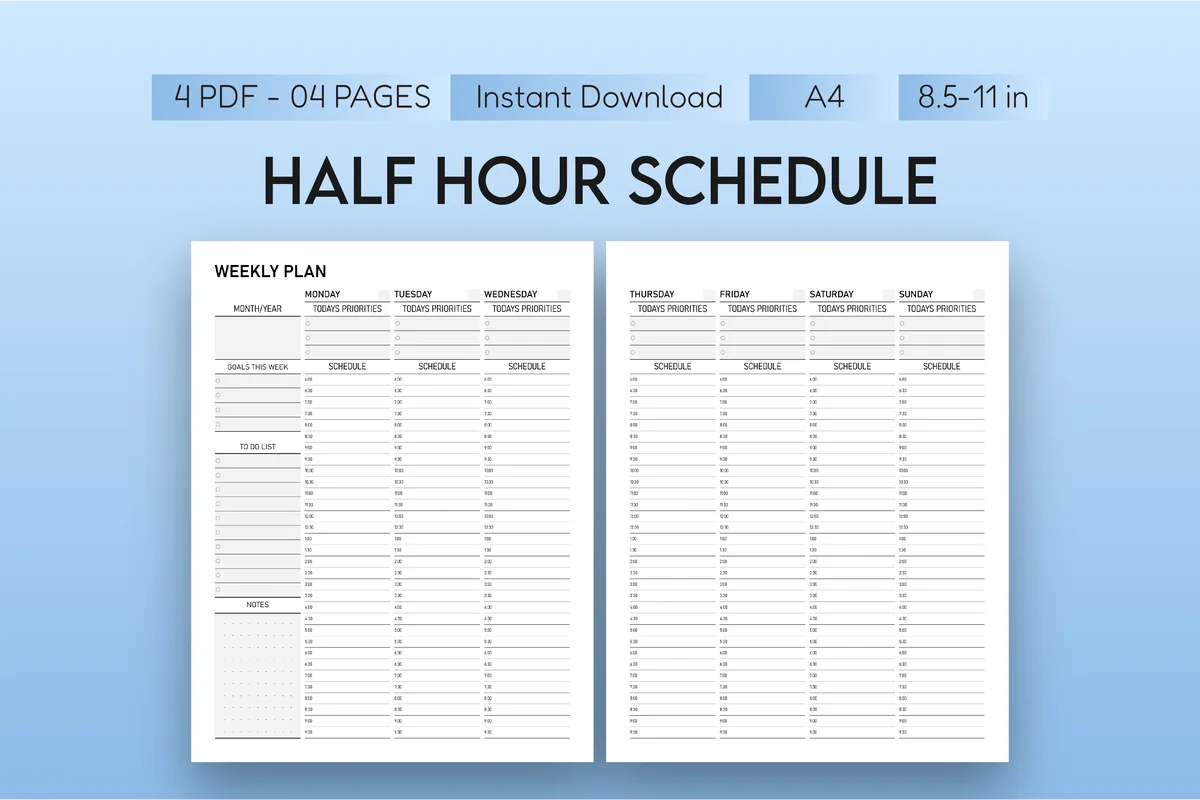
1. Half-Hour Weekly Planner
Orientation: PortraitLayouts: Weekly (30-minute slots, 2 pages)Format: PDF + PNG, A4 and US LetterDates: Undated
Best for: busy professionals, students, time blockers. Designed by Mol Tazime.
- Weekly layout in 30-minute intervals: Monday to Wednesday on one page, Thursday to Sunday on the next
- Today's priorities box above each day's schedule column
- Goals this week, a to-do list and notes down the side
- Undated PDF and PNG files, A4 and US Letter, made for GoodNotes, Notability and similar apps
This is the purest time grid in the list: no trackers, no themes, only the week cut into half hours. It suits people whose days are full of 30-minute calls, classes or appointments, where a one-hour row is too coarse. There are no tabs or links on the pages, only the two-page week, so you duplicate both pages each week in GoodNotes.
Best for ADHD and messy days
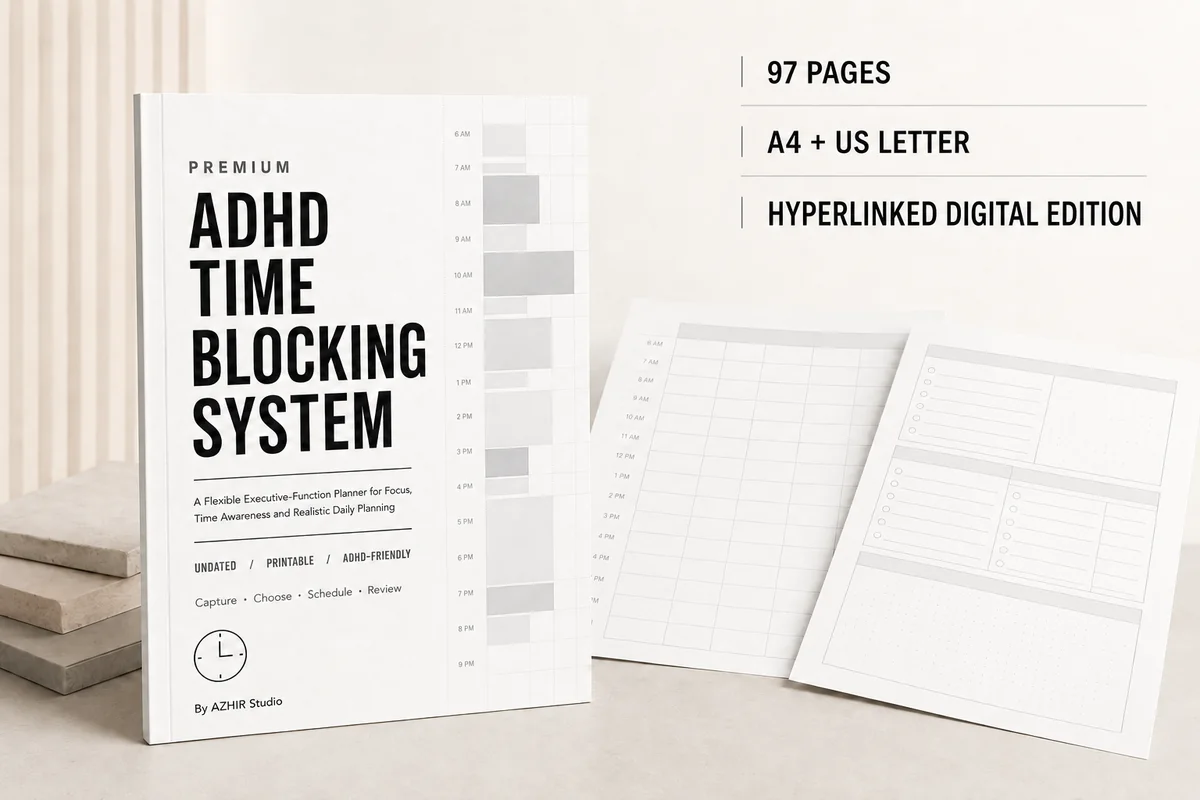
2. Premium ADHD Time Blocking System
Orientation: PortraitLayouts: Daily, Weekly, Monthly, hourly and half-hour time blockingFormat: Hyperlinked PDF, 97 pages (+ A4 and US Letter printables)Dates: Undated
Best for: ADHD planners, deep work fans, overwhelmed days. Designed by Azhir.
- 97 undated pages as a hyperlinked digital PDF, plus A4 and US Letter printables
- Hourly and half-hour time blocking pages, plus a three-block day planner
- Focus-block, deep-work and Pomodoro planners
- Buffer and transition-time planning, overwhelm reset and restart pages
Most hourly planners assume the day goes to plan. This one has pages for when it doesn't: buffer time between blocks, a three-block day for low-energy days and a restart page after you lose an afternoon. The design is black, white and light gray, so color comes from your highlighters. The designer notes it's a planning tool, not medical advice.
Best simple daily page
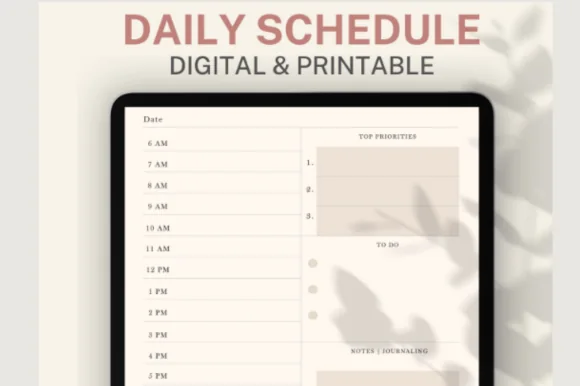
3. Daily Schedule Planner, Daily to Do List
Layouts: Daily (hourly, 5 or 6 a.m. start)Dates: Undated
Best for: time blockers, soft color lovers, minimalists. Designed by ThePlannersDelight.
- An hourly schedule down the left side of the page, in a 5 a.m. start and a 6 a.m. start version
- Top 3 priorities, a to-do list and a notes and journaling box
- A quote or mantra line, a mood tracker and today's rating at the foot
- Undated, ivory pages with soft pastel versions, for GoodNotes and Notability
If you only want the classic daily hourly planner page, this is it: hours on the left, priorities and to-dos on the right, nothing else to learn. The early-bird version starting at 5 a.m. is a nice touch most templates skip. It's a page set, not a full planner, so pair it with a monthly calendar if you need one.

Best for 2027
4. Digital Life Planner 2027 Portrait
Orientation: PortraitLayouts: Monthly, Weekly, Daily (hourly 6 a.m.–9 p.m.) + 6 subject tabsDates: 2027Week start: Monday or Sunday
Best for: life admin planners, bill payers, habit builders. Designed by Print Magic StudioX.
- 365 daily pages, each with an hourly schedule from 6 a.m. to 9 p.m., top 3, to do and notes
- Monthly planners, month-at-a-glance pages and a weekly page for every week of 2027
- 6 subject tabs (Digital, Focus, Bills, Habits, Work, Life) with 24 templates
- Two hyperlinked files, Monday or Sunday start, sized for a 13-inch iPad Pro in portrait
The hourly page here is part of a whole year: 365 dated daily pages, each with a 6 a.m. to 9 p.m. schedule, and the month tabs across the top take you to the right part of the year. That saves the setup an undated page set needs. Pick it if you want one planner for 2027 and the hourly day is how you like to plan.

Best for workdays
5. Work Life Planner 2027 Landscape
Orientation: LandscapeLayouts: Monthly, Weekly, Daily (hourly 6 a.m.–9 p.m.) + Work, Meetings, Self-Care tabsDates: 2027Week start: Monday or Sunday
Best for: busy professionals, work-life balancers, 2027 planners. Designed by Print Magic StudioX.
- 365 daily pages with an hourly schedule from 6 a.m. to 9 p.m., top 3, to do and notes
- Tabs for Work, Tasks, Meetings, Self-Care, Routines and Life, 24 templates in all
- Landscape spread with a gold coil down the middle, two pages per screen
- Dated 2027, Monday or Sunday start, hyperlinked months and tabs
Same hourly daily page as the Life planner from the same designer, but in landscape and with tabs built for a workday: tasks, meetings and routines sit one tap away from the schedule. Landscape works well with a keyboard case on the desk. If your hourly plan is mostly work blocks, I'd take this one over the portrait Life planner.
Quick Comparison
| Planner | Hourly grid | Dates and format | Best for |
|---|---|---|---|
| 1. Half-Hour Weekly Planner | 30 minutes, weekly spread | Undated, 2-page spread | Busy weeks with short meetings |
| 2. Premium ADHD Time Blocking System | 1 hour and 30 minutes | Undated, 97 pages, hyperlinked | ADHD and deep work |
| 3. Daily Schedule Planner, Daily to Do List | 1 hour, from 5 or 6 a.m. | Undated daily page | Early risers and minimalists |
| 4. Digital Life Planner 2027 Portrait | 1 hour, 6 a.m. to 9 p.m. | Dated 2027, hyperlinked | One planner for the whole year |
| 5. Work Life Planner 2027 Landscape | 1 hour, 6 a.m. to 9 p.m. | Dated 2027, landscape | Work and meeting days |
Every Hour Has a Box: Why an Hourly Planner Works
A list has no edges. You can write twenty items on it and it looks just as calm as a list of five. A time grid has edges: from 6 a.m. to 9 p.m. there are fifteen boxes, and sleep, meals and the commute take some of them before you plan anything.
That’s the whole idea of time blocking. Each task gets a box at a real time, so the plan becomes a schedule you can check against the clock. When a task doesn’t fit, you find out at 8 a.m. while planning, not at 6 p.m. when it’s still undone.
- It shows the real size of the day. Five hours of meetings leave three hours for everything else, and the grid makes that visible.
- It cuts the “what next” moments. When a block ends, the next one is already written down.
- It keeps a record. Looking back at a week of hourly pages tells you where the time actually went.
Hourly planner vs to-do list
You still need both. The list is where tasks wait; the grid is where they get a time. Most pages in this roundup put a short to-do list or top 3 next to the hours for exactly that reason. If you only want lists, my to-do list templates are the simpler choice.
Half-Hour, Hourly or a Weekly Hourly Planner?
The five planners split along two lines: how small the boxes are and how many days you see at once.
- 30-minute slots suit days with short calls, classes, client sessions or appointments. The Half-Hour Weekly Planner and the ADHD system both have them.
- 1-hour rows are easier to read and enough for most people. You can still split a row in two with a line when you need to.
- A daily hourly page (Daily Schedule Planner and both 2027 planners) gives each day room for priorities, notes and trackers next to the hours.
- A weekly hourly planner puts seven days of hours side by side, so you can see a busy Tuesday and an empty Thursday at the same time and move blocks between them.
A good mix for a lot of people: plan the week on a weekly hourly spread on Sunday, then use a daily page for the days that are packed. For the weekly part, my weekly digital planners have more layouts.
How to Time Block an Hourly Planner Page
Ten minutes in the evening or first thing in the morning is enough. This is the order I’d fill the boxes in.
- Fixed blocks first. Meetings, classes, school runs, meals. These don’t move, so they go in before anything else.
- Your top 3 next. Put the most important task into the best free block of the day, usually the morning, and give it a real length.
- Add buffer blocks. Leave 15 to 30 minutes empty after long meetings and before you leave the house. Plans fail at the edges, not in the middle.
- Batch the small stuff. Emails, calls and errands go into one or two “admin” blocks instead of being scattered across the day.
- One color per type of block. For example blue for work, green for health, pink for family, yellow for admin. In GoodNotes, a highlighter stroke over the hour box does it in a second.
- Review at night. Mark what happened, move what didn’t to tomorrow’s grid, and note how long things really took.
Expect the plan to change by noon. Moving blocks around is part of the method, and the grid still shows what’s left of the day. With a digital page, the lasso tool lets you drag a block to a new hour without making a mess.
What I Look For in an Hourly Planner Template
- Hours that match your day. A 6 a.m. to 9 p.m. grid covers most days; the Daily Schedule Planner also has a 5 a.m. version for early starts. Night-shift workers should check the hours on the preview first.
- Space next to the hours. A top 3 or a short to-do list beside the grid keeps the plan and the tasks together.
- Big enough boxes. You’ll be writing with an Apple Pencil, so a row needs room for a few words, not a single line of tiny print.
- Dated or undated. Dated 2027 planners save setup; undated pages let you skip days without wasting anything.
- Hyperlinks if it’s a full planner. In a 400-page file, tapping from the month to today’s hourly page matters. A short page set doesn’t need them.
- No past years inside. I left out every planner with an old calendar on its pages.
Hourly Planner or Calendar App?
Calendar and time blocking apps can send reminders and sync with your phone. A PDF hourly planner in GoodNotes can’t: it doesn’t sync with Google or Apple Calendar and it won’t ping you before a block starts. What it gives you is a quiet page with no notifications, handwriting you remember better than typed events, and room for notes, habits and doodles next to the hours.
Plenty of people use both: shared meetings live in the calendar app, and the hourly planner is where they plan their own day around them.
Keeping appointments in Calendar and time blocks in a PDF also raises a practical question: how do you keep both easy to reach? These iPad productivity setup ideas cover a side-by-side planning view, a short dock and a dedicated planning Home Screen.
How to Set Up an Hourly Planner in GoodNotes
- Open the PDF from Files and choose GoodNotes (or Notability) to import it.
- For a page set like the Half-Hour Weekly or Daily Schedule Planner, keep one clean copy and duplicate the page each day or week.
- For a dated 2027 planner, bookmark today’s page or use the hyperlinked month to jump to the date.
- Pick a fine pen for writing in the boxes and a highlighter with 3 to 5 colors for block types.
- Save the highlighter colors as favorites so color coding stays the same every day.
For more ways to set up a day page, see my daily digital planners, and for a work-only version with meeting and project pages, the digital work planners.
FAQ
What is an hourly planner?
A planner page where the day is split into hours, or half hours, with a box or row for each. You write tasks and events at the time you’ll do them, so the page becomes a schedule rather than a list.
What is the best hourly planner for iPad?
For a simple daily page, the Daily Schedule Planner. For a full year with dates already filled in, the Digital Life Planner 2027 or, for work days in landscape, the Work Life Planner 2027. For 30-minute weekly slots, the Half-Hour Weekly Planner.
Should I use a 30-minute or a 1-hour planner?
Start with 1-hour rows unless your day is full of short appointments. Half-hour slots give more precision but also more boxes to fill, which can feel like too much on a quiet day.
Is time blocking good for ADHD?
Many people with ADHD find a visible time grid helps with time blindness, especially with buffer blocks and short focus sprints, which is why the ADHD Time Blocking System has pages for both. Others find a rigid hour-by-hour plan stressful and do better with three loose blocks a day. A planner is a tool, not treatment: if planning problems keep getting in the way of work or life, talk to a doctor or an ADHD coach.
Is there a free hourly planner template?
Some designers share free samples, and you can draw a simple hour grid on a GoodNotes page yourself. The planners in this list are paid products on Creative Fabrica; many are also included in its All Access plan.
Does a digital hourly planner sync with my calendar?
No. These are PDF planners, so nothing syncs and there are no reminders. If you need alerts, keep fixed events in your calendar app and use the hourly planner to plan the rest of the day around them.
What’s the difference between time blocking and time boxing?
Time blocking reserves a slot of the day for a task or type of work. Time boxing also sets a hard limit: when the box ends, you stop, finished or not. An hourly planner works for both; for time boxing, draw the end of the box clearly.
Final Thoughts
The best hourly planner is the one whose grid matches your day: half hours for appointment-heavy weeks, one-hour rows for most of us, and a full 2027 planner if you want the dates done for you. Fill the fixed blocks first, leave buffers, and move blocks without guilt when the day changes. For more ways to plan a day, see my day planners and ADHD planner ideas, or browse all everyday planners.
You May Also Like
This post contains affiliate links. If you buy through them, I may earn a small commission at no extra cost to you. Learn more.