Most study stickers on Pinterest look lovely and take an hour to place. That hour is exactly what a student doesn’t have. Good study stickers do the opposite: a “Deadline” label you can see from across the page, a flag in the color of the subject, a sticky note on top of a lecture slide, a small “You can do it.” next to the chapter you’ve been avoiding. On an iPad they also need to be digital: transparent PNGs or a ready GoodNotes file you can place in a second and reuse all semester.
Below are 8 study sticker packs from Creative Fabrica I’d use in GoodNotes notes and a study planner, from a 500+ back-to-school kit and cute study icons to class and deadline labels, to-do flags and sticky notes. After the list: which pack fits which job, what to look for, a 5-minute sticker system for notes you’ll actually want to open, stickers in lecture notes vs a study planner, an exam season kit, ideas and how to add the stickers in GoodNotes.
The 8 Best Study Stickers I Found for GoodNotes
I skipped fonts sold as “study” sets, clipart bundles made for T-shirts and mugs, printable-only sticker sheets, flashcards and packs for young kids. Every pack below names GoodNotes, Notability or the iPad in its description, and no designer appears more than twice. Study and school kits come first, then functional labels for classes and deadlines, then sticky notes.
TL;DR: 8 study sticker packs for GoodNotes notes and iPad planners, in three groups: study and school kits (a 500+ back-to-school set, cute study and work icons with motivation words, a cozy focus pack with a pomodoro timer), functional labels for classes and deadlines (productivity labels, to-do flags in 50+ colors, a hand-drawn to-do set) and sticky notes for lecture notes and timetables. The cards say which packs include a GoodNotes file.
Quick Picks
- Best overall: Digital Planner Stickers Back to School
- Best for cute study icons: Study and Work Stickers
- Best for focus sessions: Cozy Productivity Planner Stickers Vol.4
- Best for classes and deadlines: Productivity Digital Planner Stickers
- Best for color-coding subjects: To Do Digital Planner Sticker Flags
- Best for hand-drawn to-do set: Digital Stickers Set To Do List
- Digital Planner Stickers Back to School – Best overall
- Study and Work Stickers – Best cute study icons
- Cozy Productivity Planner Stickers Vol.4 – Best for focus sessions
- Productivity Digital Planner Stickers – Best for classes and deadlines
- To Do Digital Planner Sticker Flags – Best for color-coding subjects
- Digital Stickers Set To Do List – Best hand-drawn to-do set
- Sticky Notes Digital Stickers GoodNotes – Best for GoodNotes Elements
- Transparent Digital Stickers Notes PNG – Best for quick notes on lecture slides
Best overall
1. Digital Planner Stickers Back to School
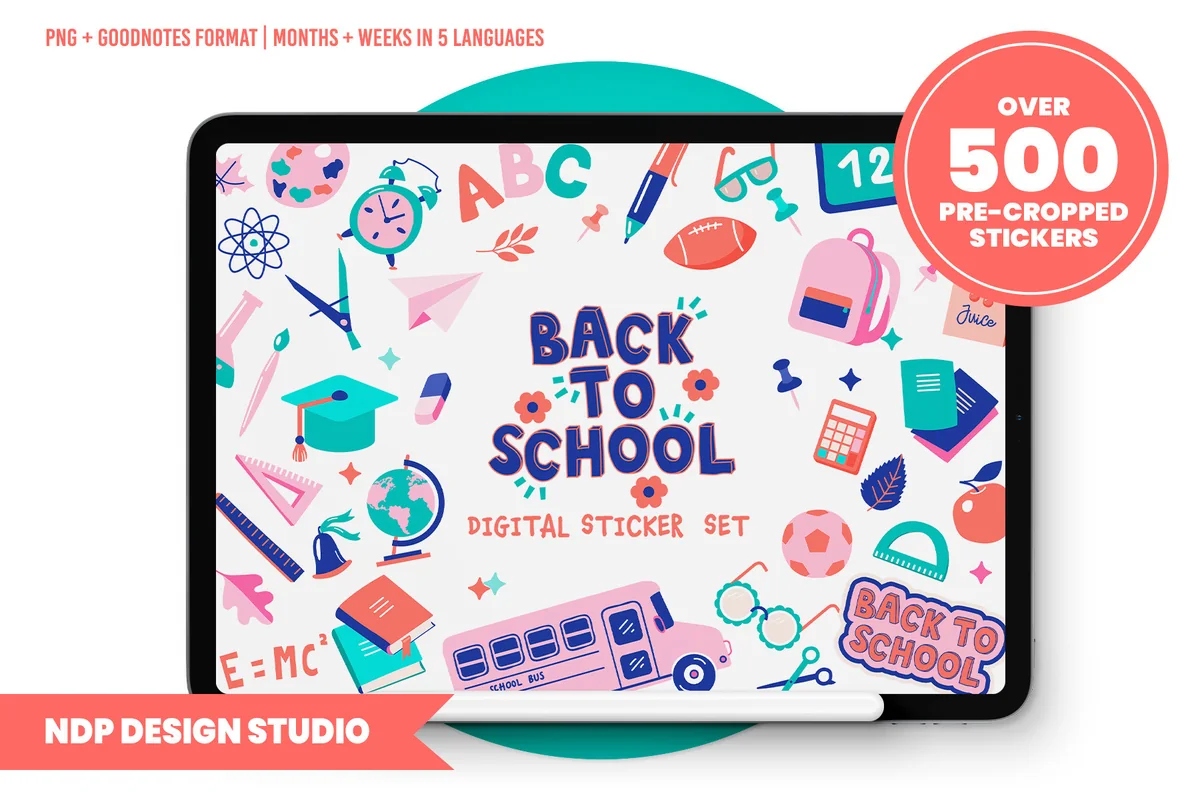
Layouts: 500+ school icons, boxes, checklists, sticky notes, quote cards, banners; month and week names in 5 languagesFormat: Pre-cropped PNG + hyperlinked GoodNotes sticker book, blank PDF sticker book (150 dpi)
Best for: students, semester planners, bright palette fans. Designed by NDP Design Studio.
- Over 500 pre-cropped stickers: school icons (books, calculator, globe, graduation cap, pencils), boxes, checklists, sticky notes, quote cards and banners
- A hyperlinked GoodNotes sticker book with every sticker already placed
- Individual PNGs, placement guides and a blank PDF sticker book for Notability, Noteshelf and ZoomNotes
- Week and month names in English, Spanish, Italian, French and Portuguese
- 150 dpi files made for the screen, not for printing
If you want one pack that covers decoration and function, this is it. The school icons make a lecture page feel like yours, and the boxes, checklists and labels do the actual planning work. The colors are bright (pink, teal, coral, navy), so it suits a cheerful planner more than a beige one. The 150 dpi files keep a big GoodNotes notebook light.
Best cute study icons
2. Study and Work Stickers
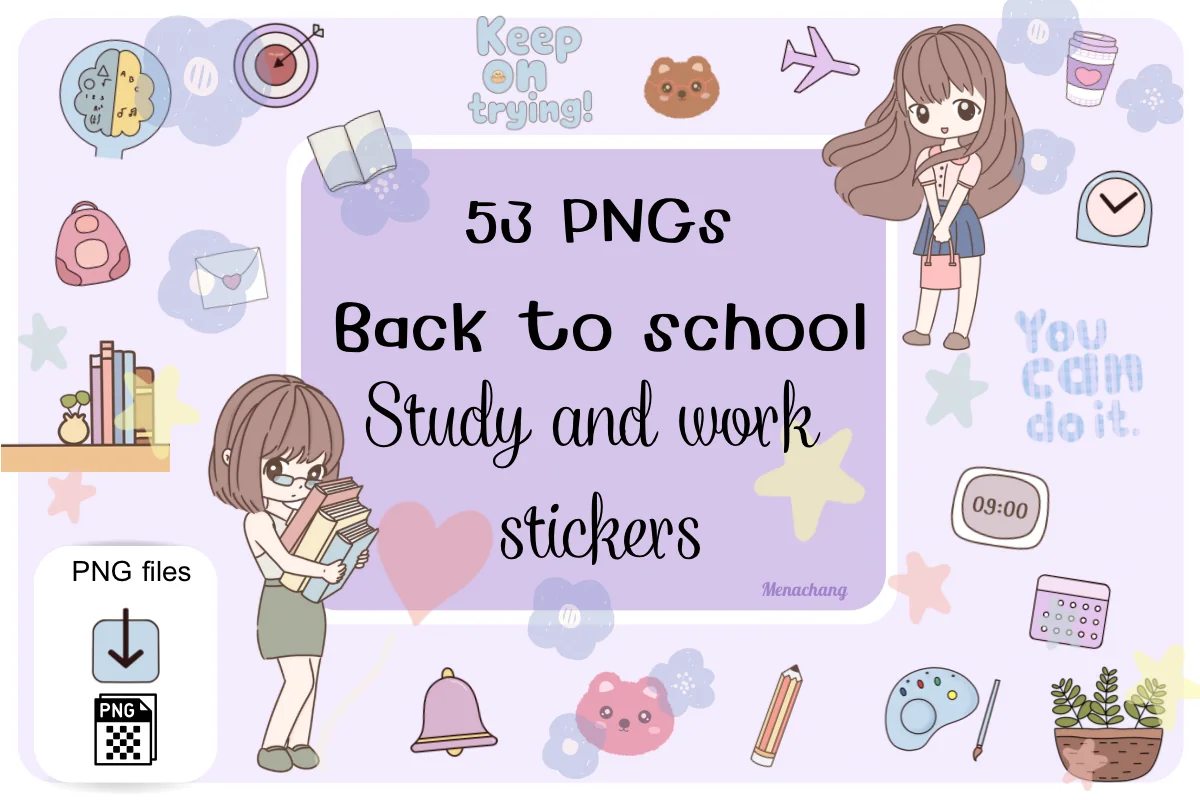
Layouts: 53 pastel study and work icons with motivation wordsFormat: Transparent PNG, 300 dpi
Best for: students, cute note takers, pastel planners. Designed by Menachang.
- 53 PNG stickers with transparent backgrounds, 3000 x 3000 px, 300 dpi
- Study objects: books, laptop, clock, calendar, globe, backpack, paper clip, light bulb, bell
- Small labels and words: "Note", "To do", "Keep going!", "Keep on trying!", "You can do it."
- A few hand-drawn characters with books, plus plants and bear faces
- Made for GoodNotes, Notability and other apps
This is the softest set in the list: lilac and pale blue, hand-drawn, with little motivation words that fit right next to a hard topic. The "To do" and "Note" labels make it useful, not only pretty. Note that it comes as single PNGs, so you'll set up your own sticker page or Elements in GoodNotes.

Best for focus sessions
3. Cozy Productivity Planner Stickers Vol.4
Layouts: 30+ cozy focus and productivity stickers: timers, notes, labels, frog and puppyFormat: Transparent PNG 300 dpi + print-ready PDF
Best for: pomodoro fans, cozy aesthetic fans, students and remote workers. Designed by azartstickers.
- 30+ stickers in warm beige, olive and brown
- Focus tools: a tomato timer, a 00:00 timer, an alarm clock, a "Focus" candle, a water bottle with hours
- Notes and planning pieces: Today's Plan, Ideas, Meeting, Important!, Don't Forget!
- A frog with a laptop and a puppy taking notes, plus small labels like "Deep Focus" and "Make It Happen"
- Transparent PNG at 300 dpi plus a print-ready PDF; GoodNotes named in the description
The tomato timer and the hour-marked water bottle are the reason I picked this one: they fit a pomodoro log or a study session tracker perfectly. The cozy style is calm enough for an exam week page. Vol. 5 from the same designer is already in my aesthetic notes ideas, so this is the one to add if you liked that look.
Best for classes and deadlines
4. Productivity Digital Planner Stickers
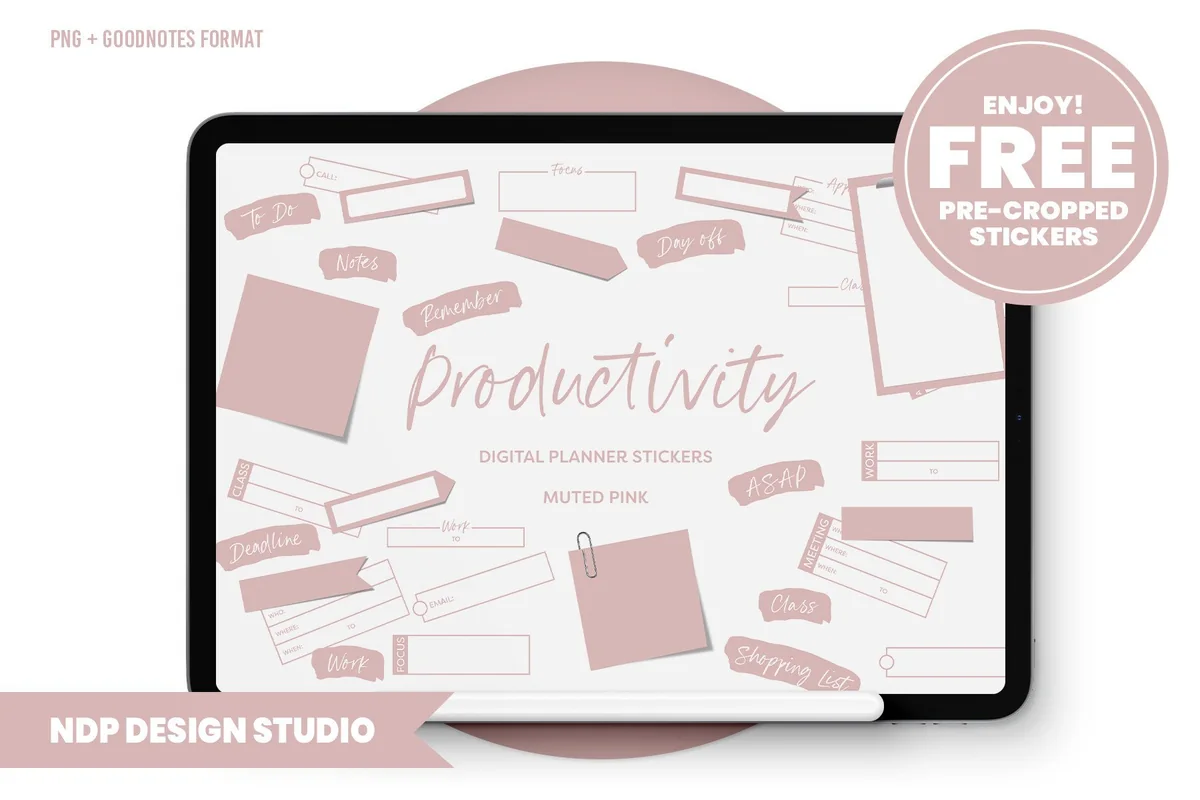
Layouts: 85 functional stickers in muted pink: boxes, sticky notes, flags, Class, Deadline, ASAP labelsFormat: Pre-cropped PNG + hyperlinked GoodNotes sticker book, blank PDF sticker book (150 dpi)
Best for: college students, functional planners, minimal pink fans. Designed by NDP Design Studio.
- 85 functional stickers in muted pink: boxes, sticky notes, clipboards, page flags, date grid
- Script labels like Class, Deadline, ASAP, Remember, Notes, To Do, Day Off
- A hyperlinked GoodNotes sticker book with all stickers placed
- Individual PNGs and a blank PDF sticker book for Notability, Noteshelf and ZoomNotes
- Made for home, college, school or work, 150 dpi for the screen
This is the most practical pack here and one of the most saved (404 favorites). The "Class" and "Deadline" labels alone make a weekly study plan easier to scan. Everything is one muted pink, so it looks calm on a busy week. It's from the same designer as card 1, but this one is pure function, without the school icons.
Best for color-coding subjects
5. To Do Digital Planner Sticker Flags
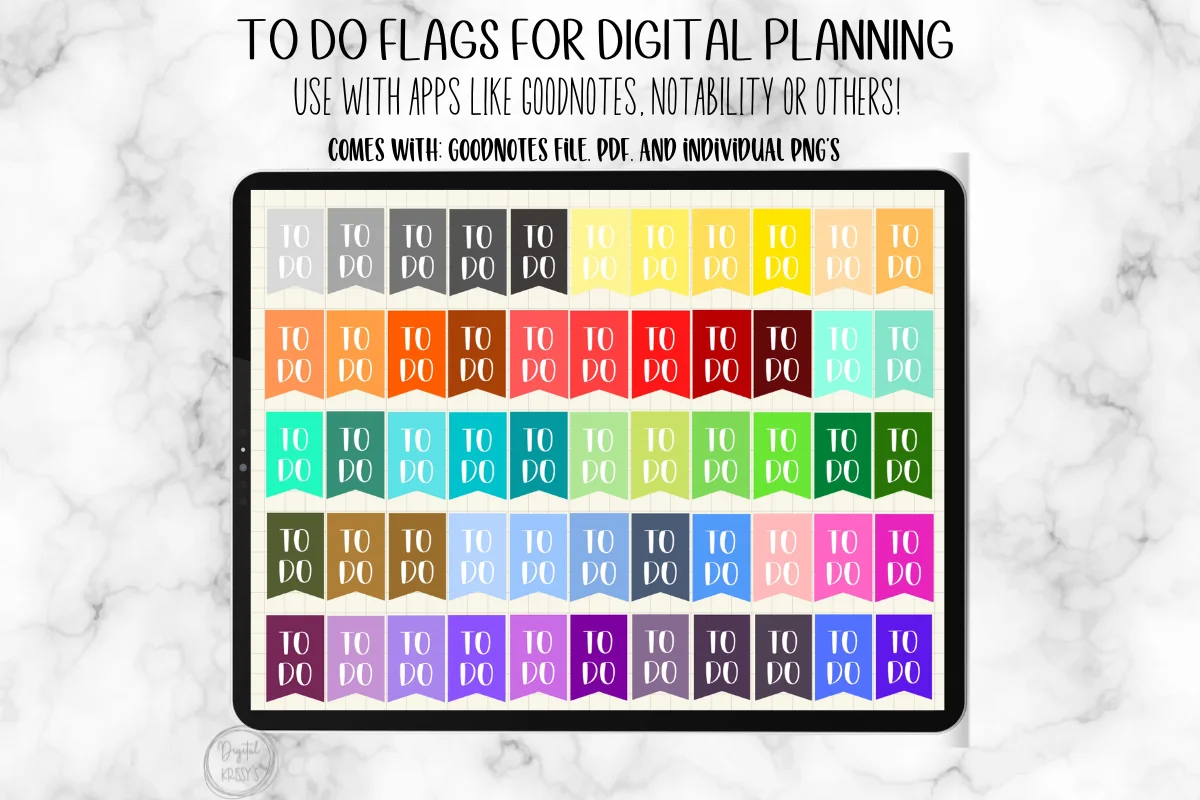
Layouts: To Do flags in 50+ colorsFormat: GoodNotes file + PDF + individual PNG
Best for: color-coders, students with many subjects, to-do list makers. Designed by simplyprintables1.
- "To Do" flags in 50+ different colors
- A GoodNotes file you can open straight away, plus a PDF and individual PNGs
- For GoodNotes, Notability and other note apps
Simple, and that's the point. Give every subject its own flag color (blue for math, green for biology) and your to-dos sort themselves at a glance. With 50+ colors you can match any planner palette. It's a one-job pack, so pair it with a decorative set from the first group.
Best hand-drawn to-do set
6. Digital Stickers Set To Do List
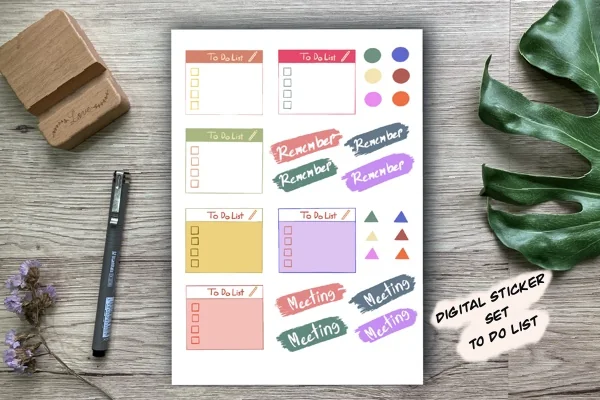
Layouts: 26 hand-drawn to-do boxes, Remember and Meeting labels, dotsFormat: 1 transparent PNG sheet, 300 dpi
Best for: to-do list makers, hand-drawn style fans, GoodNotes users. Designed by Aloe_wannaart.
- 26 hand-drawn stickers on one transparent PNG sheet, 300 dpi
- To Do List boxes with checkboxes in six colors
- Brush labels "Remember" and "Meeting", plus colored dots and triangles
- Made for GoodNotes on iPad
The most popular pack in this list by far (over 1,100 favorites), and I can see why: the to-do boxes look hand-painted and still leave room to write. "Remember" works well for a formula or a date you can't forget. It comes as one sheet, so you'll cut the pieces out with the lasso once and save them as Elements.
Best for GoodNotes Elements
7. Sticky Notes Digital Stickers GoodNotes
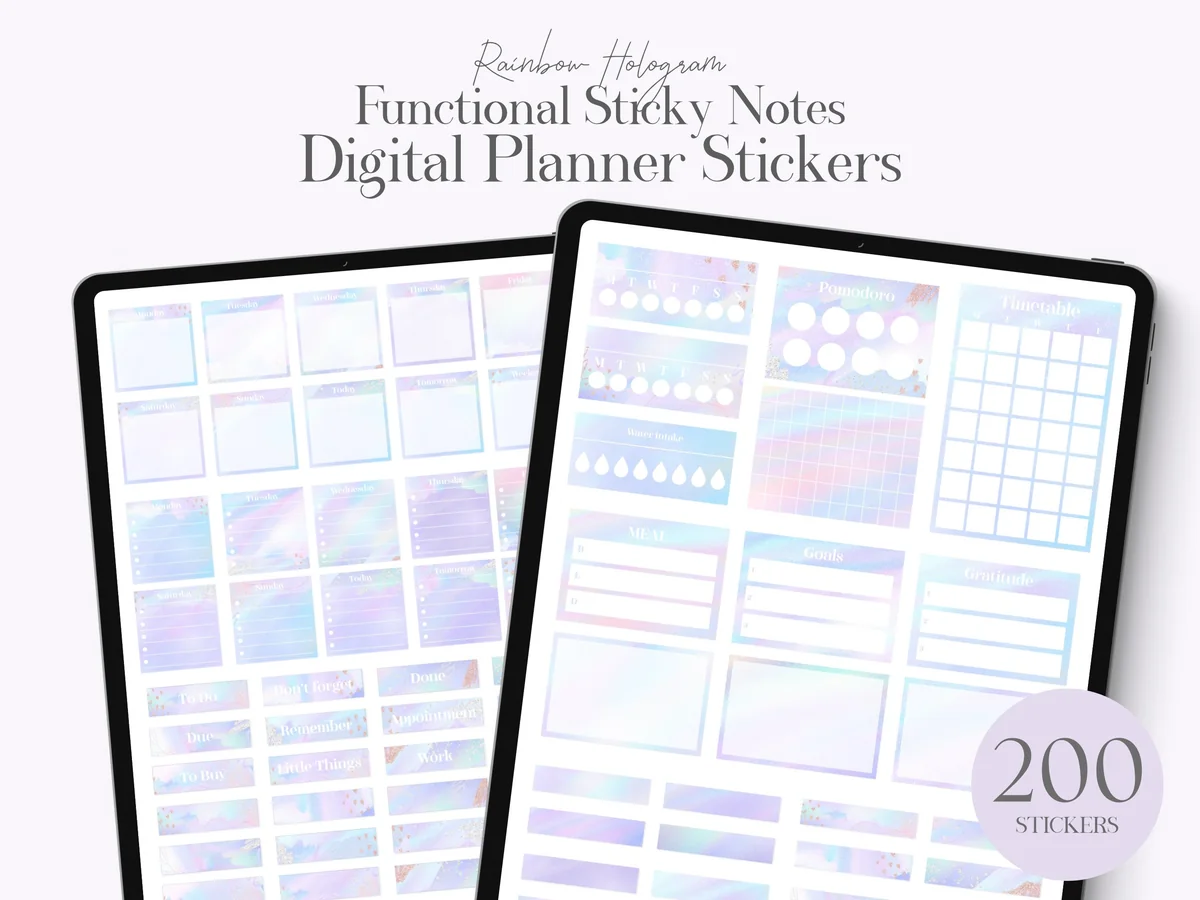
Layouts: 200 hologram sticky notes: timetable, pomodoro, focus, priorities, to-do, habit, goalsFormat: GoodNotes Elements file (.collection) + PNG
Best for: GoodNotes Elements users, students, routine trackers. Designed by lilyuri0205.
- 200 pre-cropped functional sticky notes in a rainbow hologram style
- Templates include Timetable, Pomodoro, Focus, Priorities, To Do List, Checklist, Goals, Habit Tracker, Daily and Weekly Planner
- A GoodNotes Elements file (.collection) plus PNG files
- No .goodnotes sticker book page: the stickers go straight into the Elements panel
The Elements file is the best part: you import it once and every sticky note sits in the GoodNotes sidebar, no second tab needed. For study, the timetable, pomodoro and priorities notes are the ones I'd use most. The holographic pastel look is strong, so it suits a lilac or white planner best.
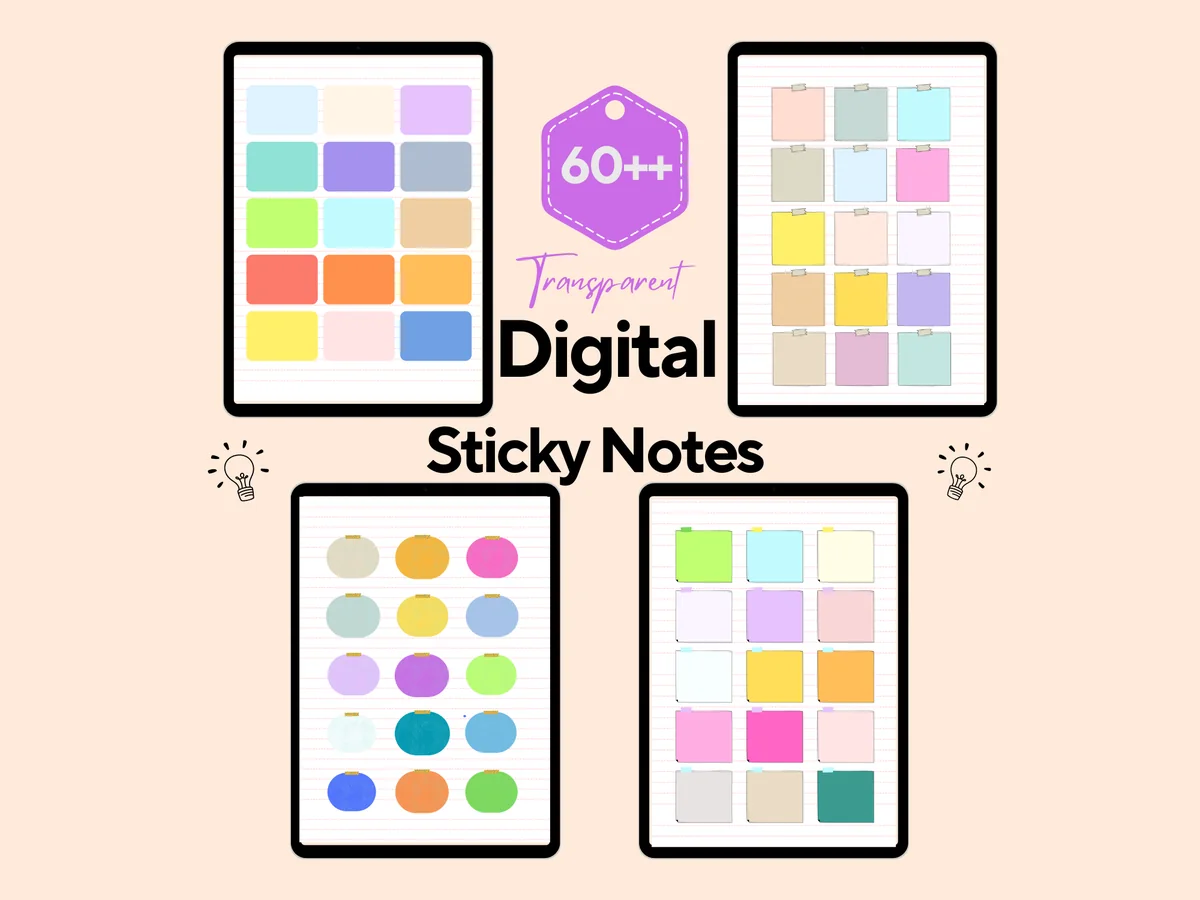
Best for quick notes on lecture slides
8. Transparent Digital Stickers Notes PNG
Layouts: 60 colored sticky notes: square, rectangle, roundFormat: Transparent PNG
Best for: students annotating slides, color-coders, minimal note takers. Designed by HEARTSinRED.
- 60 individual sticky notes as PNGs with transparent backgrounds
- Square, rectangle and round notes, some with a small tape strip
- Bright and soft colors: yellow, coral, teal, lilac, blue, beige
- Sold as student digital sticky notes for GoodNotes and Notability on iPad
Lecture slides imported into GoodNotes rarely have space to write. A colored note dropped on top fixes that, and these are simple enough not to hide the slide. There is no decoration here, just paper shapes in many colors, which makes it a good match for the color-coding idea below.
Quick Comparison
| Sticker pack | Style | What you get | Stand-out extra |
|---|---|---|---|
| 1. Digital Planner Stickers Back to School | Bright school icons and boxes | 500+ stickers, GoodNotes book | Month and week names in 5 languages |
| 2. Study and Work Stickers | Pastel hand-drawn | 53 PNG stickers | Motivation words |
| 3. Cozy Productivity Planner Stickers Vol.4 | Cozy beige and olive | 30+ PNG stickers | Pomodoro and focus pieces |
| 4. Productivity Digital Planner Stickers | Muted pink labels | 85 stickers, GoodNotes book | Class and Deadline labels |
| 5. To Do Digital Planner Sticker Flags | Bold banner flags | 50+ colors | GoodNotes file included |
| 6. Digital Stickers Set To Do List | Hand-drawn brush style | 26 stickers on 1 PNG sheet | Remember and Meeting labels |
| 7. Sticky Notes Digital Stickers GoodNotes | Pastel hologram | 200 sticky notes | GoodNotes Elements file |
| 8. Transparent Digital Stickers Notes PNG | Plain colored notes | 60 PNG sticky notes | Round notes with tape |
Kits, Labels or Notes: Which Study Stickers Fit Your Pages
The 8 packs do three different jobs. Most students need one pack from the first group and one from the second; the sticky notes are for anyone who annotates slides or PDFs.
Study and school kits
Icons and decoration with some function built in: the 500+ back-to-school kit, the pastel study and work icons with motivation words and the cozy focus pack with a tomato timer.
Functional labels for classes and deadlines
Stickers that tell you what to do and when: Class, Deadline and ASAP labels, to-do flags in 50+ colors and hand-drawn to-do boxes.
Sticky notes for lecture notes and timetables
Space to write where there was none: 200 functional sticky notes in a GoodNotes Elements file and 60 plain colored notes for slides.
What I Look For in Study Stickers
- A job, not only a look. Labels like Class, Deadline, Exam or To Do, checkboxes and sticky notes earn their place on a study page. Pure decoration is nice, but one decorative set is enough.
- Readable at a glance. A label should be legible at a small size. Script fonts are fine for “Notes”; for “Deadline” bold and simple works better.
- A GoodNotes file or Elements. Three packs here include a GoodNotes sticker book or file, and one comes as a GoodNotes Elements collection. Single PNGs work too, but you’ll set them up yourself once.
- Colors you can code with. If you color-code subjects, pick a pack with many colors (the to-do flags and the sticky notes) or one calm color that won’t fight your highlighters (the muted pink labels).
- Light files. A notebook with hundreds of lecture pages gets heavy. The 150 dpi packs from NDP Design Studio are made for the screen, which keeps GoodNotes fast.
- Made for the screen. “Transparent PNG”, “pre-cropped” or “GoodNotes file” in the description. “Sublimation”, “print then cut” and fonts with “study” in the name are not sticker packs for a digital planner.
Notes You Want to Open: A 5-Minute Sticker System
The idea behind the title: you don’t reread notes that feel like a wall of text, and you don’t need to decorate for an hour to fix that. A small fixed system does it in about five minutes per lecture:
- One subject icon on the title. A book for literature, a globe for geography, a calculator for math. You’ll find the right notes faster when scrolling.
- One color flag per subject. Use the same flag color in your notes and in your weekly planner, so a blue flag always means the same class.
- A “Remember” or “Exam” label next to anything the lecturer said will be tested.
- A sticky note for questions. Write what you didn’t understand on a note at the end of the page and bring it to the next class or office hours.
- One small reward sticker when the page is done. “Keep going!” or a tiny check mark is enough.
Save these five pieces as a GoodNotes Elements collection called “Lecture” and the whole system is two taps per page. For page layouts to put them on, see my aesthetic notes ideas and GoodNotes note templates.
Stickers in Lecture Notes vs a Study Planner
The same pack works differently in the two places, so it helps to give each one its own rules.
- In lecture notes: fewer stickers, more function. Subject icons, “Remember” labels and sticky notes for questions. Keep the writing area clear, because notes get long.
- In a study planner: stickers mark time. Class labels on the weekly page, deadline labels on the monthly page, to-do flags on the daily list and a pomodoro timer next to each study block.
- Same colors in both. If chemistry is green in the planner, its notes get a green flag too. That one rule connects the two notebooks.
If you don’t have a planner for that side yet, my digital study planners and college planners have the weekly and semester pages these stickers go on.
An Exam Season Sticker Kit
Before finals, make one small kit and stop browsing for more stickers. Everything below comes from the packs above:
- Deadline and Class labels for every exam date on the monthly page (the productivity labels)
- A tomato timer for each pomodoro block (the cozy focus pack)
- To-do flags in subject colors for the daily revision list (the to-do flags)
- A timetable sticky note for the exam week schedule (the hologram sticky notes)
- A few motivation words for the hard days (the study and work icons)
For a full revision plan around the kit, see my study planner ideas.
Study Sticker Ideas for Notes and Planners
- A subject icon on the cover page of every notebook
- A semester overview with one Deadline label per assignment
- A pomodoro log: one tomato sticker for every 25 minutes
- A reading list for each course with a check mark per chapter
- A “questions for class” sticky note at the end of every lecture
- Color-coded to-do flags by subject on the daily list
- A weekly timetable on a timetable sticky note
- A study streak tracker with a small reward sticker per day
- Motivation words on the first page of the exam week
- A grade tracker with a ribbon or star for every passed test
- A group project page with Meeting labels
- A “Day Off” label on the weekend after finals
The streak and pomodoro ideas need a tracker to live on: my digital habit trackers have layouts for that, and the to-do list templates pair well with the flags.
Digital vs Printable Study Stickers
A lot of searches for study stickers are about paper: laptop stickers, printable sheets, stickers for a school notebook. The packs above are digital first, and you can reuse every sticker as often as you like. How they handle print:
For the plan that holds those study notes, compare printable study planners for iPad. That guide separates the PDF’s paper and screen uses, so the planner choice stays distinct from the print limits of a sticker pack.
- Screen only: both NDP Design Studio packs are 150 dpi, and the designer says they are not suitable for printing.
- Digital and print: the cozy focus pack includes a print-ready PDF next to the 300 dpi PNGs.
- Not stated: the other packs are described for digital planners, so treat them as screen stickers.
How to Add Study Stickers in GoodNotes
- Unzip the pack in the Files app. Depending on the pack, you’ll find single PNGs, a PNG sheet, a GoodNotes file or an Elements collection.
- For an Elements file (.collection), open any notebook, tap the Elements tool, tap + and import the file. The stickers appear in the sidebar of every notebook.
- For a GoodNotes sticker book, import it as a notebook and open it in a second tab next to your notes; copy stickers across with the lasso.
- For single PNGs, tap the image tool on a page, add the sticker from Photos or Files and resize it.
- For a PNG sheet, add the sheet to a sticker notebook, cut out each piece once with the lasso and save it to Elements.
- Make small collections like “Lecture”, “Deadlines” and “Exam week”, so the right sticker is always one tap away.
Using Notability, Noteshelf or ZoomNotes? PNG stickers go onto the page as images in all of them, and both NDP Design Studio packs include a blank PDF sticker book for other apps. My GoodNotes vs Notability comparison covers how each app handles stickers.
FAQ
What are study stickers?
Study stickers are small images for notes and study planners: subject icons, labels like Class, Deadline or Exam, to-do flags, sticky notes, timers and motivation words. Digital study stickers are PNGs with a transparent background or GoodNotes sticker files that you place on iPad pages and reuse as often as you like.
How do I get stickers on GoodNotes?
Import a GoodNotes sticker book as a notebook, import an Elements collection with the Elements tool, or add single PNGs with the image tool. Once a sticker is on a page, select it with the lasso and add it to Elements, and it’s available in every notebook.
What’s the difference between PNG stickers and a sticker sheet?
PNG stickers are separate files, one sticker each, ready to place. A sticker sheet is one image or page with many stickers on it; you cut each one out with the lasso before you use it. A GoodNotes sticker book is a notebook with all the stickers already placed, so you only copy and paste.
Are there free study stickers for GoodNotes?
Some planner blogs and the GoodNotes Marketplace share a few free study stickers, usually a handful in one style. A full pack gives you matching labels, flags and notes in one look. Creative Fabrica also offers many sticker packs as part of its All Access subscription.
How do I make my own study stickers?
Draw a label or icon on a blank GoodNotes page, select it with the lasso and add it to Elements. You can also lift any object from a photo in the Photos app (touch and hold it, then Copy) and paste it into GoodNotes as a sticker, for example a photo of your real highlighters.
Do study stickers work in Notability?
Yes. PNG stickers work in Notability, Noteshelf and ZoomNotes as images. Only the GoodNotes files and Elements collections inside some packs are GoodNotes-specific; the PNGs in the same pack work everywhere.
Final Thoughts
The best study stickers are the ones that make your notes easier to open and faster to read, not the ones that take longest to place. Start with one kit for icons, like the back-to-school set, add one functional pack, such as the Class and Deadline labels, and save both to Elements before the next lecture. For more styles, see my GoodNotes sticker packs and the kawaii stickers, or browse all planner stickers.
You May Also Like
This post contains affiliate links. If you buy through them, I may earn a small commission at no extra cost to you. Learn more.