The assignment is in one course portal, the reading list is in a message, and your lecture notes are somewhere on your iPad. I look for Notion templates for college students that give those pieces a clear home, without making a dashboard another project to maintain.
I picked five templates for different parts of student life. One has a dedicated academic area; the others are adaptable planning systems for tasks, weeks, projects and goals. Start with the thing you keep losing track of, then choose the smallest structure that solves it. A pretty student dashboard is useful only if you can find tomorrow’s work.
My Best Notion Templates for College Students: Five Different Roles
If you want classes and assignments together from the start, begin with the first option. The remaining picks make sense when you already have part of your system: a reliable notebook, a course portal or a working assignment list. They are alternatives for different needs, not five purchases to combine into one enormous student OS.
TL;DR: Start with Notion Student Planner for a ready-made academic area. The other four options serve task progress, weekly planning, broader projects or a focused goal cycle and need adapting for college. These are Notion workspace templates; the PDF received may hold an access link rather than handwriting pages.
Quick Picks
- Best for an academic home base: Notion Student Planner
- Best for assignment progress: Getting Things Done Notion Template
- Best for a weekly study rhythm: Notion Template, Notion Life Planner
- Best for projects beside college: Life OS Notion Template
- Best for a focused study goal: 12 Week Year Planner Notion Template
- Notion Student Planner – Best for an academic home base
- Getting Things Done Notion Template – Best for assignment progress
- Notion Template, Notion Life Planner – Best for a weekly study rhythm
- Life OS Notion Template – Best for projects beside college
- 12 Week Year Planner Notion Template – Best for a focused study goal
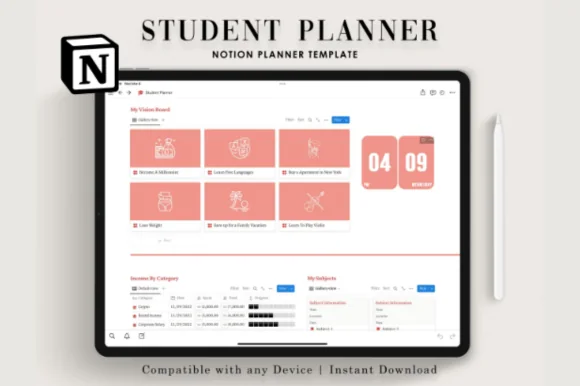
Best for an academic home base
1. Notion Student Planner
Format: Notion template
Best for: keeping class schedules, assignments and notes within a student-focused workspace. Designed by ThePlannersDelight.
- Academic section with a daily class schedule, subject tracker and assignments shown in the gallery
- Notebooks, inbox and quick notes, plus a monthly tasks board and daily tasks
- Budget, goals, media, fitness and recipes alongside study planning
- PDF containing the Notion template link and instructions to duplicate it
This is my first pick when the problem is scattered coursework. The coral navigation gives Academics and Notebooks clear places to live, and the assignment area is actually visible in the previews. That makes it a closer fit than adapting a household dashboard from scratch. Start with one subject and one real assignment before filling the lifestyle pages. The seller mentions automated calculators, but that does not establish a grade calculator; check any grading requirement separately.
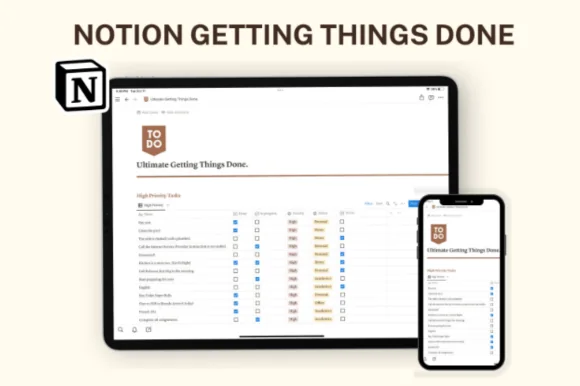
Best for assignment progress
2. Getting Things Done Notion Template
Format: Notion template
Best for: seeing coursework move from an unfinished task to a finished submission. Designed by ThePlannersDelight.
- High-priority task checklist and a calendar
- To Do, In Progress and Done task stages, with priority categories
- Personal, home and academics categories visible in the gallery
- PDF containing a link to the Notion template
A deadline tells you when a paper is due; a status tells you whether you have started it. That distinction is why this task-focused option earns a place here. For an essay, use concrete tasks such as choosing sources, drafting an outline and checking citations. The academics category is a useful starting label, but this is still a general task system. The listing does not specify a dedicated lecture-notes structure. If you prefer, keep lecture material in a separate notebook instead of forcing it into a checklist.
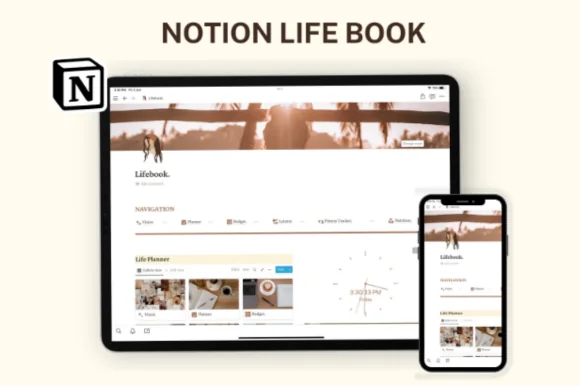
Best for a weekly study rhythm
3. Notion Template, Notion Life Planner
Format: Notion template
Best for: fitting study blocks around work shifts, meals and the rest of student life. Designed by ThePlannersDelight.
- Yearly, monthly, weekly and daily planning sections with a calendar and to-do lists
- Vision area for longer goals and a weekly-priorities section
- Budget, subscription tracking, booklists, fitness and nutrition sections
- PDF containing the Notion template link
The Lifebook is a useful alternative if you already have course notes but your week keeps collapsing around them. Its separate planning horizons let a semester intention become a weekly commitment and then a daily action. Use the monthly page for major submissions and the weekly page for preparation time, leaving the detailed assignment record in one place. The listing does not specify course links or exam-topic fields; check these before choosing it. Avoid maintaining two competing deadline lists.
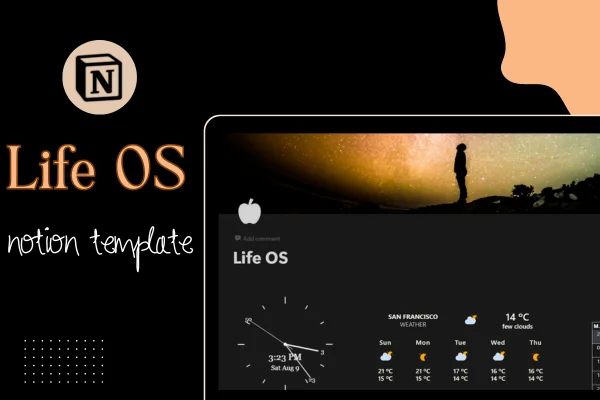
Best for projects beside college
4. Life OS Notion Template
Format: Notion template
Best for: organizing a long project while keeping personal responsibilities visible. Designed by Dohaforkdp.
- Dashboard with top tasks, weekly agenda, master to-do list and quick capture
- Annual goals, quarterly OKRs, projects and habit tracking
- Learning hub, reading list and a place for saved articles and videos
- Health, finance, home and personal modules; English-only template accessed through a PDF link
Choose this broader Life OS when a dissertation or portfolio sits beside a job and household responsibilities. The learning and project areas give those commitments a home without pretending they are all assignments. My caution is its scale: the dark dashboard contains many modules, and an iPad screen rewards a short route to the page you need. Keep your active study project prominent. The learning hub is not evidence of a ready-made university course database, grade calculator or automatic campus connection.
Best for a focused study goal
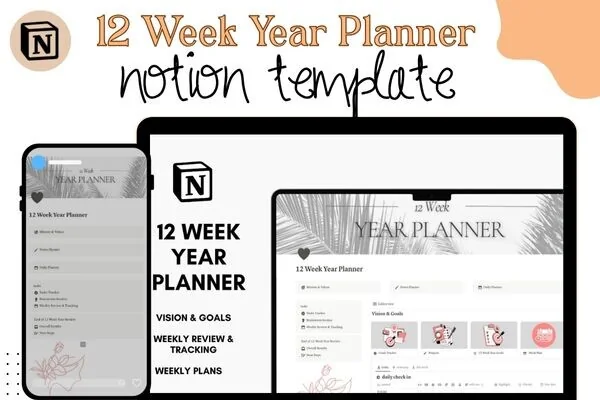
5. 12 Week Year Planner Notion Template
Format: Notion template
Best for: planning a bounded revision or project cycle with a weekly review. Designed by Dohaforkdp.
- Mission and values, vision and goals, plus notes and brainstorming
- Daily planner, tasks tracker, weekly plans and daily check-in
- Weekly review and tracking, overall results and next steps
- English-only Notion template accessed through a PDF link
This one suits a specific stretch of work: a language exam, a portfolio milestone or a research draft. The useful distinction is the review loop. Instead of just adding tasks, you have somewhere to compare your weekly plan with what happened and decide the next step. Twelve weeks is the product’s goal framework, not a promise about your semester length or academic results. Map it to your actual teaching calendar; keep exam dates and official requirements in your university system too.
Quick Comparison
| Template | Main role | Included structure | Tradeoff |
|---|---|---|---|
| 1. Notion Student Planner | Academic dashboard | Classes + assignments | Broad student-life setup |
| 2. Getting Things Done Notion Template | Task progress | Priorities + stages | Add your course structure |
| 3. Notion Template, Notion Life Planner | Daily to yearly | Planning + life admin | Academic structure not specified |
| 4. Life OS Notion Template | Projects + learning | Quick capture + weekly agenda | Many modules; English only |
| 5. 12 Week Year Planner Notion Template | 12-week goal cycle | Weekly review + next steps | Adapt to your teaching calendar |
What a College Notion Setup Actually Needs
A useful student template answers four questions: where do I need to be, what is due, where are my notes, and what should I study next? You can use the following as a setup checklist. These are suggested fields for your own workspace, not a list of features included in every product above.
- Courses: course name, instructor, room or meeting link, office hours and the syllabus. Keep the official grading breakdown close to the material it belongs to.
- Assignments: a clear title, course, due date, next action and status. Record the submission destination too, so completing the work and handing it in stay distinct.
- Notes: one easy route from a course to its lecture notes, readings and questions. A note title with the lecture topic is more useful later than a row of identical dates.
- Exams and review: assessment dates, topics to revisit and the next study session. A date on a calendar does not reserve preparation time by itself.
Start with one course and one assignment before decorating the workspace. For example, “Biology lab report” needs a submission date, the course name and a next action such as “draft the results section.” A vague task called “biology” hides the decision you need to make when you sit down to work.
Connect Your Assignment Tracker to Your Notes
A simple workflow can be enough: course → assignment → next action → relevant notes. For a seminar presentation, keep the brief and reading references within reach of the task. That prevents the useful material from disappearing into a separate collection of attractive pages.
If you decide to build linked databases, Notion’s relations guide explains how a relation connects database entries. A course database and an assignments database can be connected this way. For example, link a class assignment to its course schedule and lecture notes so the next study session starts with the right material. That is an optional customization, not a promise that a purchased template already includes the relationship.
- Give each assignment one authoritative due date. If you also show it on a weekly page, point back to the original task rather than keeping an independent copy.
- Separate the academic deadline from your personal work target. “Submit Friday” and “finish a draft Wednesday” are different commitments.
- Keep an overdue item visible until you resolve it. Move the next action deliberately instead of changing a due date just to make a dashboard look clean.
- For group work, record the next handoff and who is responsible. Your personal workspace is not evidence that a teammate has finished their part.
Set Up a Semester on iPad Without Rebuilding Everything
Notion has an iOS app, and its mobile guide covers the smaller-screen interface. Still, a wide gallery in a product preview does not prove a comfortable daily workflow on your particular iPad. Check the shortest route to a task and a note before spending time changing colors.
A First-Week Setup You Can Finish
- 1Open the template instructions. Use the seller’s access link and sign into the workspace where you want to keep college material. The PDF received with a template can contain access instructions rather than planning pages.
- 2Make your own copy. Follow the seller’s directions and choose the correct workspace. Notion documents public-page copying through its Duplicate control; check that you are editing your copy before replacing sample content.
- 3Add one real course. Enter its title, syllabus link and next class meeting. Remove or rename a sample only after you understand what it connects to.
- 4Enter one assignment and its next action. Include the official deadline and submission location. Open the task from your iPad home page so you know the route is practical during a busy day.
- 5Plan a short weekly check. Look for missing deadlines, unfinished notes and an upcoming exam. Add study sessions to the time you actually have, then keep the dashboard quiet until those basics work.
The current copying steps are in Notion’s guide to duplicating public pages. Seller access settings and instructions still matter. A broken or restricted template link is something to resolve with the seller, rather than a reason to grant unrelated account access.
Make Your Notes Useful for Revision
A neat note-taking system can store material without helping you retrieve it. My suggested layout gives each lecture three small sections: questions to answer, the notes themselves, and a short summary. For a worked example, keep the question beside the method so you can cover the answer and try it again. This is a layout you can create; I am not claiming the five templates contain a Cornell notes page.
- During the lecture: capture the main argument, a worked example and any point you do not understand. Leave decorative work until after class.
- At the end: turn one important idea into a question you can answer without looking. Keep the source reference so you can check an uncertain answer.
- At the next study session: answer the question first, then reopen the material. Use active recall as an action rather than a label on a page.
- For later review: record a next-review date if that helps you return to difficult topics. A spaced repetition schedule is something you set up; a topic label or calendar is not proof of an automated repetition system.
A Pomodoro timer, grade calculator and automatic review reminder are separate requirements. If one is essential to your workflow, look for an explicit description and a readable demonstration before choosing a template. A finance calculator in a student-life planner does not establish a weighted-grade formula.
College Notion Templates: Aesthetic Choices That Stay Readable
For college students comparing cute Notion templates, look beyond icons and a calm color palette. The more useful design question is whether the main task is obvious when you open it between classes. An aesthetic student dashboard should give course material a stable place, with study tasks near the top and optional student life sections further down.
- Use one consistent color per course if it helps you distinguish subjects. Keep the course name visible too, so color is not the only cue.
- Prefer a readable task title over a long row of tiny icons. On iPad, check how much of the assignment remains visible beside dates and status.
- Keep a compact weekly schedule separate from your full reading archive. Everything can have a home without everything appearing on the first screen.
- Remove a decorative widget if it pushes the next action out of view. A clean student OS can be a small dashboard, not a collection of every available feature. Keep key deadlines in a compact weekly overview so your next study block has a clear focus.
Why a Student Notion Setup Can Become Hard to Maintain
A warning sign is spending more time tending the system than using the material. A template with many pages can make every ordinary task feel as though it needs a category, a cover and a progress bar. You can stop at the fields that help you decide what to do next.
A Weekly Reset for a Busy College Week
- 1Check the official source. Read the course portal and recent course messages for changes. Update your personal assignment record when an instructor changes a requirement.
- 2Look at unfinished work. Find tasks that are still in progress, notes missing a title and readings without a next step. Decide whether each needs work, a question to the instructor or removal.
- 3Plan around real time. Put work shifts, labs and travel into your week first. Then choose a small number of study sessions you can actually attend.
- 4Close the review with one action. Choose the next task you will open. If a module has not helped you make a decision, keep it off the main dashboard for now.
For a separate handwritten approach, our assignment tracker ideas show ways to organize coursework on iPad. You do not need to copy every task into both systems. Choose one main record and use the other for the kind of work it makes easier.
Notion Template or Handwriting Planner?
Choose Notion when you want typed notes, task properties and pages that can connect to each other. A handwriting planner is a different experience: it gives you a page to annotate, sketch or mark up with a stylus. The PDF that delivers a Notion template link is not automatically a Goodnotes planner.
If you think through diagrams or prefer writing revision plans by hand, compare our digital academic planners. You can use handwriting for working through a topic and Notion for the task index, but keep the boundary clear. Our Notion vs Goodnotes comparison explains the broader choice.
FAQ: Choosing a College Notion Template
What is the best Notion template for college students?
Of these five, Notion Student Planner is my starting choice for a dedicated academic home base because its gallery shows classes, subjects and assignments. Choose Getting Things Done if task progress is your main need, or a broader planning system if your course notes already work well. The best fit depends on what you need to organize, not the size of the bundle.
Is Notion free for college students, and are the templates free?
Notion’s education guidance describes a free Education Plan for eligible students and educators at accredited colleges or universities, subject to its requirements. Eligibility includes a school email, and the individual education workspace has a one-member requirement. Check the current rules before upgrading. An app plan and a seller’s template are separate: education eligibility does not make these Creative Fabrica products free.
Are Notion templates for college students PDF planners?
A product may provide a PDF containing the link to its Notion workspace template. You use that link and the seller’s instructions to make your own copy in Notion. That is different from receiving handwriting pages for Goodnotes. Read the format information before buying, especially if your main goal is writing directly on a planner with Apple Pencil.
Can these templates calculate grades or sync with Canvas?
Do not assume either feature. A template needs a suitable grading formula and your course’s correct weighting to calculate a meaningful estimate. A general task board does not establish a Canvas connection. Check any integration independently and keep official submission deadlines and grades in your university portal as the authoritative record.
How do I add a template to my Notion account?
Open the seller’s access instructions, sign into Notion and copy the shared template into the intended workspace using the available duplication option. Keep the instructions until you have checked your copy. If the link is restricted or the expected control is missing, ask the seller for help before reorganizing the template.
How do Notion templates for university students fit a busy semester?
Begin with courses, assignments and notes, then add a small weekly review. Keep a team project’s next handoff beside your own tasks, and use a table of exam topics to decide what needs attention. Use the same course names throughout the workspace, make each task concrete and keep a clear next action. Add an exam topic list or another feature only when it solves a recurring problem. A student template is a starting structure, not an obligation to use every page.
Choose the System You Can Return to Between Classes
The most useful Notion templates for college students make the next piece of work easier to find. Start with the academic planner when classes and notes need one home, the task board when submissions stall, or a broader option when study shares space with work and personal projects. Build one small, reliable routine before expanding your dashboard.
You May Also Like
This article contains affiliate links. If you purchase through them, I may earn a commission at no extra cost to you. Read the affiliate disclosure.