Your sitter asks where the pet details are, and you start searching through messages while the suitcase is still open. A digital pet care planner can give those details a clear home on your iPad, provided you choose a page that fits the job.
I picked three Creative Fabrica templates for two small tasks: keeping basic pet information together and preparing a sitter handoff. Two are the same simple log in different colors; the third is a travel planner with actual pet-sitter pages. None should be mistaken for an app that manages your pet’s care for you.
Which Pet Care Planner Format Fits Your Task?
Start with the question you need the page to answer. “What information do I want to keep?” and “What does another person need while I am away?” sound similar, but they call for different amounts of space. A compact grid suits the first; a handoff form suits the second.
- For a basic reference sheet: the Tas logs keep names and a few other details in rows. Pick the pastel or coffee design according to your planner style.
- For a sitter before a trip: MikuWaku has a named Pet Sitter Information spread, alongside house-sitter and travel pages.
- For a full care history: these small options may be too limited. Do not expect a dedicated sequence of vet visits, expenses, training and medication records from the Tas sheets.
I compared the product descriptions and every listing preview; I have not tested the purchased files. The recommendations below focus on the fields and layouts shown.
3 Templates for Pet Details and Sitter Notes
TL;DR: Choose Cozy Pastel or Coffee Latte for the same simple one-page pet log in two styles. Choose MikuWaku for its pet-sitter information pages inside a larger travel bundle. These are three products but only two functional approaches, not three complete pet-care systems.
Quick Picks
- Best for a pastel pet log: Pet Care Log – Cozy Pastel Planner
- Best for a coffee-toned pet log: Pet Care Log • Coffee Latte
- Best for a travel-time sitter handoff: Digital Travel Planner Bundle 1
- Pet Care Log – Cozy Pastel Planner – Best for a pastel pet log
- Pet Care Log • Coffee Latte – Best for a coffee-toned pet log
- Digital Travel Planner Bundle 1 – Best for a travel-time sitter handoff
Best for a pastel pet log
1. Pet Care Log – Cozy Pastel Planner
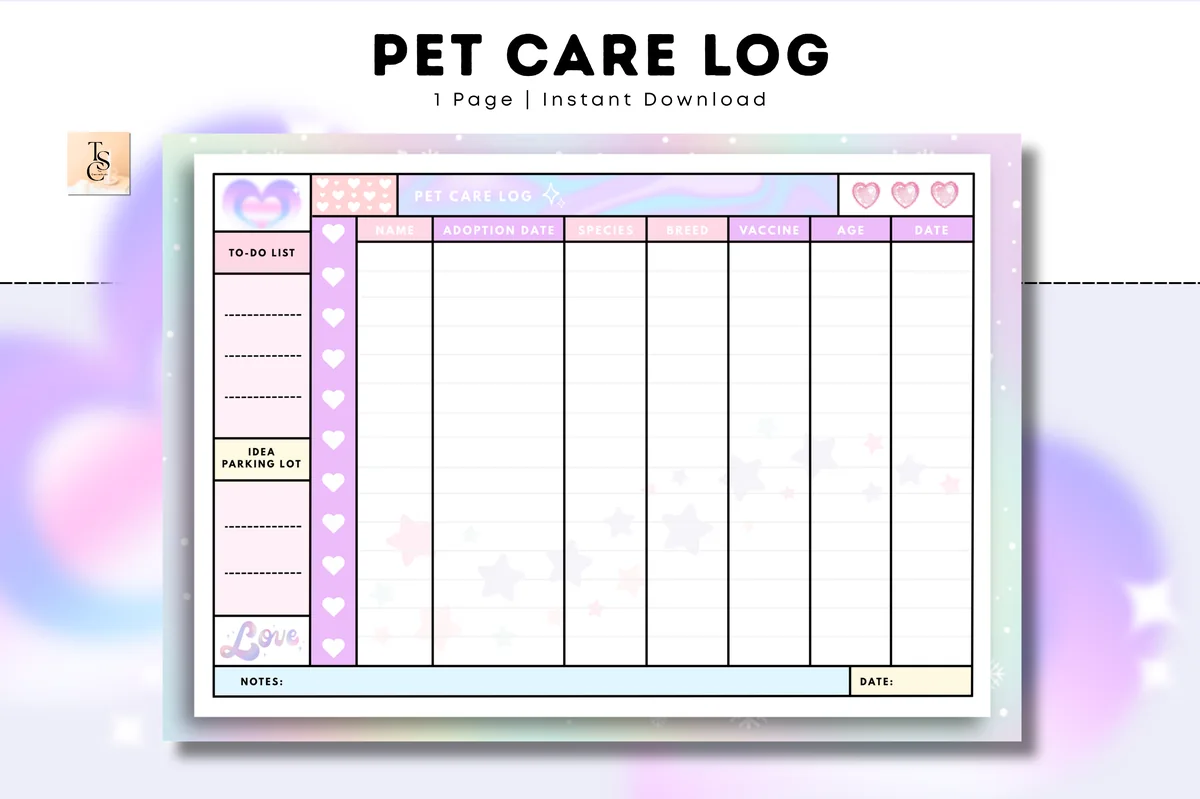
Orientation: LandscapeLayouts: One pet-information grid with sidebar and bottom notesPaper: A4Format: PDFDates: Undated
Best for: keeping basic pet information together on a colorful landscape sheet. Designed by Tas Creative Studio.
- One undated pet-care log page; A4 landscape PDF in digital and printable versions
- Columns for name, adoption date, species, breed, vaccine, age and date
- Sidebar with a to-do list and idea parking lot, plus notes along the bottom
- GoodNotes, Notability, Noteshelf, Xodo and Samsung Notes are listed as supported apps
The rainbow border and small hearts make this the more playful of the two Tas designs. I like the narrow scope: a page of basic information can be easier to keep current than a binder you rarely open. The vaccine column is a place to copy existing information, not a vaccination schedule. Choose it for the look and compact layout; dedicated feeding instructions, medication pages and automatic reminders are not part of the stated offer.
Best for a coffee-toned pet log
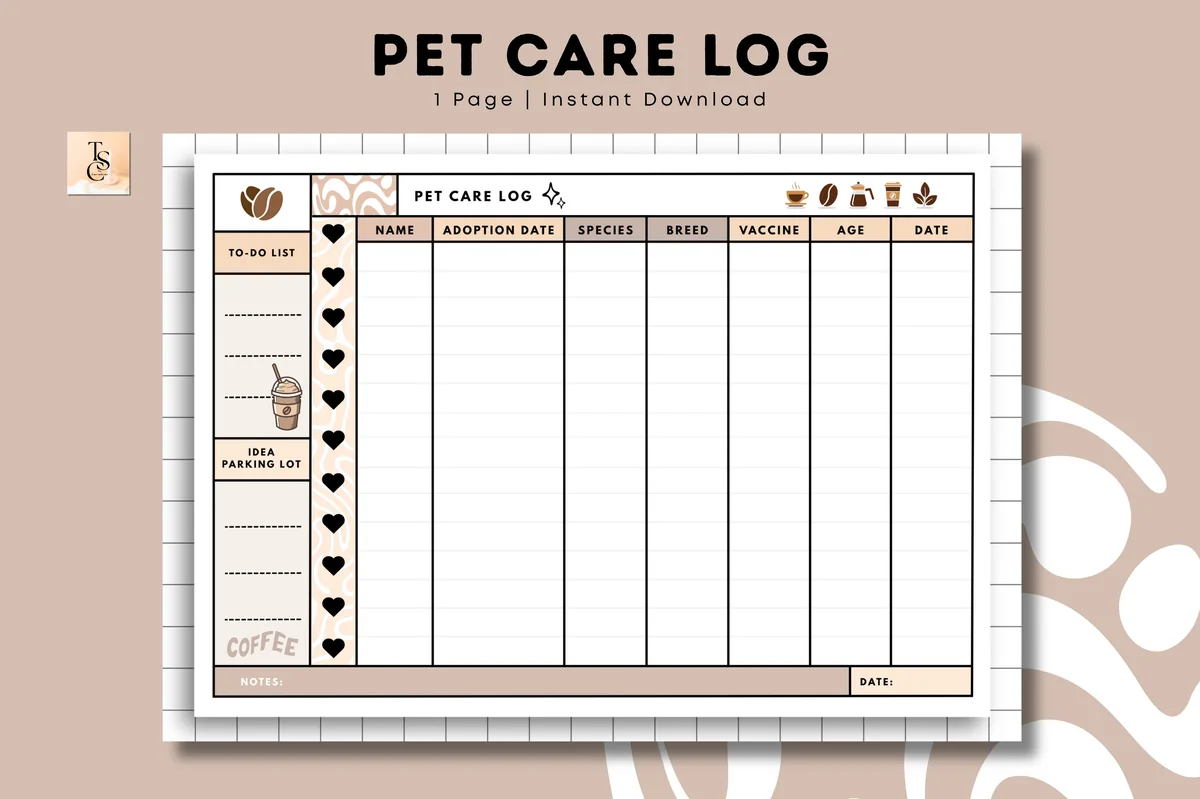
2. Pet Care Log • Coffee Latte
Orientation: LandscapeLayouts: One pet-information grid with sidebar and bottom notesFormat: PDFDates: Undated
Best for: the same compact pet-information layout in warm neutral colors. Designed by Tas Creative Studio.
- One undated landscape pet-care log page in digital and printable PDF versions
- The same name, adoption date, species, breed, vaccine, age and date columns as Cozy Pastel
- Coffee motifs, a warm brown border, a to-do sidebar and bottom notes area
- GoodNotes, Notability, Noteshelf, Xodo and Samsung Notes are listed as supported apps
Coffee Latte offers the same information grid in a warm neutral palette. Choose between the two Tas designs by the contrast and writing space you prefer; buying both adds no new planning functions. Its paper size is not specified, so check that detail if you also plan to print it.

Best for a travel-time sitter handoff
3. Digital Travel Planner Bundle 1
Orientation: Landscape spread in previewsLayouts: Pet-sitter information plus travel and house-sitter pagesFormat: PDF in a ZIP archiveDates: No fixed calendar dates shown
Best for: organizing a pet-sitter handoff alongside plans for being away. Designed by MikuWaku.
- Travel PDF bundle; its cover advertises 20 pages and hyperlinked navigation
- Pet Sitter Information spread for a handoff before a trip
- House Sitter Information, house chores, packing lists, itinerary and travel budget are also listed
- The seller specifies iPad and Android tablets and import into GoodNotes or another annotation app
This is the useful detour if your real problem is leaving instructions before a trip. The sitter spread is much closer to a handoff form than the two Tas grids, and the surrounding house-sitter pages fit the same departure routine. Most of the bundle is still travel planning. Skip it if you only want a small pet log and already have a travel system; consider it when those extra pages would earn their place. This is a travel planner with a pet section, not a dedicated pet-health binder.
Quick Comparison
| Template | Best use | Format and scope | Main limitation |
|---|---|---|---|
| 1. Pet Care Log – Cozy Pastel Planner | Colorful information log | One undated page; A4 landscape | Basic pet details; no dedicated sitter form |
| 2. Pet Care Log • Coffee Latte | Warm neutral information log | One undated landscape page | Same core fields as Cozy Pastel |
| 3. Digital Travel Planner Bundle 1 | Pet-sitter handoff before a trip | Travel bundle with a sitter spread | Adjacent option; most pages concern travel |
Choose Between a Pet Log and a Sitter Handoff
The biggest difference is the reader. A personal log can use shorthand you understand. A handoff needs to make sense to someone who was not there when you wrote it, without requiring access to your whole planner.
| Your question | Better starting point | What to check |
|---|---|---|
| Where can I keep basic pet details? | Either Tas pet log | Whether the fixed columns match the information you want to record |
| What can I give the sitter before I leave? | MikuWaku sitter spread | Enough room for your handoff and a readable copy for the recipient |
| Will this replace a complete pet-care binder? | None is presented here as that solution | Dedicated sections for each record you actually need |
For example, if you are only trying to stop losing an adoption date, the travel bundle adds a lot of unrelated pages. If you are handing over a household for a weekend, a row of identifying details leaves more explaining to do. Buy for the task rather than the larger page count.
Read the Tas Grid Before Choosing a Color
Cozy Pastel and Coffee Latte have matching core columns. That makes the design choice refreshingly simple, but it also means you should not treat the second product as an extra set of tools. The one-page layout is the feature, and the limit.
- Name, species and breed: these are separate labeled columns, so you do not have to combine all identifying details in a notes box.
- Adoption date, age and date: keep the meaning of your entries consistent. If you add context to an age entry, use the nearby notes area rather than leaving yourself to guess later.
- Vaccine: this is a column heading on the page. Copy information from an existing record if useful; the sheet does not determine what is needed or when.
- Sidebar and bottom notes: the to-do list and idea parking lot are small general areas. They are not dedicated feeding schedules or treatment instructions.
The rows allow multiple entries, but the preview does not define a complete record system for multiple pets. Decide what one row will mean before filling the sheet. A consistent convention is more useful than trying to squeeze every kind of information into the same grid.
Cozy Pastel specifies A4 landscape; Coffee Latte gives no paper size. For iPad use, compare the writing space and contrast in the previews. Narrow columns may require smaller handwriting or zooming, whichever design you choose.
Prepare a Clear Sitter Copy Before You Leave
The MikuWaku spread is relevant because it is labeled for pet-sitter information, not because a travel planner automatically covers pet care. Keep your handoff focused on what the sitter needs, and treat any extra notes you add as your own content rather than an included template feature.
A Short Handoff Routine
- 1Choose the right page. Start with the Pet Sitter Information spread, not an itinerary or packing list. Keep the pet handoff separate from the information about your journey, so the recipient can find it without paging through your bookings. Only fill fields that are relevant to your situation.
- 2Write from your current instructions. Use the arrangements you have actually agreed with the sitter. If something is uncertain, resolve it before leaving instead of letting a tidy-looking form imply an answer. Any health-related instructions should come from the owner and veterinarian, not from the template.
- 3Read the copy as the recipient. Check that names and contact details are legible, and that any note makes sense without a second conversation. Avoid private shorthand. A little blank space is preferable to crowded writing that the sitter cannot reliably read on their own screen.
- 4Agree how the sitter will access it. Your iPad may be traveling with you. Provide the information in an agreed, readable form and ask the sitter to open it before departure. Check the product’s license before sharing template files; a purchased planner is not permission to redistribute the blank design.
House Sitter Information and House Chores pages also appear in this bundle. They may suit a broader house-and-pet handoff, but keep those instructions distinct. A pet-sitter page should not become a dumping ground for every task you hope someone will handle while you are away.
Set Up Your PDF Without Building a Complicated System
All three listings describe digital PDF use with note-taking or annotation apps. The Tas listings name GoodNotes and Notability among their supported apps; MikuWaku names GoodNotes and other annotation apps. App access is separate from choosing a template, so check what you already use before buying another planning tool.
From Files to a Usable Pet Page
- 1Locate the PDF you received. If the files arrive in an archive, extract it first. The MikuWaku listing specifically describes this step. Keep the original somewhere you can find again, and distinguish it from the copy you will fill with personal information.
- 2Open a working copy in your annotation app. Use your app’s PDF import option. Start with the single log or sitter page that solves today’s problem; there is no need to populate every travel page just because it comes in the same bundle. This keeps the first session small.
- 3Check readability before completing the page. Try a short entry in a narrow field and view it at the size you expect to use. If you have to zoom heavily to read your own writing, reduce decorative additions and consider a clearer text size rather than shrinking everything to fit.
- 4Give the finished copy a specific name. A pet name and purpose, such as “Milo sitter notes,” is easier to identify than “planner final.” Add a review date to your own file name or notes if helpful. That is an organizational choice, not a built-in feature promised by these products.
For a broader overview of the surrounding trip pages, see my digital travel planner comparison. It covers the itinerary, packing and budget pages beyond the sitter section.
What to Leave Out of This Small Planning System
A compact pet page works best when its limits stay visible. More entries do not turn it into a complete care record, and a filled page does not mean the information is up to date. Keep the original documents you rely on and use this sheet as a reference or handoff aid.
- No assumed alerts: none of these listings promises automated feeding, appointment or vaccine notifications. Put any needed reminders in a tool that actually supports them.
- No inferred medical advice: a vaccine column or a box on a sitter form is a place for information, not guidance on diagnosis, dosage or treatment.
- No invented bonus sections: the Tas logs do not gain expense, training or medication pages because another pet planner offers them.
- No unnecessary personal details: share the information needed for the handoff rather than exposing your whole travel or household planner.
Keep the Page Useful After the First Week
The next time you open the log, look for information that has changed rather than adding decoration first. For a sitter copy, review it for the particular absence and recipient. Reusing the layout is convenient; silently reusing old arrangements is where a simple page can become confusing.
- Check: are identifying details and any copied records still accurate?
- Clarify: would someone else understand the notes and abbreviations?
- Separate: is this your ongoing reference sheet or the copy prepared for a particular sitter?
- Retire: move superseded handoff copies out of the way so the current version is obvious.
You do not need both Tas styles to do this. One well-maintained sheet is a more useful starting point than two matching logs containing slightly different information. The travel bundle earns its place only if you need the sitter spread or its surrounding departure pages.
FAQ: Choosing a Digital Pet Care Template
Are these complete pet-health planners?
No. Cozy Pastel and Coffee Latte are one-page information logs with the same core fields. MikuWaku is a travel planner containing pet-sitter information pages. This comparison does not present any of them as a complete veterinary record binder.
Do Cozy Pastel and Coffee Latte have different functions?
Their previews show the same main columns and sidebar structure. The clear difference is design: pastel hearts and stars versus warmer coffee details. Cozy Pastel also explicitly specifies A4; Coffee Latte does not state its paper size in the description.
Which Annotation Apps Work with These PDFs?
The two Tas listings explicitly name both GoodNotes and Notability. MikuWaku describes importing its PDF into GoodNotes or another annotation app. These are templates for use in an app, rather than standalone apps or a subscription that supplies automatic pet-care tracking.
Which option is most relevant for a pet sitter?
MikuWaku has a dedicated Pet Sitter Information spread, making it the closest match for a handoff. Most of the bundle covers travel; choose a Tas log instead if you only need a compact reference sheet.
Can a vaccine column tell me when care is due?
No. Use it to record information you already have. Ask your veterinarian about your pet’s health, vaccination needs or treatment instructions. These templates do not assess symptoms, prescribe care or replace professional advice.
Do I need both a digital copy and a printed copy?
That depends on how you and the sitter will read the information. The Tas listings include digital and printable PDF versions. Whichever form you choose, check that the recipient can read it and can identify the current copy; do not assume they will have your iPad or the same annotation app.
Choose the Smallest Page That Solves the Problem
My starting point for a pet care planner is the question I want answered quickly. For basic details, choose one Tas design and keep its entries consistent. For a trip-time handoff, MikuWaku offers the more relevant sitter spread, with travel pages attached. The best fit is the one that makes the next exchange of information clearer, without pretending to manage care on your behalf.
You May Also Like
This article contains affiliate links. If you buy through them, I may earn a commission at no extra cost to you. Read the affiliate disclosure.