Exam weeks rarely stay on one device. You plan the day on the iPad, then want the same plan on paper next to your textbook, where a quick glance doesn’t turn into twenty minutes of scrolling. A study planner printable that also opens in GoodNotes covers both: the same PDF works as a notebook on screen and prints as a clean page for the desk. One file, one layout, and you choose each week how to use it.
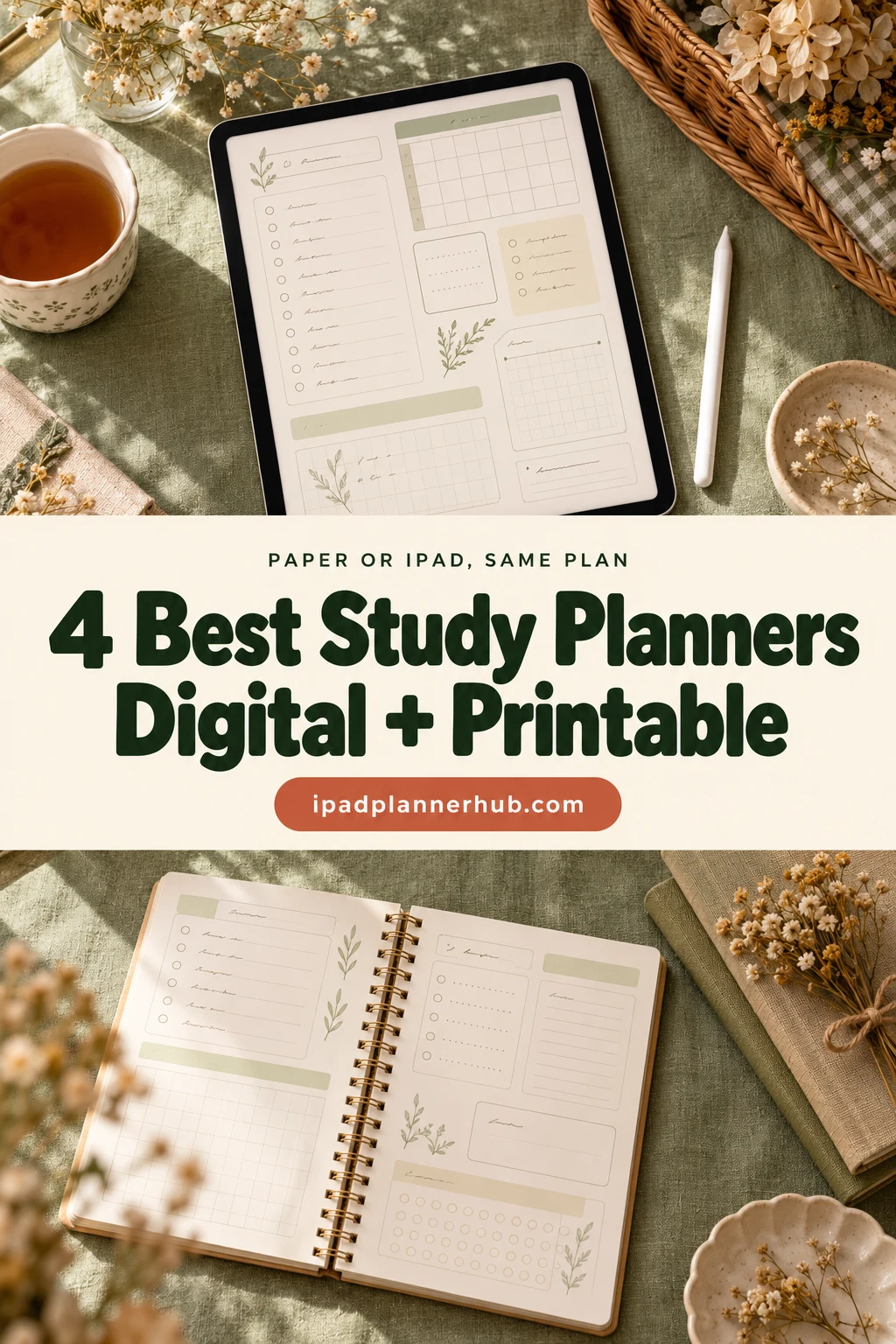
Below are 4 study planner printables from Creative Fabrica that I’d pick for that double life: a one-page daily study plan, a full student planner bundle, a semester assignment planner for 2027 and a student weekly planner. After the list: how to study with one file on paper and on the iPad, how to set it up in GoodNotes, print sizes, a simple study routine and when a free printable is enough.
The 4 Best Study Planner Printables I Found
Most “study planner printable” results on Creative Fabrica are Canva templates, KDP interiors or print-only sheets, so the list is short on purpose. I skipped all of those, kids’ homework charts and anything dated to a past year. Every pick says in its description that it works in GoodNotes or Notability, and each one also prints at home.
TL;DR: 4 study planner printables from Creative Fabrica that also work on the iPad in GoodNotes or Notability: a one-page daily study plan, a full student planner bundle with light and dark digital versions, a 36-page semester assignment planner for 2027 and a student weekly planner. Each card lists the paper sizes and what is on the pages.
Quick Picks
- Best overall: Study Planner Printable
- Best for all-in-one bundle: Student Planner: Printable & Digital
- Best for a semester: 2027 Assignment Planner | Printable PDF
- Best for weekly view: Student Weekly Planner
- Study Planner Printable – Best overall
- Student Planner: Printable & Digital – Best all-in-one bundle
- 2027 Assignment Planner | Printable PDF – Best for a semester
- Student Weekly Planner – Best weekly view
Best overall
1. Study Planner Printable
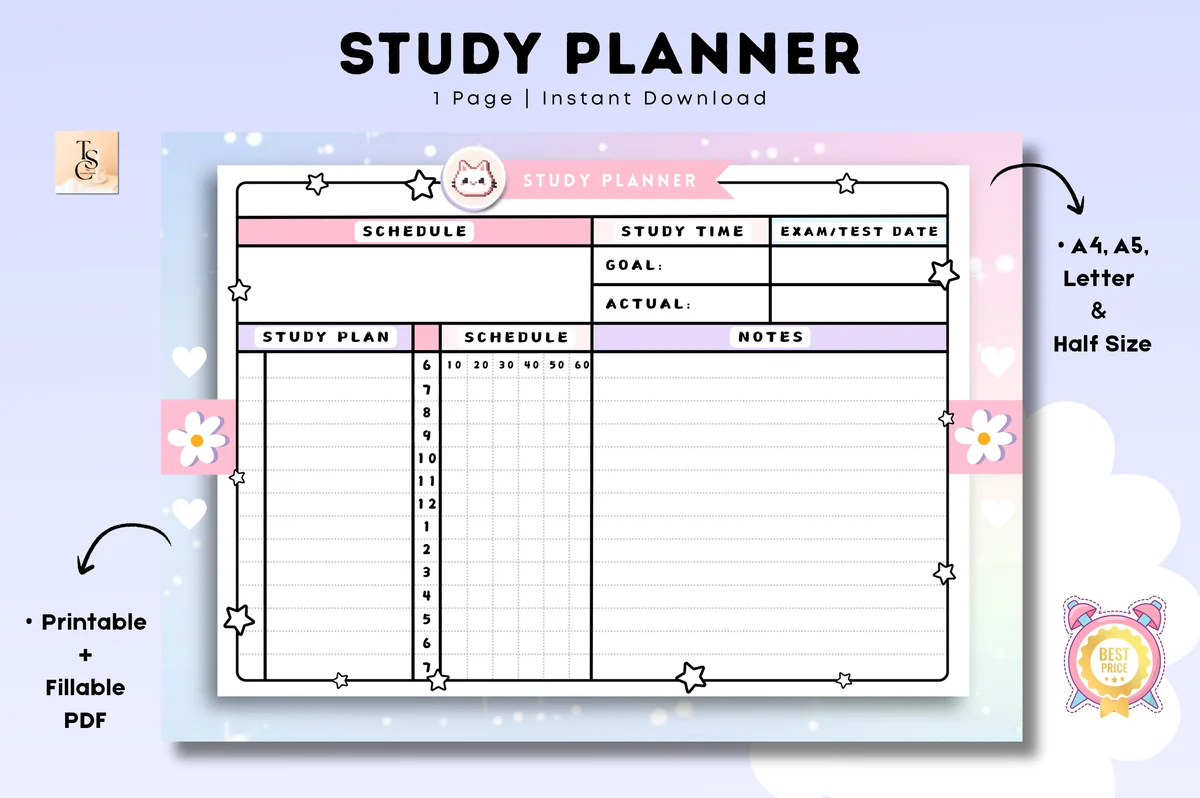
Orientation: LandscapeLayouts: One-page daily study plan with hours, goal vs actual, exam dateFormat: Printable + digital PDF: A4, A5, Letter, Half LetterDates: Undated
Best for: exam season, students, print and iPad users. Designed by Tas Creative Studio.
- Undated one-page study planner in landscape: schedule, study plan, notes, goal vs actual study time and an exam/test date box
- Hour-by-hour column with 10-minute boxes for study blocks
- 4 PDF files: A4, A5, US Letter and Half Letter
- Printable PDF and digital PDF versions for GoodNotes, Notability, Noteshelf, Xodo or any PDF app
This is the page I'd print a stack of before exams. Goal vs actual study time sits right at the top, so a day where you planned four hours and did two is visible without any tracker. On the iPad, duplicate the page each morning; on paper, Half Letter fits a small binder. It's also the most saved study printable I found on Creative Fabrica.
Best all-in-one bundle
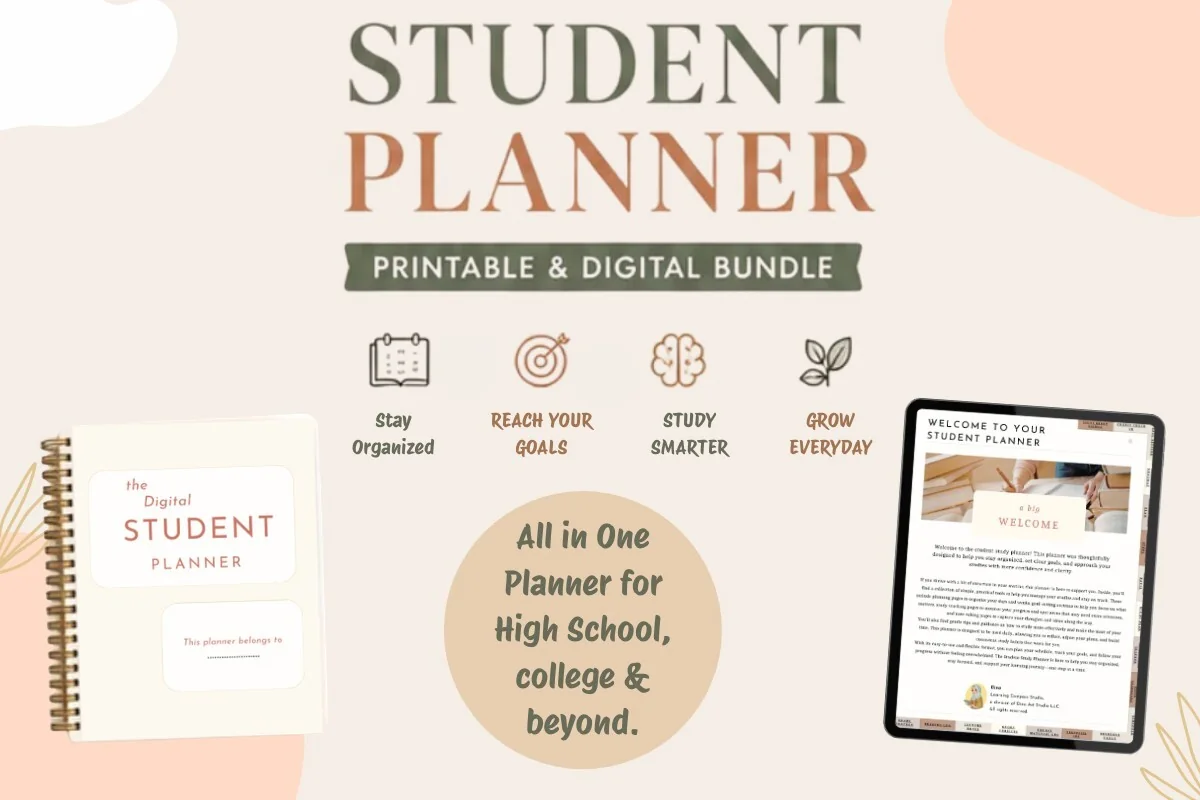
2. Student Planner: Printable & Digital
Orientation: PortraitLayouts: Yearly, monthly, weekly, daily, class schedule, assignment trackerFormat: Printable PDF (8.5 x 11 in) + 2 hyperlinked digital PDFs (light, dark)Dates: Undated
Best for: high school students, college students, dark mode fans. Designed by Dina Art Studio.
- 3 versions of one layout: a printable PDF (8.5 x 11 in) and two digital files, light and dark
- Hyperlinked tabs in the digital versions to jump between sections
- Yearly review, monthly roadmap, weekly plan, daily planning, class schedule and assignment tracker
- Undated; made for GoodNotes, Notability, Xodo or Noteshelf
If you want more than single sheets, this is the bundle. The digital files are a real hyperlinked planner, and the print version keeps the same layout, so the class schedule you printed for the wall matches the one on the iPad. The dark theme is a nice touch for late study sessions. It's new on Creative Fabrica (listed in 2026), so it has few saves yet.
Best for a semester
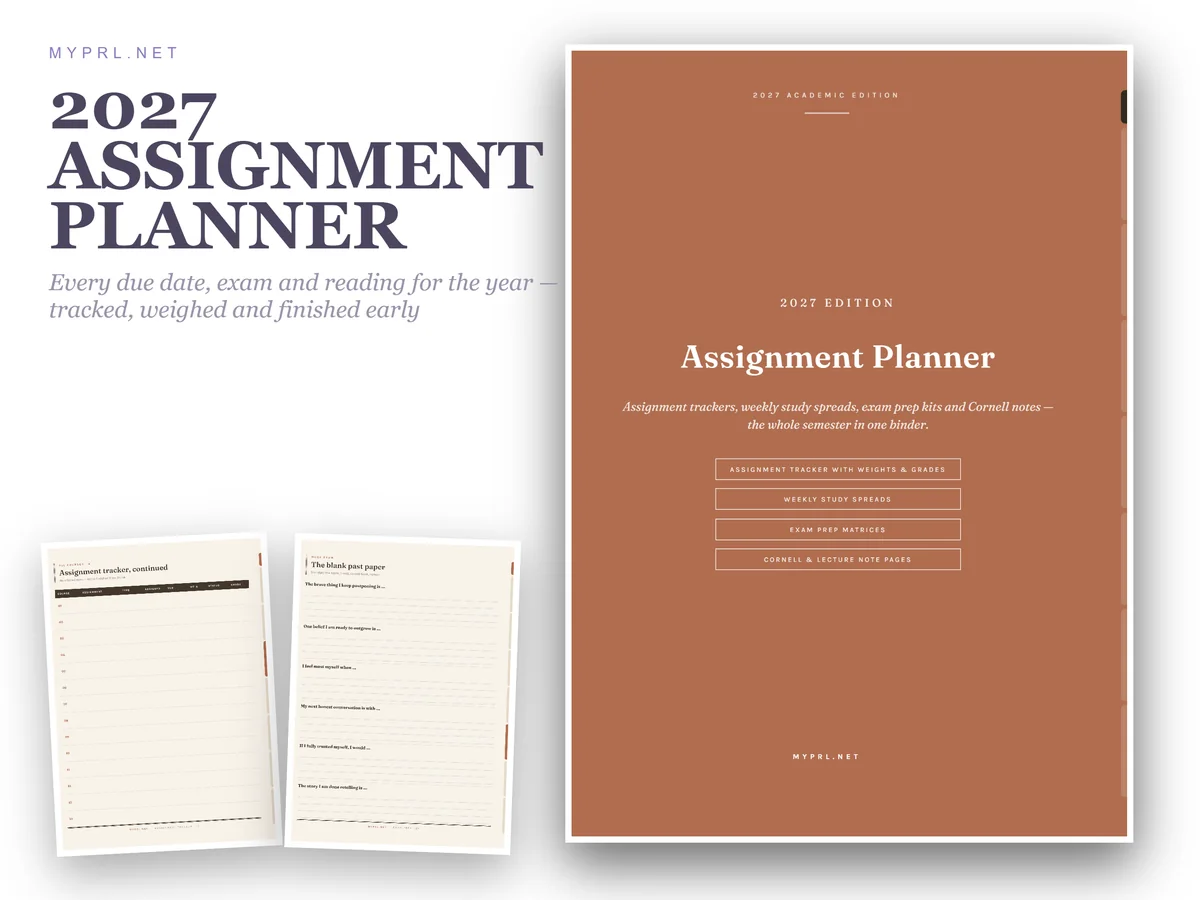
3. 2027 Assignment Planner | Printable PDF
Orientation: PortraitLayouts: Semester setup, assignment tracker, weekly study, exam prep, notes, gradesFormat: 36-page hyperlinked PDF, US LetterDates: 2027, weeks write-in
Best for: college students, heavy course loads, exam preppers. Designed by Healers Hub co.
- 36 US Letter pages in 6 sections: semester setup, assignment tracker, weekly study, exam prep, reading & notes, grades & reviews
- Syllabus extraction page course by course and the whole term on one timeline
- Exam matrix and active recall checklist; Cornell-ruled lecture notes
- Hyperlinked side tabs for GoodNotes, Notability or Xodo; prints at home at 100% scale
The most thought-through study system on this list. The assignment tracker rows have due date, weight and grade, so you can see which task is actually worth the points, and the exam matrix turns revision into a checklist. It's dated 2027 on the cover, which suits the next school year. Only US Letter, so A4 users will need to print with "fit to page".
Best weekly view
4. Student Weekly Planner
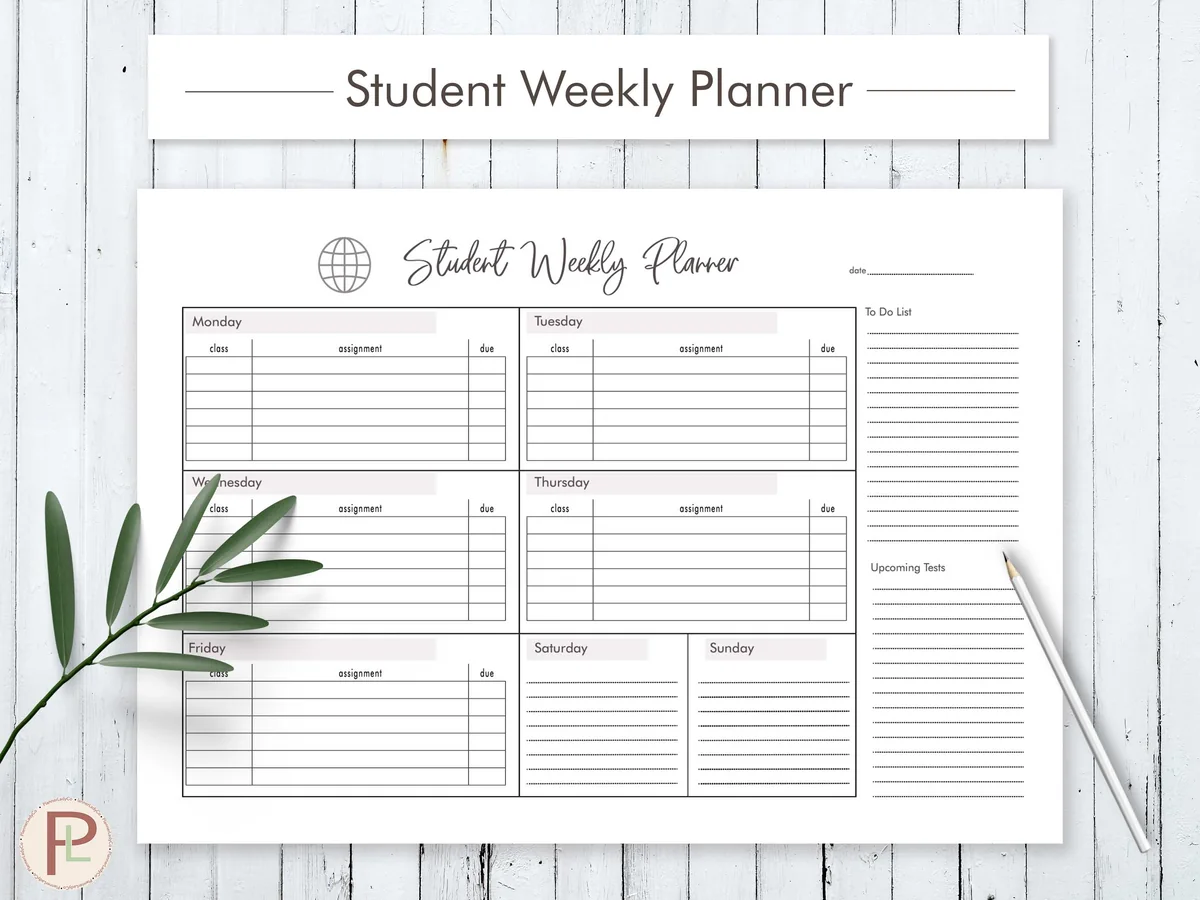
Orientation: LandscapeLayouts: Weekly by day with assignments + to-doFormat: PDF: A4, A5, LetterDates: UndatedWeek start: Monday
Best for: students, homework planners, simple planners. Designed by HelArtShop.
- Landscape week with a lined box for each day, Monday to Sunday, with small columns for assignments
- A to-do list column on the right side of the page
- 3 PDF files: A4, A5 and US Letter
- Text can be typed in Adobe Reader or Preview; works on the iPad in GoodNotes and Notability
A simple, calm week for students who think in assignments rather than hours. Each day has room for homework and due dates, and the to-do column catches everything that isn't tied to a day. It's an older listing but undated, and it's one of the most saved student pages I found.
Quick Comparison
| Planner | Best for | Sizes & files | Stand-out extra |
|---|---|---|---|
| 1. Study Planner Printable | Daily study sessions | A4, A5, Letter, Half Letter | Goal vs actual study time |
| 2. Student Planner: Printable & Digital | Full school year | Printable PDF + 2 digital PDFs | Light and dark hyperlinked versions |
| 3. 2027 Assignment Planner | Printable PDF | Semester planning | 36 pages, US Letter PDF | Exam matrix + Cornell notes |
| 4. Student Weekly Planner | Weekly homework plan | A4, A5, Letter | Day boxes + to-do column |
Paper or iPad, Same Plan: How to Study With One File
The point of a hybrid study planner is that you never copy a plan twice. Here is how I’d split the work between the iPad and paper:
- Plan on the iPad. Keep the whole term in GoodNotes: the semester setup, the assignment tracker and every week. It’s searchable, it doesn’t get lost, and you can move a task with the lasso tool instead of crossing it out.
- Print the day or the week you need to see. On heavy days, print one daily study page and keep it next to your books. Paper stays visible while the iPad is busy with lecture slides or flashcards.
- Bring the results back. At the end of the day, tick off the same tasks in the digital copy. Goal vs actual study time (planner #1) takes ten seconds to fill in.
- Keep the layout the same. Because both versions are one design, your eyes know where the exam dates and to-dos are, whether you look at paper or a screen.
How to Use a Study Planner Printable in GoodNotes
- Open the PDF from the Files app and choose “Open in GoodNotes” (or Notability). For the bundle and the assignment planner, import the digital or hyperlinked version, not the print file, so the tabs work.
- Create one notebook per term and name it by semester, so last term’s grades don’t mix with this one.
- For single-page planners (#1 and #4), long-press the blank page and duplicate it before you write. Keep one empty copy at the end of the notebook as a master.
- Add a bookmark or outline entry to the assignment tracker so it’s one tap away.
- Use highlighters in two or three colors only: one for exams, one for deadlines, one for done.
If you are still choosing an app, my GoodNotes vs Notability comparison covers how each handles PDFs and links.
How to Print a Study Planner at Home
- Pick the file that matches your paper. US Letter in the US, A4 almost everywhere else. A5 and Half Letter suit small binders and discbound notebooks.
- Print at actual size (100%). “Fit to page” shrinks the boxes; use it only when the file is a different paper size, for example the US Letter assignment planner on A4.
- Landscape pages need landscape printing. Planners #1 and #4 are landscape; check the orientation in the print dialog.
- Print from the iPad with AirPrint. In GoodNotes, tap Share, choose Print and pick only the page you need.
- Print a week at a time. A stack of a whole term looks motivating and ends up in a drawer. Seven pages on Sunday is easier to keep up with.
Free vs Paid Study Planner Printables
A free study planner printable is enough if you only need one simple page: a to-do list for homework or a basic weekly timetable. Plenty of school sites and blogs give those away. Paid planners make sense when you want more than one page that works together: an assignment tracker linked from every page, exam prep pages, grades and a semester timeline in one hyperlinked file, or a digital version with tabs next to the print version. Planners #1 to #3 are that kind of file.
What I Look For in a Study Planner Printable
- Works in an iPad app. The description has to name GoodNotes, Notability or the iPad. A print-only sheet can still be imported, but it’s not made for it.
- Undated pages or the right year. Undated pages last as long as you need; a dated planner should cover the coming school year.
- Study-specific boxes. Exam dates, study hours, assignments, grades. A general to-do list is not a study planner.
- Paper sizes you can print. At least A4 and US Letter, ideally A5 too.
- Clean enough to print. Large dark backgrounds eat ink; light layouts work on both screen and paper.
Study Planner Printable Ideas
- An exam countdown page: every exam date in one list with the days left.
- A revision timetable with one subject per study block.
- A weekly page with a column for assignments and a column for due dates.
- A “goal vs actual” box for study hours, filled in every evening.
- A syllabus page per course with every deadline copied in on day one.
- A grade tracker to see which class needs more time.
- A reading log for required chapters and articles.
- A one-page “today” plan printed only on heavy study days.
For more layouts and page ideas, see my study planner ideas.
How to Plan a Study Week With a Printable
- Sunday, 15 minutes: copy new deadlines from the syllabus or class portal into the assignment tracker.
- Fill the weekly page: classes first, then assignments by due date, then exam prep blocks.
- Each morning: pick the day’s study blocks on a daily page and write a realistic goal in hours.
- Each evening: write the actual hours, tick off what’s done and move the rest to tomorrow.
- Friday: look at grades and upcoming exams and decide which subject gets more time next week.
Who These Printables Are For
- High school and college students who study on the iPad but like a paper page on the desk.
- Students preparing for exams who need a daily plan with hours.
- Anyone with several courses and deadlines that clash.
- Students who share a printed weekly plan with family or roommates.
If you’d rather plan only on the screen with hyperlinked tabs, my digital study planners for iPad are a better fit.
FAQ
Can I use a study planner printable in GoodNotes?
Yes. Any PDF opens in GoodNotes or Notability, and the planners in this list are made for it. Two of them (the student planner bundle and the 2027 assignment planner) have hyperlinked tabs; the single-page planners are plain pages you duplicate.
Is there a free study planner printable?
Yes, many schools and blogs share simple free pages. They work well for one weekly timetable or a homework list. For a planner with exam prep, grades and linked sections, a paid file saves time.
How do I make a study planner?
Start with three pages: an assignment tracker for every deadline, a weekly page for classes and study blocks, and a daily page for the hours you plan to study. Fill the tracker first, then plan the week from it. The planners above already have these pages laid out.
What size should I print a study planner?
Use the file that matches your paper: US Letter in the US, A4 in most other countries, A5 or Half Letter for small binders. Print at 100% so the boxes keep their size.
What’s the difference between a printable and a digital study planner?
A printable is a flat PDF made to print; a digital planner usually has hyperlinked tabs and is made for the iPad. The planners in this list do both: you get a version to print and a version to use in GoodNotes.
Can I reuse an undated study planner?
Yes. On the iPad, duplicate the blank page each day or week; on paper, print as many copies as you need for personal use. Check the designer’s license before sharing printed copies with classmates.
Final Thoughts
A good study planner printable shouldn’t make you choose between paper and the iPad. For daily study hours and exam dates on one page, start with #1; for a whole school year in one file, #2; for a heavy semester of deadlines, #3; for a simple homework week, #4. Keep the plan in GoodNotes, print the days that need to stay in sight, and keep the layout the same so the habit sticks. Browse all study planners for more.
You May Also Like
This post contains affiliate links. If you buy through them, I may earn a small commission at no extra cost to you. Learn more.