Meeting notes in one app, tasks in another, deadlines on sticky notes around the screen, and that one important thing your manager mentioned on Tuesday? Gone. A digital work planner on your iPad pulls the workday into one notebook: the meeting notes, the project list and the deadlines sit next to your week, and you write them with the Apple Pencil as fast as on paper.
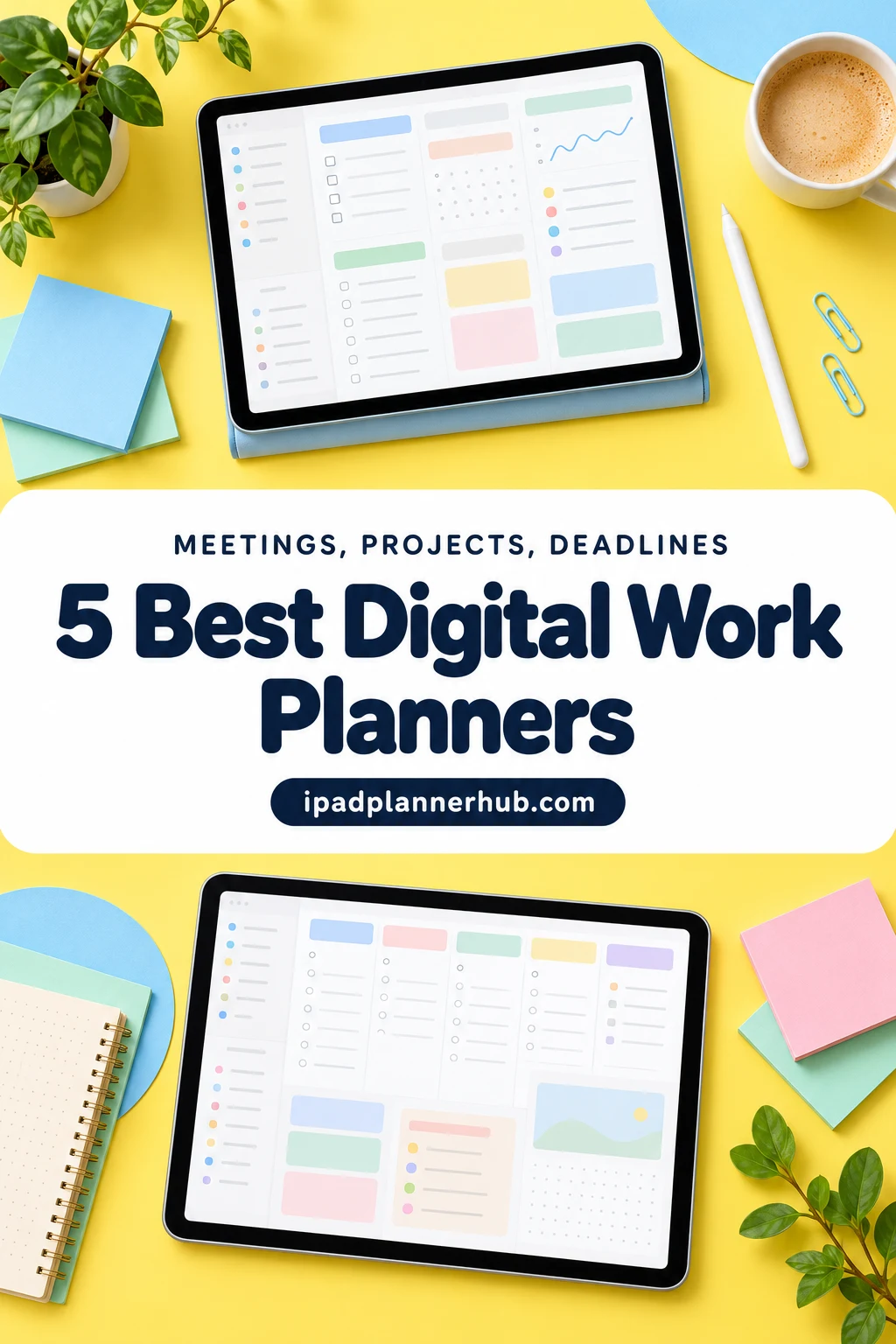
Below are the 5 work planners from Creative Fabrica I’d use on my iPad: two for the everyday workday, two for running a small business and one simple page for focused days. After the list: what to look for, work planner layout ideas, template or app, and a 10-minute routine for meetings, projects and deadlines.
The Best Digital Work Planners for iPad I Found
I skipped printables, Canva templates, stickers and planners dated for past years. Every planner here has real work pages (meetings, tasks, projects or business tracking) and works on the iPad in GoodNotes or a similar app.
TL;DR: 5 digital work planners for iPad from Creative Fabrica: 2 for the everyday workday (meetings, to-dos, weekly review), 2 small business planners and 1 one-page productivity sheet. Each card lists orientation, layouts and dates, plus who it suits.
Quick Picks
- Best overall: Pinksy Work Planner
- Best for a weekly review: Weekly Work From Home Planner
- Best for planning a business: Small Business Plan Digital Planner
- Best for running a small business: Business Digital Planner (Gray & Rose Gold)
- Best for one-page planner: Productivity Planner • Coffee Latte
- Pinksy Work Planner – Best overall
- Weekly Work From Home Planner – Best for a weekly review
- Small Business Plan Digital Planner – Best for planning a business
- Business Digital Planner (Gray & Rose Gold) – Best for running a small business
- Productivity Planner • Coffee Latte – Best one-page planner
Best overall
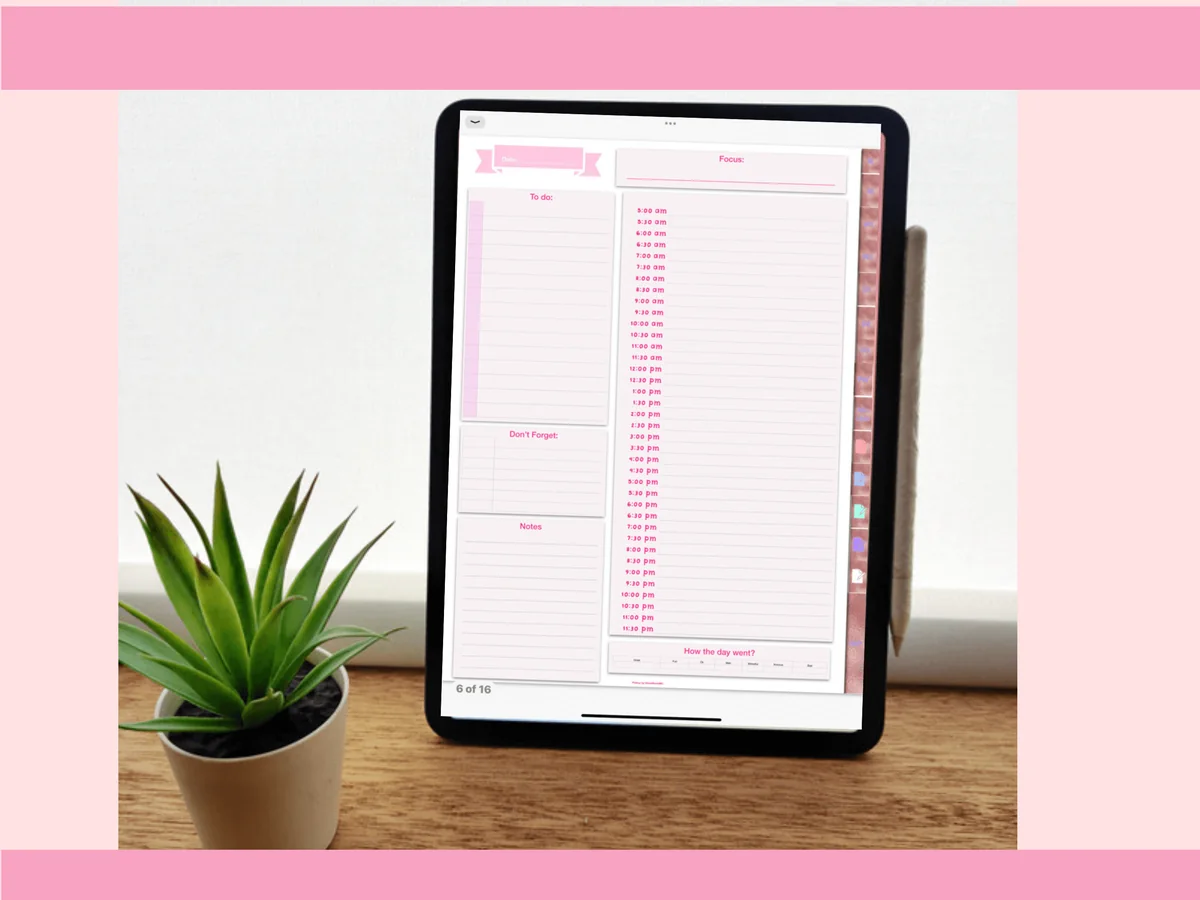
1. Pinksy Work Planner
Orientation: PortraitLayouts: Monthly, Weekly (2 layouts), Daily (3 layouts), Meeting minutesDates: Undated
Best for: remote workers, meeting-heavy jobs, pink lovers. Designed by Pinksy by HimeMarieMC.
- 16 work templates with an index you can tap from the left corner
- Undated monthly calendar, 2 weekly layouts and 3 daily layouts
- A daily page with an hourly schedule, to-do list and "Don't forget" box
- A minutes template for meetings and 5 blank pages
- PDF and GoodNotes files
Made for working from home, and it shows: the daily page has an hour-by-hour column next to the to-do list, and there's a proper minutes template for all those video calls. I'd skip the password page, though; a password manager is a safer place for logins than a planner.
Best for a weekly review
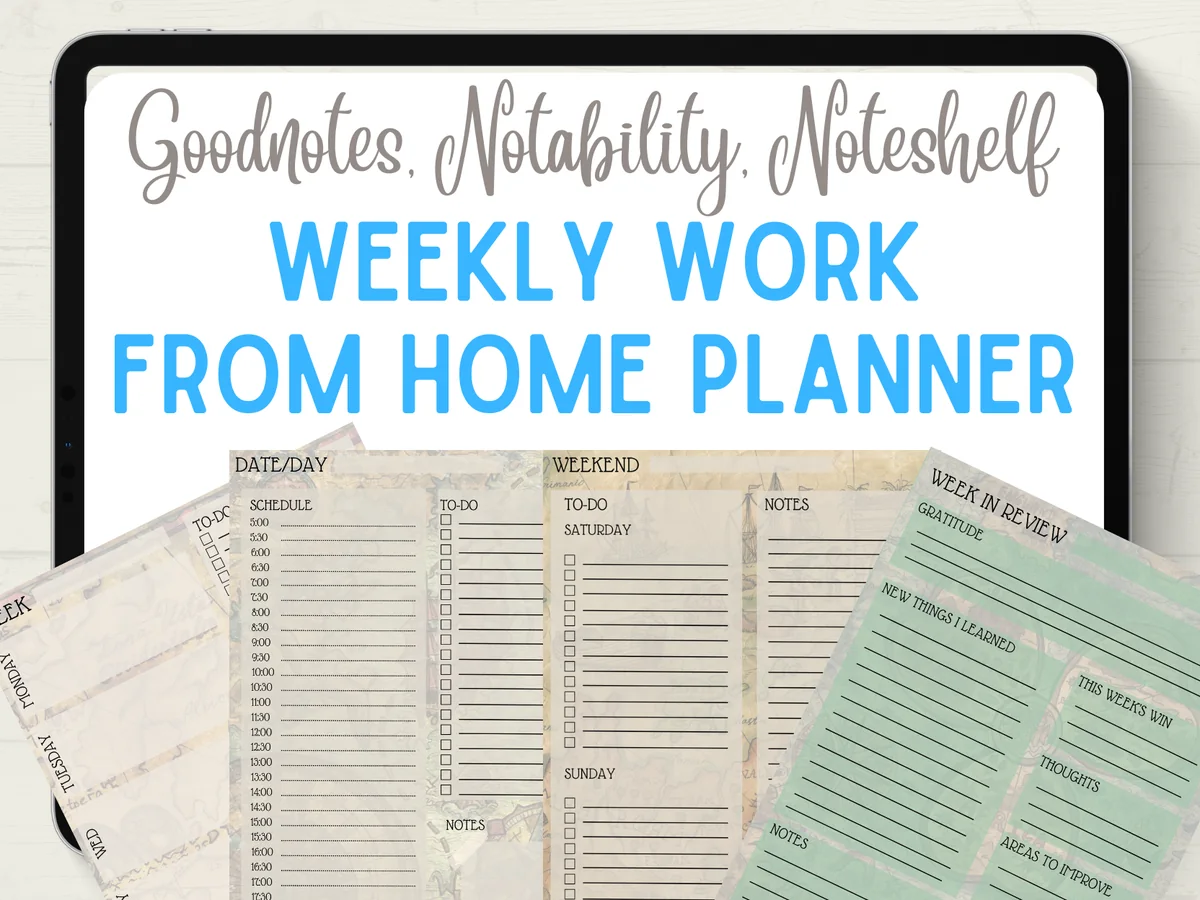
2. Weekly Work From Home Planner
Layouts: Weekly, Daily
Best for: remote workers, freelancers, weekly planners. Designed by Quiet Deluxe Digital.
- A weekly overview page
- A daily to-do list with a time schedule
- A combined page for the weekend
- A week-in-review page: gratitude, your big win and areas to improve
- PDF for GoodNotes, Notability and Noteshelf, with 14 bonus covers
A small planner with one habit most work planners skip: the Friday review. You write down the big win of the week and what to improve, then plan Monday with that in mind. The bonus covers have a playful pirate theme, while the pages themselves are calm and easy to write on.
Best for planning a business
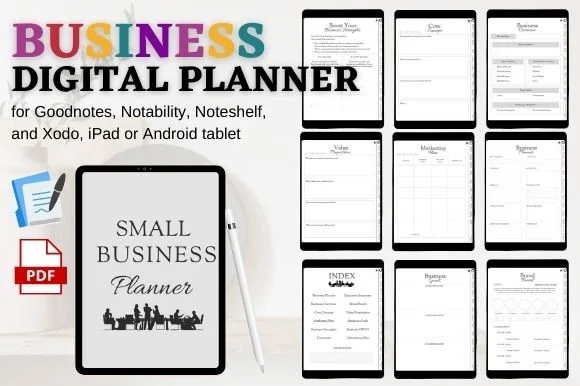
3. Small Business Plan Digital Planner
Orientation: PortraitLayouts: Business plan, SWOT, Marketing plan, Goals
Best for: side hustlers, new business owners, freelancers. Designed by mixxdigitaldesign.
- Executive summary, business overview and core concept pages
- Value proposition, brand board and business goals
- Strengths, SWOT and an "overcome" page for obstacles
- Marketing plan and advertising plan
- Hyperlinked tabs and index; for GoodNotes, Notability, Noteshelf and Xodo
This isn't a calendar, it's a business plan workbook. If you're starting a side business or a freelance career, these pages walk you through the questions in a sensible order: what you sell, to whom, why you and how people will find you. I'd pair it with any weekly planner from this list for the day-to-day.

Best for running a small business
4. Business Digital Planner (Gray & Rose Gold)
Orientation: PortraitLayouts: Goals, Income & expense trackers, Ad tracker, SWOTDates: Undated
Best for: small business owners, online sellers, marketers. Designed by Nann Digital Art.
- 25 hyperlinked A4 pages with an index
- Income tracker, expense tracker and advertising tracker
- Business goals, yearly goals, checklist and vision & mission
- SWOT, target audience and marketing channel pages
- For GoodNotes, Notability, Noteshelf and Xodo; can also be printed
Where the previous planner helps you write the plan, this one helps you run it: income and expenses side by side, an advertising tracker and a business checklist. The gray and rose gold design looks grown-up enough for a work notebook. If your business is already running, I'd choose this one.
Best one-page planner
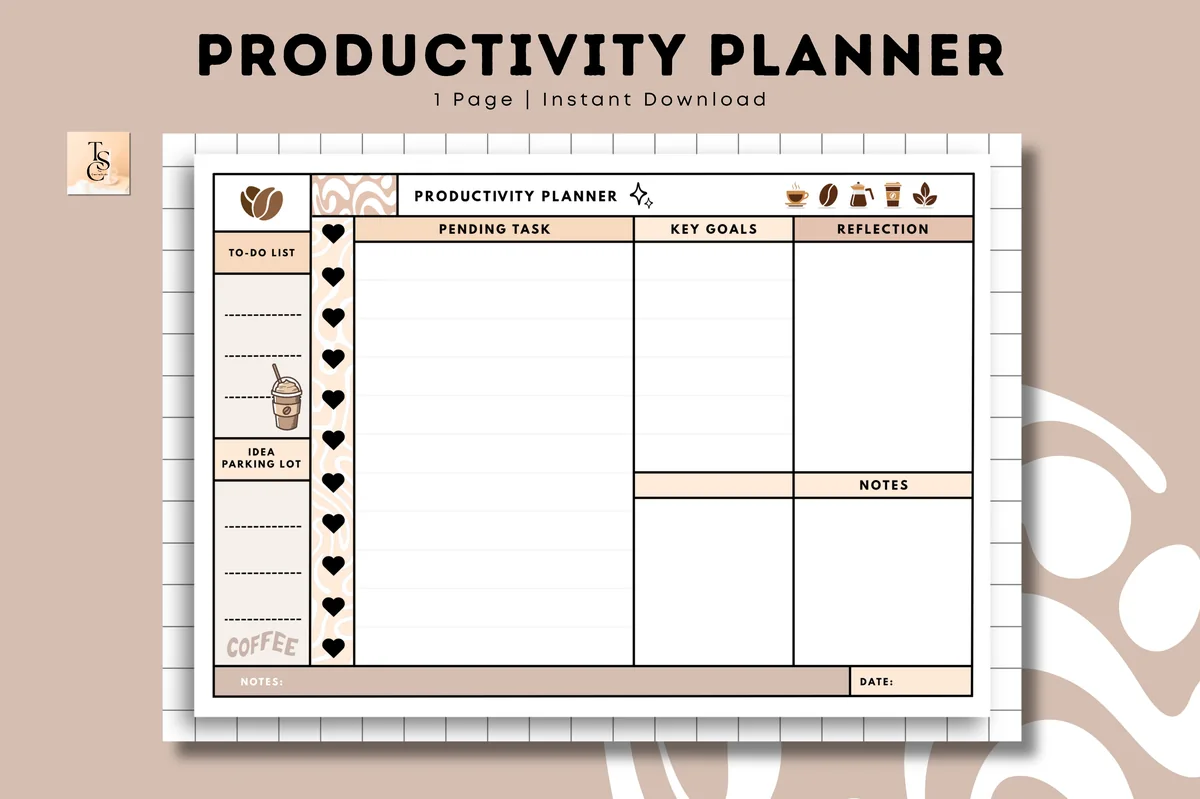
5. Productivity Planner • Coffee Latte
Orientation: LandscapeLayouts: One-page productivity plannerDates: Undated
Best for: minimalists, coffee lovers, one-page planners. Designed by Tas Creative Studio.
- One undated A4 landscape page
- Columns for pending tasks, key goals and reflection
- A to-do list and an "idea parking lot" on the side
- A notes box and a date line
- Digital PDF for GoodNotes, Notability, Noteshelf and Xodo, plus a printable version
Just one page, and that's the point: duplicate it every morning in GoodNotes and you have a daily work sheet. My favorite part is the idea parking lot, a place for the thoughts that pop up mid-task so they don't pull you away from it. Cozy coffee colors, and it costs about as much as a latte.
Quick Comparison
| Planner | Best for | Work pages | Stand-out extra |
|---|---|---|---|
| 1. Pinksy Work Planner | Meetings and calls | Meeting minutes template | Hourly daily page |
| 2. Weekly Work From Home Planner | Simple work weeks | Week overview + daily to-do | Week-in-review page |
| 3. Small Business Plan Digital Planner | Starting a business | Business plan + SWOT | Brand board page |
| 4. Business Digital Planner (Gray & Rose Gold) | A running small business | Income, expense, ad trackers | 25 pages, rated 5.0 |
| 5. Productivity Planner • Coffee Latte | Simple workdays | Tasks, goals, reflection | Idea parking lot |
What I Look For in a Work Planner
- A page for meetings. Date, attendees, notes and action items. Without it, meeting notes end up scattered across random pages.
- Room for priorities, not just a to-do list. A “top 3” box keeps the important work from drowning in small tasks.
- Time on the page. An hourly column or time blocks show whether your to-do list actually fits into the day.
- Weekly and daily views. The week for deadlines and the big picture, the day for the details.
- Working hyperlinks. Jumping from the month to today’s page should be one tap, not twenty swipes.
- A calm, professional design. You’ll open it in meetings and maybe on a shared screen, so pick a look you’re comfortable showing.
Work Planner Layout Ideas: What to Put on Your Pages
What’s the best planner layout for work? The one that matches how your days look. A meeting-heavy job needs a different page than deep project work. Mix and match these work planner ideas:
- Top 3 priorities. The three things that would make today a good workday, written before you open email.
- Time blocks. An hourly column where you block focus time around your meetings.
- Meeting notes. One page per meeting with action items at the bottom, marked with a box you can tick.
- Project tracker. A page per project with milestones, deadlines and the next step.
- Waiting-on list. What you’ve asked others for and when to follow up.
- Deadline overview. A monthly page with every due date in one color.
- Idea parking lot. A box for thoughts that pop up mid-task, so they don’t pull you away from it.
- Weekly review. Wins, what slipped, and what moves to next week.
- Business pages. If you work for yourself: income, expenses, clients and marketing.
Also Worth a Look: Productivity Tracker Planners
A productivity tracker shows the workday in numbers you can look back on: how many focus blocks you got, which projects moved, what kept rolling over to tomorrow. The 5 work planners above are built around meetings and deadlines. These two dated 2027 planners add whole tabs for focus, projects and habits, so the tracking pages sit next to your calendar.
Both come from the same designer and share the same calendar, so choose by the tabs you’d open most.
Best for tracking projects and meetings
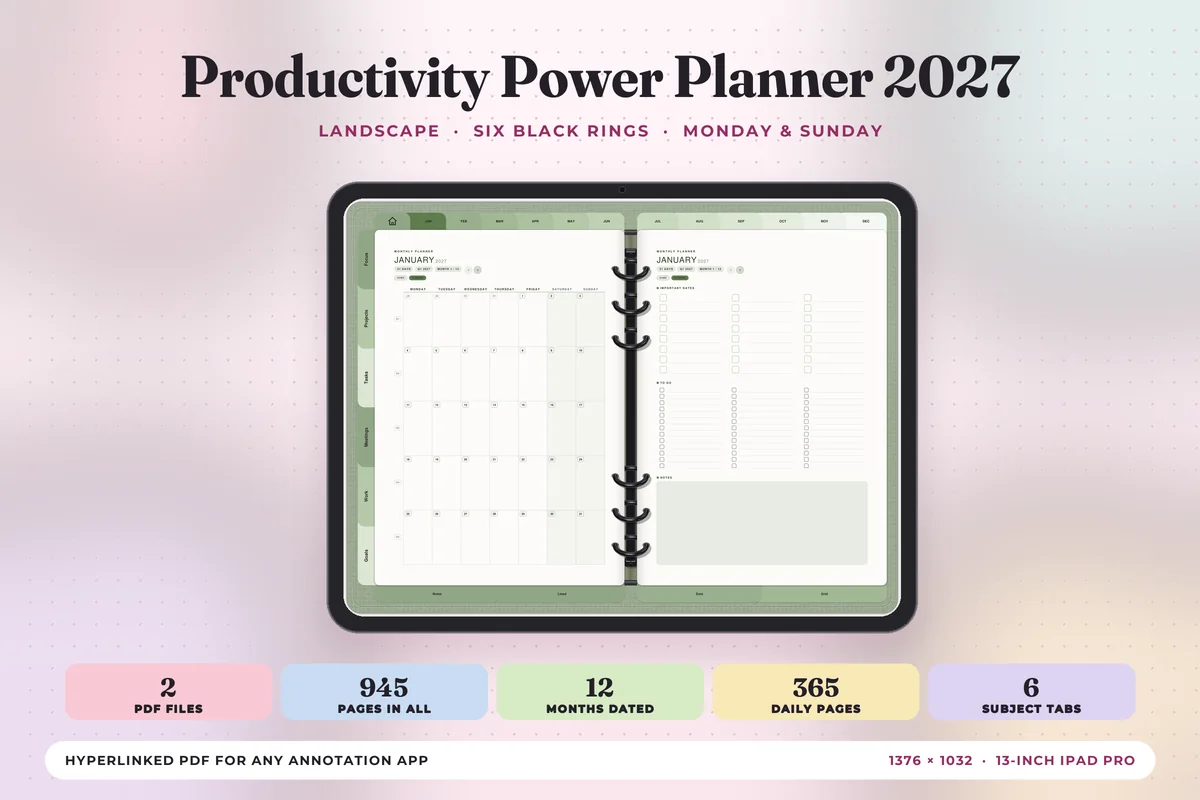
Productivity Power Planner 2027
Orientation: LandscapeLayouts: 12 month-at-a-glance pages, Monthly, Weekly, Daily (hourly 6 a.m.–9 p.m.) + 6 subject tabsDates: 2027Week start: Monday or Sunday
Best for: project-heavy jobs, meeting-heavy weeks, productivity trackers. Designed by Print Magic StudioX.
- Six subject tabs of its own: Focus, Projects, Tasks, Meetings, Work and Goals, with 4 templates under each
- 365 daily pages with an hourly schedule from 6 a.m. to 9 p.m., a top 3, to do and notes
- A weekly page with the week's one thing at the top, wins and what rolls over at the foot
- Two hyperlinked PDFs, Monday start and Sunday start, sized for the 13-inch iPad Pro in landscape
This is the one I'd pick if work means meetings plus several projects at once. Meetings and Projects get their own tabs, so the tracker pages live one tap from today instead of in a second notebook. The black rings drawn down the middle make each spread look like a real binder.
Best for focus and habit streaks
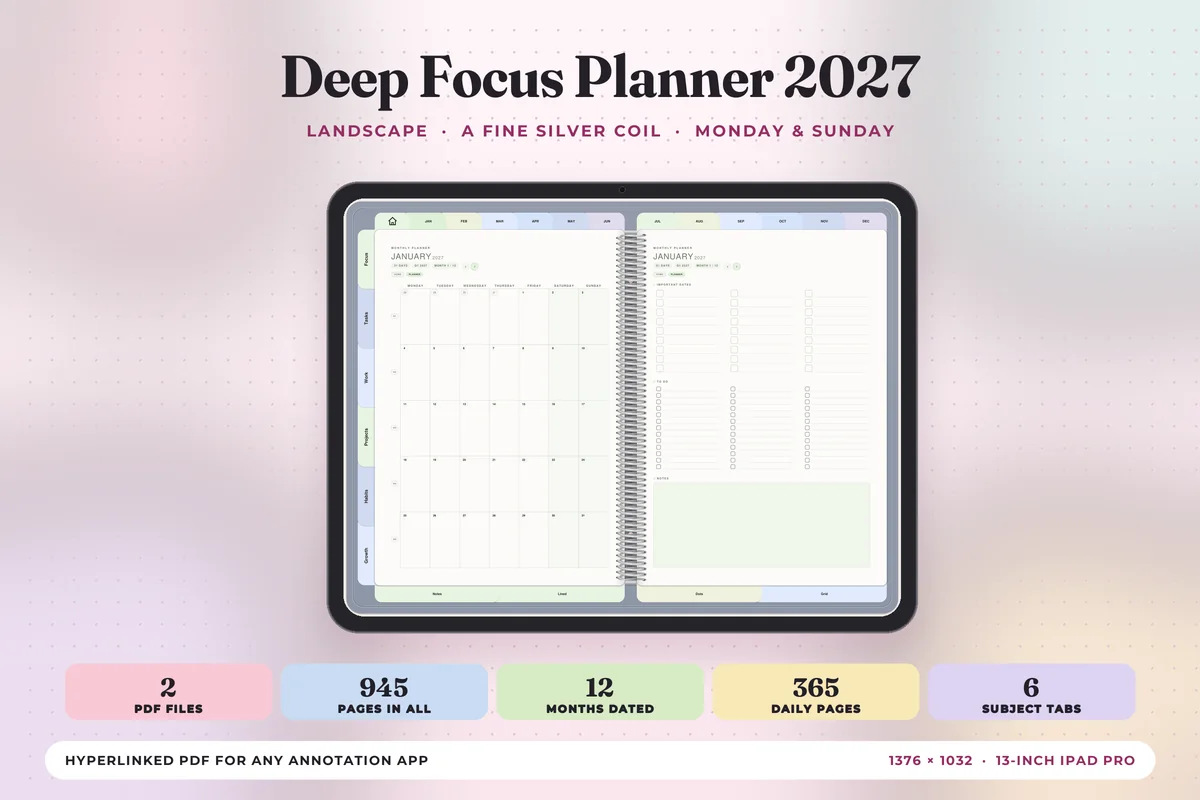
Deep Focus Planner 2027
Orientation: LandscapeLayouts: 12 month-at-a-glance pages, Monthly, Weekly, Daily (hourly 6 a.m.–9 p.m.) + 6 subject tabsDates: 2027Week start: Monday or Sunday
Best for: solo workers, deep work sessions, habit streaks. Designed by Print Magic StudioX.
- Six subject tabs: Focus, Tasks, Work, Projects, Habits and Growth, 4 templates under each
- The same 2027 calendar: 12 monthly planners, a weekly page for every week, 365 hourly daily pages
- 30 note pages: lined, dot grid and square grid
- Landscape spreads with a fine silver coil, Monday or Sunday start
Same calendar as the Productivity Power planner, but the tabs lean toward your own output: Habits and Growth take the place of Meetings and Goals. I'd choose it if you work alone or in long focus sessions and care more about streaks than meeting notes.
On a productivity tracker page I’d log only four things a day: focus blocks done, top 3 finished, tasks rolled over and a 1 to 5 energy score. After two weeks the pattern is easy to read, for example that meeting-heavy Tuesdays never leave room for deep work.
Work Stickers for Your Planner Pages
Work stickers do the job of a colored sticky note: a deadline flag on Thursday, a laptop next to a focus block, a coffee cup on the one free half hour. The planners above come without a work-themed sticker set, so here are two packs that fill the gap. One is cute, the other is plain icons.

Best for cute work pages
Kawaii Work Planner Stickers
Stickers: 40 kawaii designsFiles: GoodNotes sticker file + transparent PNG, 300 dpi
Best for: busy weeks, deadline days, cozy workday spreads. Designed by helloBerryBloom.
- 40 stickers of a bear and a bunny getting through a work day: meetings, to-do lists, deadlines, coffee breaks
- A GoodNotes sticker collection file, plus separate transparent PNGs for other planner apps
- 300 dpi files, so they stay sharp when you scale them down
- Warm pastel colors that sit well on beige and pink planner pages
The deadline calendar and the URGENT stamp are the two I’d use every week, and the bear buried in papers is for the Friday when nothing went to plan. It’s a set with a sense of humor, so it suits a planner you open with a smile more than a formal client notebook.

Best for plain work icons
Daily Life & Work Stickers
Stickers: 48 icons in 4 setsFiles: digital stickers for GoodNotes and digital planners
Best for: office tasks, errands, weeks that mix work and home. Designed by jamesinspires6.
- Work & Office set: desk, folder, calculator, briefcase, presentation board, meeting table, laptop
- Daily Life and Wellness & Planning sets: coffee, water bottle, groceries, calendar, checklist, sticky note
- Business, Travel & Holiday set: shop, delivery truck, plane, passport, suitcase, birthday cake
- Flat colored icons that read as small markers next to handwriting
These are icons rather than characters, which is what a work planner usually wants: a briefcase beside a client call, a plane on the day you fly out. The set is new and has few saves yet, but the drawings are clean and 48 icons cover a whole week of work and errands.
Drag the five stickers you use most (meeting, deadline, laptop, coffee, plane) onto one sticker page at the back of your work notebook, and decorating a week takes a minute.
Why Use a Digital Work Planner on Your iPad?
- Everything in one notebook. Meetings, tasks and notes from the whole year in one file you can search (GoodNotes even searches your handwriting).
- Move things without rewriting. A task didn’t happen? Lasso it and drag it to tomorrow.
- Paste what you need. Drop a screenshot of a slide or an email right next to your meeting notes.
- Endless pages. Duplicate a meeting template as many times as your calendar demands.
- Lighter bag. No separate work notebook, planner and sticky notes.
Digital or Paper Work Planner?
Paper is lovely and never needs charging. But work changes fast: meetings move, projects slip, deadlines shift. On the iPad you change the plan instead of crossing it out, and you never run out of meeting pages in May. If you already take notes on an iPad in meetings, a digital work planner is the natural next step.
Who a Digital Work Planner Is For
- Office and hybrid workers with a calendar full of meetings and a list of things to follow up on.
- Remote workers who need a clear start and end to the workday at home.
- Freelancers juggling several clients, deadlines and invoices.
- Small business owners and side hustlers who want the business plan and the money in one place.
- Anyone who thinks better with a pen than with a task app.
Work Planner Template or App?
Apps like Outlook, Google Calendar, Notion or Todoist are great at reminders, shared calendars and team projects. A planner template doesn’t replace them. What it gives you is a place to think: you write the plan by hand, see the whole week at a glance and decide what really matters today.
One honest note: a PDF planner doesn’t sync with your work calendar. Some planners, like the Complete Digital Planner for Work and Study, have links that open Apple Calendar, Reminders or Google Calendar in one tap, but your meetings won’t appear on the pages by themselves. Many people use both: the app for the schedule and alerts, the iPad planner for priorities, notes and reviews.
What You Need to Use a Digital Work Planner
- An iPad that works with an Apple Pencil (any recent model, including the iPad mini).
- An Apple Pencil or another compatible stylus.
- A note-taking app: GoodNotes, Notability or Noteshelf. All the planners above are PDFs that open in these apps.
- Optional: a matte screen protector that feels more like paper.
Check your company’s rules before you write confidential work details in a personal app. If in doubt, keep client names and sensitive numbers out of the planner.
How to Set Up a Work Planner in GoodNotes
- Save the PDF from Creative Fabrica and open it on your iPad.
- Tap Share → GoodNotes → Import as New Document.
- Write this month’s deadlines on the monthly page in one color.
- Duplicate the meeting notes page a few times so a blank one is always ready.
- Add a GoodNotes bookmark to your weekly page and your project tracker.
- Keep the planner in the sidebar, or use Split View next to your email or calendar.
How to Plan Your Workday: Meetings, Projects, Deadlines
A simple routine keeps a work planner useful instead of pretty. It takes about 10 minutes a day:
- Monday, 15 minutes: copy this week’s deadlines from the monthly page, list your meetings and pick the three outcomes that would make it a good week.
- Every morning, 5 minutes: write today’s top 3 and block focus time around meetings in the hourly column.
- After each meeting, 1 minute: write the action items at the bottom of the meeting page and copy your own to today’s or tomorrow’s list.
- End of the day, 3 minutes: tick what’s done, drag the rest to tomorrow and add anything you’re waiting on.
- Friday, 10 minutes: a weekly review: your wins, what slipped and what moves to next week.
FAQ
What is the best digital planner for work?
One with meeting pages, a priority box and weekly and daily views. From my list, the Pinksy Work Planner is the best all-round pick if your days are full of meetings, and the Weekly Work From Home Planner suits a week planned and reviewed in one view.
What is the best planner layout for work?
For meeting-heavy jobs, a daily page with an hourly column next to a to-do list. For project work, a weekly overview plus a project tracker. Most people do best with a weekly page for deadlines and a daily page for the details.
What should a productivity tracker include?
Keep it small: focus time, the top 3 you finished, tasks that rolled over and a quick energy score. Log them daily for two or three weeks, then compare the weekly totals. If you want tracker pages built into the planner, the Productivity Power Planner 2027 has its own Focus and Projects tabs next to the calendar.
Is there a free digital work planner?
Some designers offer free samples, and Creative Fabrica has free items with an All Access subscription. Free planners are usually just a few pages, though; the work planners above cost a few dollars and include meeting, project or business pages.
Can a digital planner sync with Outlook or Google Calendar?
No. A PDF planner doesn’t sync events in either direction. Some planners have links that open Apple Calendar or Google Calendar in one tap, which helps you check a meeting time quickly, but you still write the plan yourself.
What device do I need for a digital work planner?
An iPad with an Apple Pencil and an app like GoodNotes, Notability or Noteshelf. Most of these PDFs also open on Android tablets in apps like Samsung Notes or Xodo.
Is a digital planner worth it for work?
If you already use an iPad at work, yes: you get handwritten planning and notes without carrying a separate notebook, and everything stays searchable. If you rarely take your iPad to work, a paper notebook may be simpler.
Final Thoughts
The best digital work planner is the one you open before your first meeting. Start with a weekly page, a meeting template and a top 3 box, and add business pages only when you need them. Running your own business rather than working for one? See my business planners for small business owners. For more everyday planning, see my daily digital planners, the weekly digital planners and the all-in-one life planners, or browse all everyday planners. Want to start without dates? See my undated digital planners. For the meetings themselves, here are my favorite meeting notes templates. If your work is teaching, my lesson plan template ideas show daily, weekly and unit formats. For the daily task list itself, try one of my iPad to-do list templates.
Want one planner for the whole year instead? Here are the best digital planners for 2027 I’d keep all year.
You May Also Like
When a weekly work schedule needs a separate project overview, these project planners for iPad offer space for tasks, dates and progress notes.
This post contains affiliate links. If you buy through them, I may earn a small commission at no extra cost to you. Learn more.