Planning the next day usually happens late, on the couch or in bed, and a bright white planner page is the last thing anyone wants to look at then. A dark mode digital planner flips the page: black or charcoal background, light lines and text, so the iPad glows less in a dim room and your pen colors pop.
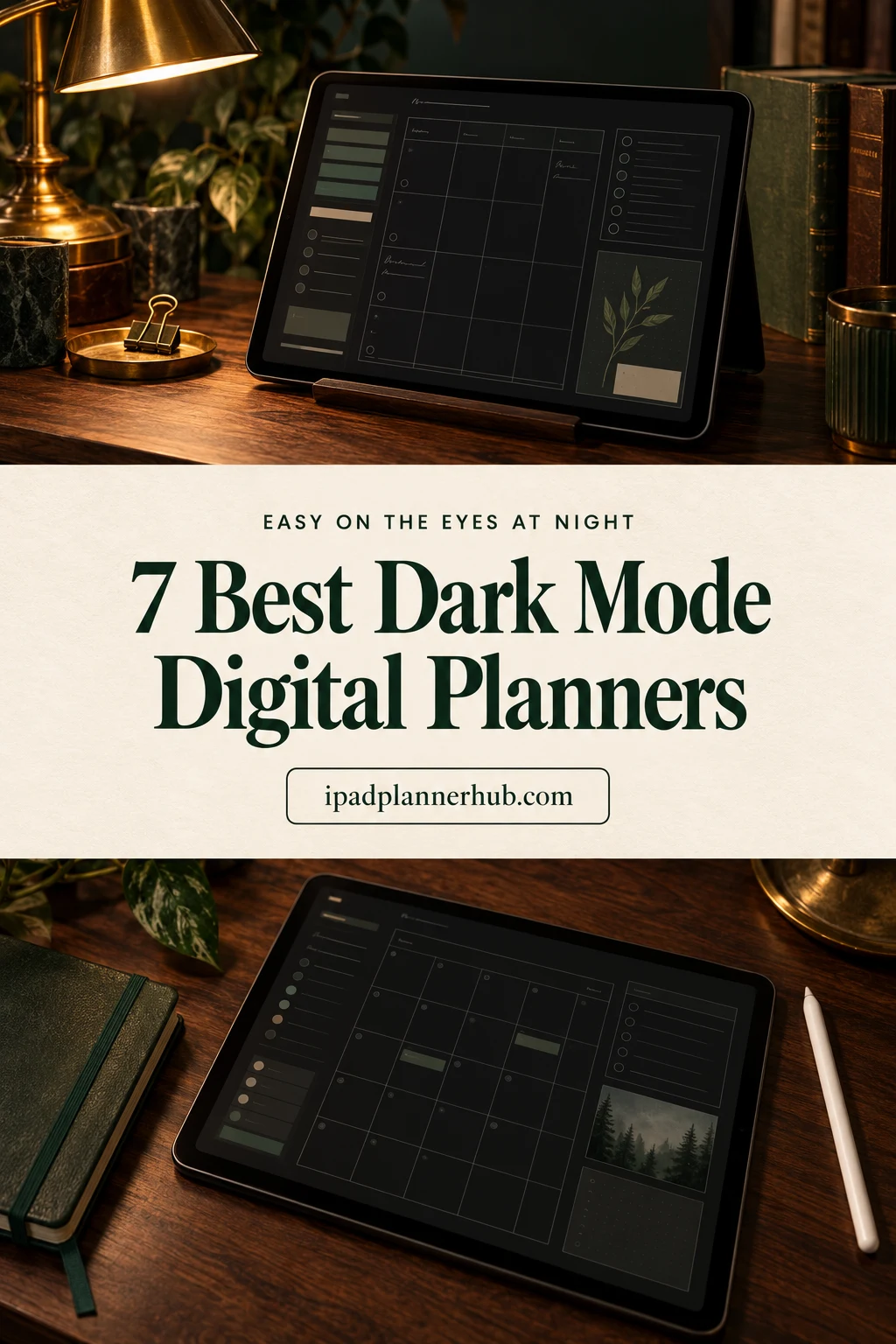
Below are the 7 dark mode planners from Creative Fabrica I’d use on my iPad: four undated planners, one dark notebook and two dark journals for the evening. After the list: why dark pages are different from dark mode in GoodNotes, which pen colors show up on black, stickers on dark pages and a 10-minute evening routine.
The 7 Best Dark Mode Digital Planners I Found
Many “black” planners on Creative Fabrica have a black cover and white pages inside, so I checked the sample pages of each one and kept only planners where you actually write on a dark page. I also skipped every planner with a past year in it (including a popular dark all-in-one whose dated pages start in a year that is already over), Canva templates and printables.
TL;DR: 7 dark mode picks for the iPad: four undated planners (two big all-in-ones, one simple monthly and weekly planner, one monthly calendar), a dark notebook and two dark journals for gratitude and reading. All have black or charcoal pages with light lines, and none carries a past year.
Quick Picks
- Best for all-in-one planning: Digital Planner Undated Dark Mode
- Best for choosing your own layout: Undated Essential Digital Planner (Dark)
- Best for simple planning: Digital Planner Dark Mode Design
- Best for month at a glance: Dark Mode Minimalist Digital Calendar
- Best for dark notes: Dark Mode Digital Notebook, Purple Theme
- Best for evening journaling: 365-Daily Digital Gratitude Journal Dark
- Digital Planner Undated Dark Mode – Best for all-in-one planning
- Undated Essential Digital Planner (Dark) – Best for choosing your own layout
- Digital Planner Dark Mode Design – Best for simple planning
- Dark Mode Minimalist Digital Calendar – Best for month at a glance
- Dark Mode Digital Notebook, Purple Theme – Best for dark notes
- 365-Daily Digital Gratitude Journal Dark – Best for evening journaling
- Digital Reading Journal (Dark Mode) – Best for readers

Best for all-in-one planning
1. Digital Planner Undated Dark Mode
Orientation: LandscapeLayouts: Daily, Weekly, Monthly + fitness, health, meal, budget, cleaning trackersDates: Undated
Best for: dark mode fans, all-in-one planners, busy households. Designed by PlannerPlanet.
- Undated, 450+ pages per the cover, fully hyperlinked with tabs along the top and side
- Daily and weekly layouts, plus trackers for weight, workouts, health and cleaning
- Meal plan, grocery list, monthly budget, appointments, important dates and a pet planner
- Cover says it is made for GoodNotes on the iPad, with buttons for iCal and Google Calendar
Charcoal pages, gold rings and white tabs: this is the most complete dark planner I found that has no year printed on it. Most pages are dark, but the monthly grid on the sample uses white boxes, so expect a little contrast on that one spread. If you want a single file for the whole household, start here.
Best for choosing your own layout
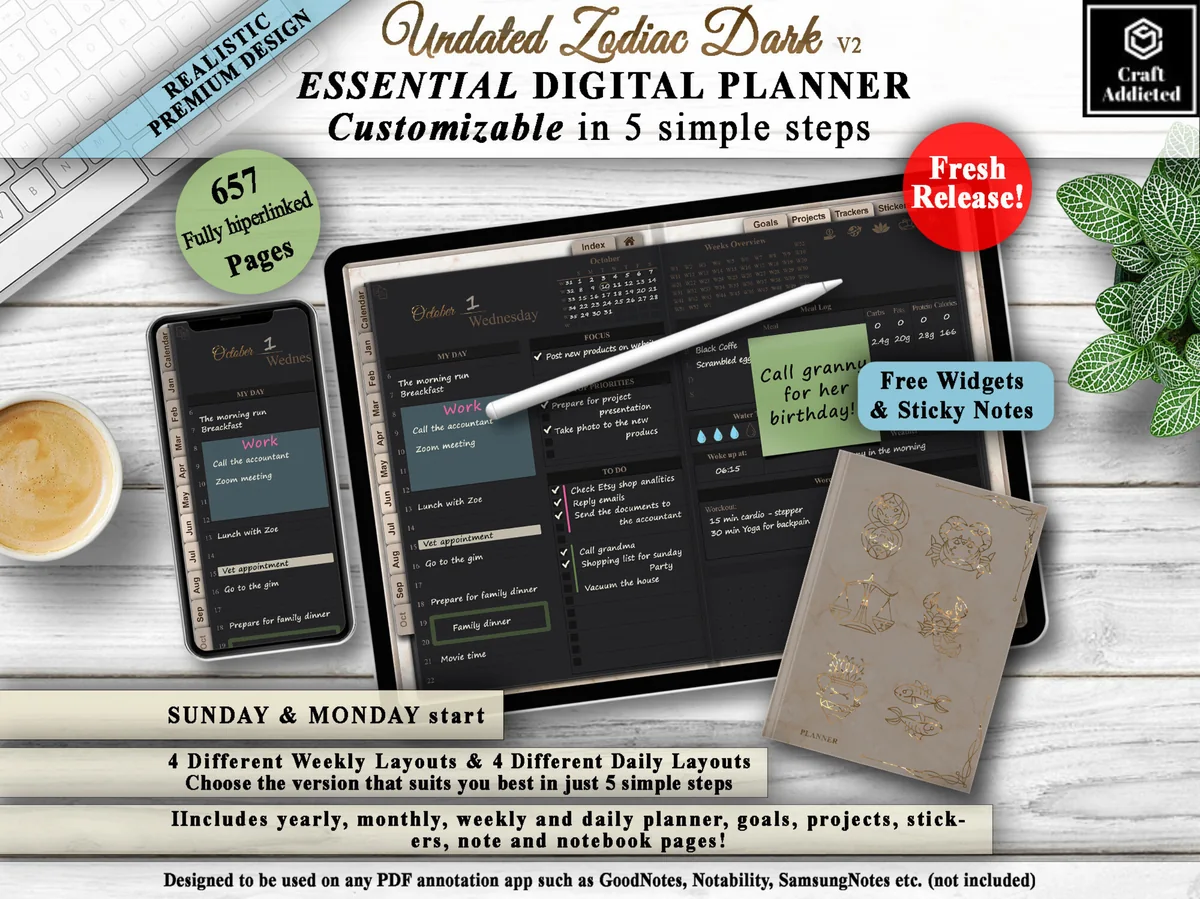
2. Undated Essential Digital Planner (Dark)
Orientation: LandscapeLayouts: Yearly, Monthly, 4 Weekly + 4 Daily layouts, goals, projectsDates: UndatedWeek start: Monday or Sunday
Best for: dark mode fans, sensitive eyes, project planners. Designed by CraftAddicted.
- Undated, 650+ hyperlinked pages, Sunday or Monday start
- 4 weekly and 4 daily layouts you combine yourself (32 versions in total)
- Year calendar, year and month overviews, goals planner for 10 goals, projects planner for 10 projects
- Over 110 widgets and 35 sticky notes included; works in GoodNotes, Notability and other PDF apps
The designer says it outright: dark pages for people with sensitive eyes. The daily and weekly pages are near black, while the index and overview pages are a softer taupe, which I actually like as a visual break. The 4 x 4 layout choice is the reason to pick it over the first planner.
Best for simple planning
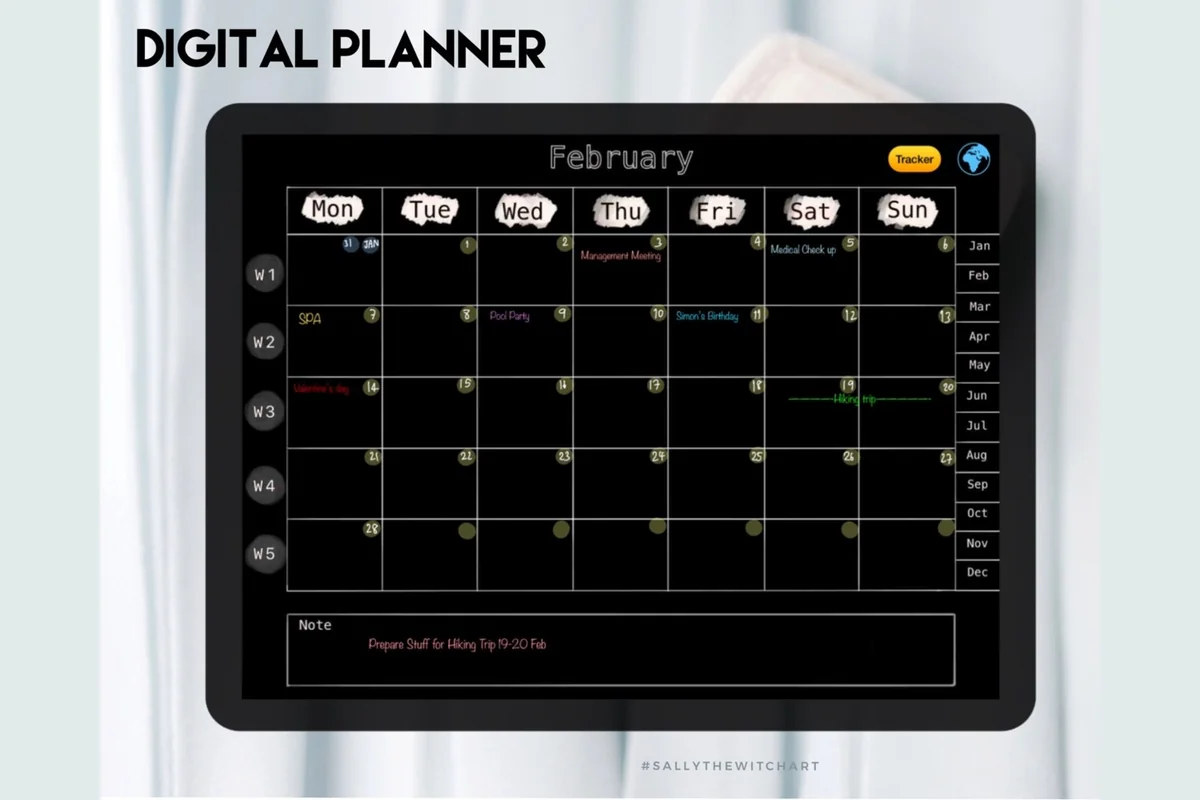
3. Digital Planner Dark Mode Design
Orientation: LandscapeLayouts: Yearly goals, Monthly, Weekly, habit tracker, notesDates: UndatedWeek start: Monday
Best for: dark mode fans, minimal planners, habit trackers. Designed by Sallythewitchart.
- Undated PDF, 97 pages per the product images, Monday start
- Home page index, yearly goals page, monthly and weekly plans
- Monthly habit tracker (12 pages) and 10 blank note pages
- Hyperlinked month tabs; made for GoodNotes and Notability
Pure black pages with thin gray lines and small handwritten-style headers. It's an older listing, but it's undated, so nothing in it goes stale. There are no daily pages, which I see as a plus for evening planning: one look at the week and you're done.

Best for month at a glance
4. Dark Mode Minimalist Digital Calendar
Orientation: LandscapeLayouts: Monthly (12 pages, 6 weeks)Dates: UndatedWeek start: Monday or Sunday
Best for: dark mode fans, night planners, month-at-a-glance planners. Designed by ZaraRozaDesigns.
- 12 undated monthly pages, each with 6 week rows
- Black background with white text and thin white grid lines
- Hyperlinked month buttons along the top
- Two PDFs (Monday or Sunday start) for GoodNotes, Notability, Noteshelf and OneNote
It's only a calendar, and that's the point. Big boxes, white lines, nothing else on the page. I'd import it as a second notebook for deadlines and birthdays, or use it as the whole planner if a month view is all you need.
Best for dark notes
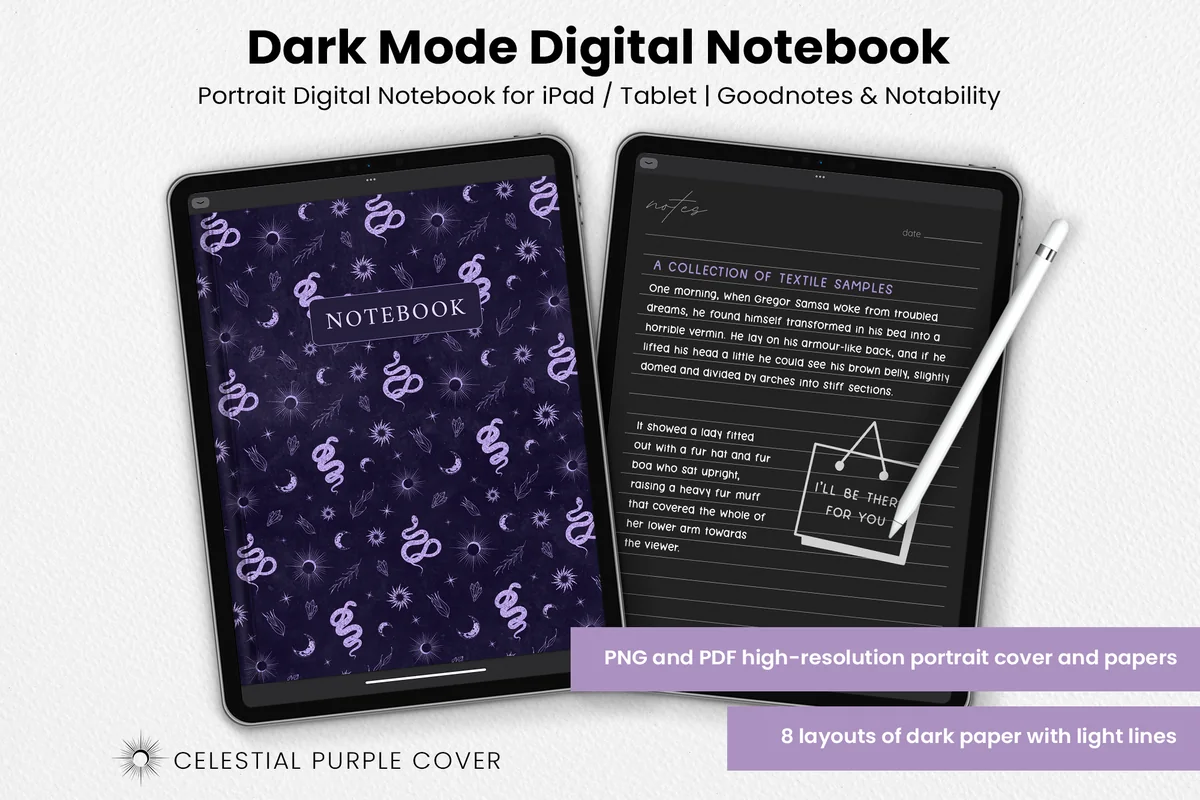
5. Dark Mode Digital Notebook, Purple Theme
Orientation: PortraitLayouts: 8 dark papers: columns, habit tracker, to-do, numbered list, dots, square, lines, notesFormat: PDF + PNG, 8.5 x 11 in
Best for: note takers, bullet journalers, celestial design fans. Designed by catsquills.
- Portrait notebook for GoodNotes and Notability, 8.5 x 11 in
- Celestial purple cover with moons, snakes and crystals
- 8 dark paper layouts with light lines: columns, habit tracker, to-do, numbered list, dots, square, lines, notes
- PNG and PDF files
Not a planner, but the easiest way to keep your notes in dark mode too. The paper is charcoal with soft gray lines, and the habit and to-do pages make it a decent bullet journal base. The same notebook comes in gold and blue themes if purple isn't your thing.

Best for evening journaling
6. 365-Daily Digital Gratitude Journal Dark
Layouts: Daily (365 pages), 16 page templatesDates: Undated
Best for: dark mode fans, night-time journalers, minimalists. Designed by ThePlannersDelight.
- 365 undated daily pages on coal black paper, fully hyperlinked by month and day
- Each day: I am grateful for, quote of the day, what would make today better, today was beautiful because
- 16 page templates, 5 bonus covers and matching stickers
- PDF for GoodNotes, Notability and other note apps
Of everything here, this is the one I'd open last thing at night. One page per day, minimalist fonts, warm orange accents only on the cover. I also picked it for my gratitude journals list, and it fits even better in a dark mode roundup.
Best for readers
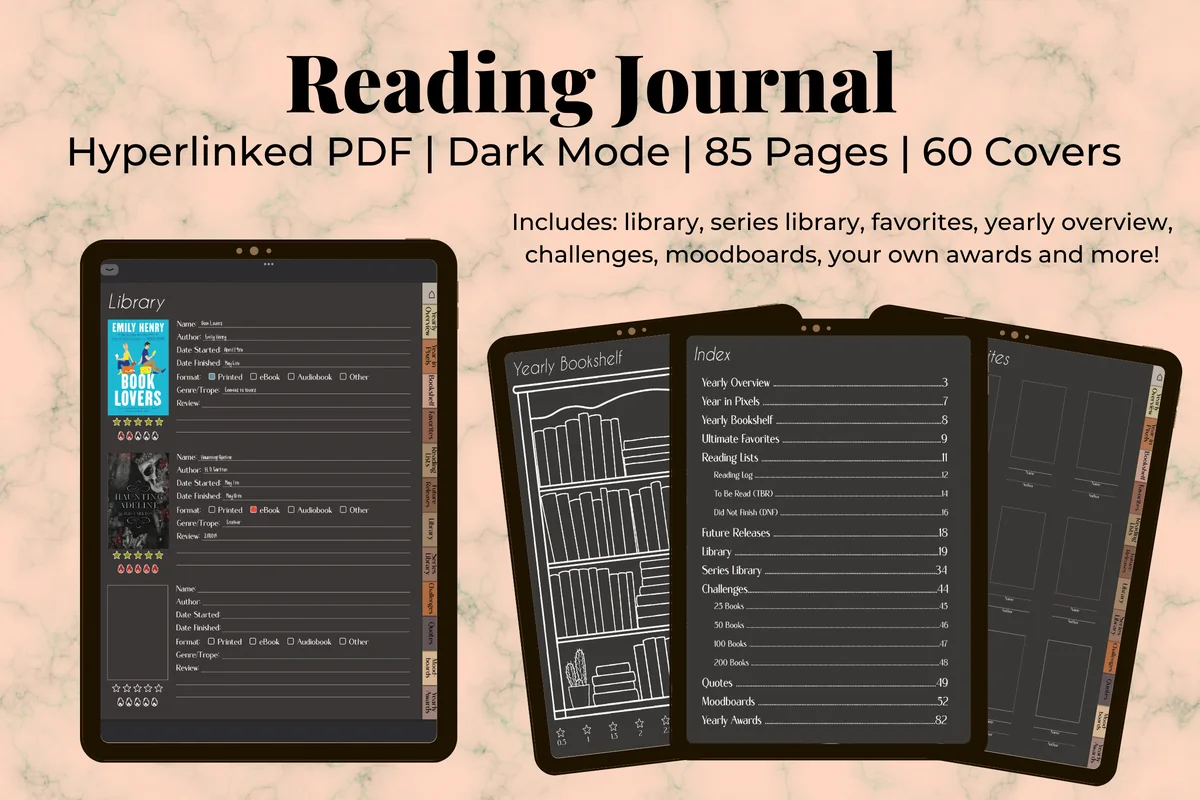
7. Digital Reading Journal (Dark Mode)
Layouts: 85 pages: yearly overview, year in pixels, library, series library, 25 to 200 book challenges, moodboards, book awardsFormat: Hyperlinked PDF + 60 covers; light mode version sold separately
Best for: dark mode fans, reading stats lovers, book award makers. Designed by Kinu Planners.
- 85 hyperlinked pages for GoodNotes and Notability, per the cover
- Yearly overview, year in pixels, yearly bookshelf, library and series library
- Reading log, TBR and DNF lists, challenges for 25, 50, 100 and 200 books
- Quotes, moodboards, your own book awards and 60 covers
Dark gray pages with white line drawings of shelves and books, so filling in your reading log after a chapter in bed feels natural. It's a journal rather than a planner, but readers who want the whole setup in dark mode will like it next to any planner above.
Quick Comparison
| Planner | Pages | Best for | Stand-out detail |
|---|---|---|---|
| 1. Digital Planner Undated Dark Mode | Charcoal, landscape | All-in-one planners | Fitness, meal and budget tabs |
| 2. Undated Essential Digital Planner (Dark) | Black with taupe overviews, landscape | Picky planners | 32 layout combinations |
| 3. Digital Planner Dark Mode Design | Pure black, landscape | Minimal weekly planners | Habit tracker for every month |
| 4. Dark Mode Minimalist Digital Calendar | Black and white, landscape | Month-at-a-glance fans | Only 12 pages, nothing extra |
| 5. Dark Mode Digital Notebook, Purple Theme | Charcoal paper, portrait | Note takers | 8 paper types in one file |
| 6. 365-Daily Digital Gratitude Journal Dark | Coal black, portrait | Night-time journalers | 365 linked daily pages |
| 7. Digital Reading Journal (Dark Mode) | Dark gray, portrait | Book lovers | Book challenges up to 200 |
Why Plan in Dark Mode on the iPad
- Less glare at night: a mostly black page sends much less light into a dark room than a white one, even at the same brightness.
- Colors stand out: pastel and bright pens look almost neon on black, so color-coding is easier to read at a glance.
- It matches the rest of the iPad: if your iPad is already in dark mode, a white planner is the one bright square on the screen.
- OLED screens: on an iPad with an OLED display, black areas are truly black, which makes dark pages look especially crisp.
One honest note: dark pages are a comfort choice, not a medical one. Some people find light text on black harder to read in daylight, so it’s worth keeping a light planner or notebook for daytime if that’s you.
Dark Mode in GoodNotes vs a Dark Planner PDF
This is the part that confuses most people. Turning on dark mode on the iPad (Settings → Display & Brightness → Dark) darkens the menus, toolbars and library in GoodNotes, but it doesn’t change the pages of a PDF planner. A white planner stays white. To plan on a dark page, the dark background has to be built into the PDF itself, which is exactly what the planners above are.
GoodNotes also has plain dark paper among its built-in templates, which is fine for notes. What it doesn’t give you is a calendar, weekly spreads or hyperlinked tabs, and that’s why a ready dark planner is worth it.
What I Look For in a Dark Planner
- Dark pages, not just a dark cover: check the sample pages, not the title. “Black” in a product name often means a black and white design.
- Soft line contrast: gray or muted lines are easier on the eyes than pure white grids on pure black.
- Room for your own color: the page should stay quiet, because your pens do the decorating.
- Undated pages: all four planners here are undated, so you can start mid-month and never pay for empty past weeks.
- Hyperlinks: tabs and month buttons matter more in the evening, when you want to jump to tomorrow in one tap.
Pen Colors That Show Up on Black Pages
Dark ink disappears on a dark page, so the usual navy and black pens are out. Light, slightly soft colors work best; pure white is great for text but tiring for long notes. A starter set:
- Off-white #F2EFE9
- Cream #FFF1C9
- Butter yellow #FFE27A
- Mint #9FE5C8
- Sky blue #8FD0FF
- Lavender #C8B8FF
- Peach #FFB49A
- Rose #FF9CC2
Highlighters behave differently on black: a translucent highlighter barely shows, so use a bright color at higher opacity or simply underline. For more ready hex codes, including bright and pastel sets, see my GoodNotes color palettes.
Stickers on Dark Pages
Stickers with a transparent background (pre-cropped PNG) look clean on a dark page. Stickers with a white background turn into white boxes, and stickers with thin dark outlines can vanish. Bright, colorful designs and stickers with a white border, like classic die-cut stickers, read best on black. A few sticker packs that work well: my GoodNotes stickers roundup.
Dark Planner, Dark Notebook or Dark Journal?
- Dark planner: calendar, weekly and daily pages with tabs. Pick an all-in-one if you want trackers too, or the simple dark planner if month plus week is enough.
- Dark calendar: only the month view. Good next to a planner you already like, or for deadlines and birthdays.
- Dark notebook: paper types (lined, dots, grid, to-do) without dates. Great for notes, lists and a free-form bullet journal.
- Dark journal: one guided page per day or per book. The gratitude and reading journals above are made for the evening anyway.
Looking for light versions of those journals too? See my digital gratitude journals and digital reading journals.
Template or Dark Planner App?
Planner apps with a dark theme sync with your calendar and send reminders. A PDF planner in GoodNotes doesn’t sync; some, like the first planner in this list, only add buttons that open Apple or Google Calendar. What a dark template gives you is handwriting, freedom over the page and no notifications at night. Many people keep appointments in the calendar app and use the dark planner for tasks, habits and the evening plan.
How to Set Up a Dark Mode Digital Planner in GoodNotes
- Get the planner from Creative Fabrica, unzip it in the Files app and open the PDF in GoodNotes with New → Import. Keep the original file in Files.
- Switch the iPad to dark mode so the GoodNotes toolbars match the pages.
- Pick the Monday or Sunday start version (if there are two) and delete the other.
- Save three light pens and one bright highlighter as favorites from the colors above.
- Delete sections you won’t use this month and bookmark this week’s page.
- Lower the screen brightness a little: dark pages look best when the iPad isn’t at full brightness.
Easy on the Eyes at Night: a 10-Minute Evening Plan
- 2 minutes: check off today and move unfinished tasks to tomorrow.
- 3 minutes: write tomorrow’s top three and any fixed times.
- 2 minutes: tick your habit tracker or mood box.
- 3 minutes: one gratitude line or a reading log entry in your dark journal, then close the iPad.
That’s the whole point of a dark setup: the plan for tomorrow is done in the same dim light you’re already in. For more ways to lay out a day, see my daily planner ideas.
FAQ
How do I make my planner dark mode?
You need a planner PDF with dark pages built in, like the ones above. Switching the iPad or GoodNotes to dark mode only changes the app’s menus, not the pages of a white planner.
How do I turn on dark mode in GoodNotes?
GoodNotes follows the iPad’s appearance: go to Settings → Display & Brightness and choose Dark. The library and toolbars turn dark; your notebook pages stay as they are, so pair it with a dark planner or dark paper.
Is dark mode better for your eyes?
Many people find dark pages more comfortable in a dim room because there’s less glare. It isn’t a treatment, though, and in bright light dark pages can be harder to read. If your eyes feel tired, dry or blurry often, a regular eye exam with an optometrist is a better step than any planner.
Is there a free dark mode digital planner?
Some designers share free samples, and GoodNotes has plain dark paper you can turn into a very basic planner. The planners in this list are paid products on Creative Fabrica; many of them are also included in its All Access plan.
Do dark mode planners work in Notability?
Yes. They are PDFs, so they open in Notability, Noteshelf and other PDF apps with hyperlink support. Each card above lists the apps the designer names.
Can I print a dark mode planner?
You can, but a full black page uses a lot of ink and doesn’t look like it does on screen. Dark planners are made for the iPad; for paper, a light planner is the better choice.
Final Thoughts
A dark mode digital planner is a small change that makes evening planning feel calmer: dark pages, three light pens and ten minutes before bed. If you’d rather have a quiet light planner for the day, see my minimalist digital planners or the undated digital planners, or browse all everyday planners. If you would rather write than plan, my digital journals for GoodNotes include a dark mode notebook with a gold theme.
Want dated pages for next year? See my top digital planner picks for 2027.
You May Also Like
This post contains affiliate links. If you buy through them, I may earn a small commission at no extra cost to you. Learn more.