Paper sticky notes have one big flaw: they fall off. They curl at the corner, lose their glue in a week and end up stuck to the bottom of a bag. Digital sticky notes keep everything good about them, the bright square, the quick reminder, the list you can move, and drop the rest. In GoodNotes a sticky note is a transparent PNG or a ready sticker file: place it on any page, write on it with the Apple Pencil, move it to tomorrow, and reuse it as often as you like.
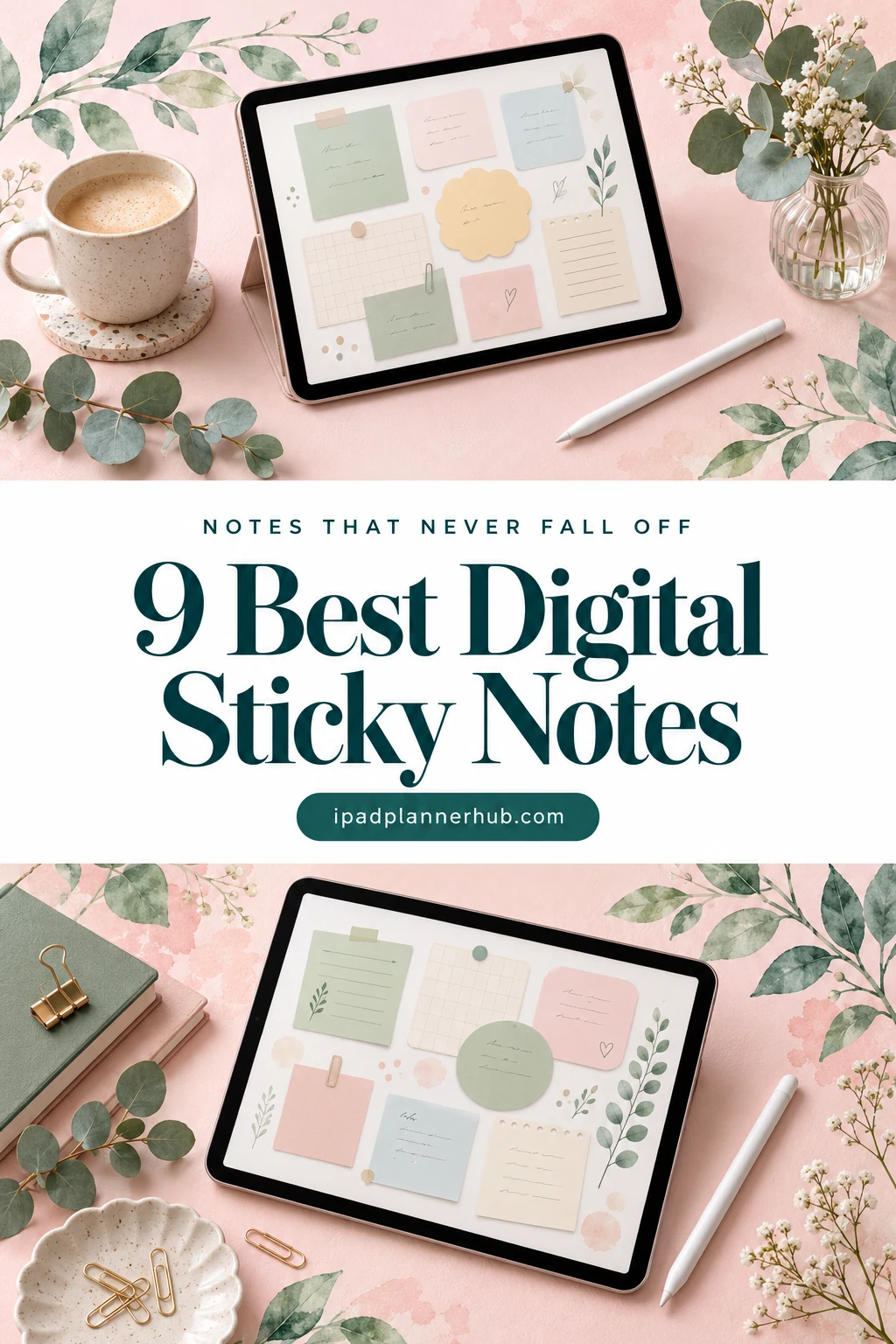
Below are 9 sticky note packs from Creative Fabrica I’d use in a GoodNotes planner or notebook, from calm beige and sage sets to 135 watercolor notes and a hand-drawn kit with a calendar. After the list: which pack fits which job, what to look for, sticky note ideas for a planner page, a simple color code, how to add the notes in GoodNotes and how to make your own.
The 9 Best Digital Sticky Notes I Found for GoodNotes
I skipped printable-only memo pads, cut files for Cricut, clipart made for T-shirts and mugs, Canva templates and the sticky note packs already in my GoodNotes and study sticker posts. Every pack below names GoodNotes, Notability or the iPad in its description, and no designer appears more than twice. Neutral sets come first, then colorful and pastel notes, then two sets with something extra.
TL;DR: 9 digital sticky note packs for GoodNotes and iPad planners, in three groups: neutral and minimal notes (a 25-piece beige set, blush to-do notes with a GoodNotes Elements file, sage notes with clips and scalloped frames), colorful and pastel notes (135 watercolor notes, 160+ transparent notes for color-coding, classic pastel squares, labeled reminder notes) and functional or fun sets (a hand-drawn kit with a calendar and checklist, 3 x 3 notes with illustrated women). The cards say which packs include a GoodNotes file.
Quick Picks
- Best overall: Digital Sticky Note Stickers
- Best for to-do lists: Kangaroo Paw Digital Sticky Notes
- Best for sage green: Digital Planners GoodNotes Sticker Note
- Best for biggest variety: Sticky Notes Digital Sticker
- Best for color coding: Digital Sticky Notes Svg, GoodNotes SVG
- Best for classic square: Digital Sticky Notes Pastel Style
- Digital Sticky Note Stickers – Best overall
- Kangaroo Paw Digital Sticky Notes – Best for to-do lists
- Digital Planners GoodNotes Sticker Note – Best sage green
- Sticky Notes Digital Sticker – Biggest variety
- Digital Sticky Notes Svg, GoodNotes SVG – Best for color coding
- Digital Sticky Notes Pastel Style – Best classic square
- Digital Sticky Notes Cute Paper 8 Items – Best for reminders
- Sticky Notes Sticker – Best functional kit
- 3×3 Sticky Notes – Girlies Collection – Best with personality
Best overall
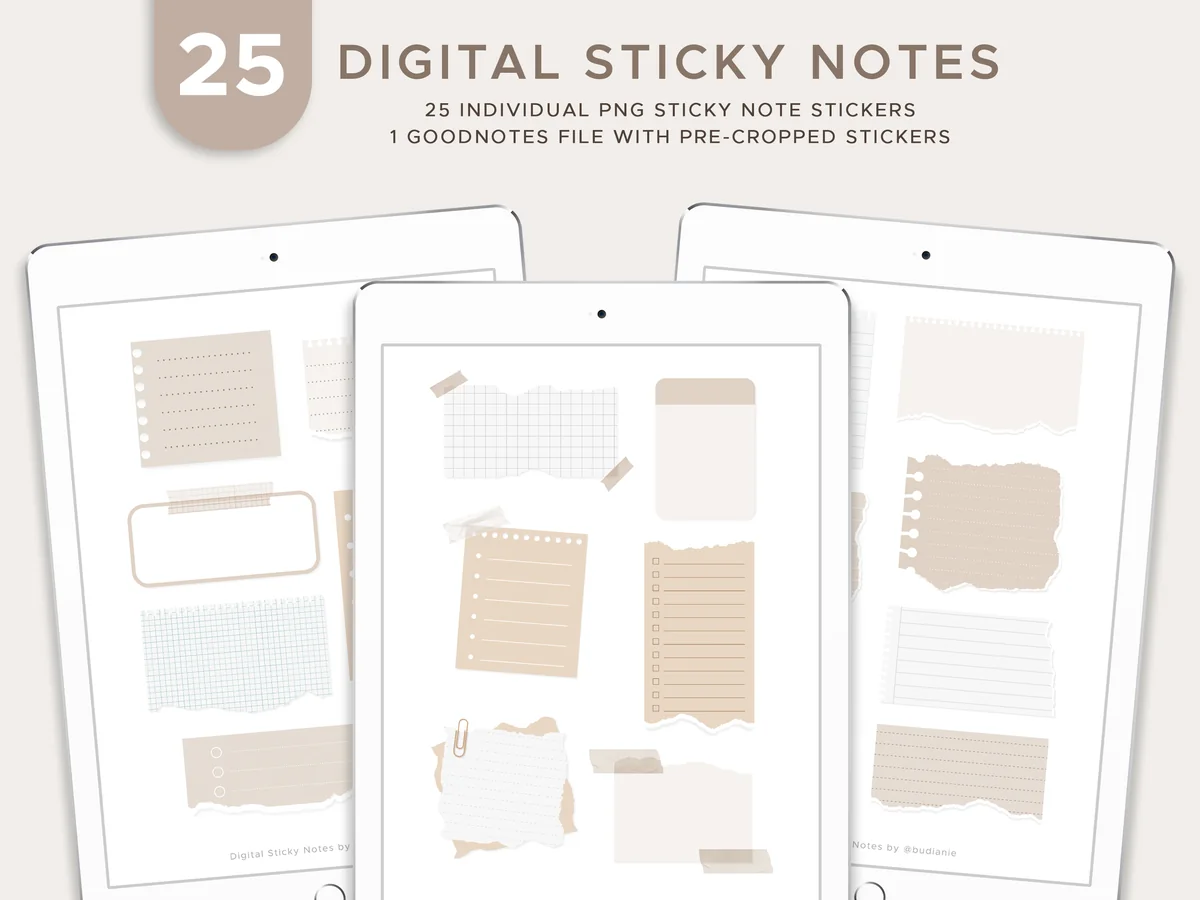
1. Digital Sticky Note Stickers
Layouts: 25 sticky notes (lined, grid, torn paper)Format: PNG + pre-cropped GoodNotes file
Best for: note takers, students, neutral lovers. Designed by budianie.
- 25 individual PNG sticky notes with transparent backgrounds
- A GoodNotes file with all the notes already pre-cropped
- Lined, grid and checklist notes, torn paper strips and a framed note, some with paper clips and tape
- Beige, sand, cream and soft grey on every piece
- Made for GoodNotes, Notability and other PDF notebook apps
This is the set I'd start with. The colors are quiet enough for any planner, and the mix of lined, grid and checklist notes covers most jobs a sticky note does. It's also the most favorited sticky note pack I found on Creative Fabrica, with 5-star reviews. The pre-cropped GoodNotes file means no cutting out.
Best for to-do lists
2. Kangaroo Paw Digital Sticky Notes
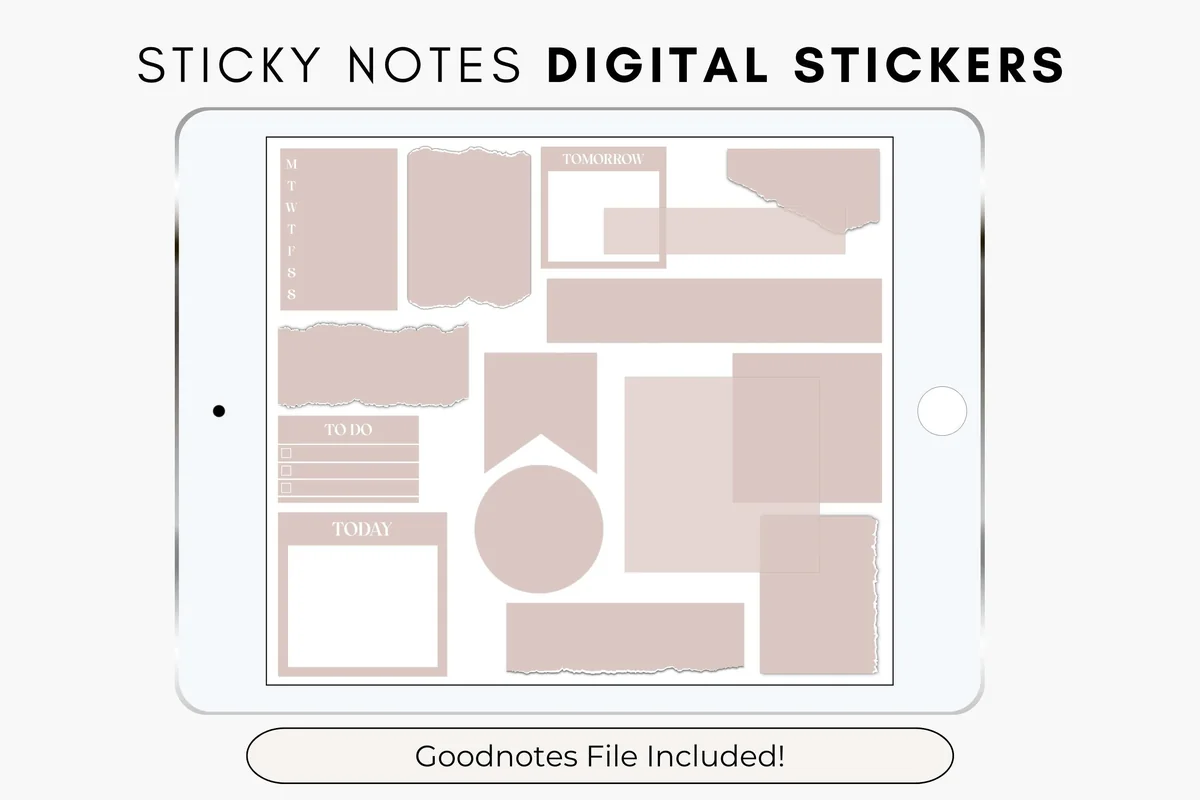
Layouts: 17 blush sticky notes: To Do lists, Today and Tomorrow frames, M-S weekday strip, torn paper, banner, circleFormat: Transparent PNG with shadow + GoodNotes Elements file (.collection)
Best for: GoodNotes Elements users, minimal planners, to-do list makers. Designed by thedigitaldoodle.
- 17 PNG sticky notes with transparent backgrounds and a soft shadow
- A GoodNotes Elements file (.collection) for a one-step import
- To Do checklists, Today and Tomorrow frames and a Monday-to-Sunday strip
- Plain squares, torn paper, a banner flag and a circle in one blush pink
- The PNGs work in most note-taking apps, the .collection file needs GoodNotes
This pack thinks like a planner: To Do, Today and Tomorrow are already printed on the notes, so a daily page takes seconds. The single blush color keeps it calm. The same set is also listed in other colors (Navy Blazer, Oakwood, Mountain Lake), which helps if pink isn't your thing.
Best sage green
3. Digital Planners GoodNotes Sticker Note
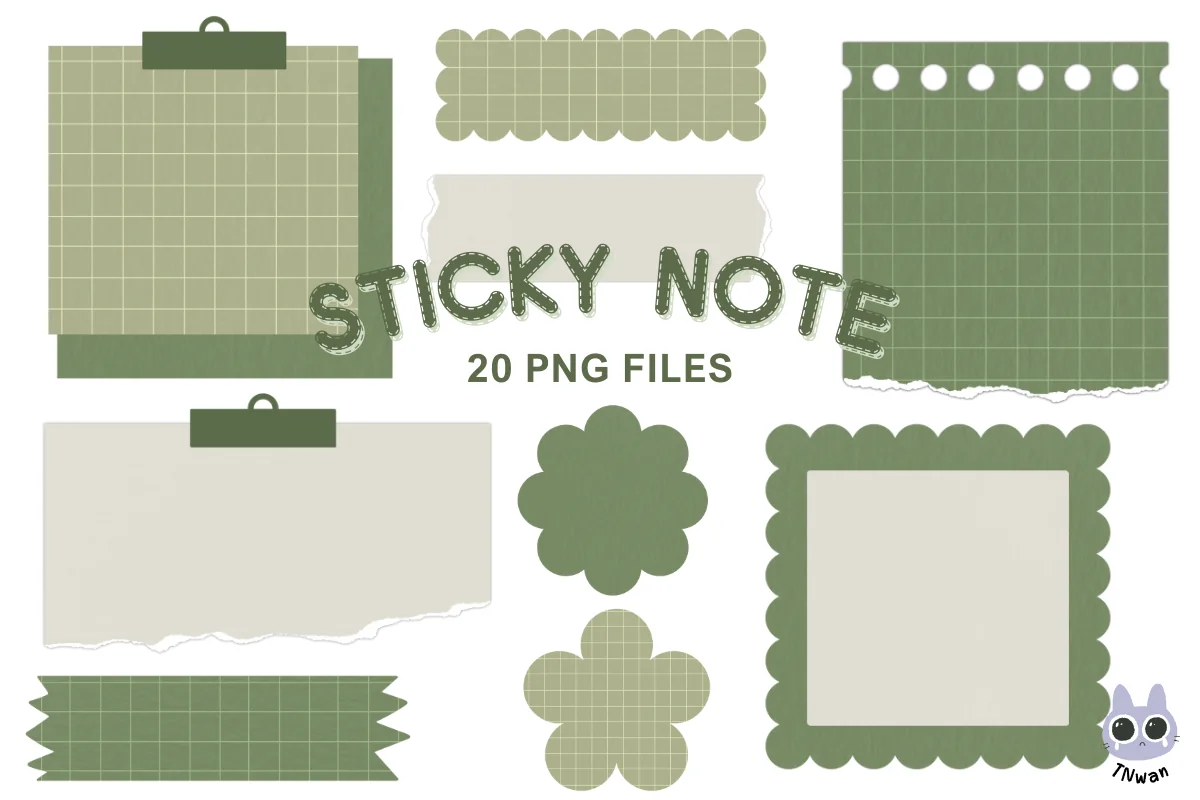
Layouts: 20 sage and cream notes: grid notes with binder clips, scalloped frames, flowers, hearts, torn stripsFormat: Transparent PNG, 300 dpi
Best for: sage and neutral planners, journalers, cute but calm pages. Designed by TNwan.
- 20 PNG notes with transparent backgrounds, 300 dpi
- Sage green and cream with a soft kraft paper texture
- Grid notes with binder clips, scalloped frames, flower and heart shapes
- Torn strips, a ribbon tab, an arch and a rounded label
- Described for digital planners and GoodNotes
If your planner is green, this one matches without trying. The shapes are the cute part (flowers, hearts, scalloped edges), while the colors stay calm, so it works on work pages too. The grid notes with clips are my favorite pieces for a quick list.
Biggest variety
4. Sticky Notes Digital Sticker
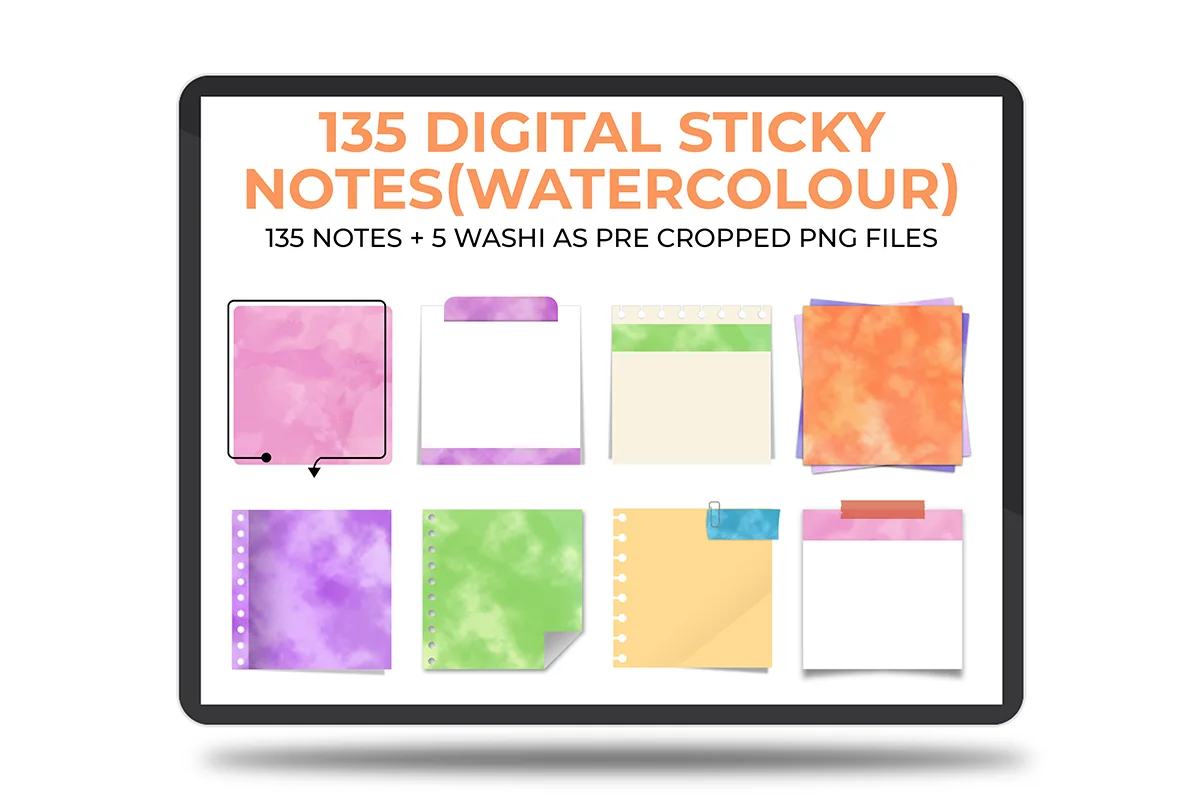
Layouts: 135 watercolor sticky notes in 9 styles x 5 colors, plain, lined and dotted; plus 5 washi stripsFormat: Pre-cropped transparent PNG
Best for: color-coders, watercolor lovers, heavy sticker users. Designed by The Lunar Digital.
- 135 pre-cropped PNG sticky notes plus 5 washi tape strips
- 9 note styles, each in 5 watercolor colors: pink, green, purple, orange and blue
- Every color in 3 versions: plain, lined and dotted
- Speech bubble notes, notes with tape or a paper clip, hole-punched edges
- Works in GoodNotes, Noteshelf, Notability and Xodo
This is the biggest set in the list, and it's organized: 9 styles × 5 colors × 3 paper types. That makes it easy to give each project or class its own color and still have a matching note for every job. The watercolor texture is soft, so even the orange doesn't shout.
Best for color coding
5. Digital Sticky Notes Svg, GoodNotes SVG
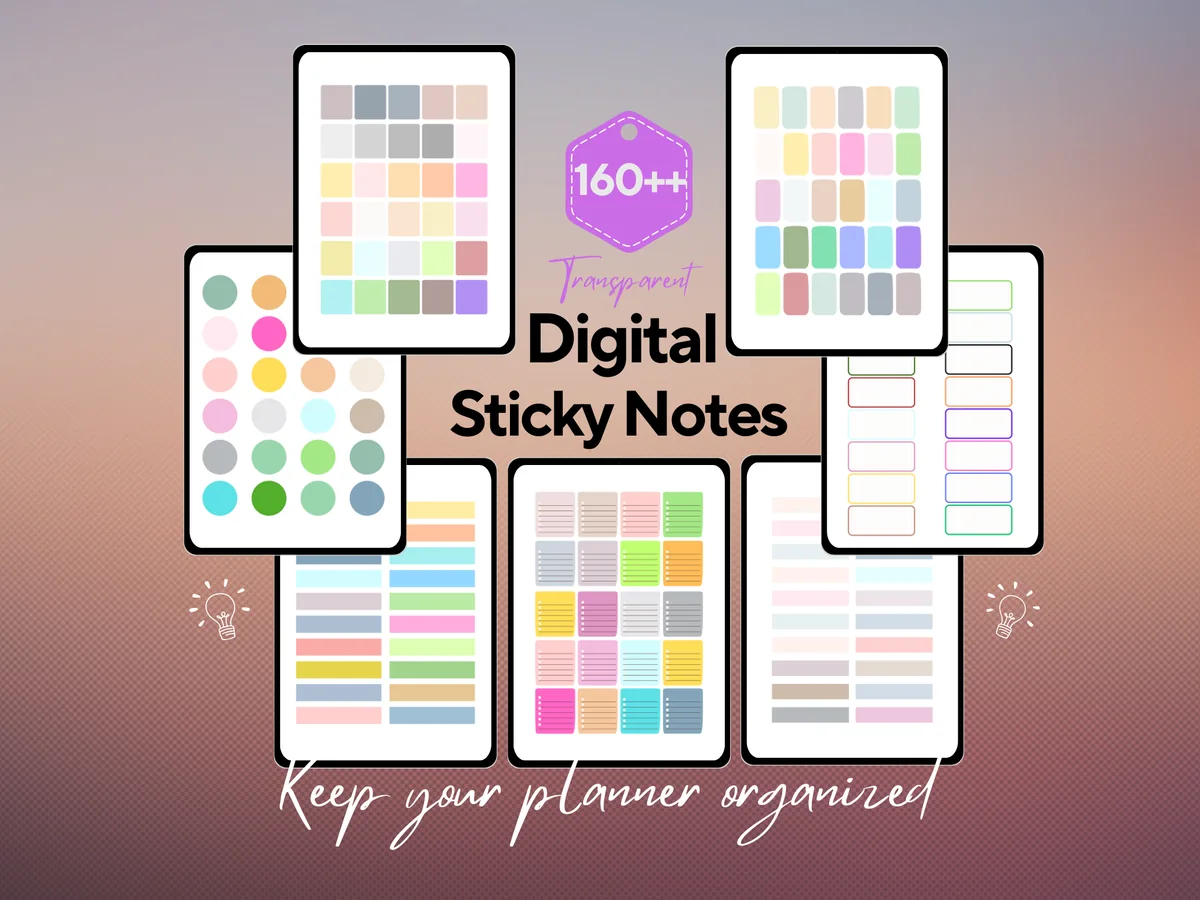
Layouts: 160+ transparent sticky notes on 7 sheets: squares, lined notes, dots, outlined boxesFormat: 7 PNG + 7 SVG + 1 PDF
Best for: color-coders, functional planners, work notes. Designed by HEARTSinRED.
- 160+ transparent sticky notes, according to the cover
- 7 PNG sheets, the same 7 as SVG files, and 1 PDF
- Squares, lined notes, round dots and outlined boxes
- Muted neutrals, pastels and a few brighter shades
- Described as functional sticky notes for GoodNotes, Notability, Xodo and the iPad
This is the practical one: many small notes in many colors, and nothing decorative. That's exactly what color-coding needs, for example green for health and blue for work on every page. The notes come on sheets, so plan five minutes to cut your favorites out once with the lasso.
Best classic square
6. Digital Sticky Notes Pastel Style
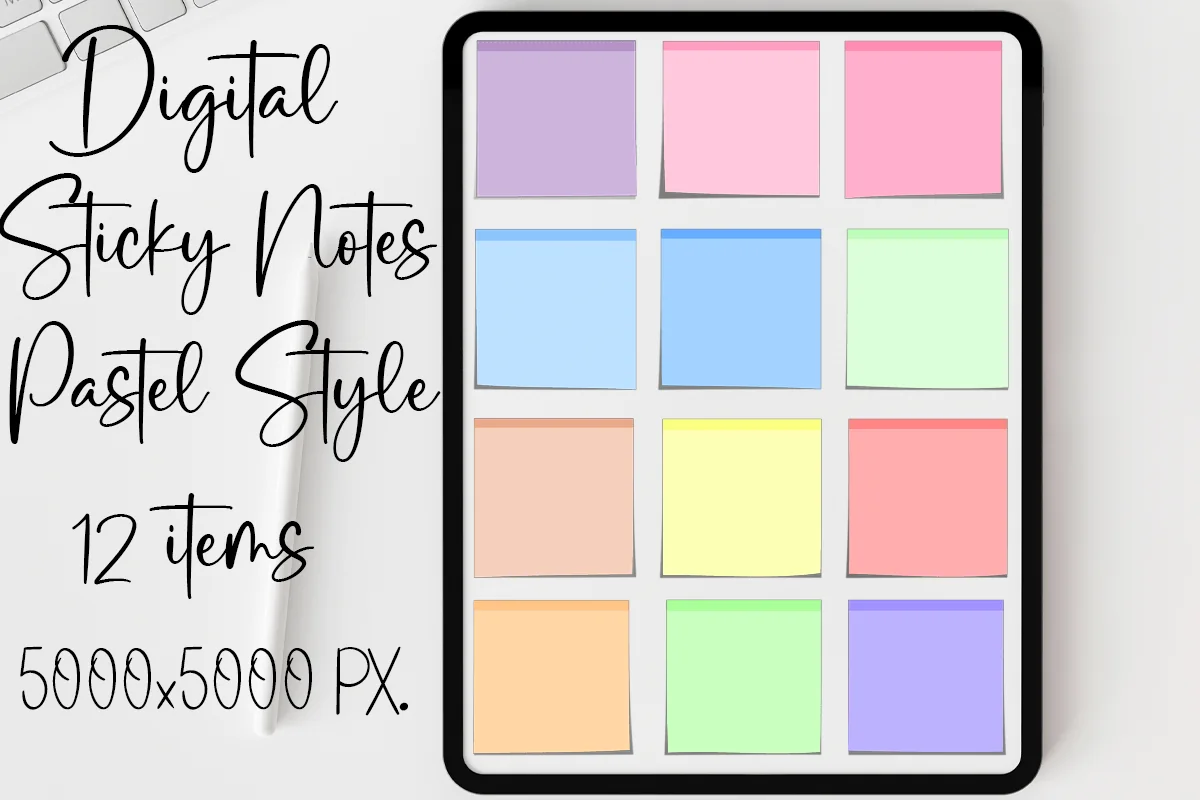
Layouts: 12 classic square pastel sticky notesFormat: PNG, 5000 x 5000 px
Best for: classic sticky note fans, pastel planners, monthly pages. Designed by MOMAT THIRTYONE.
- 12 square pastel sticky notes as PNG files
- Large files: 5000 x 5000 px each
- Purple, pink, blue, green, peach, yellow and coral, with a darker strip at the top
- The preview shows them on a monthly planner page
- For GoodNotes, Notability, Xodo, Noteshelf and other apps
Sometimes you just want the familiar square note. This set is exactly that, in 12 soft colors, and the big files stay sharp even when you stretch a note across half a page. It's simple, so it fits almost any planner design.
Best for reminders
7. Digital Sticky Notes Cute Paper 8 Items
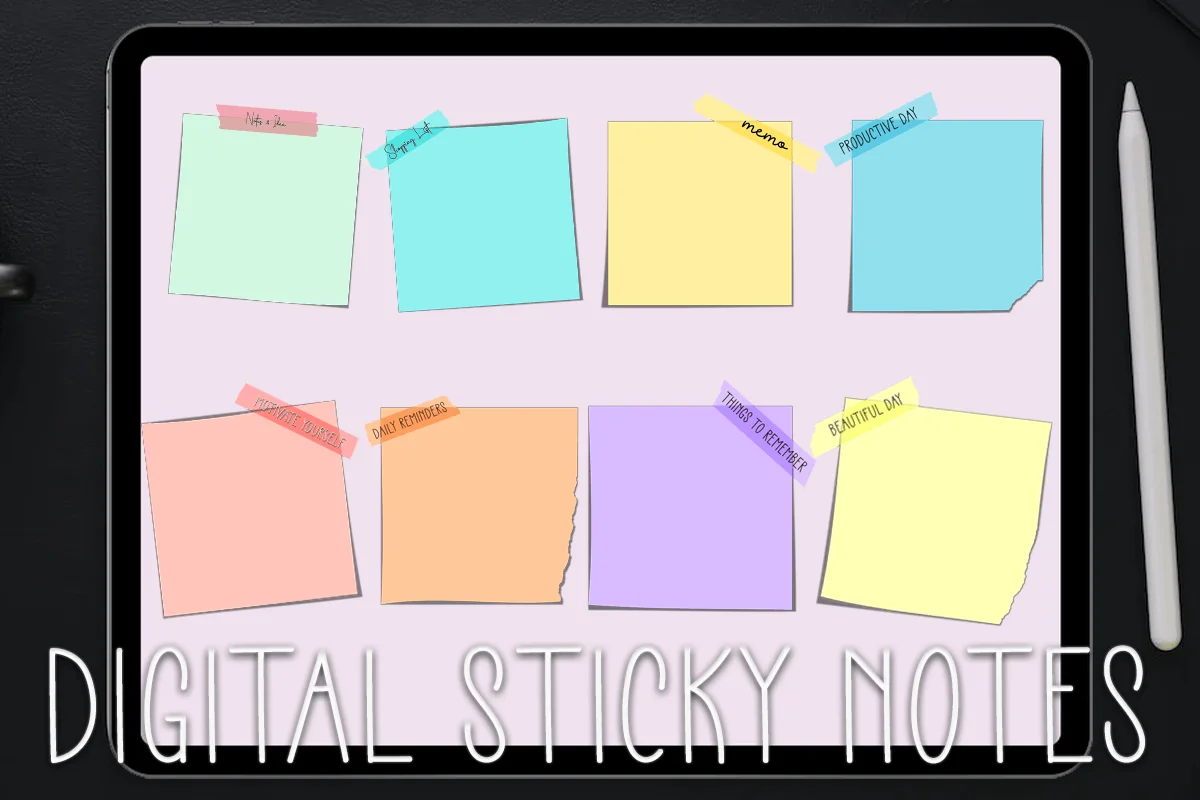
Layouts: 8 pastel notes with labeled tape: memo, daily reminders, things to remember, productive dayFormat: PNG, 5000 x 5000 px
Best for: reminder writers, pastel planners, daily pages. Designed by MOMAT THIRTYONE.
- 8 pastel sticky notes as PNG files, 5000 x 5000 px
- Each note has a small tape label with a word, such as "memo", "daily reminders", "things to remember" or "productive day"
- Mint, aqua, yellow, blue, peach, orange, lilac and lemon
- Some notes have a torn or curled corner
- For GoodNotes, Notability, Xodo and Noteshelf
The labels are what I like here: the note already says what it's for, so a "things to remember" note on Monday works like a tiny reminder system. It's a small set from the same designer as the pastel squares, so the two packs mix well.
Best functional kit
8. Sticky Notes Sticker
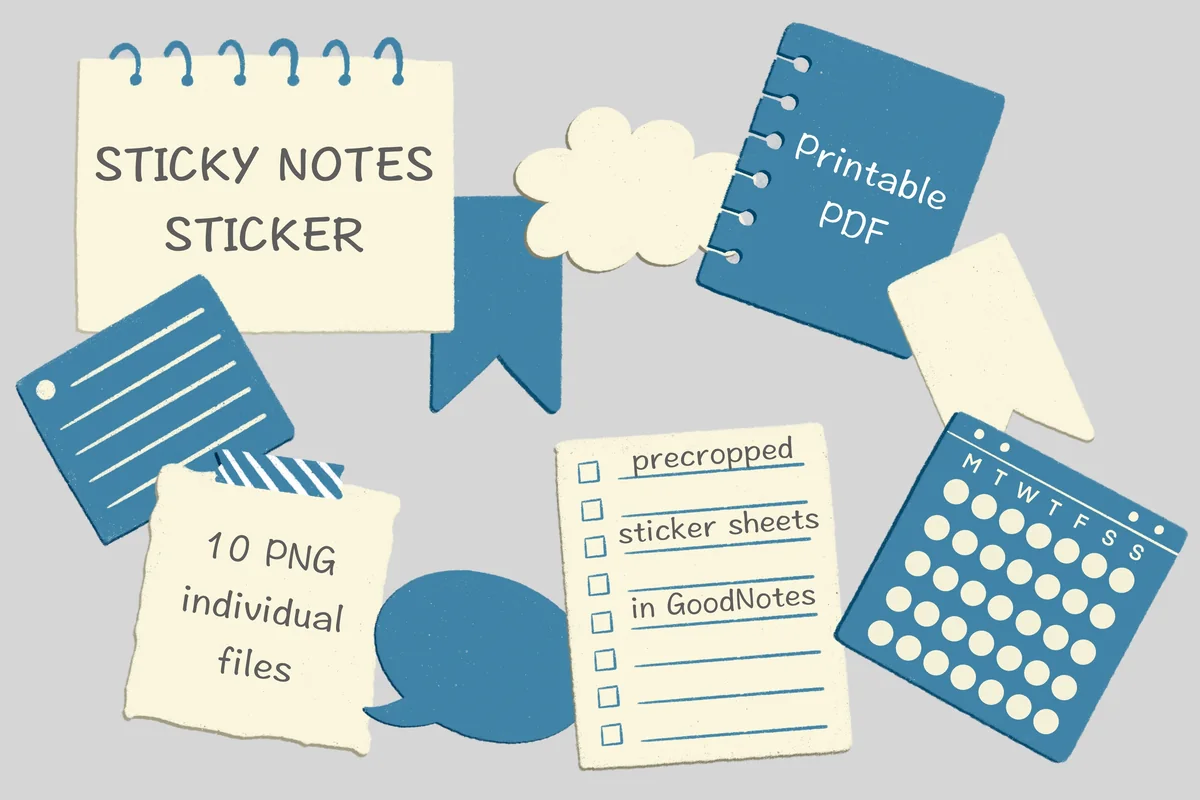
Layouts: 10 dusty blue and cream notes: spiral notepad, checklist, month calendar, date flag, speech bubble, cloud, bannerFormat: 10 PNG + pre-cropped GoodNotes sticker sheet + printable PDF
Best for: functional planners, hand-drawn style fans, weekly pages. Designed by Mogumogu.
- 10 individual PNG stickers with transparent backgrounds
- A GoodNotes file with a pre-cropped sticker sheet
- A spiral notepad, a lined checklist, a blank month calendar and a date flag
- A speech bubble, a cloud note, banners and a tape strip in dusty blue and cream
- Also a PDF for printing
This pack is small but every piece has a job: the calendar for deadlines, the checklist for tasks, the date flag for a big day, the speech bubble for a quote. The hand-drawn, slightly grainy style looks cozy without being childish.
Best with personality
9. 3×3 Sticky Notes – Girlies Collection
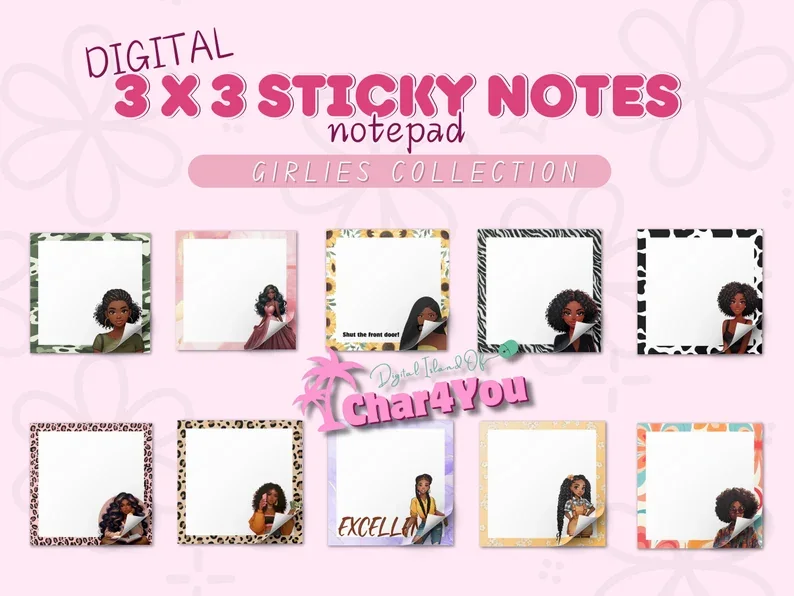
Layouts: 10 square 3 x 3 in notes with illustrated Black women and patterned framesFormat: 10 PNG (digital or print)
Best for: representation seekers, bold patterns, fun daily notes. Designed by Char4You.
- 10 PNG sticky notes in a 3 x 3 inch square format
- Most notes have an illustrated Black woman at the edge
- Patterned frames: leopard, zebra, cow print, sunflowers and florals
- Plenty of white space to write on
- Made for GoodNotes, Notability and other apps, and can be printed too
Most sticky notes are plain shapes, and this pack is the opposite: every note has a character and a bold frame. The designer made it to bring representation into digital planners, and it does. Writing space stays large, so they are still real notes, not only decoration.
Quick Comparison
| Sticky note pack | Style | What you get | Stand-out extra |
|---|---|---|---|
| 1. Digital Sticky Note Stickers | Beige and grey, paper textures | 25 PNG + GoodNotes file | Most favorited pack |
| 2. Kangaroo Paw Digital Sticky Notes | One blush pink, minimal | 17 PNG + Elements file | To Do, Today, Tomorrow notes |
| 3. Digital Planners GoodNotes Sticker Note | Sage and cream, kraft | 20 PNG notes | Flower, heart, scalloped shapes |
| 4. Sticky Notes Digital Sticker | Watercolor, 5 colors | 135 notes + 5 washi | Plain, lined and dotted |
| 5. Digital Sticky Notes Svg, GoodNotes SVG | Plain, many colors | 160+ notes on 7 sheets | PNG, SVG and PDF |
| 6. Digital Sticky Notes Pastel Style | Classic pastel squares | 12 PNG notes | 5000 px files |
| 7. Digital Sticky Notes Cute Paper 8 Items | Pastel with tape labels | 8 PNG notes | Labels like "memo" |
| 8. Sticky Notes Sticker | Hand-drawn dusty blue | 10 PNG + GoodNotes sheet | Calendar and checklist notes |
| 9. 3×3 Sticky Notes – Girlies Collection | Bold patterns, illustrated women | 10 PNG notes | Representation |
Neutral, Pastel or Functional: Which Sticky Notes Fit Your Pages
The 9 packs fall into three groups. One neutral set plus one colorful set covers most planners; the last group is for pages that need a calendar or a bit of personality.
Neutral and minimal sticky notes
Quiet colors that sit on any page: the 25 beige and grey notes with a GoodNotes file, the blush to-do notes with Today and Tomorrow frames and the sage notes with clips and scalloped edges.
Colorful and pastel sticky notes
Notes for color-coding and bright pages: 135 watercolor notes in 5 colors, 160+ plain notes on sheets, classic pastel squares and reminder notes with tape labels.
Functional and fun sets
A hand-drawn kit with a calendar, a checklist and a date flag, and 3 x 3 notes with illustrated women and bold patterns.
What I Look For in Digital Sticky Notes
- Room to write. A sticky note is for handwriting. Large plain or lined areas beat busy patterns, and lined or grid notes help if your writing drifts.
- Transparent PNG. The note should sit on the page with no white box around it. “Transparent background” or “pre-cropped” in the description is what you want.
- A GoodNotes file is a bonus. Three packs here include a GoodNotes file or an Elements collection, so the notes are ready in the sidebar. Single PNGs work too; you set them up once.
- Colors you can code with. If you color-code, pick a pack with many colors (the watercolor or the 160+ set). If you don’t, one calm color is easier on the eyes.
- Notes with a job. To Do, Today, Tomorrow, a weekday strip or a calendar printed on the note save time every day.
- Made for the screen. “Print and cut”, “SVG for Cricut” or a single A4 memo sheet means the pack was made for paper first.
Notes That Never Fall Off: Why Digital Beats Paper
The title is the whole point. A digital sticky note stays exactly where you put it until you move it, and moving it takes one drag with the lasso. That changes how you use them:
- Move, don’t rewrite. An unfinished task on Tuesday’s note moves to Wednesday in a second, with your handwriting intact.
- Unlimited supply. One pack gives you every note as often as you need it, all year.
- Resize to the job. Shrink a note for a one-word reminder or stretch it across half a page for meeting notes. Big files, like the 5000 px pastel squares, stay sharp.
- Nothing gets lost. Notes live inside the notebook, so GoodNotes search can find handwritten notes on them too.
- A tidy desk. No curling pads around the monitor, no glue on the screen.
What paper still does better is the quick note on the fridge or the laptop lid. For everything that lives in a planner, digital wins.
Sticky Note Ideas for a Planner Page
- A “Top 3” note at the top of the daily page for the three things that must happen
- A “Tomorrow” note at the bottom for tasks that didn’t fit today
- A weekday strip on the weekly page for a quick habit check (the blush set has one)
- A meeting note with the time on the tape label and the agenda inside
- A shopping list note that moves from page to page until the weekend
- A “Waiting for” note for replies and deliveries you’re expecting
- A quote or kind words note on Monday
- A deadline note on the monthly page with a small calendar (the hand-drawn kit)
- A “Questions” note at the end of lecture or meeting notes
- A brain dump note: everything in your head, sorted later
- An idea parking lot for things you don’t want to forget but can’t do now
- A “Done” note where finished tasks go, for a little satisfaction at night
Most of these ideas pair with a list page. My to-do list templates and daily digital planners have the pages they go on.
A Simple Sticky Note Color Code
Color only helps if each color always means the same thing. Pick four or five, write them on the first page of your planner and keep to them:
- Yellow: today’s must-dos
- Pink: personal and family
- Blue: work or classes
- Green: money, health and errands
- Purple or grey: ideas and someday tasks
The watercolor set has every style in 5 colors, so you can keep the same code across lined, dotted and plain notes. For matching tape and labels, see my digital washi tapes.
Sticky Note App or Sticky Notes in Your Planner?
Search for digital sticky notes and you’ll find desktop apps, browser extensions and whiteboard tools. They’re great for notes on a computer screen or for team brainstorming. They don’t live inside a GoodNotes planner, though. If your plans are already on the iPad, sticker-style notes keep the reminder on the same page as the task, in your own handwriting. Nothing syncs with a calendar, so for alarms and repeating reminders keep a reminder app next to the planner.
How to Add Sticky Notes in GoodNotes
- Unzip the pack in the Files app. Depending on the pack, you’ll find single PNGs, PNG sheets, a GoodNotes file or an Elements collection.
- For an Elements file (.collection), open any notebook, tap the Elements tool, tap + and import the file. The notes appear in the sidebar of every notebook.
- For a GoodNotes sticker file, import it as a notebook and open it in a second tab next to your planner; copy notes across with the lasso.
- For single PNGs, tap the image tool on a page, add the note from Photos or Files and resize it.
- For a PNG sheet, add the sheet to a sticker notebook, cut out each note once with the lasso and save it to Elements.
- Write on top. Handwriting goes over the image like on any page. Select the note and the writing together with the lasso to move them as one.
Using Notability, Noteshelf or Xodo? The PNGs go onto the page as images in all of them; only the GoodNotes files and Elements collections are GoodNotes-specific. My GoodNotes vs Notability comparison covers how each app handles stickers.
How to Make Your Own Sticky Note in GoodNotes
- Draw a square with the shape tool and fill it with a color (or use the highlighter in wide strokes).
- Add a line or two of text on top, such as “To Do” or “Tomorrow”, or leave it blank.
- Select it with the lasso and tap Add to Elements.
- Make the same note in each color of your code and keep them in one “Sticky notes” collection.
Homemade notes are flat and simple. A pack adds paper texture, shadows, torn edges, tape and clips, which is what makes a note look like it’s sitting on the page.
FAQ
Can you add sticky notes to GoodNotes?
Yes. Sticky notes go into GoodNotes as stickers: PNG images you add with the image tool, notes from a GoodNotes sticker file or items in an Elements collection. Once a note is on the page, you can write on it, resize it and move it with the lasso.
What are digital sticky notes?
Digital sticky notes are images of sticky notes, usually transparent PNGs, that you place on pages in a note-taking app on the iPad. They work like paper ones (a reminder, a short list, a note on top of a page), but you can move, resize and reuse them as often as you like.
What’s the difference between sticky notes PNG and a sticker sheet?
Sticky notes PNG files are separate files, one note each, ready to place. A sticker sheet is one image with many notes on it; you cut each one out with the lasso before you use it. A GoodNotes sticker file is a notebook with all the notes already cut out, so you only copy and paste.
Are there free digital sticky notes for GoodNotes?
Some planner blogs and the GoodNotes Marketplace share a few free sticky notes, usually a handful in one style. A full pack gives you matching notes in many shapes and colors. Creative Fabrica also offers many sticker packs as part of its All Access subscription.
Can I print digital sticky notes?
Some packs allow it: the hand-drawn kit includes a PDF for printing, and the 3 x 3 Girlies notes are described for digital or print use. Printed on plain paper they are memo cards, not sticky notes, so you’d need sticker paper or tape. The other packs are described for digital planners.
Do digital sticky notes work in Notability?
Yes. PNG sticky notes work in Notability, Noteshelf and Xodo as images. Only the GoodNotes files and Elements collections inside some packs are GoodNotes-specific; the PNGs in the same pack work everywhere.
Final Thoughts
The best digital sticky notes are the ones you actually write on, so pick for the job first and the look second. Start with one calm set, like the 25 beige notes or the blush to-do notes, add one colorful pack if you color-code, such as the watercolor set, and save both to Elements before next week’s planning. For more sticker styles, see my GoodNotes sticker packs and study stickers, or browse all planner stickers.
You May Also Like
To pair writable notes with hand-drawn frames and small illustrations, see these doodle digital stickers for GoodNotes.
This post contains affiliate links. If you buy through them, I may earn a small commission at no extra cost to you. Learn more.