Most iPads spend their day sideways, clipped into a keyboard case or propped on a stand, yet most planners are drawn for a tall page. Open one in that position and you get a narrow strip in the middle of the screen with gray bars on both sides. A landscape digital planner is drawn for the wide screen: the week runs left to right, two pages sit side by side like an open notebook, and nothing has to be rotated.
Below are the 8 landscape planners from Creative Fabrica I’d use on my iPad: two dated 2027 planners, three undated all-in-ones, a planner with a journal page, a dark mode planner and a one-month planner to test the format. After the list: landscape vs portrait, weekly and monthly spreads, dated or undated, and how to set one up in GoodNotes.
The 8 Best Landscape Digital Planners I Found
Plenty of “horizontal” planners on Creative Fabrica turned out to have dated pages for a year that is already over, so I opened the sample pages of every candidate and kept only planners that are undated or dated 2027. I also skipped printables, Canva templates and the landscape junk journal papers that show up when you search for the word.
TL;DR: 8 landscape digital planners for iPad: two dated 2027 planners with two-page spreads, three undated all-in-ones, a two-page planner with a journal, a dark mode planner and a one-month pastel planner. Every pick was checked on its sample pages, not just its title, and each card lists orientation, layouts, dates and week start.
Quick Picks
- Best overall: Simple Digital Planner 2027 Landscape
- Best for life admin: Digital Life Planner 2027 Landscape
- Best for minimalist: Black and White Digital Planner
- Best for the big picture: Undated Digital Planner for Goodnotes (Landscape Version)
- Best for planner + journal: Undated Digital Planner Journal Goodnote
- Best for dark mode: Digital Planner Undated Dark Mode
- Simple Digital Planner 2027 Landscape – Best overall
- Digital Life Planner 2027 Landscape – Best for life admin
- Black and White Digital Planner – Best minimalist
- Undated Digital Planner for Goodnotes (Landscape Version) – Best for the big picture
- Undated Digital Planner Journal Goodnote – Best planner + journal
- Digital Planner Undated Dark Mode – Best dark mode
- Cute iPad Digital Planner (112 Pages) – Best cute
- Daily, Weekly, Monthly Digital Planner – Best to try landscape

Best overall
1. Simple Digital Planner 2027 Landscape
Orientation: LandscapeLayouts: Monthly, Weekly, Daily (hourly 6 a.m.–9 p.m.)Dates: 2027Week start: Monday or Sunday
Best for: 2027 planners, simple planners, two-page spread fans. Designed by Print Magic StudioX.
- Dated January to December 2027, with separate Monday and Sunday start files
- Page size 1376 x 1032 points, the 13-inch iPad Pro's landscape page; any 4:3 iPad scales it
- Gold rings drawn down the center, so every view is a two-page spread
- 12 month-at-a-glance pages, 12 monthly grids, a weekly page for every week and 365 daily pages with an hourly schedule from 6 am to 9 pm
- Months across the top of every page, 10 sections you name yourself, plus lined, dot and grid paper
This is the planner I'd pick if the whole reason for going landscape is the keyboard case. It's built for a horizontal screen from the start, so nothing is squeezed or rotated, and the month tabs sit along the top edge where a sideways iPad has room for them. The design is calm and simple, which suits a planner you'll open every day for a year.

Best for life admin
2. Digital Life Planner 2027 Landscape
Orientation: LandscapeLayouts: Monthly, Weekly, Daily (hourly 6 a.m.–9 p.m.) + 6 subject tabsDates: 2027Week start: Monday or Sunday
Best for: life admin planners, bill payers, habit builders. Designed by Print Magic StudioX.
- Dated January to December 2027, Monday and Sunday start files
- 6 subject tabs down the side: Digital, Focus, Bills, Habits, Work and Life, with 4 templates under each
- The same calendar as the Simple Planner: month at a glance, monthly grid, a weekly page for every week and 365 hourly daily pages
- Silver wire binding drawn down the center, so it reads as a two-page spread
- Sized for the 13-inch iPad Pro in landscape and scales to other 4:3 iPads
It's the Simple Planner's big sibling from the same designer: same clean landscape calendar, plus 24 pages for the things that usually live in a separate app, like bills and habits. If you want one file for the whole year and not two, this is the one. It's brand new on Creative Fabrica, so there are no reviews yet.
Best minimalist
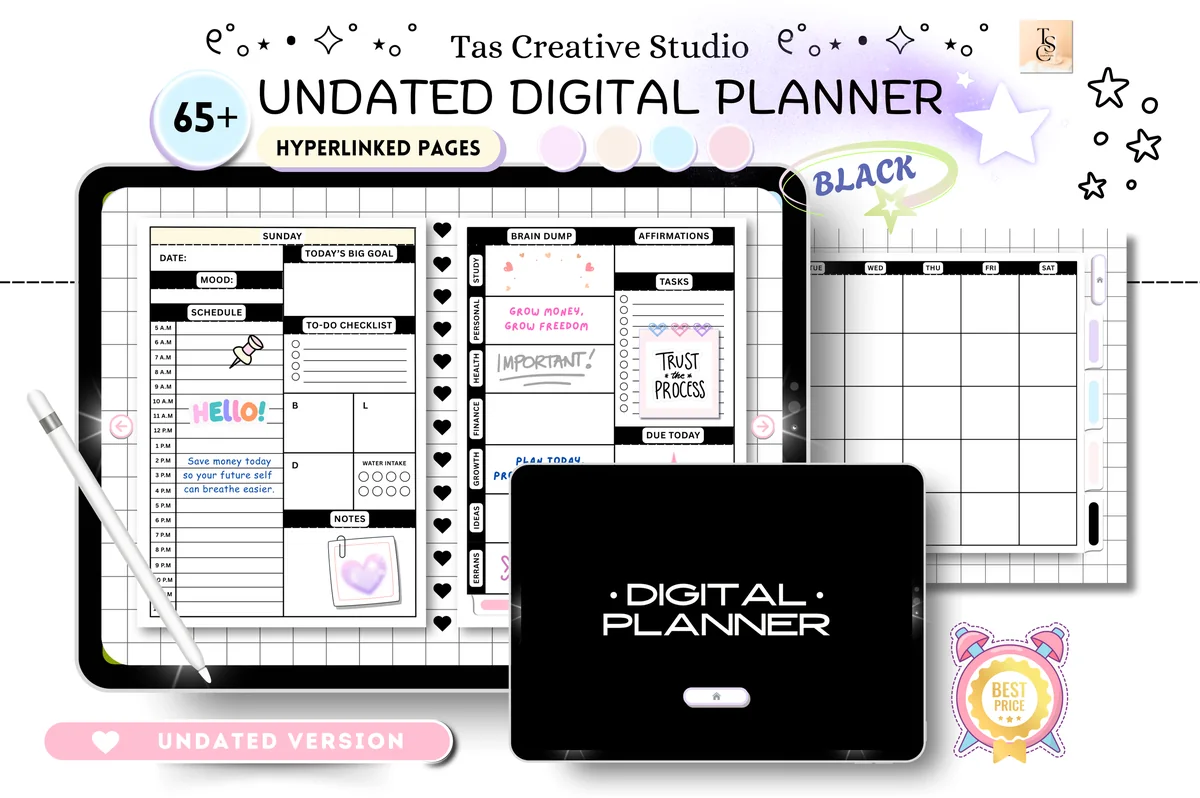
3. Black and White Digital Planner
Orientation: LandscapeLayouts: Monthly, Weekly, Daily + health, productivity, finance trackers (68 pages)Dates: Undated
Best for: monochrome fans, minimalists, all-in-one planners. Designed by Tas Creative Studio.
- Horizontal page, 11 x 8.3 inches, 68 hyperlinked pages
- Undated daily pages for each day of the week, a weekly planner, a weekly self-care checklist, meal tracker and vitamins page
- Productivity pages: habit tracker, reading log, movies to watch and daily routines
- Health and finance pages: workout plan, 30-day challenges, monthly budget, no-spend challenge, debt and savings trackers
- Works in GoodNotes, Notability, Noteshelf, Xodo and other PDF apps
Black and white is the safest look for a landscape planner, because a wide page shows a lot at once and color can get busy fast. This one keeps the trackers inside the same file, so habits and budget sit one tap away from the week. It's one of the most saved planners in this list.
Best for the big picture
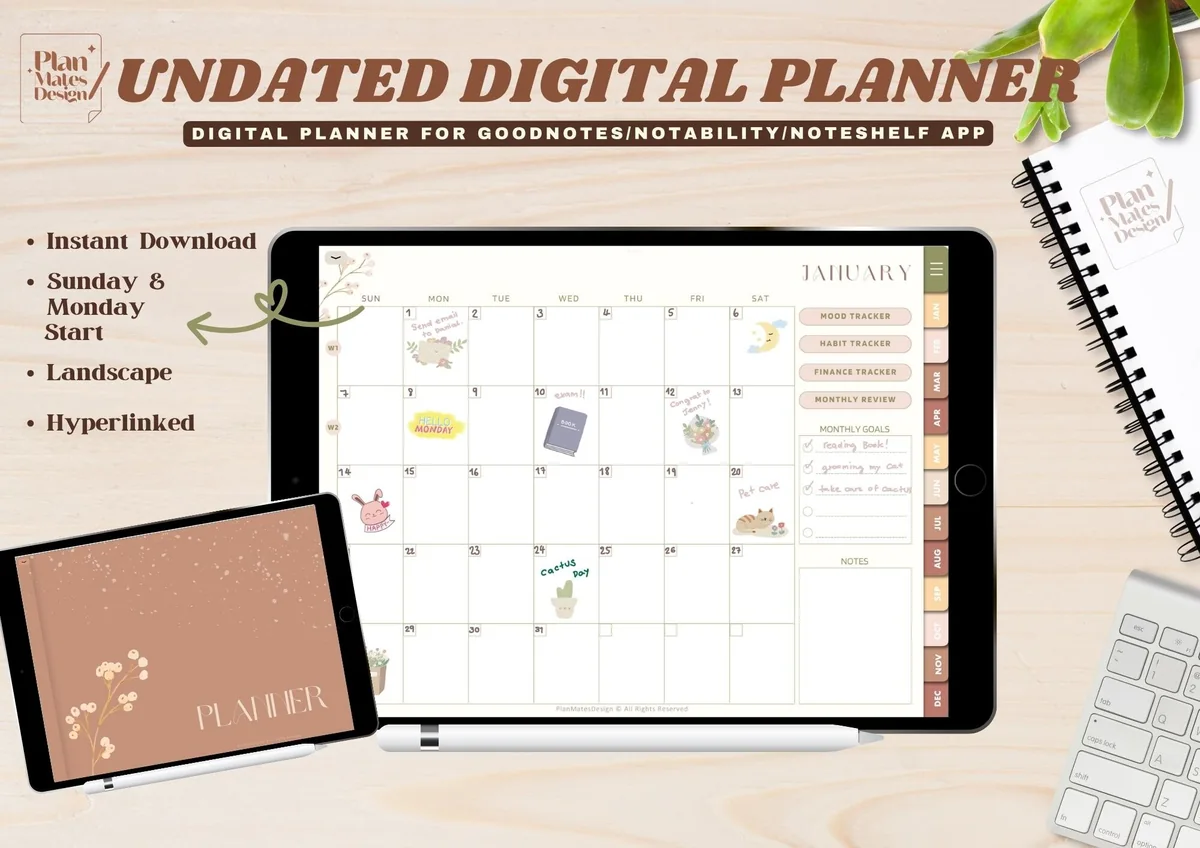
4. Undated Digital Planner for Goodnotes (Landscape Version)
Orientation: LandscapeLayouts: Yearly, Monthly, Weekly, TrackersDates: UndatedWeek start: Monday or Sunday
Best for: minimalists, neutral lovers, beginners. Designed by TinyGoong Studio.
- Landscape version, with separate Monday and Sunday start PDFs
- Yearly pages: undated calendar, key dates, yearly overview, New Year's resolutions and an end-of-year review
- Undated monthly planner with a monthly review, plus a weekly planner
- Trackers: year in pixels for mood, habits and finance
- 10 covers included as JPG files
I like this one for people who plan from the top down: the year first, then the month, then the week. The neutral beige and green palette looks good on a wide screen and leaves space for stickers. It's lighter than the all-in-ones here, which also makes it a good first landscape planner.

Best planner + journal
5. Undated Digital Planner Journal Goodnote
Orientation: Landscape (two-page spread)Layouts: Daily with journal page, Weekly, Monthly goals, Gratitude, Habit tracker, Meal plan, Scrapbook, Bible studyDates: Undated
Best for: one-file people, faith journalers, memory keepers. Designed by ArtistryByAnnabel.
- Landscape view of two pages, undated
- Daily pages for appointments, work shifts and dinner, with a journal page beside them
- Weekly overview, weekly meals and shopping list, habit tracker, monthly goals and gratitude
- Scrapbook pages for photos, a wish list, gift list and password pages
- Bible study pages with sections for scripture, prayers and spiritual goals (you can delete them in GoodNotes)
This is where landscape really pays off: the plan sits on the left page and the writing on the right, like an open paper planner. The floral design is soft and pretty, and the Bible study section is a nice extra for faith journalers. If you don't need it, you can simply delete those pages.

Best dark mode
6. Digital Planner Undated Dark Mode
Orientation: LandscapeLayouts: Daily, Weekly, Monthly + fitness, health, meal, budget, cleaning trackersDates: Undated
Best for: dark mode fans, all-in-one planners, busy households. Designed by PlannerPlanet.
- Undated landscape planner with dark pages and a ring binder look
- 450+ hyperlinked pages, with tabs for months and sections
- Daily, weekly and monthly pages plus goal tracking
- Fitness, health, meal, budget and cleaning pages shown in the samples
- Calendar links for Apple and Google shown on the cover image
A wide dark page is easy on the eyes when you plan late, and the ring binder look makes the spread feel like a real book. It's the biggest file in this list, so it suits someone who wants every tracker in one place. Pair it with light pen colors, because dark ink disappears on black.
Best cute
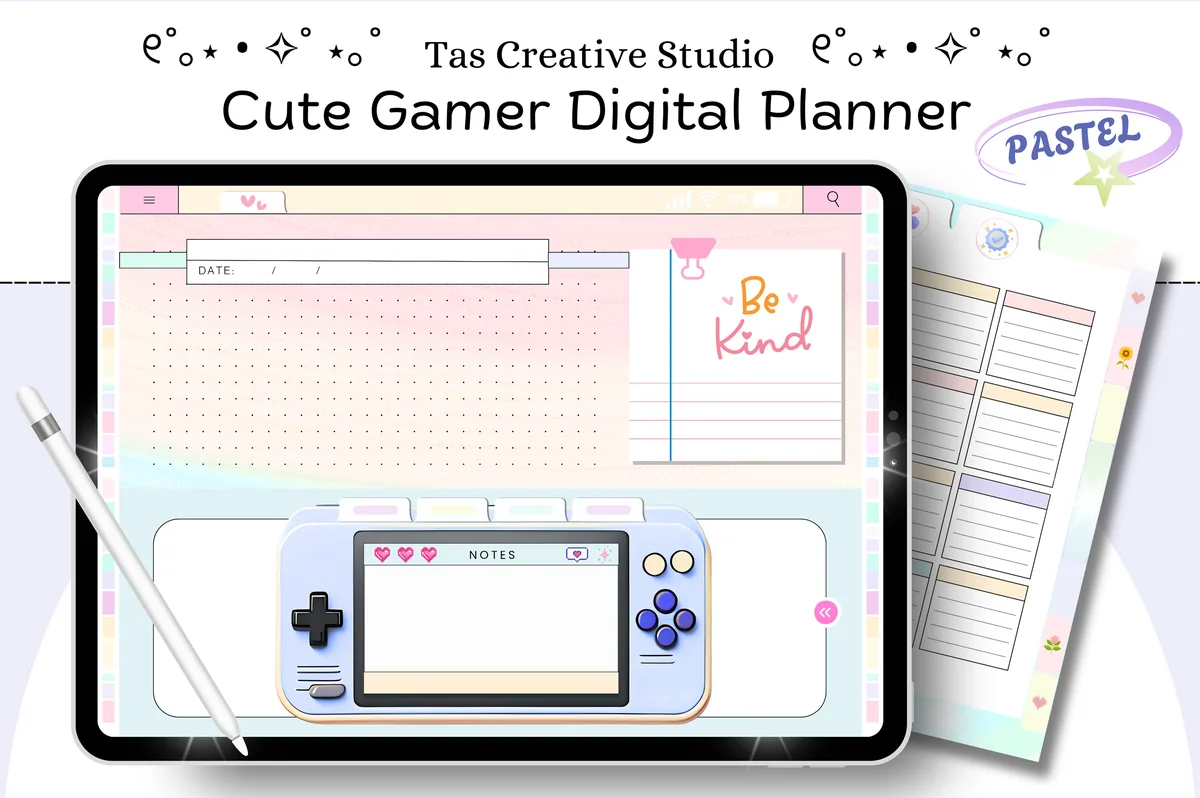
7. Cute iPad Digital Planner (112 Pages)
Orientation: LandscapeLayouts: Monthly, Weekly, DailyDates: Undated
Best for: cute planner fans, beginners, students. Designed by Tas Creative Studio.
- Horizontal page, 112 hyperlinked pages, undated
- Daily pages for each day of the week and a weekly planner
- Health and fitness pages: self-care, mood and water trackers
- Productivity pages: goal planner, vision board, to-do list, reading log and TV tracker
- Finance pages: monthly budget, expense, savings, bill and debt trackers
Landscape doesn't have to mean serious. This one has a pastel, gamer-style design with a little console notes box on the pages, and the wide format gives the cute details room without crowding the lists. It's from the same studio as the black and white planner, so the structure is similar with a very different mood.
Best to try landscape
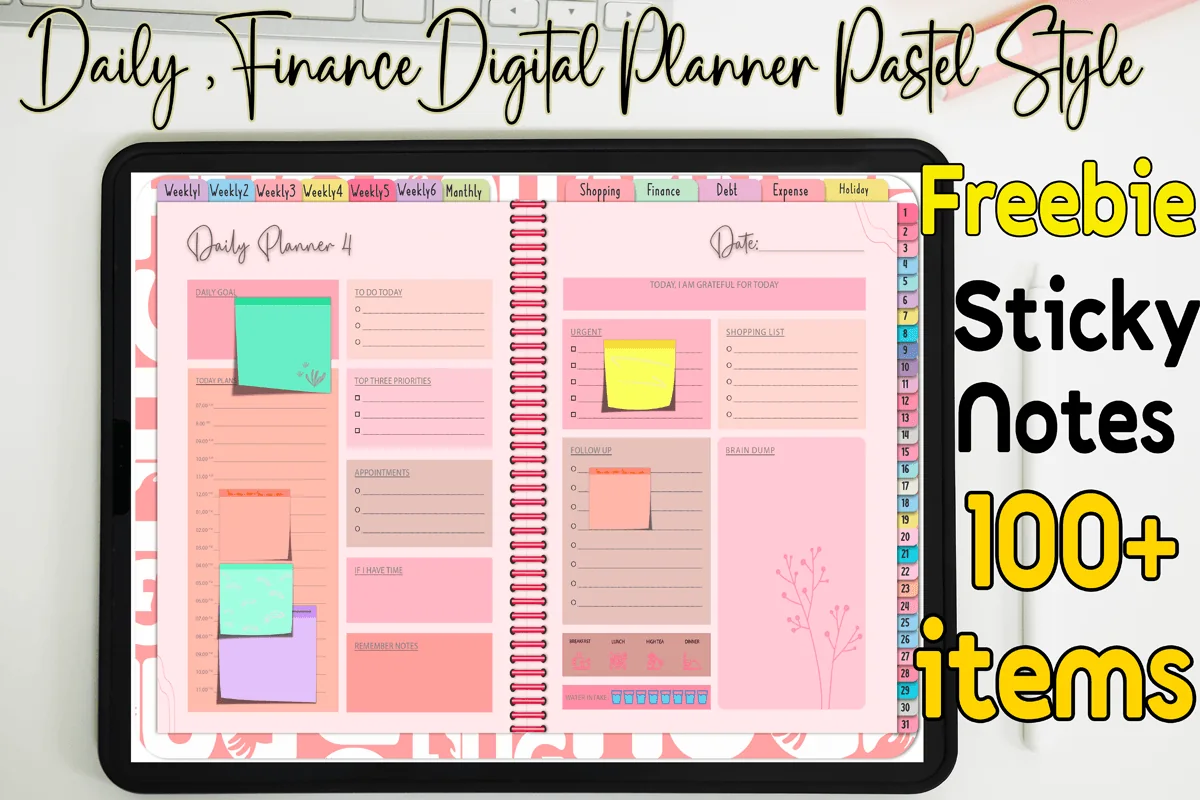
8. Daily, Weekly, Monthly Digital Planner
Orientation: LandscapeLayouts: Monthly, Weekly, Daily (31 pages)Dates: Undated
Best for: pastel lovers, one-month planners, budget shoppers. Designed by MOMAT THIRTYONE.
- Undated, made for one month and reused month after month
- 31 daily pages, 6 weekly pages and 1 monthly page
- Weekly shopping, finance, debt payment, monthly expense and holiday pages (56 pages in total)
- Two-page landscape spreads with a spiral down the middle
- 100+ sticky notes included; works in GoodNotes, Notability, Xodo and Noteshelf
Not sure landscape is for you? A one-month planner is a cheap way to find out. Use it for four weeks with the keyboard case on, and if you keep reaching for it, move up to a full-year file. The pastel blocks are bright, so it suits people who like color more than minimal pages.
Quick Comparison
| Planner | Best for | Dates | Spread |
|---|---|---|---|
| 1. Simple Digital Planner 2027 Landscape | Dated 2027, simple layout | 2027 | Two pages, ring binder |
| 2. Digital Life Planner 2027 Landscape | Calendar + bills, habits, work | 2027 | Two pages, wire binding |
| 3. Black and White Digital Planner | Monochrome, trackers inside | Undated | Single wide page |
| 4. Undated Digital Planner for Goodnotes (Landscape Version) | Year to week, neutral | Undated | Single wide page |
| 5. Undated Digital Planner Journal Goodnote | Plan left, journal right | Undated | Two pages |
| 6. Digital Planner Undated Dark Mode | Dark pages for evenings | Undated | Two pages, rings |
| 7. Cute iPad Digital Planner (112 Pages) | Pastel, playful | Undated | Single wide page |
| 8. Daily, Weekly, Monthly Digital Planner | One month, reusable | Undated | Two pages, spiral |
Landscape vs Portrait Digital Planner: Which One Fits You
Neither orientation is better on its own. The question is how you hold the iPad when you plan.
- Pick landscape if the iPad sits in a keyboard case or on a stand most of the day, you like seeing a whole week in one wide row, or you want the look of an open paper planner with two pages side by side.
- Pick portrait if you write with the iPad flat on your lap or in your hand, you use an iPad mini, or you like one tall page per day with a long hourly column.
- Split View users: when two apps share the screen, each half is narrow, and a landscape page shrinks to fit it. If you plan with a calendar app open next to the planner, a portrait page fills that half better.
If you are still deciding, my guide to digital planner templates covers both orientations and other formats.
What I Look For in a Landscape Planner
- A page drawn for the wide screen: some “landscape” files are just two portrait pages glued together. That’s fine, as long as the tabs and the week are planned for the wide view, not squeezed.
- A 4:3 page or close to it: most iPads have a 4:3 screen, so a page in that shape fills it with almost no gray bars. The two 2027 planners above use the 13-inch iPad Pro’s own landscape size.
- Tabs where a wide page has room: month tabs along the top edge and sections down the side are easier to tap than a crowded strip of tabs on one side.
- Hyperlinks everywhere: a landscape planner is usually a long file, and you want to reach today in one tap.
- No past years: every planner in this list is undated or dated 2027, nothing that starts in a year that is already gone.
Landscape Weekly and Monthly Spreads
The wide page changes how a week and a month look. These are the layouts you will see in landscape planners:
- Horizontal weekly: each day is a long row from left to right, with room for tasks at the end of the row. Easy to scan, and the most popular weekly planner landscape layout on Pinterest.
- Vertical weekly across two pages: seven columns, Monday to Sunday, spread over the left and right page. Good for time blocking, because every column can be an hourly schedule.
- Week plus notes: the week on the left page and a free page on the right for a to-do list, meals or a journal entry, like the Undated Digital Planner Journal above.
- Monthly planner landscape: a seven-day grid that finally has square boxes. On a portrait page the month grid gets tall and thin; in landscape there is room to write a few words in each day.
- Daily landscape: schedule on the left, top 3 and notes on the right, so the whole day fits on one screen without scrolling.
For more ideas on what to put into those spreads, see my weekly planner ideas and planner layout ideas.
Why a Landscape Planner Works With a Keyboard Case
This is the promise in the title, so here is what it means in practice:
- No flipping between modes: you can type an email, swipe to GoodNotes and add a task to the week without taking the iPad out of the case.
- Typing on the page: with a keyboard attached, the text tool in GoodNotes becomes quick. A wide weekly row is a good place for typed tasks, and handwriting still works with the Apple Pencil.
- A desk view of your week: a stand or case holds the iPad upright like a small monitor, and a landscape week reads well from a little further away.
- The spread feels like paper: two pages side by side look like an open planner on the desk, which many people miss after switching from paper.
Dated 2027 or Undated?
A dated 2027 planner has the days printed in, every week linked to its month, and a real year view. It saves setup time and is the better choice if you start in January and plan the whole year in one file. Both Print Magic StudioX planners in the list are dated 2027.
An undated planner lets you start any week, skip a month without wasting pages and reuse the same file next year. You write the dates in yourself. Six of the eight planners here are undated. If you want more of those, see my list of undated digital planners; for dated ones in both orientations, the best iPad digital planners for 2027.
Who a Landscape Planner Is For
- Keyboard case and laptop-style iPad users who keep the iPad on a desk most of the day.
- Weekly planners who want the whole week in one view without zooming.
- People switching from a paper planner and missing the two-page spread.
- Students and remote workers who plan next to a monitor and glance at the iPad like a second screen.
- Not ideal for iPad mini users and people who mostly write with the iPad flat in their hands; portrait pages are usually more comfortable there.
What You Need to Use a Landscape Planner
- An iPad with a 10-inch or larger screen. A landscape page works on an iPad mini too, but the text gets small.
- An Apple Pencil or another stylus for handwriting; a keyboard is optional but handy for typed tasks.
- A PDF annotation app with hyperlink support: GoodNotes, Notability, Noteshelf or Xodo. If you are choosing between the first two, see GoodNotes vs Notability.
- A case or stand that holds the iPad sideways at a comfortable angle.
How to Set Up a Landscape Planner in GoodNotes
- Open the PDF from Files and choose to import it into GoodNotes as a new notebook (not as a single page).
- Turn the iPad sideways before you open the notebook, so the page fills the width.
- In GoodNotes settings, switch scrolling to horizontal: pages then turn left and right like a book, which suits two-page spreads.
- Open the index or year page and tap a tab to check that the hyperlinks work. If a tap draws a dot instead of jumping, switch to read-only mode and try again.
- If you bought a planner with Monday and Sunday start files, delete the one you don’t need so your library stays tidy.
- Add the planner to your favorites and pick a cover; the neutral undated planner above comes with 10 spare covers.
- Turn on Orientation Lock in Control Center if the iPad flips to portrait when you lift it.
How to Plan Your Week on a Wide Page
A 15-minute weekly routine that uses the extra width:
- 3 minutes: open the monthly page and copy fixed dates (appointments, deadlines, birthdays) into the week.
- 5 minutes: on the left page, give each day its two or three main tasks; type them if the keyboard is attached.
- 4 minutes: use the right page or the notes column for meals, errands and the one thing that matters most this week.
- 3 minutes: tick off last week’s habits and move unfinished tasks forward.
For more ideas on rhythm and planning time, see my Sunday reset ideas.
FAQ
What size is a landscape digital planner?
There is no single size. Planners made to fill the iPad screen use a 4:3 page, for example 1376 x 1032 points in the two 2027 planners above. Others use a paper-like size such as 11 x 8.3 inches. Any of them works in GoodNotes; a page close to 4:3 just leaves less empty space around it.
Can I turn a portrait planner into a landscape one?
Not really. You can rotate the iPad, but the page stays tall and shrinks to fit the wide screen. Some apps can show two portrait pages side by side, which gets close to a spread, but the tabs and links still follow the portrait design.
Is there a free landscape digital planner?
Some designers share free samples, and GoodNotes has plain landscape paper you can turn into a basic planner. The planners in this list are paid products on Creative Fabrica; many of them are also included in its All Access plan.
Do landscape planners work on an iPad mini?
They open and the links work, but the screen is small, so a wide week ends up with tiny boxes. On an iPad mini, a portrait daily or weekly planner is usually easier to write in.
Can I use these planners in Notability?
Yes. They are PDFs, so they open in Notability, Noteshelf and other PDF apps with hyperlink support. Each card above lists the apps the designer names.
Will a landscape planner sync with my calendar?
No. A PDF planner doesn’t sync with Apple or Google Calendar on its own. Some designers add links that open the Calendar app, but events still have to be written into the planner by hand.
Final Thoughts
If your iPad already lives sideways, a landscape digital planner is the simplest upgrade: the page finally matches the screen, and the week reads like an open notebook. For a full 2027 year I’d start with the Simple Planner, and if you’re unsure about the format, try the one-month planner first. For more everyday options, browse my weekly digital planners, the minimalist digital planners or all everyday planners.
You May Also Like
This post contains affiliate links. If you buy through them, I may earn a small commission at no extra cost to you. Learn more.